AI war movie generator

Make a war film with AI.Every soldier in the right place.

Write the battle, get a storyboard of every shot, and keep the front line, the weapons and the uniforms readable from the first volley to the last man standing.
  • Free screenwriting
  • A board for every shot of the fight
  • Armour and weapons that stay the same
Battle rushes

Available today: free screenwriting, and a storyboard drawn from your screenplay with Storyboard Beta, $9.99 a month.

Coming: video generation of each shot with the Filmmaker plan, targeted for 30 September 2026.

Examples

Four battlefields from the ScreenWeaver team.

Frozen cavalry, banners at dusk, an aftermath and an anime army: four finished stills, four ways to stage war.
  • Warriors ride armoured woolly mammoths with banners and torches through a frozen haze

    War Mammoths

    Riders on armoured mammoths march behind their banners through a frozen haze.

  • Pixel art of a long column of soldiers carrying tattered banners against a red sunset

    Banners at Dusk

    A column of banner bearers against a burning sky, in cinematic pixel art.

  • A knight and a figure in a red cloak raise a sword in front of a gothic city, a huge army with banners behind them

    Before the Walls

    A knight and a red-cloaked captain raise their swords before a cathedral city. Behind them, an army that fills the plain.

  • Anime knight in white armour and a red cloak pointing forward, a shield on his arm, pikemen behind him

    The Captain

    A knight in a red cloak sends his pikemen forward, in a 90s anime look.

One battle, script to screen

Rabbit Gunner: a war scene in five shots.

A scene written for this page, and a test of the three questions every battle must answer: where is the enemy, where is our soldier, which way is he firing. Below, every shot twice: the grey storyboard frame and the final image, plus the direction that produced it.
Screenplay · page 1

EXT. NO MAN'S LAND - DAY

Smoke rolls over broken wire and burning wrecks. A squad of rabbits in brass armour walks toward us through the haze. Every gun points the same way: frame right, toward an enemy we never see.

CORPORAL HOLT, the squad's gunner, plants his boots. Spent brass rains into the mud around them.

Inside the helmet, his breathing is the only sound. Through the visor slits: smoke, and nothing else.

HOLT

(to himself)

Hold the line. Watch the right.

The feed spits brass, round after round. The belt is almost empty.

He drops to one knee behind the wire and fires into the smoke. What he hits stays off screen.

CUT TO:

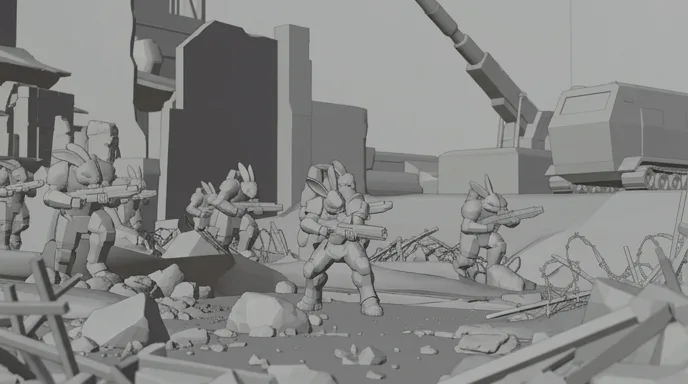
  1. Rabbit soldiers in brass armour advance through smoke and barbed wire on a burning battlefield
    The wide shot as a grey storyboard frame
    01

    Wide · the map

    Wide shot of a smoky battlefield, squad of anthropomorphic rabbit soldiers in battered brass power armour advancing toward camera, guns aimed frame right, barbed wire, burning wrecks, dust

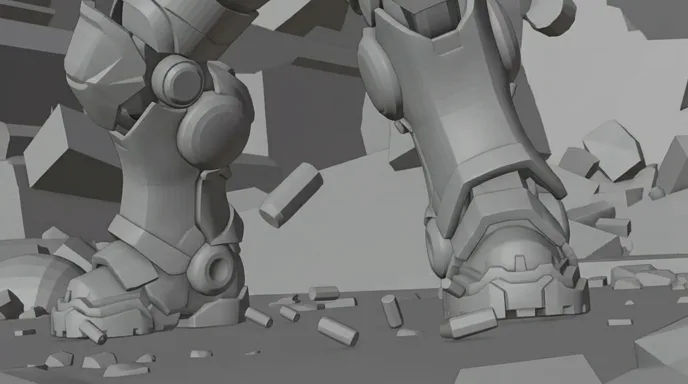
  2. Two brass armoured boots planted in the mud as spent casings fall around them
    The insert as a grey storyboard frame
    02

    Low insert · boots and brass

    Low-angle insert at ground level, two heavy brass armoured boots planted in dark mud, spent shell casings falling and bouncing around them, shallow depth of field, smoke behind

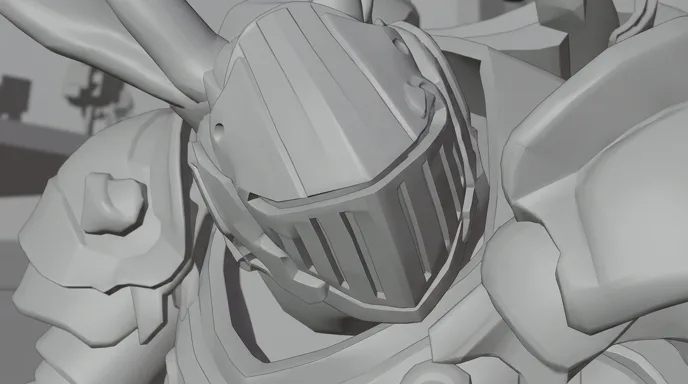
  3. Close-up of a scratched brass helmet with a slotted visor, white fur showing at the collar
    The close-up as a grey storyboard frame
    03

    Close-up · behind the visor

    Close-up of a battered brass helmet with a slotted visor, white fur at the neck, head lowered, scratched metal, warm side light, background soft

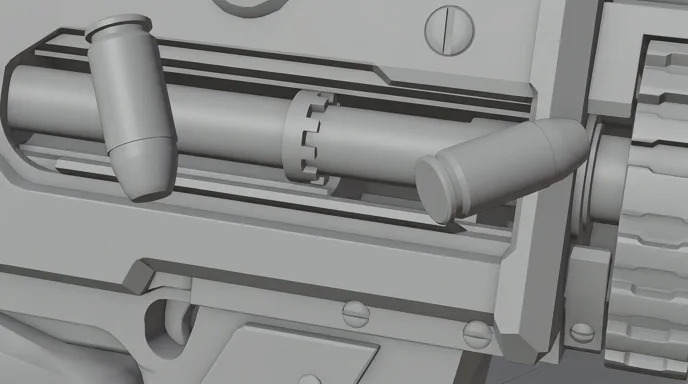
  4. Brass casings flying out of the ejection port of a worn machine gun
    The macro insert as a grey storyboard frame
    04

    Macro insert · the feed

    Macro insert on the ejection port of a heavy machine gun, brass casings flying out in slow motion, worn gunmetal, no text or markings

  5. The rabbit gunner kneels in brass armour and aims a heavy gun to the right of the frame
    The medium shot as a grey storyboard frame
    05

    Medium · the gunner

    Medium shot of the rabbit gunner kneeling, heavy gun aimed frame right, same brass armour and slotted helmet, blurred squad behind, smoke, afternoon light

The five shots cut together: ten seconds, 16:9.

Writing war

Four rules for a battle scene that films well.

Any AI war movie generator can fill a field with soldiers. The script decides whether anyone can follow the fight.
  1. 01

    Draw the map before the first line

    Before you write a shot, know where each side stands, where the cover is and what the objective is. Then put it on screen in the first wide shot. An audience that knows the terrain feels every metre gained or lost.

  2. 02

    One side left, the other right

    The 180-degree rule matters most in chaos. If our side fires toward frame right, it fires toward frame right in every shot. Write it into the action lines ("guns aimed frame right") so the storyboard and the prompts carry it.

  3. 03

    One soldier inside the mass

    Thousands of extras move no one. Pick one soldier and cut back to him: his boots, his breath, his weapon. The battle is what happens to him, and the wide shots only show where he is.

  4. 04

    Write what we hear

    War is mostly sound: the far guns, the close ones, the silence inside a helmet. Put sound cues in the action lines. They tell the editor where the fight is when the picture is full of smoke.

Structure and pacing

The shape of a three‑minute battle short.

A battle short is a small war with a clear objective. The cutting speeds up with the danger, then stops dead.
  1. 15 %

    The ground

    The terrain, the two sides, the objective. Wide, quiet, readable.

  2. 10 %

    First contact

    One shot fired, one reaction. The axis of the fight is set here.

  3. 35 %

    The chaos

    Short cuts, smoke, inserts. We stay close to one soldier so we never get lost.

  4. 25 %

    The turn

    The line breaks, a gun jams, an order arrives. Something changes the odds.

  5. 15 %

    The cost

    The noise stops. A slow wide shows the field, and who is missing.

For a sixty-second teaser, keep the ground and the cost. They are what makes the chaos in between feel like it means something.

Shot vocabulary

Eight shots that make a battle feel real.

Under each one, the prompt wording that gets it out of an image or video model. Keep the same screen direction in every prompt.
  • The map shot

    High and wide. Both sides, the ground between them, the objective.

    high wide establishing shot, two armies facing each other across a muddy field, our side on the left, the enemy on the right, smoke drifting, overcast light

  • Boots in the mud

    A ground-level insert that gives weight to one soldier.

    ground-level insert, heavy armoured boots planted in mud, spent casings bouncing around them, shallow depth of field, smoke behind

  • The helmet close‑up

    The face hidden, the fear in the posture. The mass becomes one person.

    close-up of a battered helmet with a narrow visor, head lowered, breath fogging in cold air, background soft, warm side light

  • The line of fire

    A lateral move along the trench, every gun aimed the same way.

    lateral tracking shot along a trench, row of soldiers aiming frame right, muzzle flashes, dust kicked up, steady camera

  • The weapon insert

    A macro on the gun. It fixes the weapon's design for the rest of the film.

    macro insert on the ejection port of a rifle, brass casings flying out in slow motion, worn metal, no text or markings

  • Out of the smoke

    Figures take shape in a wall of smoke. It also hides every seam between shots.

    wall of thick grey smoke, soldiers' silhouettes emerging toward camera, backlit, embers drifting, slow motion

  • Running with him

    The camera follows one soldier across open ground, at his height.

    handheld follow shot behind one soldier running across open ground, explosions of dirt far behind, camera at shoulder height, motion blur

  • The empty helmet

    The aftermath, told by an object. Violence without showing a wound.

    still wide shot of a quiet battlefield after the fight, a dented helmet lying in the mud in the foreground, drifting smoke, pale light

Light and palette

Brass, smoke and one flash of fire.

War films are lit by the battle itself: smoke flattens the sun into a dirty khaki, metal catches whatever light is left, and fire is the only saturated colour. The five colours below were sampled from the Rabbit Gunner shots. Put smoke or dust in every prompt: it holds the palette together and hides the seams where one generated shot meets the next.

  • Armour brass

    #A66C30

  • Muzzle flash

    #E88A4E

  • Battle smoke

    #84755B

  • Gunmetal

    #485C5A

  • Trench shadow

    #0D0F08

Where AI goes wrong

Four battle traps, and how the script avoids them.

Video models can render an explosion. They lose track of who is who by the next cut. These are the usual failures in war and action.
  • A rifle that changes model

    Magazines vanish, barrels grow, the helmet gains a crest. Show the weapon once in an insert and keep it as a prop reference: ScreenWeaver carries references from shot to shot, like the brass armour across all five Rabbit Gunner shots.

  • Two armies in the same uniform

    Models blend both sides into one grey crowd. Give each side one colour and one silhouette (brass against black, plumes against bare helmets) and repeat them in every prompt.

  • Crowds that melt

    A thousand soldiers in one frame turn to noise at the edges. Keep the sharp action in the foreground, put the mass in the smoke behind, and let debris fill the gap.

  • Prompts that get refused

    Video models filter graphic injury, and gore often gets blocked or blurred. Film the impact, the reaction and the aftermath instead: a flinch, a dropped weapon, an empty helmet. It is also how the best war films work.

Sub-genres

Medieval, modern, sci‑fi, and stylised war.

  • Medieval battle

    Shield walls, cavalry, banners. Blocks of colour for each army and slow wides before the charge, like War Mammoths above.

  • Modern war

    Trenches, streets, radios. Handheld cameras at shoulder height, desaturated light, and a strict screen direction for each side.

  • Sci‑fi war

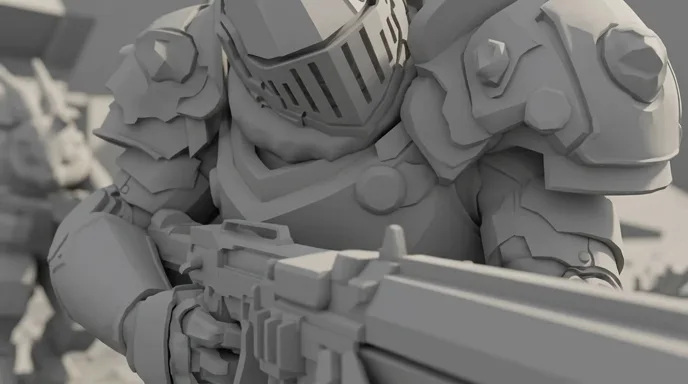
    Power armour, drones, energy weapons. Reference sheets for every suit, and light from the weapons themselves.

  • Stylised war

    Animals in armour, toy soldiers, anime armies. The rules of real combat still apply, which is why Rabbit Gunner reads as a war film.

The pipeline

Write. Board. Produce.

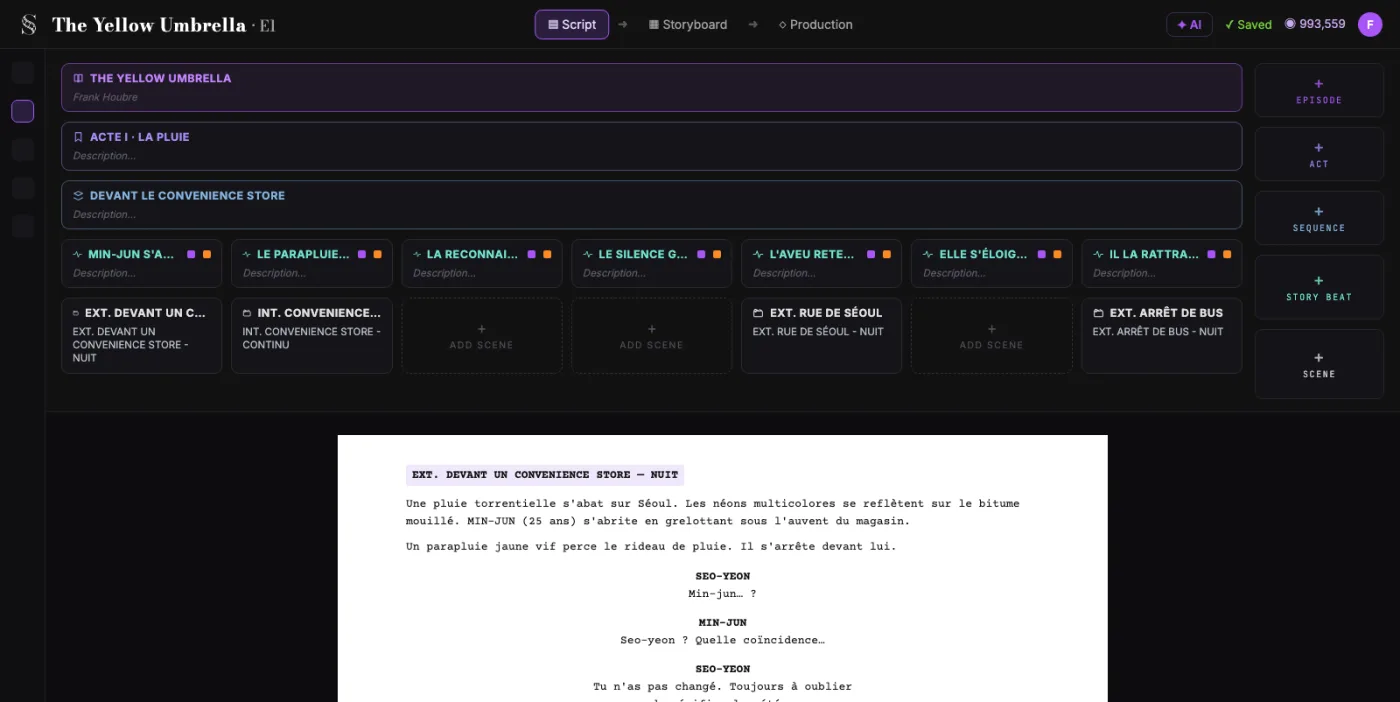
  1. ScreenWeaver screenplay editor: acts, sequences and beats above the formatted script of The Yellow Umbrella

    01The screenplay, enriched

    An industry-standard screenplay editor, and more: a visual outline and beat editor, your writing inspirations (notes, photos, audio) kept next to the page, and an AI researcher to support your writing, not replace it.

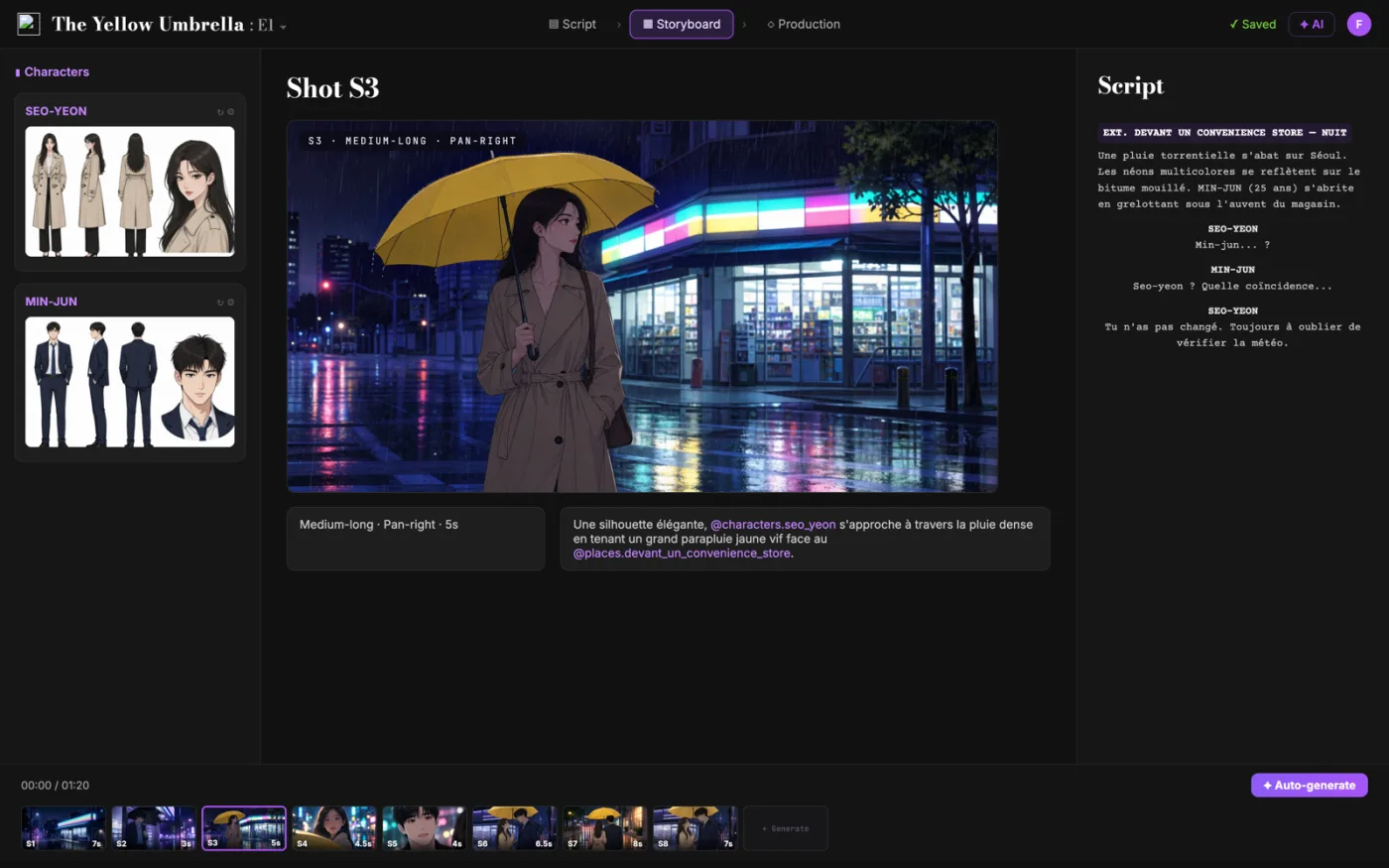
  2. ScreenWeaver storyboard: shot S3 of The Yellow Umbrella with characters, shot settings and the script beside it

    02The storyboard, made easy

    Shot breakdown generated from your screenplay, manual control over every shot (frame, angle, movement, duration), and generative AI previsualization in one click.

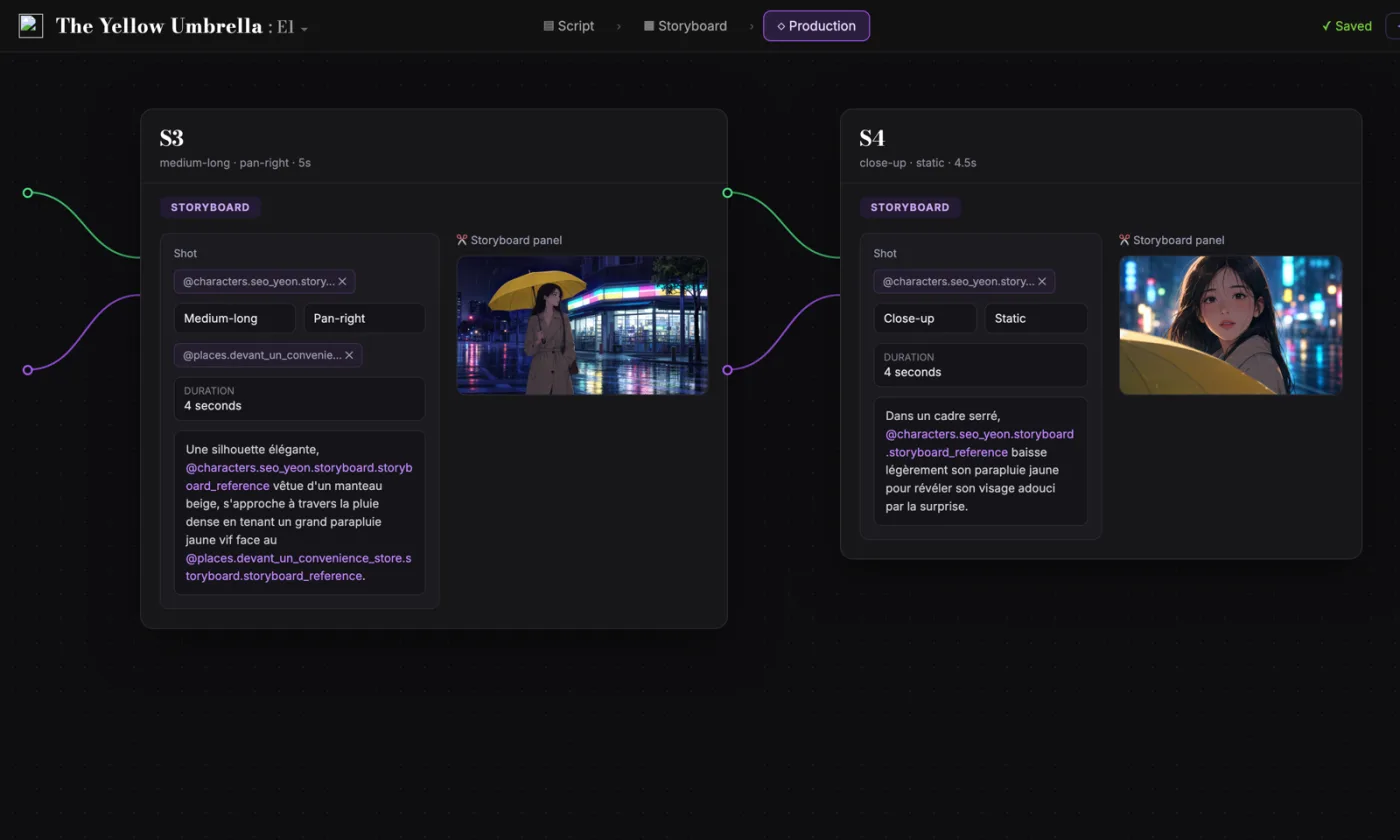
  3. ScreenWeaver production canvas: shots S3 and S4 as connected nodes carrying their storyboard panels and prompts

    03AI production, with finesse

    Footage generation pipelines connected to your screenplay and storyboard. Optimized out of the box, fully editable workflow.

FAQ

War films with AI, your questions

Is ScreenWeaver an AI war movie generator?
It takes a war film from the page to the screen. The screenplay is free to write today, the storyboard comes with Storyboard Beta at $9.99 a month, and each shot will be generated with the Filmmaker plan, targeted for 30 September 2026.
How do I keep a battle scene easy to follow?
Open on a wide shot that shows both sides and the ground between them, keep each side on its own side of the frame, and cut back to one soldier. In ScreenWeaver, each shot is framed on the storyboard before anything is generated, so you check the geography first.
Will AI video models make violent war scenes?
Most video models filter graphic injury, so gore tends to be refused or softened. Suggest it: the impact off screen, the reaction on a face, the aftermath in a wide. What the audience imagines hits harder than what a model is allowed to show.
How do I keep weapons and uniforms the same in every shot?
Give each one a reference: a character sheet for the soldier, a prop reference for the rifle. Characters, locations and references carry from shot to shot in ScreenWeaver, so the armour in the last shot is the armour of the first.
Can I make a medieval battle, a modern war film or an action short?
Yes. The script and the storyboard work the same way for sword and shield, rifles, power armour or a street chase. Choose the look in the prompts: live action, anime or 3D animation, in 16:9 or 9:16.
How long should an AI war short be?
Aim for one to three minutes. With shots of two to four seconds, that is fifty to seventy shots, and a battle eats them fast: plan the wide shots first, then fill the chaos with inserts.
Is writing the war screenplay free?
Yes. The Screenwriter plan is $0 and never expires. Write every battle, every draft, with standard formatting and PDF or Final Draft export, before you pay for anything.
Which AI video models are behind ScreenWeaver?
ScreenWeaver runs on Seedance 2.0 and 2.5. The generation pipelines read your script and storyboard, come optimised by default, and every setting can be changed shot by shot.

Your battle starts with a map on the page.

The screenplay costs nothing to write. Storyboard the fight when you are ready.