Script Time Calculator
Free script timer · Words to screen time · Script length to duration
The "1 page = 1 minute" rule is universal, but screenwriters often need finer estimates based on dialogue density or action-heavy scenes. Use this page as a free script timer: it turns your words into minutes and seconds of screen time.
Paste a script excerpt or enter a word count. The tool estimates screen time in minutes and seconds. Use the pace slider (slow drama vs. fast action) to refine the estimate.
Runs entirely in your browser , no data is sent to any server. Algorithm based on word count (about 130-150 words per minute of screen time).
Slow drama: fewer words per minute on screen. Fast action: more words per minute.
Using 140 words per minute for this pace.
How it works
Screen time is estimated from word count. Industry benchmarks use roughly 130-150 words per minute: dialogue-heavy or slow-paced material leans toward 130 wpm, action-heavy or snappy dialogue toward 150 wpm. The slider lets you pick a pace in between. One script page in standard format is typically 200-250 words, so "1 page = 1 minute" aligns with the middle of this range.
How to convert script length to screen time
Most writers hear that "one page equals one minute",and then discover that not all pages are created equal. A 3-page dialogue scene with lots of white space does not play the same as a 3-page action sequence full of dense description and stunts. A script length to time calculator gives you a more realistic estimate than a raw page count.
The simplest way to estimate screen time is to look at word count. A typical produced feature plays at around 130-150 spoken or described words per minute. Dialogue-heavy drama or contemplative cinema tends to sit near 130 words per minute; lean, action-heavy thrillers can creep closer to 150 words per minute, especially when visual storytelling replaces long speeches.
If you only know your page count, you can still approximate. Many standard-formatted scripts fall between 200 and 250 words per page. A 105-page script at roughly 225 words per page is around 23,600 words. At 140 words per minute, that lands close to 168 minutes. Adjusting the pace slider up or down lets you model a slower, more dialogue-driven film or a faster, cut-heavy one.
When to use a script length to time calculator
- Planning festival runtime and programming slots Short films and festival submissions often have strict runtime limits. Instead of guessing from page count alone, you can paste your script and see whether you are closer to 8 minutes or 14 minutes, then trim accordingly.
- Aligning structure (acts and beats) to minutes Knowing that your midpoint, break into Act Three, or key reversals land around specific minutes helps you compare your script pacing to common structures. Once you estimate duration from words, you can map beats to approximate timestamps.
- Communicating expectations to producers and crew Producers, line producers, and assistant directors need a sense of total runtime when budgeting and scheduling. A words to screen time estimate is a quick way to check whether a draft is still a tight 95 minutes or drifting toward a more expensive 130-minute running time.
Go deeper on script length and timing
You timed the pages.Now write the rest.
Write the whole screenplay in ScreenWeaver, with industry-standard formatting and unlimited pages. The Screenwriter plan is free and does not expire.
- $0, does not expire
- PDF and Final Draft export
- Mac, Windows, Linux, iPad
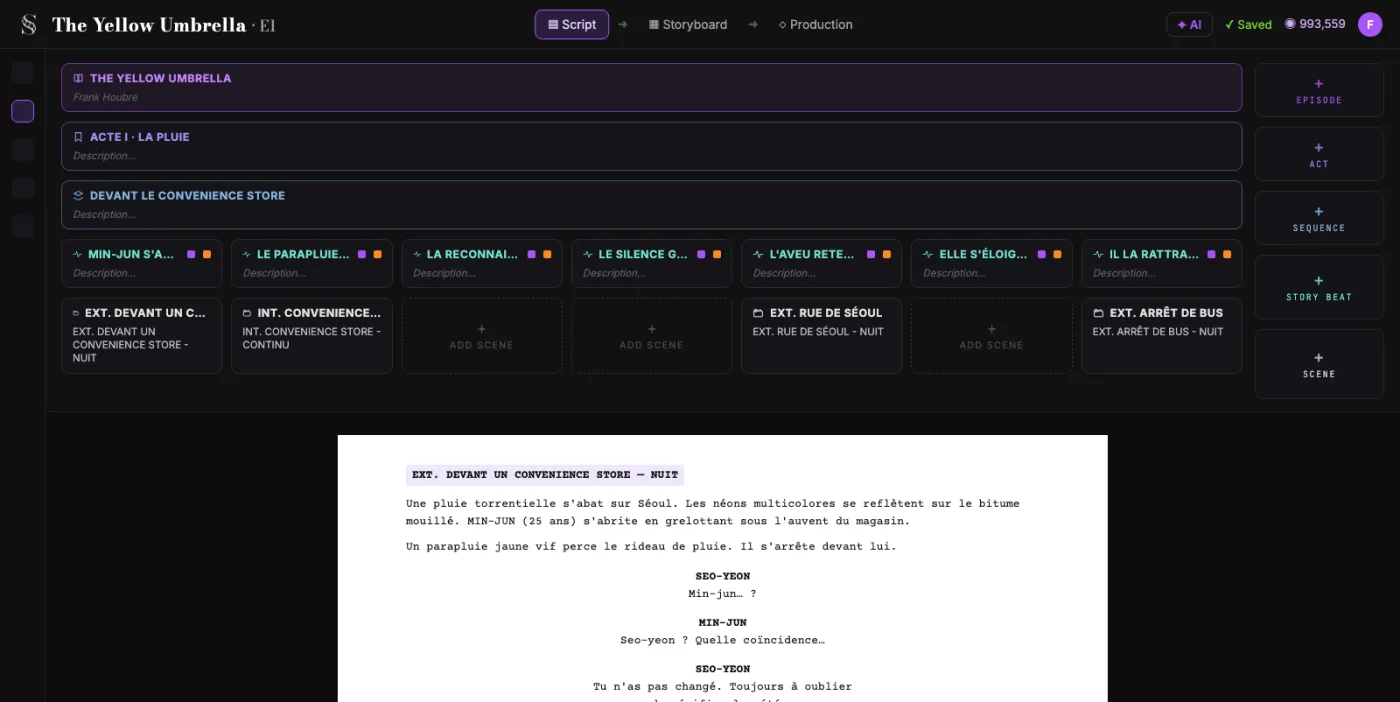
Script Time Calculator: the complete guide
It converts script words into an estimated runtime window, so you can validate pacing assumptions before table reads or expensive pre-production steps.
For this workflow, the central problem is clear: runtime estimates are often guessed from page count without accounting for dialogue density, pacing, or scene construction. Left unresolved, this creates downstream friction and slower decisions. The practical target is a more realistic runtime range that helps with rewrite decisions, pitch expectations, and production planning.
Limitation to keep in mind: It cannot predict performance timing, edit rhythm, or directorial style exactly, so it should be treated as a calibrated estimate, not a final runtime guarantee.
Advanced workflow: Advanced teams run this per act and per sequence, then compare runtime drift across versions to detect where rewrites are silently inflating duration.
Step-by-Step Workflow
- Paste either a full draft or a representative excerpt, then verify the word count baseline before making structural decisions.
- Set the pace according to your genre and scene style, then compare runtime between conservative and aggressive assumptions.
- Map estimated minutes to your major turns (catalyst, midpoint, all-is-lost) and check if your dramatic rhythm matches intent.
- Re-run after every major rewrite pass and track deltas in a changelog so runtime drift is visible, not accidental.
Use Cases By Profile
- Writer: verify whether second-act expansion is improving story or only adding runtime weight.
- Script editor: benchmark scene compression opportunities without guessing from page count alone.
- Producer: align early runtime expectations with budget and scheduling conversations.
Common Mistakes To Avoid
- Using one static pace value for every genre and every sequence.
- Treating the estimate as final truth instead of a planning signal.
- Ignoring how dialogue-heavy scenes and visual sequences affect real screen time.
Professional Best Practices
- Model best-case, expected, and worst-case runtime scenarios before handing pages to collaborators.
- Use act-level estimates, not only full-draft estimates, when diagnosing pacing.
- Pair runtime checks with beat placement to avoid late structural surprises.
Treat this tool output as a decision support layer, not a replacement for authorship. Great scripts are remembered for specific choices, emotional precision, and clarity of dramatic movement. Tools help by removing noise so your energy can go where it matters: character, conflict, escalation, and payoff. If you review outcomes after each pass and keep an explicit log of accepted changes, your workflow becomes faster and more predictable from draft to draft. That consistency is exactly what professional collaborators value: fewer surprises, clearer rationale, and a script that evolves with intent.
Extended FAQ
How accurate is runtime estimation from words?
It is directionally strong for rewrite and planning decisions, especially when you calibrate pace by genre. Treat it as a decision range, then validate with table reads or rough cuts.
Should I estimate runtime from full draft or sample scenes?
Use full draft for global planning and sample scenes for diagnosing specific pacing problems. Both views are useful and complementary.
Can this help avoid bloated second acts?
Yes. Track estimated minutes by act and compare against intended rhythm. If Act Two inflates repeatedly, trim before line-level polish.
Does page count still matter if I use words?
Yes. Page count is still a shared production language. Word-based estimation adds finer granularity when density varies.
When should producers request runtime checks?
At outline lock, first full draft, and after major structural revisions. Early checks prevent late expensive adjustments.
What is the best workflow with beat tools?
Estimate runtime first, then verify beat timing. Duration and structure should reinforce each other, not conflict.
FAQ: script length, pages, words and screen time
No. "One page equals one minute" is a useful rule of thumb for standard-format scripts in 12pt Courier with balanced action and dialogue. In practice, a chase written in a few lines can run for minutes on screen, while a page of rapid-fire dialogue often plays in well under a minute, so add time to action-heavy scenes. Word count plus pace (slow drama vs. fast action) is a more honest indicator of how long your script will play.
Take your total page count, estimate roughly 200-250 words per page, and multiply. Then divide by a realistic words-per-minute pace: 130 for slow, dialogue-heavy work; 150 for very tight, visual storytelling. The Script Time Calculator lets you paste your text or enter a word count and then adjust a slider between slow drama and fast action to see the effect on runtime.
There is no single correct value, but most features land between 130 and 150 words per minute when you average dialogue and description. Under 120 words per minute will feel very slow and sparse; over 160 will usually feel rushed on the page and on screen. Long takes, subtext-heavy dialogue, and visual storytelling all influence the real pace.
No. A script length to time calculator is meant for quick estimation and comparison drafts to drafts. The only precise way to know how long your story plays is through table reads, watchable animatics, or cuts. This tool helps you catch extreme runtimes early so you can rewrite before production.
Yes. The same logic applies whether you are writing a 90-120 page feature, a 10-page short, or a 30-page pilot. Paste the pages that will be in the final cut, choose a realistic pace on the slider, and the words to screen time estimate will give you a reasonable range for the finished runtime.