PixVerse turns a prompt, a photo or a template into short AI videos, on the web and in its phone apps. ScreenWeaver starts from a real screenplay, free to write, and builds the storyboard and the footage from it. Your script stays the source of truth.
Both get you to moving pictures. The difference is what holds the film together from the first shot to the last.
Prompt-first · PixVerse
Start from a prompt or a photo
1Type a prompt, upload a photo, or pick one of the ready-made templates.
2The PixVerse agent can turn one prompt into several shots, and you refine them in the conversation.
3PixVerse V6 or partner models such as Seedance 2.5 and MiniMax H3 generate the clips, with lip sync and voice.
4Extend, transition or edit the clips, or chain the steps on the node canvas.
Fast for social clips, effects and short pieces made on a phone, when the idea is a moment rather than a screenplay.
Script-first · ScreenWeaver
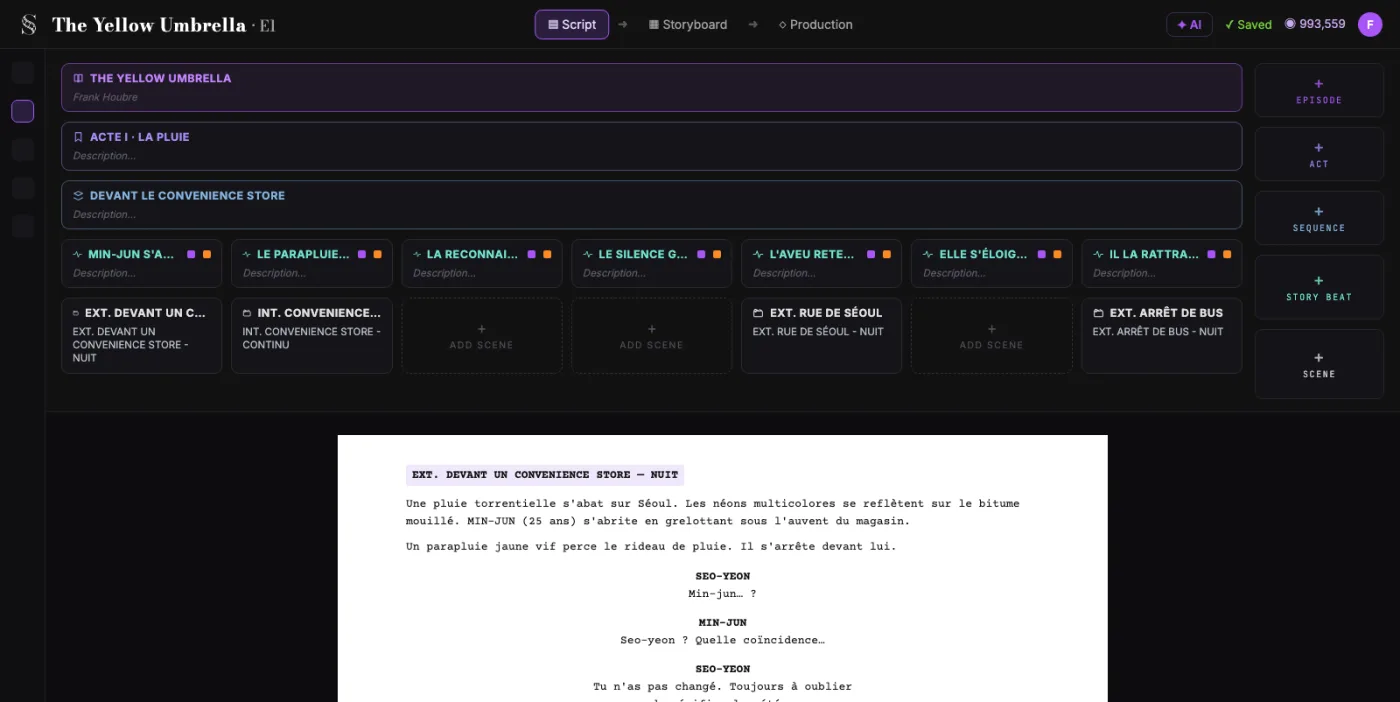
Write the screenplay first
1Write in a real screenwriting editor: industry formatting, outline and beats. Free.
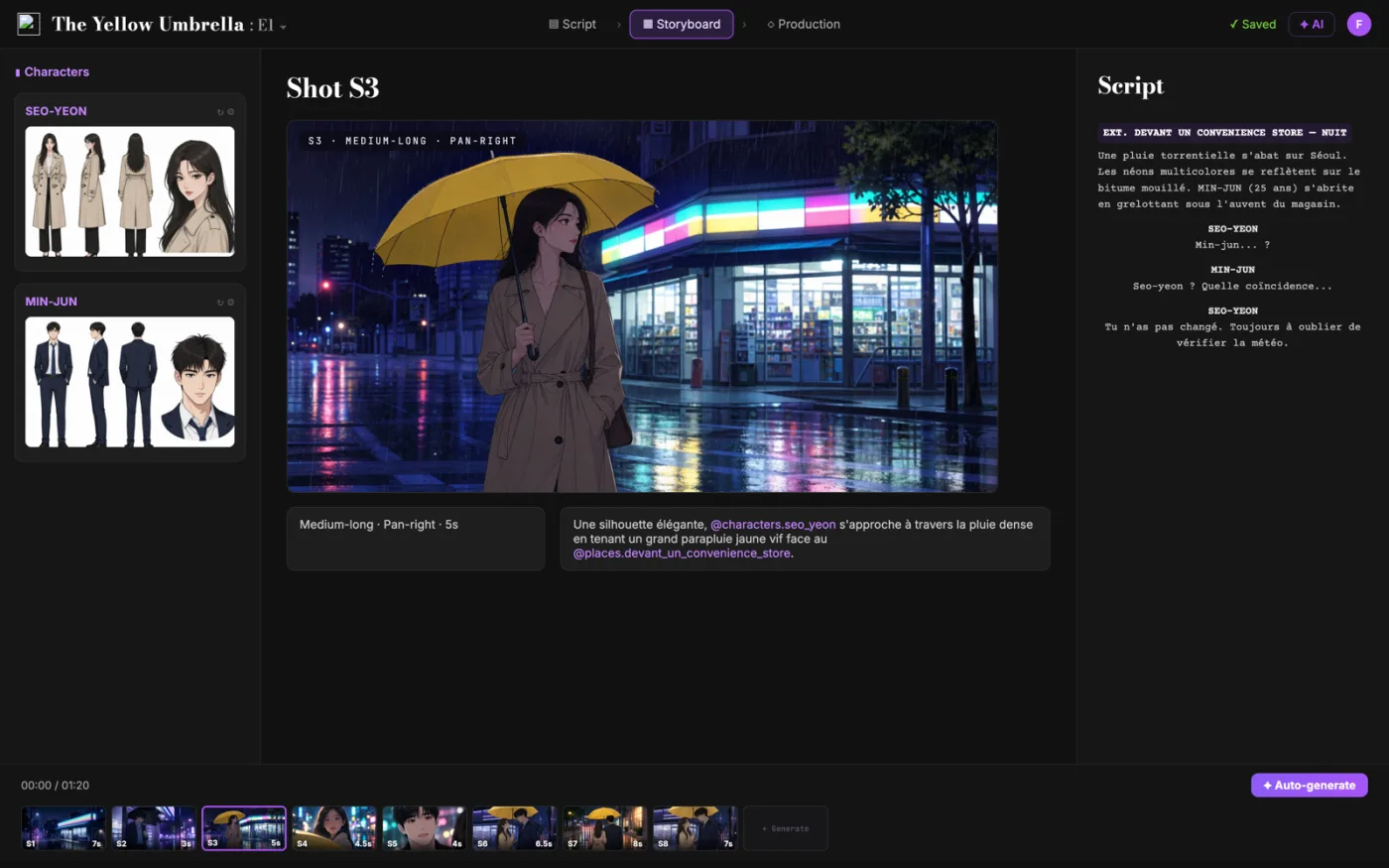
2The shot breakdown and storyboard are generated from your scenes. You control each shot.
3Characters, locations and references carry from shot to shot.
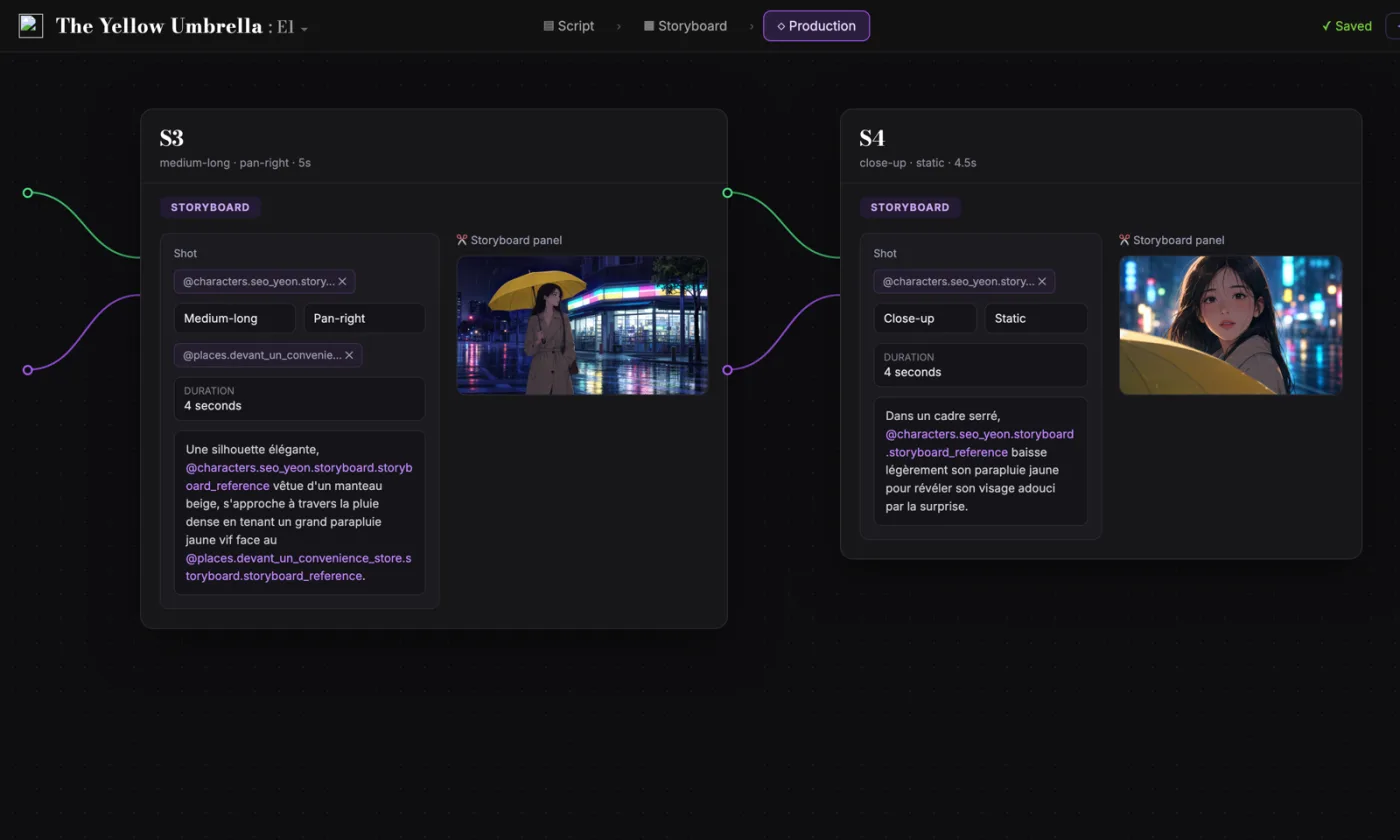
4Each shot becomes a video node in the same project. Seedance 2.5, Veo 3.1, Kling 3.0 and more in one menu.
Built for writers and directors of films and series, who rewrite the script while the boards take shape.
What stays in your hands
The script leads. The AI follows.
The screenplay is the reference
Every storyboard frame is linked to its scene and beat. Rewrite a scene and you know which shots it touches.
Manual control of each shot
Framing, angle, movement and duration: you set them, shot by shot.
Continuity from shot to shot
Characters, locations and references carry from one shot to the next.
Several models, one project
Seedance 2.5 by default, with Seedance 2.0, Veo 3.1, Kling 3.0, MiniMax H3 and Grok Imagine Video 1.5 on the same video node.
The pipeline
Write. Board. Produce.
01The screenplay, enriched
An industry-standard screenplay editor, and more: a visual outline and beat editor, your writing inspirations (notes, photos, audio) kept next to the page, and an AI researcher to support your writing, not replace it.
02The storyboard, made easy
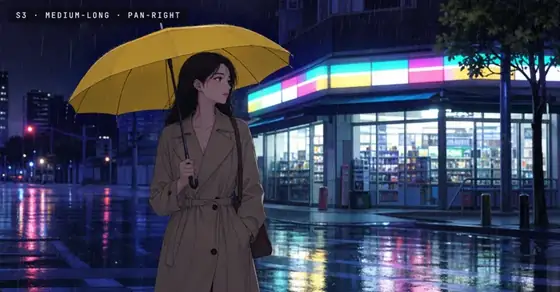
Shot breakdown generated from your screenplay, manual control over every shot (frame, angle, movement, duration), and generative AI previsualization in one click.
03AI production, with finesse
Footage generation pipelines connected to your screenplay and storyboard. Optimized out of the box, fully editable workflow.
Demo project · The Yellow Umbrella · Episode 1
Where things stand
What you can use today.
PixVerse and ScreenWeaver both generate video today. Here is exactly what each ScreenWeaver plan includes.
Available
Screenwriter
$0does not expire
Unlimited projects and pages, industry formatting, outline and beats, PDF and Final Draft (.fdx) export.
Available
Auteur
$39.99a month, 6,000 credits
The storyboard generated from your screenplay, then AI video from the same shots, with the latest models.
Available
Studio
$149.99a month, 25,000 credits
Everything in Auteur, plus real-time collaboration, unlimited seats and Owner, Editor and Viewer permissions.
Side by side
ScreenWeaver vs PixVerse
Plans and features as each company lists them. PixVerse prices are monthly, with the yearly price per month in brackets.
ScreenWeaver
PixVerse
Starting point
Your screenplay
A prompt, an image or a template
Writing the script
Screenwriting editor, industry formatting
No script editor; the agent works from a prompt
Script files
Export to PDF and Final Draft (.fdx)
No screenplay files listed
Storyboard from the script
Auteur plan, $39.99/mo
The agent turns one prompt into several shots
Shot control
Framing, angle, movement, duration
Prompt, templates and conversation with the agent
Consistency
Characters, locations, references tied to the script
Consistent characters across videos
Video generation today
Yes, in the Auteur plan
Video models
Seedance 2.5 and 2.0, Veo 3.1, Kling 3.0, MiniMax H3, Grok Imagine Video 1.5
PixVerse V6, C1 and R2, plus Seedance 2.5, Seedance 2 and MiniMax H3
Free plan
Writing free, no expiry
60 credits to start, then 30 a day, up to 540p
Paid plans
Auteur $39.99/mo (6,000 credits), Studio $149.99/mo (25,000 credits)
Standard $10, Pro $30, Premium $60, Ultra $249 a month ($8, $24, $48, $149 billed yearly)
Collaboration
Real-time, Studio plan
Team Ultra: shared workspace and credit pool
Beyond video
Script, storyboard and production in one project
Lip sync, text to speech, templates, node canvas, CLI and API
On a phone
Any browser on phone, tablet or computer, installable like an app, no app store needed
Web, plus iOS and Android apps
Competitor information as of October 2026, from pixverse.ai and the PixVerse subscription page. Prices in US dollars. Credits each month: 1,200 on Standard, 6,000 on Pro, 15,000 on Premium and 25,000 on Ultra. Check their site for the latest.
Fair is fair
What PixVerse does well
PixVerse is one of the most popular AI video apps on phones, built to turn a photo or an idea into a shareable clip in seconds.
PixVerse V6, its own flagship model, next to Seedance 2.5, Seedance 2 and MiniMax H3
Templates and an agent: ready-made starting points, and video you refine in a conversation
Lip sync and voice: text to speech, sound effects and synced dialogue on your clips
Everywhere: web, iOS and Android apps, plus a node canvas, a CLI and an API
PixVerse is still a good fit if you make short social clips, effects or ads from a photo or a prompt, often on your phone, more than a film from a screenplay.
Our verdict
If your film starts from a script, start here.
PixVerse is great at turning a photo or an idea into a clip in seconds. If your film starts from a script, ScreenWeaver keeps the screenplay as the source of truth: free professional writing, a storyboard generated from your scenes, and video from the same shots.
Professional writing, free and unlimited, with PDF and Final Draft export
A storyboard generated from your screenplay, shot by shot
Video from the same shots, characters kept consistent
Prices in US dollars, list prices as published on each vendor's site in September 2026 (Katalist, Runway, Kling, invideo, PixVerse, Hailuo AI, Pika, Luma, Previs Pro, Dreamina and Vidu in October 2026). Check their sites for the latest.
Yes, for filmmakers who start from a screenplay. PixVerse starts from a prompt, a photo or a template and generates short clips. ScreenWeaver starts with a free screenwriting editor, then generates the shot breakdown, the storyboard and the footage from your script.
Does ScreenWeaver generate video today?
Yes. Video generation is available in the Auteur plan, at $39.99 a month. Each storyboard shot becomes a video node, so the footage stays tied to the scene you wrote.
How much does PixVerse cost in 2026?
As of October 2026, the PixVerse subscription page lists a free Basic plan (60 credits to start, then 30 a day), Standard at $10 a month (1,200 credits), Pro at $30 (6,000 credits), Premium at $60 (15,000 credits) and Ultra at $249 (25,000 credits). Billed yearly, they come to $8, $24, $48 and $149 a month. Check their site for current prices.
Can I write a screenplay in PixVerse?
No. PixVerse works from prompts, photos and templates, and lists no script editor and no screenplay files. ScreenWeaver is a screenwriting editor with industry formatting, outline and beats, and PDF and Final Draft (.fdx) export, for free.
Can PixVerse make a storyboard from a script?
PixVerse does not list a storyboard tool: its agent turns a prompt into a few shots. In ScreenWeaver the storyboard is generated from the scenes you wrote, and each frame stays linked to its scene and beat while you rewrite.
How does ScreenWeaver keep characters consistent?
Characters, locations and references carry from shot to shot, tied to the same script. Their sheets are wired into each shot's video node as references, which is what keeps a face the same from one shot to the next.
Which video models does ScreenWeaver use?
Seedance 2.5 is the default. Seedance 2.0, Veo 3.1, Kling 3.0, MiniMax H3 and Grok Imagine Video 1.5 are in the same menu, so you can try another model on the same shot without leaving the project.
Is ScreenWeaver free?
Writing is. The Screenwriter plan costs $0 and does not expire: unlimited projects and pages, PDF and Final Draft export. The Auteur plan costs $39.99 a month for 6,000 credits, and the Studio plan $149.99 a month for 25,000 credits.
What is the best software like PixVerse?
For quick clips and effects from a photo, PixVerse, Pika and Hailuo AI are built for speed, on the web and on phones. For a film or a series you write yourself, ScreenWeaver keeps the script, the storyboard and the footage in one project. Each tool is compared on its own page, linked above.
PixVerse is a trademark of its respective owner. ScreenWeaver is not affiliated with, endorsed by or sponsored by PixVerse. Product names are used only to identify the products compared.
Write the film first. Then shoot it.
Start with a free screenplay editor. The storyboard is built from your pages, and the video from your storyboard.