AI cartoon generator

Make a cartoon with AI.Your character, on model every shot.

Write the episode, get a storyboard of every gag, and keep your character’s design, colours and outfit identical from the first shot to the last.
  • Free script writing
  • Storyboard from your script
  • Characters that stay on model
Cartoon rushes

Available today: free script writing, then the Auteur plan at $39.99 a month for the storyboard and the video generation of each shot, with 6,000 credits a month.

In your own tools: voices, music and the final edit. ScreenWeaver prepares the script, the board and the shots; you record the voices and cut the episode where you already work.

Character consistency

One model sheet, every shot on model.

In animation, a character that changes design between shots is called off model, and audiences notice it instantly. Generic video tools redraw your character in every clip. In ScreenWeaver, your character gets a model sheet, and every shot of the episode is generated from it. Here is how Mila’s Delivery was built.
  1. Cartoon model sheet of a small red fox courier girl: turnaround in four views and four expressions, teal cap, mustard jacket and brown satchel
    Model sheet

    Mila, the fox courier

    One sheet: front, three-quarter, side and back, plus four key expressions. The design is locked: crooked teal cap, mustard jacket, brown satchel, green sneakers. Look for the notch in her left ear: it is in every shot.

    • A fox courier in a teal cap rides a red bicycle fast down a cobbled street, letters flying from her satchel02
    • Close-up of the fox courier with a huge surprised face as a blue envelope flies away on the wind03
    • The fox courier leaps between two pastel rooftops reaching for a floating blue envelope, the harbour below04
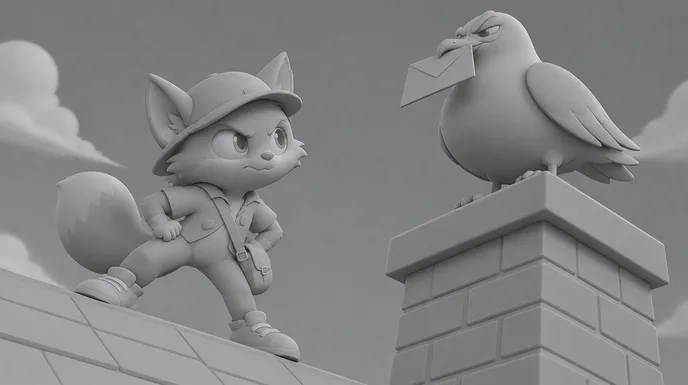
    • A smug seagull on a chimney holds the envelope while the fox courier glares from the roof below05
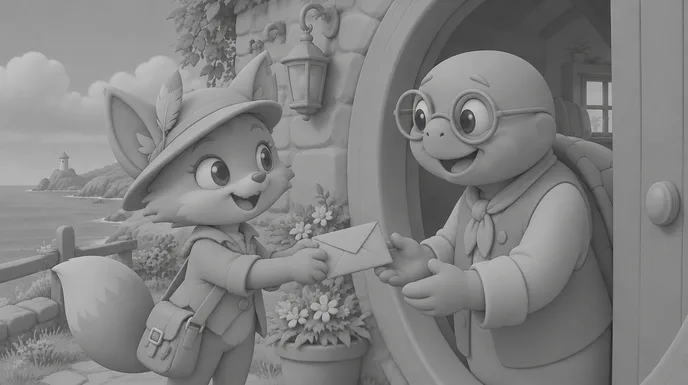
    • The fox courier hands a crumpled blue envelope to a smiling old turtle with round glasses at a round green door06
  1. 01

    Model sheet first

    Draw or generate the turnaround and the key expressions before any shot. In ScreenWeaver the sheet lives in the project as a Character, and the storyboard and the production canvas both read it.

  2. 02

    Attach, don’t describe

    Attach the sheet to every shot instead of describing the character again in the prompt. Every extra adjective is a chance for the model to redesign her.

  3. 03

    One signature detail

    Give the character one small, unmistakable mark, like Mila’s notched ear. It is the fastest way to spot an off-model shot on the board.

  4. 04

    Check the board first

    Read the storyboard as a model check before you spend a credit on video. A character that drifts on the board will drift on screen.

One scene, script to screen

Mila’s Delivery: six shots of a 2D cartoon.

A scene written for this page, then each shot as a storyboard frame and as the final image, all generated from the model sheet above. Under each shot, the direction that produced it.
Episode script · page 1

EXT. HARBOUR HILL - MORNING

Pastel houses tumble down to the sea. Gulls circle the lighthouse.

MILA, a small fox courier, rockets down the cobbles on her red bike, satchel stuffed with letters.

MILA

(grinning)

Last letter. Easy.

WHOOSH. A gust plucks the blue envelope out of the bag. Mila’s eyes go huge.

She leaps from roof to roof. The envelope lands in the beak of a very smug seagull.

MILA

Don’t. You. Dare.

Later: a crumpled envelope, a feather on her cap, and an old turtle beaming at his door.

IRIS OUT.

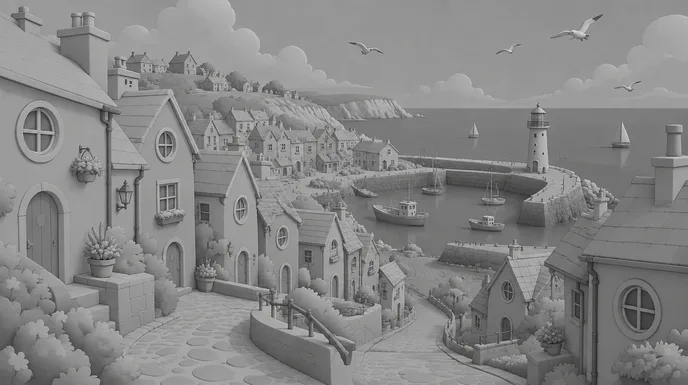
  1. A colourful cartoon seaside town with pastel houses, a cobbled street, a harbour and a red and white lighthouse
    Storyboard frame of the same establishing shot, in grey
    01

    Establishing · the town

    Wide on the seaside hill town, pastel houses, cobbled street down to the harbour, lighthouse on the pier, no characters

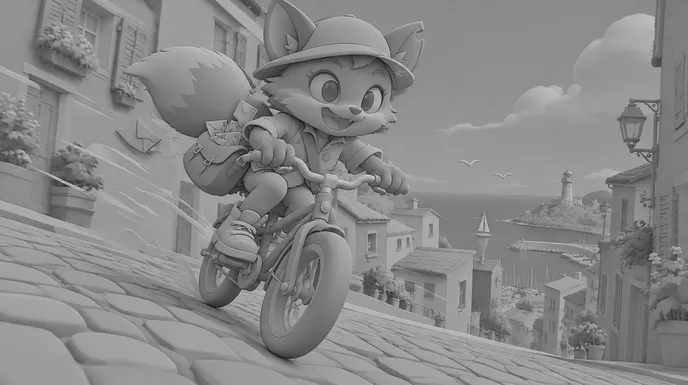
  2. A fox courier in a teal cap rides a red bicycle fast down a cobbled street, letters flying from her satchel
    Storyboard frame of the ride, in grey
    02

    Low three-quarter · the ride

    Mila races down the street on her red bike, ears and tail flying back, speed lines, big grin

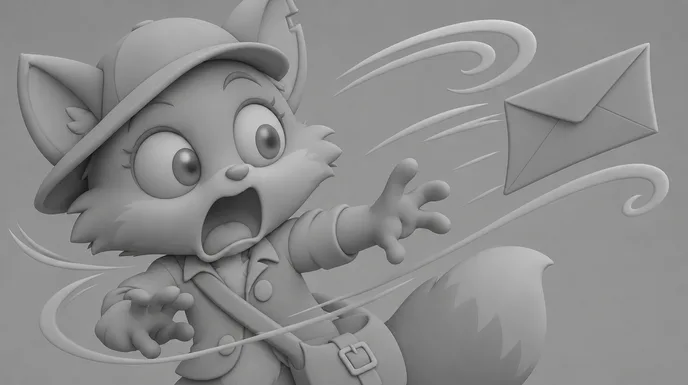
  3. Close-up of the fox courier with a huge surprised face as a blue envelope flies away on the wind
    Storyboard frame of the surprised take, in grey
    03

    Close-up · the gust

    Huge surprised take, eyes wide, mouth open, the blue envelope flutters past her face on wind swirls

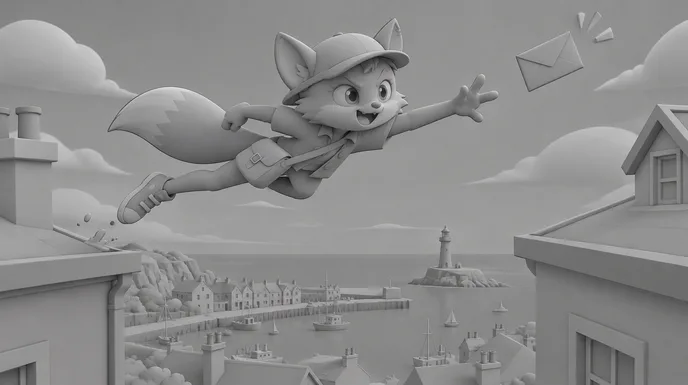
  4. The fox courier leaps between two pastel rooftops reaching for a floating blue envelope, the harbour below
    Storyboard frame of the rooftop leap, in grey
    04

    Wide side view · the leap

    Stretched action pose between two rooftops, arm reaching for the envelope, harbour far below

  5. A smug seagull on a chimney holds the envelope while the fox courier glares from the roof below
    Storyboard frame of the face-off, in grey
    05

    Low angle · the face-off

    A smug seagull on a chimney with the envelope in its beak, Mila below, hands on hips, determined frown

  6. The fox courier hands a crumpled blue envelope to a smiling old turtle with round glasses at a round green door
    Storyboard frame of the delivery, in grey
    06

    Two-shot · the delivery

    Mila hands the crumpled envelope to an old turtle at a round green door, both smiling, warm light

The six shots cut together: twelve seconds, 16:9, generated from the model sheet above. Voices and music are added in the edit.

Writing a cartoon

Four rules for a cartoon script that animates well.

AI draws the frames. The script decides whether the gag lands.
  1. 01

    Write the gag in three beats

    Anticipation, action, reaction. The gust, the leap, the seagull. Give each beat its own shot and the timing does the comedy for you: one beat, one shot.

  2. 02

    Silhouette first

    A cartoon character must read in black silhouette: big ears, a cap, a satchel. If you cannot recognise the pose without colour, the shot will be unclear on a phone screen.

  3. 03

    Push the expressions

    Cartoon acting is bigger than live action. Write the take into the action line: “her eyes go huge”, “she stamps her foot”. The model only exaggerates what you ask for.

  4. 04

    Short scenes, clear goals

    One character, one want, one obstacle per scene. Mila wants to deliver one letter. Everything on the page serves that, which keeps each shot simple to generate.

Structure and pacing

The shape of a three-minute cartoon short.

Cartoon shorts run on escalation: a simple goal, a run of obstacles that get sillier, and a payoff. Shots last one to three seconds.
  1. 10 %

    The setup

    Where we are and what the character wants, in one image.

  2. 25 %

    The first problem

    Something small goes wrong. The character reacts big.

  3. 30 %

    The escalation

    Each fix makes it worse. The cuts get faster.

  4. 20 %

    The face-off

    The character against the obstacle, eye to eye.

  5. 15 %

    The payoff

    The goal is reached, usually with a twist or a final gag.

For a sixty-second episode, keep the same five beats with two or three shots each, and end on a reaction.

Shot vocabulary

Eight shots that make it feel like a cartoon.

Each one with the wording that gets it from an image or video model. Use them in the storyboard, shot by shot.
  • The background plate

    The world on its own, before the character enters.

    2D cartoon background, wide establishing shot, bold clean outlines, flat cel colours, one shadow tone, no characters

  • The take

    A huge reaction on a close-up. The heart of cartoon comedy.

    close-up, exaggerated surprised expression, eyes wide, mouth open, motion lines, flat cel colours, bold outlines

  • The stretch

    A pose pushed to its limit in the middle of an action.

    stretched action pose mid-leap, strong squash and stretch, clear silhouette, side view, flat colours

  • The speed run

    The character crossing frame fast, with lines doing the work.

    character racing through frame, speed lines, dust puffs, ears and tail flying back, low three-quarter angle

  • The face-off

    Two characters, eye to eye, framed for the pause before the gag.

    low angle comic face-off, two characters facing each other, clear eyelines, simple sky background

  • The anticipation

    The beat before the action: crouch, wind-up, held breath.

    character crouched in anticipation pose before a jump, squash, held moment, clean silhouette

  • The prop insert

    The object the gag turns on, big and readable.

    insert shot of a blue envelope fluttering in the wind, wind swirl lines, flat colours, no readable text

  • The iris out

    The classic ending, closing on the final reaction.

    final two-shot, characters smiling, warm light, composition centred for an iris out

Colour and palette

Flat colours, one accent.

Cartoons read through flat, saturated colour and clean outlines. Give the hero one colour nobody else wears, keep the backgrounds softer than the characters, and never let the shading turn 3D. The five colours below were sampled from the Mila’s Delivery shots. Keep them in every prompt and the episode stays one show.

  • Fox orange

    #CB5E2D

  • Cap teal

    #357D87

  • Jacket mustard

    #DCB042

  • Harbour sky

    #54A9E2

  • Paper cream

    #F3F1E6

Where AI goes wrong

Four cartoon traps, and how the script avoids them.

Video models are trained on every style at once. These are the usual failures when you ask them for a cartoon.
  • Off-model characters

    The ear notch disappears, the jacket changes colour. Generate every shot from the same model sheet, attached, not described.

  • Shading that turns 3D

    Soft gradients creep in and the cartoon starts to look like a game render. Ask for flat cel colours with one shadow tone in every prompt.

  • Motion that is too smooth

    Cartoons snap: hold, move, hold. Fluid, floaty motion kills the comedy. Write snappy timing and short shots, and cut on the reaction.

  • Gibberish on signs and letters

    Models scribble fake text on shop signs and envelopes. Ask for no readable text, and add real lettering in the edit if the gag needs it.

Cartoon styles

TV cartoon, storybook, retro, and the rest.

  • Modern TV cartoon

    Bold outlines, flat colours, big expressions. The look of Mila’s Delivery, made for episodes and series.

  • Storybook and kids

    Softer lines, watercolour backgrounds, slower pacing. Bedtime stories and preschool shorts.

  • Retro rubber hose

    Bendy limbs and bouncy loops in the spirit of 1930s cartoons, in black and white or faded colour.

  • Cartoon shorts for social

    Ten to sixty seconds, vertical 9:16, one gag per short, the same character every week.

The pipeline

Write. Board. Produce.

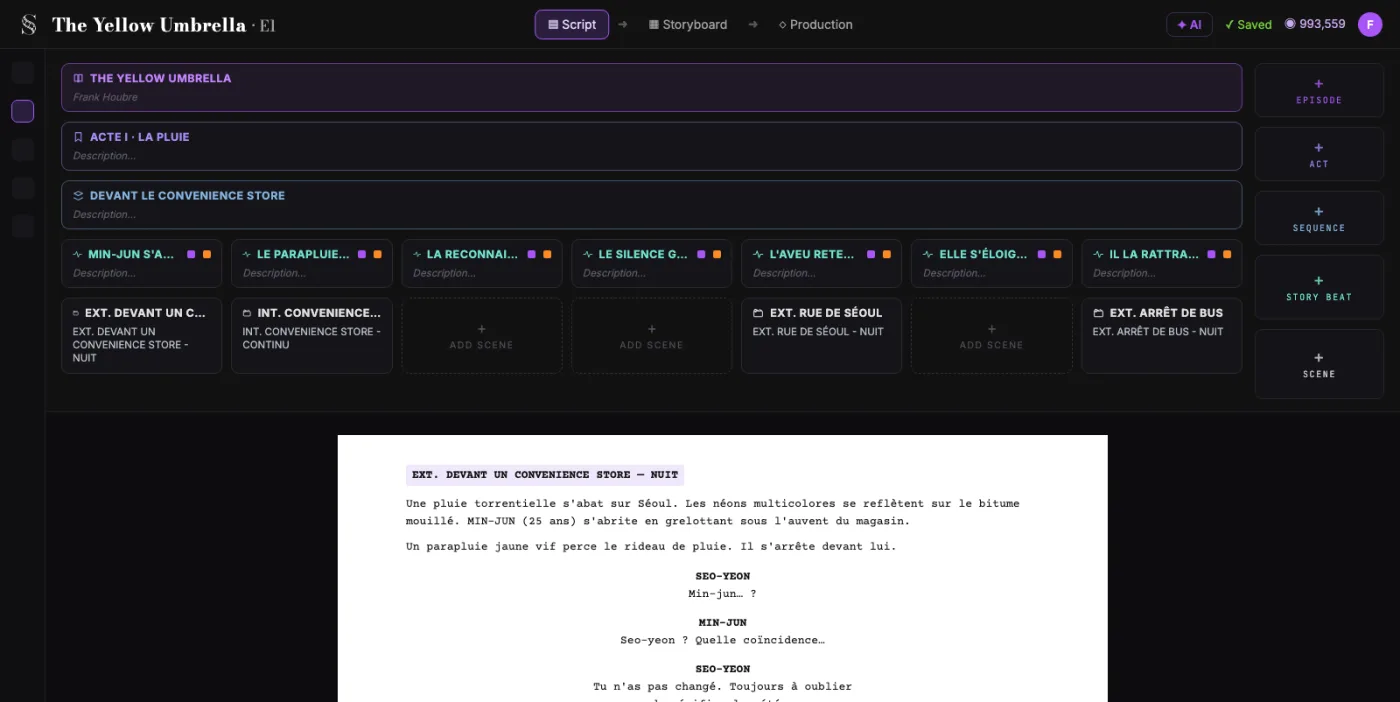
  1. ScreenWeaver screenplay editor: acts, sequences and beats above the formatted script of The Yellow Umbrella

    01The screenplay, enriched

    An industry-standard screenplay editor, and more: a visual outline and beat editor, your writing inspirations (notes, photos, audio) kept next to the page, and an AI researcher to support your writing, not replace it.

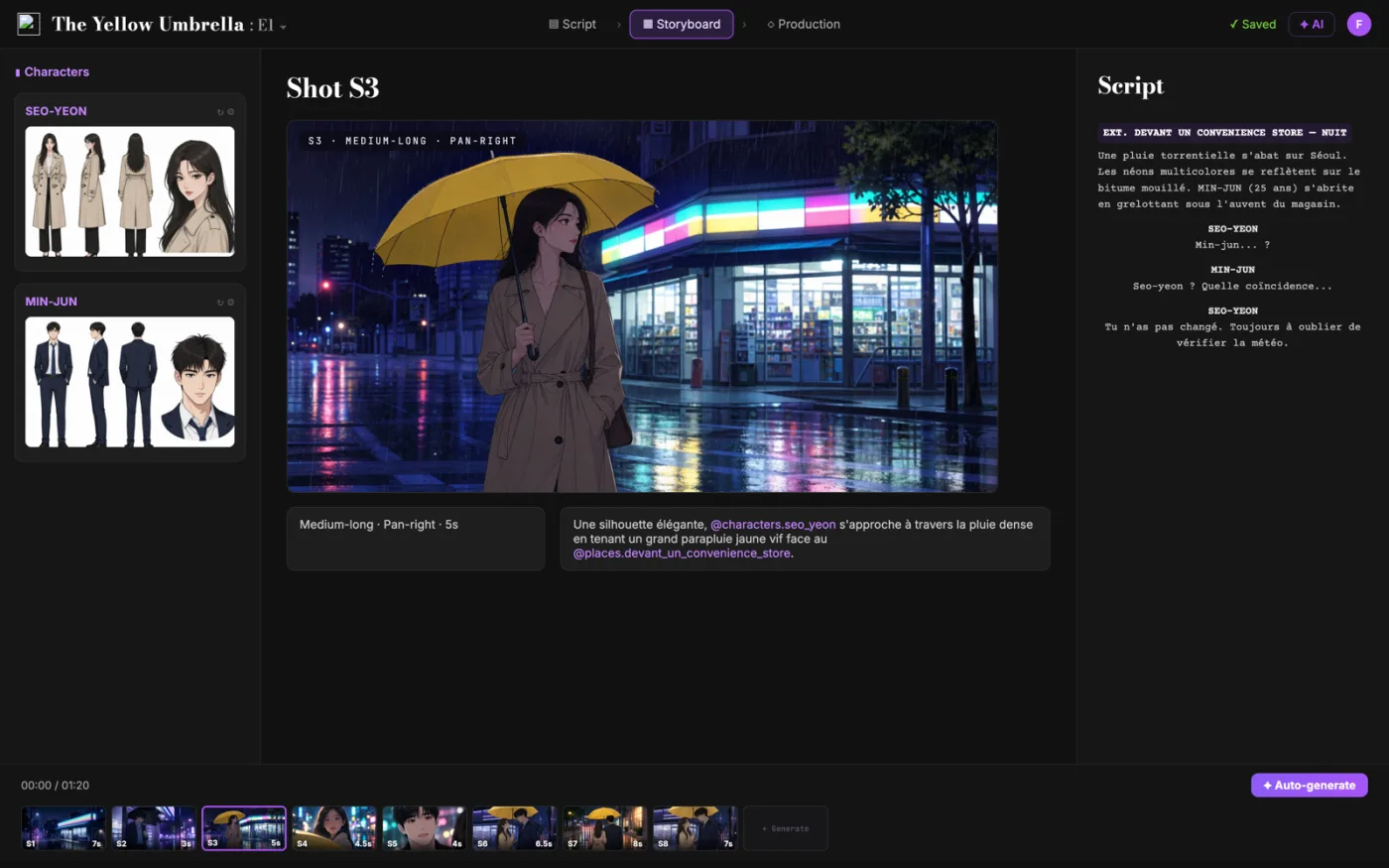
  2. ScreenWeaver storyboard: shot S3 of The Yellow Umbrella with characters, shot settings and the script beside it

    02The storyboard, made easy

    Shot breakdown generated from your screenplay, manual control over every shot (frame, angle, movement, duration), and generative AI previsualization in one click.

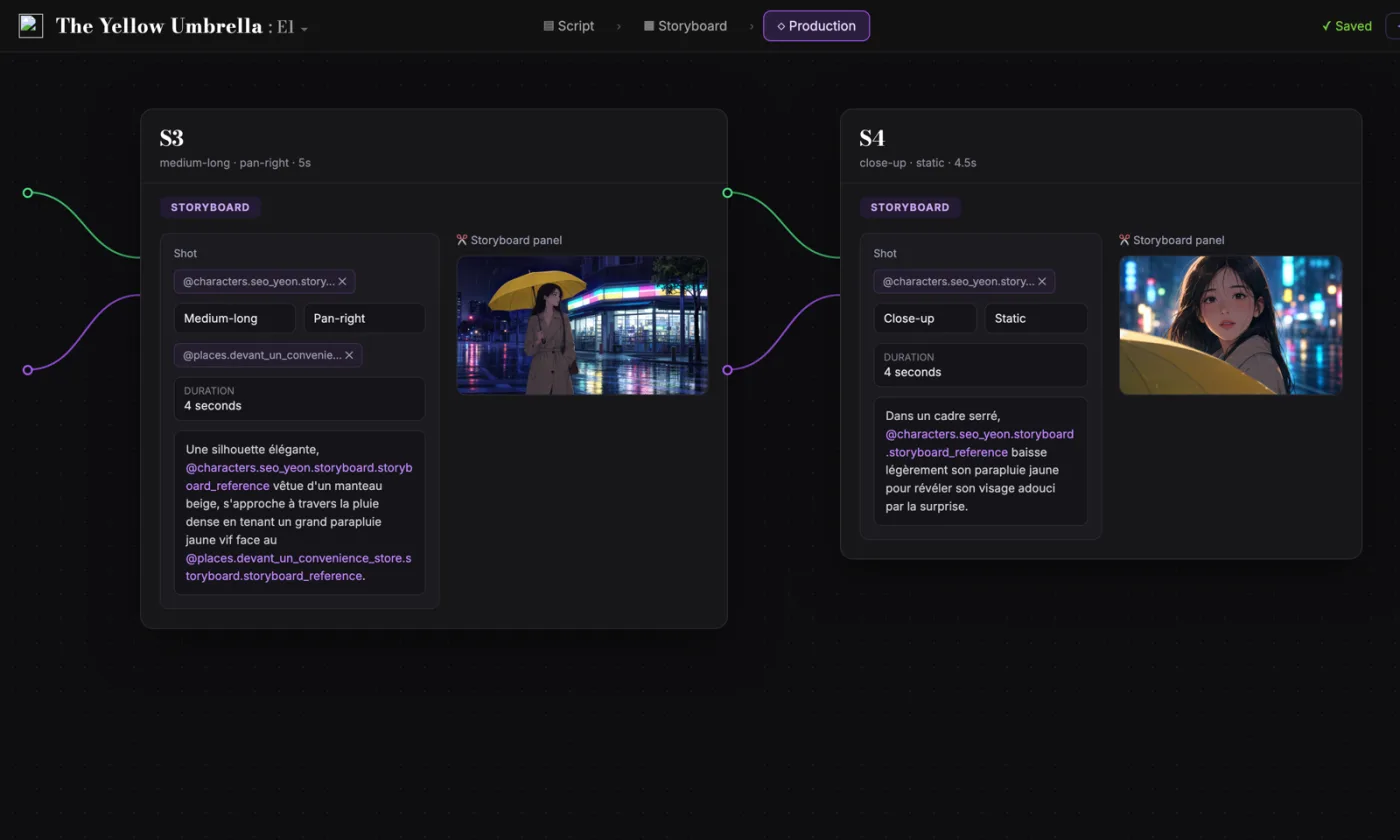
  3. ScreenWeaver production canvas: shots S3 and S4 as connected nodes carrying their storyboard panels and prompts

    03AI production, with finesse

    Footage generation pipelines connected to your screenplay and storyboard. Optimized out of the box, fully editable workflow.

FAQ

Cartoons with AI, your questions

Can I make a cartoon with AI in ScreenWeaver?
Yes. You write the episode for free, then the Auteur plan at $39.99 a month breaks it into shots, storyboards it and generates each shot as animated video, with 6,000 credits a month. You add voices, music and the final edit in your own tools.
How do I keep my cartoon character on model in every shot?
Make a model sheet once, with a turnaround and key expressions, and generate every shot from it. Attach the sheet rather than describing the character again in the prompt. ScreenWeaver keeps Characters, Places and Objects in the project, so the storyboard and the video use the same references.
Can I make a cartoon series, with the same character every episode?
Yes. The model sheet stays in the project, so episode 12 uses the same character as episode 1. Keep the palette and the shot vocabulary of the show in your prompts too.
Can I make vertical cartoons for TikTok, Reels or Shorts?
Yes. Projects can be in 9:16 as well as 16:9, and the storyboard and the shots follow the project format.
Can I copy the style of a famous studio or show?
Don’t. Prompting with a studio or a show name raises rights questions, and models average those styles anyway. Describe the look instead: outlines, colours, shading, motion. That is how you get a style that is yours.
Does ScreenWeaver generate the voices?
No. Write the dialogue in the script, then record the voices or use a voice tool, and add them in the edit. Video models can add sound effects to each shot.
Is writing the script free?
Yes. The Screenwriter plan costs $0 and does not expire: unlimited projects and pages, industry-standard formatting, PDF and Final Draft export.
Which video models does ScreenWeaver use?
Seedance 2.5 by default, with up to 30 image references per shot, and other models such as Veo 3.1 and Kling 3.0 on the same production canvas. The pipelines are connected to your script and storyboard, and fully editable.

Your cartoon starts with a character.

Write the episode for free. Storyboard and animate it when your model sheet is ready.

Film techniques

Film techniques to explore

Each one with a short clip, a screenplay excerpt and the shot list line.

All 263 techniques