
The short answer: most AI anime fails in the timing, not in the drawing. Write the episode first, lock a three-view sheet for every character, board every cut, then generate one beat per shot and retime the motion to 12 or 8 new images per second in the edit. That method produced 38 minutes of finished anime, made by one person.
Most guides on this topic mix up two things. An anime image is one picture: a portrait, a poster. An anime video is a sequence of cuts that must hold the same characters and the same rhythm for minutes. This guide is about the second, which is a filmmaking problem before it is a prompting problem.
We use Lost Garden as the running example: a dark fantasy anime series written, boarded and produced in ScreenWeaver. Its creator tells the whole story in the first person in How I Made a Japanese-Style Anime With AI, From A to Z. This page is the method you can reuse on your own project.
What you need before you start
| Realistic answer | |
|---|---|
| Time | For scale: Lost Garden episode 2 runs 21 minutes and took 75 hours. A first short of one to three minutes is the right first project. |
| Budget | Writing the script is free. Storyboard and video generation use credits; see the pricing section. For scale, Lost Garden episode 2 cost $1,850. |
| Hardware | A computer and a browser. ScreenWeaver runs online, and nothing renders on your machine. We recommend a real screen over a phone: a storyboard and a production canvas need room. |
| Skills | No drawing required. You need to write a scene, judge a frame and say no to a pretty shot that does not cut. |
| Other tools | An editor (DaVinci Resolve has a free version), and a source for voices and music. ScreenWeaver does not generate voices or music and does not export a finished edit. |
What makes anime read as anime
Start with the grammar, not the tool: the grammar is what the model does not know.
1. Anime moves in poses, not in glides. Film runs at 24 frames per second. Television animation holds each drawing for two frames ("on twos", 12 drawings per second) or three ("on threes", about 8) (Wikipedia, Traditional animation, accessed 8 October 2026; Anime News Network lexicon, accessed 8 October 2026). Video models do the opposite: they produce continuous, interpolated motion. Over a cel-shaded character, that smoothness reads as traced live action. This is the single biggest reason AI anime looks off, and no style keyword fixes it.
2. Cuts are short, and each cut is one image. Lost Garden cuts every two to three seconds, around 400 shots for 21 minutes. One action line in the script becomes one cut on the board.
3. The emotion lives on the face. Eye close-ups, reaction shots, a pupil that tightens. Write the reaction as action, and the close-up writes itself.
4. Stillness is a choice. A face that holds while only the hair moves. A slow pan across a painted background. Save full, fluid motion for one moment per scene, the one the audience will remember.
5. Flat colour, hard shadow, a line that stays. One base colour, one shadow tone, one highlight on the characters. The softness goes into the painted skies and backgrounds, never into the faces.
6. Silhouettes read at any size. In a series with very wide shots, a character you only recognise in close-up is a character you cannot stage.
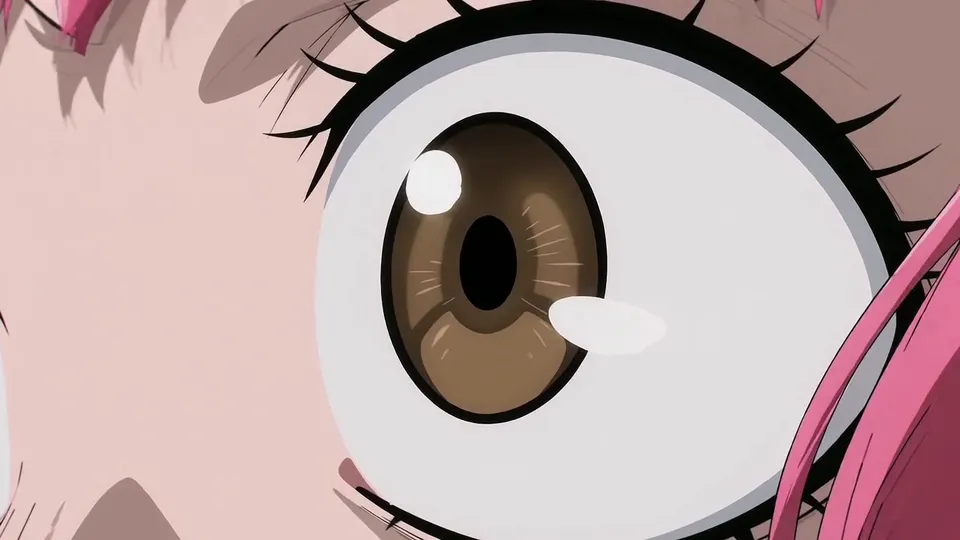
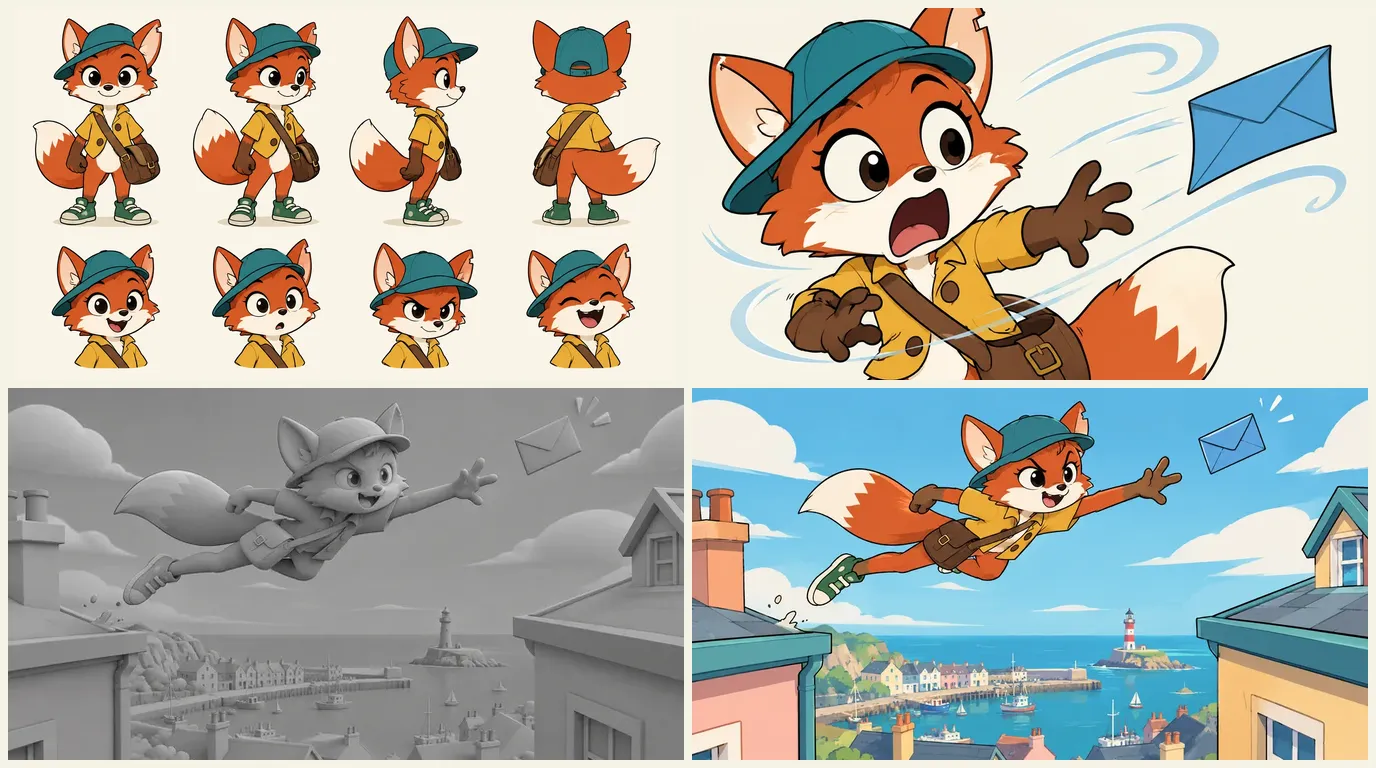
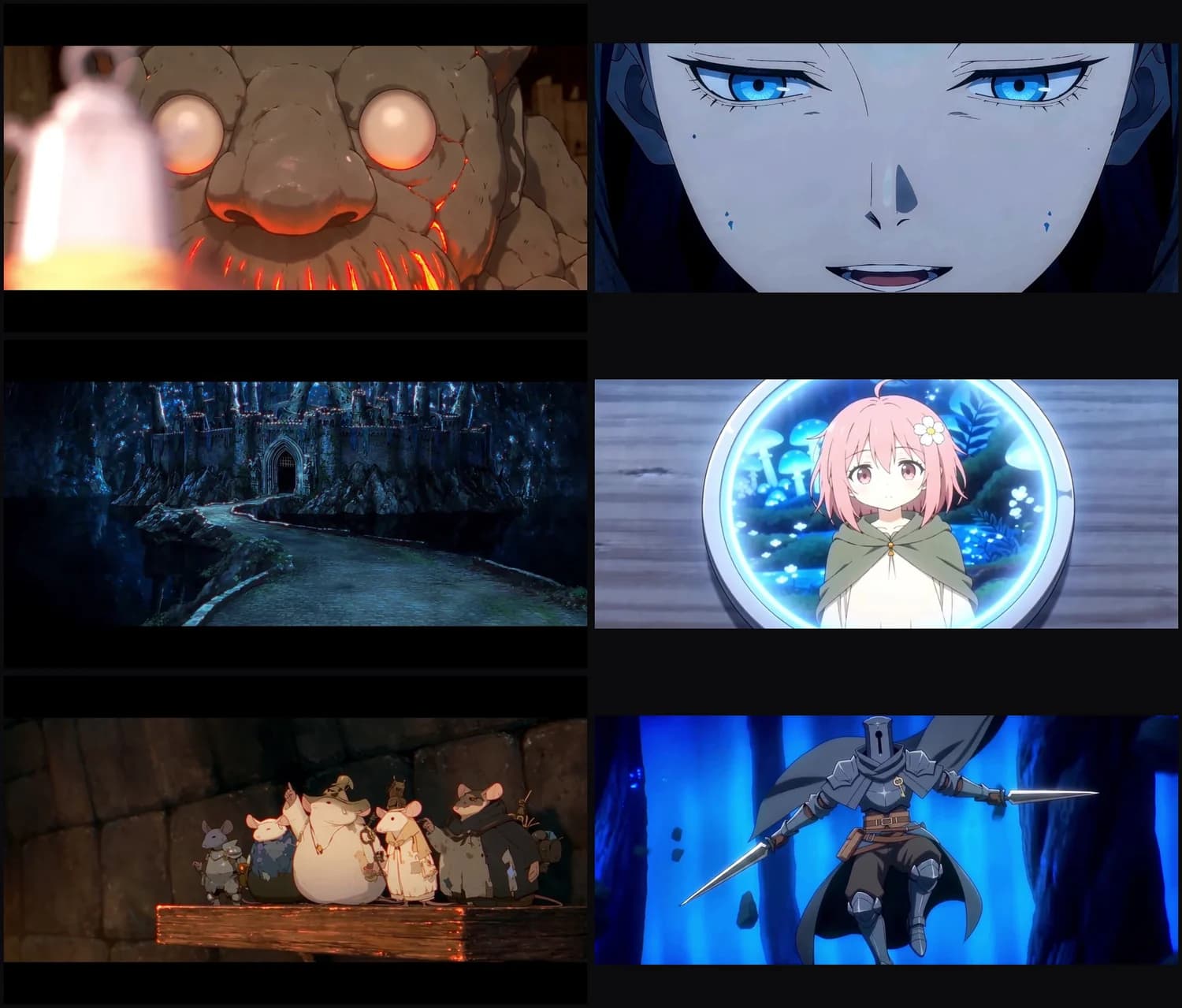
That eye is one cut from a five-cut demo scene our team made for the anime page: twelve seconds in total, four cuts under two and a half seconds and one long hold to close.
The method, step by step
1. Idea and logline
Write the story in two sentences: who wants what, and what stands in the way. Then make three production decisions before page one, because each one changes everything downstream.
- Format. A 16:9 episode for YouTube, or a 9:16 vertical episode for TikTok and Reels. ScreenWeaver also offers 2.39:1, 4:3 and 3:4. Pick one now: the storyboard is generated in that ratio.
- Shot length. A fast cut like Lost Garden, or longer held shots. It changes the shot count, which changes the board, which changes the script.
- Mouths. Lost Garden's heroes are empty suits of armour, so there is no lip sync to match. If your leads talk on screen, plan to stage dialogue over reaction shots, back views and off-screen lines, the way anime itself does.
2. Write the script in an anime format
A screenplay for anime is a cut list in disguise. Three habits make it animate well:
- One action line, one image. Each line becomes a cut on the board.
- Write the holds. "Only her hair moves" is a direction, not decoration.
- Write the reaction, not the feeling. "Her eye widens, the pupil tightens" is a shot. "She is scared" is not.
ScreenWeaver's screenplay editor is free on the Screenwriter plan and exports to PDF and Final Draft. Characters, places and objects you write become story elements you call with an @, which matters two steps from now. For the codes specific to the genre, from the cold open to the hook at the end of an episode, read scripting manga and anime: the specific codes.
3. Reference sheets: characters, places, objects
Before the first board, every recurring character, place and important object gets a reference sheet. In a Japanese studio, this is the settei, the model sheets the whole crew draws from. In ScreenWeaver, Characters, Places and Objects each get an AI reference sheet, and you can upload your own drawings or reference images instead of, or alongside, generated ones. This step is long enough to deserve its own section below.
4. Art direction: one style plate, in your own words
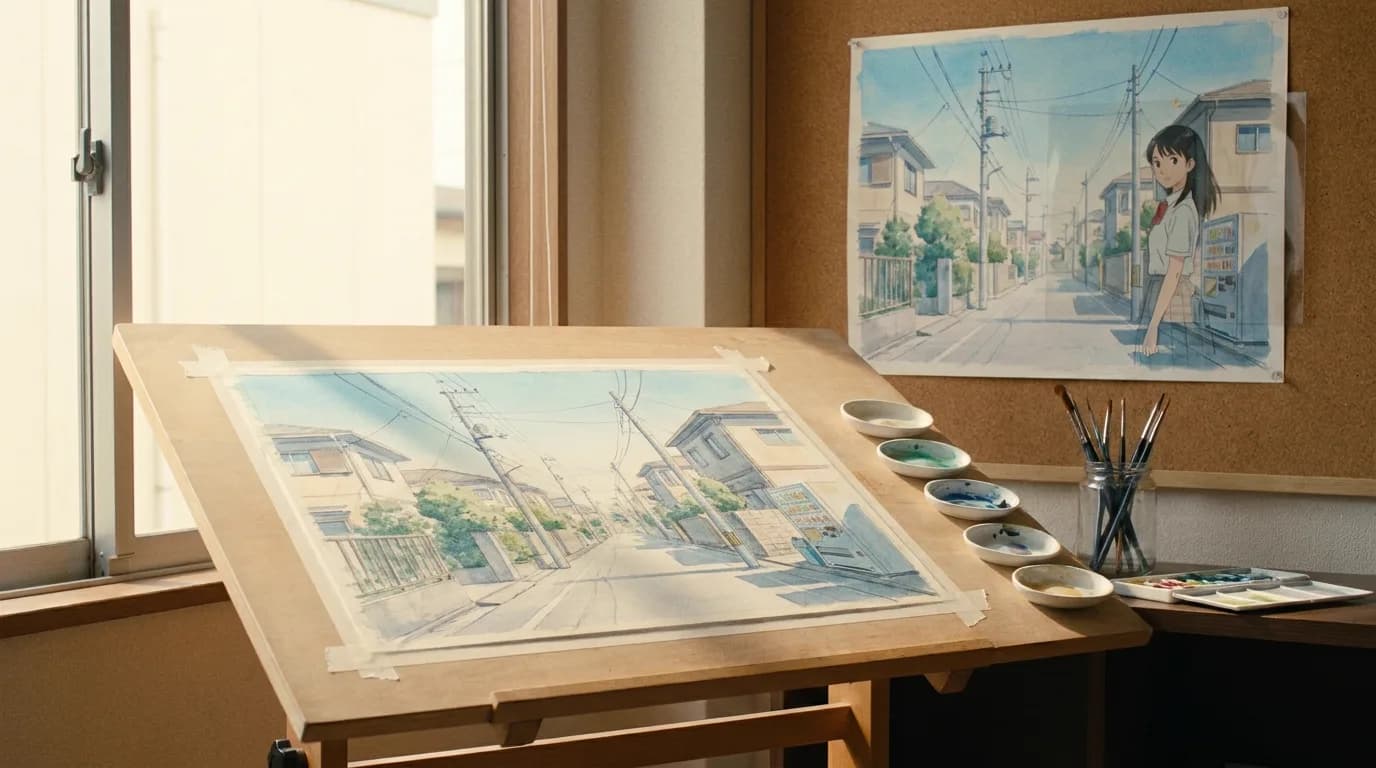
Write the look once, in concrete terms, and attach it to every generation: line weight, flat colour, two-tone shadows, the palette, how backgrounds are painted, and what is forbidden (soft gradients on skin, 3D shading). If you have drawings of your own, upload them as references: it is the surest way to a look that belongs to you.
Do not prompt "in the style of" a named studio or director. Two reasons. The practical one: the model averages everything it associates with that name and gives you a pastiche, not a look. The legal one: in October 2025, CODA, the Japanese content association whose members include Studio Ghibli, Toei and Aniplex, sent OpenAI a written request about Sora 2, saying much of its output closely resembled Japanese works and asking that members' content not be used without permission (CODA, 28 October 2025). Rights holders are watching. Describe the visual properties you want, never the brand.
5. Storyboard every cut
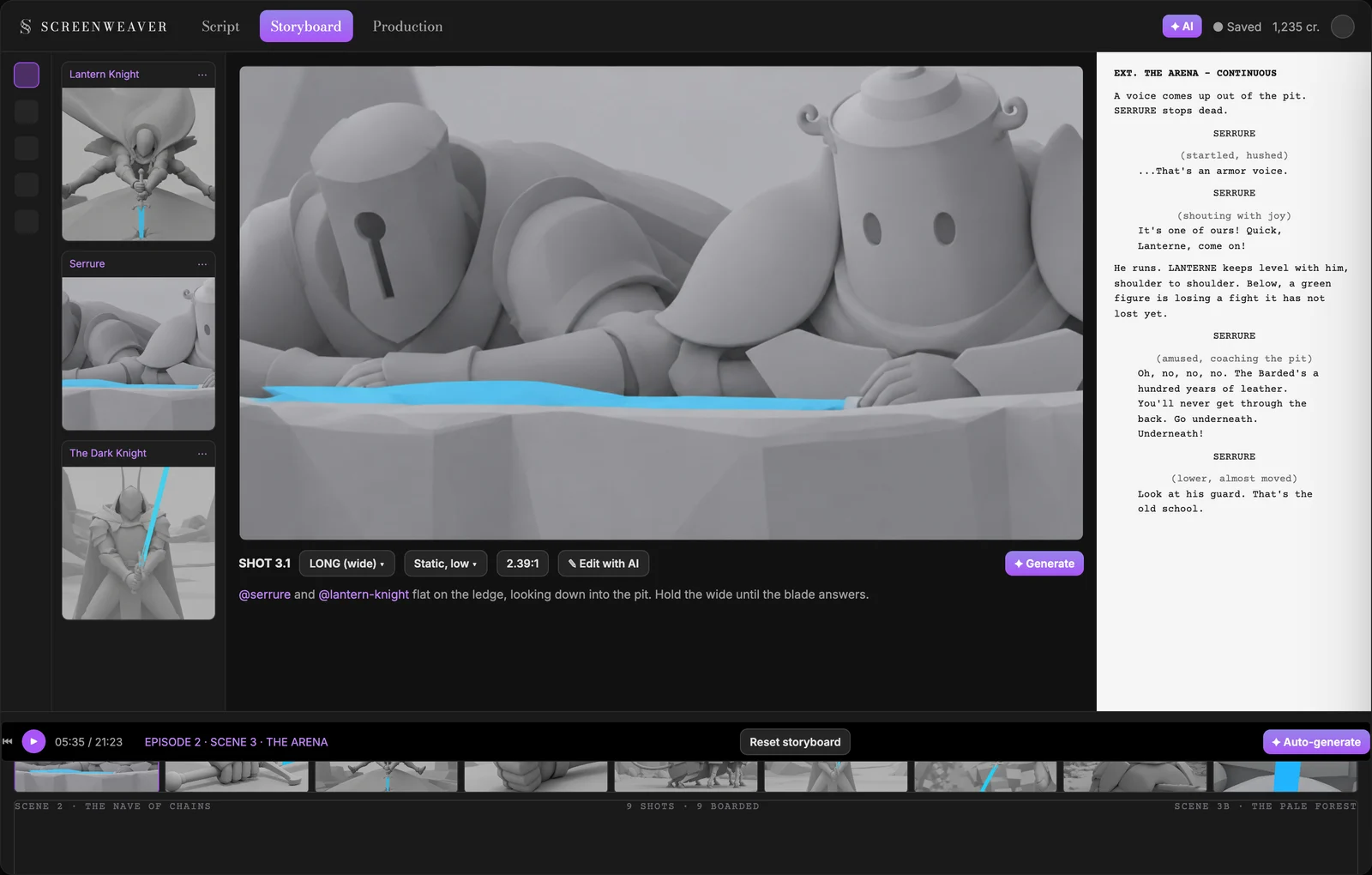
The storyboard is where you see the episode before you pay for it. In ScreenWeaver, the AI reads each scene and proposes a shot breakdown: shot value, camera movement and action line for every shot. You keep what works and rewrite the rest. Above the list, write your shooting plan in one plain sentence. For Lost Garden's arena fight it was: stay on the ledge with the two watchers, never take the fighter's point of view. That sentence decided nine shots.
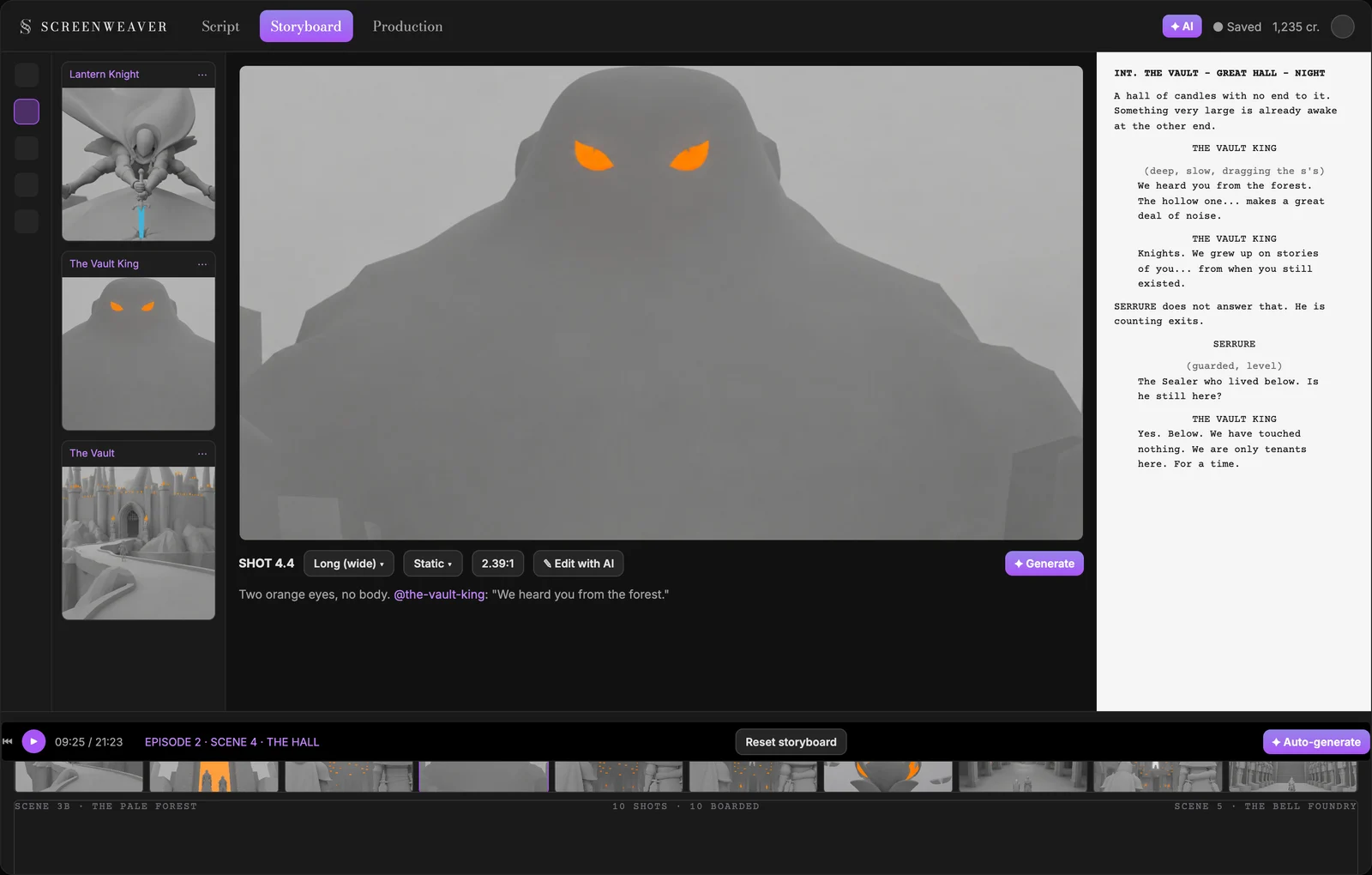
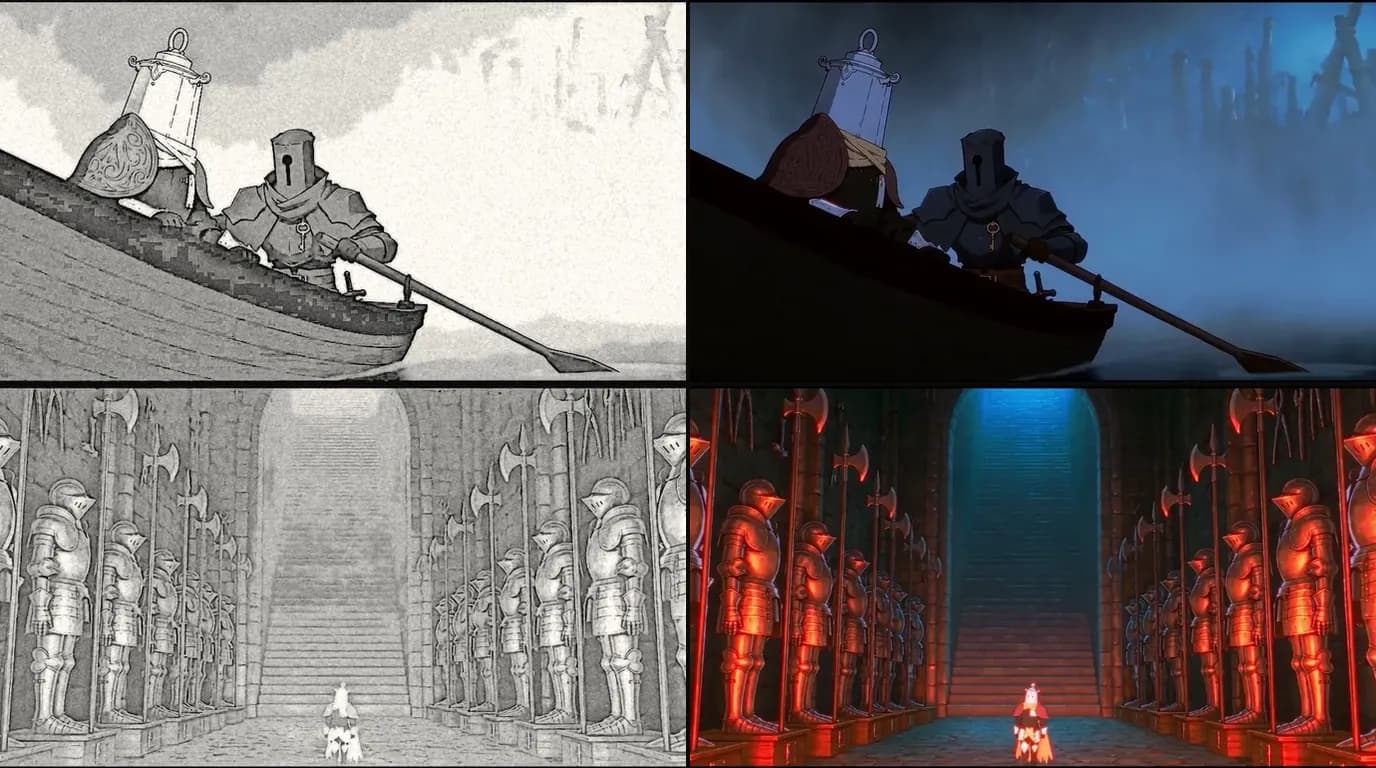
The boards come out in a grey 3D previz style, one flat colour on the thing that matters. A board settles framing and staging. Fix a framing with "Edit with AI" instead of a reroll, lock what is right, and move to video only when the whole scene plays. The AI storyboard generator page shows the boards in detail, and how e-konte works covers the anime storyboard tradition.
6. Generate shot by shot
In the production canvas, a scene's shots go through one of two pipelines:
- Reference to video: each shot's action becomes a directed prompt, and the characters, places and objects cited in the shot are attached as references.
- Storyboard panels to video: up to 14 boarded panels of a scene guide the order and composition of the sequence, alongside the references.
Seedance 2.5 is the default video model: clips from 4 to 30 seconds, up to 1080p, with up to 30 image references. Seedance 2, Veo 3.1, Kling 3.0, MiniMax H3 and Grok Imagine Video are also available, so you can pick per shot. Three rules:
- One beat per shot. A shot that has to do three things does none of them well.
- Several takes, then choose. The take that cuts is rarely the prettiest. Compare versions side by side before you move on.
- No music in the clip. Lost Garden puts that instruction in every video prompt. Thirty clips with thirty sound beds sound like thirty films.
Then retime. Generate at the model's native rate, and in your editor, hold every second frame for action (12 new images per second) or every third for dialogue and walking (8). A posterize-time or frame-hold effect does it in seconds. Our AI anime production pipeline has the full timing table, and the video frames calculator does the arithmetic.
7. Voices, music, sound effects
ScreenWeaver does not generate voices or music. For voices: voice actors, your own voice, or a text-to-speech service. Some video models can also speak a line inside the clip from a reference recording; Lost Garden did that with Seedance 2.5, one short recording per character, which kept each voice identical across hundreds of shots.
For music, license, commission or compose it, on the locked cut: Lost Garden's six original tracks were written to picture after the edit was locked. Our guide to sound for AI films covers the full audio pass.
8. Edit and export
The edit happens in DaVinci Resolve, Premiere Pro or any editor you know; Lost Garden was cut in DaVinci Resolve Studio. Retime per cut, but leave a slow pan across a held still smooth: that is classic limited animation. Grade everything as one film, since clips from different models react differently to colour. And if you deliver both formats, master in 16:9, burn the subtitles, then make the 9:16 version.
Character consistency: the part that decides everything
An anime series lives or dies on its characters staying on model. Audiences forgive a simple background. They do not forgive a hero whose eyes change size between two cuts.
Why characters drift
A video model has no memory between generations. Describe "a tall knight in dark armour with a keyhole helm" in ten prompts and you get ten knights that all match the sentence and none that match each other. More adjectives do not help: more than one design always fits a paragraph. We wrote about the mechanics in character drift in AI video.
The rule: attach the reference, do not describe it again
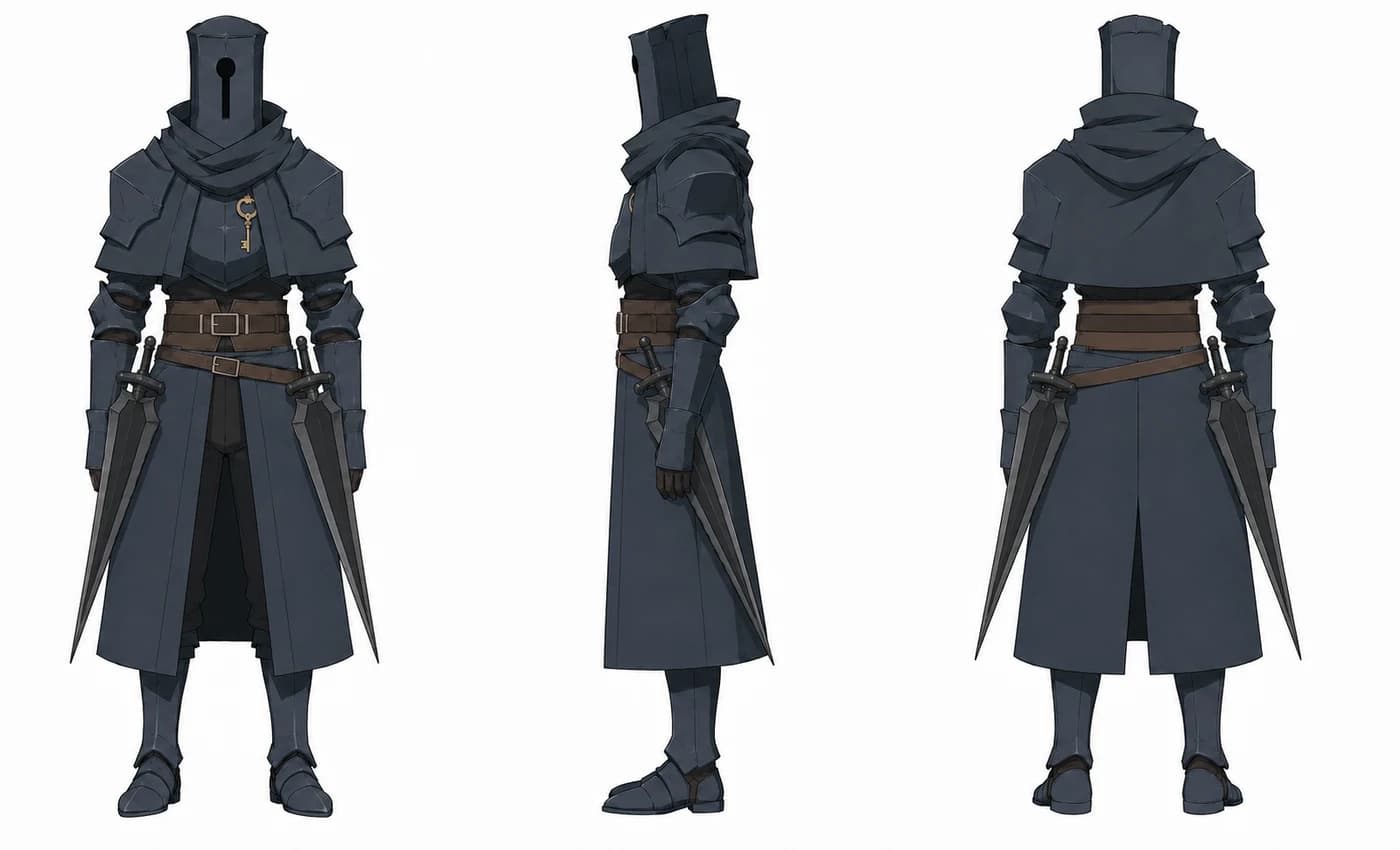
The fix is images, not adjectives. Build the character once as a reference sheet, then attach that sheet to every board and every shot where the character appears. In ScreenWeaver, typing @ and the character's name in an action line does exactly that: the sheet travels with the shot from the storyboard to the video node. Change the sheet and the next board and the next clip both follow.
The models are built for it. Nano Banana 2 accepts up to 14 reference images per generation, and Seedance 2.5 up to 30, enough for a character's sheet, a second character, the place and a key prop in a single shot.
The kit for each character
- A three-view sheet. Front, profile, back, on a white background, flat colours, no lighting, no action pose. The back view is the one you forget until an over-the-shoulder shot needs it. Lighting on a sheet leaks into every board that uses it. An action pose on a sheet gets repeated forever.
- A head study for anyone who gets close-ups. A full-body turnaround does not carry enough information about a face at that scale.
- Props drawn on the sheet. Silhouettes survive thirty boards; props mutate by the fourth. A hammer becomes an axe, a teapot vanishes. Draw them and name them.
- Key expressions for your leads: neutral, angry, shocked, laughing. Anime acting is in the face.
- A short written description with measurable facts. "Half a head taller than the Lantern Knight" can be checked in a frame. "Tall" cannot.
- A "never" list. Lost Garden's barrel character carries a hard rule at the top of his description: no head, no helm. Without it, the model eventually gives him one, because knights are in its training data and barrels with faces are not.
What drifts first in anime
Anime designs are simplified, and simplification is fragile. Watch these:
- Eye size and shape. The most expressive feature and the first to wander. Put the eyes in the head study.
- Hair. The spikes, the parting, the colour. In anime, hair is silhouette: treat it like a prop.
- Colour keys. One or two colours that identify the character at a glance, like an ochre raincoat. Name them and check them in every cut.
- One detail that never changes. A plaster on the cheek, a key on the breastplate. It anchors identity when the character is small in frame.
- The line itself. Models drift towards soft 3D shading on skin. Reject any cut with gradients on a face, and keep "clean line art, flat cel shading, two-tone shadows" in the style plate.
- Height. Keep it as a ratio between characters, never as an absolute number.
Places and objects drift too
A castle gains a tower between two cuts. Give each recurring place one master reference and derive other angles from it, and make important props Objects with their own sheets.
The drift test
Before you generate the rest of a scene, put the first board and the tenth board side by side. Same eyes? Same hair? Same colour keys, same props, same height ratio? Then do the same with the first and tenth clips. Fixing a sheet now costs one regeneration. Fixing it after forty shots costs forty. For a step-by-step build of sheets, use the AI character consistency sheet tool, and read character consistency in AI storyboards for the reference method applied to boards.
Try it free
Try Screenweaver for free on your script
It is free. Import your existing project, get a clearer view of your outline, and regain control of your story structure in minutes.
Start FreeOne shot, taken apart
Here is how a single Lost Garden shot went through the method. The case study follows it line by line; this is the short version.
| Step | What it held |
|---|---|
| Play sheet | Serrure thinks out loud, and when his voice drops flat, something is wrong. |
| Script | A voice rises from the pit. Serrure stops: "...That's an armor voice." |
| Shooting plan | Stay on the ledge with the watchers for the whole fight. |
| Shot 3.1 | Long shot, static, low angle. Action line: "@serrure and @lantern-knight flat on the ledge, looking down into the pit. Hold the wide until the blade answers." |
| References | The two @ handles attach both character sheets. |
| Board, then video | The board fixes the framing; the production image renders the board; the video node animates it. |
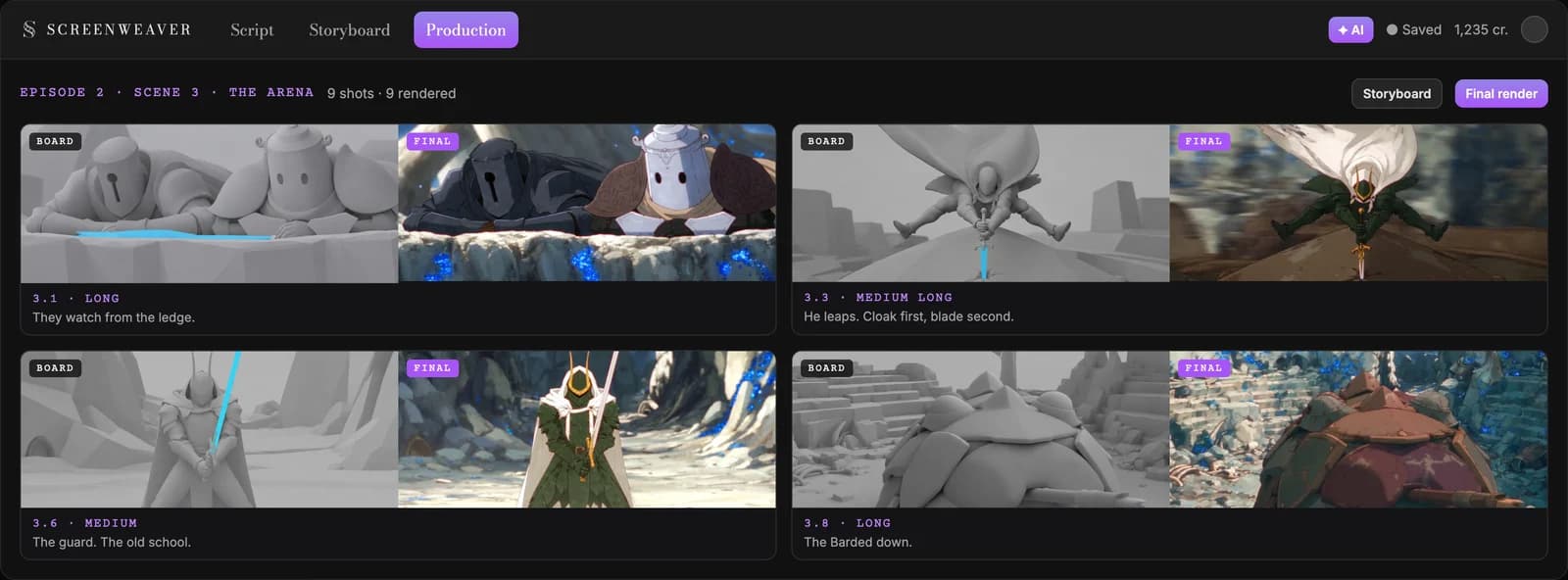
Top left is shot 3.1: same framing in the board and in the film, and no prompt typed by hand.
What it costs, and how long it takes
We do not quote subscription prices here because they change; the pricing section has the current plans. Writing is free. What costs credits is generation, and the numbers from a real episode are more useful than a plan grid:
- Lost Garden episode 2: 21 minutes, about 400 shots, $1,850 and 75 hours, roughly nine working days.
- Storyboard ratio: about 2.4 generations per kept board, so a little under a thousand board generations for 400 shots.
- Where the time goes: deciding, not generating. Every hour spent on the storyboard saved about five hours of generating shots that were never needed.
If you reroll six or eight times for one usable shot, the problem is rarely the model: the shot points to no sheet, or should not exist.
Common mistakes, and how to fix them
1. Generating before writing. A folder of beautiful clips is not an episode. Fix: script, then sheets, then boards, then video.
2. Leaving the motion smooth. The clip looks like traced live action and you cannot say why. Fix: retime to 12 or 8 new images per second per cut, and write holds into the script.
3. Describing the character again in every prompt. Ten prompts, ten slightly different heroes. Fix: attach the sheet with an @ reference, every time, wide shots included.
4. Stacking style words or naming a studio. You get a pastiche and a rights problem. Fix: one style plate in concrete visual terms.
5. Several actions in one shot. Turn, draw, leap and land in one clip will fail at one of the four. Fix: one beat per shot, and let the cut do the rest.
6. Keeping the first take. The first take is a draft. Fix: compare versions side by side and keep the one that cuts with its neighbours.
7. Letting each clip make its own music. Thirty sound beds cannot be mixed into one film. Fix: "no music" in every video prompt, and score the locked cut.
8. Mouths everywhere. Lip flap breaks first. Fix: design some characters without visible mouths, and stage dialogue over reactions, back views and off-screen lines.
Which tool to choose
| Type of tool | Good at | Where it breaks for anime |
|---|---|---|
| Image generators | Striking single anime images, posters, character concepts | No sequence, no motion, no memory between images |
| Clip generators and all-in-one video apps | A quick clip from a prompt | Every clip reinvents the characters; script and board live elsewhere |
| Production suite (script, storyboard, video in one project) | Episodes and series where characters must stay on model | You still have to write and make the decisions |
For an episode, the hard part is not producing a clip; it is keeping forty clips coherent. That is why ScreenWeaver keeps script, boards and shots in one project, and why we think it is the most complete option for anime with recurring characters. Our AI anime video generator page shows a full scene from script to cut.
Proof: Lost Garden
Lost Garden is a dark fantasy anime series about empty suits of armour waking up twenty centuries after the end of the world. Two episodes, 38 minutes, made by one person in ScreenWeaver. Episode 2 cost $1,850 and 75 hours.
Watch episode 2 on Vimeo: Lost Garden, episode 2. The full making-of, with every tool and every mistake, is in How I Made a Japanese-Style Anime With AI. For the pipeline on any genre, see how to make an AI film.
FAQ
Can I make anime with AI for free?
You can write the full script for free on ScreenWeaver's Screenwriter plan. Storyboard and video generation use credits, and voices, music and the edit happen in other tools, some with free tiers such as DaVinci Resolve. A finished anime episode is not free. The writing, which decides most of its quality, can be.
Can I make AI anime on my phone?
We recommend a computer. Boarding a scene and comparing takes side by side need room, and the edit happens in desktop software.
What is the best AI for anime video?
There is no single best model, and rankings change often. Pick per shot: Seedance 2.5 is our default for its long clips and up to 30 image references, and Veo 3.1, Kling 3.0 and others are available in the same canvas. What matters more than the model is the sheet, the board and the retiming.
How long does it take to make an AI anime?
For scale, a 21-minute Lost Garden episode took 75 hours for one person. A one-to-three-minute short is a realistic first project, and most of the time goes into writing and boarding, not generating.
Can I monetize AI anime on YouTube?
Yes, if it is original. Since 15 July 2025, YouTube's "inauthentic content" policy excludes mass-produced and template-made videos, and it states that with automated tools "the final product must still demonstrate your creative vision" (YouTube Help, accessed 8 October 2026). Your own script, your own characters and boarded shots fit that. Existing characters from other shows do not.
Can I make a whole anime series with AI?
Yes. The method scales because the sheets do: build each character once and every episode reuses them. Lost Garden's episode 3 is being written in ScreenWeaver now with the same cast.
Can I use my own drawings?
Yes, and you should if you have them. Upload them as reference images for your characters, places and objects. They give the model a design that belongs to you.
Start your anime
Write the first scene tonight. The script editor is free, and your characters are created as you write them: open ScreenWeaver.
Final Step
Build your next script with Screenweaver
Move from ideas to production-ready pages faster with timeline-native writing and AI-assisted story flow.
Try Screenweaver