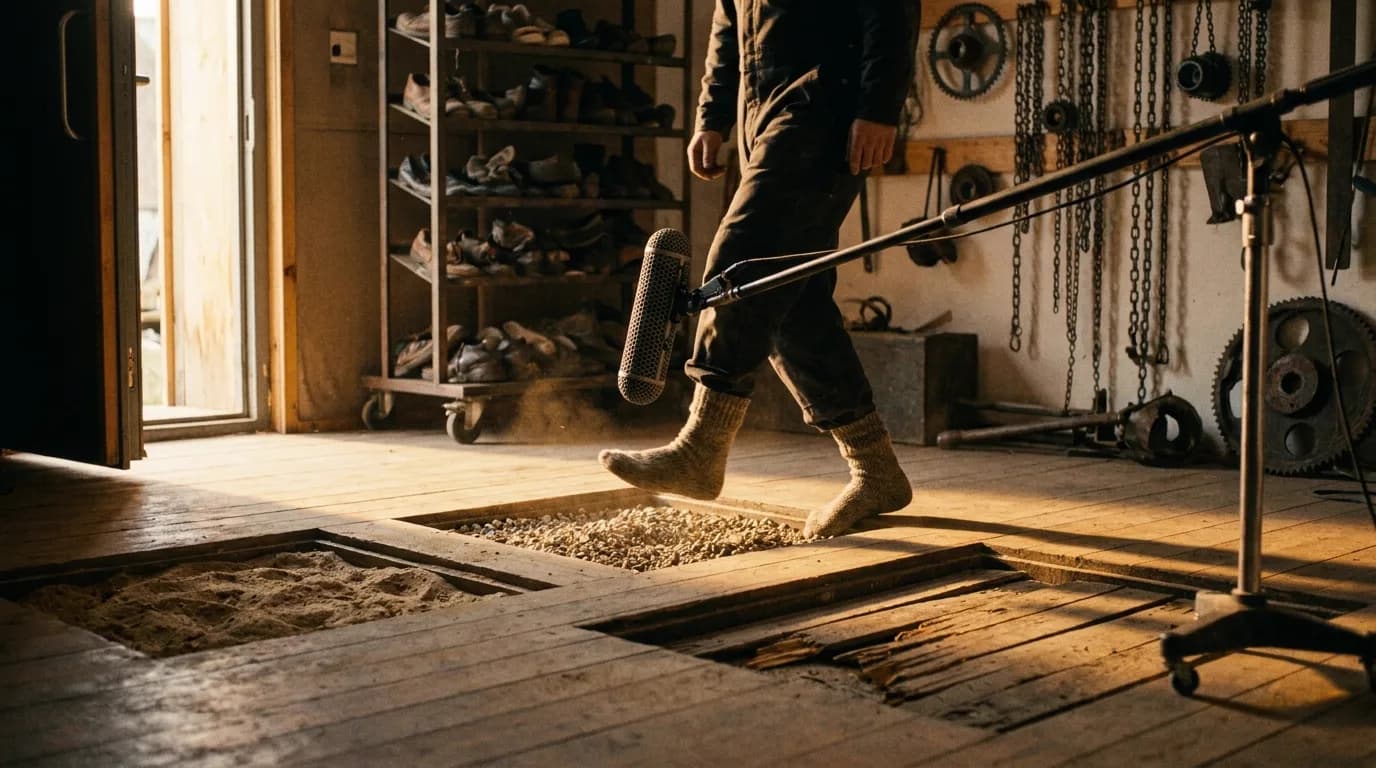

An AI film arrives with no production sound at all, so the soundtrack gets built from silence in seven passes: spot the cut, lay continuous ambience beds, place dialogue, add Foley, license music, mix to dialogue, deliver stems and a cue sheet. Ambience comes first, because shots generated separately never shared a room.
No room tone, no footsteps, no traffic through a window, nothing recorded on the day because there was no day. A live-action mixer inherits a continuous recording of a real space and spends post cleaning it up. You inherit forty clips that each exist in their own acoustic vacuum, and what gives an AI film away is rarely the quality of the elements. It is the fact that they were never in the same room.
This sits under the complete AI filmmaking guide as the audio half of post. The seven-day production log gives sound a full day and this is what goes in it.
Native model audio is a scratch track, not a mix
Veo 3 and the models that followed it generate synchronised audio in the same pass as the picture: dialogue, effects, ambience, together. It is genuinely useful, and you still cannot mix with it.
What comes back is one mixed audio track inside the MP4. There are no dialogue, music and effects stems, so there is no way to lower the music without also lowering the footsteps, no way to keep the ambience while replacing a line, no way to duck anything under anything else. You own a bounce somebody else made, at a balance you did not choose.
Worse for continuity: each clip's generated ambience is its own invention. Two shots in the same kitchen come back with two different kitchens behind them. Cut them together and the background jumps on every edit. Viewers do not identify this consciously. They just feel that the film is a sequence of clips rather than a scene.
So use it for three things and nothing else:
- A timing reference while you cut. The generated audio is sample-accurate to the picture, which makes it a free scratch track.
- A sound-effects sketch. If the model's version of a door suggests the texture you want, go find that texture.
- Lip-sync anchoring, where you are generating to a line rather than dubbing onto a finished shot. The AI voices and lip sync article covers that case properly.
Then mute it. Every one of them. Before you place a single intentional element, the timeline should be silent.
The pass order, and why ambience comes first
Most sound tutorials start with dialogue, and for a live-action film that is right: the dialogue is already there, recorded, and everything else is built around it. For generated footage the order flips at the front.
Build the ambience bed first. One continuous bed per location, laid across every shot in that location including the cuts, running underneath the whole scene rather than per clip. That single continuous layer is what tells the ear the shots share a space, and it does more for the illusion than any other element you will add. It is also the one thing the model cannot give you, because the model works a clip at a time and a bed is by definition longer than a clip.
Dialogue still comes first for the cut. Place lines, trim picture to the performance, lock the edit. The distinction matters: voices drive your editorial decisions, ambience drives your mix structure. Lock picture against the voices, then build the mix from the bed upward.
| Pass | What you build | Input you need | Output |
|---|---|---|---|
| 1 | Spotting list | Picture-locked cut | Timecoded list of every sound the film needs |
| 2 | Ambience beds | One bed per location, min. 2 min each | Continuous layer under every shot, cuts included |
| 3 | Dialogue | Generated or recorded lines, per character | Lines placed, cut trimmed to performance, picture locked |
| 4 | Hard effects and Foley | Per-action library or recordings | Every on-screen action that makes a noise |
| 5 | Music | Cleared tracks, theme plus alternate | Cues placed against the spotting list |
| 6 | Mix | All of the above on separate tracks | Balanced mix, dialogue intelligible, levels to spec |
| 7 | Deliverables and paperwork | Final mix | Master, stems, cue sheet |
Seven passes, and for a six-minute film they are roughly a day's work if you have your elements ready and three days if you do not. The spotting list in pass 1 is what decides which of those it is.
Spotting: watch it silent, write down every noise
Play the locked cut with all audio muted and write down, with a timecode, every single thing that should make a sound. Work from what the picture implies rather than from the library you already have.
A character sets a glass down: that is a cue. A car passes behind a window in the background of shot 14: cue. A door is already closing when the shot starts, meaning the latch click lands four frames in: cue. You will write thirty to sixty lines for a six-minute film, and the list will be longer than you expected, because generated footage is full of incidental motion nobody planned.
That list is your build order and your budget. It also catches the sound problems that are really picture problems. If shot 22 shows a character's mouth moving in the background of a two-shot and you have no line for them, you found that now instead of in the mix.
Keep the shot numbering you used in the edit so the spotting list, the take log from your dailies review and the final cue sheet all refer to the same shots. Renumbering between departments is how a mix loses half a day.
Foley for motion nobody performed
Hard effects are the ones with a clear source: the door, the gunshot, the phone. Foley is the quiet layer underneath that: a body moving through a space. Generated footage needs far more of it than live-action does.
A camera on a real set records the actor's clothing, their weight on the floor, their hand on the table. All of it arrives free, buried in the production track, and the audience never notices it until you take it away. Generated footage has none of that, so a character can walk across a room in total silence while looking entirely convincing. The picture is fine. The scene feels dead.
Footsteps and cloth are the two that matter most. Get those under every walking shot and the figures gain weight. Then handle whatever your spotting list caught.
A practical constraint: generated motion is often slightly inconsistent in timing, with a step that lands a frame early or a hand that arrives sooner than it should. Cut the effect to the picture frame by frame rather than laying down a rhythmic footstep loop and hoping. Loops reveal the drift. Individual placement hides it.
Music, and the licence you can actually prove
This is where AI films get into trouble, and it is almost never about the music being bad.
The obvious option for a generated film is an AI music generator, and the licence on the plan you are likely to buy may not cover the film you are making. ElevenLabs tiers its music rights, and the ladder runs from personal use through two different grades of commercial.
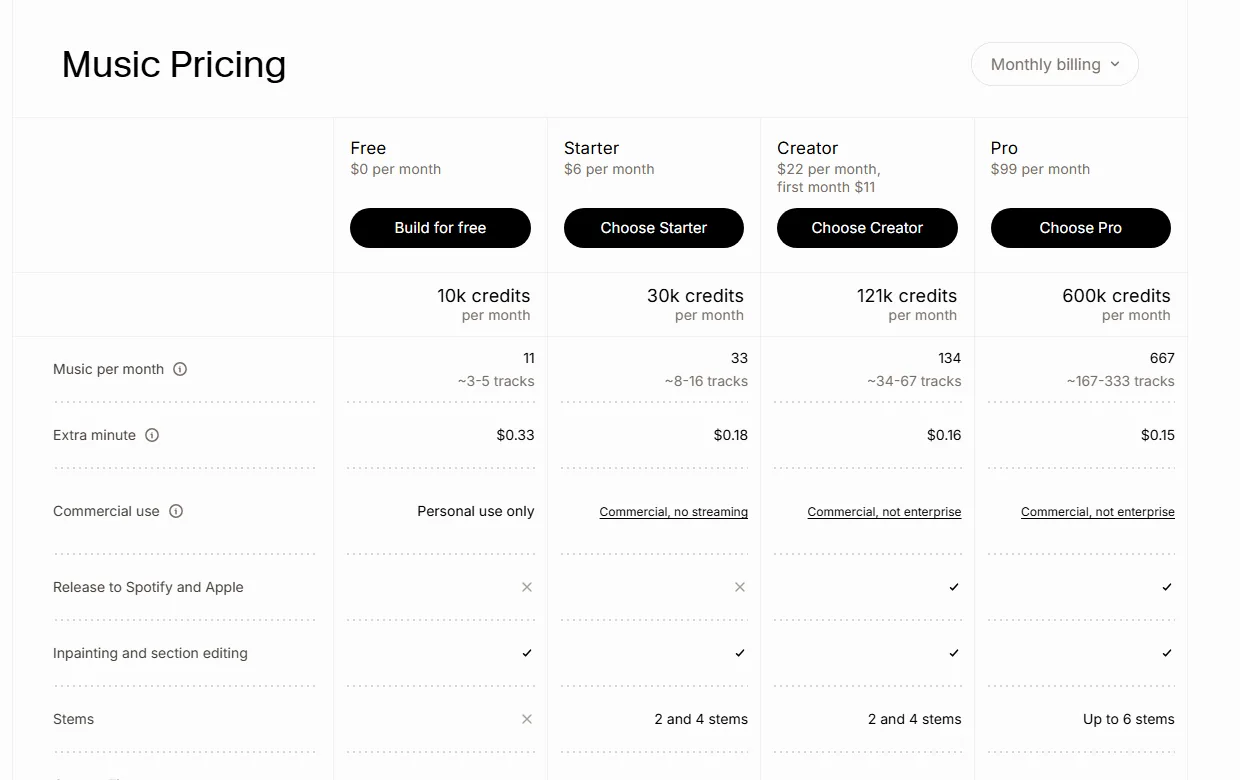
The commercial use row of the Music pricing table on elevenlabs.io/music, captured 1 October 2026.
"Commercial, not enterprise" is the row that matters, and the Eleven Music Model-Specific Terms spell out what it excludes. Every self-serve plan from Free through Business, plus Enterprise Music Lite, permits "All online and offline commercial use permitted, except film, TV, radio, & Studio Games". Only the full Enterprise tier drops that carve-out. The terms page is dated 26 May 2026, so check it again before you rely on this.
Traditional stock libraries draw the line in the same place. Epidemic Sound puts online ads, branded content and social client work on its Pro plan, and its filmmaking page says that "films intended for theatrical/festival release" need the Enterprise plan's tailored licence.
So both of the fastest music routes license you for the internet, and the thing most AI filmmakers want next is a festival. If you are working through the AI festival submission list, the entry form will ask you to warrant that you hold the rights to every element in the film, and a social-tier music subscription does not give you that warranty.
Three ways out, in the order most people should consider them:
| Route | Covers festivals | Cost shape | Catch |
|---|---|---|---|
| Composer, work for hire | Yes, if the contract assigns or licenses it to you | Per project, negotiated | Needs lead time and a written agreement |
| Library or AI tool, upgraded plan | Yes on the tier that says so | Higher subscription or custom quote | Verify the tier before you cut to the track |
| Public domain or permissive Creative Commons | Depends entirely on the specific licence | Free to low | Attribution terms, and recordings are copyrighted separately from compositions |
That last catch traps people constantly. A Debussy composition is public domain. A modern orchestra's recording of it is not, and you need clearance on the recording as well as the composition. Check both.
One theme and one alternate is enough for a short. Twenty library tracks is what a film sounds like when nobody decided what it was about.
Try it free
Try Screenweaver for free on your script
It is free. Import your existing project, get a clearer view of your outline, and regain control of your story structure in minutes.
Start FreeThe mix: get dialogue right, then everything else
Separate tracks per element, one fader group each for dialogue, music and effects. Mix dialogue first, to intelligibility, then set music and effects against it. Reverse that order and you get a beautiful score over a film nobody can follow.
Delivery numbers depend entirely on where the film goes, and the two destinations an AI short actually has ask for very different ones.
| Destination | Target | Measurement |
|---|---|---|
| YouTube, Spotify, Amazon Music, Tidal | around -14 LUFS integrated, -1.0 dBTP ceiling | Integrated programme loudness, ITU-R BS.1770 |
| Netflix delivery | -27 LKFS ±2 LU, peaks not above -2 dBTP | Dialogue-gated, so the meter ignores music and effects |
Do not try to convert between those two rows. They are not the same measurement with a different target: Netflix anchors on dialogue and meters with dialogue intelligence, so music and effects never pull the number at all, while the streaming platforms normalise the whole programme, which means a loud score eats your dialogue headroom. Netflix also recommends the full mix sit between 4 and 18 LRA with dialogue inside a 10 LRA window.
If the film's destination is a platform, a single master around -14 LUFS integrated with a -1.0 dBTP ceiling covers most of them at once. If a distributor is involved, ask for their spec sheet before you mix, not after.
Then run three checks that catch nearly everything:
- Phone speaker. Play the whole film from a phone at half volume, no headphones. If a line disappears, the mix is wrong, whatever the meter says. This is how most of your audience will actually hear it.
- The cut check. Scrub each edit point with your eyes closed. Any audible jump in the background means your ambience bed is not continuous through that cut.
- Mute the music. Play a full scene with the score off. If it collapses, the music is carrying the scene and the sound design is not finished.
Where the mix usually goes wrong
In rough order of how often I see each one in AI shorts:
- Native model audio left running under the real mix. Two ambiences fighting, and nobody can hear why the scene sounds muddy. Mute everything the model gave you, deliberately, before you start.
- Ambience built per clip: forty short beds instead of three long ones, and a background that jumps on every cut.
- No Foley at all. Characters walk in silence through fully realised rooms.
- Music placed before picture lock. You cut to the track, the edit changes, and now the hits land nowhere. Music is pass 5 for a reason.
- Mixing on headphones only. Flattering, and it hides exactly the dialogue problems a phone speaker exposes.
- No stems in the deliverables. The festival wants a textless master or a different language version, and you have one baked file. Export dialogue, music and effects stems while the session is still open.
Deliverables and the paperwork nobody warns you about
Picture departments finish with a master. Sound finishes with a master plus documentation, and the documentation is what unblocks distribution.
A music cue sheet lists every cue in the film with its timecode in and out, duration, usage type, composer, publisher and performing-rights organisation. Festivals ask for it, broadcasters require it, and it is how composers and publishers actually get paid when a film is screened or broadcast. It takes twenty minutes if you kept notes while placing cues and an afternoon if you did not. Build it from your spotting list with the cue sheet generator, which exports the PDF and CSV most submission forms accept.
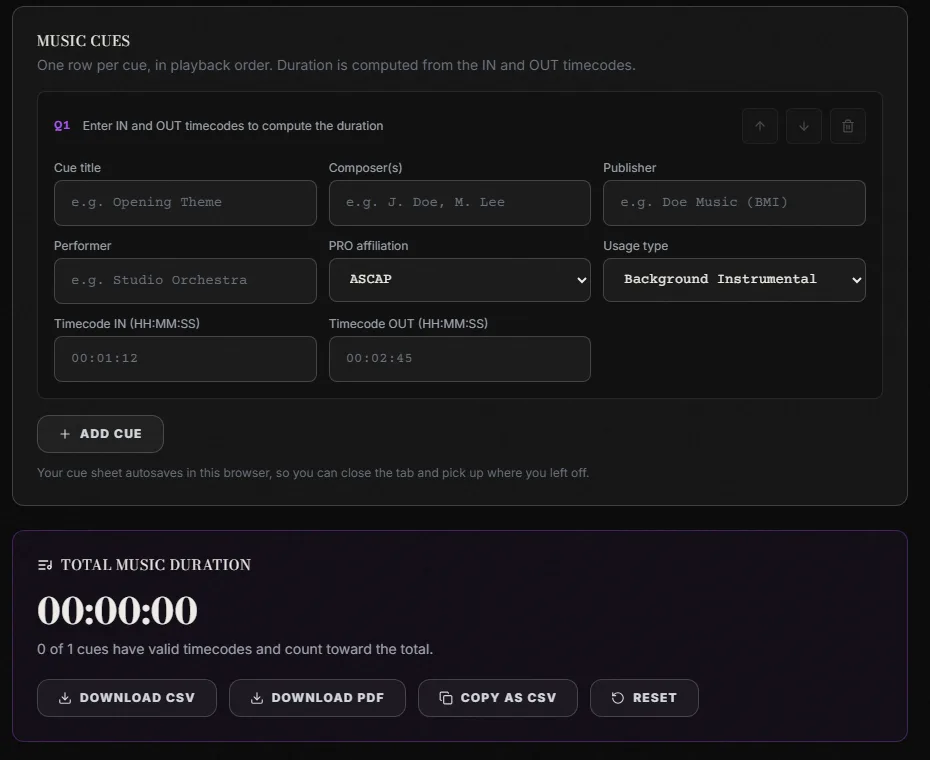
One cue row in the ScreenWeaver cue sheet generator, captured 1 October 2026. Duration is computed from the IN and OUT timecodes.
The usage column is the one people get wrong. Background instrumental, visual vocal and main title carry different royalty weightings, so marking every cue as background because it is the default quietly costs your composer money every time the film screens.
While you are there, finish the rest of the audio paperwork: stems exported, voice sources documented per character, music licences saved as files rather than as emails you will search for later, and generated audio disclosed where the platform asks. The AI film disclosure rules article covers what each platform asks you to declare, and synthetic voice is increasingly a separate question from synthetic picture on those forms.
Keep a one-page audio log next to the film: which voice model produced which character, which music came from where under which licence tier, which effects you recorded yourself. The first time someone asks you to prove a chain of rights, that page is the answer, and writing it after the fact is miserable.
FAQ
Can I just use the audio the video model generates?
As a scratch track, yes, and it is good at that. As a finished mix, no. You receive one mixed track with no separate dialogue, music or effects stems, so you cannot change the balance of anything, and each clip's generated ambience is independently invented, which makes the background jump at every cut.
How long does sound take on a short AI film?
Budget one full day for a film under about seven minutes if your elements are ready, and three days if you are still sourcing music and recording Foley. Spotting is two hours, ambience beds are quick once you have the files, and the mix is where the time actually goes.
Do I need a composer, or is AI music fine?
Both work. What decides it is where the film goes. Check the licence tier against your distribution plan: on self-serve plans, AI music tools and stock libraries routinely clear online use while carving out film, TV, radio and theatrical or festival release. A work-for-hire composer with a written agreement is the cleanest route for anything headed to a festival.
What loudness should I mix to?
If the film is going to YouTube or the music platforms, around -14 LUFS integrated with a -1.0 dBTP true-peak ceiling. If a distributor is involved, ask for their spec: Netflix, for instance, wants -27 LKFS ±2 LU measured dialogue-gated with peaks no higher than -2 dBTP, which is a very different mix.
How do I keep dialogue consistent when each shot was generated separately?
Treat it as one continuous recording rather than per-shot audio. Same voice settings per character across the whole film, dialogue sitting on one track group with one chain of processing, and a continuous ambience bed underneath so the lines share a space. The per-line craft, prosody and lip sync is covered in the AI voices article.
Do I have to declare AI-generated audio separately?
Often, yes. Several platforms and festivals now ask about synthetic voice as a separate question from generated picture, particularly where a real person's voice might be involved. Declare the voice tools by name alongside the video tools, and keep the per-character log so you can answer precisely.
Final Step
Build your next script with Screenweaver
Move from ideas to production-ready pages faster with timeline-native writing and AI-assisted story flow.
Try Screenweaver