
Character consistency in an AI storyboard comes from one fixed reference sheet per character, generated once from a written description and attached to every panel that character appears in. A longer prompt does not do it. Regenerating until you get lucky does not do it either. Here is the method in seven steps, and the ways it fails.
The tool driven here is ScreenWeaver's script-linked storyboard workspace, where the sheet is a built-in object rather than a folder of images you manage yourself. The principle carries to any panel generator that accepts reference images. If you have not run a full board pass yet, the AI storyboard from a script walkthrough covers the whole pipeline; this article stays on the one step people skip.
Why panels drift in the first place
Every panel is a fresh generation. The model has no memory of panel 4 when it draws panel 5. Whatever it knows about your lead, it knows from what you handed it this time.
Hand it prose and you hand it a range. "A tall woman in her fifties in a dark coat" describes thousands of women and hundreds of coats, and each panel samples one of them. The face wanders. The coat changes cut, length and colour. By the wide in scene 9, the crew reading the board is asking who the second woman is.
Hand it an image and you hand it a point: a body, a hairline, a coat with a specific number of buttons, copied rather than interpreted. The whole reference method is that move. Take identity out of the prompt, put it in a picture, and make sure the picture is present every single time.
Animation solved this a century ago with the model sheet, one drawing of the character from several angles, pinned above every desk so that fifty hands drew one person. The storyboard reference sheet is the same document, generated instead of drawn.
Step 1: Decide who gets a sheet
Not everyone. A sheet costs a generation and a few minutes of writing, and a character that appears in one panel does not drift, because there is nothing to drift from.
| Character | Sheet? | Why |
|---|---|---|
| Lead, in most scenes | Yes, first | Every panel depends on it |
| Supporting, three or more scenes | Yes | Drift shows up by the second scene |
| Two-scene bit part with a recognisable look (uniform, prosthetic, distinctive hair) | Yes | The look is what the crew will notice |
| One-scene walk-on, several panels in that scene | Usually | Consistency within the scene still matters in a reverse pair |
| One panel, no dialogue | No | Nothing to keep consistent |
Do the same triage for places and objects. A location that recurs needs its own sheet for the same reason a lead does, and a prop the plot turns on needs one if it will be seen in close-up more than once. In ScreenWeaver the entities panel on the left of the Storyboard tab already lists the characters, places and objects pulled from the draft, so the triage is a read-through.
Step 2: Write the description the sheet is built from
Everything downstream inherits from this step, and most people spend ninety seconds on it.
In ScreenWeaver, each entity has a moodboard with a pinned description text block. The reference sheet prompt reads that block. Nothing else about the character reaches the sheet generation: not the dialogue, not the action lines, not the casting notes in your head. If the block is empty, the tool warns you before it generates, because a sheet built from a name alone is a sheet built from defaults.
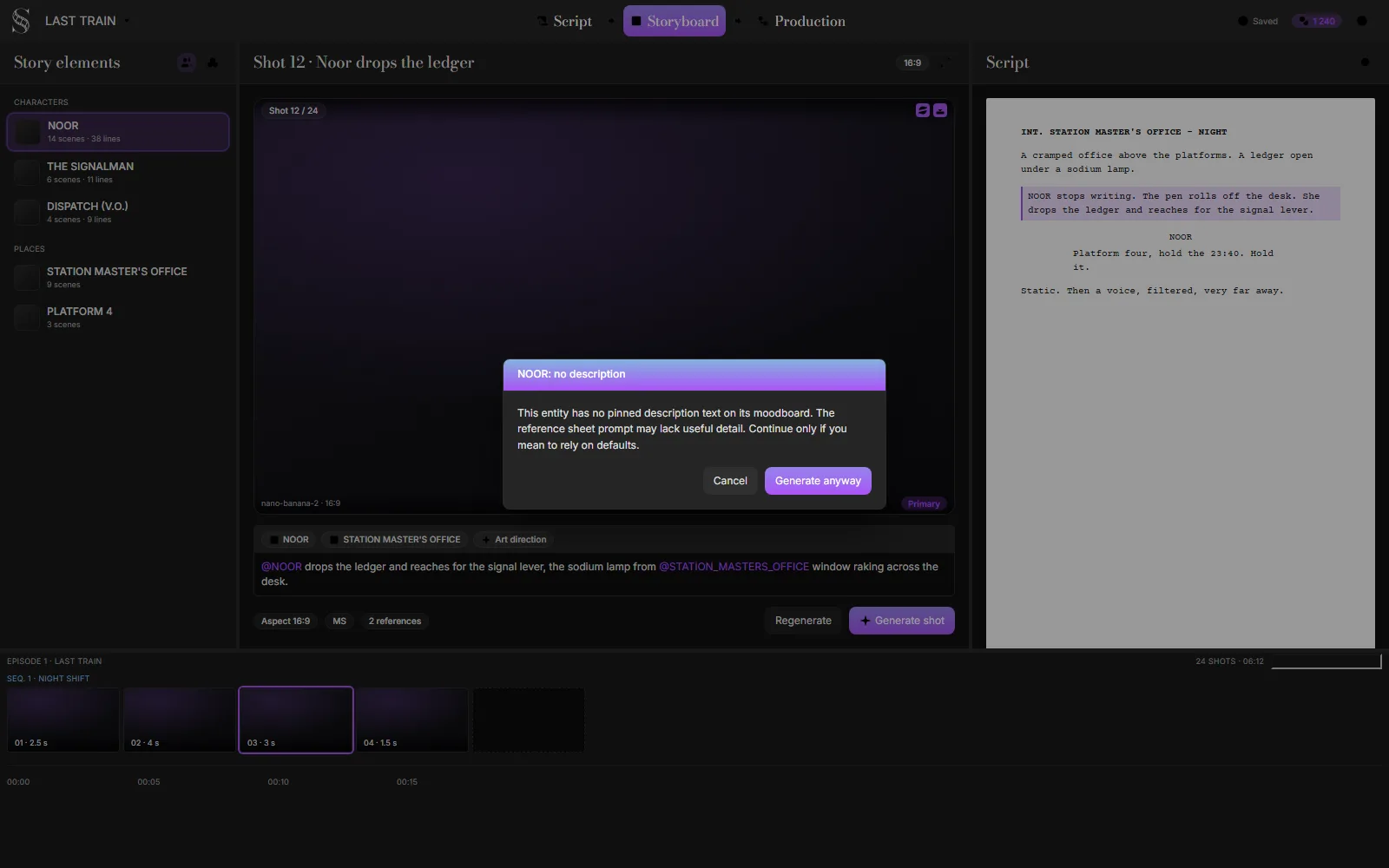
The pinned-description warning in the Storyboard tab, rebuilt from ScreenWeaver's UI kit with the product's own interface copy, September 2026.
Take the warning literally. Cancel, write the block, then generate.
What goes in the block is physical fact, not characterisation. The model cannot draw "wounded pride" and it will draw "middle-aged" a different way every time. Write what a costume designer and a casting director would each need, in three or four sentences. Body first: sex, age to the decade, height, build in nameable terms. Then the head: hair length, colour and cut, skin tone, facial hair, glasses. Then every garment with its colour and material, the footwear, and one distinguishing detail the eye will find in a wide shot. Finish with how they stand when nothing is happening.
The block for Noor, the character used through this article:
Noor, woman, mid fifties, tall and heavy-set, broad shoulders. Close-cropped grey hair, dark brown skin, no glasses. Navy wool railway coat to the knee with brass buttons, the bottom two missing, over a grey crew-neck jumper. Red scarf knotted once at the throat. Black lace-up boots. Reading glasses on a chain around her neck. Stands square, hands in coat pockets.
Every noun in that block is something a generator can copy and a reviewer can check. The versions that fail:
| What people write | Why it drifts | What to write instead |
|---|---|---|
| "Stylish, put together" | Style is a range, not a garment | Name the garments and their colours |
| "Middle-aged" | Spans 35 to 60 in most models | "Mid fifties, grey close-cropped hair" |
| "Athletic" | Could be a swimmer or a wrestler | "Tall, broad shoulders, thick forearms" |
| "Tired eyes, carries grief" | Emotion belongs in the panel's action text, not the sheet | Cut it |
| "Looks like a young Al Pacino" | Likeness to a real person is unreliable and a rights problem | Describe the features you actually mean |
| "Wears a jacket" | Cut, length and colour will change per panel | "Navy wool coat to the knee, brass buttons" |
If writing this from a blank page is hard, the AI character consistency sheet walks through the same fields (age range, face and build, hair, exact wardrobe, one distinguishing detail) and assembles them into a block you can paste onto the moodboard. It was built for video prompts, and the fields are the same ones a storyboard sheet needs.
One outfit per description. If Noor is in the coat for acts one and two and in a hospital gown for act three, that is two sheets, and step 6 covers how to handle it.
Step 3: Generate the sheet and read it like a model sheet
Generate the reference sheet from the entities panel. For a character, ScreenWeaver's sheet prompt asks for four full-body views on one sheet at the same scale and ground line (front, three-quarter, side profile, back) plus a separate close-up of the head at a neutral three-quarter angle, in a neutral standing pose. The sheet is rendered in a deliberately plain previs style on a white background: simple forms, controlled colour, no text, no labels.
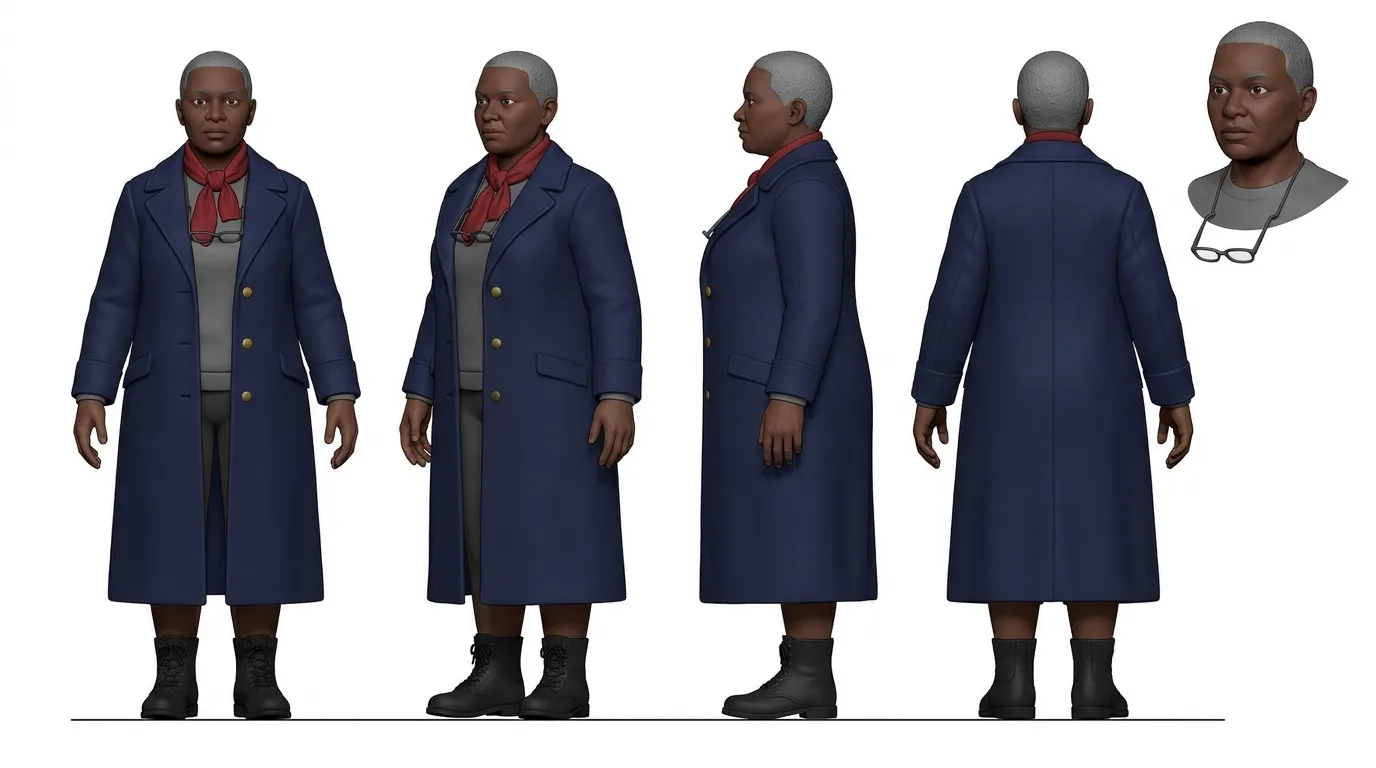
A reference sheet for NOOR, generated for this article from the description above with the same four-view prompt template and model ScreenWeaver uses for character sheets, September 2026.
Read that one against the block and two things show up straight away. The template's neutral pose won over "hands in coat pockets", which is fine, because stance belongs to the panel and the sheet only needs the body. And the coat shows three buttons with bare wool below them, which is one reading of "the bottom two missing" and would be worth a second roll if the missing buttons mattered on screen. That is the level of attention the read-through needs.
The plain style is deliberate. A photoreal, moodily lit portrait would be treated by the panel generator as a style to imitate as much as a person to copy, and every panel would inherit that lighting. A flat previs figure on white carries identity and almost nothing else, which is what a reference should carry.
Now read the sheet before you accept it, with the description open beside it:
- Do the four views agree with each other? Same height, same build, same hair from every angle. If the back view has longer hair than the front, the sheet will teach the panel generator two people.
- Is every wardrobe noun present? Count the buttons. Check the scarf. Find the glasses chain. A missing detail on the sheet will be missing in every panel and you will not be able to prompt it back in.
- Is the silhouette readable at thumbnail size? Squint. If Noor is not recognisable as a shape, she will not be recognisable in a wide shot.
- Is there anything that is not in the description? Invented accessories, a hat, a bag. Regenerate. Anything the model added here becomes canon for the whole board.
If the sheet fails any of these, do not try to fix it in the panels. Edit the description, regenerate the sheet, check again. Two regenerations of a sheet cost less than one regenerated scene.
The checklist matters even more once the style leaves previs. Simple, stylised designs are the most fragile: change a cap or an ear and the audience sees a different character. Our AI cartoon method shows one four-view, four-expression model sheet carrying a fox courier through every shot, and the guide to 3D animation with AI runs the same turnaround on rounded, lit characters, where a glove that turns from rubber to leather breaks the illusion before the face does.
Step 4: Cite the sheet in every panel where the character is in frame
A sheet does nothing until a panel uses it. In ScreenWeaver, the panel's action text is the prompt, and it has one piece of syntax: @ cites an entity, which attaches that entity's sheet to the generation as a reference. Type @, pick Noor, and the sheet travels with the panel.
The panel prompt then carries a strict instruction to match the cited character's face shape, proportions, hair, clothing, silhouette and posture exactly, with no redesign, no outfit change and no added or removed accessories. You do not write that instruction. Citing the handle applies it.
The citing rule is narrower than instinct suggests. Cite Noor when Noor is inside the frame, and only then. If she is being talked about, or standing off-screen in the same room, or if the shot is her point of view of someone else, leave the citation out. A citation for a character who is not in the panel invites the model to put her there.
And stop re-describing her in the action text. The action text is for the beat: Noor drops the ledger and reaches for the signal lever. Not: Noor, a tall woman in her fifties in a navy coat, drops the ledger. The second version hands the model two sources of truth, a picture and a paragraph, and gives it permission to average them. Keep identity on the sheet and action in the text. The same split holds when you prompt a video model directly, which is what writing character consistency prompts around a reference covers.
A shot that cites a sheet which does not exist yet comes back marked blocked, and the automatic pass will refuse to render it until the sheet is there. That block is a favour. The panel you would have got is the drifting one.
Try it free
Try ScreenWeaver for free on your script
It is free. Import your existing project, get a clearer view of your outline, and regain control of your story structure in minutes.
Start FreeStep 5: Run the three-panel probe before you board anything
Before the batch pass, before scene one, generate three panels of Noor on purpose, in this order:
| Panel | Shot value | What it tests |
|---|---|---|
| 1 | Close-up, facing camera | Face and hair. The easiest test, and the one most people stop at. |
| 2 | Medium shot, three-quarter, doing something with her hands | Wardrobe detail and build under a real pose. |
| 3 | Wide, from behind, walking away | Silhouette, coat length, stance, hair from the back. No face to fool you. |
Panel 3 is the one that matters. Faces mostly hold now with a good sheet. Silhouettes and wardrobe are where boards still fall apart, and a wide shot from behind is the only panel where nothing else can distract you from them. If Noor's coat has become hip-length or her shoulders have narrowed, you found it for the cost of three panels instead of thirty.
Judge each probe against the sheet, not against the previous probe. When a probe fails, the fix is almost never in the panel: it is a thin description, a sheet with disagreeing views, or a missing citation. Go back one step, fix it, run the probe again. Only when all three pass do you open the automatic pass and let it run the rest.
Step 6: Handle the changes that are supposed to happen
Characters change on purpose. They get wet, bloodied, older, or they change clothes. Plan for it and the method copes; improvise and it falls over.
A costume change is a second sheet. Create a second entity, name it so nobody confuses the two (NOOR (HOSPITAL GOWN), NOOR (WEDDING)), give it its own description that repeats the body and head paragraph word for word and swaps the wardrobe paragraph, and cite the right one per scene. The repeated body paragraph is what keeps her the same person across the two sheets.
A within-scene change belongs in the action text and the continuation chain. Noor gets soaked in shot 14 and stays soaked for the scene. Write "soaked, hair flat, coat dark with rain" into the action text of shot 14, then point shots 15 to 19 at shot 14 with the Continues from field. A continuation panel is instructed to keep the previous panel's costuming, blocking and light and advance only the action, so the wet look carries forward without a new sheet. Once the scene ends and she is dry again, drop the chain and go back to the plain citation.
Ageing across a long time jump is a second sheet, with the body paragraph rewritten deliberately rather than copied. Twenty years is a different silhouette.
What you should not do is edit the original description to reflect the new state. The moment you change the sheet Noor is built from, every panel already generated from it is out of date, and you will not remember which ones.
Step 7: Lock the sheet
Once the probe passes, the sheet is frozen. Write the date next to the entity name if it helps. From here on, three rules.
Panels get regenerated, sheets do not. If a panel drifts, regenerate the panel first with the same citation. Most single-panel drift is a bad roll, and a second roll with identical inputs fixes it.
If the same drift repeats across panels, the sheet is the cause, and fixing the sheet resets the board. Accept that before you do it. A regenerated sheet means every panel citing it should be regenerated too, or the board will have two Noors, one per sheet version. Do it early or do not do it.
The sheet is not the place for style. If the client wants a moodier board, that is a panel-level parameter, not a darker sheet. The sheet stays flat and plain so it keeps working when the look changes.
Common failures and what actually fixes them
| What you see | Real cause | Fix |
|---|---|---|
| Face changes between panels | No sheet, or a sheet built from a one-line description | Write the description, regenerate the sheet, regenerate the panels |
| Face holds, coat changes length or colour | Wardrobe not named on the description, so the sheet is vague there | Add colour, material and length to the block, regenerate the sheet |
| Two versions of the character in one scene | A sheet was regenerated mid-board | Regenerate every panel that cites it, or roll the sheet back |
| Character appears in a panel she is not in | Cited in a shot where she is only mentioned or off-screen | Remove the citation |
| Character is missing from a wide she should be in | Not cited, or handle unresolved | Add the citation; the panel warns on unresolved handles |
| Character looks right but stiff and identical in every panel | Action text is thin, so the model falls back on the sheet's neutral pose | Write the physical action at its decisive moment |
| Panels inherit a look you did not ask for | Sheet was regenerated in a styled, lit or photoreal way | Keep the sheet in the plain default style |
| Shots marked blocked | Panels cite sheets that do not exist | Run the missing entity sheets step first |
What the sheet cannot promise
A reference sheet makes a character recognisable as the same person from panel to panel, in a previs style meant for planning. It does not make her look like a specific actor, and it should not try. A board exists so a crew can read staging, coverage and continuity; the storyboard shot types reference covers what each panel communicates, and likeness is not on the list.
Nor does the sheet carry over to final frames by itself. Generated video is a different pipeline with its own reference kit, its own look and a harder consistency problem past ten shots. When you get there, character drift in AI video covers that stage. The description you wrote in step 2 does carry over, which is one more reason to write it properly the first time.
And no sheet fixes a script that has not decided who the character is. If you cannot write four sentences about what Noor looks like, the problem is upstream of the storyboard.
FAQ
How many reference images does a character need for a consistent AI storyboard?
One sheet, if the sheet shows the character from several angles at the same scale. ScreenWeaver's character sheet renders front, three-quarter, profile and back views plus a head close-up on a single image. A single front-facing portrait is not enough, because the panel generator has to invent the back and the profile, and it will invent them differently each time.
Why is the reference sheet in a plain style instead of matching my film's look?
So the panel generator copies the person and not the lighting. A styled sheet pushes its mood, palette and rendering into every panel that cites it. Keep the sheet plain even if the board is not.
Should I describe the character in every panel prompt as well as citing the sheet?
No. Cite the sheet and keep the action text for the action. Describing the character again gives the model a second source of truth to average against the image, and the average is where drift comes from. The exception is a temporary state (soaked, bloodied, hat on) that belongs in the action text for that shot and its continuations.
What do I do when a character changes clothes halfway through?
Make a second entity with a second sheet, repeat the body and head part of the description word for word, change only the wardrobe part, and cite whichever one is in the scene. Do not edit the original description, because every panel already generated from it would then be out of date.
A panel came back wrong. Do I regenerate the panel or the sheet?
The panel first, with the same citation. One bad roll is normal. If the same drift shows up in three panels, the sheet or the description is thin, and fixing it means regenerating every panel that cites it. That is why the three-panel probe runs before the batch and not after.
Does this method work outside ScreenWeaver?
The principle does: one multi-view reference image per character, built from a nameable description, attached to every generation where the character is in frame, never re-described in prose, locked once it passes a probe. Elsewhere you manage the sheet files and the citations by hand, and nothing blocks a shot whose reference is missing, so the discipline has to come from you.
From script to shots
Turn your script into a film, shot by shot
Write the scene, get its storyboard, then generate each shot with consistent characters. You direct every step.
Start your film free