
To adapt a light novel into an anime with AI, split volume 1 into episodes yourself, turn the book's illustrations into character references, write the pilot as a screenplay, then break it into shots before generating anything. An AI assistant connected to ScreenWeaver can do the reading, cropping and data entry. The episode plan and the script stay yours.
That order matters more than any model choice. For the general method of adapting prose, see how to turn a novel into an AI film. For anime production as a whole, start with how to make anime with AI.
Disclosure: we build ScreenWeaver (Frank Houbre is one of our co-founders). Every tool name and limit below comes from the app's code and agent documentation, read on 31 October 2026.
Why so many anime start as light novels
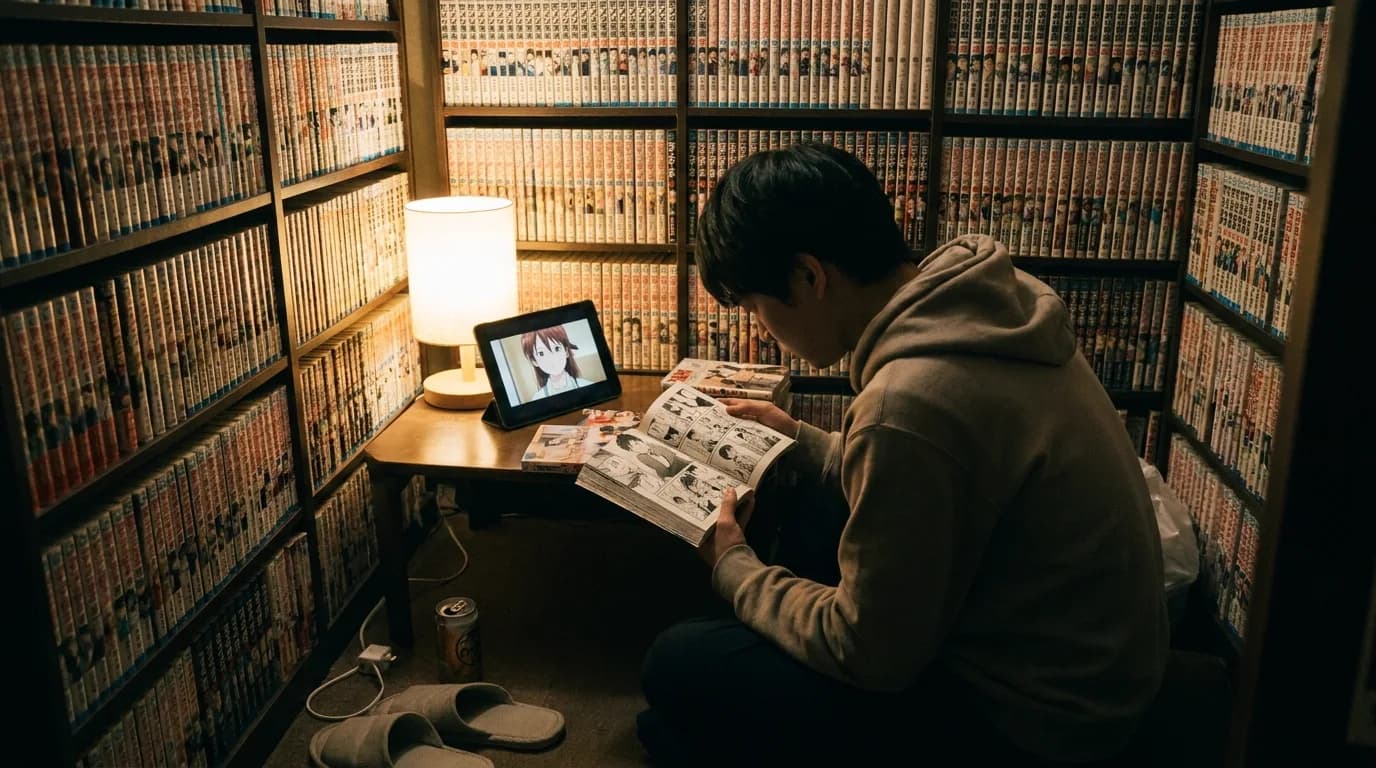
A light novel is a Japanese prose format with manga-style illustrations. Wikipedia calls the definition "very vague", but the shape is familiar: a small bunkobon paperback (A6, 10.5 by 14.8 cm), black and white illustrations inside, and new volumes every three to nine months. Many start online. Wikipedia names Shōsetsuka ni Narō, a free web novel site, as a popular source of light novel material, and it cites Sword Art Online as a light novel whose anime adaptation was a hit (Wikipedia, Light novel).
Studios keep adapting them because the money runs both ways. Animetics tracked novel series adapted to anime between 2010 and 2016. For Re:Zero and KonoSuba, per-volume novel sales sat between 5,000 and 15,000 copies before the anime and jumped past 50,000 after it (Animetics, 2017).
For an adapter, the format comes half prepared:
- The cover and the inserts show what the cast looks like. A plain novel gives you a paragraph; a light novel gives you a drawing.
- A series that started as a web serial came out chapter by chapter, so the break points are already there.
- The narrator is the weak spot. Light novels are full of first-person inner monologue, and anime has to show it. Our guide to anime scripting codes covers that conversion in detail, and it is where most of your writing time goes.
One warning before any of this. A light novel you did not write is under copyright, illustrations included. Adapting it for anything beyond private practice needs a licence from the publisher. Your own web novel is yours to adapt, and so is a public domain text. The rights section of the novel to film guide and our public domain adaptation rights guide go further.
There is no standard number of episodes per volume
A tool that promises a ratio is guessing. The first season of KonoSuba ran 10 episodes, while Re:Zero got two cours (Animetics, same source). Studios decide per series, based on how many volumes exist, how much story the first season needs to land on, and budget.
What you can do is make the decision on paper before touching a generator. Here is the method we use, and it works for a web novel too:
- List every chapter of volume 1 with one line on what changes in it.
- Mark the turning points: the first time the premise is clear, the first reversal, the volume's climax.
- Give each episode an ending. If a run of chapters has no ending you would cut to credits on, it is not an episode yet.
- Decide what the pilot must contain: the premise and one strong hook. Everything else can wait for episode 2.
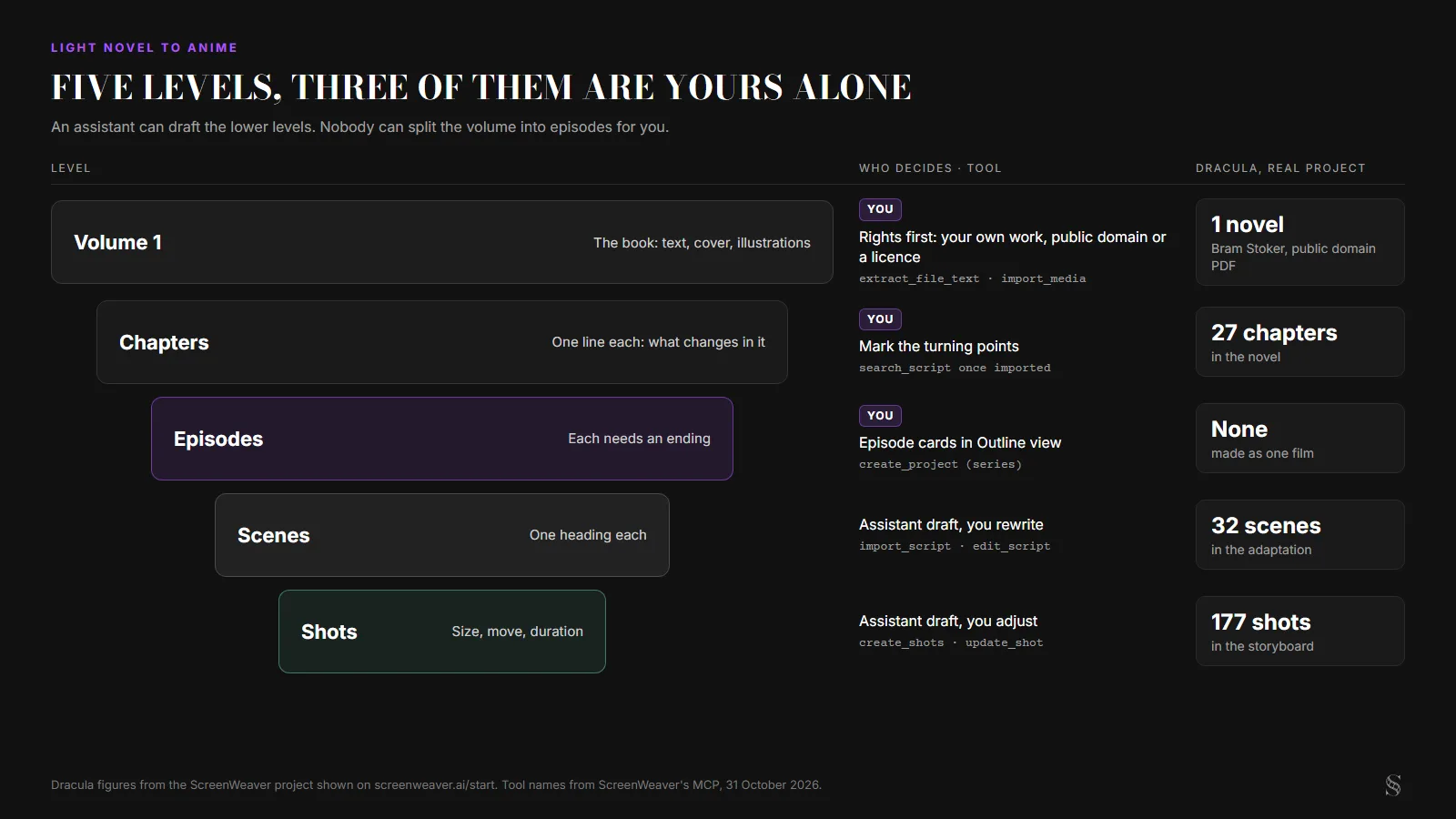
The five levels of an adaptation, with who decides each one. Real figures from the Dracula project; diagram by ScreenWeaver.
| Level | Who decides | Where it lives in ScreenWeaver | Tool an assistant uses |
|---|---|---|---|
| Volume to episodes | You | Episode cards in Outline view | None: this is your plan |
| Episode to scenes | You, or an assistant draft you rewrite | Script, one heading per scene | import_script, edit_script |
| Characters, places, objects | You approve the list | Story elements | create_entities, add_reference_images |
| Scenes to shots | Assistant draft, you adjust | Storyboard | create_shots, update_shot |
| Panels and video | You approve the cost | Storyboard and Production tabs | run_generations for images; video in the app only |
The pipeline in ScreenWeaver, step by step
ScreenWeaver exposes its projects to AI assistants through an MCP server. Claude, ChatGPT, Cursor, VS Code and the assistant built into the app use the same tools. If nothing is connected yet, the Claude setup guide takes a couple of minutes, and the ChatGPT one covers developer mode. The MCP is part of the Auteur and Studio plans.
1. Create a series project
create_project makes either a film or a series. Ask for a series: it gives you the Episode level in the outline, which is where your episode plan from the previous section goes. set_project_aspect_ratio sets 16:9 for a TV-style anime, or 9:16 if you are making vertical shorts.
2. Get the text out of the book
extract_file_text reads a PDF's text layer first, which costs nothing. Pages with fewer than 20 characters of text, meaning scans or photos, go to OCR, which ScreenWeaver's site prices at about half a credit per page. Above 20 pages to transcribe, the tool stops and asks you to confirm the estimate. It reads up to 300 pages per file, returns the text in chunks of 60,000 characters, and never charges twice for the same page. Over MCP the file comes from an HTTPS link, 15 MB at most.
If you wrote the web novel yourself, you probably have the text already. Paste it or export it, and skip the OCR entirely.
3. Turn the illustrations into references
This is the step a light novel makes easy. import_media takes the illustration pages (PDF, PNG, JPEG or WebP, up to 25 MB, 50 pages per call). The assistant then cuts out each character with crops, giving the boxes as fractions of the page, which is free. findPanels exists too, but it is built for comic pages with several panels. A full-page illustration of two characters needs two crops, not panel detection.
Next comes create_entities. The assistant lists the people and places it found, asks you once to approve the names, and creates them, 1 to 20 per call. Names are stored in capitals, a name with parentheses is refused, and a name that already exists is reused instead of duplicated. Finally add_reference_images attaches up to 8 images to each story element's reference sheet generator.
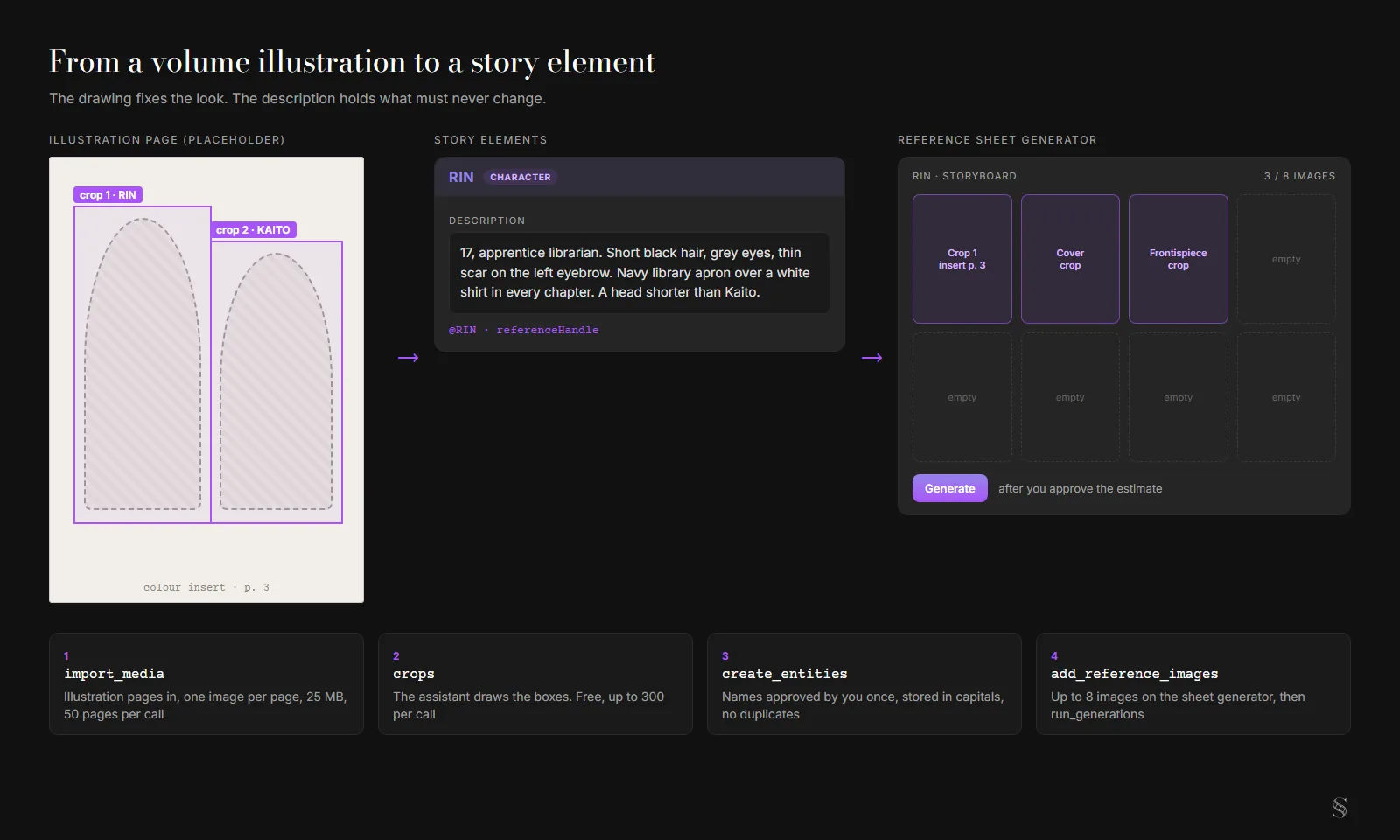
From a volume illustration to a story element, with the calls that do it. Interface reconstructed from the ScreenWeaver UI kit; the illustration is a placeholder outline, not a real book page.
Crop from the colour frontispiece and the cover when you can, because they fix hair and eye colours that the black and white inserts cannot. And write the unchanging details into the element's description (scar, uniform, height next to another character), since a drawing from chapter 5 might show a costume that only exists in chapter 5.
The sheets themselves are images, so they cost credits. run_generations first returns an estimate for the whole batch. Nothing runs until you approve a ceiling with maxCredits, and a target that cannot run is skipped without being charged.
On a real project the finished board looks like this. Dracula has no illustrations, so these sheets came from the novel's text, but the board is the same.
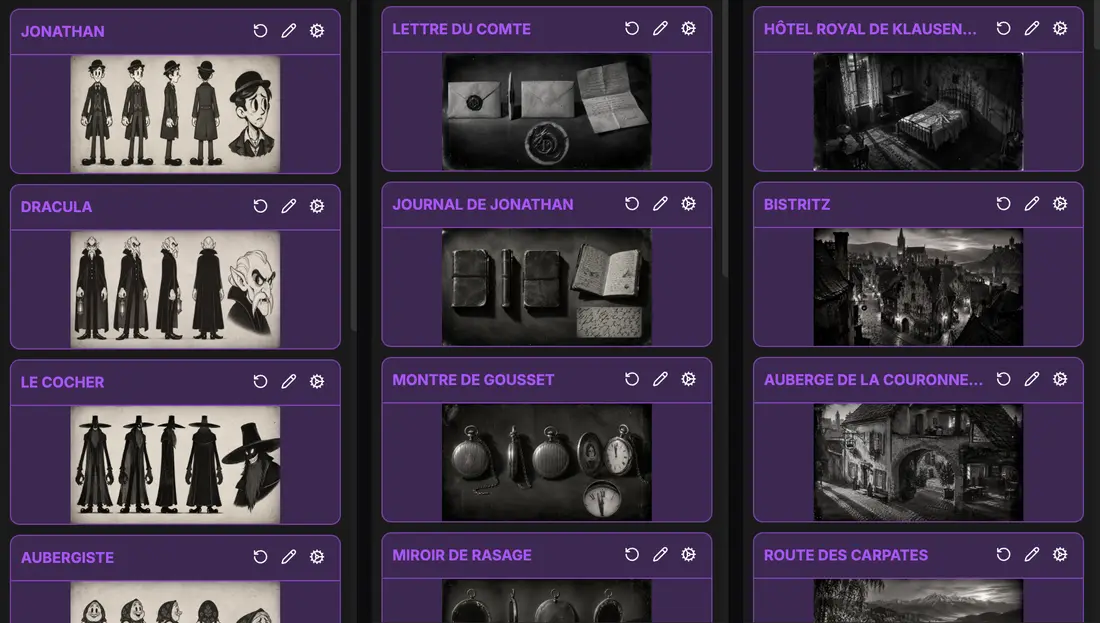
Part of the Dracula bible (11 characters, 16 places, 8 objects) built in ScreenWeaver from the novel's PDF, as shown on screenweaver.ai/start.
4. Write the pilot, then import it
Whether you write the screenplay yourself or ask the assistant for a draft that you rewrite line by line, the pilot ends up as script pages. import_script brings them in. Run it with dryRun: true first: it shows the scenes, where they land and which characters they link to, without writing anything. If your script calls the heroine by a nickname and the story element uses her full name, entityMap points the cue at the existing element. The version before the import goes to the project's history.
This is also where the narrator problem gets solved or not. A line of inner monologue can become voice-over, a look held one beat longer, an object in the frame, or nothing at all. Decide per line. A pilot that is half voice-over plays like an audiobook with pictures.
5. Break the scenes into shots
create_shots writes up to 50 shots per call, each with a shot size, a camera movement, a duration and the story elements it shows. The assistant drafts; you move, merge and delete shots in the Storyboard tab, or ask it to through update_shot and delete_shots (the delete shows a preview and waits for your yes). Our e-konte guide covers how Japanese anime storyboards handle this step.
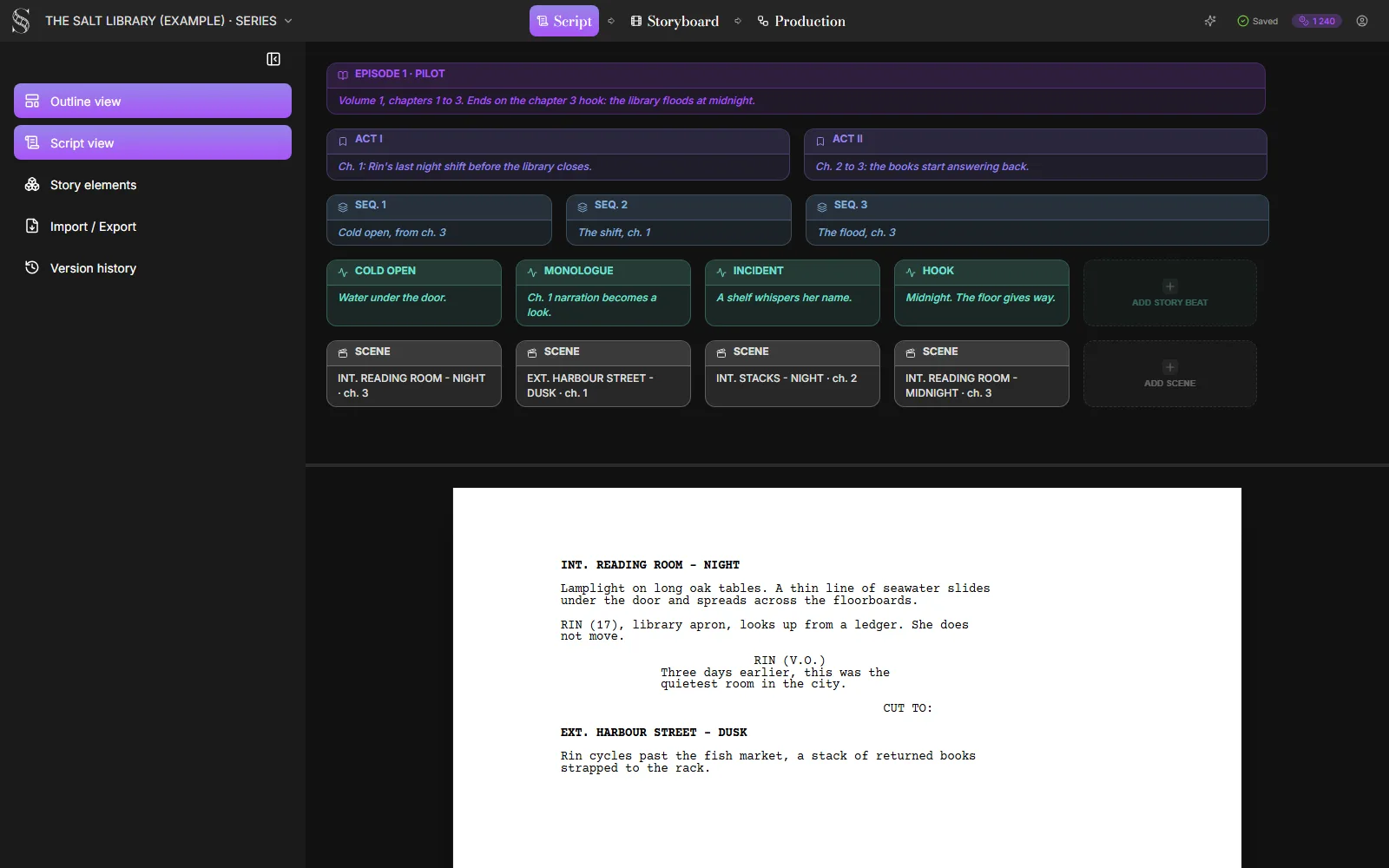
A series project's outline with the pilot opened and the source chapter noted on each scene card. Interface reconstructed from the ScreenWeaver UI kit; The Salt Library is an example written for this page.
6. Generate panels, then video in the app
Storyboard panels go through run_generations, with the same estimate and approval as the sheets. Video does not: no MCP tool launches a video generation. You open the Production tab, check each shot's references, and press Generate yourself. For which video model suits which anime shot, see the best AI video model for anime.
Try it free
Try ScreenWeaver for free on your script
It is free. Import your existing project, get a clearer view of your outline, and regain control of your story structure in minutes.
Start FreeWhat we can show you, and what we cannot
We have no light novel in our demo projects, and we would rather say so than fake one. What we have covers the two halves of the job.
The text half is Dracula. We gave Claude, connected through the MCP, the PDF of Bram Stoker's whole novel. The project came back with 11 characters, 16 places and 8 objects, each with a sheet, an adaptation in 32 scenes, and 177 shots. The book opens on Jonathan Harker's journal in Bistritz on 3 May. The script opens on the shaving mirror from chapter 2 falling into the castle courtyard (shot S1, long shot, crane down, 3 seconds), then cuts back five days. That is the kind of restructuring a light novel's first chapter usually needs too, since many open on the narrator explaining things.
The anime half is Imaginarium, a webtoon we adapted into an animated series in ScreenWeaver. Its pages are drawn, not written, so it shows the other end: what a drawn reference becomes once it is a shot.
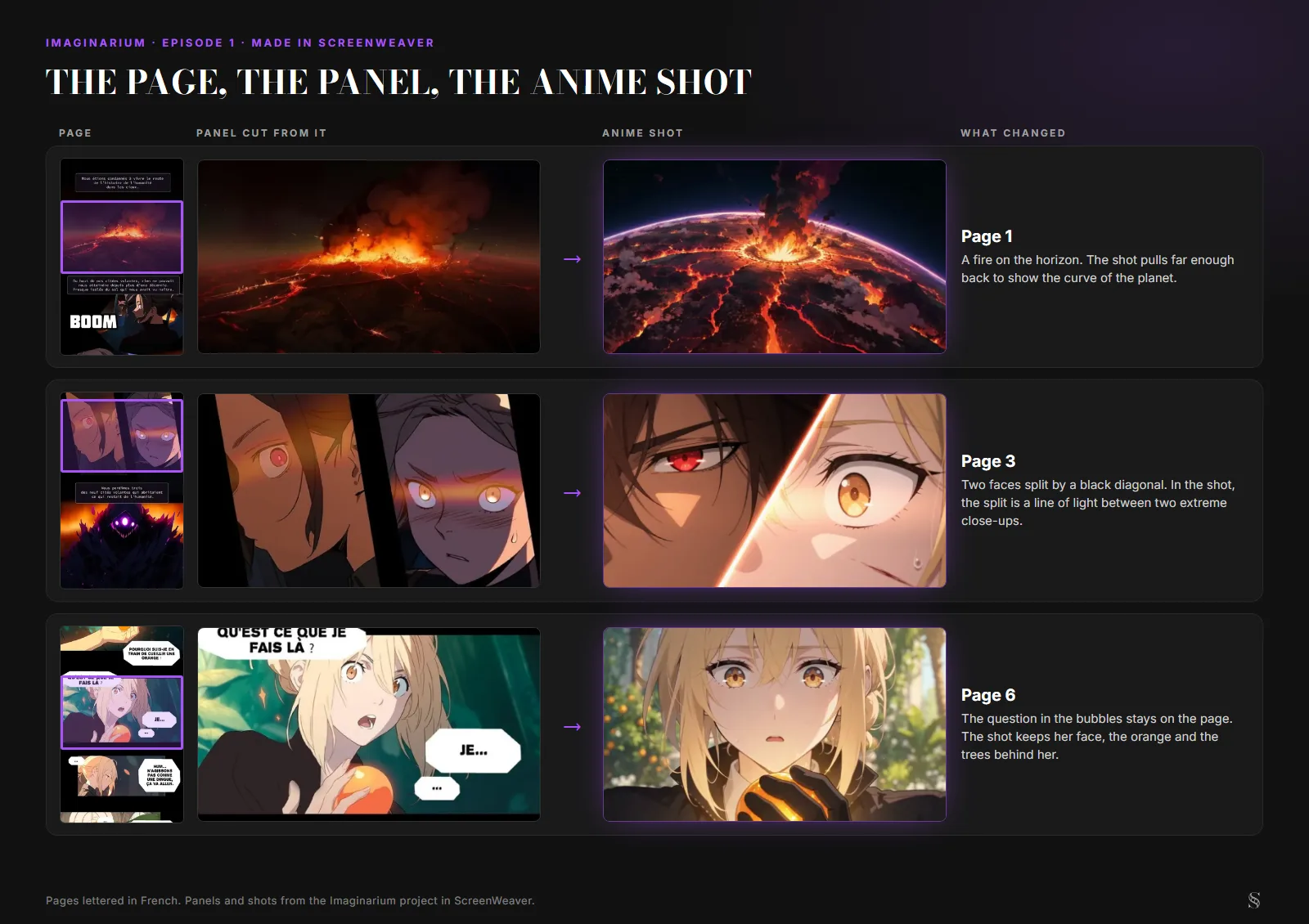
Pages, panels and shots from the Imaginarium project in ScreenWeaver. The webtoon is lettered in French.
A light novel adaptation sits between the two: Dracula's text pipeline, plus illustrations that work like Imaginarium's panels, except they become character references rather than shot boards. If your source is a manga instead, the manga to anime guide covers reading order and screentone, and the AI anime video generator page shows the product side.
Pilot checklist
Before you spend a credit on video, the pilot should pass all of these:
- Rights are clear: your own work, public domain, or a licence in writing.
- Volume 1 has an episode plan, and the pilot has an ending you would cut to credits on.
- Every recurring character has a story element with a written description and cropped references.
- Colours come from a colour illustration or are written down, not guessed from black and white inserts.
- Each line of inner monologue in the pilot has a decision: voice-over, image, or cut.
- The script imported cleanly after a dry run, with nicknames mapped to the right elements.
- Shots have sizes, movements and durations, and you have read the whole list once.
- Panels are approved before any video generation.
FAQ
Can AI turn a light novel into an anime automatically?
No tool does it end to end with a watchable result. An assistant connected to ScreenWeaver can read the book, crop the illustrations, create the characters, import your script and draft the shots. The episode plan, the adaptation choices and the approval of every image and video stay with you.
How many episodes does one light novel volume make?
There is no standard. The first season of KonoSuba had 10 episodes and Re:Zero ran two cours. Plan it chapter by chapter: an episode needs an ending, and the pilot needs the premise plus one hook.
Can I adapt a light novel I don't own?
Not for publication without a licence from the rights holder, and the illustrations are protected along with the text. Your own web novel and public domain works are safe starting points. Our public domain adaptation rights guide explains the rules by country.
Can I use the book's illustrations as character references?
Yes, if you hold the rights to them. import_media brings the pages in, crops cuts out each character for free, and add_reference_images attaches up to 8 images to a story element. Prefer colour pages and the cover for hair and eye colour.
Does the assistant generate the anime video too?
No. Through the MCP it can generate images (character sheets and storyboard panels) after you approve an estimate with a credit ceiling. Video generation is launched by you from the Production tab in ScreenWeaver.
From script to shots
Turn your script into a film, shot by shot
Write the scene, get its storyboard, then generate each shot with consistent characters. You direct every step.
Start your film free