
Seedance 2.5 is the best AI video model for most anime shots in 2026. It takes up to 30 reference images, runs clips up to 30 seconds and can speak the dialogue in the same pass. Send choreographed action to Kling 3.0 Motion Control, and a short 4K key shot to Veo 3.1. Pick per cut, never per project.
That verdict comes from how anime is built, which is different from how a live action ad or a music video is built. Anime holds a drawn design across hundreds of cuts, moves in stepped poses instead of smooth glides, and puts the emotion on a face that cannot drift. So the useful comparison is about how much of a character sheet a model can see, how long it can hold a shot, and what its frame rate does when you retime it. If you want the full method around the model, from script to edit, start with how to make anime with AI. This page is only the model decision.
All specs below come from the public Vercel AI Gateway model catalog, read on 30 October 2026, plus the probes ScreenWeaver ran when it wired these models into its production canvas. Prices are API list rates in US dollars.
The comparison table
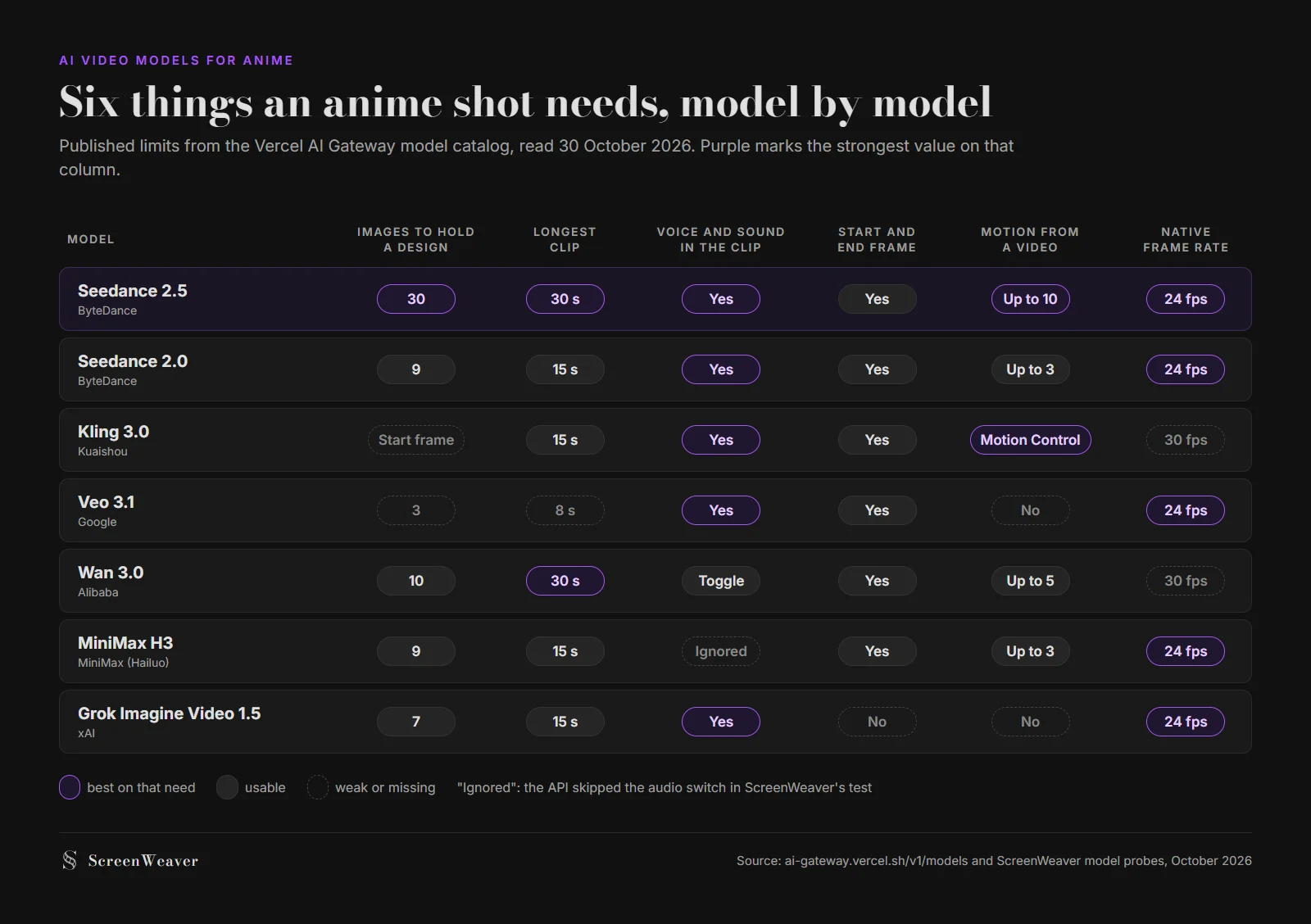
Six anime needs scored per model, built from the Vercel AI Gateway catalog on 30 October 2026.
| Model | Images to hold a design | Longest clip | Audio in the clip | Native fps | Top resolution | List price |
|---|---|---|---|---|---|---|
| Seedance 2.5 (ByteDance) | 30 | 30 s | Yes | 24 | 1080p | $10.70 to $11.70 per million video tokens |
| Seedance 2.0 (ByteDance) | 9 | 15 s | Yes | 24 | 4K | $4 to $7.70 per million video tokens |
| Kling 3.0 (Kuaishou) | Start frame, or start and end | 15 s | Yes | 30 | 4K | $0.168 to $0.392 per second |
| Kling 3.0 Motion Control | 1 image plus 1 motion video | 30 s | No | 30 | 1080p | $0.126 to $0.168 per second |
| Veo 3.1 (Google) | 3 | 8 s | Yes | 24 | 4K | $0.20 to $0.60 per second |
| Wan 3.0 (Alibaba) | 10 | 30 s | On or off | 30 | 1080p | $0.05 to $0.20 per second |
| MiniMax H3 (Hailuo) | 9 | 15 s | Listed, ignored in our test | 24 | 2K | $0.08 to $0.13 per second |
| Grok Imagine Video 1.5 (xAI) | 7 | 15 s | Yes | 24 | 1080p | $0.08 to $0.25 per second |
Two of those columns decide more anime shots than the rest: the reference count and the frame rate.
Why reference count decides character consistency
An anime character is a specification: a three-view sheet, a palette, a silhouette, a prop that must sit in the same hand every time. A video model only holds what it can see during that generation. Give it the front view alone and the back of the costume gets invented fresh on every cut that turns the character around.
Count what a normal two-character dialogue cut needs. Three views of the hero, three of the second character, one expression close-up, the background plate, and the prop. That is nine images.
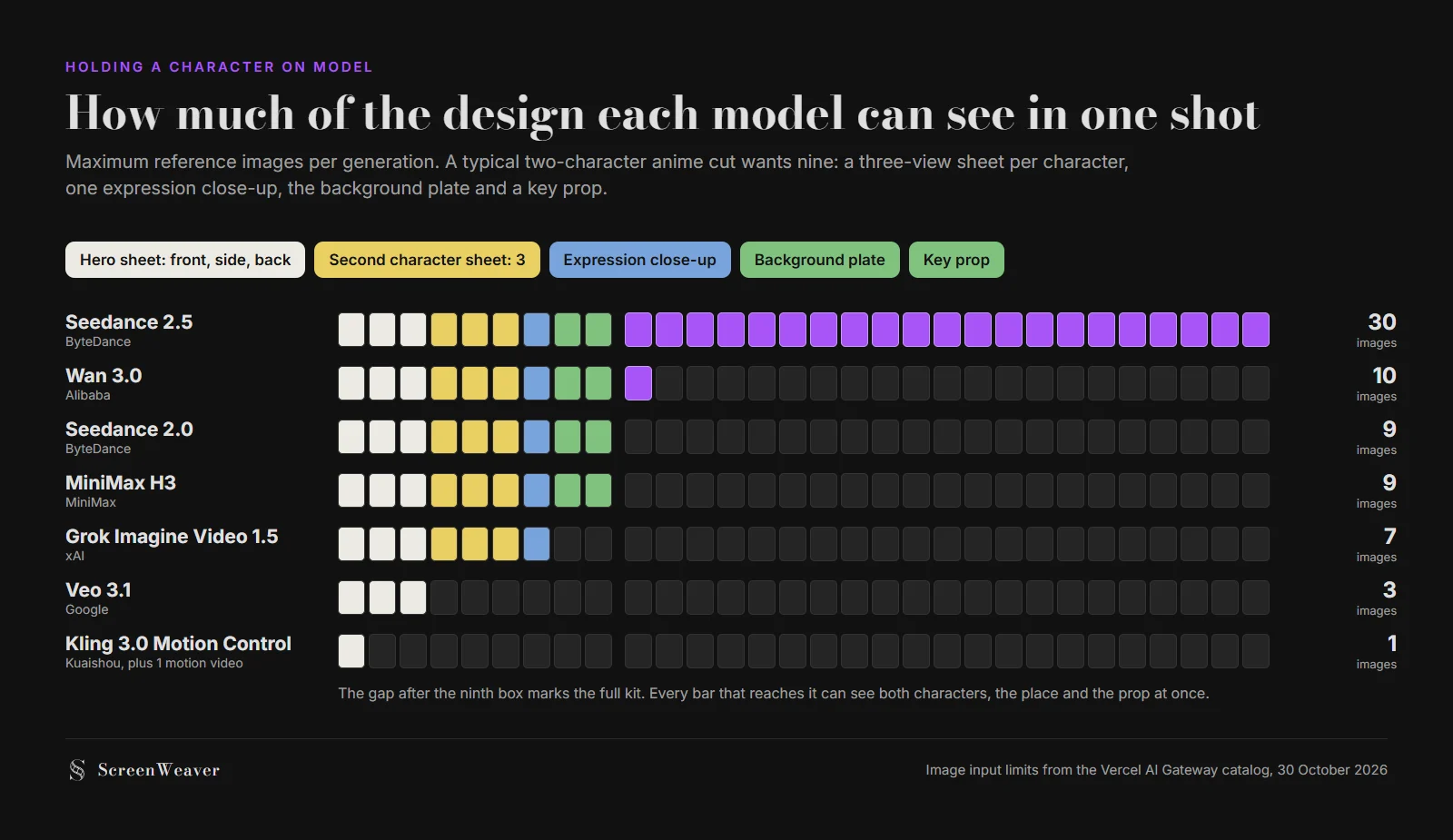
How much of a nine-image character kit each model can take in one generation, from the Vercel AI Gateway catalog, 30 October 2026.
Only four models clear nine. Seedance 2.5 clears it three times over, which leaves room for a third character, a second angle of the location, or a style frame. Veo 3.1 stops at three, enough for one character's turnaround and nothing else. Ask it to hold two people with three pictures and one of them drifts.
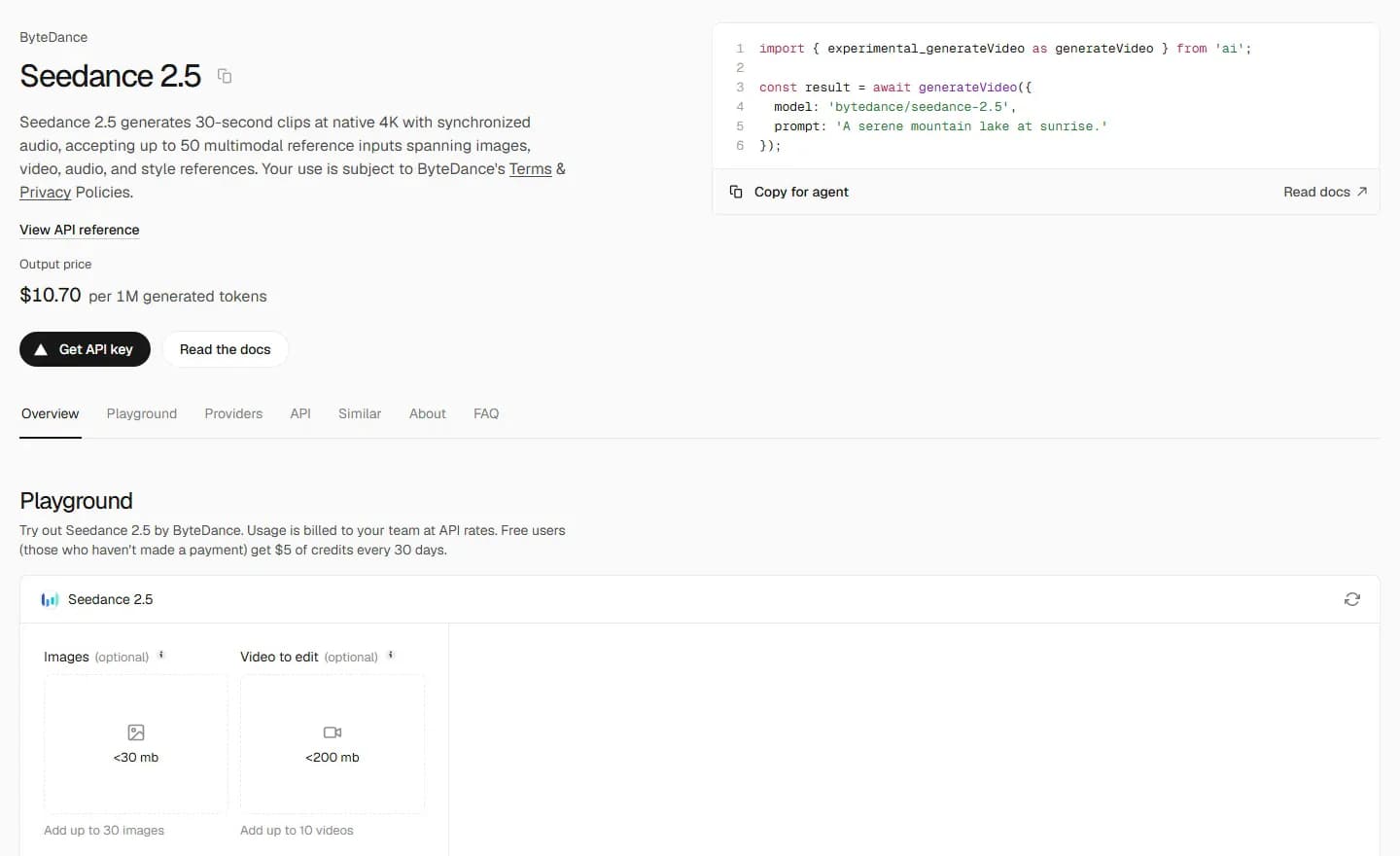
Seedance 2.5 on the Vercel AI Gateway model page, captured 30 October 2026.
One caution on that page. Its blurb says Seedance 2.5 generates "at native 4K", but the same catalog's capability list stops at 480p, 720p and 1080p, and so does ScreenWeaver's integration. Plan an anime delivery at 1080p if Seedance carries it, and upscale afterwards if your platform needs more.
Why frame rate matters more for anime than for any other genre
Anime holds each drawing for two frames (on twos, 12 new images per second) or three (on threes, 8). Video models do the opposite and interpolate every frame, which reads as traced live action over a cel-shaded character. The fix is to step the clip in your editor, the method laid out in our AI anime production pipeline.
That fix only lands cleanly on a 24 fps source. Kling 3.0 and Wan 3.0 render at 30 fps, and 30 does not divide into 12 or 8.
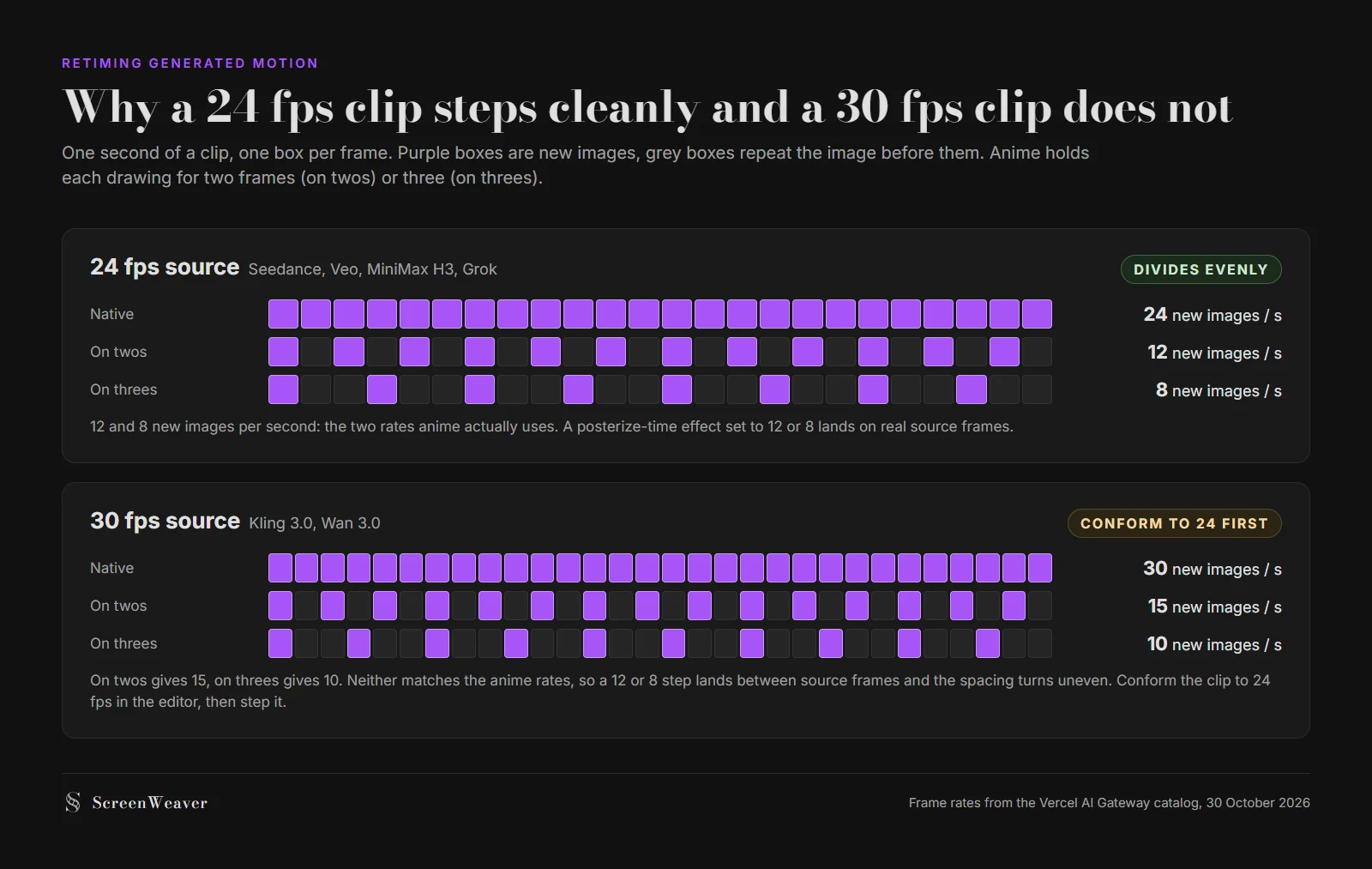
Stepping one second of footage on twos and threes from a 24 fps and a 30 fps source.
On twos, a 30 fps clip gives 15 new images per second, on threes it gives 10. Force a 12 or 8 step on it and the holds fall between source frames, so some poses last longer than others and the motion stutters in a way that no animator would draw. The workaround costs one step: conform the clip to 24 fps in the editor, then apply the hold. It is still worth knowing before you pick Kling for a dialogue scene that needs a precise rhythm. The video frames calculator shows how many distinct images a cut needs at 8 or 12 fps.
Each model, strengths and costs
Seedance 2.5: the default for anime
Thirty reference images, clips from 4 to 30 seconds, audio in the same pass, first and last frame, and up to 10 reference videos on the gateway. Length matters more in anime than it looks. A held face where only the hair moves is a classic anime beat, and a model capped at 8 seconds runs out before the hold lands.
Voice is the other reason. Lost Garden, the dark fantasy anime made in ScreenWeaver, had almost every line in both episodes spoken by Seedance 2.5 from a short reference recording of each character. One recording per character kept each voice identical across the episode. Episode 2 runs 21 minutes and took one person 75 hours, about $1,850 of generation in total. Its makers say no single model made the episode, but Seedance 2.5 carried the dialogue.

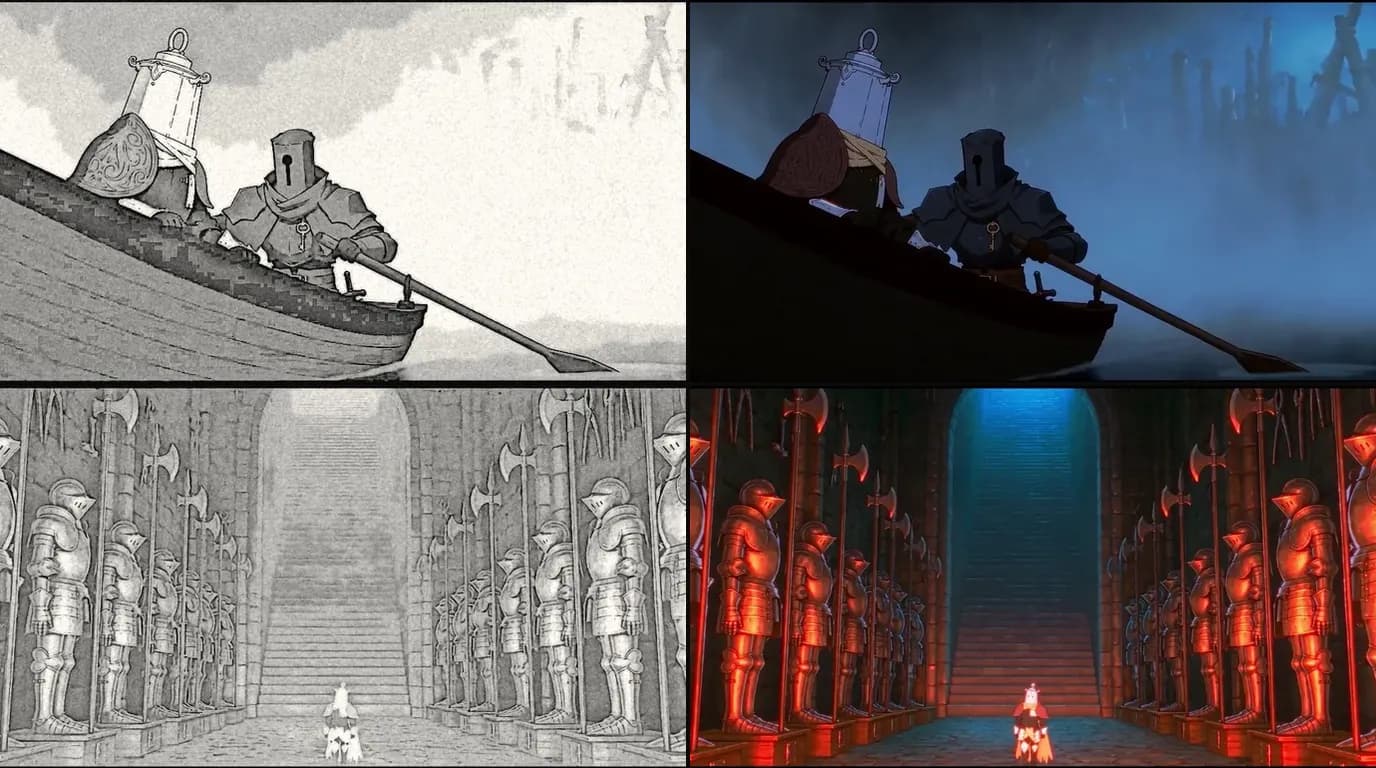
Lanterne in Lost Garden episode 1, The Awakening of the Lantern Knight, at 03:18. Flat colour, hard shadow, the same armour design in every cut.
The cost: token billing makes a per-shot price harder to predict than a per-second rate, and the ceiling is 1080p.
Seedance 2.0: the 4K Seedance
Same family, nine reference images, 4 to 15 seconds, and a 4K tier that 2.5 does not list. If your anime goes to a 4K screen and the cut holds one character, 2.0 is the Seedance to use. With two characters, nine images is exactly the kit and no margin.
Kling 3.0 and Kling 3.0 Motion Control: action you can act out
Plain Kling 3.0 works from a start frame, or a start and end frame, at up to 4K and 30 fps, with native audio and an optional voice control tier. Its reference mode is not usable on the gateway (ScreenWeaver's probe confirmed it), so it holds a design through the start image only. In ScreenWeaver it runs 5 or 10 second clips.
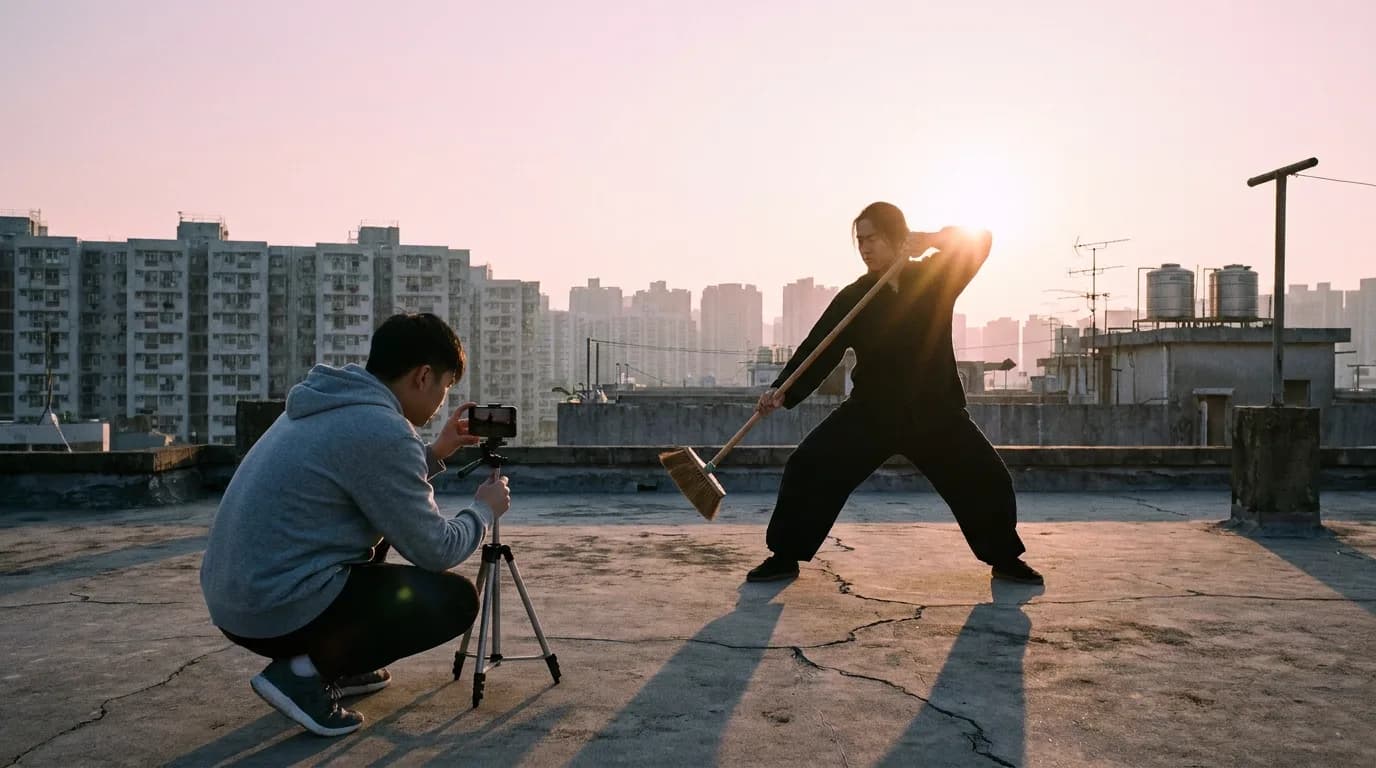
Motion Control is the reason to have Kling in an anime pipeline. You give it one character image and one video of the movement, 3 to 30 seconds, and the output follows that movement. Film a friend doing the sword kata on a rooftop, feed the clip in with your character sheet, and the knight performs the choreography you blocked. A text prompt can't pin a fight beat down that precisely. The output is silent, and at 30 fps, so conform before you step it.
Veo 3.1: the 4K key shot
Veo 3.1 gives 4K with audio, at 4, 6 or 8 seconds, and only 3 reference images. At 1080p and 4K it locks to 8 seconds, and reference-to-video runs at 8 seconds only. It also takes no reference videos. For anime that makes it a specialist: a title plate, a poster moment, a single-character close-up that must look its best at 4K. At $0.60 per second for 4K with audio, an 8-second take costs $4.80 at list price.
Wan 3.0: cheap drafts and long holds
Ten reference images, 2 to 30 seconds, audio you can switch on or off with audio references, and the lowest list rate in this group at $0.05 per second for 480p. That makes it the draft model: test the timing of a scene at 480p for a few dollars, then regenerate the keepers with Seedance. Its 30 fps output needs the same conform step as Kling.
MiniMax H3 and Grok Imagine Video 1.5: niche picks
MiniMax H3, sold as Hailuo, takes nine images and three reference videos and outputs 2K, at $0.13 per second. The catalog lists audio, but when ScreenWeaver probed it the API ignored the audio switch, so treat it as silent. That suits establishing shots and wordless cuts. Grok Imagine Video 1.5 takes seven images and generates audio, but has no first and last frame mode, which rules it out for most continuity work in a series.
Try it free
Try ScreenWeaver for free on your script
It is free. Import your existing project, get a clearer view of your outline, and regain control of your story structure in minutes.
Start FreeWhich to pick, shot by shot
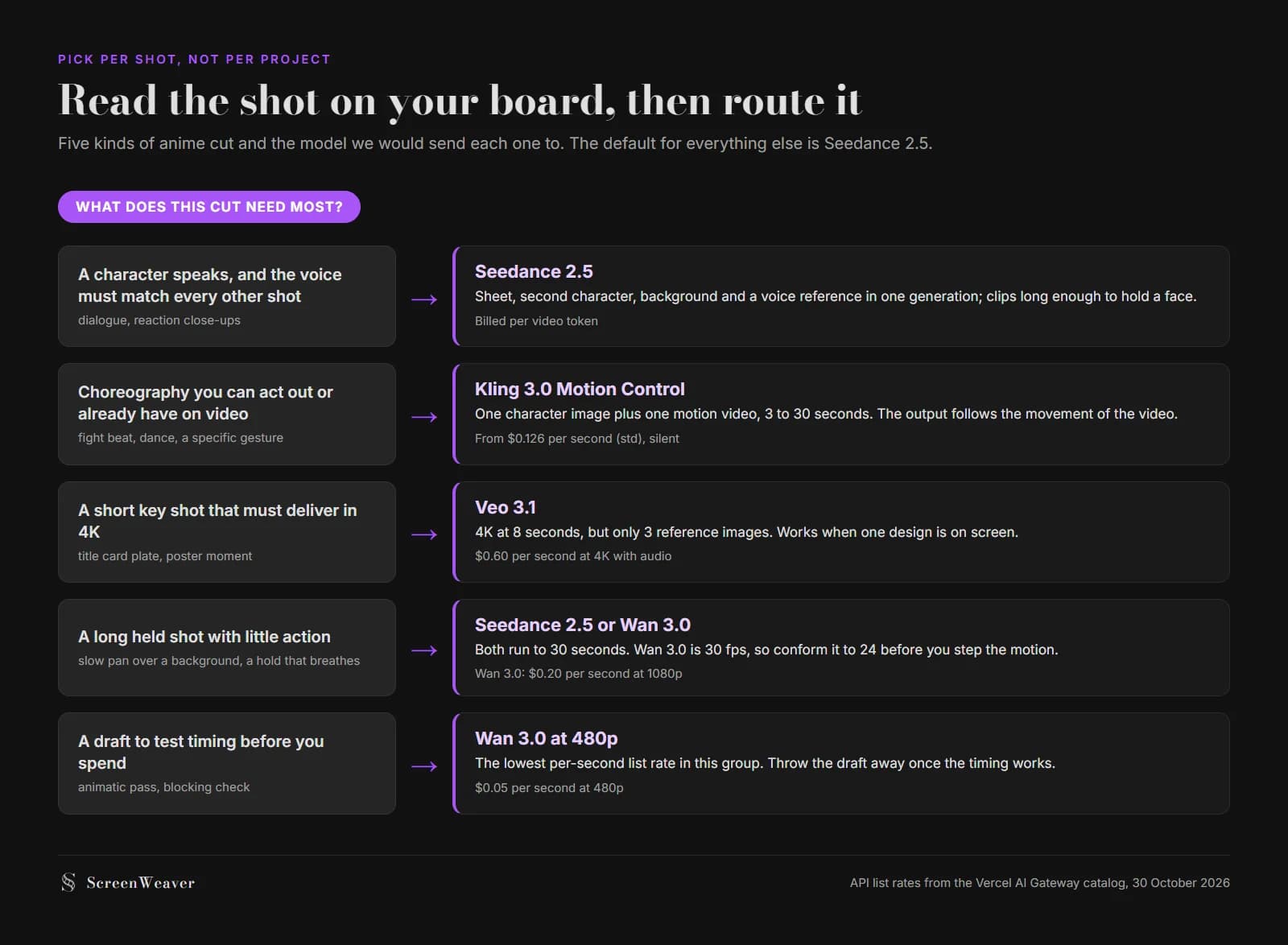
Routing anime cuts by what each one needs most. List prices from the Vercel AI Gateway catalog, 30 October 2026.
| The cut on your board | Send it to | Why |
|---|---|---|
| Dialogue, reaction close-up, two characters in frame | Seedance 2.5 | Both sheets fit, voice comes from a reference recording |
| Fight beat, dance, a gesture you can perform | Kling 3.0 Motion Control | Movement copied from your own reference video |
| Single-character key shot for a 4K master | Veo 3.1 or Seedance 2.0 | 4K output; Veo for 8 s or less, Seedance 2.0 up to 15 s |
| Slow pan, held pose, breathing shot | Seedance 2.5, or Wan 3.0 to save | Both reach 30 seconds |
| Timing test before the real render | Wan 3.0 at 480p | $0.05 per second list rate |
| Silent establishing shot of a location | MiniMax H3 | 2K, nine images for the place, no audio needed |
You don't need seven subscriptions to work this way. ScreenWeaver's production canvas carries all of these models on its video node, so a shot can move from Wan to Seedance by changing one dropdown, with the character sheets already wired from the storyboard. The AI anime video generator page shows a scene built that way, and the AI video model picker filters models by audio, length and budget if you work outside it. For a non-anime use case, the same per-shot logic drives our Veo vs Kling comparison for commercials.
Two checks before you commit a whole episode to any model. Generate the hardest cut first, the one where the character turns away or two characters touch, because that is where a short reference budget shows. And retime one finished clip on threes before you generate fifty more, since a model whose motion falls apart when stepped will fail the same way on every shot.
FAQ
What is the best AI video model for anime in 2026?
Seedance 2.5, for most shots. It accepts up to 30 reference images, so two full character sheets and the location fit in one generation, it runs clips up to 30 seconds, and it can speak a line from a voice reference. Use Kling 3.0 Motion Control for choreographed action and Veo 3.1 for short 4K key shots.
Which AI video model keeps anime characters consistent?
The one that can see the most of your design per generation. Seedance 2.5 takes 30 images, Wan 3.0 takes 10, Seedance 2.0 and MiniMax H3 take 9, Grok Imagine Video 1.5 takes 7 and Veo 3.1 takes 3. Consistency also depends on locking a three-view sheet before you generate any shot.
Can AI video models generate anime at 12 or 8 frames per second?
Not natively. The models in this comparison render at 24 or 30 fps with interpolated motion. Step the clip in your editor with a posterize-time or frame-hold effect set to 12 for action or 8 for dialogue. Conform 30 fps clips from Kling 3.0 or Wan 3.0 to 24 fps first.
Is Kling or Seedance better for anime fight scenes?
Kling 3.0 Motion Control, when you can film the movement yourself. It copies the motion of a 3 to 30 second reference video onto your character image. Seedance 2.5 is better when the fight beat is short, involves two designed characters, and you need them both on model.
How much does an AI anime episode cost to generate?
For scale, Lost Garden episode 2 runs 21 minutes and cost about $1,850 in generation, made by one person in 75 hours. Your cost depends on the shot count, the model per shot and how many takes you keep. Drafting timing with Wan 3.0 at 480p ($0.05 per second list) before the final render cuts waste.
Can I use several AI video models in one anime?
Yes, and you should. The models differ on reference count, length, audio and frame rate, so the right choice changes from cut to cut. Keep the character sheets and the grade constant across models so the switch is hard to spot.
See for yourself
Try the editor on your own script
Import your script or start a new one. Writing, PDF and Final Draft export are free.
Start writing free