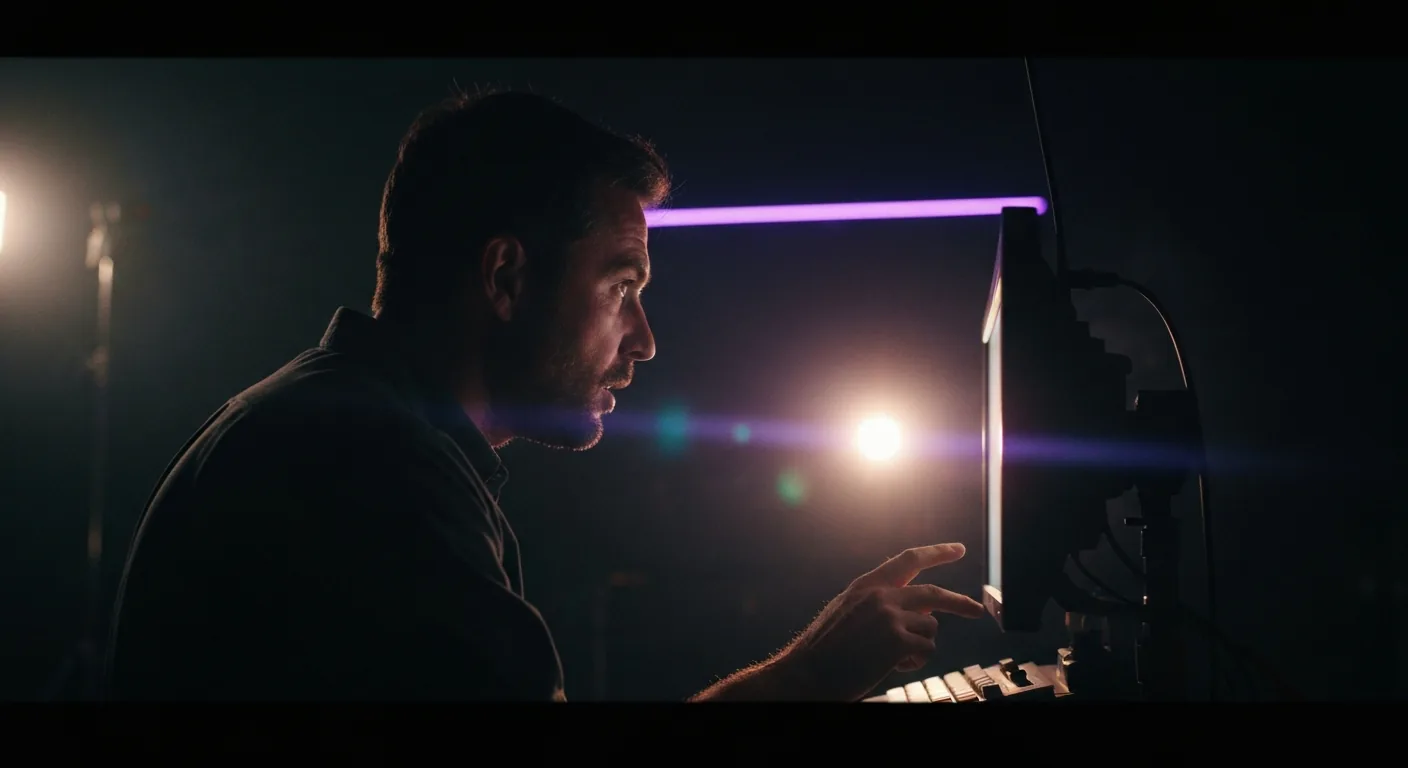

The short answer: two episodes, 38 minutes of finished anime, one person, one tool. Episode 2 cost $1,850 and 75 hours. The script was written, boarded and sent to production inside ScreenWeaver, and at no point was the generator the bottleneck. What takes time is deciding. Everything below is the actual pipeline, tool by tool, including what failed and what replaced it.
Lost Garden is a dark fantasy series about empty suits of armor that wake up twenty centuries after the end of the world. Episode 1 runs 17 minutes, episode 2 runs 21. No studio, no crew, no outsourcing.
Lost Garden was my dream. An anime of my own, with my characters, my world, my story. And I knew exactly what that costs: an episode like this one, produced by a studio, runs close to $300,000. Not $300,000 you find one morning, $300,000 you chase for years, application after application, waiting for an answer that never comes. The script for that kind of project ends up in a drawer, and the drawer never opens again.
I am not going to tell you AI made this easy. What it removed was the wait. Thanks to AI and to this tool, the episode that should have cost $300,000 cost me $1,850, and it exists. It never died because I could not find someone who can draw. People who can draw are everywhere, and they are better at it than any model. It could have died of waiting, like so many others. That is what changed.
And keep one thing in mind before you read on: what made these two episodes possible is not any particular video model. It is having worked from start to finish in a single space, where the script, the storyboard and production are in constant conversation. At every step, ScreenWeaver gave me a coherent space: the same characters, the same places, the same decisions, from the first word of the script to the last rendered clip. Going from script to storyboard, then from storyboard to video production on the same interface, is a comfort I had never had, and it saved me an enormous amount of time. I will show you exactly where.
Prefer to watch? In this twelve-minute masterclass I walk through how the 17-minute pilot was built from nothing: a silent hero, a whole world to explain, a giant who talks, and a machine that chases him.
Watch the result first
Everything below is process. Here is what it produced, so you can judge whether the method is worth your time.
Episode 1, The Awakening of the Lantern Knight, 17 minutes: youtu.be/eZ_JlaLDJ-8
Episode 2, The King Beneath the Vault, 21 minutes: youtu.be/z-YRrutXaFE
Both live at lostgarden.world with the press kit.
What follows is my own story, tool by tool and mistake by mistake. If you would rather have the generalized method, stripped of my project and written as steps you can run on yours, from the logline to retiming the motion on twos and threes, read the generalized method for making anime with AI alongside this one.
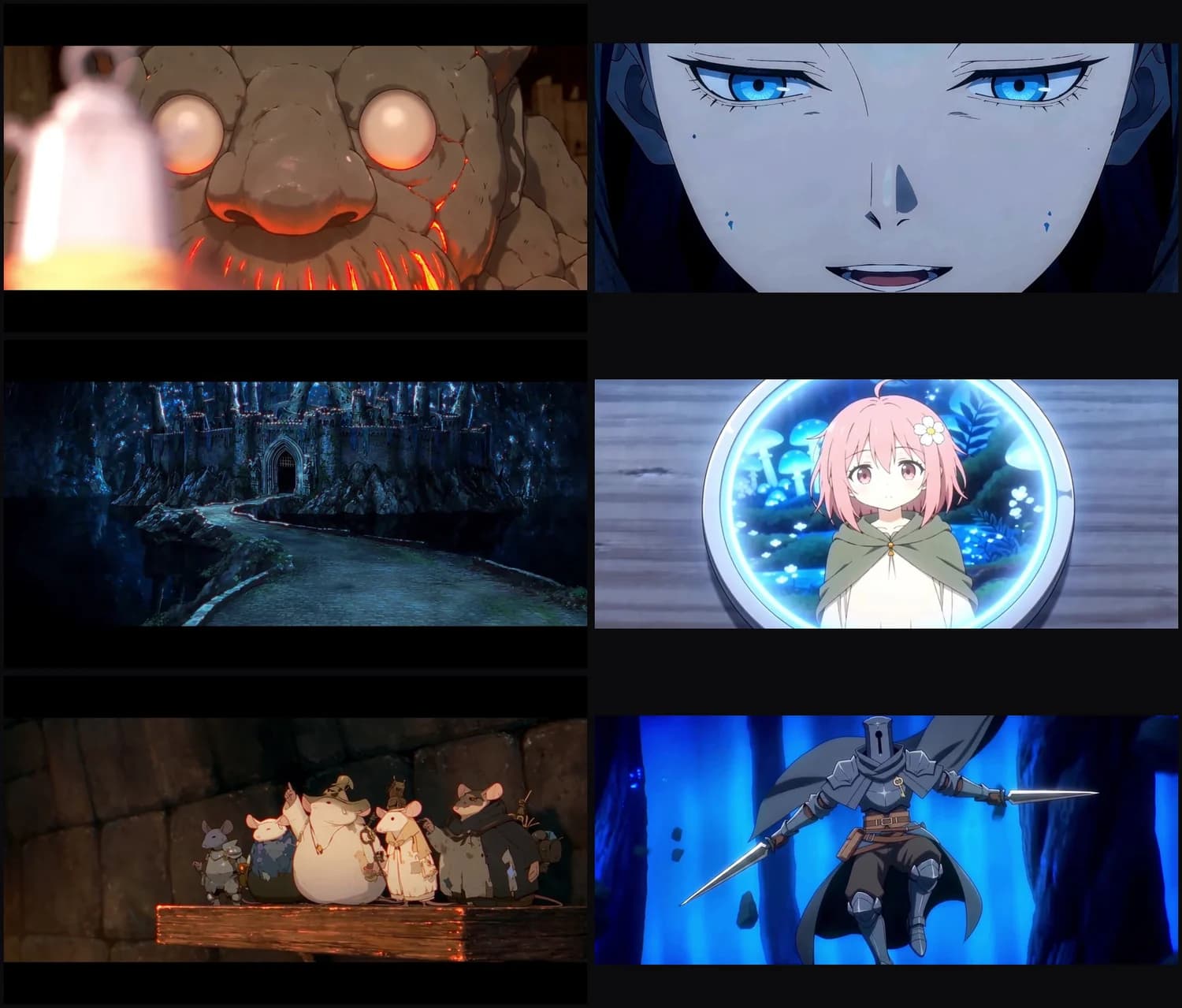
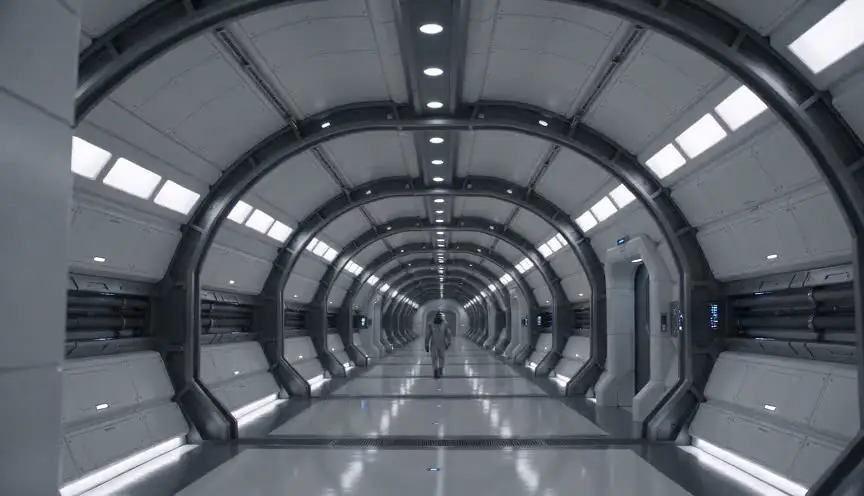
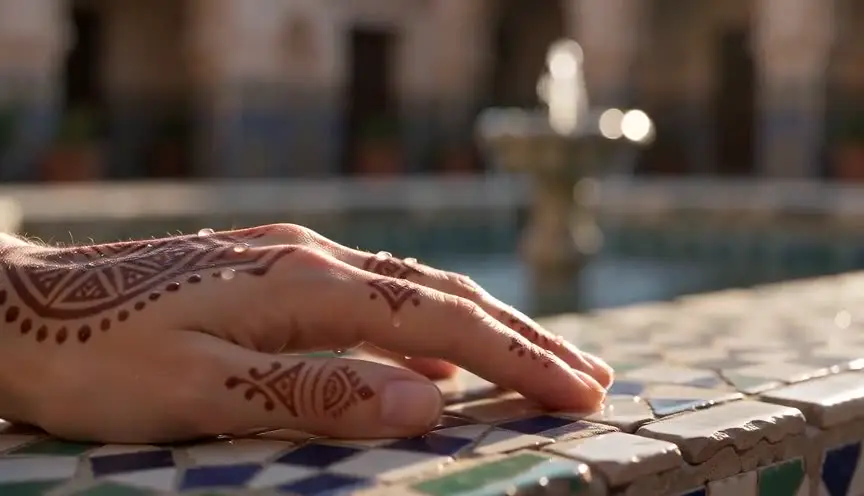
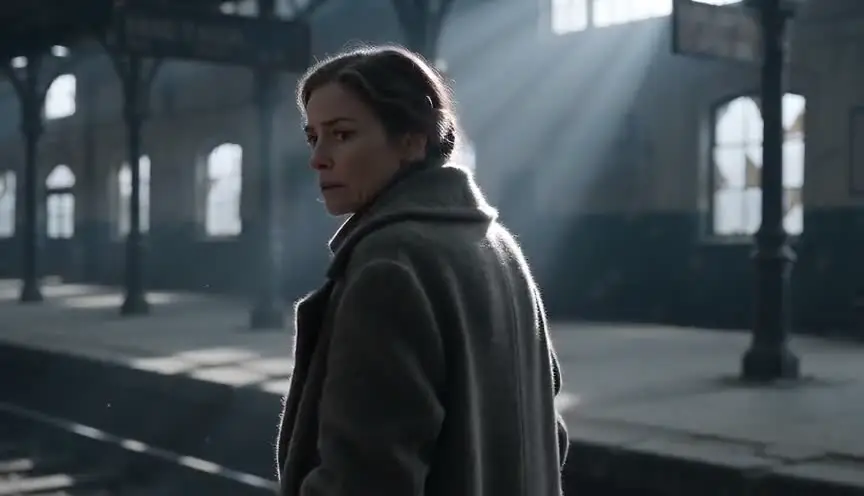
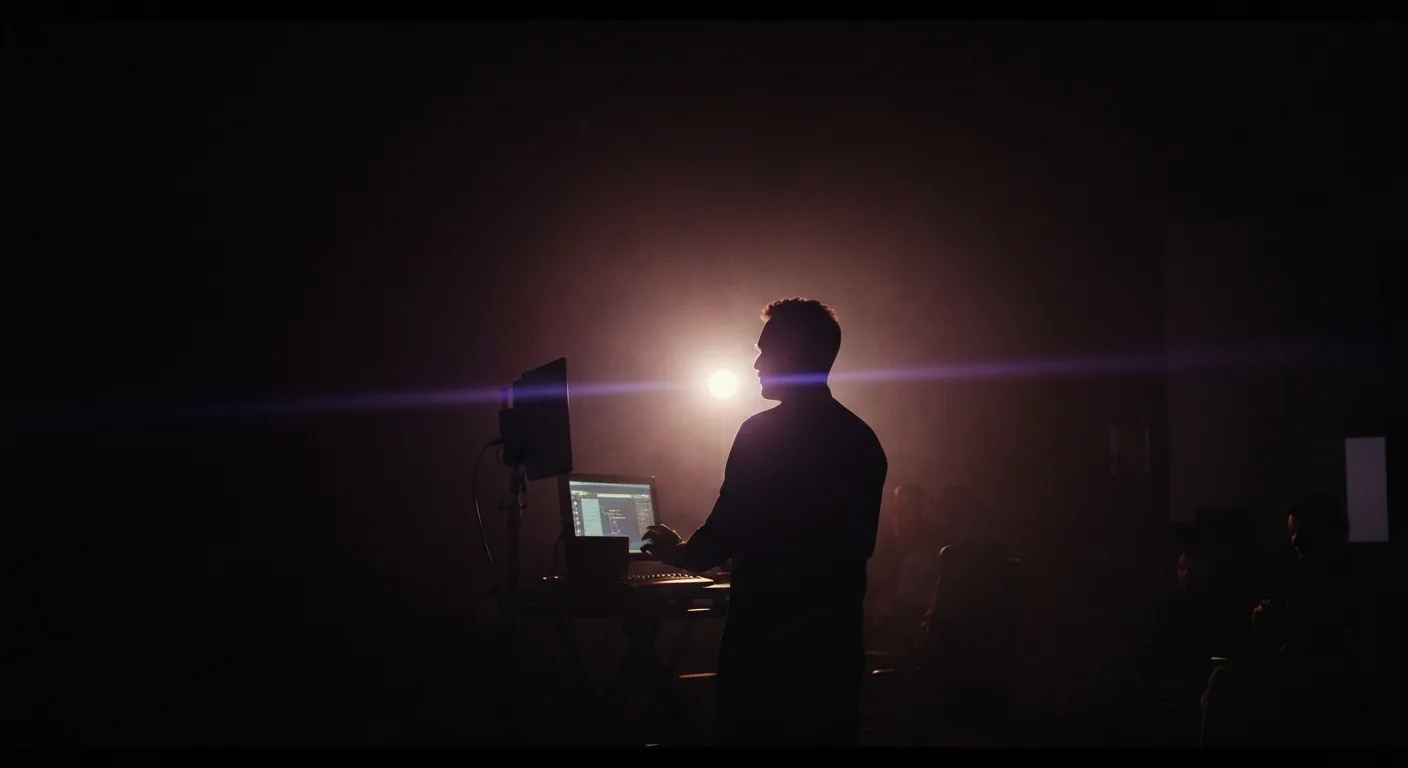
Those are finished frames, straight out of the episodes. Keep them in mind while you read, because every screenshot after this point shows the machinery that produced them.
The map of the whole thing
ScreenWeaver is built as three steps, and both episodes followed them in order. From script to storyboard, then from storyboard to video, without ever switching tools.
| Step | What happens | Where in ScreenWeaver |
|---|---|---|
| Write | The screenplay, its structure, its characters, its places, its objects | The Script tab, the Living Story Map, story elements, the AI agent |
| See | Every scene becomes shots, every shot becomes a board | The Storyboard tab: character sheets, shot breakdown, shot panels, Auto-generate |
| Build | Approved boards become production images and videos | The workflow engine: a node graph pre-wired from the script, Seedance and friends at the end of the chain |
Then a finishing pass on the outputs: music, the edit, subtitles, distribution. That part is short. The interesting part is everything before it.
That table looks harmless. Yet it says the most important thing in this article: a character created in the Script tab is the same one the Storyboard tab draws and the workflow engine renders. Nothing to re-export, nothing to retype, nothing that can fall out of sync along the way. Each step has its own tools, of course, and we will go through them one by one. But that continuity is what changed everything.
The short cut, and why it is no longer a requirement
On both episodes, I cut every two to three seconds.
At the time, AI video fell apart the moment a shot ran long. Hands drifted, faces slid, backgrounds breathed. A shot held at two seconds, went soft at four, became unusable at eight. So I stopped letting shots run long, not as a stylistic choice, as a survival instinct. Episode 2 has around 400 shots in 21 minutes.
Then something happened that I had not planned. The constraint became the style. Anime already cuts fast. Holding two seconds and cutting hard reads as deliberate direction rather than patchwork. What I did because I had no choice is what people compliment me on today.
Now, the important point. That limit of a few seconds no longer exists. Today, 15 to 30 second shots come out fully usable, and the drift in hands and characters is gone. Not because the models worked a miracle, but because ScreenWeaver lets you prepare your character sheets and your production images from A to Z, with a pipeline optimized end to end. When the video model receives a character already defined from every angle, an approved production image and a precise shot direction, it has nothing left to invent, so nothing drifts anymore.
Which means shot length goes back to being what it should be: a directing decision. On Lost Garden, I keep the short cut because it is part of the series' identity. On another project, I would hold my shots. Either way, decide it before you generate a single frame, because it changes the shot count, which changes the storyboard, which changes the script. In ScreenWeaver, that decision lives in one specific place: the shooting plan you write before the shot breakdown, and which we come back to in the See step.
Step 1, Write: the script stays the source of truth
The single biggest time sink in this kind of production is not generation. It is the round trip.
You write in one tool. You board in another. You change a line, and the storyboard is wrong for two days before you notice. You change a shot, and the script no longer describes what happens on screen.
ScreenWeaver does not let that drift settle in. The script is vertical, the structure is horizontal, and the two are a single document.
The Living Story Map
The horizontal sequencer at the bottom of the Script tab shows acts, sequences and beats at all times. For a series, it nests like this: Episode, Act, Sequence, Story Beats, Scenes. Click a sequence, the script scrolls to it. Move a beat somewhere else, the pages follow.
I used it as a pacing gauge. When a sequence swells compared to its neighbors, you see it on the map before you feel it in the read. That is where to cut, not once the boards exist.
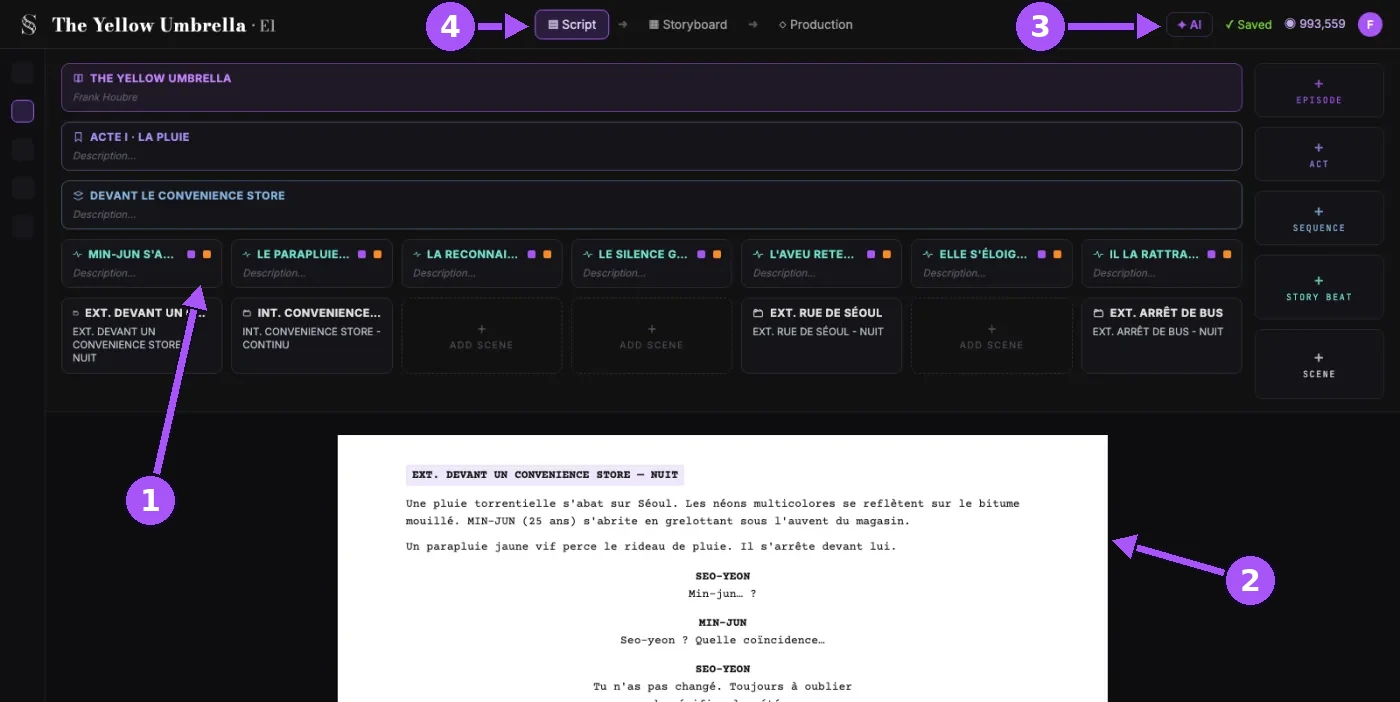
On this screenshot: (1) the Living Story Map, with the episode, act, sequence, story beats and scenes; (2) the screenplay, in professional format, written right here; (3) the AI button, which opens the AI agent; (4) the three tabs, Script, Storyboard and Production, one interface from start to finish. These interface screenshots come from other projects; the interface is the same.
Story elements and @ mentions
Every character, place and object in the episode exists as a story element. In the script, you call them with an @: type @ser and Serrure appears, type @bel and so does the Bell Foundry. That little @ is the join between the script and everything that comes after. The element that lives in the script is the one the Storyboard tab will draw and the workflow engine will render. One Serrure, from the first word to the last clip.
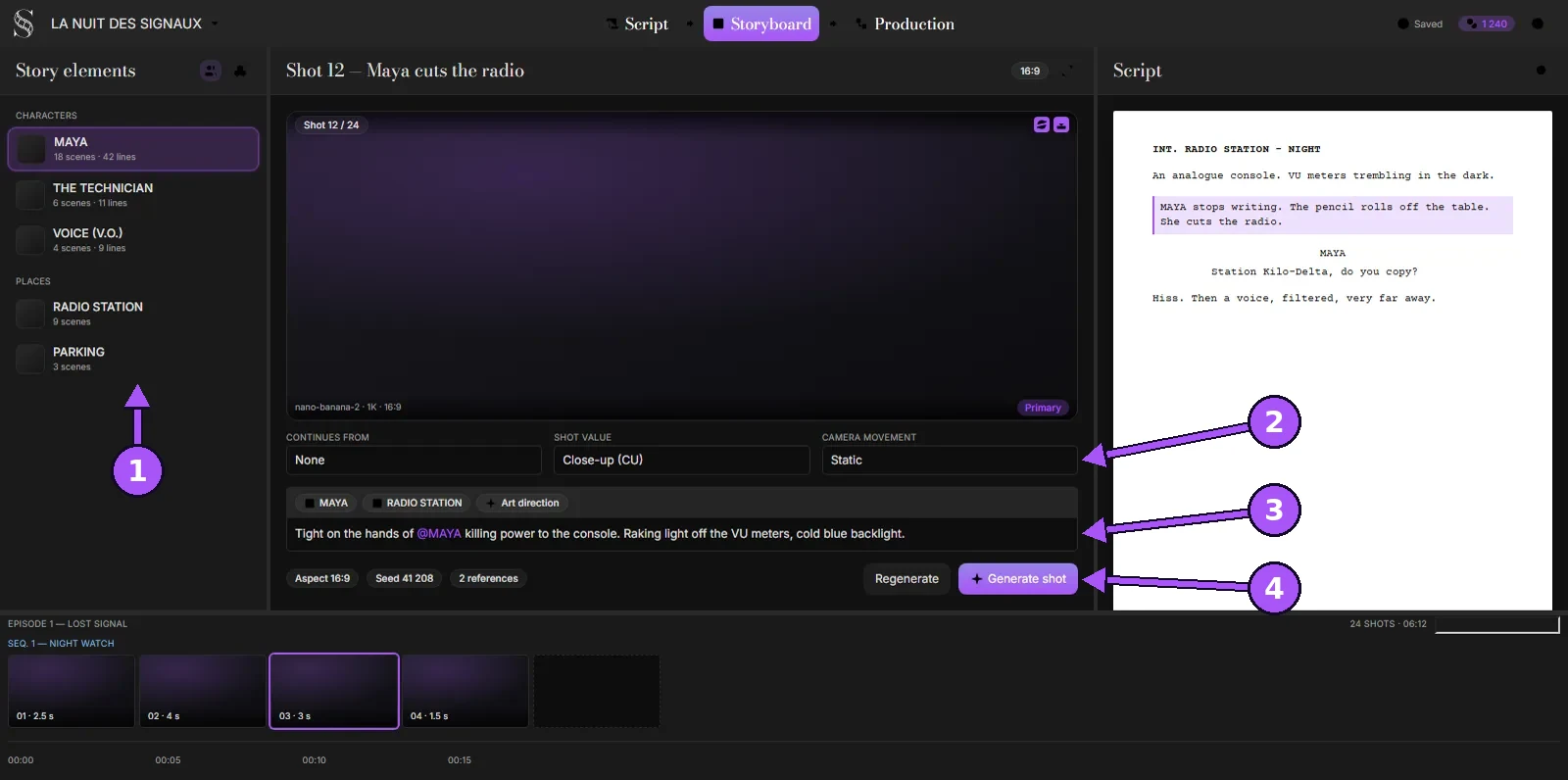
On this screenshot: (1) the Story elements panel, with the scene's characters and places; (2) the shot value and camera movement; (3) the action line, where an @ calls up the character's reference; (4) the Regenerate and Generate shot buttons.
Episode 2 was written from beginning to end in ScreenWeaver's Script tab. No Final Draft, no word processor on the side, no copy-pasting between two programs. The editor follows professional screenplay format, scene headings, action, character, dialogue, and as I wrote, every new character and every new place took its spot among the story elements. When I finished the last scene, the episode's cast already existed, ready for the storyboard.
By the way, the entire screenwriting part is free. I say this for your friends who pay $200 a year for screenwriting software: on writing, this one is more complete, and it costs nothing. Credits are only used for generation, when you decide to move on to the storyboard and video.
The AI agent, and what it does not do
ScreenWeaver has a single AI agent, and there is one important thing to know about it: it does not write. The writing stays human, from the first word to the last. Its job is everything that happens around the writing.
It knows the project's Bible, where the canon of Lost Garden lives: who the thirteen knights are, why the medallions have to stay shut once the Unhooker is established, what a Source Child is. When a line contradicts an established fact, it says so. When Serrure starts talking like someone else, it says that too, because it knows each character's voice and style. An anachronism that slips into a world twenty centuries after the end of the world, it spots before I do. On a series, that is exactly the job I least want to do from memory.
Then there is the other half, the one I did not expect: when I get stuck on a scene, I talk to it, and it gets me out of the dead end by asking the right questions. When I like an idea too much, it challenges it. I do not take all of its notes, but the ones about pacing I take almost every time, because pacing is precisely the thing you cannot see from inside your own script.
A writing partner who never holds the pen. That is the principle, and it is why, in the end, the script is mine.
Export, for those who still work differently
I no longer need Final Draft, but the rest of the world still uses it, and ScreenWeaver knows it. The script exports to PDF and Final Draft at any moment. The voice actors got a PDF, and an FDX went into my archive, just in case. Nothing about writing in ScreenWeaver locks you in, and nothing forces you out either. A screenwriter with no intention of producing anything can write there for an entire career without paying a cent.
Step 2, See: characters first, then shots
This is the step everybody skips, and it is why most AI films look like a folder of beautiful, unrelated images.
It is also the step I got wrong on episode 1 and redid properly for episode 2. Every character in Lost Garden now has three documents, and they do three jobs that cannot be merged.
- The character sheet. What the character looks like, generated once in the Storyboard tab and attached to every board they appear in.
- The pinned description. The paragraph the sheet is built from, and the only thing about the character that reaches the image model.
- The play sheet. How they move, speak, react, and what they never do. This one lives in the project's Bible.
Skip the first and your character drifts. Skip the second and every shot becomes a negotiation. Skip the third, which almost everybody does, and your character looks perfect and behaves like someone else in every scene.
It is precisely this upfront work that makes long shots possible today. The drift did not disappear because the models got wise. It disappeared because everything the model could invent was decided before it, in the same place, and is handed to it with every generation.
Concretely, here is how it went for me. I had had my characters in my head for a long time, some already drawn, others only described in a notebook. I expected to spend days building character sheet prompts and rerolling until I got three views that matched. ScreenWeaver already has workflows and prompts optimized for that. I paste my description, add my drawings to the moodboard when I have them, and the sheet comes out with its three views, its white background and its flat colors, without my having to reinvent anything. Then, in any shot, a simple @ calls up the reference, and my character stays the same from the first board to the last. That is consistency, and that is where I saved the most time on episode 2.
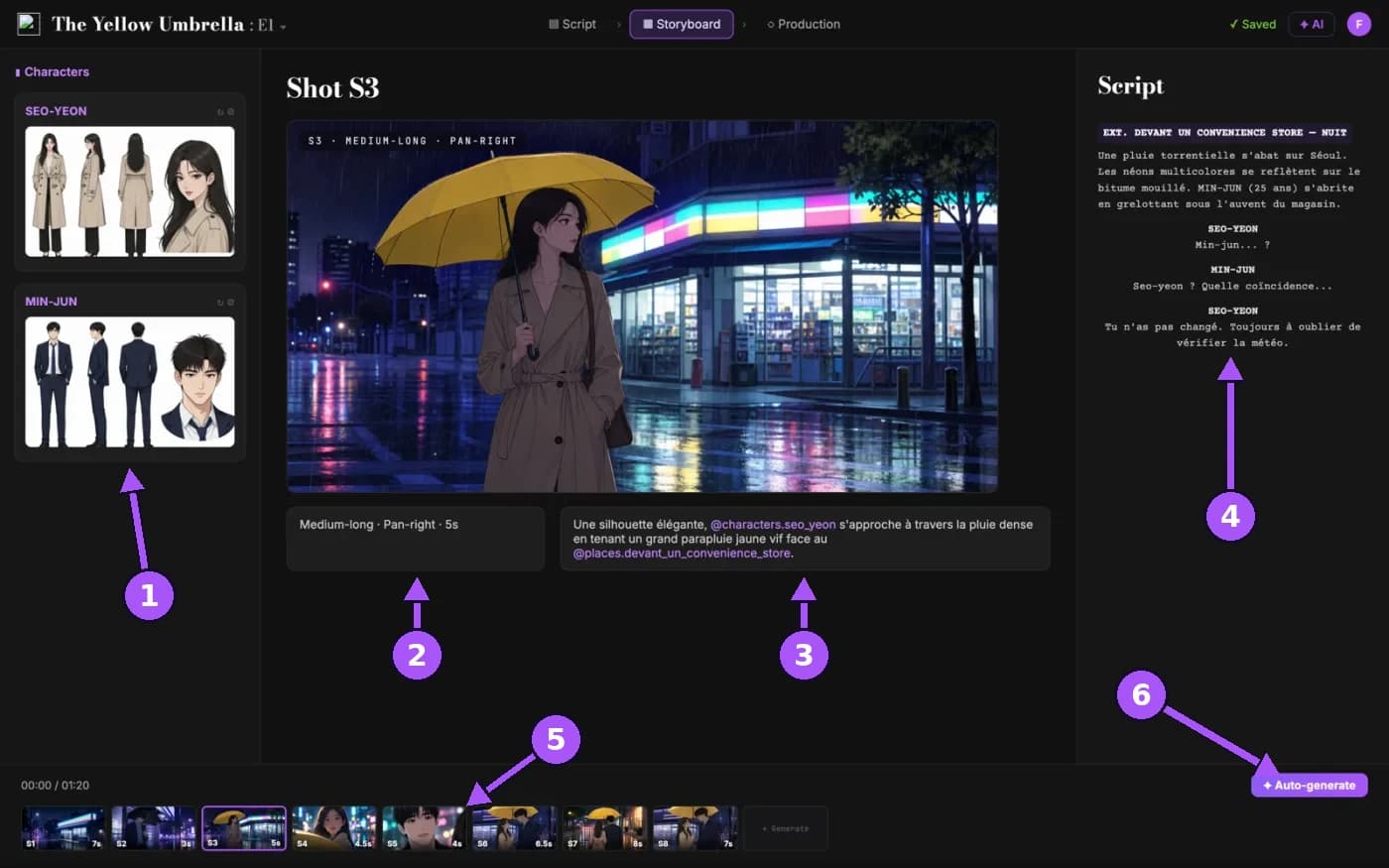
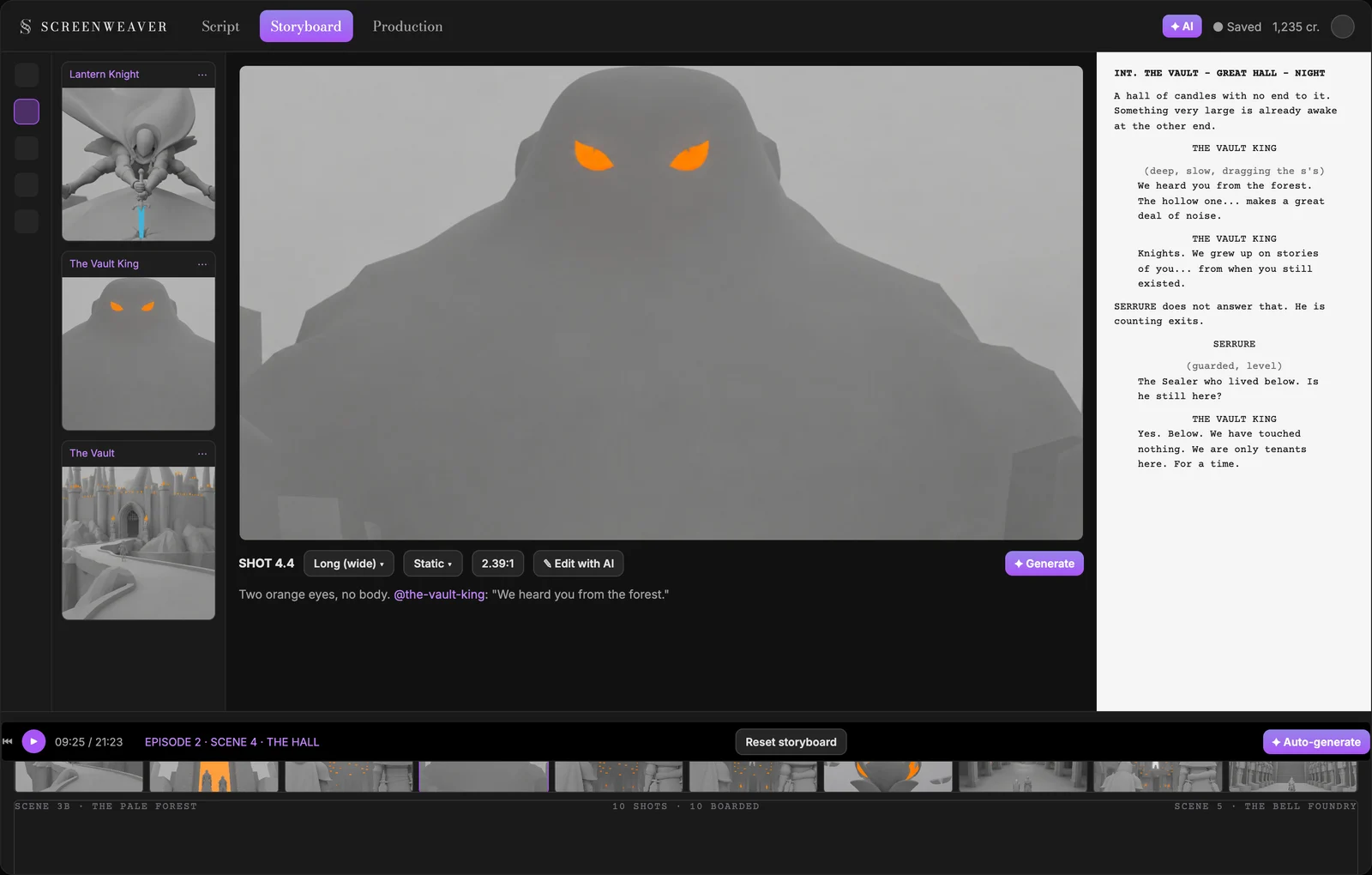
On this screenshot: (1) the character sheets of the scene's characters, in three views; (2) the shot value, movement and duration; (3) the action line, with the @ references for the character and the place; (4) the screenplay, always visible while you break the scene down; (5) the shot timeline; (6) the Auto-generate button.
The character sheet, and why it is a specification rather than a picture
In the Storyboard tab, the entities panel on the left lists every story element in the scene. Each one has a moodboard with a pinned description block. Generate reference sheet reads that block and produces the sheet: three views, white background, flat colors, no lighting, no pose.
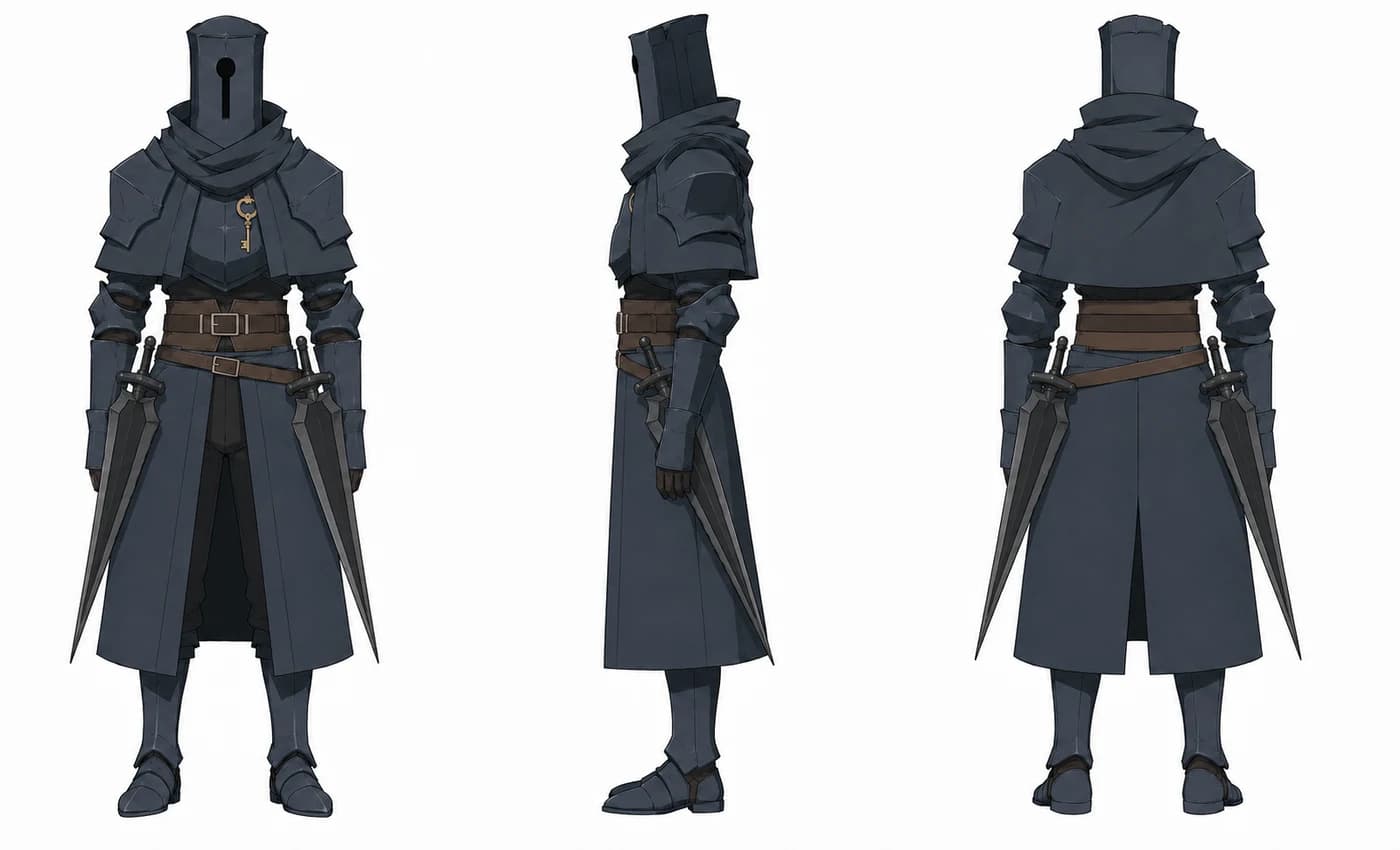
Every one of those choices is deliberate, and each is the opposite of what you want to do.
Three views, not one. Front, profile, back. The back view is the one that saves the day, because it is the one you never think about until you need an over-the-shoulder shot and discover you never decided what the back of the cape does.
White background, no lighting. The moment a sheet has worked lighting, every board that references it inherits that lighting. You want the object, not the mood.
No action pose. A character standing neutral reads as "this is what they are". A character mid-leap reads as "do this again", and you will get variations of that leap for all eternity.
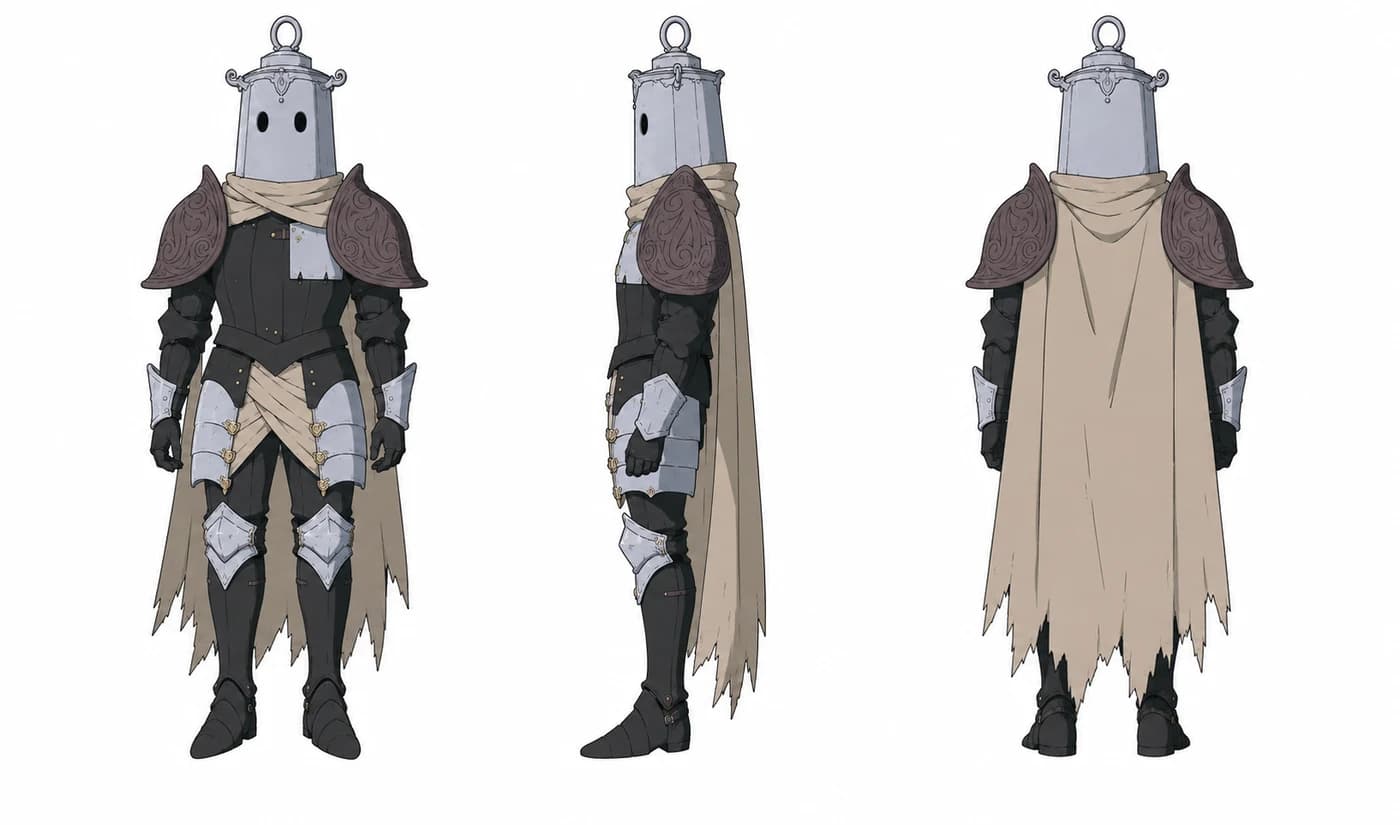
Props go on the sheet, because props are the first thing to drift
Look at Bourdon's sheet. He is a stone giant who casts bells, and his sheet carries a pagoda roof on his back with three bells hanging from it, a hammer and tongs at his belt, and a small brass teapot.
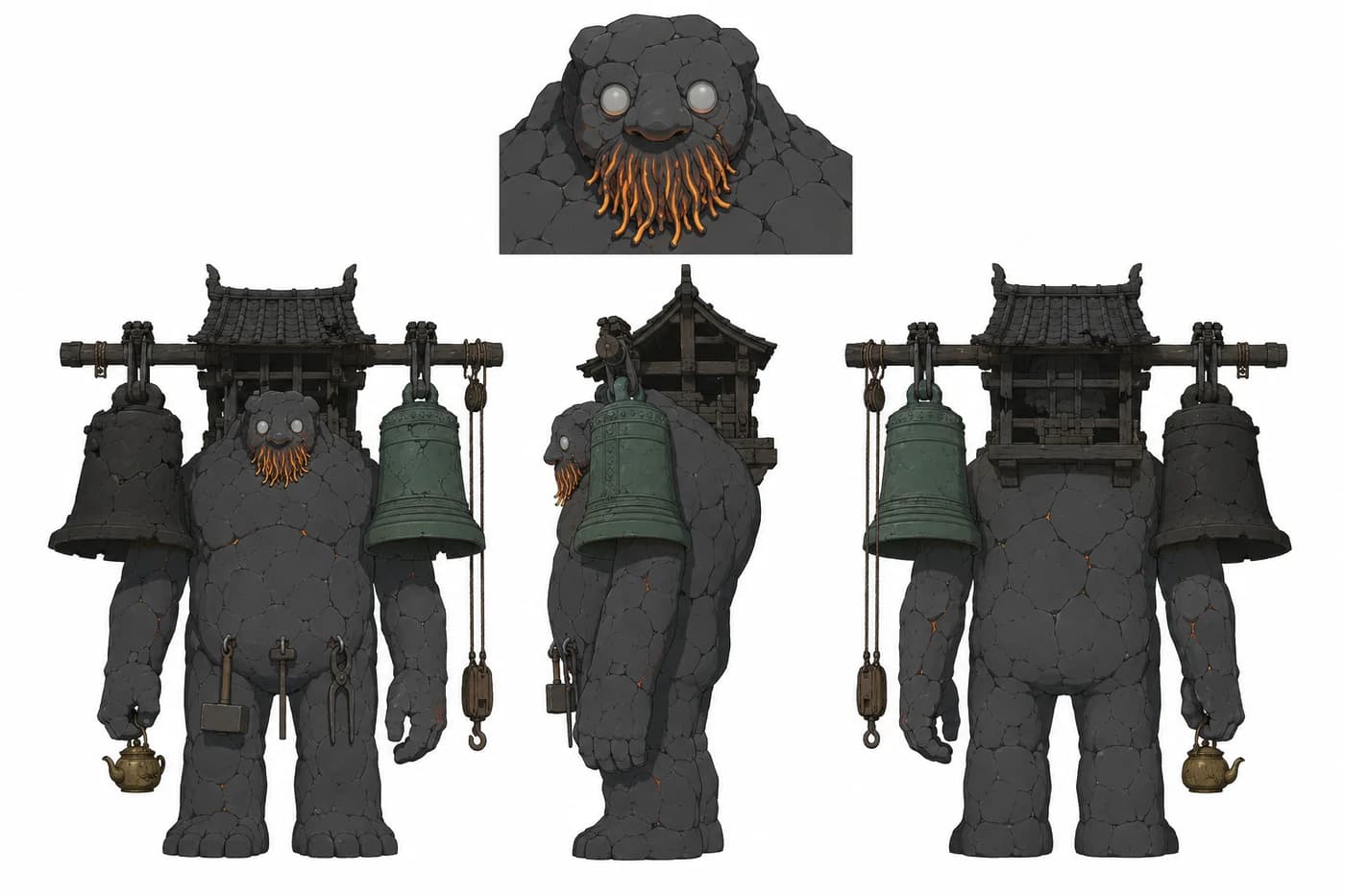
The teapot has nothing to do with his function. It is there because it says who he is, and because props are the first thing to drift. A silhouette survives thirty boards. Props mutate by the fourth: the hammer becomes an axe, the tongs become pliers, the teapot vanishes. Draw them on the sheet, name them in the pinned description, and they come back every time.
Note the head detail inset at the top. Bourdon has close-ups, and a full-body turnaround does not carry enough information about a face at that scale. If a character has a close-up in the episode, their sheet needs a head study.
Design the silhouette so it stays readable when tiny
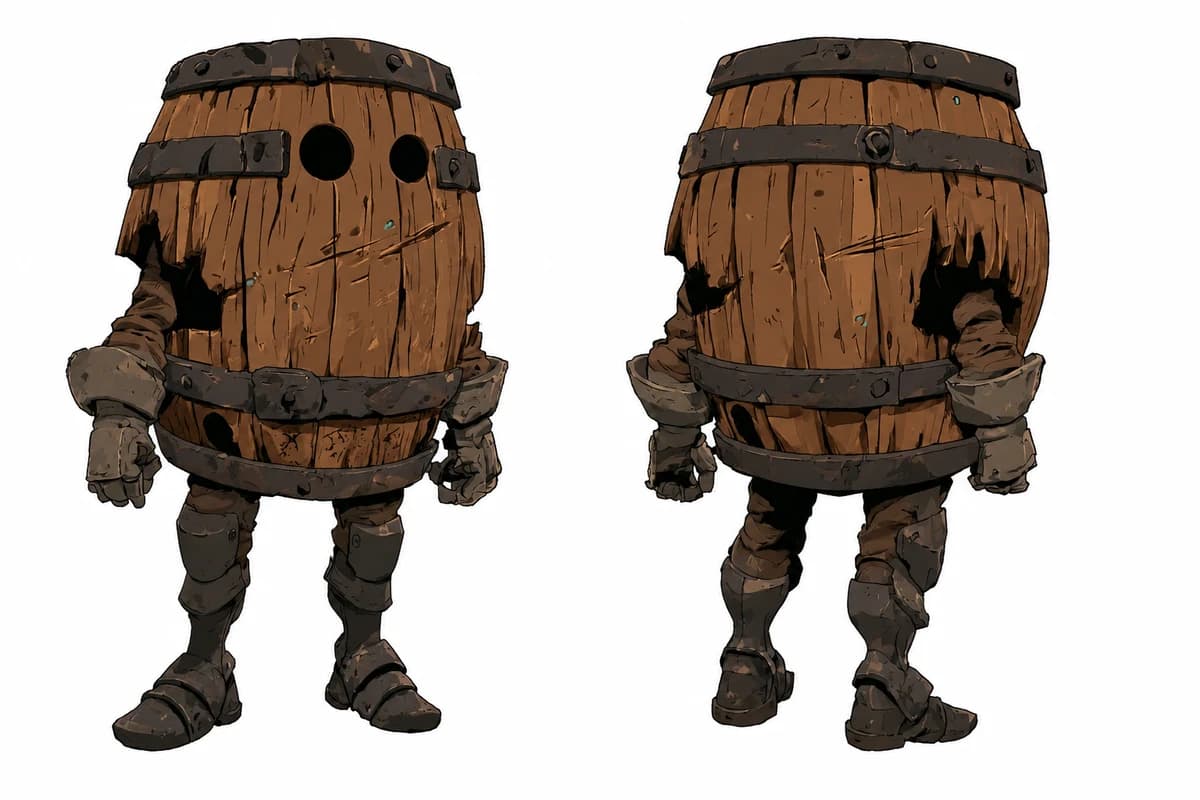
Barrik is a barrel on legs. At forty pixels tall in the timeline strip, he is still Barrik, without the slightest doubt.
It looks like a design joke. It is the design itself. In a series that cuts fast and uses a lot of very wide shots, a character you only recognize in a closer shot is a character you cannot stage.
The test: shrink the sheet to the height of the timeline strip at the bottom of the Storyboard tab. If you cannot tell who it is, the silhouette is not finished. Serrure is a tall, lean vertical with a keyhole. Lanterne is a small block with a ring on top. Bourdon is a mountain with a roof on it.
Barrik also carries the hardest rule in the series, written in capitals at the top of his pinned description: he has no head and no helm. The barrel is his head and his body at once. No dome, no hat, and never the lantern helm, which belongs to the Lantern Knight alone. Without that line, every generation eventually gives him a head, because barrels with faces are not in the training data and knights are.
The pinned description is the only thing the model reads
Here is Bourdon's, as is, exactly as it sits in his moodboard:
Stone giant, the size of a gatehouse. Pale, blind-looking eyes, a beard made of live flame, cracks that light up when he laughs. Casts bells for a kingdom that no longer answers. Laughs first, thinks out loud, decides slowly.
Two things in that paragraph matter more than they seem.
It contains measurable facts. "The size of a gatehouse" is a constraint I can check in an image. "Cracks that light up when he laughs" is a conditional: they light up when he laughs, not permanently. It is the kind of sentence that keeps a character alive instead of frozen.
The last sentence is not about appearance at all. "Laughs first, thinks out loud, decides slowly" is nearly useless for the sheet, and yet it is the most valuable line in the paragraph, because it is what holds his dialogue together over twenty minutes. It is really a play sheet line that slipped into the description, and I left it there on purpose.
The play sheet, the document nobody writes
The third document is the one that changed everything about the characters' performances, and it is written for me and for voice direction, not for a model. It lives in the project's Bible, next to the canon, where the AI agent can actually use it to hold the character's voice.
Mine open with a line that sets the boundary: play sheets, not design sheets. Some of what is in Serrure's:
Height is a ratio, not a number. The canon fixes one thing: Serrure is half a head taller than the Lantern Knight. Never more. The meters are noted as a proposal, flagged as pending approval, because a value in meters is an estimate and a ratio is a fact.
A physical vocabulary. With Lanterne, contact goes through precise, repeatable gestures: two taps on the breastplate, a flick on the lantern helm, a hand on the shoulder, turning the helm by hand to show him where to look. A list of reusable gestures is what keeps a character from having new body language every episode.
A delivery. Warm voice, medium-low, slightly hoarse. About two words per second, with real pauses. And then the sentence that really directs the performance: a line that ends too early is right, a line that runs on is wrong.
A writing tic. Serrure reassures, then undercuts his own reassurance three seconds later, under his breath, without turning around. "I am never wrong... almost never." Once that tic is written down, anyone can write a line that sounds like him, including me at two in the morning.
A rare signal, protected. When Serrure stops joking and his voice drops flat, something is genuinely wrong. The sheet says it plainly: that contrast is the best dramatic tool in the series, and it only works if it stays rare. That sentence has stopped me from using it three times.
The most valuable part of a play sheet is the list of what the character never does
All my sheets end with a "never" section, and it is the part I consult most.
Serrure never shouts to dominate. He does not make speeches. He plays neither the king nor the hero. He does not stumble, he does not lose his footing, he does not get surprised by the scenery.
The Lantern Knight's list is stricter, because he is the hardest character:
- He never speaks. Not a word. He produces only hollow metallic sounds: soft creaks, resonances that sound like breathing, clicks, small timid knocks, a questioning hiss, and a crash when something frightens him.
- He never trips. He does not slip, does not fall, does not bump into the scenery. His comedy comes from his curiosity, never from clumsiness.
- He produces no light of his own, and his medallion is never visible.
The second rule is the one I have had to defend most, because a small round character in a big dangerous world is constantly being handed a pratfall. A character who trips is a character you pity, and this one has to stay brave.
For the other one, here is what "he does not stumble, he does not lose his footing" produces at the end of episode 1, when Serrure arrives to pull the Lantern Knight out of a fight he was losing:
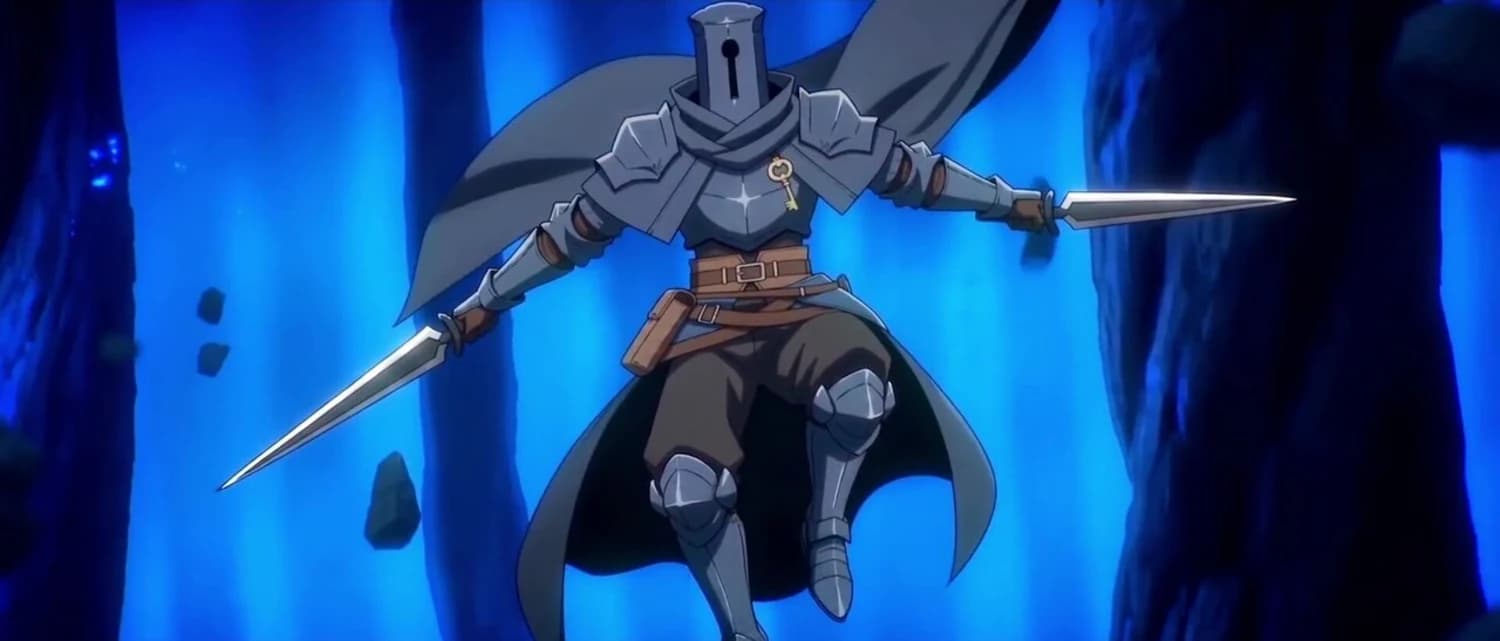
All of the Lantern Knight's emotion therefore has to pass through the body: helm tilts, posture, hand gestures, hesitations. As for the carry ring on his helm, it swings when he moves fast, and it is what plays the trembling when he panics. That ring is a prop doing an actor's job, and it only works because it is on the sheet.
The rest of the cast
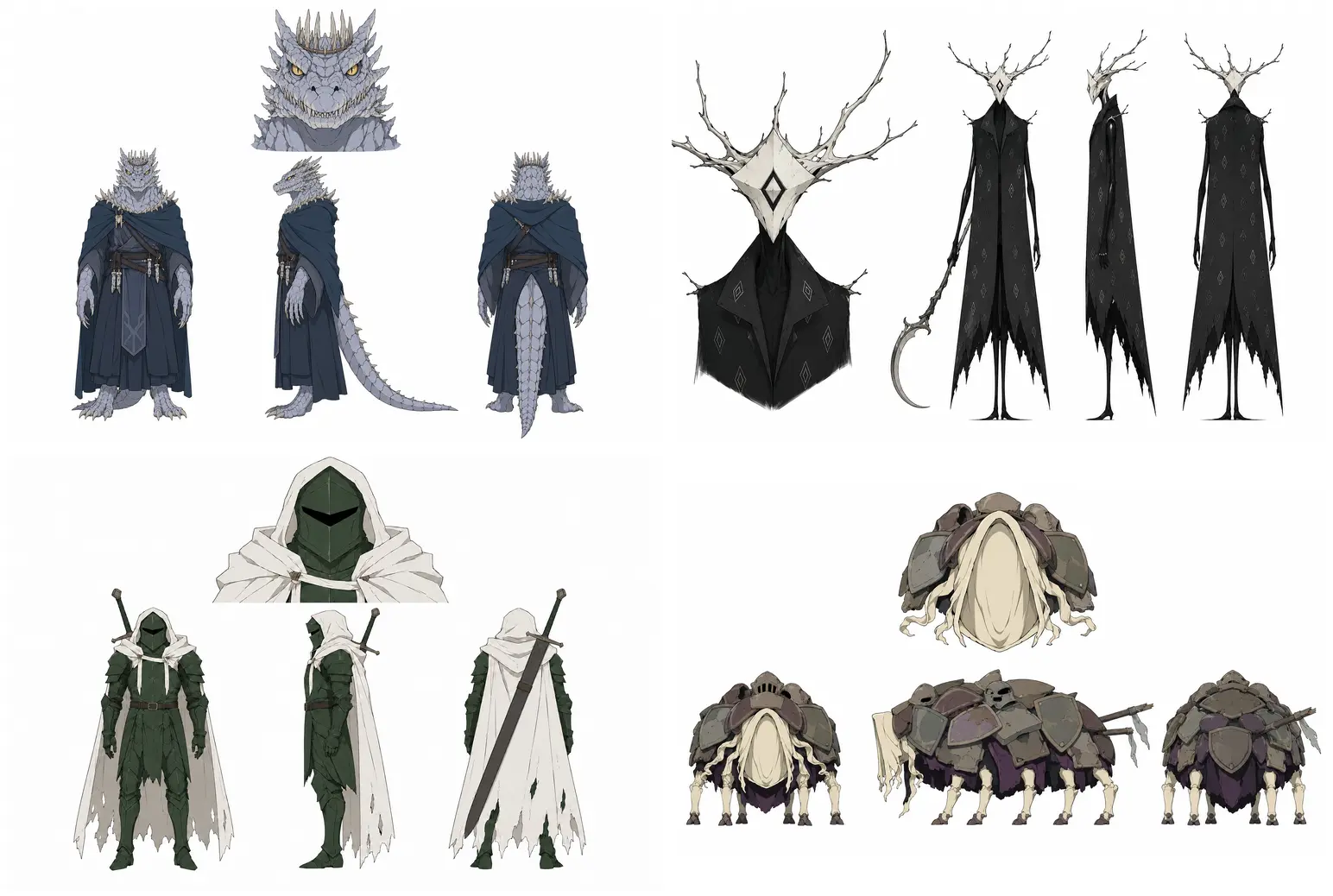
Same treatment for everyone who appears more than once, including the antagonists and the creature fought in the arena. A one-scene character still gets a sheet if that scene runs more than three shots, which, with my short cut, means almost all of them.
Write the description once, generate the sheet once, and every board references it from then on. That is why my two knights still look like themselves at shot 380.
Step 2, continued: let the scene propose its own breakdown
A blank shot list is the slowest page in filmmaking.
Generate shots from scene script reads the scene you have already written and proposes the breakdown, shot by shot, with a shot value, a movement and an action line for each. I keep maybe 60 percent and rewrite the rest, but it is far faster than a blank page, and it consistently catches the shot I always forget.
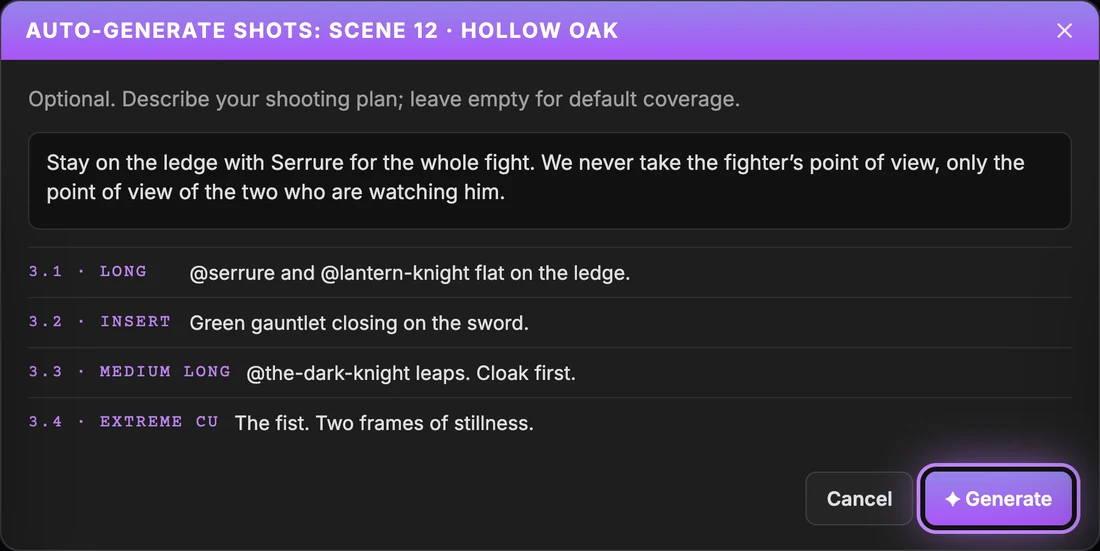
The field above the list is where the work happens. It is where you write your shooting plan in plain language, before anything is proposed. Here is the one I used for the arena fight in episode 2:
Stay on the ledge with Serrure for the whole fight. We never take the fighter's point of view, only that of the two who are watching him.
That single sentence decided nine shots. It is also the entire dramatic idea of the scene: the subject is the two characters watching a stranger fight, not the fight itself. Without that line, the breakdown gives you a decent action scene. With it, you get the scene the episode needed.
Write the intention, not the shots. The shots follow.
And this is where I measured what ScreenWeaver really changed. The storyboard is generated automatically from the scene, but it stays entirely mine: I add a shot that is missing, I change a framing, I re-edit an image, I delete what serves no purpose. The result is that I see the film before it is produced. Every scene of episode 2, I watched board by board, with its continuity and its rhythm, before spending a single credit on video.
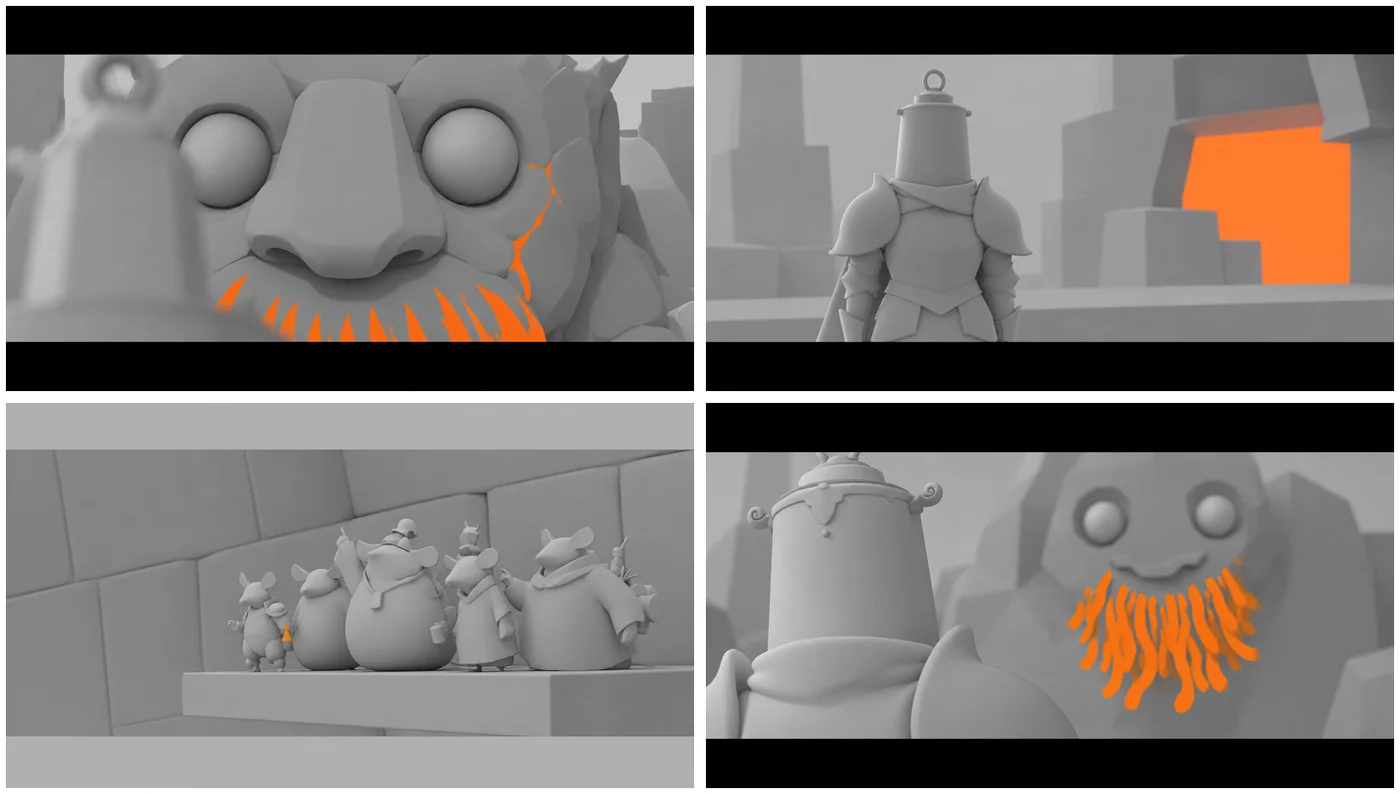
Here is the same tab on a completely different scene, the arrival at the castle. Ten shots, other entities, another intention: scale first, faces later.
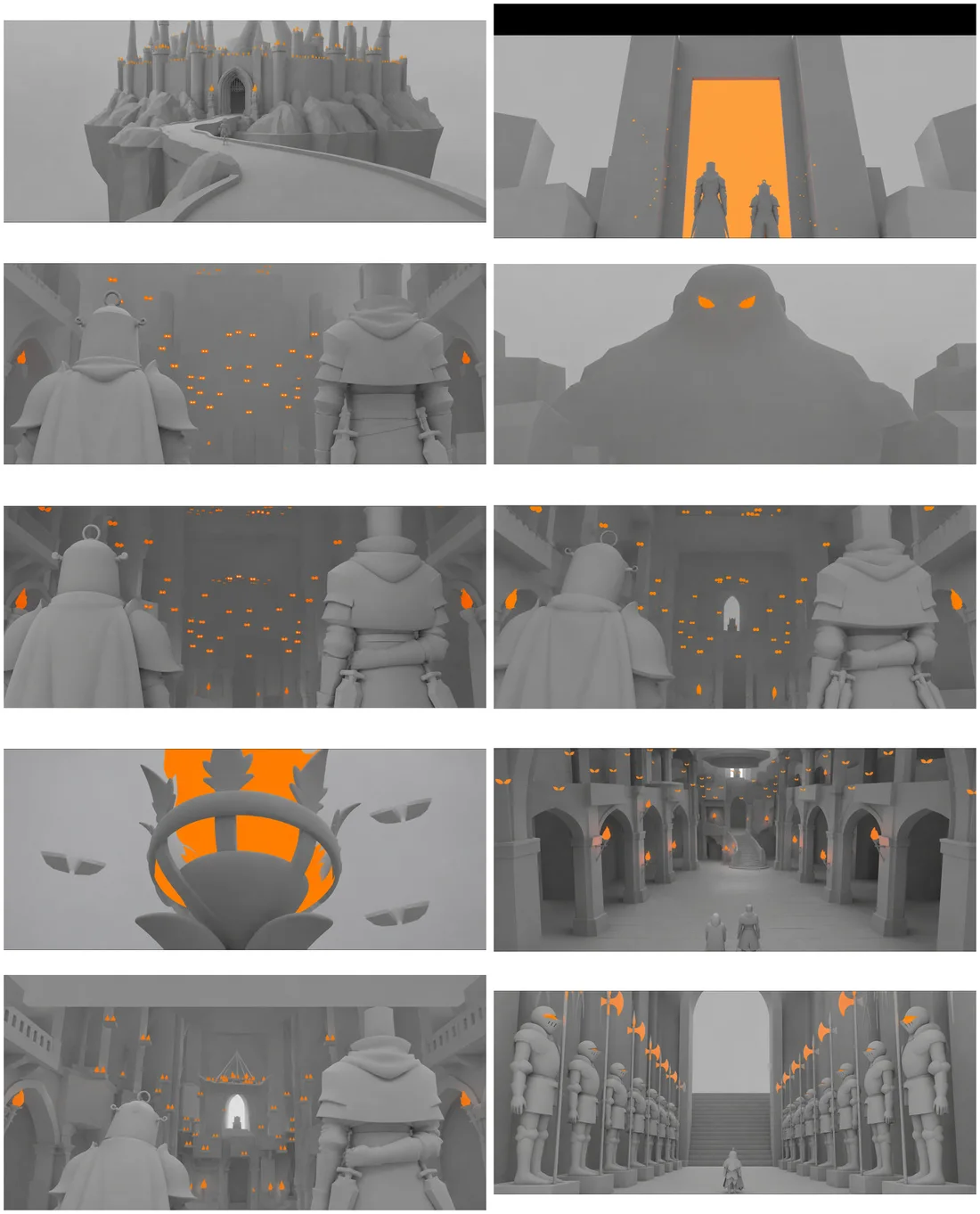
And the ten boards on their own, outside the interface. Gray blockout, flat orange where the flames are, no faces. A board is there to settle framing and staging, and a pretty board lies about both.
The shot panel: three fields, and all three go into the prompt
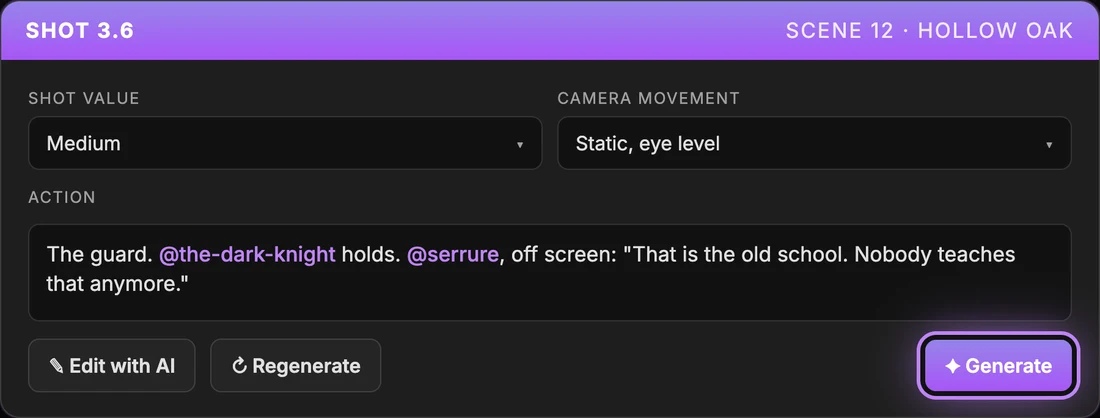
Every shot in ScreenWeaver carries three fields, and they are exactly the three things a board needs:
- The shot value, from a fixed list: extreme long shot, long shot, medium long shot, medium shot, medium close-up, close-up, extreme close-up, insert, over the shoulder, POV.
- The camera movement: static, slow push-in, slow lateral dolly, whip pan, handheld.
- The action line, the only free text, which references entities by their handle.
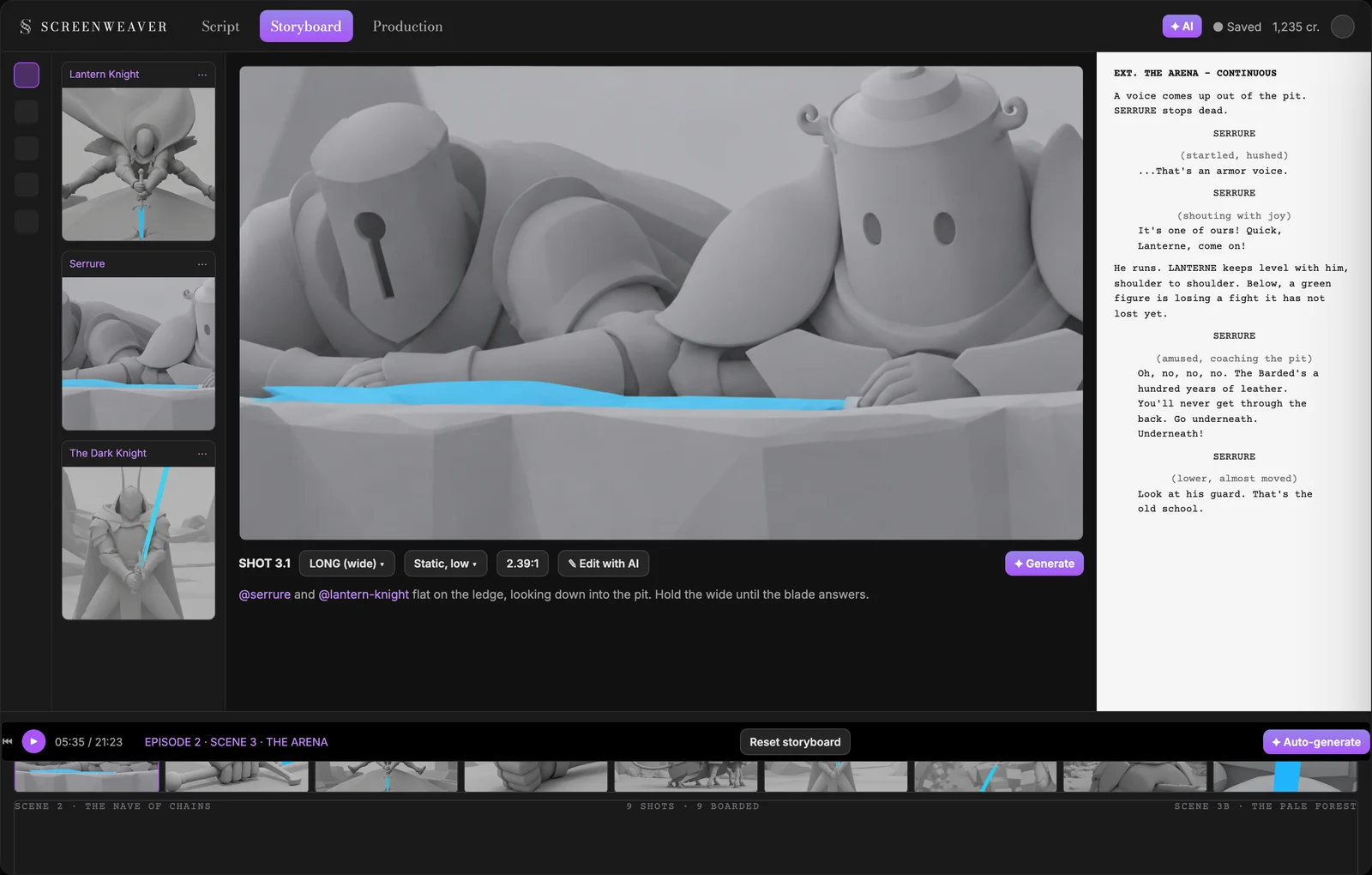
The action line for shot 3.1 reads:
@serrure and @lantern-knight flat on the ledge, looking down into the pit. Hold the wide until the blade answers.
The @ handles point to the character sheets, so the board is generated with the right knights in it. The second sentence is a timing note to myself that no model reads, and that decided the cut point in the edit.
Those three fields and the references are what ScreenWeaver assembles into the prompt. I never write the final prompt by hand, and I am certain nothing is missing from it: not the shot value, not the movement, not the characters, not the constraints of the board. Everything is optimized upstream. When you have four hundred shots to get out, never again wondering "what did I forget in this prompt?" is an enormous relief.
One more thing about that free text. "Cinematic" gives you nothing. It is the most common word in AI film prompts and it carries no information. Name the device instead: negative space, chiaroscuro lit from below, two-shot staged in depth, extreme long shot with the subject at one eighth of frame height. The shot value field already does half of that work, and that is exactly why it is a list and not a text box.
Edit with AI, Regenerate, and which to use when
Two buttons on every shot panel, and they are not the same button.
Regenerate reruns the same prompt. Use it when the framing is right and the render is not.
Edit with AI takes an instruction and modifies the existing board: lower the camera, shift Serrure to the left, make the fire bigger. Use it when the render is right and the framing is not. It is far cheaper than a reroll, because you keep what was working.
On episode 2, the ratio was about 2.4 generations per kept board, so a little under a thousand generations for 400 shots. If you are rerolling six or eight times for one usable board, the problem is almost never the model. It is that the action line does not name a device, or the shot does not point to any character sheet, or the shot simply should not exist.
Auto-generate, and the order it imposes on you
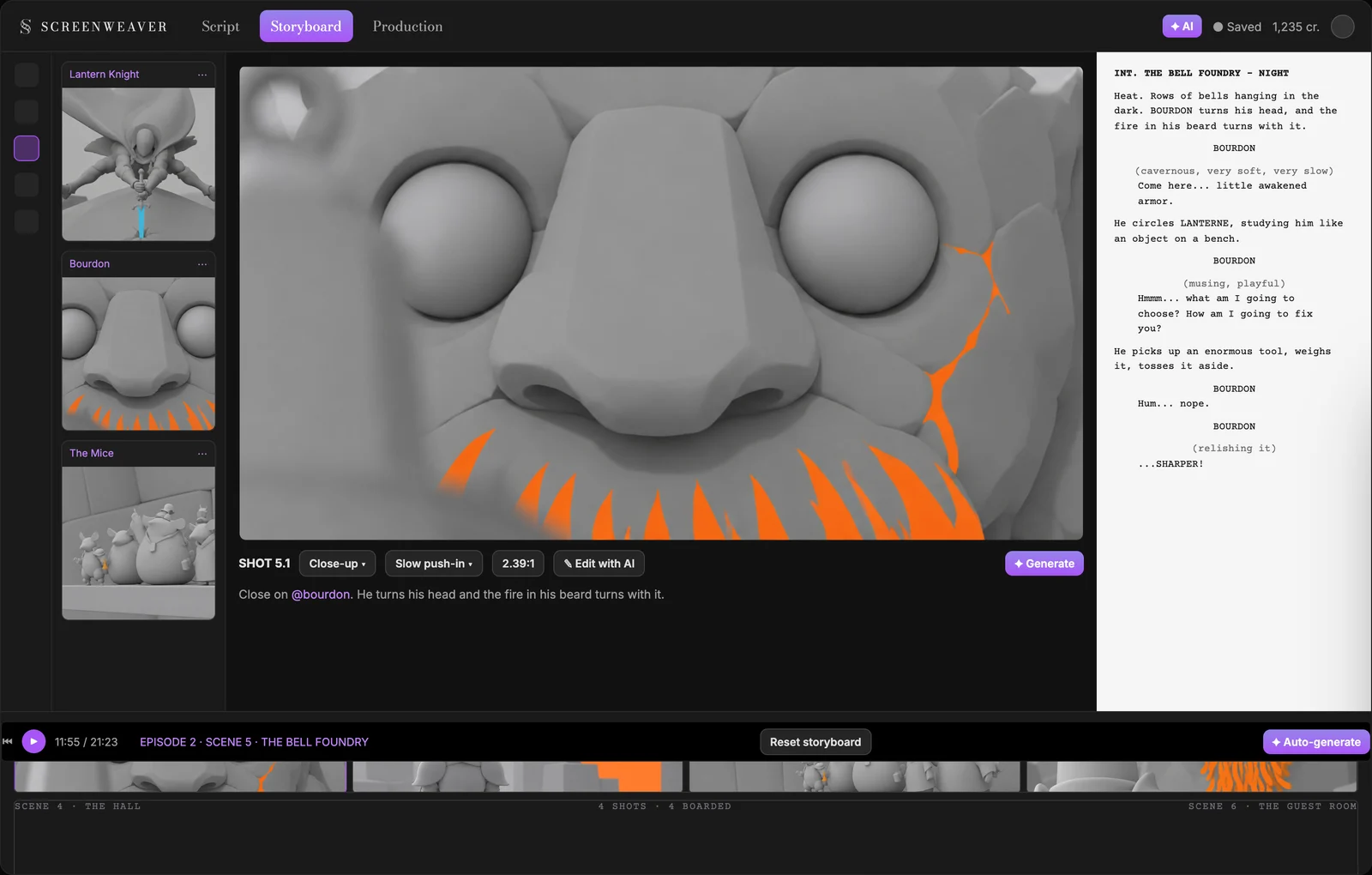
The Auto-generate button, in the timeline bar, opens a dialog with three jobs, in this order: missing character sheets, then empty scenes without a breakdown, then missing shot images. Run all chains them, up to three in parallel per step.
That order is the method. Sheets before shots, shots before boards. The dialog refuses to generate boards for a shot whose entities do not have a sheet yet, and it tells you why. The first time it blocked me, it annoyed me. The tenth time, I understood it had just spared me an entire scene of drifting characters.
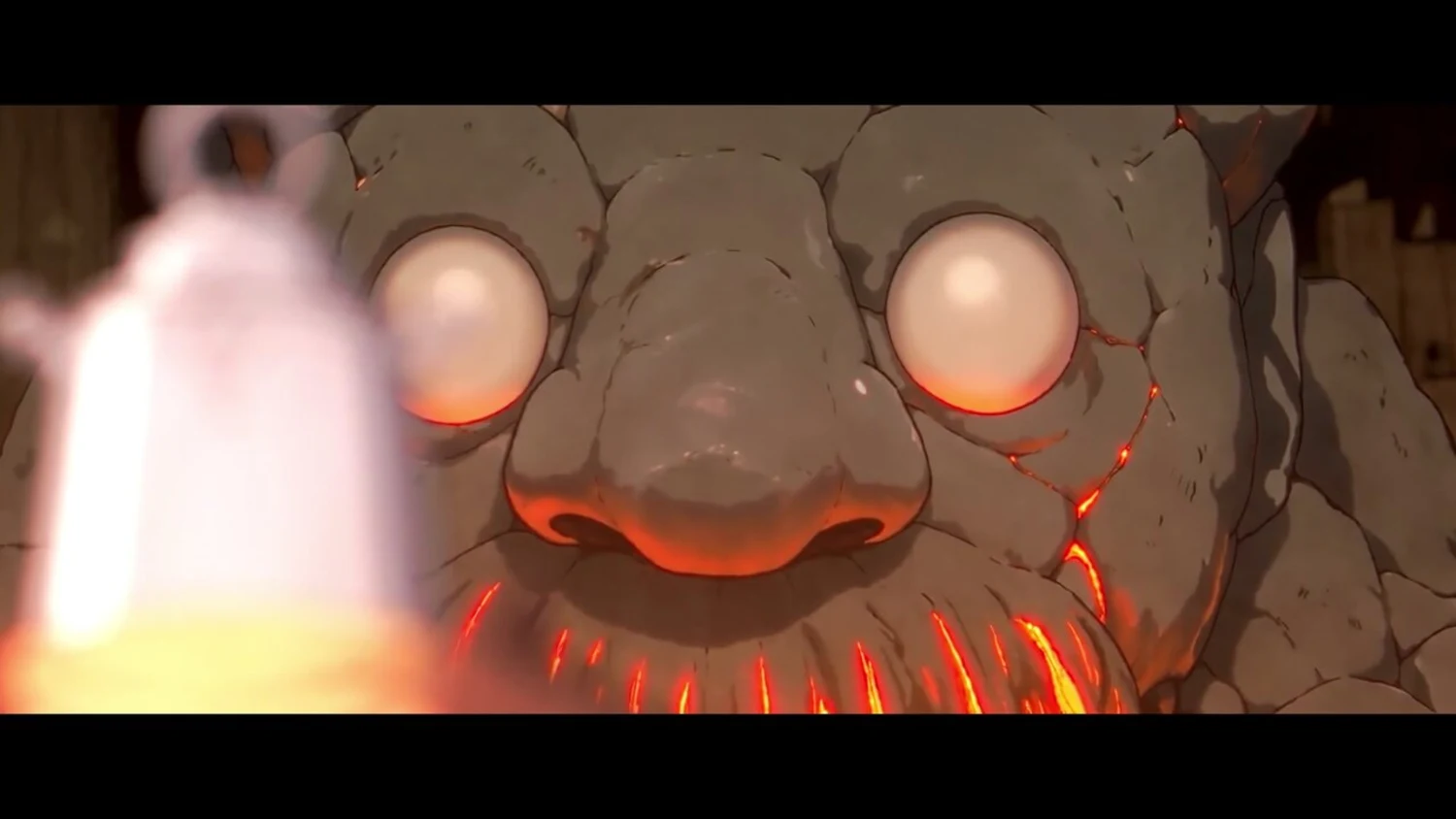
Here is what that pass produced on the foundry scene: untextured gray clay, featureless mannequins, and the fire flagged in a single flat orange, because that is what a board is for. Everything in gray, one color on the thing the shot is about.
And here is the same scene in the finished episode:
Lock what is right, import what you already have
Two features of the Storyboard tab that look minor and are not.
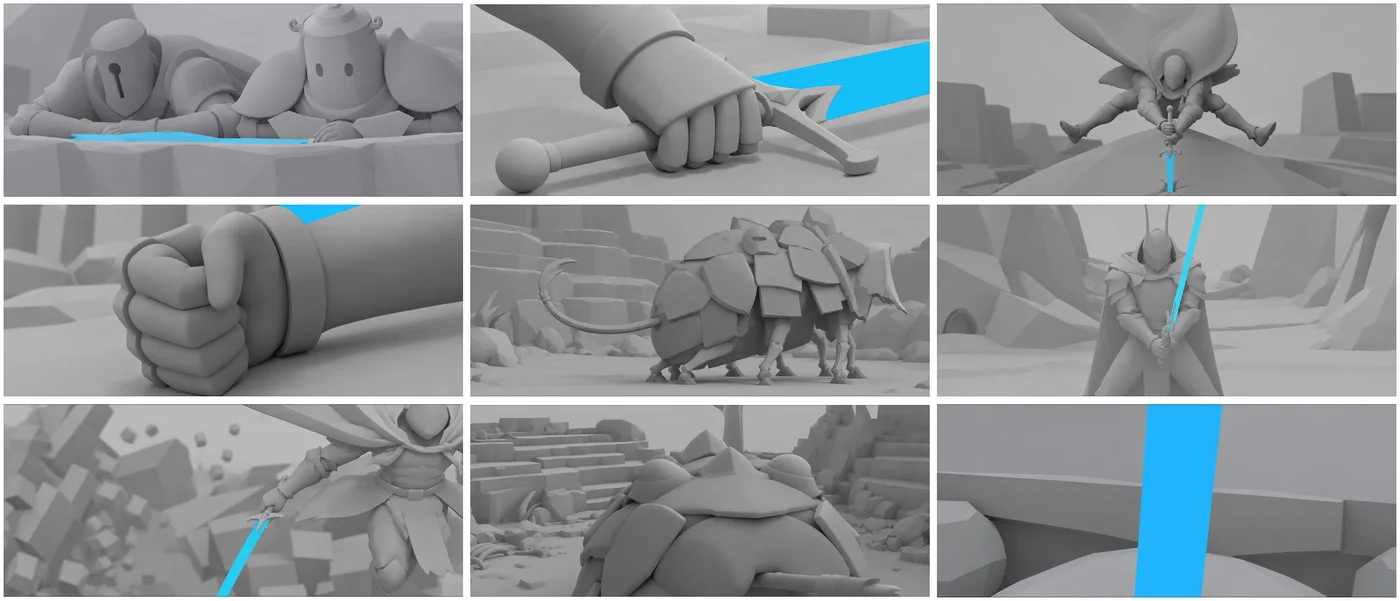
An approved board can be locked. A locked board is never touched by Run all again. Once the arena scene was right, it stayed right through the next three passes on the rest of the episode.
And you can import your own images as boards: your own references, your own renders, a frame from a previous episode, whatever. Lost Garden did not need it much, but it is the door through which an already started project walks in.
The arena, locked. Nine boards, the blade flagged in cyan, and not one of them moved after that.
Try it free
Try ScreenWeaver for free on your script
It is free. Import your existing project, get a clearer view of your outline, and regain control of your story structure in minutes.
Start FreeStep 3, Build: the workflow engine
This is the part that turns a board into a finished shot.
ScreenWeaver's Production side is a node graph. Not a form with a Generate button, an actual graph you can read: source scene, frame direction, references, image, video, outputs. The graph arrives pre-wired from the script context. The scene's text, the shot's action line and the entities' character sheets are already connected to the right nodes when you open it.
This is where the single space makes complete sense. Nothing you decided in the Script and Storyboard tabs needs to be re-entered. The character you described, the board you locked, the line you wrote: all of it reaches the video model as is, and that is exactly why the result stays consistent from one shot to the next. Going from the Storyboard tab to the production graph without changing windows, without exporting a folder of boards, without retyping a single action line, is extremely comfortable. And above all, those are hours that no longer go into logistics.
Every node is editable, and that is the sentence that matters. The pre-wiring removes setup, not control. Changing the image or video model means swapping a node, not rebuilding a pipeline, and that is what lets a series survive the model rankings changing under it.
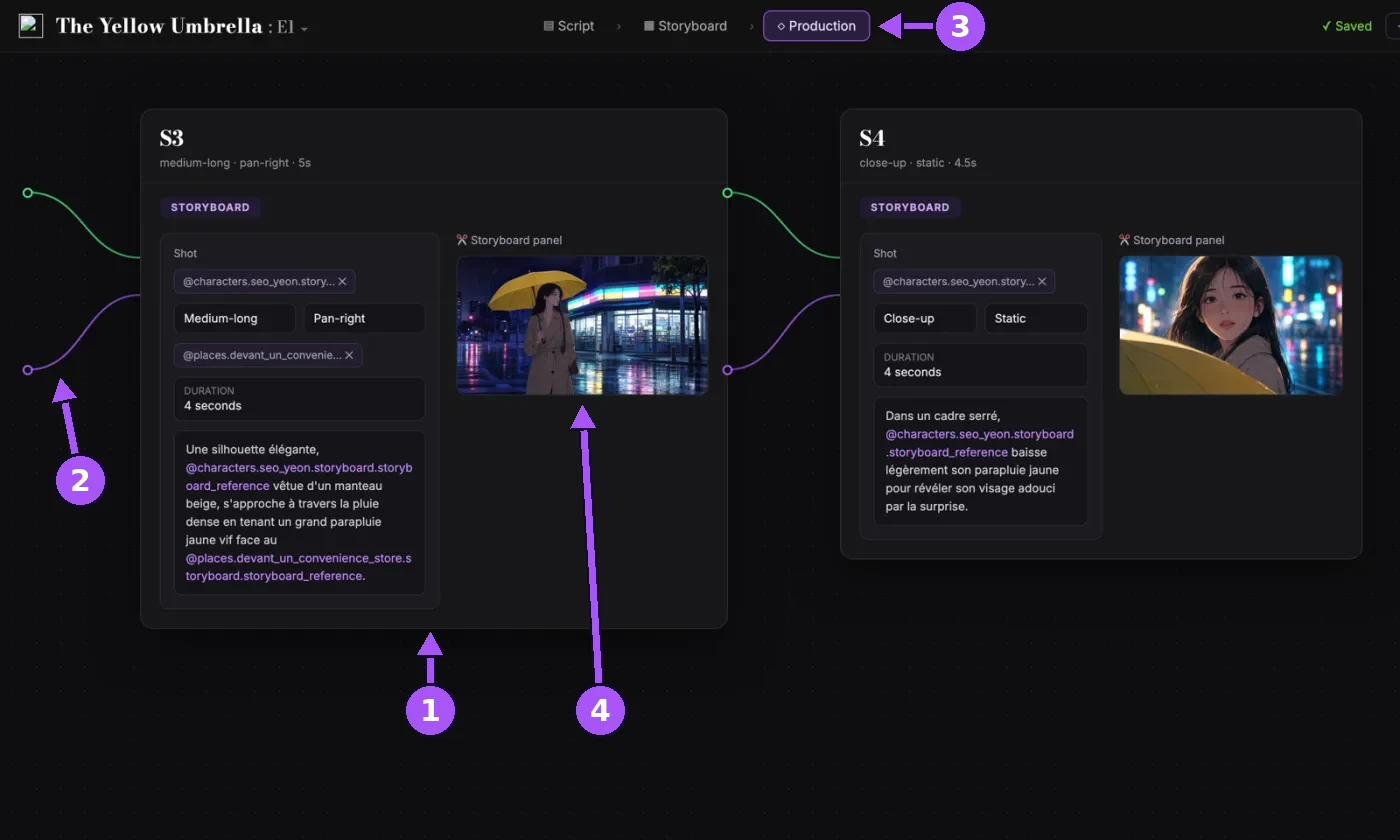
On this screenshot: (1) a shot node, pre-filled with the shot value, movement, duration and action line; (2) the inputs wired from the screenplay and the references; (3) the Production tab, without leaving the interface; (4) the storyboard panel, already plugged in as the image reference.
What the graph looked like for a Lost Garden shot
For a typical shot in episode 2:
- Source scene carries the screenplay text and the shot's three fields.
- Frame direction turns that into the image prompt, with the compositional device named.
- References attaches the character sheets of every @ handle in the action line.
- Image produces the production image. This is where the approved board comes in as the reference: the model is asked to render the board, not to invent the frame.
- Video takes that image, the movement field, the line of dialogue and a short reference recording of the character's voice, and produces the clip with the voice in it. Seedance 2.5 for Lost Garden, and the model is a node you can swap.
- Outputs gathers images, clips and rushes, versioned.
The voice deserves a sentence of its own. Almost every line in both episodes was spoken by Seedance 2.5 from a reference audio of the character: a few seconds of Serrure sounding like Serrure, attached to every shot where he speaks. One reference per character is what keeps a voice identical across four hundred shots. No separate voice pass, no separate audio tool: the clip comes out of the node already speaking.
Every video prompt in that graph carries one fixed instruction: no music. If you let each clip generate its own sound bed, thirty-nine clips sound like thirty-nine films, and you cannot fix that in the mix. Music is a separate pass on the finished cut, further down.
Versions and review, where the money is decided
Outputs are versioned. Every generation of a shot stays attached to the shot, next to the previous ones, and you choose. It sounds like a storage feature. It is a budget feature.
The expensive mistake in AI filmmaking is generating beautifully for a week and realizing you have a moodboard instead of a sequence. Comparing takes of a shot side by side, in the graph, is what lets you notice that the one that cuts is rarely the prettiest. Made there, that decision costs nothing. Discovering it in the edit costs a day, and credits thrown out the window.
One line, all the way through
Everything above is easier to believe by following a single example. Here is one line from episode 2, from the Bible to the finished shot, with the ScreenWeaver step it lived in.
1. The play sheet says what kind of line this is (project Bible, AI agent)
Serrure's sheet says he thinks out loud, that he asks questions he already knows the answer to, and that a line that ends too early is right. It also says that the moment he stops joking and his voice drops flat is the rare signal.
This is that moment. He has just heard something in the pit. So the line has to be short, and it has to be an observation he makes to himself before making it to anyone else.
2. The screenplay (Script tab)
EXT. THE ARENA - CONTINUOUS

A voice comes up out of the pit. SERRURE stops dead.

                    SERRURE
              (startled, hushed)
        ...That's an armor voice.

                    SERRURE
             (shouting with joy)
        It's one of ours! Quick, Lanterne... come on!
Four words carry the episode's theme: they have not run into one of their own in a very long time. The parenthetical serves as direction for the voice pass, four steps later.
3. The shooting plan (Generate shots from scene script)
Stay on the ledge with Serrure for the whole fight. We never take the fighter's point of view, only that of the two who are watching him.
4. The shot (shot panel)
Shot 3.1. Long shot, static, low angle. Action line:
@serrure and @lantern-knight flat on the ledge, looking down into the pit. Hold the wide until the blade answers.
5. The voice (Video node)
The line goes into the video node with Serrure's reference audio, exactly as written in the script: the parenthetical, the ellipsis, the pause.
The leading ellipsis on "...That's an armor voice." breaks the attack. Without it, the line starts loud and the beat is lost.
"Quick, Lanterne... come on!" is one sentence, not two. As two fragments, it came out as two rising shouts. Joined by an ellipsis, it reads as a single impulse.
The two seconds of silence before and after the reveal do more than any adjective, and they are written into the prompt, not left to the model. The silence is the performance.
6. The board, and the shot rendered from it (Storyboard tab, then Build)
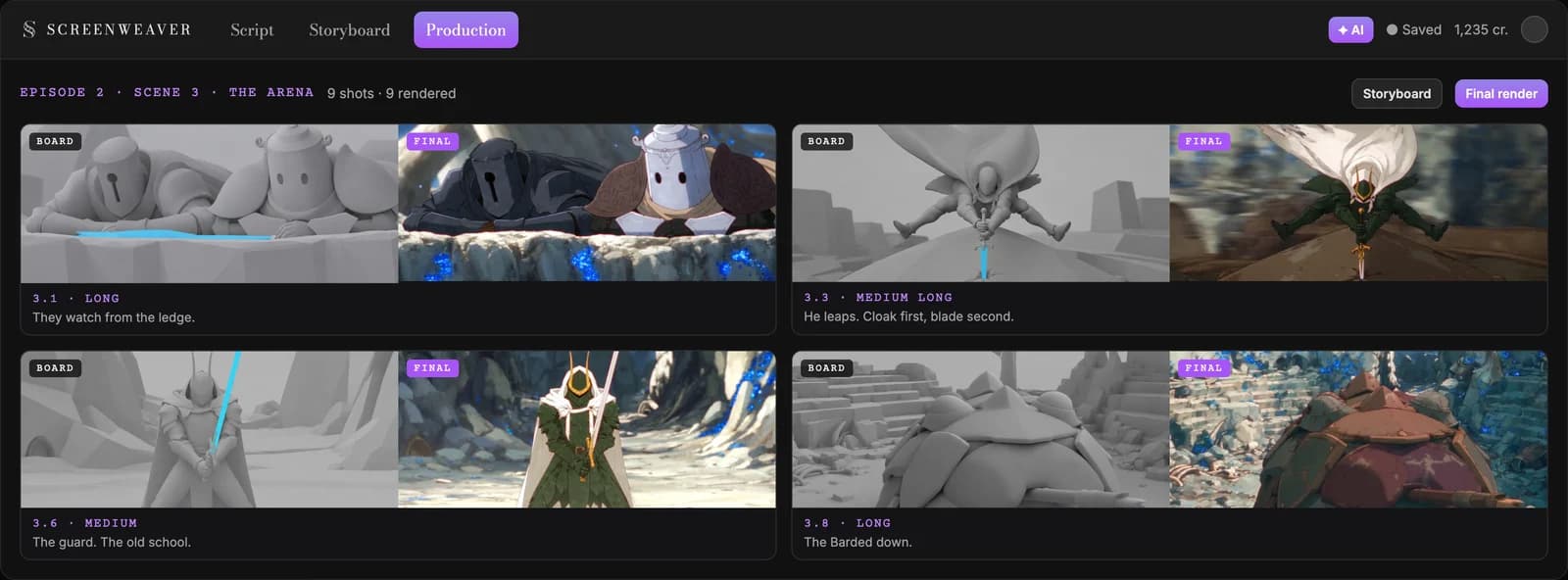
Top left is shot 3.1: two knights flat on a ledge, looking down, held wide. Same framing in the board and in the film.
That is the whole pipeline in a single shot. A Bible rule produced a line, the line produced a parenthetical, the parenthetical produced a voice direction, the shooting plan produced the framing, the framing produced the board, and the graph rendered the board into a clip. And all of it without leaving ScreenWeaver once.
The finishing pass: what happens to ScreenWeaver's outputs
Everything that follows happens on the exported clips, voices included. It is short, and every item is a lesson that cost me a take or a render.
Why empty armor is the best decision I never made
My protagonists are empty suits of armor. They have no mouths. There is never any lip sync to match.
That sounds like a detail. It is the reason the voice could live inside the video node. A take where the voice is right and the picture is not, or the reverse, never forces you to redo the other, because there is no mouth to line up. Rewrite a line, regenerate the clip, nothing else moves.
If you are designing an AI series from scratch, decide this before you draw your characters. Helms, masks, creatures, animals, anything without a visible mouth gives you enormous production freedom.
Music, on the locked cut
Six original tracks, written to picture once the cut was locked, in a single pass, one ear over the whole episode. Cut first, compose second. Cinema has done it that way for a century, and the audio button on a video model pushes you to abandon it.
| Working title | Length | Where it sits |
|---|---|---|
| Inexorable Ascent | 5:00 | the long climb, the scale of the world |
| Song of the Empty Sky | 5:00 | the open passages, the world as it has become |
| Clockwork Requiem | 3:30 | the machines, the things that still run |
| The Giant and the Knight | 3:30 | the bell foundry, Bourdon |
| Ash Lantern Prayer | 3:18 | the quiet vigils |
| The Knight's Lullaby | 2:30 | the lullaby motif, reprised across both episodes |
They were renamed for release, because a working title says where the music sits and a release title has to stand on its own as a track. Two jobs, two names.
The edit, and one encoding setting
The edit is done in DaVinci Resolve Studio, the paid version. Around 400 clips per episode, a node graph for the color grade, and one master that then becomes every delivery format.
If your source is a long master and ffmpeg sits at zero percent CPU, it is not stuck, it is analyzing the file. Give it room: -probesize 20M -analyzeduration 10M. And on the final mix, -x264-params no-fast-pskip=1 is worth its few percent of bitrate, because large flat dark areas, which is most of this series, otherwise develop blocking that looks like a frozen frame.
Subtitles, and a free trick for catching hallucinations
Both episodes are subtitled in English and French, with word-level timestamps so the subtitle lands on the word, not next to it.
Whisper produced six phantom "I'm sorry" lines over instrumental passages in episode 1. To catch them for free: re-transcribe the suspicious passage on its own. Real speech transcribes identically every time. A hallucination does not: the same eight seconds of music that gave "I'm sorry" in the full pass gave "I'm not going to die" in isolation. Disagreement between two passes is the signature. That check removed every phantom line and kept every real one, including a whispered "Find me" at the eighteenth second.
Two more things: burn the subtitles before turning a landscape master vertical, never after. And measure your black bars first. My master has 130 pixels of black at the top and bottom, so the subtitles sit in the bar and never cover the picture.
Distribution
The full episode goes on YouTube. The vertical version, converted to 9:16 with burned-in subtitles, goes on TikTok and Instagram. One discovery that saved me a re-edit: on Instagram, a video post allows sixty minutes, a Reel allows three. The full episode goes up as a post.
What it cost, and where the time went
$1,850 and 75 hours for episode 2. Seventy-five hours is about nine working days for twenty-one finished minutes.
The largest line item is generation through the workflow engine, voices included, since they come out of the video node. Music comes next. Writing and storyboarding cost time, not money.
The interesting number is the ratio between deciding and generating. Every hour spent on the storyboard saved me about five hours generating shots I did not need. That is the whole economics of this kind of production, and it is why the pipeline starts in the Script tab rather than at the video node.
What the number does not show is the time I did not spend. No round trips between three tools, no prompt rewritten by hand for every shot, no character sheet redone because a character had drifted at shot 200. Every AI filmmaker knows those hours. On episode 2, they disappeared, and that, of course, is why 75 hours were enough for 21 minutes.
What I would do differently
Write the pinned descriptions before the first board, not after the tenth. I learned consistency the hard way on episode 1 and did it properly on episode 2.
Decide shot length before the breakdown. A short cut as on Lost Garden or twenty-second held shots, that is not a post-production decision. It changes the shot count completely, and it belongs in the shooting plan.
Design at least one main character without a mouth. The production freedom it gives is out of all proportion to the constraint.
Lock boards as soon as they are right. Run all is fast and it will happily redo a scene you had already finished, if you have not told it not to.
Where to go next
If you want the pipeline in broad strokes rather than this case study, start with the AI filmmaking workflow from script to screen. If you want to see it in action, how to make an AI film is the step-by-step demonstration. If only the storyboard step interests you, the storyboard generator and how to generate a storyboard from a screenplay with AI cover it properly.
If you take one thing from all of this: the generator is never the bottleneck. What makes an episode is a script, a storyboard and a production that live in the same place and answer each other. That is what ScreenWeaver gave me at every step, and that is what allowed me, alone, to put out 38 minutes of anime. Script, storyboard, video production, on a single interface: I am not going back.
And if you too have a script in a drawer because the budget never came, know that it is no longer a reason. That dream cost me $1,850 and 75 hours, not $300,000 and years of waiting. It is online, it runs 38 minutes, and you can watch it tonight.
Both episodes are free to watch. Episode 1, episode 2, and everything else at lostgarden.world. Episode 3 is being written in ScreenWeaver right now, and Barrik, the barrel, is the one carrying it.
From script to shots
Turn your script into a film, shot by shot
Write the scene, get its storyboard, then generate each shot with consistent characters. You direct every step.
Start your film free