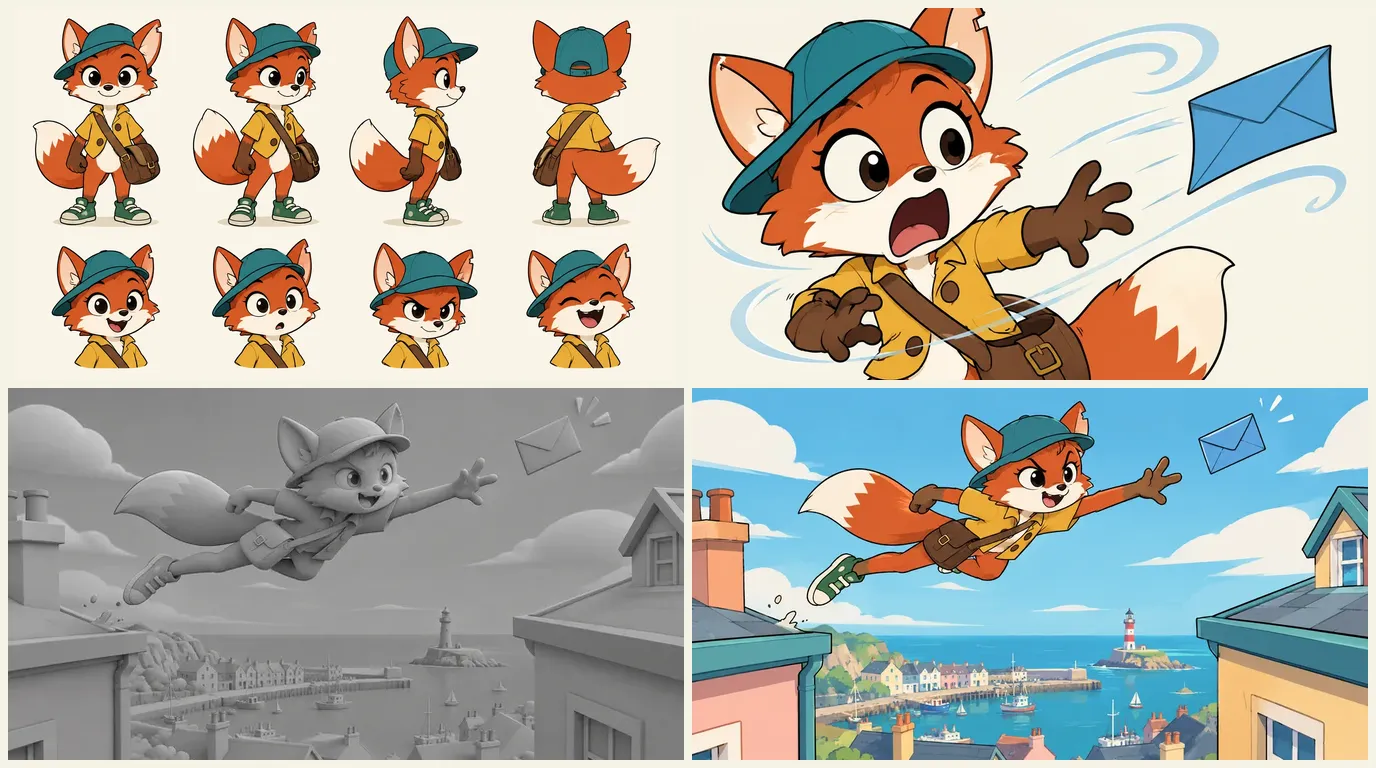

The short answer: treat your cartoon as a show, not a clip. Write a short script, make one model sheet per character, write a flat-colour style plate, board every shot, then generate each shot with the sheet attached, one beat per shot. Our demo, Mila's Delivery, is six shots and 12 seconds built from a single model sheet.
Ask a video model for "a cartoon fox" and you will get a charming one. Ask again in the next shot and you will get a different charming fox: another cap, another tail, eyes a size bigger. One good image is easy. The same character in shot 1 and shot 40 is the whole job.
This guide covers the 2D cartoon look: the modern TV cartoon, the storybook short and the retro rubber hose style. For Japanese-style anime and its timing on twos, read how to make anime with AI. For rounded, lit, studio-style characters, read how to make 3D animation with AI. Same pipeline, different visual rules.
Our running example is Mila's Delivery, a six-shot scene the ScreenWeaver team made for its cartoon page: a fox courier, a runaway blue envelope, a smug seagull and an old turtle waiting for his letter. Every image below is the real thing.
What you need
- Time: for a first project, a 30 to 90 second scene with one character and one location. Most of the time goes into the model sheet and the board.
- Budget: writing the script is free. Storyboard and video generation use credits, see the pricing. The bill depends on your shot count and your takes per kept shot.
- Hardware: a computer and a browser. Nothing renders on your machine. A phone is fine for writing, not for comparing boards side by side.
- Level: no drawing skills required. If you can draw, upload your own designs.
- Other tools: an editor, and a source for voices and music. ScreenWeaver does not generate voices or music and does not export a finished edit.
What makes a cartoon read as a cartoon
The model knows cartoon images. It does not know your rules. Decide them first.
1. The silhouette reads in black. Fill your character with solid black and you should still recognise them. Mila has tall ears, a cap tipped to one side, a satchel on her hip and a big white-tipped tail. A shape that only works in colour turns to mush on a phone screen.
2. Flat colour, one shadow tone, an outline that holds. Each surface gets a base colour and at most one darker tone. Outlines keep the same weight from shot to shot. Backgrounds can be softer and more detailed, like painted backgrounds behind flat cels, but the characters stay crisp. When gradients appear on a face, the cartoon is drifting toward a 3D render.
3. Snap, don't float. Cartoon motion alternates holds and fast moves. Television animation built a grammar on economy: reused drawings, still characters, only a mouth or an arm in motion. Hanna-Barbera adopted it after 1957, partly because it suited the small home screen (Wikipedia, Limited animation, accessed 8 October 2026). Video models glide everything. Short shots and written holds fix most of it.
4. Expressions bigger than life. The take, the double take, the jaw on the floor. A model only exaggerates when the action line asks for it.
5. One goal per scene. Mila wants to deliver one letter. The wind, the rooftops and the seagull are obstacles to that one want, which keeps every shot simple to stage and to generate.
6. A cartoon comes back. Cartoons are watched in episodes and weekly shorts. You are not making one clip, you are making the first of many.
Never prompt "in the style of" a show or studio
Two reasons. Rights: studio names are trademarks and their characters are protected, so a copied design is not something you can own or build a channel on. Technique: the model has no "studio style" stored anywhere. It averages everything near the name and gives you the same generic look as everyone who typed it.
Describe properties instead: outline weight, flat colours, shadow tones, how limbs bend, how backgrounds are painted. "Rubber hose" is a good example because it is a historical technique, not a brand: jointless, bendy limbs, popular from the 1920s to the early 1930s (Wikipedia, Rubber hose animation, accessed 8 October 2026). Write "jointless bendy limbs, round simple shapes, bouncy loops, black and white" and you get the feel without borrowing anyone's characters.
The method, step by step
1. Logline and a one-page series bible
One sentence: a character, a want, an obstacle. Ours: a fox courier has one letter left to deliver, and the wind has other plans.
Then write a one-page bible that every episode will reuse:
- Cast: each recurring character in two lines, with colour keys.
- Places and objects: the locations you return to, and the props the gags turn on (for Mila, the satchel and the blue envelope).
- Palette: five named colours.
- Format: 16:9 for YouTube or 9:16 for vertical shorts. The board is generated in the project ratio, so decide now.
- A "never" list: no readable text, no soft shading on characters, no second tail.
For the full anatomy, read TV series bibles: the essential components.
2. Write the script
Use screenplay format, even for 20 seconds. It forces you to decide what each shot shows, and ScreenWeaver's AI shot breakdown reads it directly. The editor is free on the Screenwriter plan, with PDF and Final Draft export.
- One action line, one image. "A gust plucks the envelope out of the bag" is a shot. "Things go wrong" is not.
- Write the take. "Her eyes go huge" tells the board and the model what to exaggerate.
- Keep dialogue short. Cartoons carry the story in the picture. Three words land better than a paragraph.
Go deeper with writing for animation vs live action and formatting physical comedy and slapstick.
3. Reference sheets: characters, places, objects
Every recurring character gets a model sheet before any shot. In ScreenWeaver, Characters, Places and Objects each get a reference sheet, generated with GPT Image 2.5 or Nano Banana 2, or uploaded from your own drawings. This step decides the film, so it has its own section below.
4. Art direction: one style plate
Write the look once, in visual terms, and keep it identical in every generation. For Mila's Delivery: modern 2D TV cartoon, bold clean outlines, flat cel colours, one shadow tone, soft painted backgrounds, no gradients on characters, no readable text. The palette, sampled from the finished shots: fox orange, cap teal, jacket mustard, harbour sky, paper cream. Give the hero one colour nobody else wears. Mila's teal cap is what your eye finds first in the rooftop shot.
Another style means another plate, not another method. Storybook: thinner lines, watercolour backgrounds, slower pacing. Rubber hose: jointless limbs, round heads, black and white. Social shorts: the TV plate framed for 9:16, character big in frame.
5. Storyboard every shot
The board is where you see the scene before you pay for it. ScreenWeaver reads each scene and proposes a shot breakdown with shot size, camera movement and action; you keep what works and rewrite the rest. The boards come out as grey 3D previz frames. Without colour, you judge framing, staging and silhouette, nothing else.
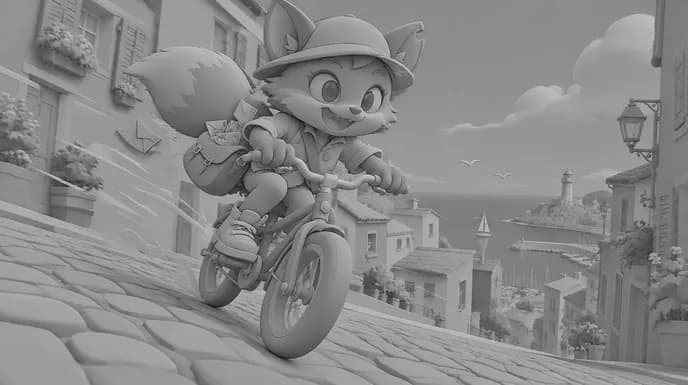
For a cartoon, the board is also your first model check (see below). The AI storyboard generator page shows the boards in detail.
6. Generate shot by shot
The production canvas offers two pipelines. Reference to video turns each shot's action into a directed prompt and attaches the characters, places and objects cited in it. Storyboard panels to video uses up to 14 boarded panels of a scene to guide order and composition. Seedance 2.5 is the default video model (4 to 30 second clips, up to 1080p, up to 30 image references), with Seedance 2, Veo 3.1, Kling 3.0, MiniMax H3 and Grok Imagine Video available per shot.
Mila's Delivery was built in that order: model sheet first, each of the six shots generated with the sheet attached, grey boards, then a 12-second clip. Four rules held it together:
- One beat per shot. The ride, the gust, the leap, the face-off, the delivery.
- Ask for snappy timing. "Sudden", "snaps", "holds" in the direction. A floaty move kills a gag.
- Several takes, then choose. Keep the take that stays on model and cuts with its neighbours.
- No music in the clip. Six sound beds will not mix into one scene. Sound effects per shot are fine.
If the motion still feels too smooth, hold every second frame in your editor. The video frames calculator does the arithmetic.
7. Voices, music, sound effects
ScreenWeaver does not generate voices or music. Record dialogue (yourself, actors or a voice tool) before the final cut so the picture follows the line, and license or commission music for the locked cut. See our sound for AI films workflow.
8. Edit and export
Cut in DaVinci Resolve, Premiere Pro or any editor. Cut on the reaction: a take needs a beat to land. Add real lettering for signs in the edit. For both formats, master in 16:9 and recentre for 9:16, or plan the project in 9:16 from the start.
Character consistency: the part that decides everything
In animation, a drawing that departs from the approved design is "off model". Studios use model sheets so that many artists, each drawing a few shots, keep a character identical from scene to scene (Wikipedia, Model sheet, accessed 8 October 2026). An AI cartoon has the same problem, except your artist forgets the character between every generation.
Why cartoon characters drift
Cartoon designs are simple, and simple is fragile. Mila has a cap, two ears, a jacket, a satchel, a tail and sneakers: change one and she is someone else. Describe "a small fox courier in a teal cap and mustard jacket" in six prompts and you get six foxes that match the sentence and not each other. More adjectives do not help, because many designs fit any paragraph. The mechanics are in character drift in AI video.
Model sheet first
Mila's model sheet was the first image of the project, made before any shot: a turnaround in four views (front, three-quarter, side, back) and four expressions (a grin, a surprised gasp, a determined frown, a full laugh).
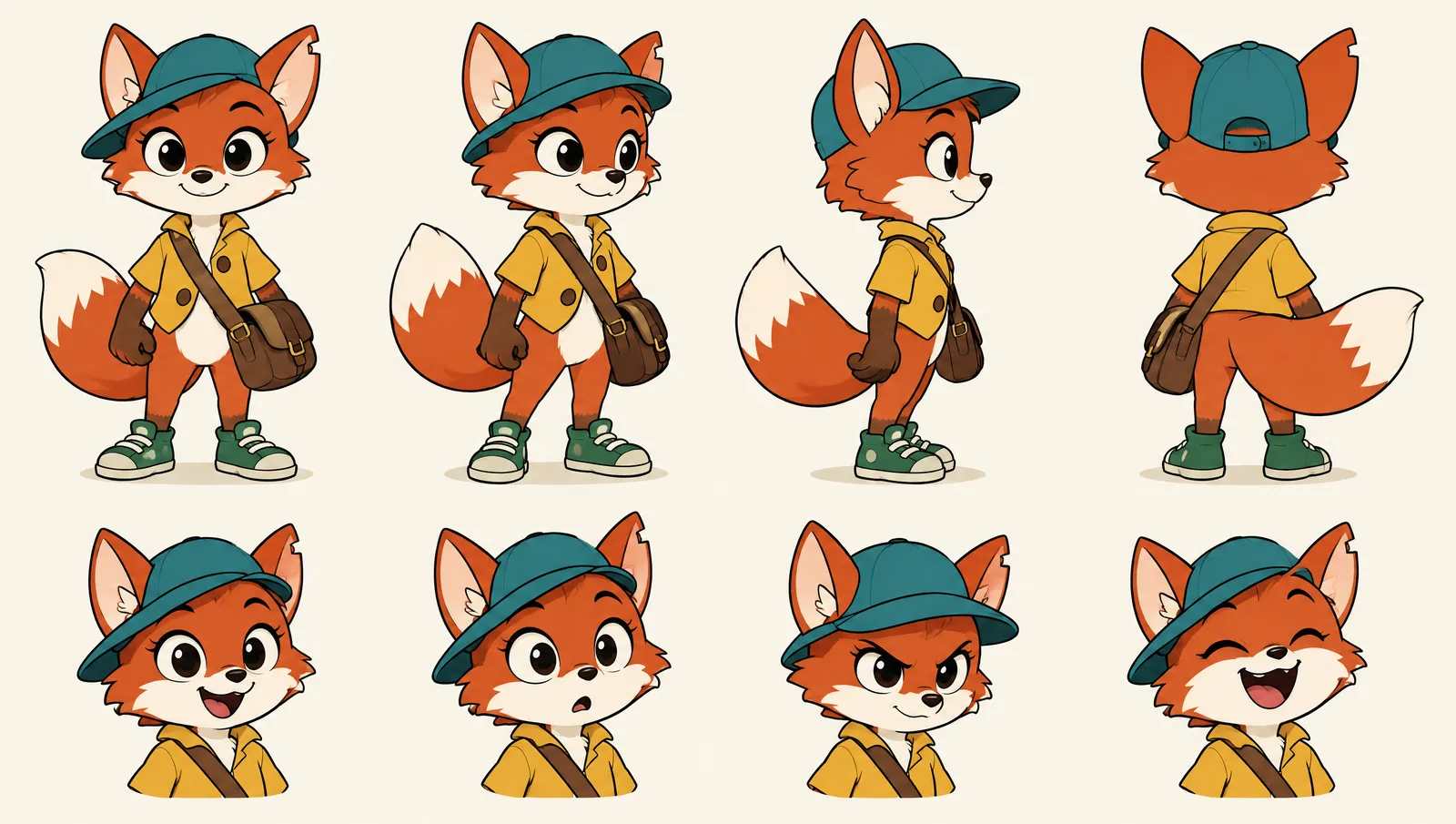
What makes a sheet useful to a model:
- Neutral pose, plain background, flat light. Lighting on a sheet leaks into every shot. An action pose on a sheet gets repeated forever.
- The back view. You forget it until a shot shows the character riding away.
- The expressions your script needs. A grin, a shock and a frown, here.
- Props on the character. The satchel is drawn on every view, strap and buckle included. Props that are only written mutate first.
Attach, don't describe
Once the sheet exists, the prompt carries only action and framing. The direction for shot 4 was a pose: a stretched leap between two rooftops, an arm reaching for the envelope, the harbour far below. Not a word about the cap or the jacket. The sheet carries those.
In ScreenWeaver, citing a character in the action line attaches its sheet to the shot, from the board to the video node. Change the sheet and the next board and clip follow. Nano Banana 2 accepts up to 14 reference images and Seedance 2.5 up to 30: room for the hero, a second character, the place and a prop in one shot.
One signature detail
Mila has a notch in her left ear. It serves no story purpose, and it is in every shot she appears in. Its job is to be checked in two seconds:
- It shows drift early. If the notch vanishes, the model has started redrawing her instead of following the sheet.
- It shows flips. If the notch jumps to the right ear, the model mirrored her, and the cap tilt and satchel side are wrong too.
- It survives small framings. When she is small in frame, the teal cap and the notched ear still read.
Put the detail on the silhouette (an ear, a tuft, a sleeve patch), not deep inside the design where a wide shot loses it.
Colour keys, and changes you write
Name each character's colour keys and check them in every take: for Mila, teal cap, mustard jacket, brown satchel, green sneakers. Story changes are not drift, but they must be written. In the last shot Mila has a seagull feather in her cap. It is in the script and on the board. A change you wrote is a gag; a change you did not is a mistake.
The on-model check, on the storyboard
Read the board as a model check before you spend credits on video. Grey frames remove colour, so you see only shape: ear height, cap angle, tail size, satchel position, the notch. A character that drifts on the board will drift on screen.
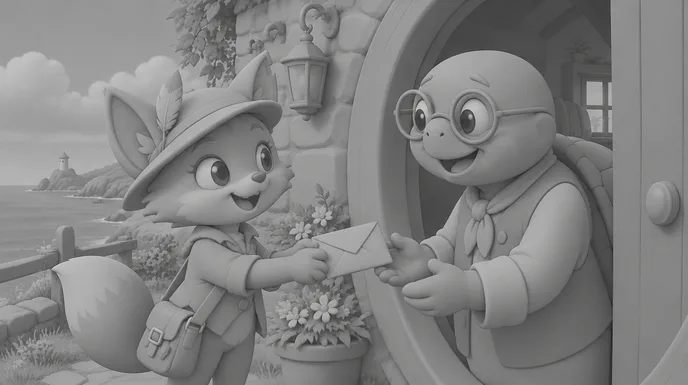
Then run the drift test on the finals: shot 2 next to shot 6. Same ears, same notch on the same ear, same cap, same buttons, same tail tip? Fixing a sheet after two shots costs two regenerations. After forty, it costs forty.
Supporting cast, props and the next episode
Secondary characters deserve sheets too: in a series the seagull and the turtle return, and viewers notice glasses that change shape. Important props become Objects. A recurring location gets one master image: a wide plate with no characters, like our harbour town opener, makes a good Place reference.
This is where a cartoon pays you back. The sheets stay in the project, so episode 2 starts with the cast, the town and the props already built. The AI character consistency sheet tool builds a sheet from a description, and character consistency in AI storyboards applies the method to boards.
Try it free
Try Screenweaver for free on your script
It is free. Import your existing project, get a clearer view of your outline, and regain control of your story structure in minutes.
Start FreeOne shot, taken apart
Shot 3 is the gust, the moment the envelope escapes.
The script line: a gust plucks the blue envelope out of the satchel, and Mila's eyes go huge.
The board: a close-up, the envelope flying off to the right. The gag plays on her face, not on a wide of the street.
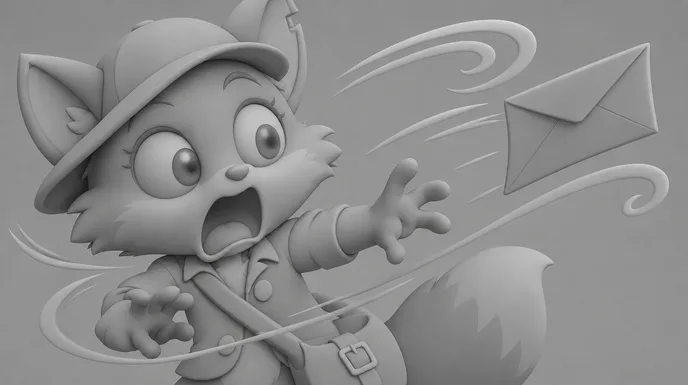
The direction: a huge surprised take, eyes wide, mouth open, the envelope fluttering past on wind lines. Action and expression, nothing else.
What gets attached: Mila's model sheet. Cap, jacket and satchel are not in the prompt.
What we check before keeping a take: the notch on the left ear, the cap angle, flat colour with one shadow tone on the fur, no text on the envelope, and an expression pushed as far as the surprised face on the sheet.
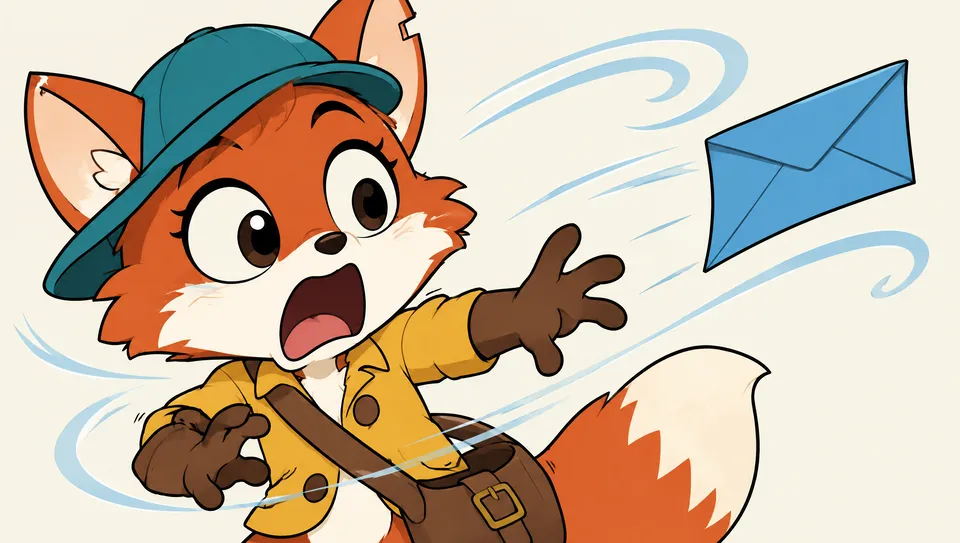
The edit decision: the gust sits between the ride and the leap, so it stays short. The take lands, then the cut throws her into the chase.
What it costs, and how long it takes
We do not quote subscription prices in a guide, because they change: see the pricing section. Writing is free. Generation uses credits, driven by three numbers you control: shot count, shot length and takes per kept shot.
- Board the whole scene to get the real shot count. Mila's Delivery is six shots for 12 seconds.
- Generate the first scene and count your own takes per kept shot.
- Multiply by your scene count with the AI video cost calculator.
Time goes into decisions: sheet, plate, board. Most are made once, so episode 2 starts at the script. For a wider view, read AI film production costs.
Common mistakes, and how to fix them
1. Generating before writing. A folder of nice clips is not a cartoon. Fix: logline, script, board, then video.
2. Describing the character in every prompt. Each rewrite is a new design. Fix: attach the model sheet; the prompt carries only the action.
3. No signature detail. Drift stays invisible until the edit. Fix: one small asymmetric mark on the silhouette, checked in every take.
4. Naming a show or studio. You get an average and a design you cannot own. Fix: describe outlines, colours, shading and motion.
5. Shading that turns 3D. Gradients creep onto faces and it starts to look like a game render. Fix: "flat cel colours, one shadow tone" in the plate; reject takes with gradients on a character.
6. Floaty motion in long shots. Smooth, slow movement drains the comedy. Fix: one beat per shot, snappy direction, cut on the reaction.
7. Gibberish lettering. Models scribble fake text on signs and envelopes. Fix: ask for no readable text, letter it in the edit.
8. Keeping the first take, with its own music. Fix: compare takes side by side, ask for no music, score the locked cut.
Which tool to choose
| Kind of tool | Good at | Where it breaks for cartoons |
|---|---|---|
| Image generators | A single cartoon image or a character concept | No motion, no sequence, no memory between images |
| Clip generators and all-in-one video apps | A quick clip from a prompt or template | Every clip redraws the character; script and board live elsewhere |
| Traditional 2D animation software | Total control of every drawing | Weeks of drawing before the first finished shot |
| A production suite: script, storyboard and video in one project | A recurring cast that stays on model | You still write, board and choose the takes |
For a one-off gag, any clip tool will do. For a recurring character, you need the sheet, the board and the shots in one place. That is why we built ScreenWeaver, and why we think it is the most complete option for cartoons with recurring characters. Our AI cartoon generator page shows Mila's Delivery shot by shot, with the edited 12-second clip.
Proof: what this method produces
Mila's Delivery, a demo by the ScreenWeaver team. Six shots of a 2D cartoon scene written for our cartoon page: one model sheet made first, every shot generated with it attached, grey storyboard frames, then a 12-second clip in 16:9. The notch in Mila's left ear is in every shot she appears in. It is a demo, not a released series.
Lost Garden, the long-form proof of the same pipeline. Two episodes, 38 minutes of finished anime, made by one person in ScreenWeaver. Episode 2 cost $1,850 and 75 hours. It is anime, not a Western cartoon, but its cast held on model across hundreds of shots with the same rule: sheets first, attached to every shot. The full case study: how I made a Japanese-style anime with AI.
FAQ
Can I make an AI cartoon for free?
You can write the whole script for free on ScreenWeaver's Screenwriter plan. Storyboard and video generation use credits on a paid plan, and voices, music and the edit happen in other tools, some free, such as DaVinci Resolve.
What is the best AI for cartoon animation?
No single model wins every shot, and rankings change often. Seedance 2.5 is our default because it accepts up to 30 image references, which is what keeps a character on model. Veo 3.1, Kling 3.0 and others sit in the same canvas. Test one boarded shot on two models and keep the one that respects the sheet.
How do I keep my cartoon character the same in every shot?
Make a model sheet with a turnaround and key expressions before the first shot. Attach it to every shot instead of describing the character again, give the character one signature detail, and check the board and the finals for drift before generating the rest.
Can I make cartoon videos for kids on YouTube?
Yes, with three rules in mind. YouTube requires you to say whether each video is made for kids, and states that complying with COPPA is your legal responsibility (YouTube Help, accessed 8 October 2026). Its AI disclosure label targets realistic content, and clearly animated content generally does not need it (YouTube Help, accessed 8 October 2026). For monetisation, the "inauthentic content" policy updated on 15 July 2025 excludes mass-produced and template-made videos (YouTube Help, accessed 8 October 2026). An original script with your own characters is the opposite of a template.
Can I make a whole cartoon series with AI?
Yes, and that is where the method pays off. The bible, the model sheets and the plate stay in the project, so every episode starts from the same cast. Keep the palette and shot vocabulary identical too.
Start your cartoon
Write the logline and the first scene tonight. The free Screenwriter plan is all you need to start: open ScreenWeaver. When the script is ready, make the model sheet, give your hero a signature detail and board every shot.
For the full pipeline on any genre, read how to make an AI film.
Final Step
Build your next script with Screenweaver
Move from ideas to production-ready pages faster with timeline-native writing and AI-assisted story flow.
Try Screenweaver