
Getting an AI storyboard from a script takes four passes, in this order: stabilise the scene headings, build reference sheets for the characters and places, break each scene into shots, then generate the panels. Skip the reference sheets and every face changes between frames. That is the whole trick.
This is the hands-on version. If you want the judgement calls behind it, read how to generate a storyboard from your screenplay with AI first, or how to make a storyboard from a screenplay if you are boarding by hand. The tool being driven here is the script-linked storyboard workspace. The steps generalise, but the field names below are ScreenWeaver's.
Before you start: what the script has to look like
Two things break generation before it begins, and both live in the script.
Scene headings have to be consistent. INT. MERCER HOUSE - KITCHEN - NIGHT in scene 4 and INT. KITCHEN - NIGHT in scene 19 are two locations as far as any breakdown pass is concerned. You will get two different kitchens. Run the headings through the slugline formatter and fix them before you touch the Storyboard tab, not after you have forty panels to redo.
Action lines have to describe what is in frame. A scene that says only "They argue" gives the shot breakdown nothing to stage. It will invent coverage, and the coverage will be generic. You do not need beautiful prose. You need the physical facts: who is where, what they touch, what the room shows.
| Symptom in the script | What it produces downstream |
|---|---|
| Same location, two spellings | Two unrelated reference sheets, two visual worlds |
| Character named "MAN" then "TOM" | Two entities, no continuity between them |
| Scene with no action lines | Invented coverage, no relation to your staging |
| Fifty scenes, no act structure | Panels that look fine and a story that still does not work |
That last one is the one people ignore. Panels are seductive. If act two is broken, boarding it will make the break harder to see. Fix the structure first.
Step 1: Open the Storyboard tab and read the layout
The pipeline runs left to right across the header: Script → Storyboard → Production. The Storyboard tab is three vertical panels over a sequencer.
On the left, the story entities: Characters, Places, Objects, each pulled from the script you already wrote. In the middle, the shot generation panel, which is where a single panel gets composed and rendered. On the right, the script reader, so you can see the scene text next to the frame you are making from it. Along the bottom, the shot sequencer: an episode row, a scene row, a strip of shot cards, and a time ruler.
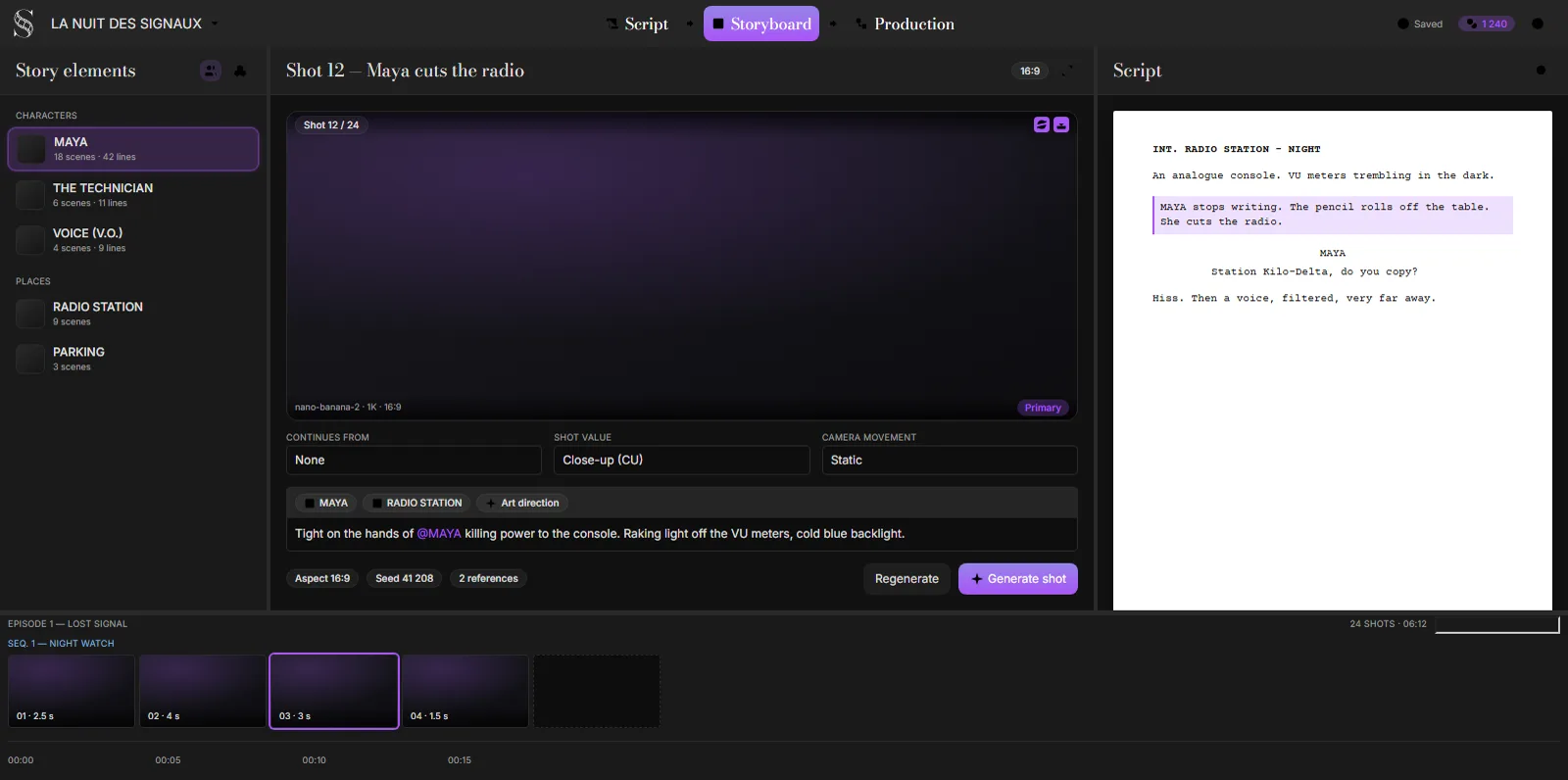
ScreenWeaver's Storyboard tab, rendered from the product's own UI kit, September 2026.
Nothing here is a separate document. The scenes in the sequencer are the scenes in your script, and they stay attached to it. That is the point of the arrangement, and it is also the thing that bites you later when you rewrite: cut a scene in the Script tab and its shots do not vanish, they become unscheduled. More on that further down.
Step 2: Generate the entity reference sheets first
This is the step everybody wants to skip, and skipping it is the reason most AI boards look like a casting call.
A reference sheet is a generated image of one entity, held as the canonical look for that character, place or object. When a panel is generated, the sheets for whatever is visible in that panel are passed in as references. Same face, same coat, same kitchen, across every frame that cites them.
Work through the left panel. For each character with more than two lines, each place that appears more than once, and each object that matters visually, generate the sheet. The panel will tell you when an entity has no pinned description on its moodboard: it warns that the sheet prompt may lack useful detail and asks whether you want to generate anyway. Say no, go back, write two sentences about what the person looks like, then generate. Two sentences of wardrobe and build beat any amount of regenerating later; character consistency in AI storyboards goes through what those sentences should contain and how to check the sheet that comes back.
The tool enforces that order. Shots that cite a sheet which does not exist yet come back marked blocked, and the batch pass refuses to render them until the sheets are there.
Step 3: Break the scene into shots
Select a scene in the sequencer and run the shot breakdown. A dialogue box asks for optional director's notes before it runs, with a placeholder that shows the register it expects: "Follow the conversation between Alice and Patrick: medium close-up on Alice, medium on Patrick."
Leave it empty and you get default coverage, which aims at three to eight shots for the scene. Fill it in and you are directing. Use it for the things a breakdown cannot infer from action lines: whose scene this is, what you want withheld, which entrance you want to play wide.
The pass reads more than the scene itself. It gets the episode outline, the previous scene, the next scene, and the list of entity handles it is allowed to cite. Each shot comes back with action text, a shot value, a camera movement and a duration. Durations are clamped to something the sequencer can actually use, and a shot with no usable duration falls back to four seconds.
What comes back is a shot list. No images yet, which is the point: read it before you render anything. This is the cheap moment to delete the three panels that say the same thing.
Step 4: Set shot value, camera movement, and continuation
Each shot card opens the composition panel, which has three parameter fields sitting above the action text.
Shot value is a ten-item list, in the order you would say them: ECU, CU, MCU, MS, MLS, LS, ELS, then over-the-shoulder, POV and insert. Each one carries a small reference thumbnail, which matters more than it sounds: it means the value you pick is anchored to a picture rather than to whatever "medium long" means in your head today. If the terms themselves are new, the storyboard shot types reference covers where each one cuts the frame.
Camera movement is seventeen presets, from static through the pans and tilts to dolly, truck, pedestal, crane, handheld, Steadicam, whip pan and the two zooms. On a still panel the movement is only an annotation. Set it anyway. It is the field the shot list and the schedule read later.
Continues from is the one that does real work. Point a shot at the shot it follows and the two become a chain: the continuation inherits shot value and camera movement from the head, and the panel says so, telling you to edit the head shot to change it. Use it for the shot that holds while somebody crosses the room, and for reverse pairs you want locked to the same value. Do not use it as a general "these are next to each other" marker, because it will quietly stop you editing the field you are trying to edit.
Below that sits the action text, which is the actual prompt for the panel. It has one piece of syntax: @ cites an entity's reference sheet. Type @ and pick the character, and the sheet goes into the generation as a reference.
The rule for citing is narrower than most people assume. Cite an entity when it is literally inside the frame. Not when it is mentioned in dialogue, not when it is elsewhere in the room, not when it matters to the beat. A character discussed on the phone is not in the panel. Cite the place handle for wides, establishers and any medium where the location's features are visible; leave it off continuation panels where the background is already fixed by the frame before.
If a handle does not resolve, the panel warns you before it burns anything.
Step 5: Generate the panel and judge it in five seconds
Hit generate on a single shot first. Not the batch. One panel, on your hardest scene, so you find out what the sheets are doing before you commit a sequence.
Then judge it on three questions, in this order:
- Geography. Does the panel agree with the last one about where the room is? Left of frame stays left of frame.
- Continuity. Same face, same wardrobe, same light. If not, the sheet is thin or the handle is missing.
- Beat. Does the frame show the turn the scene is making, or does it just show two people in a room?
Composition comes fourth and it comes a long way behind. A pretty frame that contradicts the geography is worse than a plain frame that respects it, because the pretty one gets approved.
If it fails on continuity, fix the reference sheet, not the prompt. If it fails on beat, fix the action text. Regenerating with the same inputs and hoping is how people spend a plan's worth of credits in an afternoon.
Try it free
Try Screenweaver for free on your script
It is free. Import your existing project, get a clearer view of your outline, and regain control of your story structure in minutes.
Start FreeStep 6: Run the batch pass on the rest
Once one scene behaves, open the automatic pass. It runs in three ordered steps, up to three jobs in parallel inside each step, and it reports what is ready and what is blocked before it starts:
- Missing entity reference sheets. Every character, place and object without a sheet.
- Empty-scene shot breakdown. A shot list for every scene that has no shots yet. Still no images.
- Missing shot storyboard images. The panels, on shots that do not have one.
You can close the dialog. The jobs keep running and report into Generations.
The blocked count is the number to watch. If step three shows shots blocked, it is telling you those panels cite sheets that do not exist, and it will offer to run the missing sheets first. Take the offer. Rendering blocked shots "anyway" is how you get the casting-call board.
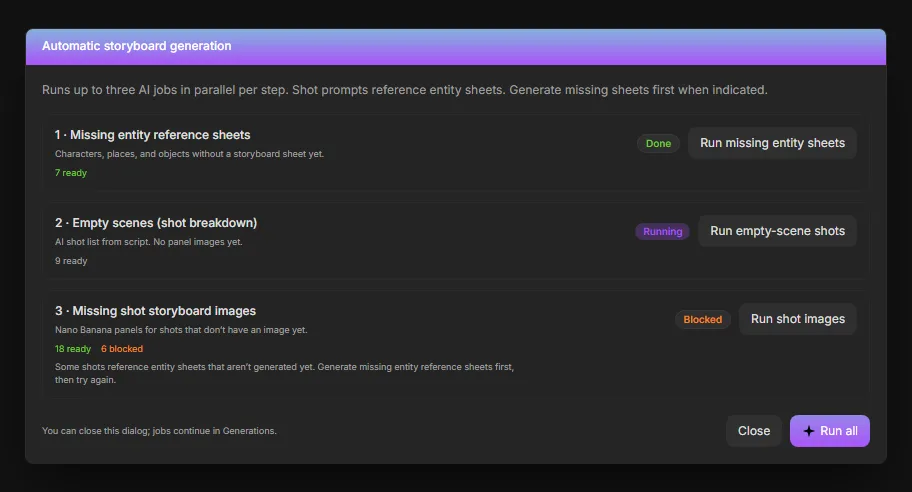
The three-step automatic pass, rebuilt from ScreenWeaver's UI kit and the product's own interface copy, September 2026.
Step 7: Rewrite the script without wrecking the board
You will rewrite. Everybody rewrites.
Shots stay attached to their scene. Delete or rename a scene in the Script tab and its shots do not disappear; they become unscheduled, and a banner tells you how many are sitting there orphaned. They stay until you reattach them or clear them.
That is deliberate, and it is also a trap if you ignore it. Leave orphans in place and run the empty-scene breakdown again, and the new shots arrive next to the old ones rather than replacing them. The reset menu gives you two doors: clear only the unscheduled shots, or clear the entire storyboard. Use the first one after a normal rewrite. Use the second when the draft changed enough that none of the coverage survives, and accept that you are paying for the panels twice.
The discipline that saves you here is boring: do not board a scene you are still arguing about.
Common failures, and what actually fixes them
| What you see | Real cause | Fix |
|---|---|---|
| Faces drift between panels | No reference sheet, or the sheet was generated from a thin description | Write the description, regenerate the sheet, then regenerate the panels |
| Two versions of one location | Inconsistent scene headings in the script | Fix the headings, clear, re-run the breakdown |
| Shots marked blocked | Panel cites a sheet that does not exist | Run the missing entity sheets step first |
| Panels contradict each other's geography | Nothing enforces the axis, only your reading does | Sketch a top-down of the room, check exits and eyelines against it |
| Generic coverage | Empty director's notes and thin action lines | Rewrite the action lines; use the notes field to name whose scene it is |
| Duplicate shots after a rewrite | Unscheduled orphans left in place | Clear unscheduled shots before re-running |
| Beautiful board, broken scene | Boarding was used to avoid a structure problem | Go back to the outline |
What it costs and where it stops
Writing and structure are free on ScreenWeaver; AI storyboard generation sits on the Auteur plan ($39.99 a month, 6,000 credits a month), and each generated image draws credits. So the cheap operations are the shot breakdowns and the text, and the expensive ones are the images. Do all your deleting at the shot-list stage.
Know what the board is for, too. This produces a readable, continuous, script-linked board for planning, pitching and shot listing. It does not produce a story artist's lookbook, and the two are not competing for the same job. If your deliverable is illustration, hire an illustrator. If your deliverable is "can we shoot this, and does the scene play", a generated board does that job, and it stays tied to the draft it came from.
When the panels are settled, turn them into a shot list with real durations before anyone starts scheduling. The scene-to-clip splitter will take the scene text apart into clip-sized beats, and shot sizes is a quick reference if you want the values checked against standard terminology.
For where boards fit in a longer pipeline, see the storyboard-first AI video workflow. For the equivalent process in an animation house, anime storyboarding and e-konte covers a stricter version of the same discipline.
FAQ
How long does an AI storyboard from a script actually take?
For a short film of twelve to fifteen scenes, budget an afternoon: most of it goes on writing entity descriptions and reading shot lists, and very little on waiting for images. The batch pass runs three jobs in parallel per step and keeps going in the background, so your review is the bottleneck long before the rendering is.
Do I have to generate reference sheets for everything?
No. Generate them for anything that appears in more than one panel, plus any place whose look you care about. A one-line waiter in a single wide does not need a sheet. Your lead does, and so does the apartment.
Can I control coverage instead of accepting what it gives me?
Yes, through the director's notes field on the breakdown dialog. Write the shooting plan in plain language, naming characters and shot values. Leave it empty only when you genuinely want default coverage to make the first proposal.
What happens to my panels if I rewrite the script?
Shots whose scenes no longer exist become unscheduled and stay visible with a warning banner. Nothing is deleted behind your back. Clear the unscheduled ones before you run the breakdown again. Otherwise the new shots arrive beside the stale ones.
Is a generated board good enough to shoot from?
For staging, coverage and communication, yes, once you have checked geography against a top-down sketch. For anything where exact lens and composition are contractual, treat the generated panel as the argument and let the DP make the frame.
Does this replace a storyboard artist?
Not for the work storyboard artists are actually hired to do, which is design. It replaces the situation where there was no board at all because there was no budget for one, and that situation is far more common.
Final Step
Build your next script with Screenweaver
Move from ideas to production-ready pages faster with timeline-native writing and AI-assisted story flow.
Try Screenweaver