
The short answer: if you already pay for Higgsfield, you can spend those credits on your ScreenWeaver film. Connect your Higgsfield account once in your ScreenWeaver profile settings, then switch any video node from ScreenWeaver credits to My Higgsfield account. The clip is generated on Higgsfield, billed to your Higgsfield balance, and lands in your ScreenWeaver project with the rest of your film.
That matters when you have a Higgsfield plan with credits left and a project that needs more than loose clips. ScreenWeaver holds the script, the storyboard, the characters, the places and the art direction. Higgsfield runs the video model. You no longer have to choose between the two, or pay twice for the same shot.
This guide covers who can use it, the three steps, which models run on your account, what it costs, and what to do when a run fails.
What you need
- A Higgsfield account with credits. Any plan that gives you credits works. Higgsfield Unlimited and free generations do not apply here (more on that below).
- A ScreenWeaver Auteur or Studio plan. The option shows on projects owned by an organisation on one of these plans. On the free Screenwriter plan, the video nodes are not part of the plan anyway.
- A video node. The option exists on video generation only. Storyboard panels, character sheets and other images keep running on ScreenWeaver credits.
Step 1: connect your Higgsfield account
- In ScreenWeaver, open your profile settings.
- Go to Connected apps, then External providers.
- Click Connect next to Higgsfield.
- A Higgsfield window opens. Sign in to Higgsfield and allow ScreenWeaver.
The window closes and the row now shows Higgsfield as connected, with the name of your Higgsfield account. You do it once: the connection stays until you remove it.
ScreenWeaver never sees your Higgsfield password. The connection uses OAuth, the same sign-in flow you use when an app asks to connect to your Google account. ScreenWeaver stores an access token, encrypted, and you can cut it at any time with Disconnect on the same row. Disconnecting also revokes the token on Higgsfield's side when Higgsfield supports it.
Step 2: switch a video node to your Higgsfield account
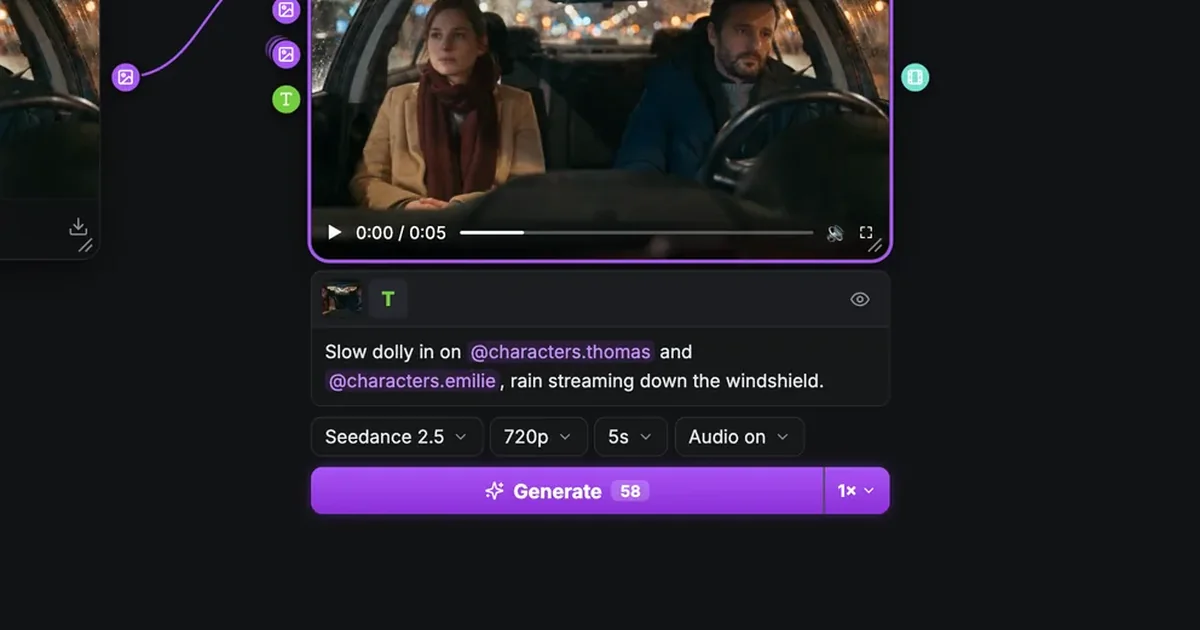
Open the Production tab and pick the video node of the shot you want to generate. Next to the model picker there is a Run on menu with two choices:
| Run on | Who pays for the clip |
|---|---|
| ScreenWeaver credits | Your ScreenWeaver organisation, at the usual rate shown on the button |
| My Higgsfield account | Your Higgsfield balance, plus a flat ScreenWeaver fee (see "What it costs") |
The first time you pick My Higgsfield account, a short window explains the rules: the run uses your Higgsfield credits, ScreenWeaver does not watch or cap your spending there, Unlimited and free generations do not apply, and your prompt and attachments go to Higgsfield under its own terms and privacy policy. The small info button next to the menu opens that window again whenever you want.
The choice is saved on the node. On a shared project, each collaborator who presses Generate on that node uses their own Higgsfield connection, never yours.
Step 3: check the settings and generate
Higgsfield does not run every model with every setting. Veo 3.1 takes a start frame but no end frame, Kling 3.0 takes no reference images, and so on. ScreenWeaver checks the node against the model's specs on Higgsfield before anything is sent. When something does not fit, the node lists the conflict ("Kling 3.0 on Higgsfield takes no reference images", for example) and the Generate button stays disabled until you fix it. Nothing is adjusted behind your back.
When the settings fit, the cost tooltip shows Higgsfield's own estimate for the clip and your Higgsfield balance, when Higgsfield returns them. Press Generate. The job starts on your Higgsfield account and the finished clip comes back into the node like any other take.
You can always tell where a clip was billed. In the media window, the info panel has a Billed to row for clips run on your account, and the run shows a small forward icon in the generation list.
Which models run on your Higgsfield account
| Model | Clip length | Resolution | What the node can send |
|---|---|---|---|
| Seedance 2.5 | 4 to 30 s | 480p to 1080p | Start and end frames, reference images, reference audio |
| Seedance 2.0 | 4 to 15 s | 480p to 1080p | Start and end frames, reference images, reference audio |
| Kling 3.0 | 3 to 15 s | 720p, 1080p or 4K | Start and end frames only; 16:9, 9:16 or 1:1; sound on or off |
| Veo 3.1 | 4, 6 or 8 s | 720p, 1080p or 4K | Start frame only; 16:9 or 9:16 |
| MiniMax H3 | 4 to 15 s | 2K | Start and end frames, reference images, reference audio |
The scope format 2.39:1 runs as 21:9 on Higgsfield. A model that is not in this table cannot run on your account: the node tells you and runs on ScreenWeaver credits instead.
For a film with recurring characters, Seedance 2.5 is the natural first choice. It takes the character and place sheets your storyboard already wired into the node as references, which is what keeps a face the same from one shot to the next. Our node canvas guide explains that wiring.
What it costs
Two things are billed for a run on your account:
- On Higgsfield: the clip itself, at Higgsfield's price for that model and those settings. It comes off your Higgsfield balance.
- On ScreenWeaver: a flat 10 credits per run for hosting and processing: importing your references, storing the clip in your project, tracking the job. If the run fails, those 10 credits are refunded.
Higgsfield Unlimited and free generations never apply. Higgsfield's developer terms reserve Unlimited for personal use inside Higgsfield itself, so ScreenWeaver always asks for a credit-billed run. If your plan is Unlimited only, keep running your nodes on ScreenWeaver credits.
ScreenWeaver does not monitor or limit what you spend on Higgsfield. Keep an eye on your Higgsfield balance there, or in the cost tooltip before each run.
Try it free
Try Screenweaver for free on your script
It is free. Import your existing project, get a clearer view of your outline, and regain control of your story structure in minutes.
Start FreeWhat stays on ScreenWeaver credits
- Every image: storyboard panels, character, place and object sheets, the art direction frames.
- Seedance drafts. The low-cost draft runs always use ScreenWeaver credits.
- Models Higgsfield does not run for your account, with a notice on the node.
You can mix freely. One node on Higgsfield, the next on ScreenWeaver credits, in the same scene.
When a run fails
- Not enough Higgsfield credits. The node says so and names Higgsfield as the place where it failed. Top up on Higgsfield, or switch the node to ScreenWeaver credits.
- Content refused by Higgsfield. Higgsfield's moderation rules apply to runs on your account. Rework the prompt or the reference.
- Connection expired or revoked. The node asks you to reconnect and offers an Open settings button. Generate stays blocked rather than silently spending ScreenWeaver credits.
In all three cases, the 10 ScreenWeaver credits come back to you.
Why not generate on Higgsfield directly?
You can, and for a one-off clip it is the shortest path. A film is a different job. You need the same character in shot 4 and in shot 40, a shot list that follows the script, and every take filed under the scene it belongs to. That is the part ScreenWeaver does: your storyboard is built from the script, each shot's node arrives with its references already connected, and every take stays in the project. Running those nodes on your Higgsfield credits gives you both: the models you already pay for, inside a real production pipeline.
FAQ
Do I need a ScreenWeaver subscription to use my Higgsfield credits?
Yes. Running a video node on your own Higgsfield account is available on the Auteur and Studio plans, for projects owned by an organisation on one of those plans.
Can I use my Higgsfield Unlimited plan in ScreenWeaver?
No. Unlimited and free generations never apply to runs from ScreenWeaver. Each run is billed in Higgsfield credits.
Does ScreenWeaver get my Higgsfield password?
No. You sign in on Higgsfield and allow ScreenWeaver through OAuth. ScreenWeaver keeps an encrypted access token, and Disconnect removes it.
Can my collaborators spend my Higgsfield credits?
No. The Run on choice is shared on the node, but each person who presses Generate uses their own Higgsfield connection.
Can I generate images with my Higgsfield credits?
Not today. The option covers video nodes only. Images run on ScreenWeaver credits.
What happens if Higgsfield does not offer the model I picked?
The node tells you and runs on ScreenWeaver credits. The models available on your Higgsfield account are Seedance 2.5, Seedance 2.0, Kling 3.0, Veo 3.1 and MiniMax H3.
Is there an extra cost on the ScreenWeaver side?
Yes, a flat 10 credits per run for hosting and processing, refunded if the run fails.
Start your film
Write the script, let the storyboard build your shots, then run the video on the account you prefer: open ScreenWeaver and connect Higgsfield from your profile settings. Plans and credits are on the pricing section.
Final Step
Build your next script with Screenweaver
Move from ideas to production-ready pages faster with timeline-native writing and AI-assisted story flow.
Try Screenweaver