
A shooting schedule is the order you will film your scenes in, day by day, which is almost never the order they appear in the script. The stripboard is how you build it: one strip per scene, coloured by interior or exterior and day or night, shuffled until every day makes sense. This guide is part of our independent filmmaker workflow, and it starts where the script breakdown ends.
Small crews need this more than big ones. A studio feature can absorb a wasted half day. A six-person crew shooting a short over a long weekend can't, and the schedule is where you find that out on paper instead of in a car park at 4pm.
What goes on a strip
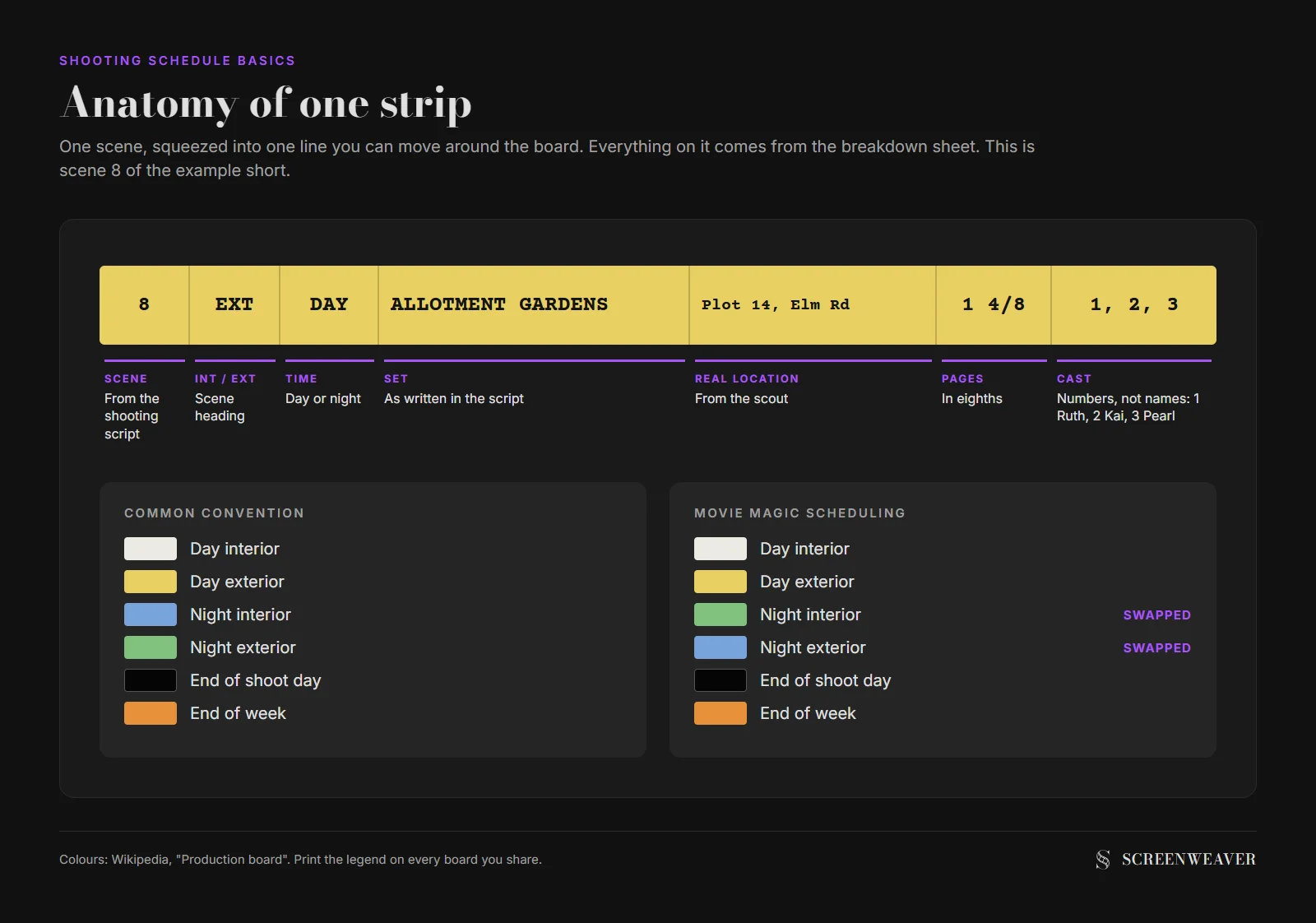
A strip is one scene squeezed into a single line. Wikipedia's entry on the production board lists what a strip usually carries: the scene number, the time of day, the page count (counted in eighths of a page), the set as described in the script, the real location you'll film it in, the characters in it, and notes.
All of that already exists on your breakdown sheets. The strip just puts it in a form you can move around.
| Field | Example | Comes from |
|---|---|---|
| Scene number | 8 | Shooting script |
| INT or EXT | EXT | Scene heading |
| Day or night | DAY | Scene heading |
| Set | Allotment gardens | Scene heading |
| Real location | Plot 14, Elm Road allotments | Location scout |
| Page count | 1 4/8 | Your eighths count |
| Cast | Ruth, Kai, Pearl | Breakdown sheet |
| Notes | Wheelbarrow, rain bars? | Breakdown sheet |
The page count is the one people get lazy about, and it's the one the whole schedule rests on. If you haven't measured your scenes yet, the script eighths calculator does it from pasted script text.
Cast members usually appear as numbers rather than names. Ruth is 1, Kai is 2, and so on down the cast list. On a paper strip there's no room for names, and in software the numbers sort cleanly.
The colour code, and the trap in it
Colour lets you read a board from across the room. White strips are day interiors and yellow strips are day exteriors, and on that point the convention is stable.
Night is where it splits. In the common convention a night interior is blue and a night exterior is green. Movie Magic Scheduling, which the same Wikipedia entry calls the most popular scheduling software, does it the other way round: green for night interiors, blue for night exteriors. If your AD learned on Movie Magic and your producer printed a board from a free template, the same blue strip means two different things in the same meeting.
| Strip | Common convention | Movie Magic Scheduling |
|---|---|---|
| Day interior | White | White |
| Day exterior | Yellow | Yellow |
| Night interior | Blue | Green |
| Night exterior | Green | Blue |
| End of a shoot day | Black or grey separator | Black or grey separator |
| End of a week | Orange separator | Orange separator |
The fix takes ten seconds. Put the legend on the board itself, top left, every time you print or share it.
How to build the board in six steps
You need a finished breakdown before you start. Without it you're scheduling scenes you haven't actually read for props, cast and locations.
1. Make one strip per scene
Fill every field from the breakdown sheets. If a scene is shot in two real places (a car interior on a driveway, the exterior on a road), it becomes two strips. The schedule doesn't care that the script calls it one scene.
2. Group by real location
This is the first sort and the one that saves the most time. Every company move means packing the van, driving, parking, unloading and lighting again, and none of that time ends up on screen. The shooting schedule calculator treats frequent moves as one of the three things that slow a shoot day down, alongside action and night work.
Note that you group by real location, not by set. Ruth's kitchen and Ruth's front hall are two sets but one house, so they belong on the same day.
3. Inside each location, split day from night
Day and night scenes at the same location rarely share a day comfortably. Lighting changes, the crew's call time changes, and you either wait for darkness or fake it.
Faking it is a real option for interiors. Black out the windows and a night interior can be shot at 2pm. Exteriors don't give you that choice.
4. Then sort by cast
Once locations and times of day are grouped, look at who's in each scene. The goal is to keep each actor's working days together. An actor who works day 1, sits at home on day 2 and comes back on day 3 is still paid and still has to be available on day 2. On a deferred-pay short, it's a favour you burn for nothing.
The day out of days generator turns your cast column into the grid that shows these gaps at a glance.
5. Fill each day to a page target
Pick a realistic number of pages per day for your crew and stack strips until you reach it. The shooting schedule calculator's baselines run from about 2.5 pages a day on a studio feature to about 7 on a micro-budget or student shoot. Those are planning numbers. A dialogue scene with two people at a table goes much faster than a quarter page of someone climbing a fence.
6. Insert day breaks and check the turnaround
Drop a black separator after each day and write the day number on it. Then check the gap between the last shot of one day and the call of the next. Union rules make this explicit: SAG-AFTRA's rest period rules give performers 12 hours between dismissal and the next call in the Studio Zone. Even if nobody on your shoot is union, a night shoot followed by an 8am call is how small crews get exhausted on day three.
A worked example: ten pages, three days
Here's a short we wrote for this guide, continuing the allotment story from our shot list template. Twelve scenes, ten pages, four characters, five real locations: the allotment (with Ruth's shed inside it), Ruth's house, a high street, a hardware shop on that street and Kai's flat.
In script order, the real location changes ten times in twelve scenes, and the time of day changes five times. Shot in that order, the crew would pack the van ten times.
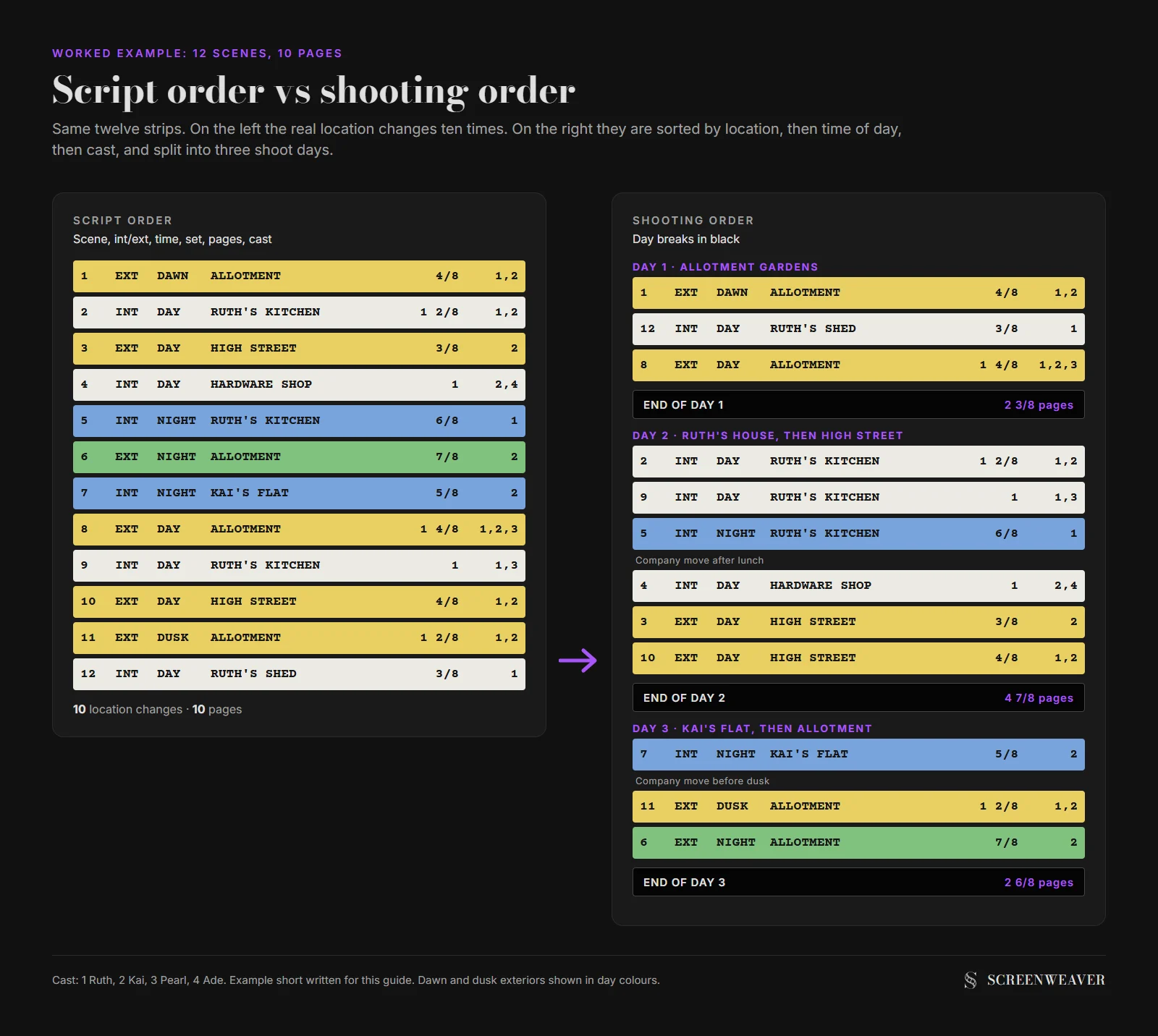
Sorted by location, then time of day, then cast, the board settles into three days:
| Day | Location | Scenes | Pages | Why this grouping |
|---|---|---|---|---|
| 1 | Allotment gardens | 1 (dawn), 12, 8 | 2 3/8 | Dawn call, then everything that needs daylight on the plots |
| 2 | Ruth's house, then high street and hardware shop | 2, 9, 5, 4, 3, 10 | 4 7/8 | Night kitchen scene 5 shot with blacked-out windows; one company move after lunch |
| 3 | Kai's flat, then allotment gardens | 7, 11 (dusk), 6 (night) | 2 6/8 | Afternoon call, blacked-out flat first, then dusk and true night outside |
Day 2 carries the most pages because it's mostly dialogue in two easy interiors. Day 1 carries the fewest because dawn gives you a short window and scene 8 has three actors and a wheelbarrow gag.
Day 3 is the only one with real night work, and its afternoon call is what keeps the turnaround sane. If we'd put the night scenes on day 1, Ruth would have wrapped at midnight and been needed again for a full day in the kitchen.
The calculator gave a different answer
We ran the same script through our own shooting schedule calculator: 10 pages, micro-budget tier, action set to Low, night scenes and location moves left on Med. It returned 2 shoot days plus 1 contingency day, at an effective 7.08 pages a day.
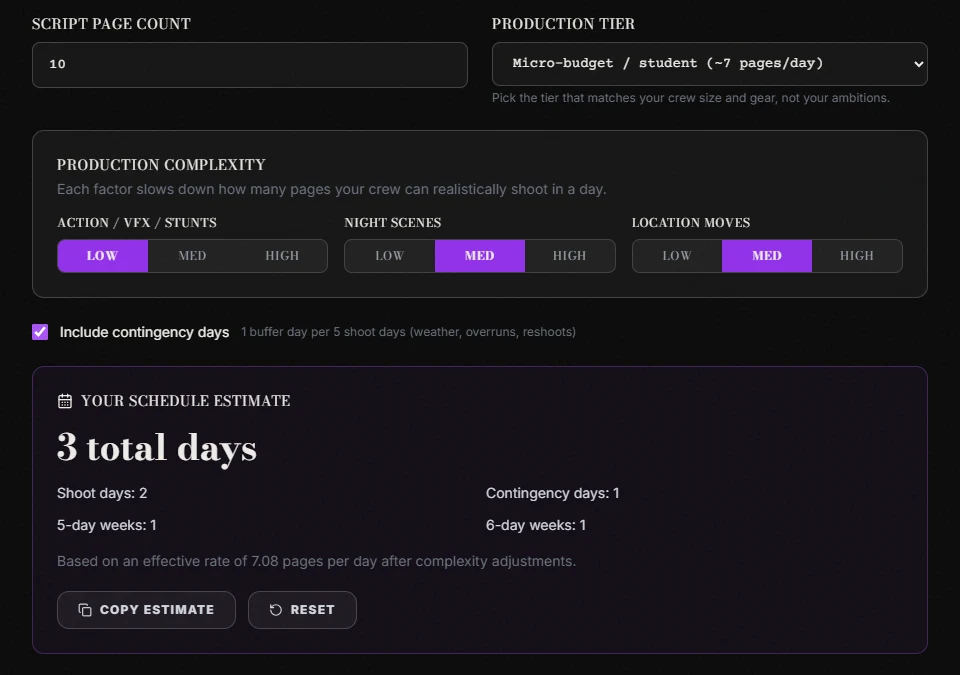
Two days by the numbers, three on the board. The pages would fit in two days. Dawn, dusk and night won't. The calculator is right about the volume of work. It can't see that scene 1 needs sunrise and scene 6 needs darkness at the same location, and nobody wants to sit in a field for 14 hours waiting between them.
So use the estimate early, before you've made a single strip, to know whether you're planning a weekend or a fortnight. Once the board exists, trust the board.
Try it free
Try Screenweaver for free on your script
It is free. Import your existing project, get a clearer view of your outline, and regain control of your story structure in minutes.
Start FreeWho works when: the cast check
With the board sorted, list each actor against the shoot days. This is the day out of days, and on a three-day shoot it fits on a sticky note.
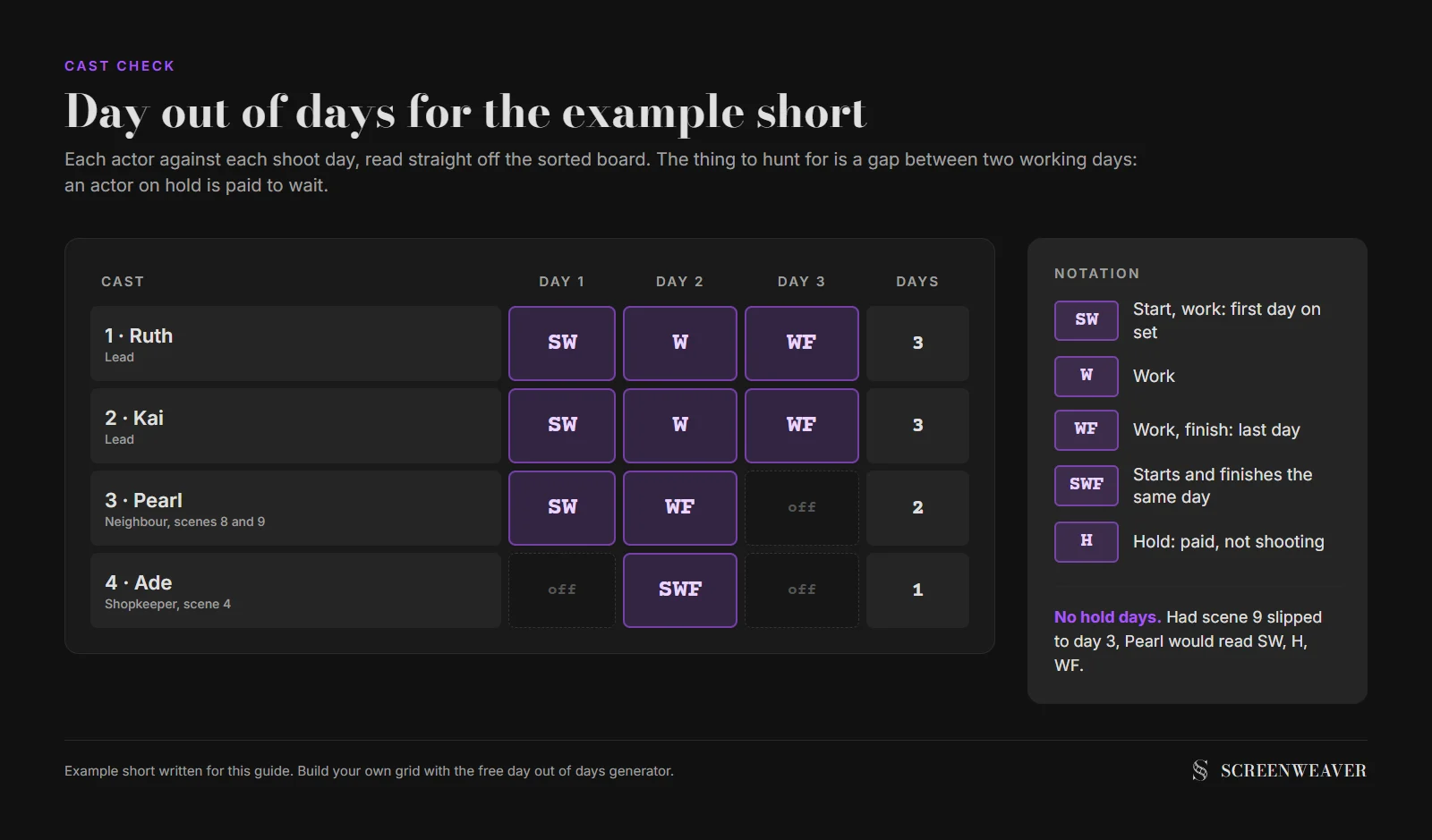
Ruth and Kai work every day, which is unavoidable for the leads. Pearl works two consecutive days with no gap. Ade, the shopkeeper, comes in for one scene on day 2 and goes home. Nobody is paid to sit on a hold day, so this board passes.
Had scene 9 slipped to day 3, Pearl would sit at home on day 2 and still need paying for it. The fix would be to pull scene 9 back to day 2 with the rest of the kitchen work, which is where it belongs anyway.
What to sort first when everything conflicts
Every board hits a point where two rules fight. The location wants scene 9 on day 2, the actor wants it on day 1. Here's the order we use, from the thing that costs most to move to the thing that costs least:
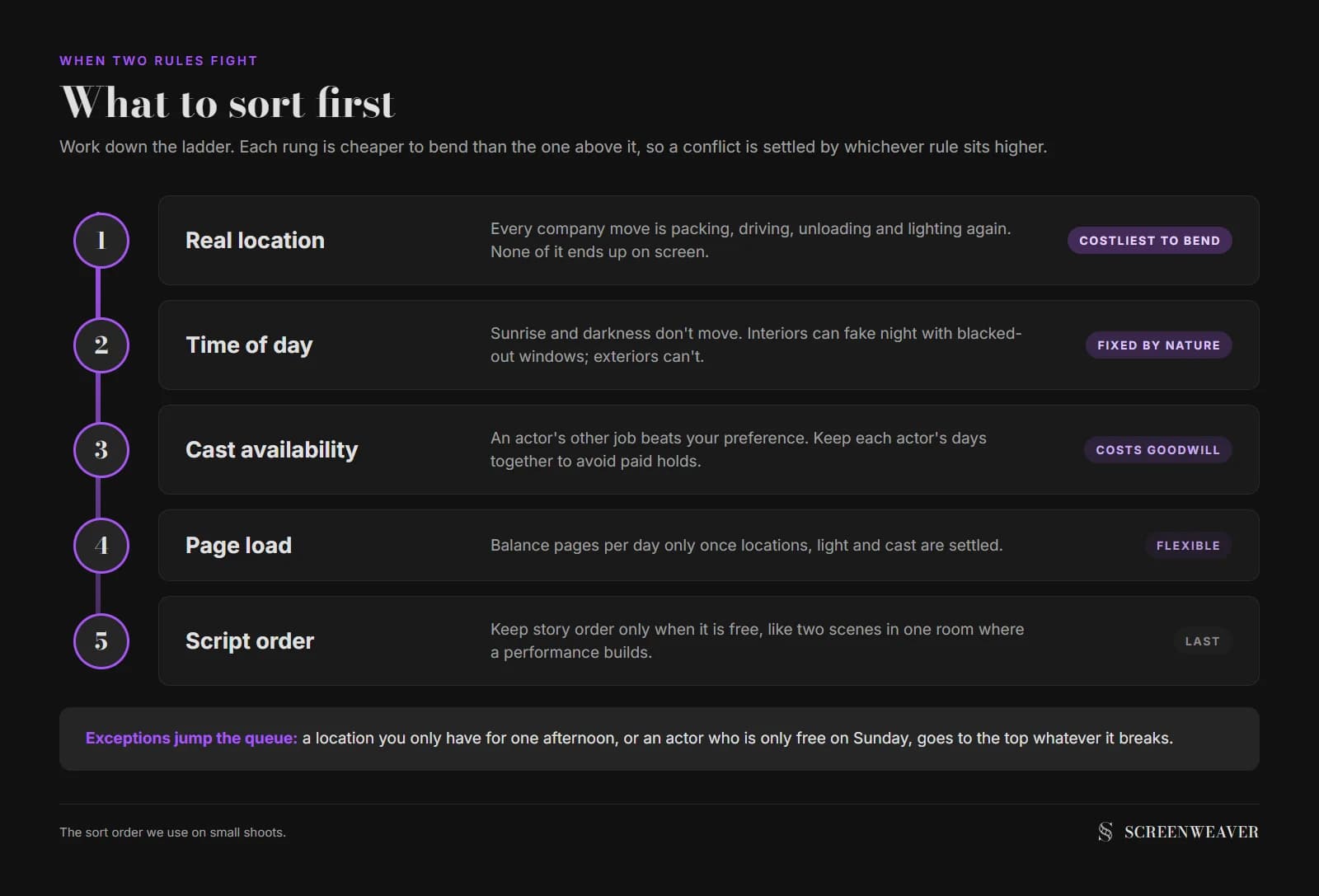
- Real location. Moving the whole crew is the most expensive thing you do in a day.
- Time of day. Sunlight and darkness don't negotiate.
- Cast availability. An actor's other job beats your preferences.
- Page load. Balance the days once the hard constraints are met.
- Script order, last of all. Shoot in story order only when it costs nothing, for example two scenes in the same room where the performance builds.
There are exceptions. A location you only have for one afternoon jumps to the top whatever else it breaks. An actor who's only free on Sunday does too.
Paper, spreadsheet or software
For a short with fewer than about 30 scenes, a spreadsheet works fine. One row per scene, fill each row with the colour of its strip, and drag rows around. Print it on one page and tape it to the wall.
Paper strips still have a fan base for a reason: you can see the whole shoot at once and move a strip with one hand while arguing. Software earns its place on features, when a change to one scene has to ripple into the cast days, the call sheets and the budget at once. Our piece on breaking down a script in Final Draft and Movie Magic covers what the software import needs from the script.
Whatever you use, keep these checks on the wall next to it:
- Every scene has exactly one strip, or two if it's shot in two places
- Every strip has an eighths count, and the total matches the script
- The colour legend is printed on the board
- No day has two company moves on a crew under ten people
- Night work is followed by a late call or a day off
- No actor has an unpaid gap between working days you could avoid
- At least one contingency day is in the plan, even if it's just a Sunday you keep free
Where this sits in prep
The schedule comes after the breakdown and before the call sheets. Each day on your board becomes one call sheet, and the strip order becomes the order of scenes on it. If you write and board your film in ScreenWeaver, the scenes, characters and locations you set up there are the same names you'll put on your strips, so the breakdown and the board use one vocabulary from the start. The film pre-production page shows how that part works.
FAQ
What is the difference between a stripboard and a shooting schedule? The stripboard is the tool and the shooting schedule is the result. The board holds one strip per scene that you sort into days; the schedule is the finished, day-by-day document that adds call times, locations and notes, and it goes out to cast and crew.
What do the colours on a stripboard mean? White is a day interior and yellow is a day exterior almost everywhere. For night, the common convention uses blue for interiors and green for exteriors, while Movie Magic Scheduling swaps them. Black or grey strips mark the end of a shoot day and orange marks the end of a week.
How many pages can a small crew shoot in a day? Coverage and complexity decide it more than crew size does. Our shooting schedule calculator uses baselines of about 4 to 5 pages a day for indie shoots and about 7 for micro-budget or student productions, then slows that down for action, night work and location moves.
Should you shoot a film in script order? Only when it costs nothing. Location, time of day and actor availability come first because they cost money and time. Story order is worth keeping when two scenes share a room and an actor's performance builds from one to the next.
Do I need scheduling software for a short film? No. A spreadsheet with one coloured row per scene is enough for most shorts. Software pays off on features, where one script change has to update cast days, call sheets and the budget together.
How do I schedule night scenes on a tight budget? Fake night for interiors by blacking out the windows and shoot them during the day. Put true exterior night scenes on the last day of a block or before a day off, and give the following day a late call.
Final Step
Build your next script with Screenweaver
Move from ideas to production-ready pages faster with timeline-native writing and AI-assisted story flow.
Try Screenweaver