
A storyboard template is a printable sheet of empty frames drawn at your delivery ratio, each with a shot number and a few ruled lines for notes. Get it two ways: download the PDF from the free storyboard template generator, 16:9, six panels, Letter or A4, no signup, or paste the Fountain block further down straight into your script file.
The PDF is for the pass where you sketch. The Fountain version is for the pass where the board has to stay attached to the scene it describes. Both feed the same place: once the shots are decided, the AI storyboard tool turns the script into rendered panels and the blank sheets go in the recycling.
Get the template
The PDF: six 16:9 frames on a page
The generator draws every frame at the exact ratio you pick, so a composition you sketch in the box is the composition the camera will see. Six ratios are on the menu: 16:9, 1.85:1, 2.39:1, 4:3, 1:1 and 9:16. Panel counts run 2, 3, 4, 6, 8, 9 or 12 per page. Paper is Letter or A4, and one download can hold up to 20 numbered pages.
Each sheet carries a header strip with PROJECT, SCENE and PAGE x of y, a SHOT n label above every frame, and, if you leave the box ticked, ruled lines under each frame for action, dialogue and camera notes. Wide ratios lay out in landscape, 9:16 flips the page to portrait so the vertical frames are large enough to draw in. The PDF is built in your browser; nothing is uploaded, and there is no watermark on the print.
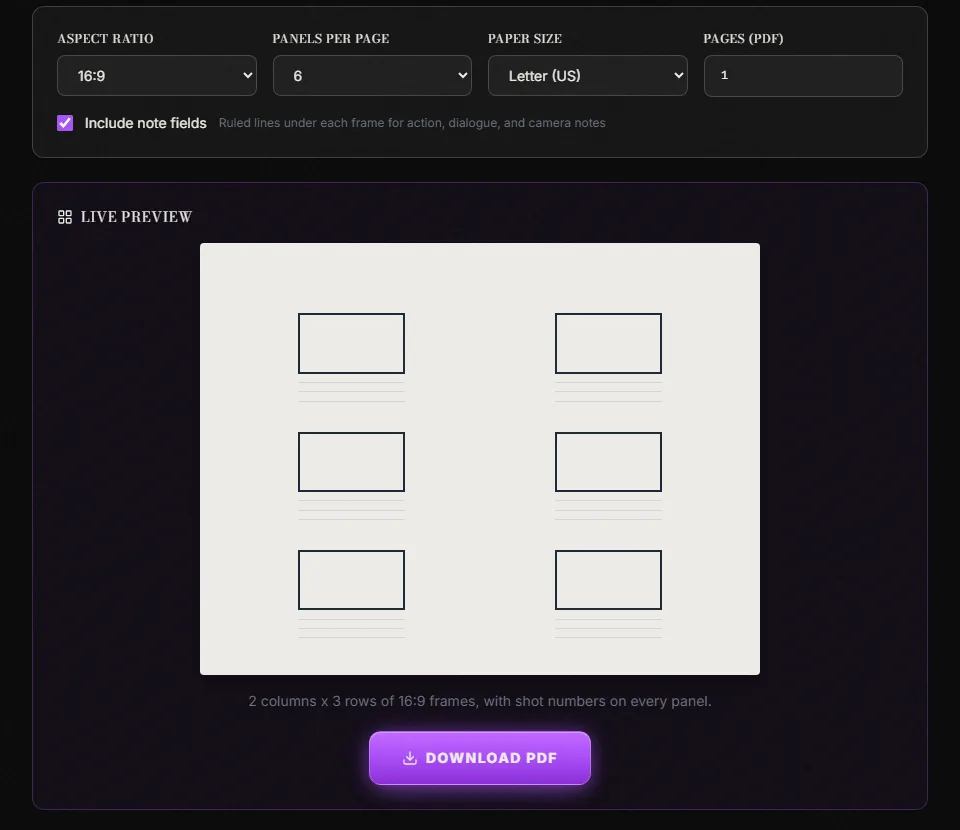
ScreenWeaver's storyboard template generator at its default settings, captured 11 September 2026.
The default (16:9, six panels, notes on) is the one to start from. On Letter paper it gives frames of about 5.5 by 3 centimetres, big enough to place three people and a doorway and small enough that you cannot fall into rendering.
The Fountain version: the board inside the script
In Fountain, anything in double brackets is a note, and notes vanish from the formatted output. Synopsis lines starting with = vanish too. Almost nobody uses either, which is a waste, because it means a shot breakdown can live inside the scene it belongs to, in the same plain text file, without touching the pages a reader sees.
Paste this shape under any scene heading. The scene is invented for this article.
INT. MERCER HOUSE - KITCHEN - NIGHT

= Board: 6 shots, 16:9, sheet 1 of 1

[[SHOT 1 | WS | eye level | static | 4s | Empty kitchen, kettle steaming, back door ajar]]
[[SHOT 2 | MS | low | push in | 3s | TOM enters, stops at the counter]]
[[SHOT 3 | CU | eye level | static | 2s | His hand on the kettle switch. Still warm.]]
[[SHOT 4 | OTS | high | static | 3s | Over Tom to the open door, garden black]]
[[SHOT 5 | MCU | eye level | slow pan L | 4s | Tom turns toward the hallway]]
[[SHOT 6 | WS | eye level | static | 3s | Same as 1, Tom small in frame, door swinging]]

The kitchen is empty. The kettle is still steaming. The back door
stands open onto the dark garden.

Tom stops at the counter and lays a hand on the kettle.

TOM
Who left this on?
Six fields per note, in a fixed order: shot number, size, angle, movement, duration, action. The order is the same one the PDF sheet asks for, so a page of sketches and a block of notes can be checked against each other in a minute.
Run the file through the free Fountain to PDF converter and the notes and synopsis line disappear; the reader gets a clean scene. Open the same file in ScreenWeaver and the scene is still one scene, with the breakdown sitting on it. If you want the whole section hidden from a collaborator's editor as well, wrap it in /* */, the Fountain boneyard, which can span several lines. The full rules are on fountain.io, and Fountain import and export without losing formatting covers what survives a round trip through other apps.
One warning. Not every screenwriting app renders notes the same way, and a few show them inline in the editor as coloured text. That is fine for you and annoying for a co-writer. Keep the notes to shots and nothing else, and they stay useful.
How to fill each field
Blank sheets fail the same way every time: the frames get filled, the lines under them stay empty, and a month later nobody can tell what shot 4 was for. Fill the fields in this order and the sheet keeps its value.
| Field | What goes there | What breaks if you skip it |
|---|---|---|
| PROJECT | Working title, plus draft colour or date | Two drafts of the same scene get mixed on the wall |
| SCENE | Scene number and slugline, as in the script | Panels drift from the page they came from |
| PAGE x of y | Filled by the generator | Sheets shuffle; the cut order goes with them |
| SHOT n | Scene-shot numbering, 12-3 not 3 | Two scenes each have a shot 3 and the AD picks the wrong one |
| The frame | Composition only: where people and edges are | Rendering eats the hour you needed for the next five panels |
| Note line 1 | Action: who moves, what enters | The panel reads as a photo, not a shot |
| Note line 2 | Dialogue cue or sound that starts here | The editor cannot tell where the line lands |
| Note line 3 | Size, angle, movement, a rough duration | The DP guesses the lens; the schedule guesses the time |
Number by scene and shot, never by page. Shot 12-3 stays 12-3 when a sheet is reprinted. If you insert a shot later, it becomes 12-3A, and nothing renumbers. Page-based numbering collapses the first time someone adds a frame.
Draw the edges, not the middle. The value of a true-ratio frame is that the border is the real border. Put the doorway where it cuts the frame, put the head where the top of frame sits, and leave the faces as ovals. If you need a name for what you are drawing, the storyboard shot types reference lists the sizes, angles and movements the note line expects.
Movement gets two frames or none. An arrow across a single panel tells a crew almost nothing. A push-in is a start frame and an end frame, numbered 12-5 and 12-5 end, with the arrow drawn between them on the page. That doubles the panel count for moving shots, which is why the sheet has to be cheap to print, and why the frames per minute estimate adds a margin for camera moves.
Duration is a guess, and it still belongs on the sheet. Two to five seconds per panel is the normal range for live action. Writing it down is what lets the six frames on a page be read as roughly twenty seconds of screen time, which is the number the shot list and the schedule will want.
Variants: which sheet for which job
Match the sheet to the delivery, not to the drawing you feel like making. The settings below are all one selection away in the generator.
| Project | Ratio | Panels per page | Orientation | Why this layout |
|---|---|---|---|---|
| Feature, cinematic release | 2.39:1 or 1.85:1 | 4 | Landscape | Wide frames need width; four keeps them legible |
| TV, YouTube, corporate | 16:9 | 6 | Landscape | The default; one page per twenty seconds |
| 30-second commercial | 16:9 | 9 or 12 | Landscape | Cut rate matters more than detail; see the commercial storyboard guide |
| Vertical short, Reels, TikTok | 9:16 | 8 | Portrait | Vertical frames sized for the format instead of cropped from wide |
| Animation, e-konte | 16:9 | 3 | Landscape | Room for timing and dialogue under each frame; the discipline is in anime storyboarding |
| Music video | 16:9 | 12 | Landscape | Beats per page, matched to the track; see the music video storyboard guide |
| Pitch or lookbook | 16:9 | 2 | Landscape | One big frame per scene, the sheet doubles as a presentation page |
| Archival or 4:3 work | 4:3 | 6 | Landscape | Old broadcast and some documentary sources |
Fewer frames per page when the composition has to carry weight, more when the rhythm of the cuts is the point. And never board in a ratio you will not deliver in: a scene composed in 16:9 and shot for 2.39:1 loses the top and bottom of every frame, which is where you put the heads.
Try it free
Try Screenweaver for free on your script
It is free. Import your existing project, get a clearer view of your outline, and regain control of your story structure in minutes.
Start FreeWhat the other free templates give you
There are plenty of free storyboard PDFs, and it is worth knowing what they contain before choosing one.
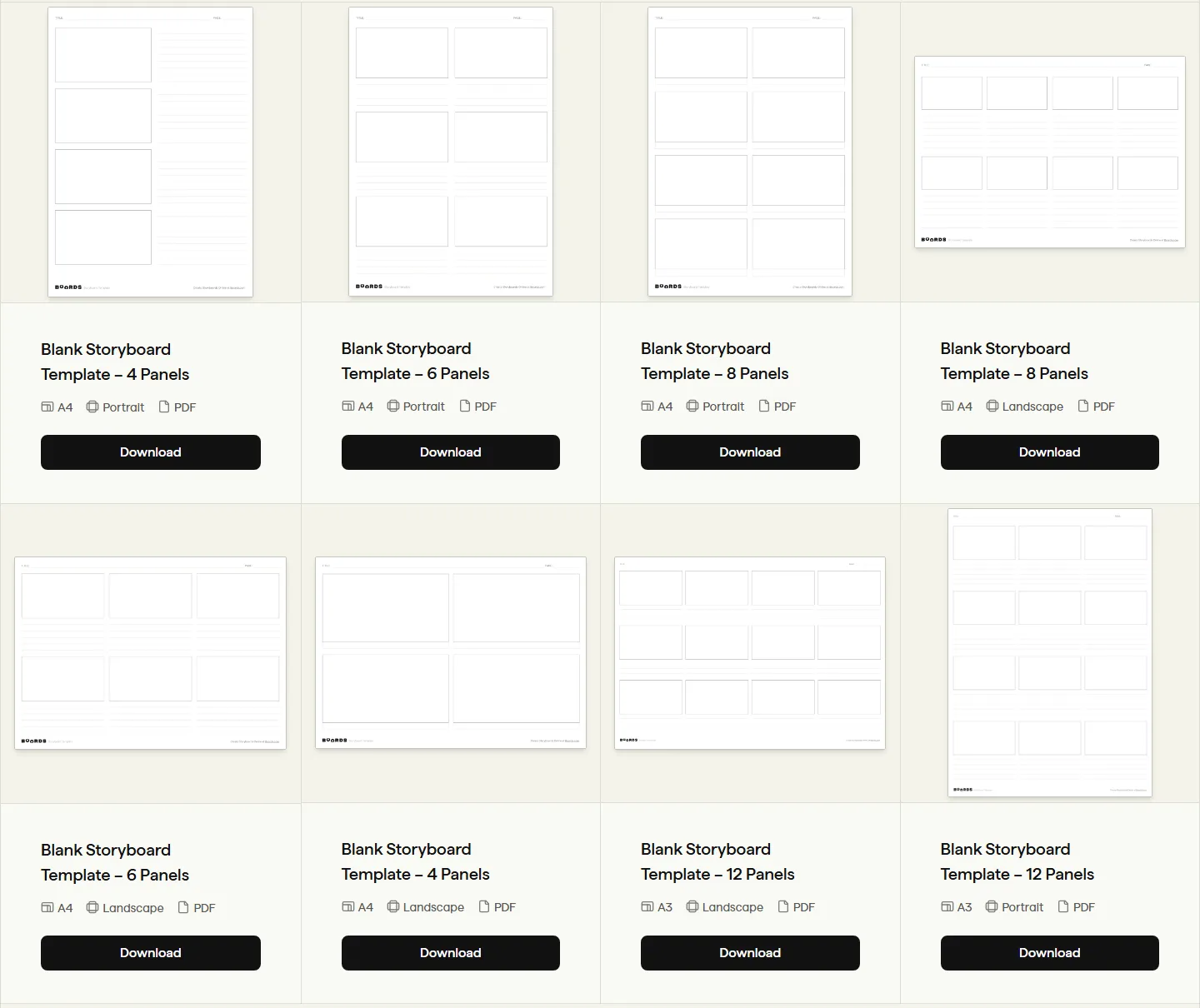
Boords' free storyboard template downloads, captured 11 September 2026.
| Source | Formats | Layouts on offer | Signup |
|---|---|---|---|
| Boords free templates | 4, 6, 8, 12 panels; A4 and A3; portrait and landscape; plus themed sets for motion design, eLearning, TV commercials, music video | None for the PDFs | |
| StudioBinder free templates | PDF, PSD, AI, PPT, DOCX | 2, 3 and 6-frame layouts; 16:9, 2.39:1, 9:16 and 1:1 mentioned | None, no email |
| ScreenWeaver generator | PDF, plus the Fountain block above | 2 to 12 panels; six ratios including 1.85:1 and 4:3; Letter and A4; up to 20 pages per file | None |
If you want an editable Word or Photoshop file, StudioBinder has it and we do not. If you want A3, Boords has it and we do not. If you want Letter paper, a 1.85:1 frame, a multi-page file numbered for you, or the board living inside the script text, that is what the generator and the Fountain block are for.
When to stop printing and generate the panels
Blank sheets are for the pass where you do not yet know the shots. They are cheap, fast, and nobody has to learn anything. Once the scene is written and the coverage is decided, redrawing forty panels by hand is a week you do not have, and that is where the template ends and the AI storyboard tool starts.
The workflow is the one in the AI storyboard from a script walkthrough: reference sheets for the characters and places first, then a shot breakdown per scene, then panels rendered from the breakdown with the same shot value and camera movement vocabulary you wrote on the ruled lines. The panels stay attached to the scene, so a rewrite in the script marks the affected shots instead of orphaning a stack of paper. Writing and structure are free; panel generation sits on the Auteur plan and draws credits per image, which is why the paper pass is still worth doing: every shot you cut on the sheet is an image you never pay for.
If you are deciding whether you need a board at all for a given scene, shot list vs storyboard settles that before you print anything. And for the manual version of the whole process, from slugline to a strip of frames, how to make a storyboard from a screenplay is the long form.
Checklist before you print
- Ratio matches the delivery spec, not the reference film you watched last night.
- Panel count picked for the scene: 4 for a slow dialogue scene, 9 or 12 for a chase or a spot.
- Note fields on, unless the sheet is for thumbnails only.
- Page count set to the number of scenes you will board today, so every sheet is pre-numbered.
- PROJECT and SCENE filled by hand before the first frame is drawn.
- Shot numbers written as scene-shot (12-3), with letters reserved for inserts.
- One extra blank sheet per scene. The best shot usually arrives while you are boarding the one before it.
- The Fountain block copied into the script once the shots are settled, so the paper can be lost without losing the board.
FAQ
What size are the frames on the 16:9 template?
On Letter paper with six panels and notes on, each frame is about 5.5 by 3 centimetres. Four panels per page roughly doubles that, to about 10.5 by 6; twelve shrinks it to under 3 by 1.5 centimetres, a large postage stamp, which is fine for pacing and wrong for composition. The numbers come from the same layout code that draws the PDF.
Can I get the template in Word or Google Docs?
Not from the generator, which produces PDF only. StudioBinder publishes DOCX and PPT versions of its own templates if you need an editable file. The Fountain block above is plain text and opens in anything.
Does the Fountain block show up in the printed script?
No. Notes in double brackets and synopsis lines starting with = are stripped from formatted output by any parser that follows the Fountain spec, including the free Fountain to PDF converter. Some editors display them on screen as highlighted text, which is by design.
How many pages should I generate at once?
One per scene you plan to board in the session, up to the file's limit of 20. The pages are pre-numbered, so a scene that runs long simply continues onto the next sheet, and the header keeps them in order.
Is the template really free, with no watermark?
Yes. The PDF is generated in your browser, nothing is uploaded, there is no account, and the printed sheet carries no branding. The header strip holds only PROJECT, SCENE and PAGE.
Should I still draw on paper if I plan to generate the panels with AI?
For the first pass, yes. Deciding the shots on a sheet costs nothing, and every panel you delete on paper is one you never generate. Once the coverage is fixed, generate from the script rather than redrawing, and keep the sheets as the record of what you rejected.
Final Step
Build your next script with Screenweaver
Move from ideas to production-ready pages faster with timeline-native writing and AI-assisted story flow.
Try Screenweaver