
You no longer need Developer mode to add an MCP server to ChatGPT. In OpenAI's current help center, you open Plugins, click +, choose Add custom MCP server, paste the server URL and set up sign-in. Full access, writes included, is for Business, Enterprise and Edu workspaces. Pro accounts get read and fetch only.
That last sentence decides whether this guide is for you, and the exact wording is further down. If you need the background first, read what an MCP server is. The full list of ScreenWeaver tools and clients is on the ScreenWeaver MCP page.
Disclosure: we build ScreenWeaver. The ChatGPT steps work for any remote MCP server; we flag the places where ScreenWeaver behaves its own way.
Developer mode or Plugins: what changed
Most guides written in 2025 tell you to open Settings, then Apps, switch on Developer mode in the advanced settings and click Create. Our own setup pages were written that way too. OpenAI has since moved custom servers into Plugins, and its help article says it plainly:
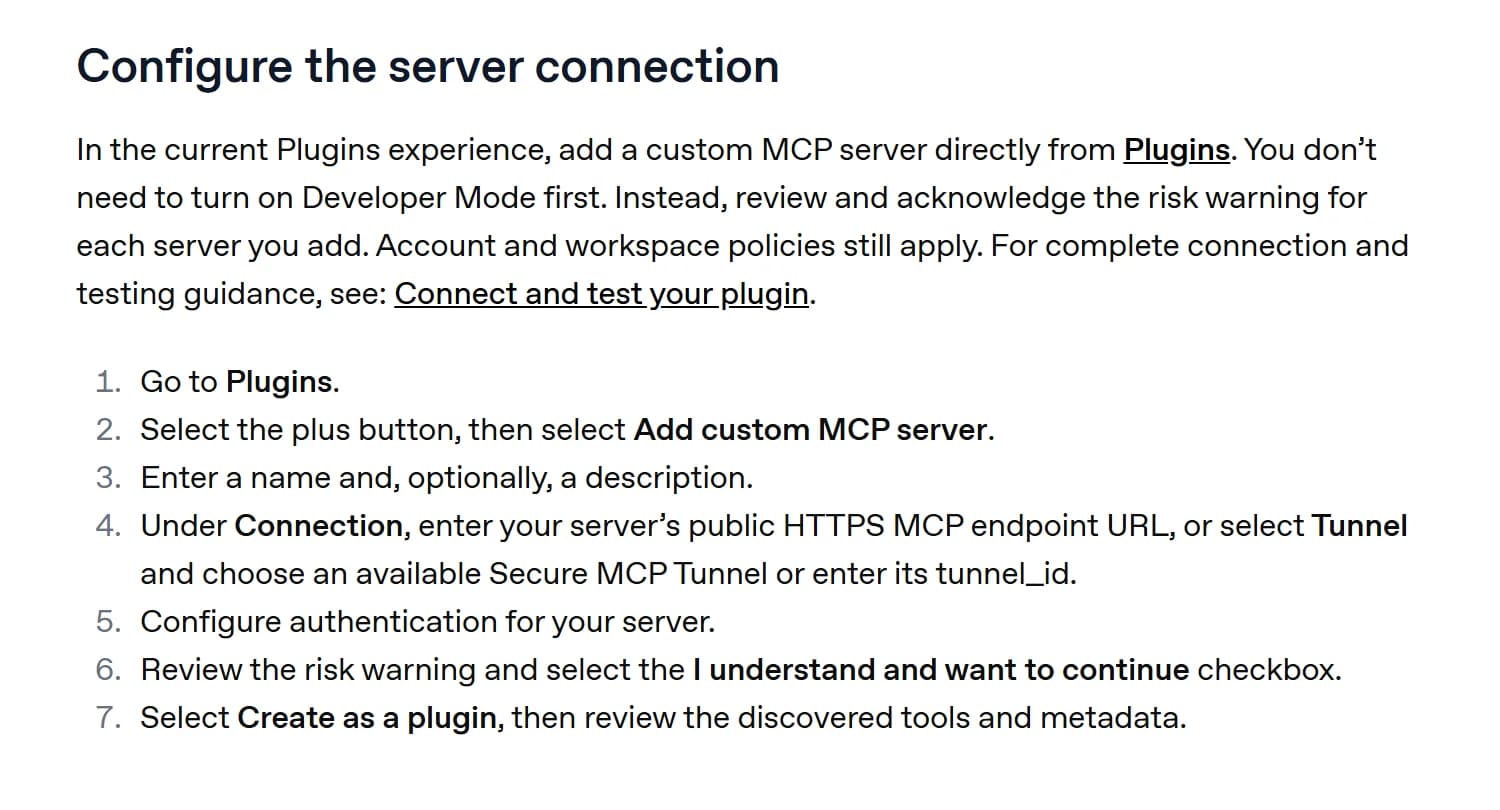
OpenAI help center, "Connecting custom MCP servers in ChatGPT", captured 25 October 2026.
The old flow has not disappeared. The same article keeps a "Legacy custom app configuration" section: Settings, Apps, Create, then a Scan Tools button, and the draft app shows up in Enabled Apps with a Dev label. If your workspace still shows that screen, use it. The ScreenWeaver part is identical either way.
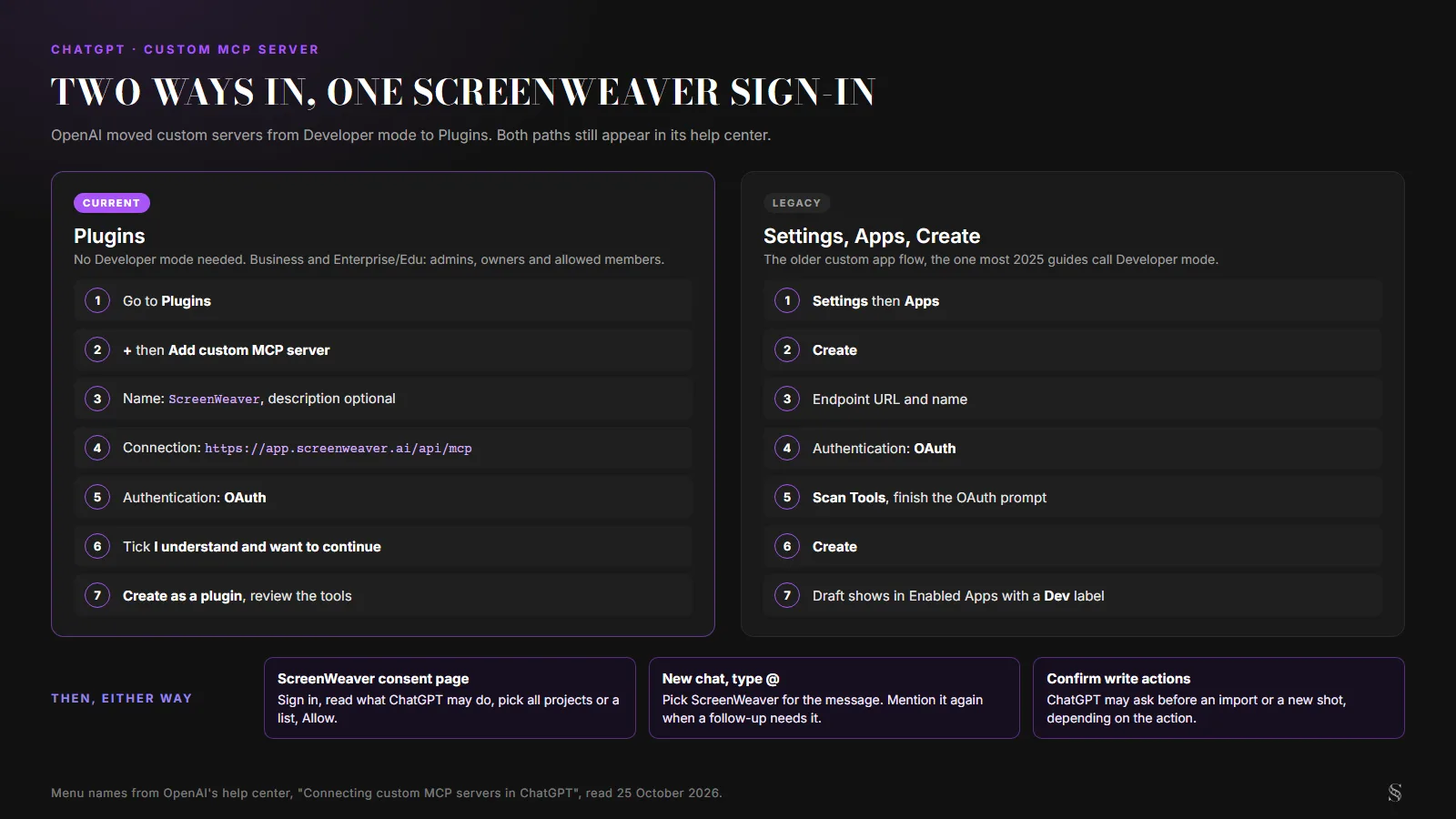
Both paths side by side. Menu names from OpenAI's help center, read 25 October 2026.
Which ChatGPT plans can connect a custom MCP server
Here is the plan line, word for word from OpenAI, together with the Pro answer from the FAQ at the bottom of the same page:
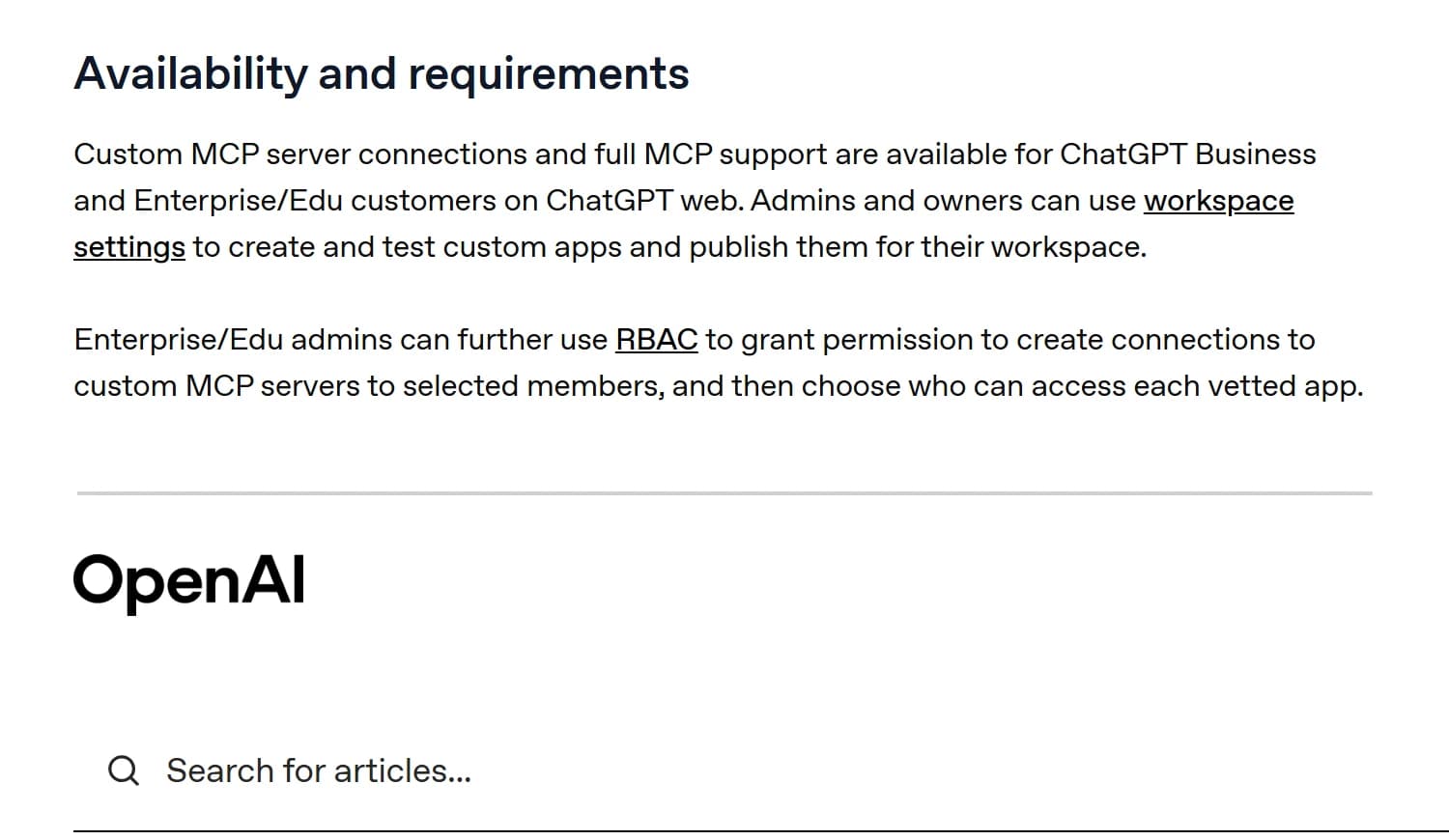
Two extracts from the same OpenAI help article, the availability section and the FAQ, captured 25 October 2026.
In practice, for a writer or a small studio:
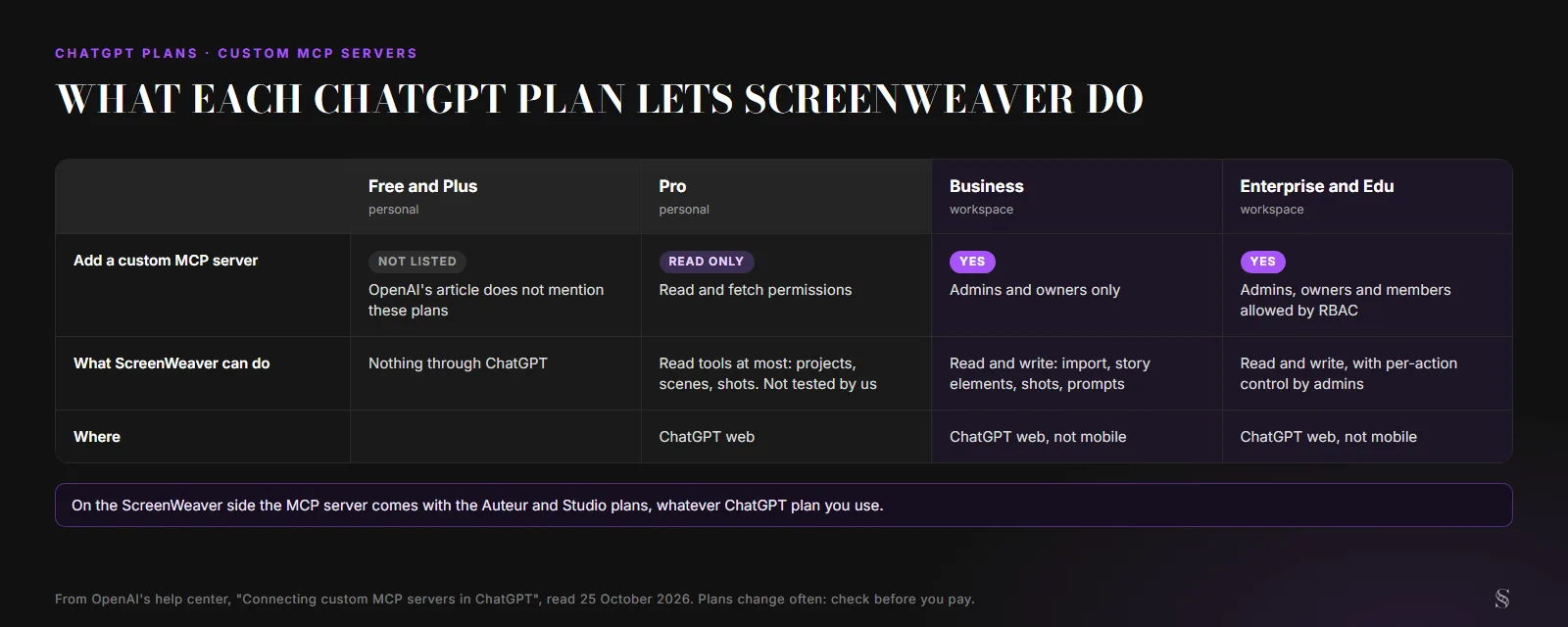
What each ChatGPT plan allows, from OpenAI's article read on 25 October 2026. We have not tested the Pro read-only mode with ScreenWeaver.
Read-only matters more than it sounds. Almost everything useful you would ask ScreenWeaver to do writes something: importing a script, creating characters and places, breaking a scene into shots. On Pro, ChatGPT can at best list your projects and read scenes and shots. If you are on Free, Plus or Pro and want the whole thing, the same server works in Claude on every plan, Free included; our guide to connecting Claude takes two minutes.
On a Business workspace, only admins and owners can create the plugin. On Enterprise and Edu, admins can also give that right to chosen members. Either way, it runs on ChatGPT web only. OpenAI's FAQ answers "Can I connect custom MCP servers on mobile?" with a flat no.
Before you start
- A ChatGPT Business, Enterprise or Edu workspace, and the right to create plugins in it (ask an admin if Add custom MCP server is missing).
- A ScreenWeaver account on the Auteur or Studio plan. The MCP server is reserved for those two.
- ChatGPT open in a browser, not the phone app.
- The server URL:
https://app.screenweaver.ai/api/mcp. You will find it with a copy button in your ScreenWeaver account, Connected apps tab, under "ChatGPT and other apps". ChatGPT has no one-click install button there, unlike Claude, Cursor and VS Code.
Add ScreenWeaver to ChatGPT, step by step
Step 1. Open Plugins. In ChatGPT on the web, go to Plugins.
Step 2. Add a custom MCP server. Click the + button, then Add custom MCP server.
Step 3. Name it. Type ScreenWeaver. The description is optional; something like "my film projects" helps when you have several servers.
Step 4. Paste the URL. Under Connection, paste:
https://app.screenweaver.ai/api/mcp
Ignore the Tunnel option. That is for servers running on a private network, and ScreenWeaver is public.
Step 5. Choose OAuth. ScreenWeaver signs you in with OAuth 2.1. There is no API key to generate and nothing to paste in a header.
Step 6. Accept the risk warning. ChatGPT shows a warning for every custom server. Read it, tick I understand and want to continue. OpenAI's advice there is fair: only connect servers you trust.
Step 7. Create the plugin. Click Create as a plugin. ChatGPT discovers the tools and their descriptions. This is when the ScreenWeaver sign-in opens.
Step 8. Allow access on ScreenWeaver. You land on a ScreenWeaver page that names the app asking for access, lists what it will be able to read, edit and spend, and asks which projects it may open: All my projects (including future ones) or Only these projects. Pick, then Allow. The page is the same one we show in the Claude guide, with ChatGPT's name instead of Claude's.
Step 9. Use it in a chat. Install the plugin, start a new conversation, type @ and pick ScreenWeaver. One habit to learn: in ChatGPT the app is chosen per message, not for the whole conversation. When a follow-up needs ScreenWeaver again, mention it again.
Try it free
Try Screenweaver for free on your script
It is free. Import your existing project, get a clearer view of your outline, and regain control of your story structure in minutes.
Start FreeWhat ChatGPT can do in your ScreenWeaver project
Start with a request that only reads, and keep ScreenWeaver open in another tab so you watch what changes. Then try a write. ChatGPT may ask you to confirm before it imports or creates something; OpenAI says it decides that from the app's permissions and the action itself.
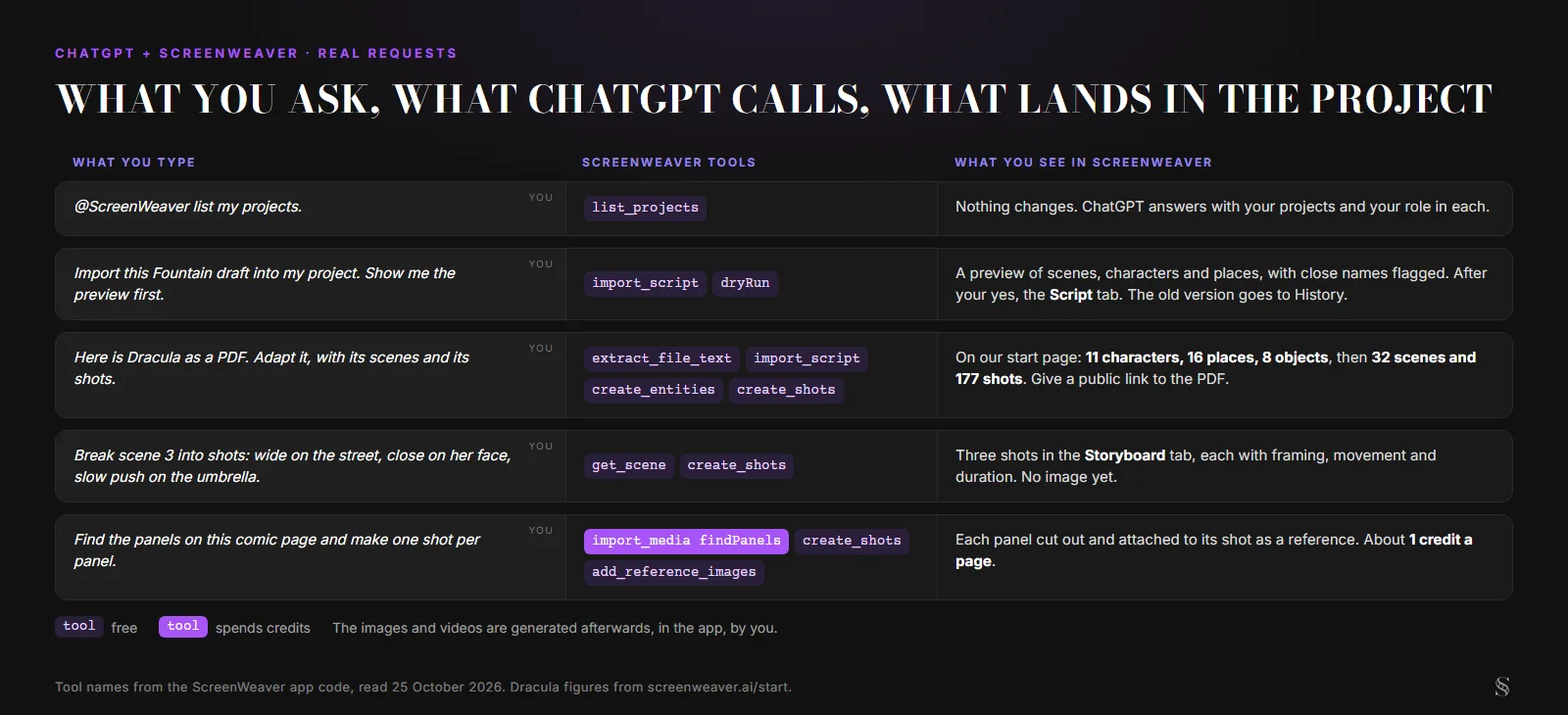
Five requests and the tools behind them. Tool names from the ScreenWeaver code, read 25 October 2026; Dracula figures from our start page.
The third line is the request we show on the start page: "Here is Dracula as a PDF. Adapt it, with its scenes and its shots." The result there was 11 characters, 16 places and 8 objects, each with its sheet, then 32 scenes broken down into 177 shots. The assistant proposes all of it. You read, correct and keep what works.
One catch is specific to ChatGPT. A file you attach in ChatGPT does not reach ScreenWeaver by itself. Over MCP, ScreenWeaver reads files from a public HTTPS link, 15 MB at most per file. Dracula is in the public domain, so a link to a public copy of the book works fine. For a short text file such as a Fountain draft, ChatGPT can also read the attachment and send the text to import_script directly. For your own unpublished PDF, the simpler route is the assistant inside ScreenWeaver, where you attach the file in the app; our screenplay import guide covers what is free and what costs credits.
What ChatGPT does not do through ScreenWeaver: generate images or video. It creates the shots, writes the prompts and attaches reference images. You launch the generation in the Storyboard and Production tabs, with your credits. And an image ChatGPT draws in the chat stays in the chat. It does not land in your project.
When ScreenWeaver gets new tools
OpenAI's FAQ explains that once an admin approves a server, ChatGPT keeps a "frozen" snapshot of its tools, and later changes are not applied until an admin refreshes them. The ScreenWeaver tool list grows: set_shot_panel, which puts an imported image on a shot as its storyboard panel, is a recent one. If a tool from our docs is missing in ChatGPT, or a call starts failing after one of our updates, ask your admin to refresh the tool list from the workspace app settings.
When it does not work
| What you see | Likely cause | Fix |
|---|---|---|
| No Add custom MCP server in Plugins | Your plan or your role does not allow it | Ask a workspace admin or owner, or use Claude |
| ScreenWeaver missing when you type @ | The plugin is not installed, or the workspace has not given you access | Install it from Plugins, or ask the admin |
| ChatGPT reads but refuses to import or create shots | A Pro account, limited to read and fetch | Use a Business workspace, or Claude |
| A 401, or ChatGPT asks you to sign in again | The ScreenWeaver session expired or was revoked | Reconnect the plugin and allow again |
forbidden on a scanned PDF or a comic page | No subscription or not enough credits for OCR or panel detection | Top up, or use a PDF with a text layer, which reads for free |
| "Rate limit exceeded" | More than 60 tool calls in a minute, the ScreenWeaver limit per user | Wait a minute, or ask for fewer, bigger steps |
| A tool from our docs is missing | ChatGPT's frozen tool snapshot | Admin refreshes the tool list |
How to disconnect ChatGPT
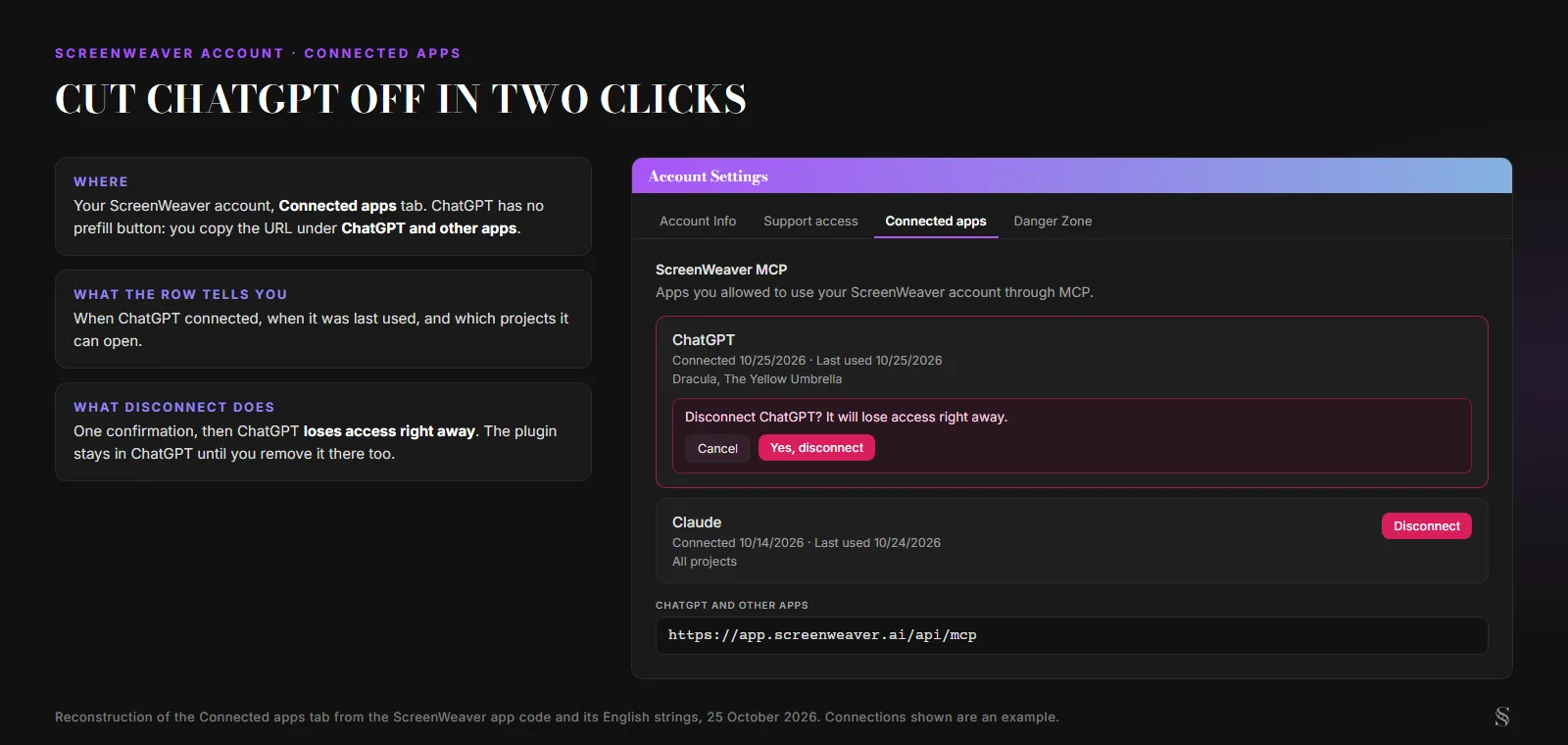
The Connected apps tab, rebuilt from the ScreenWeaver app code and its English strings on 25 October 2026. The connections are an example.
In ScreenWeaver, open your account, then Connected apps. Each app shows when it connected, when it was last used and which projects it can open. Click Disconnect next to ChatGPT and confirm: it loses access right away. The plugin itself stays in ChatGPT until you, or your admin, remove it there. Deleting your ScreenWeaver account revokes every connection.
If you mostly want to write with ChatGPT rather than wire it up, our guide to writing a screenplay with ChatGPT is the better next read. And if your script is stuck in a PDF, the free PDF to Fountain converter gives you a clean file to import.
FAQ
Do I still need Developer mode to add an MCP server to ChatGPT? Not in the current Plugins experience. OpenAI's help article says you add a custom MCP server directly from Plugins and acknowledge a risk warning instead. Some workspaces still show the legacy Settings, Apps, Create flow, which works the same way for ScreenWeaver.
Can I connect ScreenWeaver to ChatGPT Plus? OpenAI's article lists Business and Enterprise/Edu for custom MCP servers and gives Pro read and fetch only. Plus is not mentioned, so plan on it not working. Claude accepts the same server on every plan, Free included.
Does the ScreenWeaver plugin work in the ChatGPT phone app? No. OpenAI says custom MCP servers are web only. Set it up and use it on ChatGPT in a browser.
Can ChatGPT generate my storyboard or my film through ScreenWeaver? No. Through the MCP server, ChatGPT reads and writes your script, characters, places, shots and prompts. Images and videos are generated in ScreenWeaver, by you, with your credits.
Is my ScreenWeaver password shared with ChatGPT? No. You sign in on ScreenWeaver's own page and choose the projects ChatGPT may open. ScreenWeaver stores only a hashed copy of the access tokens, and you can revoke them at any time from Connected apps.
Final Step
Build your next script with Screenweaver
Move from ideas to production-ready pages faster with timeline-native writing and AI-assisted story flow.
Try Screenweaver