
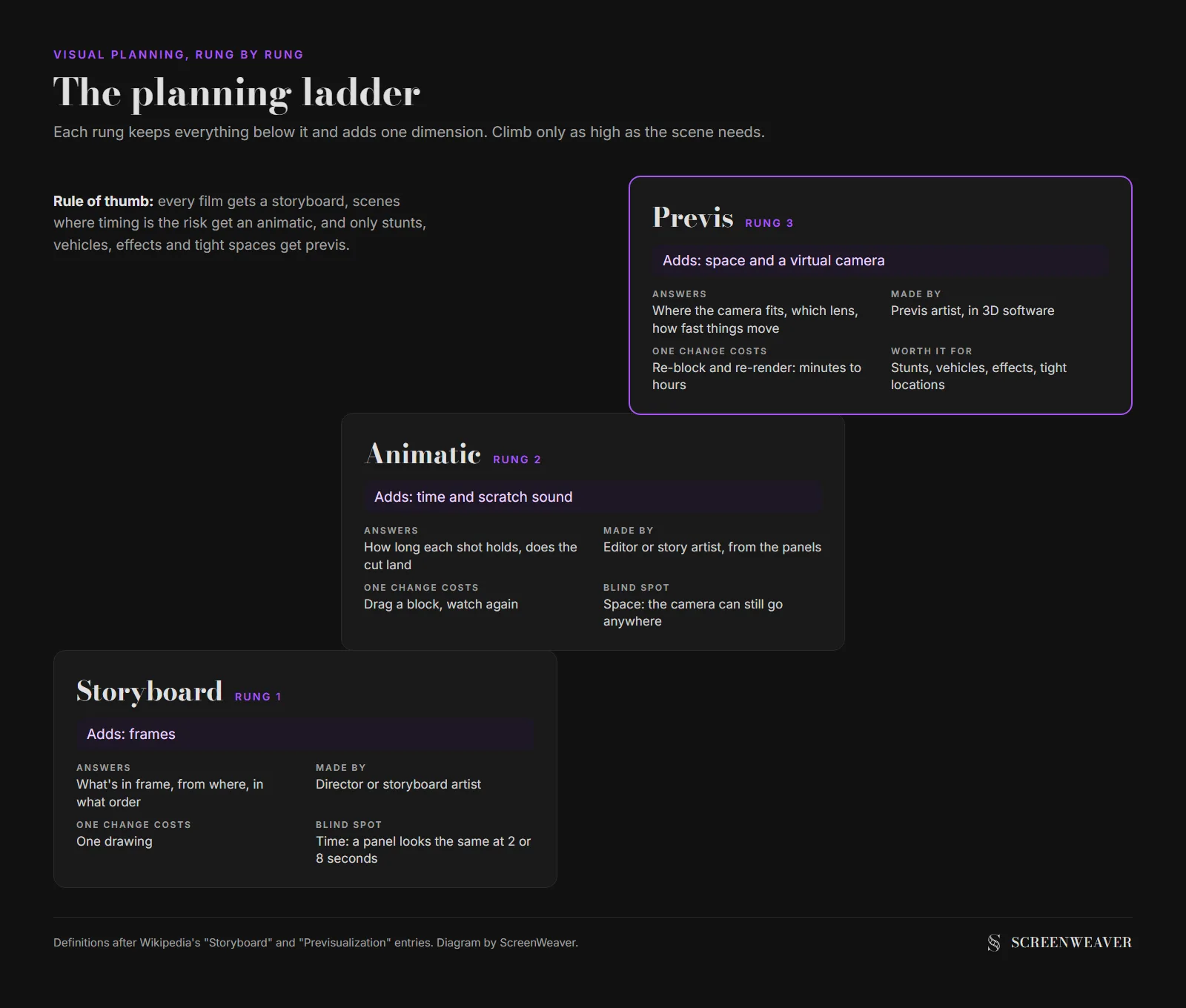
A storyboard shows what each shot looks like. An animatic plays those drawings in time, usually with scratch sound, so you can judge rhythm. Previs rebuilds the scene in rough 3D so you can test camera, lenses and movement in real space. Most indie films need the first two. Previs earns its cost on stunts, effects and tight locations.
Think of them as three rungs of one ladder, and only climb as high as the scene needs. This page belongs to our independent filmmaker workflow, and every example below uses the same four-shot scene so you can see what each rung adds.
The comparison table
| Storyboard | Animatic | Previs | |
|---|---|---|---|
| What it is | Still drawings, one or more per shot | The storyboard panels played in sequence, at their real durations | A rough 3D version of the scene, with a virtual camera |
| What it answers | What's in frame, from where | How long each shot holds, does the cut land | Where the camera can physically go, which lens, how fast things move |
| Sound | None | Usually scratch dialogue, temp music, a few effects | Optional |
| Typical maker | Director, storyboard artist | Editor or story artist, from the boards | Previs artist or a director who knows 3D software |
| Cost to change one shot | Redraw one panel | Redraw one panel, retime one block | Re-block the 3D scene, re-render |
| Where it's standard | Live action and animation alike | Animation, commercials, any scene where timing is the risk | Effects, stunts, action, big camera moves |
| Can you skip it? | Rarely | On simple dialogue scenes, yes | On most indie films, yes |
The order matters. An animatic is built from storyboard panels, so you can't have one without the other. Previs can be built straight from the script, but it goes faster when a board already settled the shot list.
Storyboard: frames you can argue about
A storyboard is a set of still images, one or more per shot, in the order the film will show them. Wikipedia's storyboard entry traces the modern form to Walt Disney Productions in the early 1930s, with the first complete storyboards made for a 1933 Disney short. Live action picked the method up within a few years.
A board settles framing: who's on the left, how tight we are, what the audience sees first. It's also the cheapest place to find out that a scene has too many shots, or not enough. Our guide to storyboard frames per minute has the numbers if you need to budget the board itself.
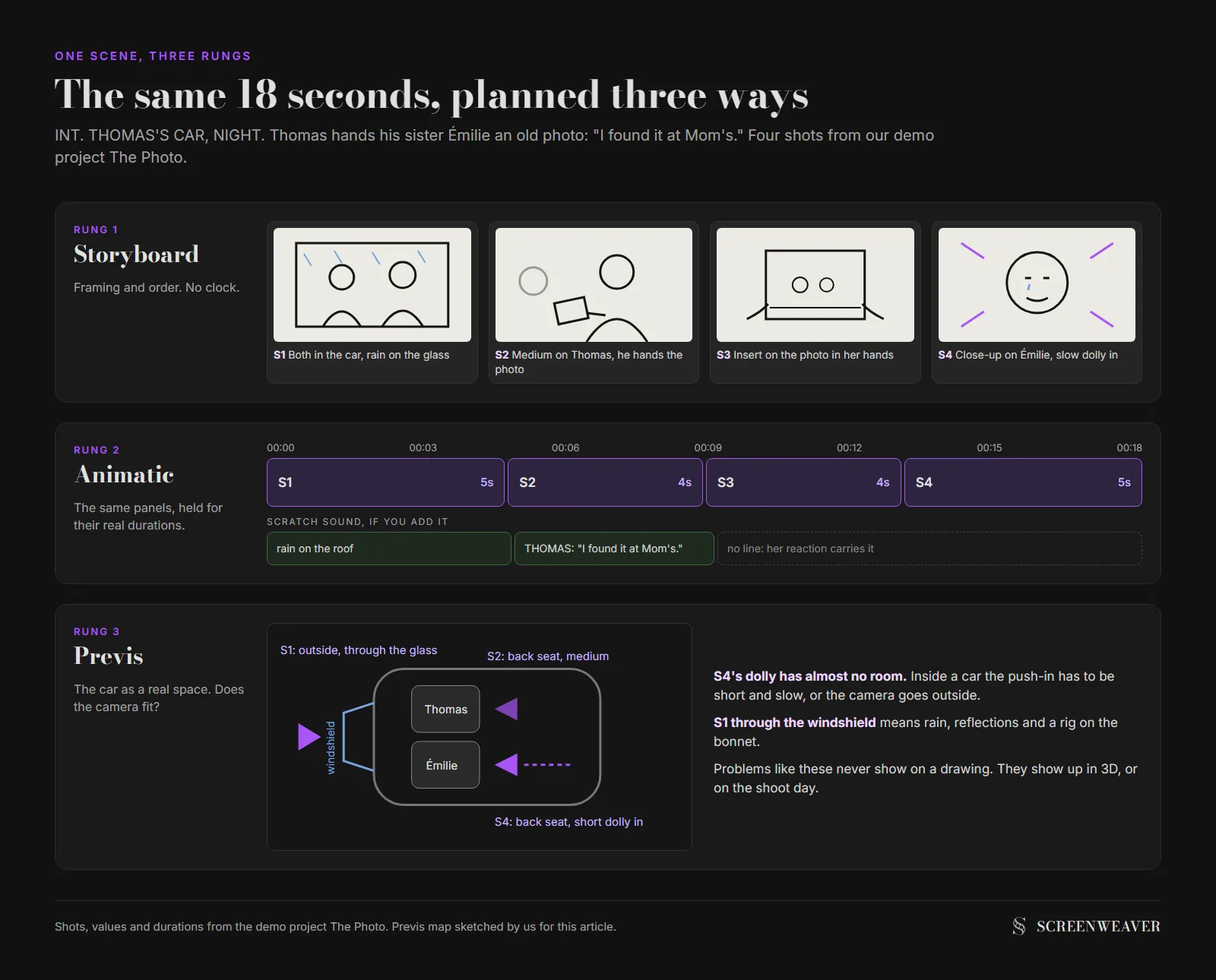
It says nothing about time, though. A panel of Thomas handing his sister an old photo looks the same whether the shot lasts two seconds or eight. Nothing on the page measures that, so a board can look finished and still produce a cut that drags. Changing a shot here costs one drawing, and with stick figures that's a minute.
Animatic: the board, with a clock
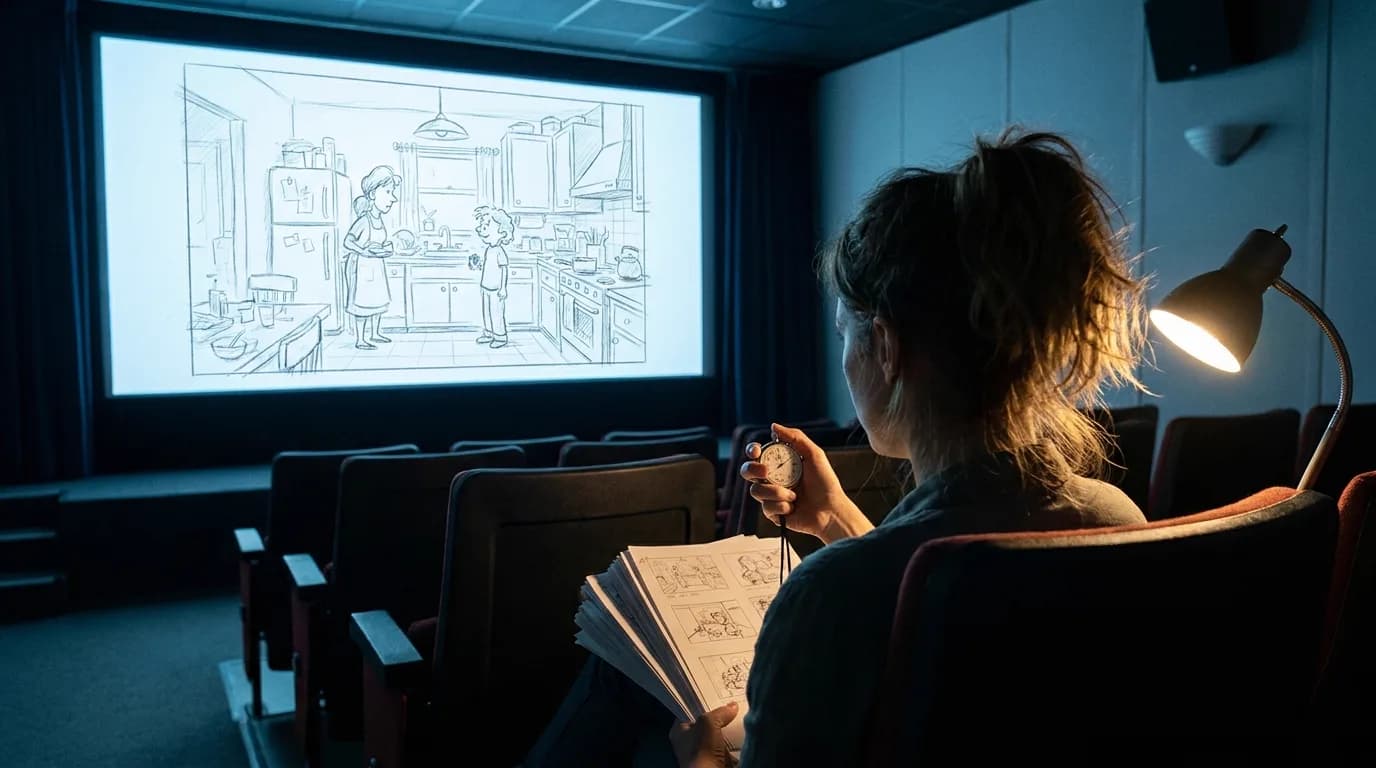
An animatic takes the storyboard panels and plays them in order, each one held for the length of the shot. Wikipedia describes it as a sequence of still images, usually taken from a storyboard, displayed in sync with rough dialogue or a rough soundtrack. Simple zooms and pans on the stills are allowed. Full animation isn't the point.
This is where the real questions about rhythm show up:
- A line of dialogue needs four seconds, but the shot you drew only holds two.
- Two inserts in a row stall the scene.
- The reaction shot comes too late, so the emotion lands on the wrong face.
In animation the animatic shows which scenes would end up cut before anyone pays to animate them. The same Wikipedia entry notes that advertising agencies use animatics to make cheap test commercials.
Most animatic fixes are timing fixes. You drag a block, watch again, and the change has cost you thirty seconds.
Previs: the scene in space
Previs, short for previsualization (also spelled previz), means building a rough version of a scene before the real shoot. Today that usually means simple 3D: grey characters, basic sets, a virtual camera with real lens values. Wikipedia's previsualization entry dates the first use of 3D software to previsualize a scene for a major film to Star Trek V in 1989, and calls Clear and Present Danger (1994 to 1995) the first fully produced use of computer previs. It also notes that before computers, George Lucas's team cut together World War II dogfight footage to plan the X-wing battles of the first Star Wars.
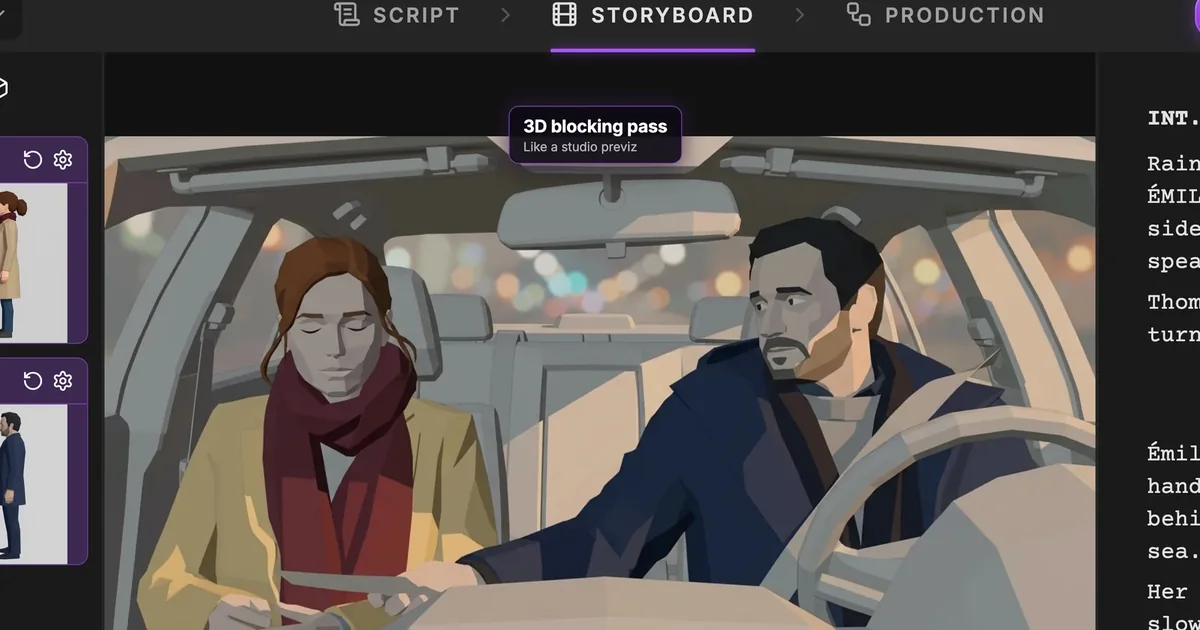
The question previs answers is physical: does the camera fit? A drawing can put the lens anywhere. In a real car, the windshield, the dashboard and the gap between the seats decide where a camera can sit and which focal length gets both faces. Previs tests that before you rent the car.
Larger productions split the job further. Technical previs (often called techvis) turns the 3D scene into measurements for the crew: camera height, distances, dolly track length. Postvis comes after the shoot and drops rough effects into the real footage so the editor can cut before the final shots arrive.
Changes are slower up here. A small camera move takes minutes to re-block and re-render; a changed set can take hours. Most indie shoots don't have a previs artist, and a dialogue scene doesn't need one.
Which rung do you need?
Climb only as high as the risk. Here is how we'd decide by project:
| Project | Storyboard | Animatic | Previs |
|---|---|---|---|
| Dialogue short, one or two locations | Yes, stick figures are fine | Only for the scenes you're unsure about | No |
| Animated short or series | Yes | Yes, it's the backbone of the edit | Only for complex 3D camera moves |
| Commercial | Yes | Yes, agencies test ads this way | Only for complex product or camera moves |
| Music video | Yes, loosely | Yes, cut to the track | Rarely |
| Stunt, fight or car scene | Yes | Yes | Yes, this is what it's for |
| Effects-heavy shot | Yes | Yes | Yes, plus postvis after the shoot |
| AI film | Yes, it becomes the shot list | Yes, before you pay for video | The rough 3D panels act as light previs |
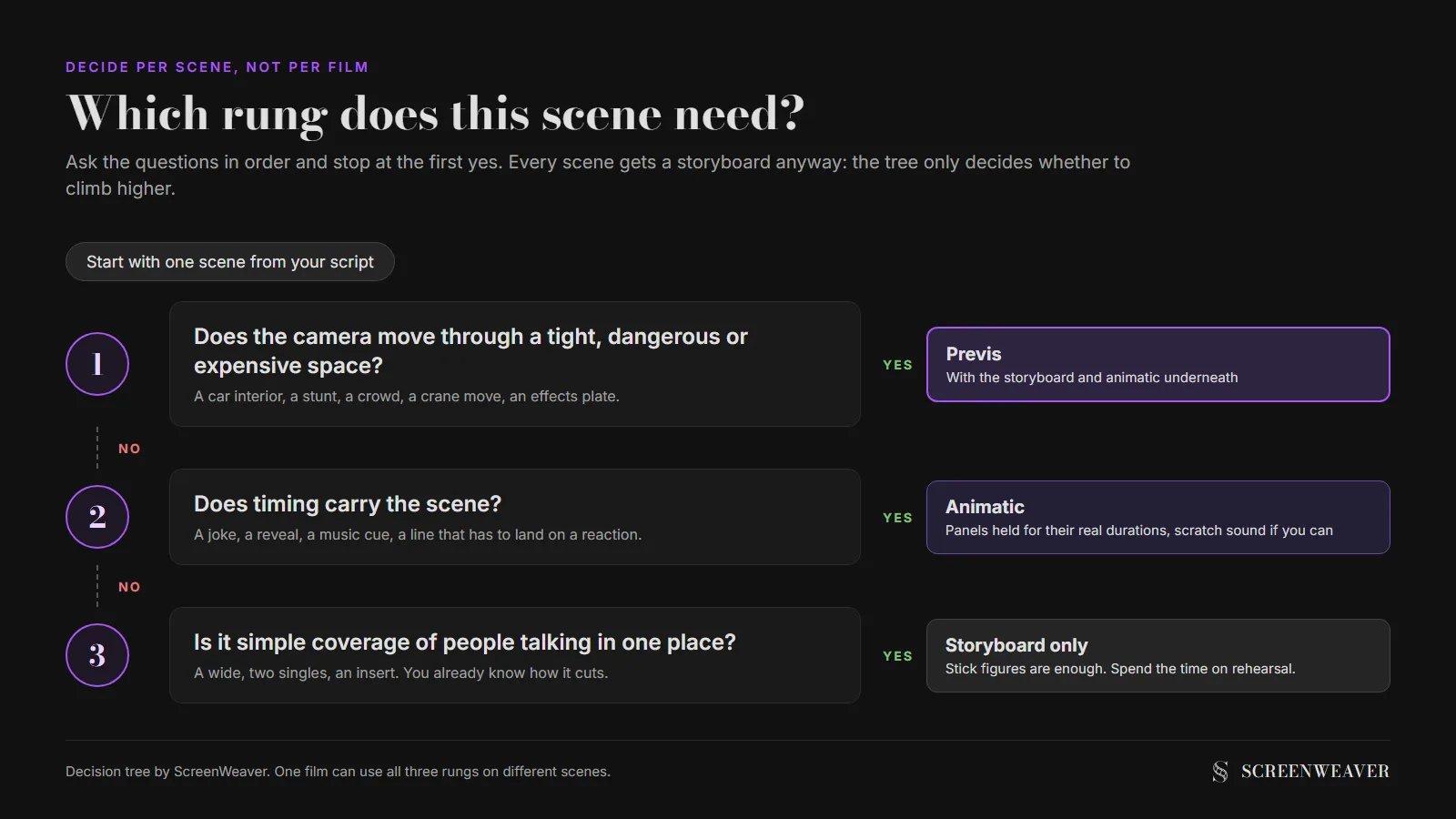
You choose per scene. A drama might board everything, cut an animatic for two scenes and previs one car crash, and that's a perfectly normal plan.
Try it free
Try Screenweaver for free on your script
It is free. Import your existing project, get a clearer view of your outline, and regain control of your story structure in minutes.
Start FreeHow the three map onto an AI film
AI video changes the cost of the rungs, and it raises the cost of skipping them. Every generated shot costs credits. A shot that's held too long or framed wrong costs the same as a good one. So the animatic step moves from "nice to have" to "do this before you pay".
In ScreenWeaver, the Storyboard tab breaks your scenes into shots and draws one rough 3D blocking panel per shot. Each panel has a shot value, a camera movement, an action and a duration. The sequencer at the bottom of the tab lays the shots out against a time ruler, and pressing Play runs the board as an animatic: each panel holds for its duration while the script on the right follows the current shot.
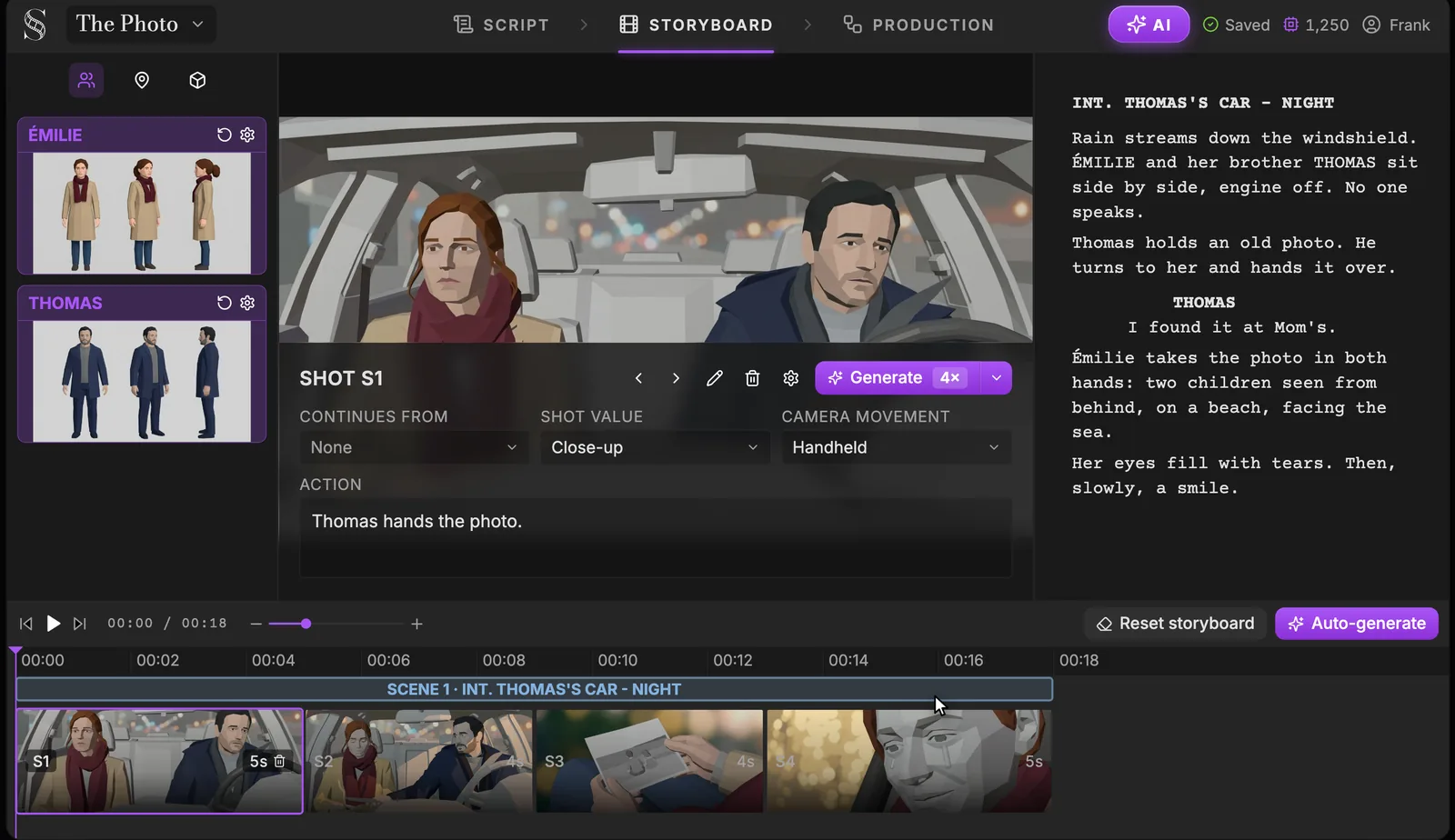
Two limits to know. The playback has no sound, so you can't hear a scratch line against the cut. And it isn't exported as a video file: it's a review tool inside the app. For dialogue timing, read the lines aloud against the playhead, or cut a quick audio animatic in your editor.
The 3D blocking look is a deliberate middle ground. It isn't true previs, since there's no virtual camera you can walk through the set, but it fixes staging and light in a way stick figures don't. Our AI previz walkthrough goes shot by shot through that tab with the same demo scene. If you need a paper board first, the free storyboard template generator prints panels in the aspect ratio you'll shoot.
Common mistakes on the ladder
Polishing the board is the first one. Finished-looking frames start debates about colour and costume when you should be deciding framing and order.
The second is skipping the animatic because the board reads well. A board always reads well. You only find the dead seconds when it plays.
Third, previs for a dialogue scene. Two people at a table rarely need 3D, and that week is better spent on rehearsal. Previs before the script is locked is worse still: one rewrite moves the scene and the 3D work goes in the bin.
Last, treating the animatic's timing as the edit. It's a guess. Your actors will change it on the day.
FAQ
What is the difference between previs and a storyboard?
A storyboard is a set of still drawings that fix framing and shot order. Previs is a rough 3D version of the scene with a virtual camera, used to test movement, lenses and space. A board says what the shot looks like; previs checks whether it can be shot that way.
Is an animatic the same as previs?
Not quite. An animatic plays storyboard panels in time, usually with scratch sound, to test rhythm. Previs builds the scene in 3D. The words overlap in practice: Wikipedia notes that the previs team on The Phantom Menace made "an average of four to six animatics" of every effects shot. When a crew says animatic without context, they usually mean the timed board.
Do I need previs for a short film?
Usually not. A dialogue short needs a storyboard and, for the tricky scenes, an animatic. Previs pays off when a shot involves a stunt, a vehicle, effects or a camera move in a cramped space.
What comes first, storyboard or animatic?
The storyboard. An animatic is made from storyboard panels, so the board comes first. Previs can start from the script or from the board.
Can I make an animatic without drawing skills?
Yes. Stick figures work, and so do photos taken on location. AI tools can also draw the panels from the script, and ScreenWeaver plays its storyboard as an animatic with each shot held for its duration.
How long should an animatic be?
As long as the scene or film it plans, since each panel holds for the real duration of its shot. If a ten-minute short gives you a fourteen-minute animatic, the problem is in the script, and it's far cheaper to fix there.
Final Step
Build your next script with Screenweaver
Move from ideas to production-ready pages faster with timeline-native writing and AI-assisted story flow.
Try Screenweaver