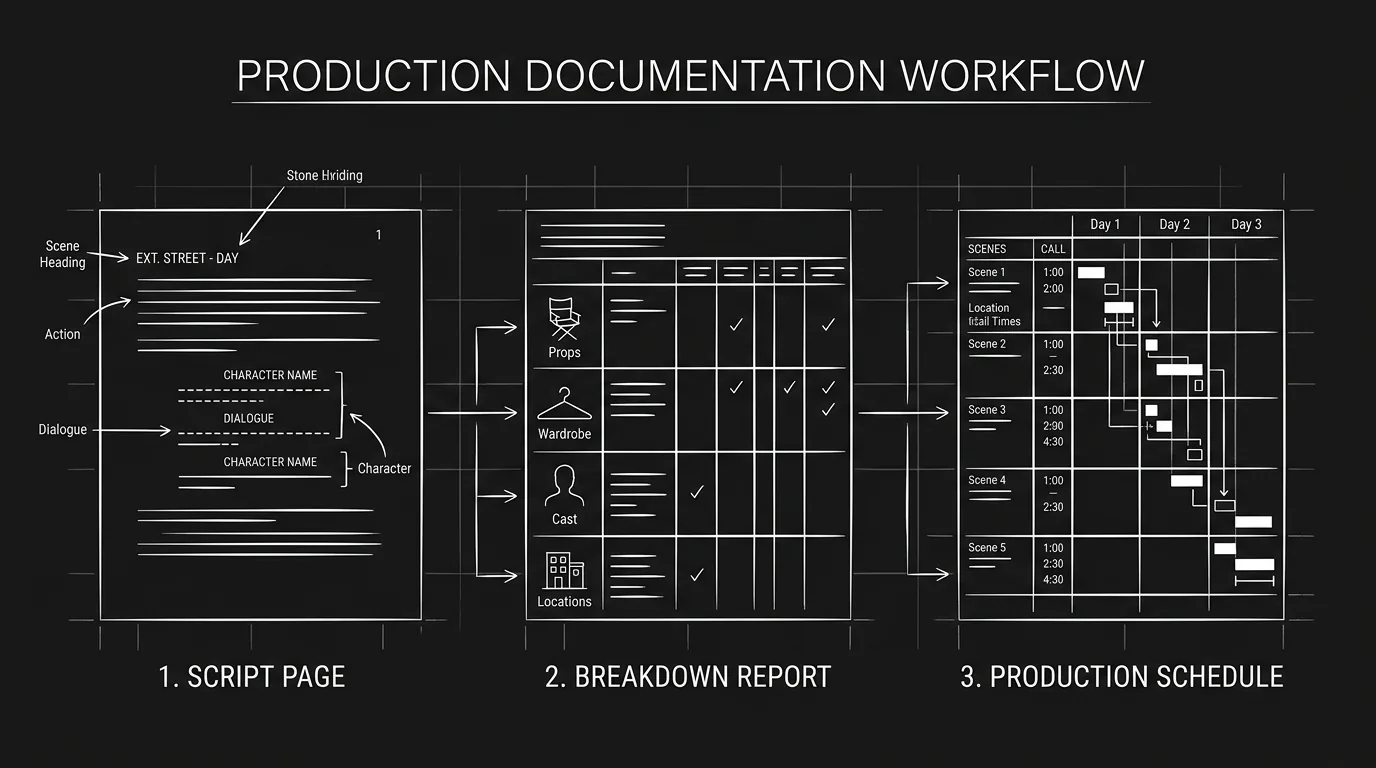

A script breakdown turns a locked screenplay into lists: for every scene, who appears, what they handle, where it happens and what it will take to shoot. You number the scenes, measure them in eighths, tag each element, fill one breakdown sheet per scene, then roll the sheets up into the schedule and the budget.
The steps below follow the order a first AD works in, with one scene broken down in full. This guide sits inside our pre-production workflow for indie filmmakers, and if you want the planning to live next to the script itself, that's what ScreenWeaver's pre-production workspace is for.
What a breakdown produces, and who reads it
Every department reads the breakdown, and each one reads a different column.
| Output | Built from | Who uses it |
|---|---|---|
| Breakdown sheets (one per scene) | Your tagged script | First AD, every head of department |
| Stripboard and shooting schedule | Breakdown sheets, page eighths | First AD, producer |
| Cast list and day out of days | Cast column of every sheet | Producer, casting, actors' agents |
| Props, wardrobe and vehicle lists | Element columns | Art department, costume, transport |
| Budget | Schedule length and element lists | Producer, line producer |
Wikipedia's entry on script breakdown puts it plainly: the lists become the basis for the production board, the schedule and the budget, and the work usually falls to the first assistant director. On a micro-budget short there is no first AD. It falls to you.
Before you start: break down the right script
A breakdown done on the wrong draft is worse than none, because people trust it. Three checks before the first highlighter comes out.
Lock the draft first. "Nearly done" doesn't count: if the writer is still changing scenes, every sheet you fill will need redoing. Our guide on scene numbers and locked revisions covers how lock works and what happens to scene 14 when a new scene lands between 13 and 14.
Work from a shooting script, with scene numbers in both margins and one consistent name per character. The difference matters more than writers expect; spec script vs shooting script explains what changes when the draft goes to production.
And mark a copy. Print it or annotate a PDF, and leave the writer's file alone.
Step 1: Number the scenes and measure them in eighths
Each scene gets a number and a length. The length isn't in pages. Assistant directors split every page into eight horizontal strips of roughly one inch each and measure every scene against them, so a two-line establishing shot is 1/8 and a long dialogue scene might come out at 2 4/8.
Why eighths? Because the shooting schedule is built on them. A shoot day holds a certain number of pages, and you can't plan that number with whole pages when half your scenes are a quarter page long.
You can do it with a ruler. Or paste the script into the script eighths calculator, which measures every scene and gives you a list you can paste straight onto your sheets.
Step 2: Read it three times before you tag anything
The usual mistake is tagging on the first read. You end up highlighting nouns instead of thinking about the shoot.
Read once for story, without a pen. You need to know what each scene is for before you decide what it needs.
Read a second time for elements. This is the pass where you mark things.
Read a third time for problems: the night exterior in the rain, the child actor in every scene of act two, the dog that has to "look up at the exact moment". These aren't elements yet. They're questions for the director and the producer, and they're cheaper to ask in week one than on day three of the shoot.
Step 3: Tag the elements with a colour code
Each element type gets its own colour, so anyone can flip through the marked script and see at a glance how heavy a scene is. The scheme below is the one documented on Wikipedia. Productions do change colours, and some breakdown software uses its own defaults, so what matters is that your whole team uses one legend and that it's printed on the front page of the marked script.
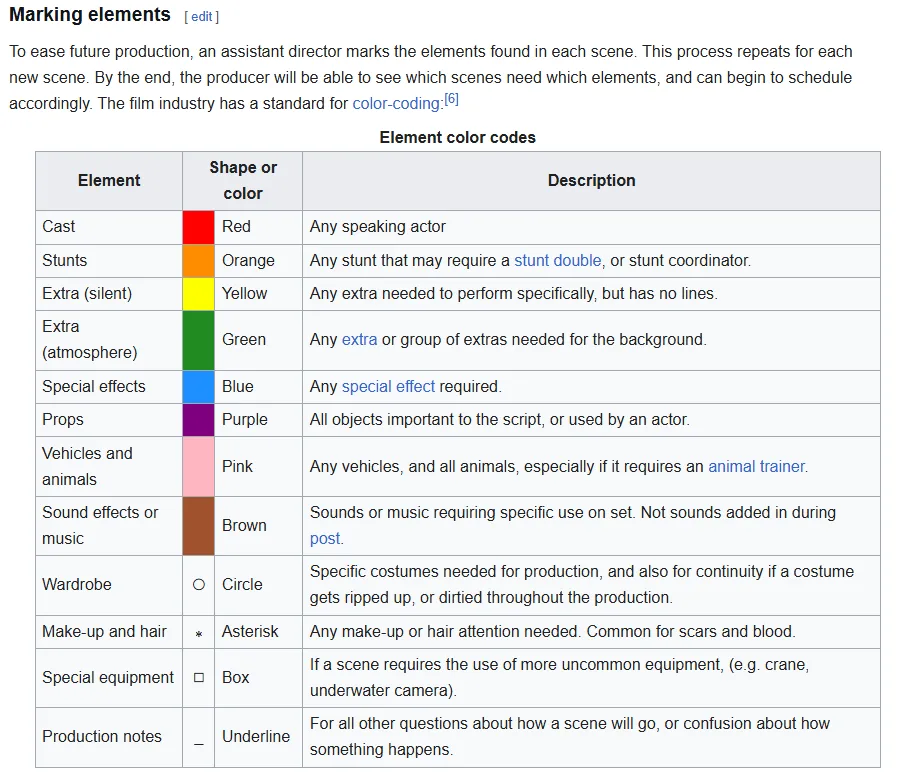
The breakdown colour codes table on Wikipedia's "Script breakdown" page, captured 19 October 2026.
A few tagging rules that save arguments later:
- Tag a character as cast only if they speak. A waiter who pours wine without a line is a silent extra (yellow), a crowd in the background is atmosphere (green).
- Tag a prop when an actor handles it or the story needs it. A lamp on a table is set dressing; the lamp she throws is a prop.
- Tag wardrobe when continuity depends on it: the torn sleeve, the blood on the shirt, the wet coat that has to stay wet across three scenes.
- Use the production notes mark (an underline in the Wikipedia scheme) for anything you don't understand. "She disappears into the crowd" might mean 40 extras or a clever lens choice. Ask.
Step 4: Fill one breakdown sheet per scene
The breakdown sheet is where the coloured marks become data. Most templates share the same header and the same element boxes. Here's what goes on one, using a short scene we wrote for this guide:
SCENE 23            EXT. HARBOUR CAR PARK - NIGHT          Pages: 1 3/8
Script day: N4      Location: Fish market car park, east quay
Synopsis: Lena cuts the padlock on Omar's van while he keeps watch.

CAST (red)             1. LENA   4. OMAR
SILENT EXTRAS (yel.)   Night security guard (crosses frame, no line)
ATMOSPHERE (green)     2 fishermen unloading crates, deep background
STUNTS (orange)        None
PROPS (purple)         Bolt cutters, padlock (breakable x3), thermos
VEHICLES (pink)        White panel van, Omar's (same as sc. 9 and 31)
ANIMALS (pink)         None
SOUND (brown)          Rain on van roof, gull calls (live)
WARDROBE (circle)      Lena's raincoat, wet (continuity from sc. 22)
MAKE-UP (asterisk)     Cut on Omar's left hand, fresh
SPECIAL EQUIPMENT      Rain towers, water truck
NOTES (underline)      Night exterior with rain: confirm budget for rain towers
The script day, N4, means the fourth night of the story. It's how the costume and make-up teams know that Omar's cut is fresh here and healing in scene 31. Without it you get continuity errors that no amount of care on set will catch.
"Padlock (breakable x3)" tells the art department to buy three, because you'll do more than one take. Breakdowns that list "padlock" end with a crew member driving to a hardware store at midnight.
The last line is the third read doing its job. Rain at night means machines, water and a crew working after dark, and the breakdown is where the producer finds out before the money is spent.
You don't need software for this. The free script breakdown checklist gives you one row per scene with columns for characters, props, locations, VFX, vehicles, wardrobe, make-up, sound and notes, and copies everything as CSV so you can paste it into a spreadsheet or a scheduling tool.
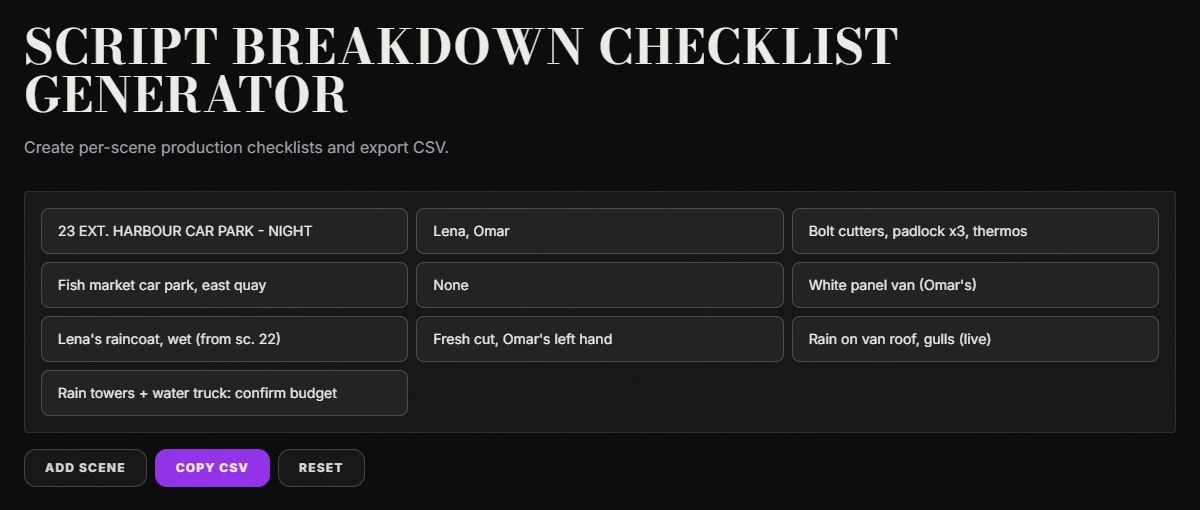
Our script breakdown checklist generator at screenweaver.ai/tools/script-breakdown-checklist, filled with the example scene, captured 19 October 2026.
Try it free
Try Screenweaver for free on your script
It is free. Import your existing project, get a clearer view of your outline, and regain control of your story structure in minutes.
Start FreeStep 5: Roll the sheets up into lists and red flags
Once every scene has a sheet, read across the sheets instead of down.
Sort by location and you see how many company moves you'll need. Sort by cast and you might find an actor who works scenes 4, 19 and 47 only, which is three days of a fee for under four pages. Sort by script day and you see the wardrobe changes.
Then pull the red flags into one short list for the producer:
- Night exteriors (and how many)
- Rain, snow, smoke or anything else from a machine
- Minors, whose hours on set are limited by child labour rules
- Animals that have to perform, which need a trainer
- Stunts and anything involving a vehicle in motion
- VFX shots, even "small" ones like a screen replacement
- Locations you don't have yet
If the list is long and the budget is short, that's a script conversation, not a scheduling one. Our pieces on writing a micro-budget feature and on VFX-heavy scripts show what writers can cut or merge before anyone rents a rain tower.
Step 6: Hand off to the schedule
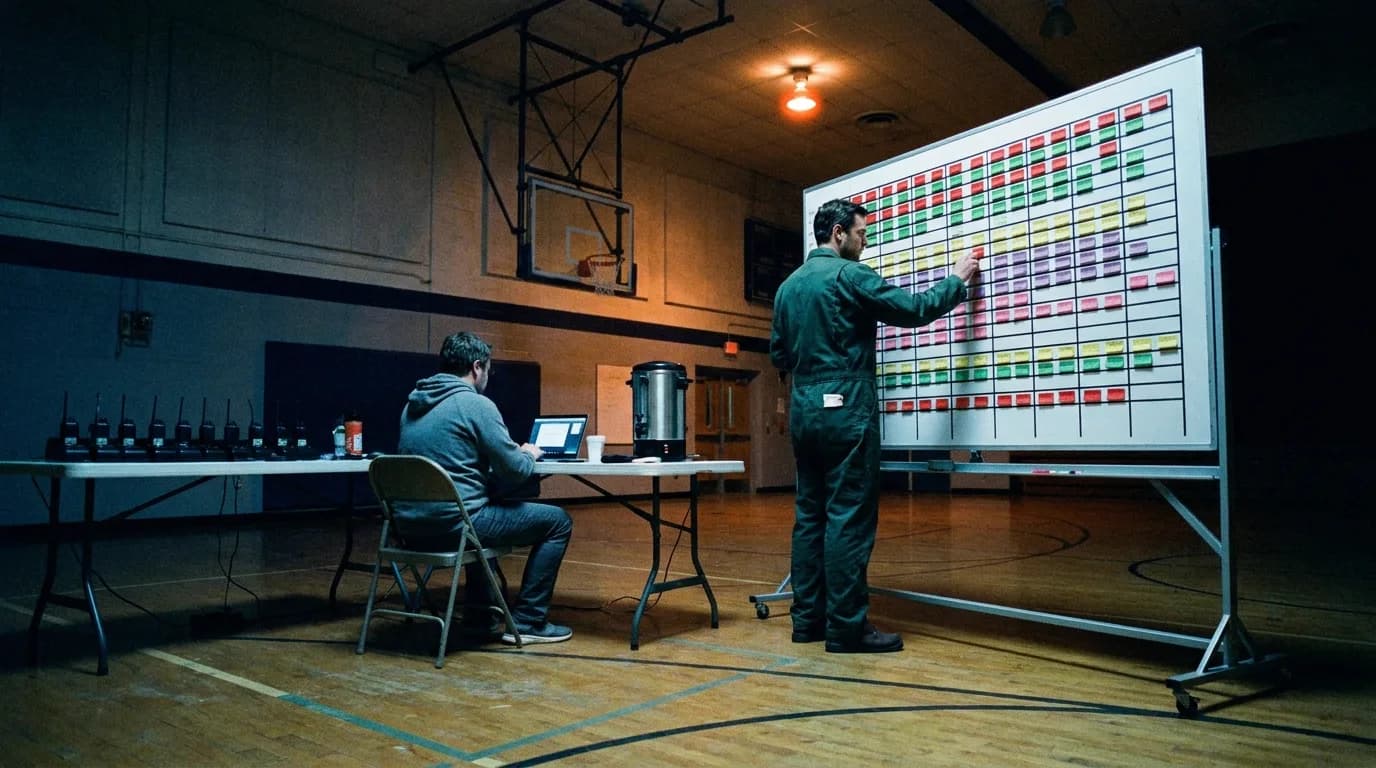
The breakdown sheets become strips on a stripboard, one strip per scene, coloured by INT/EXT and day/night, and the strips get moved around until each shoot day makes sense: same location together, cast days kept short, night work grouped.
From there the cast column of your sheets feeds the day out of days generator, which marks when each actor starts, works, holds and finishes. And the total of your eighths gives you a first estimate of shoot days in the shooting schedule calculator.
If you're moving the script into dedicated scheduling software, the import side has its own rules: consistent names, clean scene headings, an FDX export. We cover that handoff in breaking down the script from Final Draft to Movie Magic.
What changes when you're making the film with AI
The method holds. What the columns mean shifts a little.
On an AI production there's no rain tower and no water truck. The cost moves somewhere else: into generations, rerolls and the time you spend keeping a face consistent across 40 shots. So the breakdown still matters, but it answers different questions.
| Classic column | What it becomes on an AI film |
|---|---|
| Cast | Character references you need to build once and reuse |
| Locations | Location references, plus a note on time of day and light |
| Props and wardrobe | Details that drift between clips and need to be in the reference or the prompt |
| Stunts and VFX | The shots most likely to need several generations |
| Pages in eighths | Rough clip count, since a single clip covers seconds, not pages |
The script day column turns out to be even more useful, because a model has no idea that Omar's cut should be healing by scene 31 unless you tell it.
ScreenWeaver handles part of this inside the script itself: characters, locations and objects are kept as story elements with their references, and the storyboard tab generates a shot breakdown from each scene that you then adjust shot by shot. The red-flag pass is still yours. To estimate what the heavy scenes will cost, see budgeting AI video credits, and for turning each broken-down scene into prompts, converting sluglines and action lines into prompts.
Tools that do the dull parts
None of these replace the three reads. They save you the ruler and the spreadsheet.
| Task | Free tool |
|---|---|
| Measure every scene in eighths | Script eighths calculator |
| One row per scene, copied as CSV | Script breakdown checklist |
| Who is in which scene | French scene breakdown |
| Cast work days | Day out of days generator |
| First estimate of shoot days | Shooting schedule calculator |
FAQ
What is a script breakdown in film?
It's the process of going through a locked screenplay scene by scene and listing every production element each scene needs: cast, extras, props, wardrobe, vehicles, effects, special equipment. Those lists become the basis for the shooting schedule and the budget.
Who does the script breakdown?
On a funded production it's usually the first assistant director, sometimes with a production coordinator. On an indie or student film it's often the producer or the director. Whoever does it should not be the only person who reads it.
How long does it take to break down a script?
A short can often be done in an evening. A feature usually takes several days, because the three reads and the cross-checks between sheets are the slow part, not the tagging.
What do the colours mean in a script breakdown?
The common scheme uses red for cast, orange for stunts, yellow for silent extras, green for atmosphere extras, blue for special effects, purple for props, pink for vehicles and animals, and brown for sound or music, with shapes for wardrobe, make-up and special equipment. Productions do vary it, so print your legend on the marked script.
What's the difference between a script breakdown and a shot list?
The breakdown lists what each scene needs to exist. The shot list lists how you'll film it: every setup, size and movement. You usually break down first, then build the shot list scene by scene.
Do I need software for a script breakdown?
No. Highlighters, a printed script and a spreadsheet are enough for a short. Software starts to pay off on features, when a change in one scene has to update the schedule, the cast days and the budget at once.
Final Step
Build your next script with Screenweaver
Move from ideas to production-ready pages faster with timeline-native writing and AI-assisted story flow.
Try Screenweaver