
AI filmmaking borrows half its vocabulary from set and half from machine learning, and the two halves disagree. A take is not a take. A shot is sometimes a clip. This glossary defines the 40 terms you will meet in a vendor dashboard, an API doc or a note from your editor, grouped by where you hit them.
Most glossaries in this space are padded with words nobody says out loud. These 40 all appear either in a vendor's own documentation or in the notes people give each other while cutting. If a term is community slang rather than vendor vocabulary, I say so, because knowing which is which saves you a confusing support ticket. For the production context around all of this, start with the AI filmmaking guide hub.
What you type
Seven terms cover almost everything on the input side of a generation.
| Term | What it means | Why it matters |
|---|---|---|
| Prompt | The text describing what you want generated. | Google's own prompt guidance breaks a good one into subject, action, style, camera position, composition and lens effects. Descriptive beats clever. |
| Negative prompt | A second text field listing what to exclude. | Far from universal. Veo 3.1 does not list it among its parameters, and Runway's own Gen-4 prompting guide tells you to "use positive phrasing only". Do not build a workflow around it. |
| Seed | An integer that fixes the model's random starting point. | Reusing a seed gets you close to a previous result, not identical to it. Google states plainly that seed "doesn't guarantee determinism". Runway raised its ceiling to 4,294,967,295. |
| Prompt adherence | How closely output matches the words you wrote. | The single most useful axis for comparing models. High adherence means fewer rerolls, which is money. |
| Reference image | An image supplied alongside the prompt to pin down a subject's appearance. | Veo 3.1 accepts up to three. This is the mechanism behind most character consistency work. |
| Style reference | A reference image used for look rather than subject. | Same slot, different intent. Mixing the two in one request is how you get a character wearing the reference photo's colour grade. |
| Motion prompt | The clause describing camera and subject movement. | "Dolly in" and "handheld" are read as instructions by current models. Vague movement language is the most common cause of a drifting frame. |
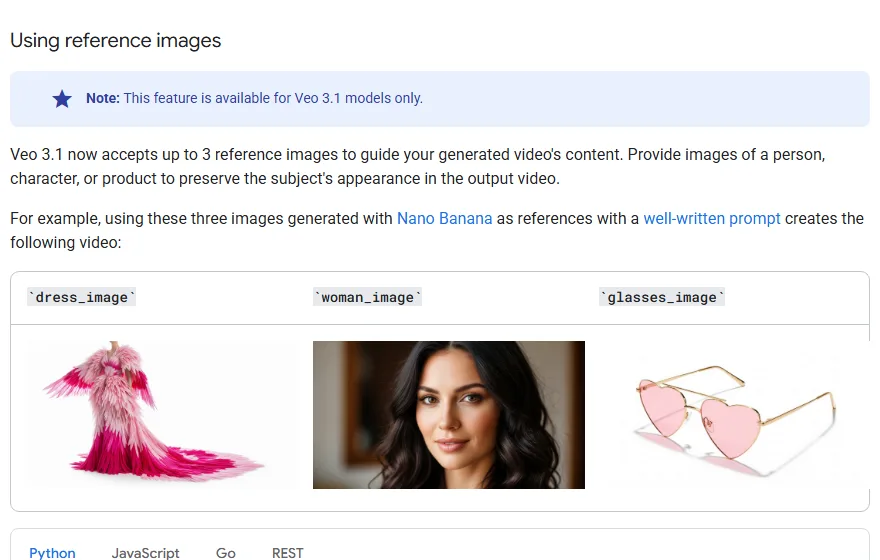
Google's Veo 3.1 reference-image documentation, captured 26 September 2026.
How you feed the model
These eight describe the shape of the request rather than its content. Vendors call them input modalities.
| Term | What it means |
|---|---|
| Text-to-video | Prompt in, clip out. No visual input. |
| Image-to-video | A still becomes the opening frame and the prompt describes what happens next. |
| Video-to-video | Existing footage is restyled or re-rendered while its motion is preserved. |
| Keyframe (first and last frame) | You supply both ends and the model generates the middle. Google calls this frame-specific generation. |
| Interpolation | Generating the frames between two supplied images. The engine behind keyframe mode. |
| Extension | Continuing an existing generation past its end. Quality usually degrades with each pass. |
| Inpainting | Regenerating a masked region inside the frame while the rest stays put. |
| Outpainting | Generating beyond the existing frame edges to widen or reframe a shot. |
Extension deserves a flag. It is the feature people reach for when a clip ends two seconds early, and it is also the feature that quietly softens your footage. I went through the degradation pattern in what extension costs you in quality.
What comes back
The output vocabulary is where set language and model language collide hardest.
| Term | What it means | Set equivalent |
|---|---|---|
| Generation | One completed model run, billed whether you keep it or not. | A take you already paid for. |
| Clip | One continuous output file. Length is capped per model. | Closer to a shot than a scene. |
| Take | One attempt at a shot. In AI work, one generation. | Same word, same meaning, different cost structure. |
| Reroll | Rerunning the same prompt hoping for a better result. | No set equivalent. This is the cost multiplier nobody plans for. |
| Temporal coherence | Whether the image holds together frame to frame. | Continuity, roughly. |
| Flicker | Frame-level instability in texture, light or colour. | Closest to a gate weave or exposure pulse. |
| Morphing | A subject deforming mid-clip, usually hands, hair or background geometry. | No equivalent. This is the failure that marks a film as AI at a glance. |
| Artifact | Any visible defect introduced by the generation or the compression after it. | Same word as post, wider meaning. |
Clip length is a hard constraint and it varies by model. Veo 3.1 generates 4, 6 or 8 seconds, and locks you to 8 as soon as you use reference images or ask for 1080p. Runway's Gen-4 video creates 5 or 10 second durations. So plan your shot lengths against the model you actually intend to use. A 14-second oner you would happily cut on a normal job is simply unavailable on most of these platforms, and finding that out after the storyboard is approved is an expensive afternoon.
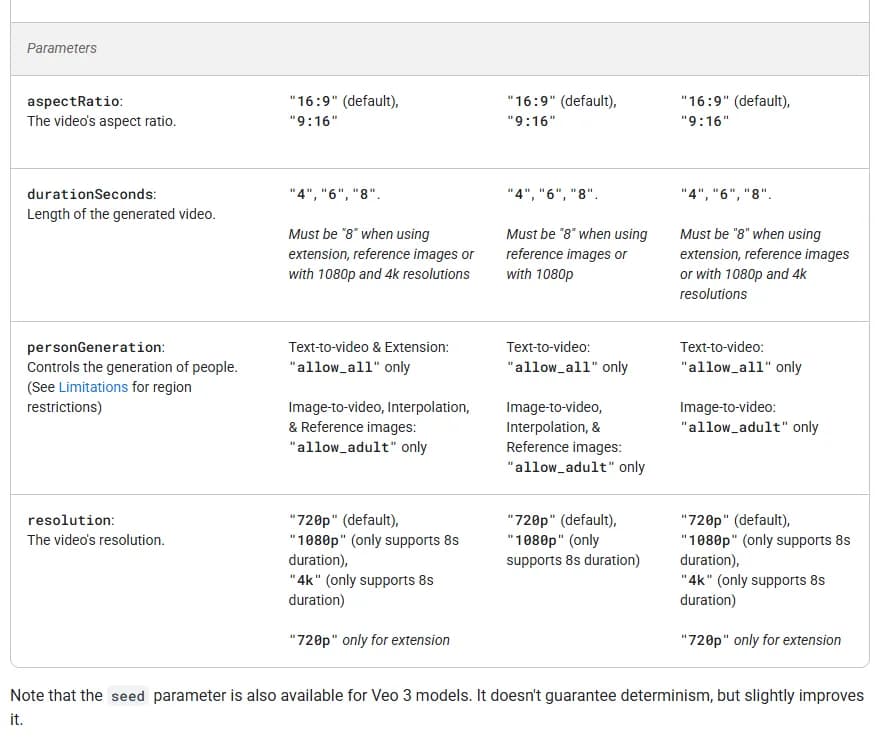
Veo 3.1's parameter table on ai.google.dev, captured 26 September 2026. The note under it confirms seed is available on Veo 3 models without guaranteeing determinism.
That table is the reason I keep telling people to read parameter docs before storyboarding. All four of those decisions, aspect ratio, duration, who may appear on screen and resolution, are locked at request time. None of them can be fixed in the edit.
Where it breaks
Five failure names. Once a collaborator knows them, "the second shot morphs" replaces a paragraph of description and a round of confused replies.
| Term | What it means | Fix |
|---|---|---|
| Character drift | A character's face, build or costume changing between shots. | Reference images, locked descriptions, a character sheet. Full method in the character drift guide. |
| Hallucination | The model inventing content you never asked for. | Tighter prompt, negative prompt where supported, shorter clip. |
| Lip-sync drift | Mouth movement falling out of step with the audio track. | Generate to the audio rather than dubbing after. Covered in AI voices and lip-sync. |
| Plastic look | The waxy, over-smoothed skin and edges you get from aggressive upscaling or denoising. | Upscale less, grain more. |
| Concept bleed | An attribute from one element attaching to another, so the red coat turns the wall red. | Community vocabulary, not vendor vocabulary. Separate the elements across clauses or across reference slots. |
What it costs
Six terms, and every one of them is a place where a platform can make a plan look cheaper than it is.
| Term | What it means |
|---|---|
| Credit | A platform-internal currency. It does not convert between tools and rarely holds the same value between tiers of one tool. |
| Burn rate | Credits consumed per second of output. Runway's Gen-4.5 runs 60 credits per five-second clip, so 12 per second, identical across plans. |
| Cost per second | Your cost per credit multiplied by burn rate. The only figure worth writing on a budget line. |
| Allowance | Credits included per billing period. Read it as seconds of generation, not minutes of film. |
| Relaxed mode | A slower queue that costs fewer credits or none, offered by some platforms and not others under various names. Useful for exploration, useless on a deadline. |
| Metered API rate | Pay-as-you-go pricing through the developer API, often cheaper per credit than the entry subscription. |
The gap between those last two lines is the one that surprises people. I ran the arithmetic on both Runway and Higgsfield in what one credit actually buys, and the short version is that the same credit buying the same model can cost you more than twice as much depending on which box you ticked at checkout. The AI video cost calculator converts a bundle into dollars per second so you can check a plan before you commit to it. If rerolls are what is eating you, the reroll math is the companion piece.
Try it free
Try Screenweaver for free on your script
It is free. Import your existing project, get a clearer view of your outline, and regain control of your story structure in minutes.
Start FreeWhat the model is
Four terms about the machine itself. You do not need the maths, but you will see these in release notes and forum threads.
| Term | What it means |
|---|---|
| Checkpoint | A saved set of model weights. When people say "which model", they usually mean which checkpoint. |
| LoRA | A small trained add-on that teaches a base model one subject or style without retraining it. Common in open image tooling, rare in closed video platforms. |
| Diffusion | The generation method behind most current video models: start from noise, remove it step by step toward the prompt. |
| Native 4K vs upscaled | Whether the model rendered at 4K or rendered smaller and enlarged afterward. Veo 3.1 lists a 4k resolution value, restricted to 8-second clips. |
That last distinction is worth more than it looks on a spec sheet. Native resolution carries real detail. Upscaled resolution carries a bigger file. I dug into which is which in the 4K generation piece.
What you have to declare
Two terms, and both are becoming contractual rather than optional.
| Term | What it means |
|---|---|
| SynthID | Google DeepMind's watermark, embedded in everything Veo generates and checkable through its verification platform. Google says it is designed to survive cropping, filters, frame-rate changes and lossy compression. |
| Content Credentials (C2PA) | Signed provenance metadata from the Coalition for Content Provenance and Authenticity, a Joint Development Foundation project. Records how a file was made and edited. See c2pa.org for the specification. |
Festivals, broadcasters and stock platforms increasingly ask about both. The current state of who requires what is in the AI film disclosure rules, and it changes often enough that you should check the rulebook of any specific festival rather than trusting a summary, including mine.
The seven terms that decide your budget
If you only memorise part of this list, memorise the seven with numbers attached, because those numbers compound. Burn rate is credits per second, published by the vendor and unchanged by your plan. Cost per credit is your plan price divided by the credits included, at the billing period you will actually pay. Multiply the two and you have cost per second, the only rate worth writing on a budget line.
Then there is the one nobody tracks: takes per keeper, your real reroll ratio. Nobody publishes it because it is a measure of your preparation rather than the model's. An improvised session where you judge results on vibes tends to sit somewhere between five and ten takes per usable shot, while a storyboarded one with prompts written in advance can hold near two. Measure yours once on a finished project and you will stop guessing.
The last three are constraints rather than rates. Clip cap, the maximum seconds per generation on your chosen model. Allowance, your included credits expressed in seconds of that model instead of a headline number. Metered rate, what the identical output costs through the developer API, which is the sanity check that tells you whether the subscription is a deal or a tax.
Cost per second, times shot count, times clip length, times takes per keeper. That is your generation budget, and it usually lands around three times the figure people write down first.
FAQ
What are the most important AI filmmaking terms to learn first?
Credit, burn rate, reroll, clip cap and reference image. Those five determine what you can shoot and what it costs. Everything else you can look up when it appears.
Is a "take" in AI filmmaking the same as a take on set?
The meaning is the same, one attempt at a shot, but the economics invert. On set the expensive part is the setup and additional takes are comparatively cheap. In generation, every take costs the same as the first, so a loose reroll habit multiplies your budget directly.
Does setting a seed guarantee I get the same clip twice?
No. Google's Veo documentation says the seed parameter "doesn't guarantee determinism" and only slightly improves it. Treat a seed as a way to stay in the same neighbourhood. If you need a render you can reproduce exactly, keep the output file.
What is the difference between interpolation and extension?
Interpolation fills the gap between two frames you supply, so both ends are fixed. Extension continues past the end of an existing clip with nothing to aim at, which is why it drifts and softens faster.
What does temporal coherence mean in practice?
It means a texture, a face or a background stays the same object from one frame to the next. When it fails you see flicker, morphing or a coat that changes buttons mid-shot. It is the single clearest technical difference between model generations.
Do I have to disclose that a film was made with AI?
Assume yes and check the rulebook. Some festivals require a declaration, some ban AI work outright, some never ask, and broadcasters and stock libraries are moving toward requiring Content Credentials. The safe habit is to keep your provenance metadata intact from the first generation, because you cannot add it back honestly later.
Where do I learn the production workflow these terms belong to?
The AI filmmaking guide hub covers the full script-to-screen path, and the storyboard-first workflow is the approach that wastes the fewest credits.
Final Step
Build your next script with Screenweaver
Move from ideas to production-ready pages faster with timeline-native writing and AI-assisted story flow.
Try Screenweaver