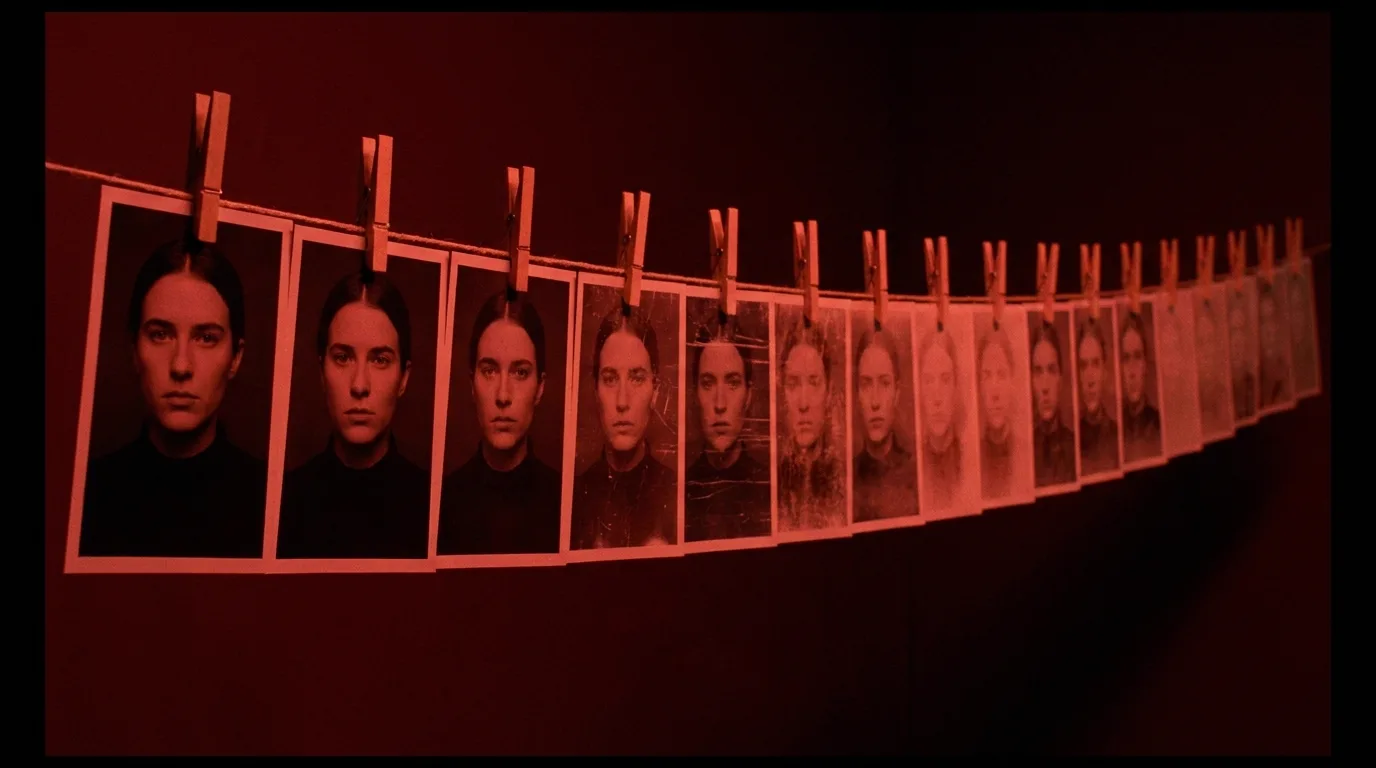

AI video extension quality loss happens because each extension conditions the new segment on a compressed rendering of the previous clip's last frames, so detail loss compounds like a photocopy of a photocopy. To extend AI video without losing quality, stop extending: generate independent clips per shot from the same fixed references and join them with cuts.
The photocopy mechanism behind every extend button
The extend button feels like it should be free. You liked the first five seconds, you want five more, the model already knows the scene. Except it doesn't. The model never keeps the scene. What it keeps, and all it keeps, is the rendered output: a compressed video file that is already an approximation of whatever the model was imagining.
Walk through what actually happens. Generation one produces a clip. That clip gets encoded, which throws away fine detail the way every video codec does. When you hit extend, the model reads the final frames of that lossy file and treats them as ground truth for generation two. It isn't continuing its original idea. It's imagining a plausible future for a slightly degraded picture, then rendering that guess through the same lossy pipeline. Generation three conditions on the degradation of the degradation.
Photographers and audio engineers have a name for this: generation loss, the compounding damage that comes from making a copy of a copy of a copy. Analog tape dubs suffered it. Photocopied photocopies suffer it. Extension chains suffer it for exactly the same structural reason, with one addition that makes it worse: between each copy, a generative model actively hallucinates replacements for the detail that went missing. A photocopier only blurs your document. An extension chain blurs it, then confidently redraws the blurry parts as something new.
That's why chain length matters more than any single extension. One extend is one copy. Five extends is five copies deep, and the fifth segment has never seen anything but degraded input.
The visible signs of AI video extension quality loss
Generation loss in AI video has a recognizable face. Once you know it, you'll see it in half the "one continuous shot" clips on your feed.
Textures go soft first. Skin turns waxy. Fabric weave becomes a smooth gradient. Foliage melts into green mush. Fine texture is exactly the high-frequency detail that compression discards first, so it's the first thing the next generation never receives.
Then things mutate. Hands gain or lose fingers mid-chain. A coffee cup becomes a slightly different coffee cup. Background faces smear into masks. This is the hallucination step: the model can't recover detail that's gone, so it invents substitutes, and the substitutes drift further each round.
The palette slides. Colors wander warm or magenta, blacks lift, contrast flattens. Each generation re-interprets the grade of a re-encoded picture. By extension four, your teal night scene has quietly become a grey-green one.
Motion decays too. Movement gets floatier, physics looser. The model is animating from frames that carry less and less information about momentum and weight.
Run a test yourself: extend any clip four times, then scrub between the first segment and the last. Same shot, allegedly. It looks like the difference between a negative and a fourth-generation VHS dub.
Why extending will never be free
It's tempting to file this under "the models are young, wait a year." Partly true. Better conditioning and lighter compression shrink the loss per step, and native long-shot generation keeps improving, so the point where decay becomes visible keeps moving later.
But the structure of the problem stays. Any system that renders output, compresses it, and then conditions its next segment on that compressed output is copying a copy. You can make the copies cleaner. You cannot make them free, because the alternative is a model that carries its full internal scene state forward indefinitely, which is a different and far more expensive machine than an extend endpoint. Even flagship models that generate impressive single takes, like the ones we tested in the Seedance 2.5 pipeline for 4K output, behave noticeably better on fresh generations than on long conditioning chains.
So treat extension the way a sound mixer treats bouncing tape: a real tool with a real cost, budgeted, never looped.
One distinction before the fix, because two different problems get blamed on each other constantly. Extension decay is degradation inside a single continuing shot: the picture itself rots. Character drift is identity wobble across separately generated shots: shot 14's jacket doesn't match shot 3's. Different disease, different cure. The drift cure is a locked reference kit, covered in how to keep your character consistent past 10 shots. This article is about the rot.
Cut, don't stretch
Here's the working alternative, and it's the oldest trick in cinema. Films aren't long shots. A finished feature averages a cut every few seconds, and audiences don't merely tolerate cuts, they read them as language. You don't need a 25-second continuous take. You need 25 seconds of screen time, and screen time is allowed to be five shots.
So instead of one generation extended four times, generate five independent clips, one per shot. Every clip is a first generation. Every clip conditions on your pristine references, not on the softened output of its predecessor. Segment five is exactly as sharp as segment one because, to the model, both are segment one.
What holds it together is the same fixed anchor set every shot shares: the character kit (hero shot, turnaround, wardrobe close-ups) and a location plate, a clean establishing image of the space that travels with every generation set there. Same anchors in, same world out, and the cut hides the seam between takes that were never physically connected.
Cut on action when you can. End shot A as the hand reaches for the door, start shot B with the door swinging. Movement across the cut carries the eye, and small mismatches vanish inside it. Editors have exploited this for a century; it works even better for AI clips, because the mismatches are slightly larger.
The joins cost almost nothing in an editor. Straight cuts, no dissolves. Dissolves draw attention to exactly the differences you're hiding. Whether a given take deserves an extension or a cut is a call you make during the dailies review, with the shot on the timeline next to its neighbours.
Plan your cut points before you generate anything
Cutting instead of extending only works if you decide where the cuts go before you spend a single generation. Retrofitting cut points onto clips you already made is how you end up extending anyway, "just this once."
Take a beat from a script and break it down on paper first, or split the scene into clip-length shots automatically and adjust from there. Illustrative example, made-up numbers but a typical shape: assume a 22-second beat where a courier enters a warehouse, crosses to a crate, and opens it.
- Write the beat as shots, not seconds. Shot 1: door opens, courier enters, wide. Shot 2: tracking on her face as she crosses. Shot 3: insert, gloved hand on the crate latch. Shot 4: medium, lid opens, light hits her face.
- Give each shot a target length inside your model's comfort zone. Call it 4 to 7 seconds each. Four shots at 5 to 6 seconds covers the 22-second beat with zero extensions. If your pipeline asks for frame counts instead of durations, as ComfyUI workflows do, a video frames calculator handles the seconds-to-frames math at any fps.
- Mark the action carrying each cut. Cut 1 on the door swing. Cut 2 on her hand leaving frame toward the latch. Cut 3 on the lid starting to rise. Write these down; they go straight into the prompts as start and end conditions.
- Attach the same anchors to all four generations. One character kit, one warehouse plate, one lighting note.
- Generate all four, then assemble. Any shot that fails gets regenerated alone, fresh, without touching its neighbors. That's the hidden bonus: with an extension chain, a failure in segment two forces you to regenerate everything after it.
This is storyboarding wearing work clothes, and it slots into the larger pipeline described in the script-to-screen AI filmmaking workflow. If you're starting from zero, the full path from idea to finished piece is laid out in how to make an AI film.
Try it free
Try Screenweaver for free on your script
It is free. Import your existing project, get a clearer view of your outline, and regain control of your story structure in minutes.
Start FreeOne extension or a cut: the decision table
Extension isn't banned. One extend on a fresh clip sits at the shallow end of the decay curve, and sometimes an unbroken take genuinely is the point. The rule is a chain length of one, and only when the shot earns it.
| Situation | Extend once | Cut to a new clip |
|---|---|---|
| Action needs 2 to 3 seconds more to complete | Yes | Overkill |
| A slow push-in or hold where any cut would be felt | Yes, once | Only if quality visibly dips |
| Beat runs past about twice your model's native clip length | No | Yes |
| Faces or hands stay large in frame throughout | Risky, decay shows there first | Yes |
| The next moment changes angle, subject, or location anyway | No | Yes, that's a free cut point |
| You're already one extension deep | No, never chain | Yes |
| The clip must survive grading and 4K delivery | No | Yes, generate fresh |
Print the last two rows somewhere visible. Chaining is the failure mode, and "delivery quality" is where softness you forgave on a phone screen becomes unmissable on a TV. Model choice moves these thresholds a little; the 2026 script-to-video comparison notes which tools hold up better at longer native lengths, which is the honest way to need fewer joins.
Before your next project, take the longest shot in your storyboard and split it at the strongest action beat. Generate both halves fresh, cut them on that action, and compare the result against a two-extension version of the same moment. That comparison will settle the argument better than any article.
FAQ
Why does AI video lose quality every time I extend it?
Because each extension conditions on a compressed rendering of the previous segment's final frames, not on the model's original scene understanding. Detail lost to encoding can't be recovered, so the model hallucinates replacements, and the next extension inherits both the loss and the hallucinations. The damage compounds with every link in the chain.
What are the visible signs of AI video extension quality loss?
Softening textures come first: waxy skin, smeared fabric, mushy foliage. Then object mutation, especially hands, props, and background faces, as the model redraws detail it can no longer see. Palette shift follows, with colors drifting warm and contrast flattening. Motion also gets floatier as the chain lengthens.
Is it ever okay to use the extend feature?
Yes, once per shot. A single extension on a fresh generation sits at the shallow end of the decay curve and is fine for finishing an action or holding a slow push-in. The rule that matters is chain length: never extend an extension, because the second link conditions on already-degraded input.
How do I extend an AI video without losing quality?
Don't extend it, replace the extra length with a new shot. Generate independent clips per shot, each anchored by the same character references and location plate, and join them with straight cuts, ideally cutting on action so movement carries the eye across the join. Every clip stays a first generation at full quality.
Is this the same problem as character drift?
No, and mixing them up leads to the wrong fix. Extension decay is degradation within one continuing shot: the image itself softens and mutates. Character drift is identity inconsistency across separately generated shots: build, wardrobe, and movement stop matching. Reference kits fix drift; cutting instead of chaining fixes decay.
Will better models eliminate generation loss in video extensions?
They'll delay it, and native long-take generation will make single shots longer before any extension is needed. But any pipeline that re-encodes output and conditions the next segment on it is still copying a copy, so chained extensions will keep degrading. Cleaner copies, same direction. Plan cuts regardless of model.
Final Step
Build your next script with Screenweaver
Move from ideas to production-ready pages faster with timeline-native writing and AI-assisted story flow.
Try Screenweaver