
Reviewing AI footage means deciding which generated takes earn a place in the cut before you spend anything else on the shot. Judge each take in a fixed order, against the cut rather than against the prompt, and write the verdict down. The habit is old. Only the footage changed. The wider process sits in the AI filmmaking guide hub.
Most people skip this step entirely. They generate, glance, reroll, generate again, and three hours later they have forty clips, no notes, and no idea which ones they already rejected. Taste has nothing to do with it. That is a review problem, and editors solved it decades ago.
Dailies still happen, the camera does not
On a set, dailies were the day's printed takes, watched together, usually the next morning. The gap mattered. You came back cold, you watched with the editor, and the person who had been sweating over the shot at 4pm was no longer the person judging it at 9am.
Generated footage collapses that gap to nothing. You prompt, you wait, and Google puts the request latency at a minimum of eleven seconds and a maximum of six minutes at peak. So the shoot and the review are the same act, performed by the same tired person, on the same screen. Every bad habit dailies were designed to prevent comes straight back.
The second thing that changed is length. A take has become a fragment. Veo 3.1 generates four, six or eight seconds, and it has to be eight if you want 1080p, 4k, or reference images. Runway's Gen-4 documentation is blunter still: five or ten seconds, nothing between. So you are judging a brick rather than a scene, and the only question that matters is whether it fits the wall next to it.
Your dailies have a 48-hour shelf life
This is the part nobody mentions, and it has cost me a shot.
Generated video does not sit on the vendor's server waiting for you. Google's own limitations section says videos are stored for two days, after which they are removed, and that you can only extend a clip that was generated or referenced in the last two days. Referencing one for extension resets its timer. Everything else quietly expires.
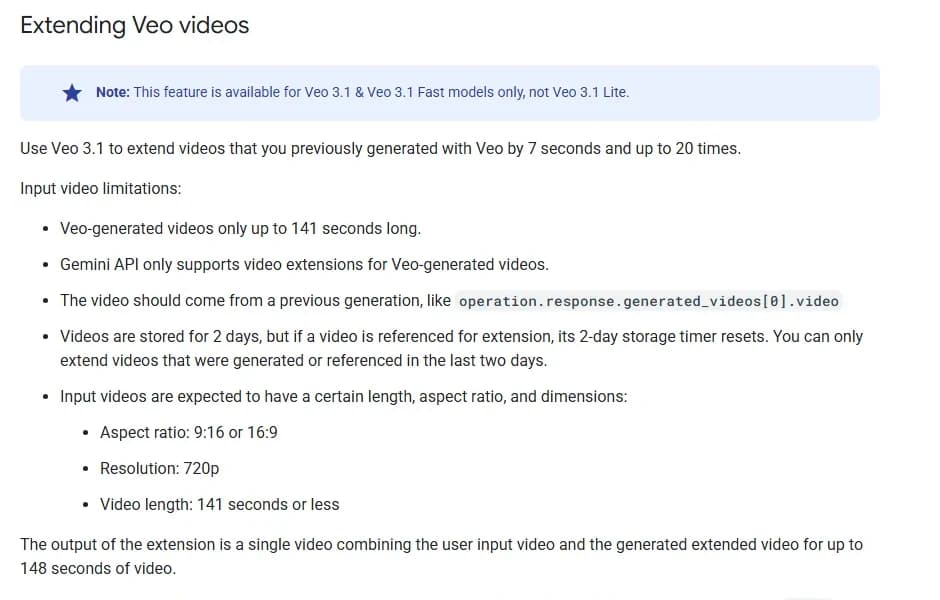
The "Extending Veo videos" section of Google's Veo 3.1 documentation on ai.google.dev, captured 27 September 2026.
Read the fourth bullet twice. If your review sits in your inbox over a weekend, the take you were undecided about is gone, and so is your option to extend it. Postponing the call makes it for you.
So the first rule of an AI dailies session has nothing to do with judgement. Download everything the day it is generated, give it a filename that matches your take log, and only then start watching. A clip you have on disk can wait. A clip on someone's server cannot.
The six passes, in this order
Order is the whole trick. If you watch a take once and form an opinion, you will spend the rest of the session defending it. Six passes, each looking for one thing, each fast.
| Pass | What you are asking | The tell that kills a take |
|---|---|---|
| 1. Silent, full size | Does the shot read in one second? | You cannot tell where to look, or what just happened |
| 2. Motion | Does weight behave? | Feet sliding, hands that gain a finger, cloth that moves before the body |
| 3. Identity | Is this still the same character? | Face drifts across the clip, or between this take and the last approved one |
| 4. Continuity | Does it match its neighbours? | Wrong eyeline, screen direction flipped, light from the other side, time of day slipped |
| 5. Audio | Does the generated sound belong to this image? | Room tone that suggests a different space, lip movement out by a frame or two |
| 6. Against the cut | Does it survive the shots either side? | Fine alone, unusable in sequence |
Pass one is the one people skip, and it is the only one that predicts whether a viewer will accept the shot. Kill the sound, put it full screen, watch once. If you had to watch twice to understand it, the audience gets one chance and will not take it.
Pass three earns its own article, because face drift is the defect that survives every other check and ruins a sequence at assembly. The mechanics are in the character drift guide. Pass four is the episodic version of the same discipline, covered in keeping a world consistent across episodes.
Pass six is where most takes die, and that is healthy. A take that looks beautiful on its own and cannot cut is a failed take. That has been true since people started splicing film, and it bites harder now, because generated shots have no shared lighting setup quietly holding them together.
Write the log, or you are guessing
A take log stops you regenerating a shot you already rejected at 10am for a reason you have forgotten by 3pm. That is its entire job, and it earns its keep the first time it does it.
Nine columns, no more:
| Field | Why it is there |
|---|---|
| Shot ID | Matches your shot list, not the vendor's filename |
| Take number | Sequential per shot, never reused |
| Model and tier | The same prompt on two tiers is two different takes |
| Settings | Duration, resolution, aspect ratio, seed if the model exposes one |
| Frames | Duration times frame rate, so in and out points are unambiguous |
| Verdict | Pass, hold or kill. One word |
| Defect | The named reason, if it is not a pass |
| Cost | Whatever that take actually consumed |
| Downloaded | Yes or no, with the local path |
The frames column looks pedantic until the first time you hand a clip to someone else. Veo and Runway both output at 24fps, so an eight second take is 192 frames and a ten second take is 240. If you want the arithmetic done for you across other frame rates, the video frames calculator handles it.
"Defect" is the column that changes behaviour. Forcing yourself to name the failure in three words stops the reroll-on-vibes loop. If you cannot name it, the take is probably fine and the problem is the shot design.
Pass, hold, kill
Three verdicts, and I would resist any attempt to add a fourth. Scores out of ten invite negotiation with yourself.
| Verdict | Means | What you do next |
|---|---|---|
| Pass | Cuts as is, or with a trim | Download, log, move on. Do not reroll a pass to see if you can do better |
| Hold | One fixable defect, everything else works | Note the fix, park it, decide at the end of the session with the shot in context |
| Kill | Defect is in the generation, not the framing | Change something concrete before regenerating, or cut around the shot |
The rule I would defend hardest: never reroll a pass. Generation is cheap enough per take to tempt you and expensive enough in aggregate to hurt, and "better" with no named target is how a morning disappears. If the shot works, it is finished.
Hold exists because judgement at minute ten is worse than judgement at minute forty. Batch the holds, revisit them once, decide fast.
Try it free
Try Screenweaver for free on your script
It is free. Import your existing project, get a clearer view of your outline, and regain control of your story structure in minutes.
Start FreeA reroll costs money, so price it before you click
Per-take prices are public and worth doing the arithmetic on once, so that the review has a number attached rather than a feeling.
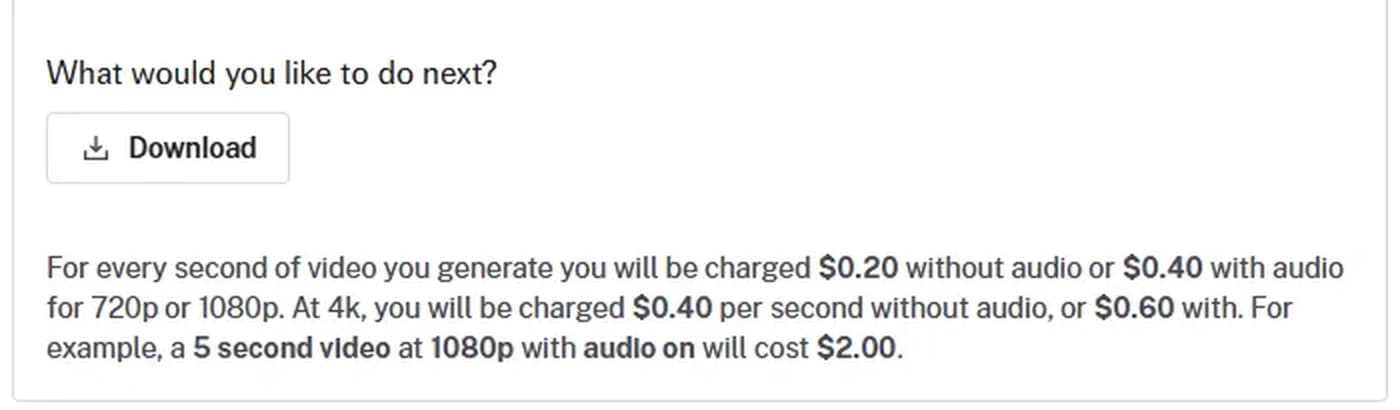
fal.ai's pricing note on the Veo 3.1 model page, captured 27 September 2026.
Take that at face value. An eight second take at 1080p with audio is $3.20. A shot you rerolled six times before you got a keeper is $22.40 for one brick in the wall. A twelve shot sequence at that hit rate is $268.80, and you will not notice it happening because each individual click feels trivial.
Runway's Gen-4 pages price the same logic in credits, and they make the workflow recommendation explicitly: Gen-4 costs 12 credits per second against 5 for Gen-4 Turbo, and the help centre tells you to test generations in Turbo and switch to Gen-4 as needed. That is a vendor describing a dailies workflow without calling it one. Block the shot cheap, approve the framing, spend on the final take only.
The full cost picture, including how rerolls compound across a project, is in the reroll cost breakdown and what one credit actually buys. For the review itself you only need one number: what this take cost, in the log, next to its verdict.
Extend or reroll
When a take is good but ends too early, extension looks like the obvious answer. It costs you something other than money.
Veo 3.1 extends a previously generated clip by seven seconds at a time, up to twenty times, for a combined output of up to 148 seconds. Look at the limitations in the same section: extension runs at 720p only, and the input has to be a Veo-generated clip of 141 seconds or less in 16:9 or 9:16. Choosing to extend a shot therefore caps that shot at 720p for good.
That is a real editorial decision and it belongs in the dailies session, not in post. If the shot is a wide establisher you will letterbox anyway, extend it. If it is the close-up the whole sequence turns on, regenerate at eight seconds and cut. Quality loss through repeated extension is its own subject, covered in the video extension quality guide.
Where dailies sessions go wrong
Five failures, all of which I have committed.
Reviewing in the tab you generated in. A clip in a 400 pixel preview panel hides exactly the defects you are looking for. Full screen or it does not count.
Judging from the thumbnail. The first frame of a generated clip is often its best frame, because that is where the reference image lives. Runway's own prompting guide tells you to feed it a high-quality input image free of visual artifacts, which is the same point from the other end. The failure arrives at second three.
Reviewing while a batch is still running. You will judge against your hopes for the running job rather than against the cut.
Asking the model what it thinks of its own output. Google states plainly that referencing or reasoning across multiple videos is not supported and may degrade performance. The comparison is your job.
Letting the two-day clock run. Covered above, and the only failure on this list that destroys work outright.
The 40-minute session
A format that fits between other work, for a batch of ten to fifteen takes.
- Download everything from the batch. Rename to shot and take. Five minutes.
- Open the log, fill model, settings, frames and cost before you watch anything. Five minutes.
- Pass one on every take, silent, full screen, no notes except pass, hold or kill. Eight minutes.
- Passes two to five on the survivors only. Ten minutes.
- Drop the survivors on the timeline next to their neighbours and run pass six. Seven minutes.
- Revisit the holds once, with the timeline open. Four minutes.
- Write the reroll list with a named defect against each entry. One minute, and no defect means no reroll.
Two things make it work. You never watch a killed take twice, and you never generate anything during the session. The generating happens after, from a list, with reasons.
FAQ
What are dailies in an AI film workflow?
The same thing they always were: the batch of takes produced in a work session, watched together and judged before more money goes into the shot. The only difference is that the takes are generated rather than shot, they arrive in four to ten second fragments, and they expire on the vendor's server if you do not download them.
How many takes per shot is normal?
Nobody has published a credible industry figure, and anyone quoting one is guessing. What you can do is measure your own. Log every take with a verdict, and after two or three sessions you will know your real hit rate per shot type. Wides and establishers usually land faster than close-ups with dialogue.
Should I review at 720p or wait for the 1080p version?
Review at whatever tier you generated at, and generate the review pass cheap on purpose. Runway's help centre recommends testing in Turbo before switching to Gen-4, and the same logic applies anywhere with a fast tier. Composition, motion and continuity are all judgeable at 720p. Only fine texture is not, and texture is rarely why a take gets killed.
Can I reuse a seed to get the same take back?
Not reliably. Google's documentation says the seed parameter is available on Veo 3 models but does not guarantee determinism, only slightly improves it. Treat a seed as a way to stay in the same neighbourhood, not as a save file. Download the take instead.
What do I do with the takes I killed?
Keep them until the cut locks, in a separate folder, logged. Killed takes turn out to be useful as reference images, as the source of a single usable frame, or as evidence when someone asks why a shot looks the way it does. Delete them at picture lock, not before.
Does the review need to check the watermark?
Check it once per delivery, not per take. Veo output carries a SynthID watermark that can be verified through Google's SynthID verification platform, and that matters for disclosure requirements rather than for judging performance. Put it on the delivery checklist, keep it out of the dailies session.
The footage is shorter, the turnaround is instant, and the vendor deletes it in 48 hours, which makes an old habit more useful than it was on film. Start the log before your next batch finishes generating. If you want the rest of the pipeline around this step, it is in how to make an AI film, and the vocabulary reference is worth keeping open while you name your first defects.
Final Step
Build your next script with Screenweaver
Move from ideas to production-ready pages faster with timeline-native writing and AI-assisted story flow.
Try Screenweaver