How to generate images and videos in ScreenWeaver: references, models, durations and drafts
Make a final-style frame with an Image node, then animate it with a Video node, choosing the right model, duration, resolution and audio.
Chapters (10)
Video: lesson 5.1 of the free AI Filmmaking Course.
Image first, then video
Working by hand is perfect for a single shot you want to control. The professional order: a strong still first, then motion. Fixing a still costs seconds, fixing a video costs a full generation, and a good frame becomes your start frame.
Click the Image tile in the toolbar, then click inside the scene's Production group. The new node takes the project aspect ratio, since that setting applies to newly created shots and image-generation nodes.
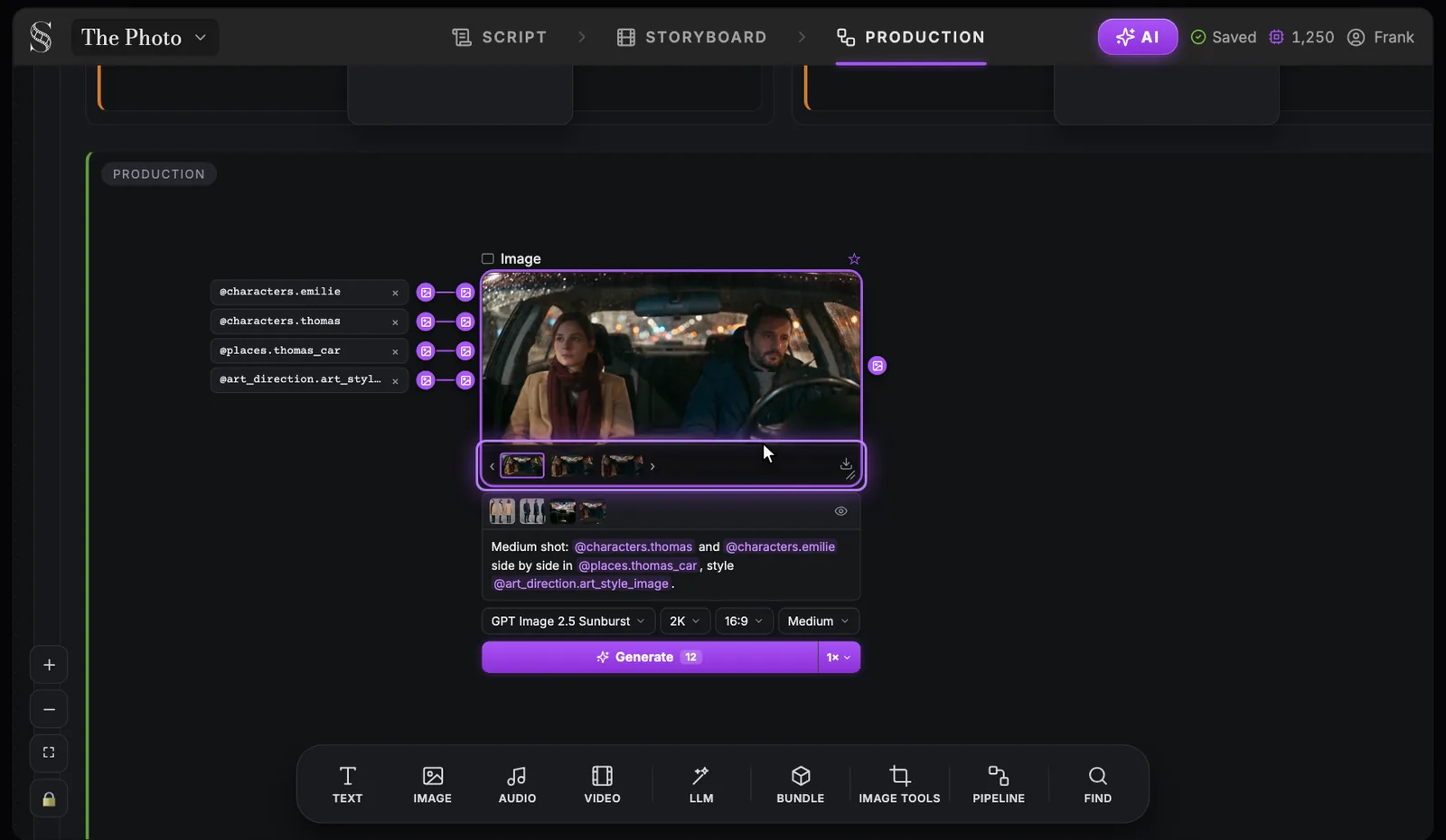
The Image node, control by control
Swipe sideways to see the whole screen.
- 1References. The entity sheets and art style wired into the node (@characters, @places, @art_direction). Wire a reference in, then cite it in the prompt by its @handle.
- 2Image preview. The current image of the node. Its output can feed a video node as a start frame or a reference.
- 3Takes. Every image this node has generated. Browse them with the arrows and save one with the download icon; running again does not erase earlier takes.
- 4Show what the model receives. "Show what the model receives" switches to the final prompt sent to the model; "Back to editable prompt" returns to your text. Check it when a result ignores an instruction.
- 5Prompt. Your instruction, with @references to the wired sheets. Spend the words on framing, action and light; the look comes from the art style reference.
- 6Model. GPT Image 2.5 Sunburst (default), Nano Banana 2.1, Seedream 5.0 Pro, GPT Image 2.5 Flare or Grok Imagine Image.
- 7Quality. Low, Medium, High, Extra high or Max. Explore at a lower quality, render the chosen frame higher, and check the cost in the Generate tooltip.
- 8Generate. Runs the node. The credit cost shows on the button and in its tooltip, and the job appears in Generations.
- 9Images per generation. 1, 4 or 8 images per run. Generate several to choose a composition, one once you know what you want.
- 1Plug in the references (marker 1): the production references of the characters, place and objects in the shot, plus the Art Style Image. They arrive as purple image wires.
- 2Write the prompt (marker 5). Type @ to call each reference by its handle instead of describing it again.
- 3Choose the model (marker 6): "GPT Image 2.5 Sunburst" is the default, with "Nano Banana 2.1", "Seedream 5.0 Pro", "GPT Image 2.5 Flare" and "Grok Imagine Image" in the same menu.
- 4Set "Quality" (marker 7): Low, Medium, High, Extra high or Max.
- 5Set "Images per generation" (marker 9): 1, 4 or 8.
- 6Click Generate (marker 8). The button shows the credit cost before you spend anything.
Medium shot: @characters.thomas and @characters.emilie side by side in @places.thomas_car, style @art_direction.art_style_image.
Every run lands in the takes strip under the preview (marker 3). Keep the take where faces, costumes and light match your sheets. You can also upload your own image instead.
The Video node: the mode follows the wiring
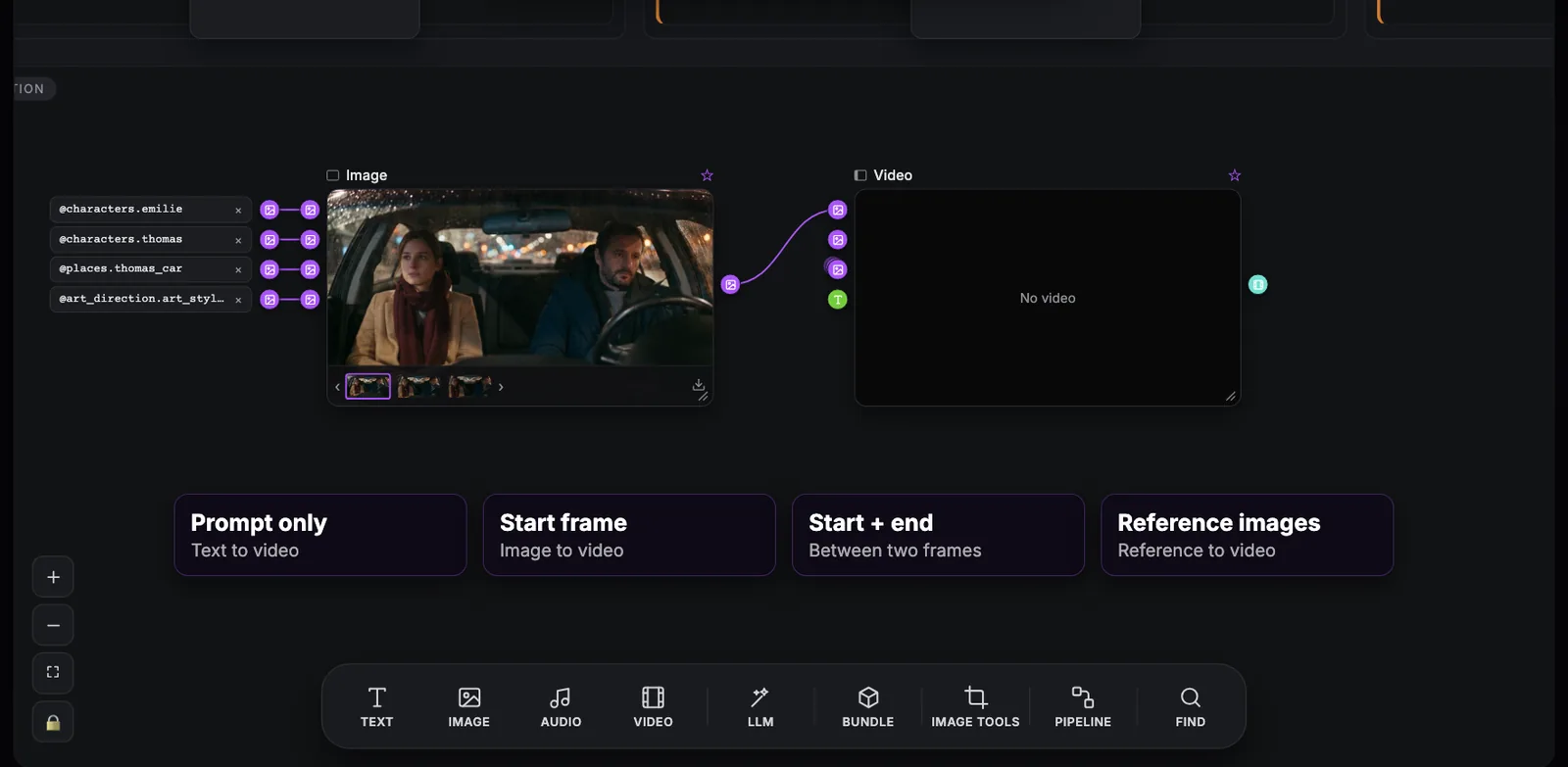
Add a Video node and you will not find a mode switch. The node reads what you plug into it.
Swipe sideways to see the whole screen.
- 1Wired image. A production image connected to the video node. As a start frame it fixes the first frame, so the clip keeps your composition, faces and light.
- 2Input ports. The ports on the left of the node: "Start frame", "End frame", reference images and text. "Reference images are ignored while a start frame is connected."
- 3Video node. The node that generates the clip ("No video" until a run). Its prompt, model, resolution, duration and audio controls sit below the preview.
- 4Four ways to drive a video. Prompt only (text to video), Start frame (image to video), Start + end (between two frames) or Reference images (reference to video). Models differ: Kling v3.0 i2v needs a start frame, and Veo 3.1 reference-to-video is 8 s only.
- Prompt only (text to video): words only. Maximum freedom, minimum consistency.
- Start frame (image to video): an image on the "Start frame" handle becomes the first frame of the clip.
- Start and end (between two frames): add an image on the "End frame" handle and the model finds the way between them.
- Reference images (reference to video): images that define who and what appears, while the model stages the shot itself.
Model, resolution, duration and audio
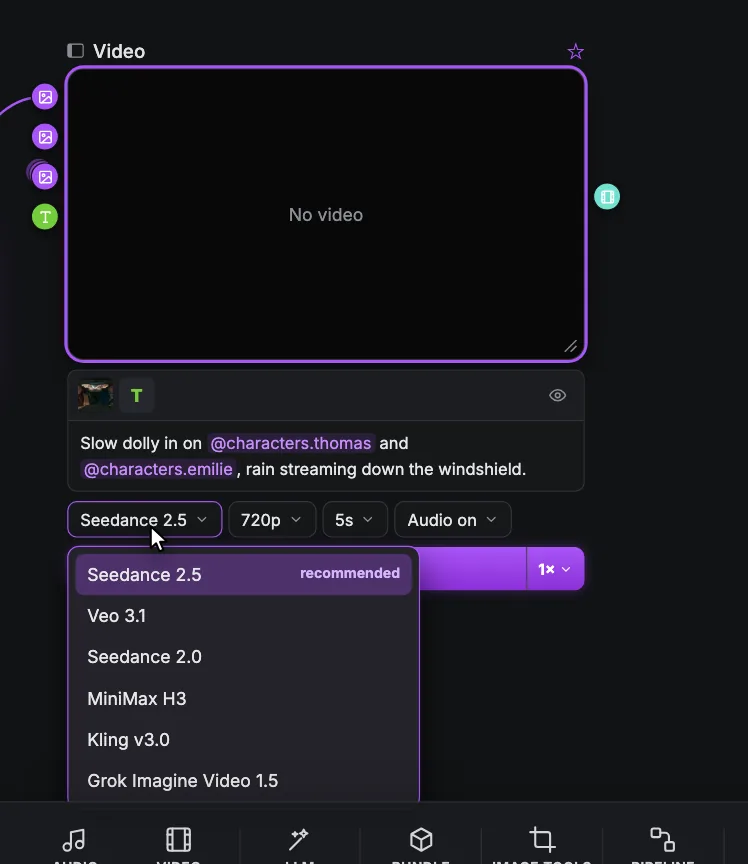
- 1Video node. The clip preview ("No video" until a run). Its "Generation history" strip keeps your takes and versions, and "Edit video" works on a result.
- 2Inputs. The ports for the start frame, the end frame, reference images and text. Reference images are ignored while a start frame is connected.
- 3Show what the model receives. Shows the final prompt sent to the model; "Back to editable prompt" returns to your text.
- 4Prompt. Describe the motion, the camera move and the sound, citing characters and places with @references. A counter ("{current} / {max}") shows how much room the model allows.
- 5Model. Seedance 2.5 is the default. Each setting first shows its common values; the rest appear under "All options".
- 6Video models. Seedance 2.5 (recommended), Veo 3.1 (16:9 and 9:16 only), Seedance 2.0, MiniMax H3, Kling v3.0 i2v (needs a start frame), Kling v3.0 t2v, Kling v3.0 Motion Control (may be blocked without video references) and Grok Imagine Video 1.5. The Kling models add a Mode, Standard or Pro.
- 7Resolution. 720p or 1080p on most models, 2k on MiniMax H3, 1080p and 4k on Veo 3.1 at 8 s only. Seedance 2.5 adds a 480p "Draft" ("Low-resolution draft for a quick, cheaper preview.") that you can finish within 7 days with "Finish seedance draft".
- 8Duration. Seedance 2.5 and 2.0: 4, 5, 6, 8, 10, 12 or 15 s (Seedance 2.5 goes up to 30 s). Veo 3.1: 4, 6 or 8 s. Kling v3.0: 5 or 10 s. Grok Imagine Video 1.5: 4, 6, 8 or 10 s. MiniMax H3: 5 to 15 s. Match it to the shot.
- 9Audio on / off. "Audio on" or "Audio off". MiniMax H3 and Grok Imagine Video 1.5 always generate audio; Kling v3.0 Motion Control has none.
One row holds the settings: model, resolution, duration and "Audio on" / "Audio off", then Generate with its cost. A counter under the prompt shows its length against the model's maximum. The values listed first are the common ones; the rest sit under "All options".
- Seedance 2.5 (default): 4, 5, 6, 8, 10, 12 or 15 s shown first, up to 30 s; 720p or 1080p, plus a 480p Draft.
- Veo 3.1: 4, 6 or 8 s; 720p or 1080p. 1080p and 4k are 8 s only, reference to video is 8 s only, and only 16:9 and 9:16 are supported.
- Seedance 2.0: 4, 5, 6, 8, 10, 12 or 15 s; 720p or 1080p.
- MiniMax H3: 5 to 15 s; 2k; audio always on.
- Kling v3.0 i2v: 5 or 10 s; 720p or 1080p; needs a start frame; Mode Standard or Pro.
- Kling v3.0 t2v: 5 or 10 s; 720p or 1080p; Mode Standard or Pro.
- Kling v3.0 Motion Control: 5 or 10 s; 720p or 1080p; no audio; may be blocked without video references.
- Grok Imagine Video 1.5: 4, 6, 8 or 10 s; 720p or 1080p; audio always on.
Seedance 2.5 is the recommendation for narrative scenes, but there is no best model, only the best model for a shot. Test one shot with the same references and prompt on two or three models, and score the results.
Draft first, finish the winner
In the Seedance 2.5 resolution menu, "480p · Draft" is a "Low-resolution draft for a quick, cheaper preview." Use it to test motion and performance. Generate your takes as drafts, pick the winner, then use "Finish seedance draft" to get it at 1080p. Drafts can be finished for 7 days, so finish your keepers the same week.
The Upscale tool under "Video tools" can do the same with "Seedance 2.5 Draft finish", and later take a finished video to 1080p or 4k with Topaz. That step is covered in finish and deliver.
Write the video prompt like a director
A model fills every silence with a default. Write each shot in the same order: camera, subjects, action, performance, world and light, then sound and constraints.
Medium two-shot, slow dolly in. @characters.thomas sits in the driver's seat of @places.thomas_car, @characters.emilie in the front passenger seat, rear seats empty. Thomas turns toward Émilie and holds out an old photograph; she takes it in both hands. Her eyes fill with tears, then a faint smile. Night, steady rain on the windshield, soft street light. Natural car ambience and rain only, no music score, no subtitles, no on-screen text.
- Always name a camera movement and its speed, or the model picks one for you: that is the floating camera.
- Write the action at the speed of the shot: five seconds holds two or three small actions.
- Show emotion as behaviour the camera can film, never as a feeling.
- For several shots in one clip, write a timeline (0 to 5 seconds, then 5 to 9 seconds) and say hard cut between shots.
Decide the sound shot by shot. "Audio on" can deliver dialogue and ambience in the take; if you will design the sound yourself, choose "Audio off".
Takes and history
The Video node keeps a "Generation history" strip, so a second try never erases the first. When you regenerate, change one thing at a time; change three and you will never know what fixed the shot.
Do it now
Practice in ScreenWeaver
- 1In a scene's Production group, add an Image node, plug in the shot's references and write a prompt with @ mentions.
- 2Generate 1 image, adjust the prompt, then generate 4 and keep the best take.
- 3Wire that image into the "Start frame" of a new Video node and write the prompt in the six-part order.
- 4Generate two takes at "480p · Draft" with Seedance 2.5, pick one and finish it to 1080p.
- 5Open "Show what the model receives" and check every reference against your prompt.
Watch the video lessons
Questions about this step
Which video model should I use in ScreenWeaver?
Start with Seedance 2.5, the default: 4 to 30 second clips, 720p or 1080p, with a 480p draft. Switch for specific shots after a side-by-side test, keeping references and art direction identical.
Why are my reference images ignored in the video?
A start frame is connected. While an image sits on the "Start frame" handle, reference images are ignored, so improve the start frame instead.
Can I get 4K video?
Veo 3.1 offers 4k for 8-second clips. For other models, finish the take you keep, then upscale it to 4k with Topaz in the Upscale video tool.
How long is a Seedance draft valid?
Drafts can be finished for 7 days. After that, the draft expires and you generate the shot again.
Why did my clip come with music or subtitles?
The model filled a silence in your prompt. End every prompt with your sound policy and constraints, or set the node to "Audio off".
How many images can I generate at once?
"Images per generation" offers 1, 4 or 8. The Generate button shows the credit cost for your choice before you click.
More answers in the Academy FAQ and the button-by-button interface guide.