What a credit is
Credits pay for AI work, and only AI work. One credit is worth $0.005, so 200 credits are one dollar. Writing, structuring, describing your characters by hand, arranging shots and exporting your script cost nothing.
Every AI button costs credits, and the price is shown before you click: in the button's tooltip, sometimes as "from N credits" when the final cost depends on the result, and on the Generate buttons of the production canvas.
- Story elements: auto-filled descriptions and reference sheets.
- Storyboard: shot breakdowns, shot images, shot edits and reframes.
- Production: Image, Video and LLM nodes, and upscales.
- The assistant: each message you send.
The assistant is capped per message. Its send button says "Up to {count} credits. You only pay for what the reply uses." The cap is 50 credits, that is $0.25, so a long conversation never surprises you.
Your balance and the billing window
Your total credit count sits on the right of the header, in the credit chip. Its tooltip says "View billing & credits"; click it to open the billing window. You can also open it from the account menu with "Billing & credits". Guests and paused members do not see the chip.
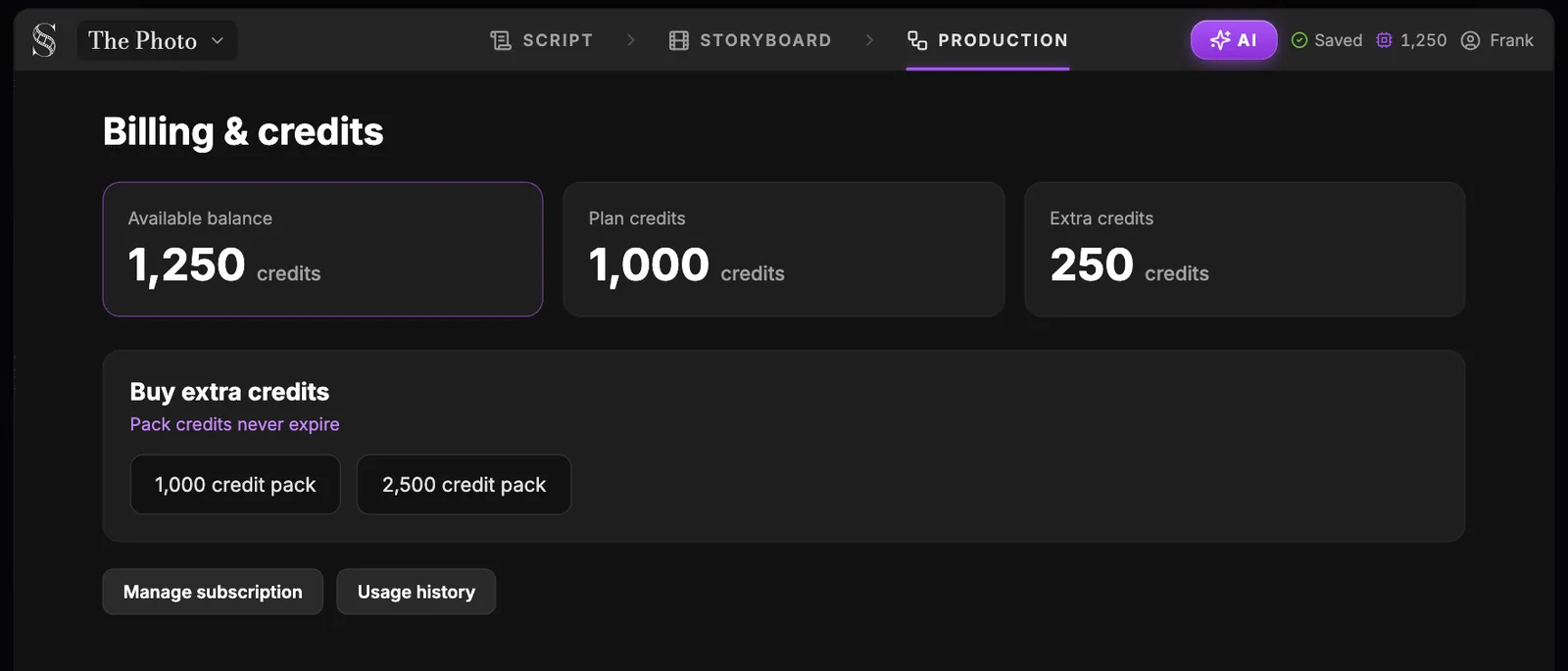
Swipe sideways to see the whole screen.
- 1Credit balance. The chip in the header with your total credits; click it ("View billing & credits") to open this screen. Guests and paused members do not see it.
- 2Available balance. Everything you can spend right now: plan credits plus extra credits. 1 credit is $0.005.
- 3Plan credits. The credits your plan gives you each month: 6,000 on Auteur ($39.99/month), 25,000 on Studio ($149.99/month). Screenwriter is free forever for the script tools, and new accounts get 20 free credits.
- 4Extra credits. Credits bought in packs. They never expire.
- 5Credit packs. Buy extra credits before a big render. Packs need Auteur or Studio; on the free plan you see "Subscribe to Auteur or Studio to buy packs."
- 6Manage subscription. Opens the management of your plan and billing. In an organisation, only owners change the plan or buy credits.
- 7Usage history. What spent your credits, generation by generation. Check it to see which steps of your workflow cost the most.
- "Your balance" splits your credits in two: "Plan credits", which come with your monthly plan, and "Extra credits", which come from packs and never expire.
- "Plans" shows the three plans and your current one.
- "Credit packs" sells extra credits. Packs need Auteur or Studio; on the free plan the section says "Subscribe to Auteur or Studio to buy packs."
- "Usage history" lists what each generation cost.
The billing window belongs to the organisation you are working in: "Billing & credits" sits in the organisation block of the account menu, next to "Switch organisation". If the balance looks wrong, check which organisation is selected first. Teams are covered in work as a team.
The three plans
- Screenwriter: $0, forever. The script editor, the outline, story beats, story elements and export.
- Auteur: $39.99 a month, with 6,000 credits a month.
- Studio: $149.99 a month, with 25,000 credits a month, real-time collaboration and unlimited seats.
Credit packs add extra credits on top of Auteur or Studio, and those never expire. For the full comparison and current details, see pricing.
When you run out
If an action needs more credits than you have, the app says "Not enough credits". Buy a pack from "Credit packs", or move to a bigger plan from "Plans".
Failed generations are refunded. In the AI Center, a failed run is marked as refunded in the Generations list, so a model error never costs you anything.
Spend like a pro
Most wasted credits come from generating before thinking. These habits are what experienced users do on every film.
- Approve the art direction and the reference sheets before any shot. Everything downstream depends on them.
- Generate 1 image until the prompt works, then ask for 4 or 8.
- Draft video at "480p · Draft" with Seedance 2.5, then finish only the take you keep.
- Repair a still with Edit with AI, Crop or Camera angle instead of regenerating the video.
- Click "Show what the model receives" before any long clip, and read the Prompt director's staging before a scene video.
- Upscale last, only the shots in your locked cut.
Do it now
Practice in ScreenWeaver
- 1Hover the AI buttons you use most and note what each one costs.
- 2Open the billing window from the credit chip and read your plan credits and extra credits.
- 3Open "Usage history" and find your three most expensive generations.
- 4Plan the next scene's budget: sheets, panels, image drafts, video drafts, then finishes.
- 5Send one short question to the assistant and compare its real cost with the cap.
Questions about this step
Is ScreenWeaver free?
The Screenwriter plan is $0 forever: script editor, outline, story beats, story elements and export. Generating images and video uses credits, which come with Auteur ($39.99 a month, 6,000 credits) or Studio ($149.99 a month, 25,000 credits).
How much is one credit worth?
One credit is $0.005, so 200 credits equal one dollar. Each AI button shows its cost in credits before you click.
Do extra credits expire?
No. Credits from packs are extra credits and never expire. Packs require the Auteur or Studio plan.
How much does an assistant message cost?
You pay for what the reply uses, up to 50 credits ($0.25) per message. The send button shows the cap.
Do I pay for a failed generation?
No. Failed generations are refunded, and the Generations list in the AI Center marks them as refunded.
Why is my credit balance different from my teammate's?
The balance belongs to the organisation you are working in. Check the organisation selected in the account menu.
More answers in the Academy FAQ and the button-by-button interface guide.