
Most wasted credits are not lost to bad prompts. They go to settings nobody changed: delivery resolution on a draft, generated audio on a shot that will be scored anyway, the flagship model on a shot a cheap one could carry. Each is a multiplier, each is one click, and together they can triple a session.
The mistakes that happen before the generate button, the ones that come from not locking a character or not deciding a shot size, live in the reroll math piece and I am not going to repeat them here. If your prep is sound and your bill still looks wrong, the ten below are where the money went. For the full pipeline around them, the AI filmmaking hub is the map.
Every number I quote comes from Runway's developer pricing page, where credits are sold at a flat cent each, so the credit figures convert straight to dollars. The mechanics are not unique to Runway. The rates are, so check yours.
The ten, ranked by how much they cost
| # | Mistake | What it multiplies | Typical damage |
|---|---|---|---|
| 1 | Drafting at delivery resolution | Credits per second | 2x to 4x |
| 2 | Flagship model on every shot | Credits per second | up to 8x |
| 3 | Paying for audio you will replace | Credits per second | 2x |
| 4 | Ignoring the per-generation minimum | Credits per take | up to 2x on short tests |
| 5 | Skipping the still test | Video takes spent on look | 10x to 40x per test |
| 6 | Re-rolling a whole clip for one bad second | Seconds billed | 2x to 5x per fix |
| 7 | Mastering before the cut locks | Surcharges and upscales | varies, often large |
| 8 | No take ledger | Duplicate generations | 10% to 20% of a session |
| 9 | Treating the allowance as a deadline | Takes per shot | end-of-cycle binge |
| 10 | Bundle pricing for a metered job | Cost per credit | up to 2x |
1. Drafting at the resolution you deliver at
Resolution is a per-second multiplier on the same model, and the jump is steeper than people expect. On Runway, wan3 costs 5 credits per second at 480p, 10 at 720p and 20 at 1080p. Identical model, identical prompt, four times the price for the same five seconds.
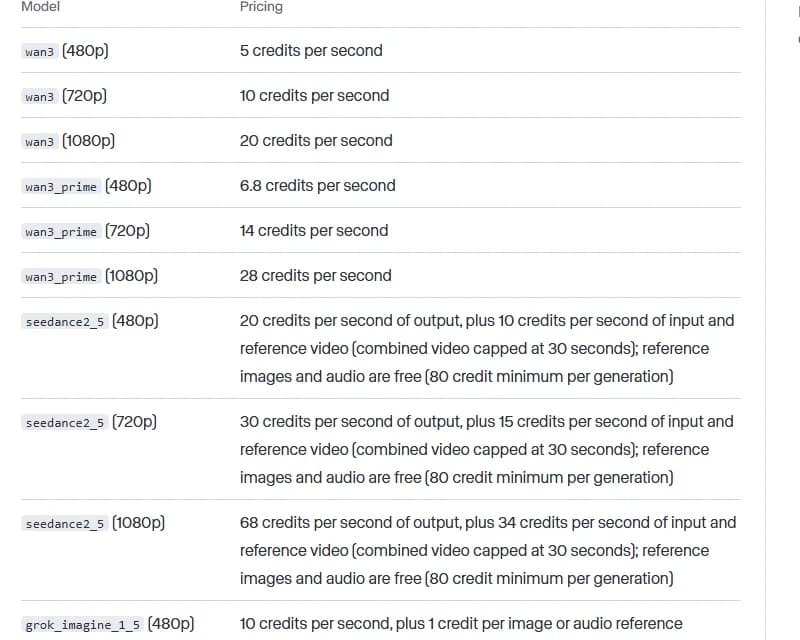
Runway Dev's video generation rates, captured 4 October 2026. Note the per-resolution tiers on the same model and the per-generation minimum on the seedance rows.
The top end is worse. seedance2 runs 40 credits per second at 1080p and 150 at 4K, which is nearly four times again for a format most people will never deliver in.
What you are buying when you draft at 1080p is a nicer-looking wrong answer. A take that fails on blocking, eyeline or motion fails just as visibly at 480p, and you find out for a quarter of the money. Draft low, lock the shot, then regenerate the keeper once at delivery resolution. The only shots that deserve a high-resolution draft are the ones where the defect you are hunting is texture or fine detail, and that is maybe one shot in twenty.
2. Sending every shot to the flagship model
The spread between the cheap model and the expensive one is the single biggest lever on the page. gen4_turbo costs 5 credits per second. veo3.1 with audio costs 40. Eight times, for shots that in many cases are a static plate, a cutaway or an insert that nobody will study.
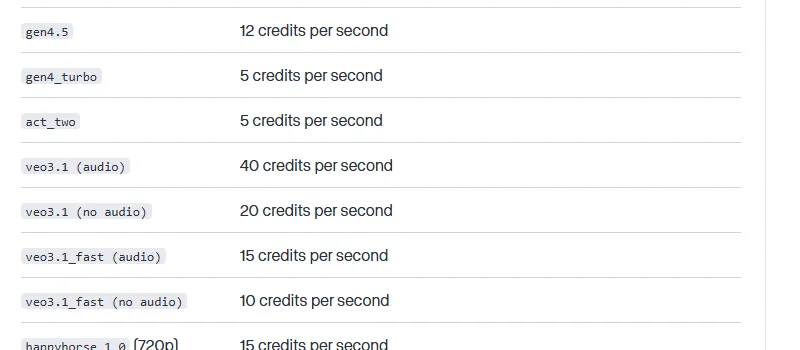
The same table further down, captured 4 October 2026. The audio and no-audio variants of veo3.1 differ by a factor of two.
Sort your shot list into three buckets before the session. Hero shots, where the audience looks at a face and the model has to hold it. Connective shots, where motion and continuity matter but nobody studies the frame. Plates, inserts and cutaways, where almost anything coherent will cut. Then assign a model per bucket, not per project. Our AI video model picker does this by shot type if you want a starting map, and the Seedance 2 vs Veo 3 vs Sora 2 comparison covers where each one actually earns its rate.
Mixing models does create small look differences between shots, and people raise that objection every time. A grade pass fixes most of it. What it does not fix is the eight shots you had to cut because the budget ran out, and an audience notices a missing scene long before it notices that two cutaways have slightly different contrast.
3. Paying for generated audio you are going to throw away
Look again at that second capture. veo3.1 with audio: 40 credits per second. veo3.1 without audio: 20. The audio track doubles the bill.
If you are mixing properly, with real voice, a score and a sound pass, every one of those generated tracks goes in the bin. You paid double for a stem you muted. The only time generated audio earns its keep is when it is the deliverable, which is a specific choice for a specific kind of piece, not a default.
The same logic applies to the "fast" variants. veo3.1_fast without audio runs 10 credits per second, a quarter of the full model with audio. For drafting, that is the shot you should be generating. Build the sound afterwards, in the order that post actually works in, which I laid out in the sound workflow guide.
4. Ignoring the per-generation minimum
This one is invisible until you read the fine print. Several models carry a floor: seedance2_5 bills an 80 credit minimum per generation, seedance2_mini a 64 credit minimum, aleph2 a 56 credit minimum. Below that length, you pay the floor regardless.
Work out what the floor buys you. At 20 credits per second of output, an 80 credit minimum covers four seconds. So a two-second test on that model costs exactly what a four-second one costs. People run short tests believing short is cheap, and on a model with a floor it simply is not.
Two habits fix it. Find your floor length per model and never generate below it, because the extra seconds are free and sometimes the extra seconds are the ones that reveal the problem. And when you genuinely need a one-second answer, run it on a model without a floor.
5. Testing the look in video when a still would answer
Stills are absurdly cheap next to video. On the same price list, a basic image model costs 1 credit and a mid-tier one costs 2 to 5 credits per image. A single second of a premium video model costs 40. One still, forty stills, the same money.
So a question like "does this costume read at this distance", "is this location the right period", "does this lighting feel like dusk or like night" should never be asked with a video take. Ask it with a still, three or four variants, for less than the price of one second of generated video. Lock the frame, then animate it.
No new tool, no new skill. The whole fix is one question before each generation: does the thing I am unsure about actually move? If it does not move, it does not need video to be tested.
6. Re-rolling the whole clip because the last second falls apart
Most generated clips fail late. The first two or three seconds hold, then a hand folds into itself or the camera lurches. The instinct is to regenerate the clip. You just paid full price again to re-get the part that was already fine.
Generate shorter than you think you need, keep the good section, and extend only if the edit asks for it. Extension has its own costs and its own quality drift, which I covered in what extending an AI video actually does to it, so it is not free either. It is still usually cheaper than paying twice for the same opening.
The deeper habit here is cutting before you finish generating. A four-second usable section inside a six-second take is a success, not a failure, and you only see that if you are reviewing takes like an editor rather than like someone waiting for a perfect one. That rubric is in the dailies review piece.
Try it free
Try Screenweaver for free on your script
It is free. Import your existing project, get a clearer view of your outline, and regain control of your story structure in minutes.
Start Free7. Mastering before the cut is locked
Delivery formats carry surcharges that stack on top of the model rate. ProRes or a PNG sequence adds 5 credits per second. The 10-bit and HDR profiles add 20 credits per second, and 40 when the output is larger than roughly 4K. Those are surcharges, not totals, so they land on top of whatever the model already charged.
Upscaling is worse because it changes the billing unit. Runway's creative video upscaler is billed per output frame rather than per second, which means a 24 frames-per-second clip bills 24 units for every second you send it. Frame rate conversion is the cheap exception at 1 credit per 2 seconds, but the upscaler is not a thing to run speculatively.
Nothing gets mastered until it is in the cut and the cut is locked. Almost nobody works that way, because exporting a good-looking take feels like progress. Every ProRes export of a take you later drop is a surcharge paid on a shot that does not exist in your film.
8. Generating something you already have
By hour three of a session, nobody remembers which prompt produced which file. So you regenerate. Sometimes you regenerate a take you already rejected, which is worse, because you then reject it a second time.
A take ledger costs nothing and saves somewhere between a tenth and a fifth of a long session. One row per generation: take ID, shot, model, resolution, seed if the platform exposes one, the prompt change from the previous take, verdict. Download as you go, because most platforms keep generated files for a limited window and a file you did not download is a file you will pay to recreate.
Name files so the name tells you the shot and the take without opening anything. s014_t03_480p_turbo.mp4 reads at a glance. generation_final_v2_REAL.mp4 does not, and you know it does not.
9. Treating the monthly allowance as a deadline
Subscription credits create a strange behaviour near the end of a cycle. People who were careful all month start generating to use the balance up, because allowances on many plans reset on your billing date rather than banking. Runway's help centre documents what happens to unused credits on each plan, and the rule is not the same on every tier, so read yours instead of assuming.
Takes generated to avoid waste get generated without a brief, and a take without a brief produces a clip nobody asked for and nobody cuts. You converted money into files.
If your plan does expire credits, the honest fix is to plan sessions against the cycle rather than against the calendar: a shot list sized to the allowance, generated steadily, instead of a panic on the 28th. If you routinely finish a cycle with a large balance, that is not an opportunity. That is a signal you are on the wrong plan.
10. Buying a bundle for a job that should be metered
Bundles make sense for steady work. For a one-off, a burst, or a project that will take six weeks of nothing followed by two days of heavy generation, metered access to the same models is often cheaper and never expires.
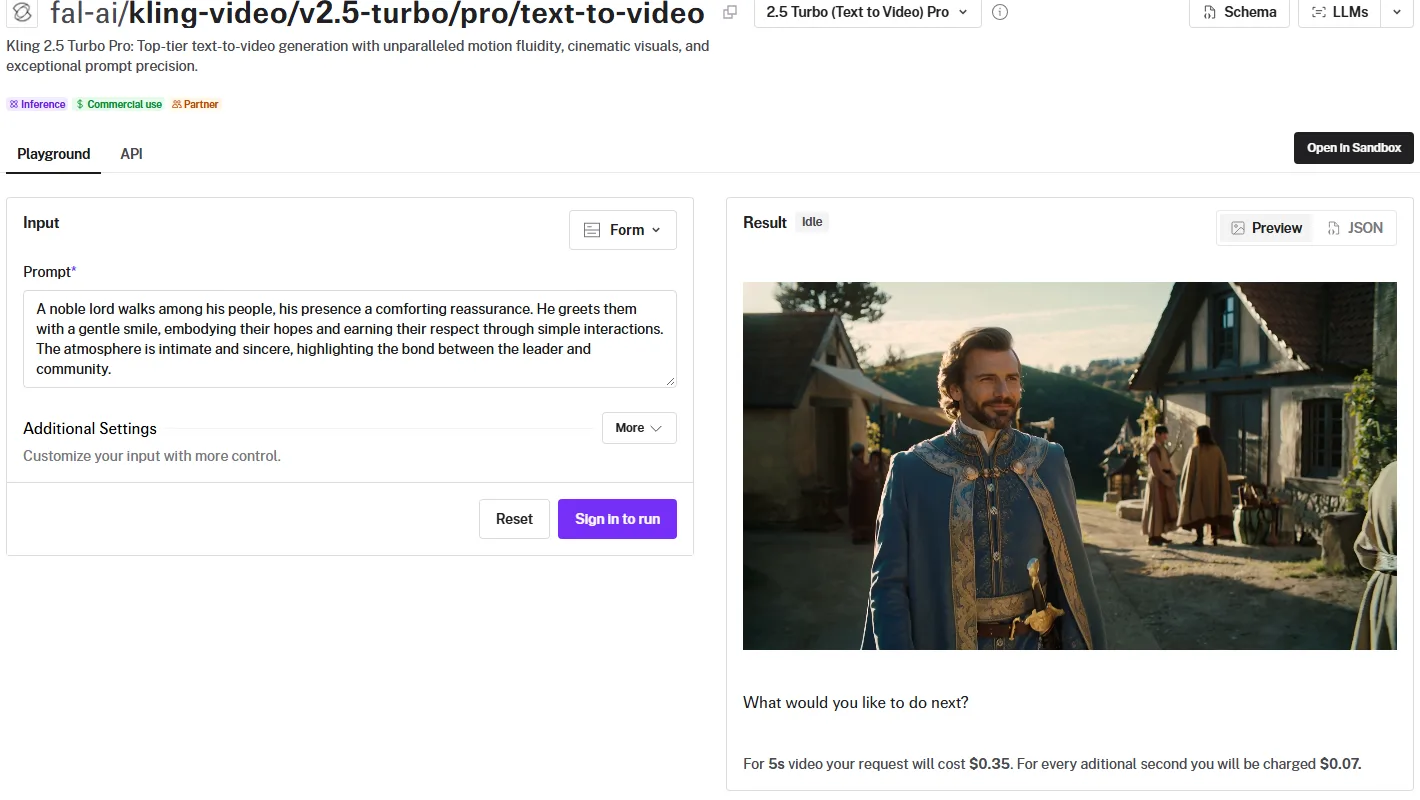
The fal.ai page for Kling 2.5 Turbo Pro, captured 4 October 2026, showing per-clip metered pricing rather than a credit bundle.
Seven cents a second, billed when you use it, is a very different commitment from a monthly allowance you have to spend. Run both numbers against the same job before you subscribe. Our AI video cost calculator does the conversion, and the method behind it is in what one credit actually buys. If the bundle loses badly on your actual volume, believe the arithmetic.
The pre-session settings check
Run this once, at the start of a session, before the first take. It takes two minutes and it closes eight of the ten leaks above.
- Draft resolution set to the lowest tier that can show the defect you are hunting.
- Model assigned per shot bucket, not per project. Hero, connective, plate.
- Audio generation off unless the generated audio is the deliverable.
- Per-generation minimum known for each model you will use, and no take shorter than its floor.
- Every look question answered with a still before any video take.
- Clip length set shorter than the cut needs, with extension as the fix for shortfalls.
- Export format left at the cheap default. No ProRes, no HDR, no upscale until picture lock.
- Take ledger open, naming convention agreed, download folder ready.
- Take budget for the session written down before the first generation.
The last line matters more than it looks. A number you wrote down beforehand is a decision. A number you discover afterwards is a bill.
FAQ
What wastes the most AI video credits?
Resolution and model choice, by a wide margin, because both are per-second multipliers applied to every take. Generating drafts at 1080p instead of 480p costs four times as much on the same model, and sending every shot to a flagship model instead of a fast one can cost eight times as much. Prompt quality matters, but it changes how many takes you need, not what each take costs.
Is it cheaper to generate at low resolution and upscale?
Usually yes for drafts, often no for finals. Drafting low is clearly cheaper. Upscaling at the end is billed per output frame on some platforms, which at 24 frames per second adds up faster than people expect, so compare the upscale cost against simply regenerating the keeper once at delivery resolution. For a handful of hero shots, regenerating is frequently the better deal.
Do unused AI video credits roll over?
Often not, and the rule can change between tiers of the same platform. Some plans reset the allowance on your billing date, some roll a limited amount forward, and separately purchased credit packs usually last much longer than subscription credits. Check your provider's own help pages before you plan a session around a balance, because this is the detail that pricing cards tend to leave out.
How many takes per shot should I budget?
Set a cap rather than an average, because the damage comes from outliers. Four takes is a reasonable ceiling for most shots. When a shot hits the cap without landing, treat that as evidence of an upstream problem, in the prompt, the reference or the writing, and fix it there instead of buying a fifth take. One stubborn shot without a cap can eat the budget of ten good ones.
Does generated audio cost extra?
On some models, yes, and the surcharge is substantial. Runway lists veo3.1 at 40 credits per second with audio and 20 without, so the audio doubles the rate. If you are doing a real sound pass afterwards, generating audio you will mute is money spent on nothing.
Is a credit subscription or pay-as-you-go better for a short film?
For a short film made in bursts, metered usually wins. Subscriptions reward steady volume and punish gaps, since unspent allowance on many plans does not carry, and most short films generate heavily for a few days and then go quiet for a month while someone edits. The exception is a production with a real weekly rhythm, where a bundle at the top tier beats metered rates comfortably. Price your actual shot count both ways before committing.
Final Step
Build your next script with Screenweaver
Move from ideas to production-ready pages faster with timeline-native writing and AI-assisted story flow.
Try Screenweaver