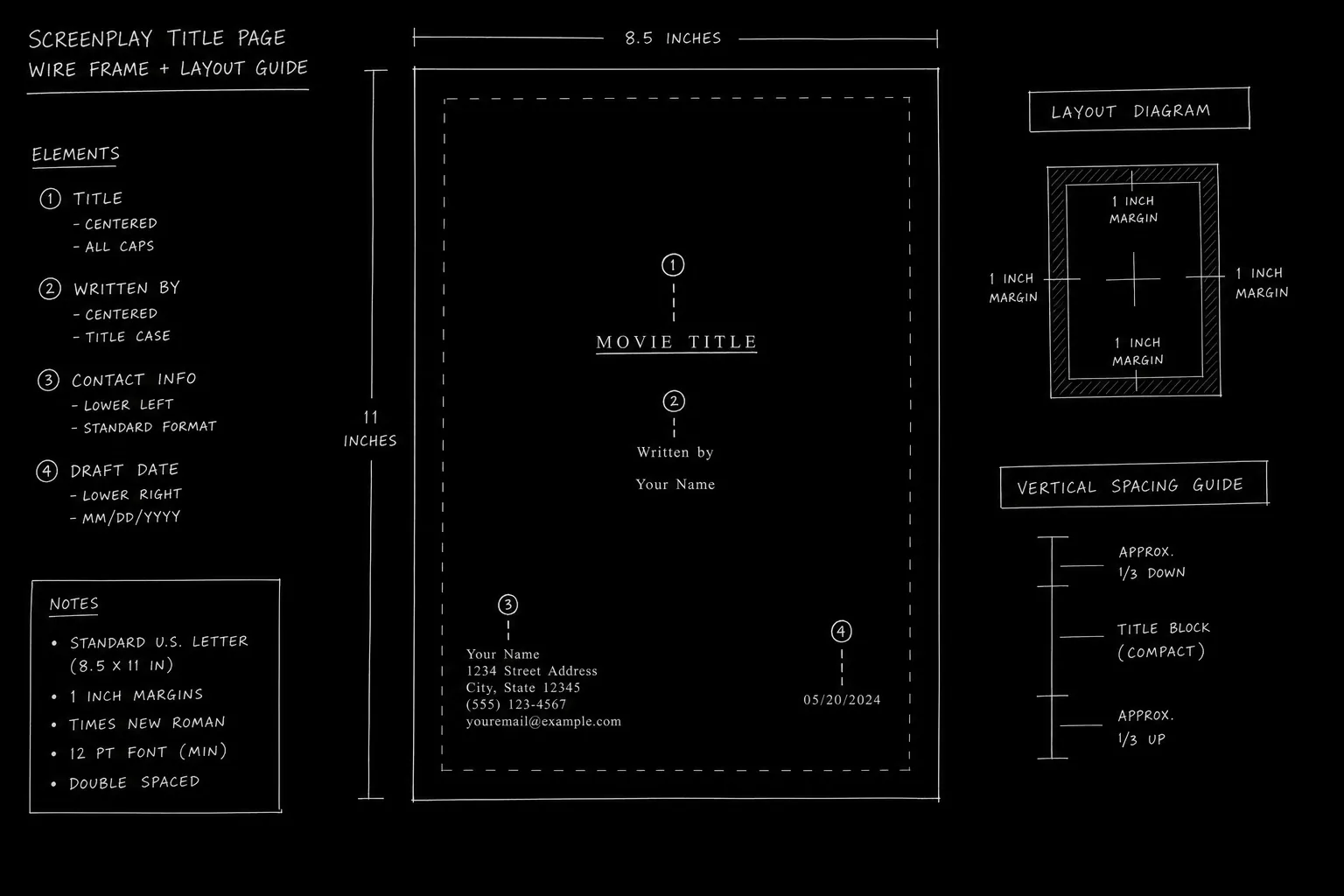

Two ways to get a correct screenplay title page in under a minute: copy the Fountain block below into the top of your script file, or fill five fields in the free title page maker and export a PDF. Both produce the same industry-standard page. Neither requires an account, a payment, or a Word template you have to fight.
The template comes first, because that is what you came for. Everything after it explains what each field does, what changes for contests and pilots, and where writers usually break the page without noticing.
The template, plain text
Paste this at the very top of your .fountain file, before your first slugline. The title page block has to be the first thing in the document, and it ends at the first blank line.
Title: THE LONG WAY DOWN
Credit: Written by
Author: Your Name
Contact:
    yourname@email.com
    (555) 555-0100
That is the whole thing. Five lines, one blank line after, then INT. SOMEWHERE - DAY and you are writing.
Run that file through the free Fountain to PDF converter and the title page renders as its own page with the screenplay starting after it. If you would rather not touch a text file at all, the title page maker gives you the same output through a form.
Here is the fuller version with every optional key that a spec script might legitimately use:
Title: THE LONG WAY DOWN
Credit: Written by
Author: Your Name
Source: Based on the novel by Someone Else
Draft date: July 2026
Contact:
    Your Name
    yourname@email.com
    (555) 555-0100
Delete any line you do not need. An unused key is worse than a missing one, since a blank Source: sitting on a page tells a reader you copied a template and did not read it.
What each field actually does
Fountain's title page is a set of key and value pairs. The parser reads the key, drops the value into the right position on the rendered page, and ignores keys it does not recognize. That last part matters: you can add private metadata that never prints, which is occasionally useful and frequently abused.
| Key | Prints as | Use it when | Skip it when |
|---|---|---|---|
Title: | Centered, upper portion of the page | Always | Never |
Credit: | Small line above the author name | Always, usually as "Written by" | You are using "Screenplay by" instead, which goes here too |
Author: | Centered under the credit line | Always | Never, unless submitting anonymously |
Authors: | Same position, plural handling | Two or more writers share the credit | One writer |
Source: | Below the author block | Adapting a novel, article, play, or real events | Original material |
Draft date: | Lower area of the page | A production draft, or a spec where the date genuinely helps | A cold spec, where dates only age your script |
Contact: | Lower left block, multi-line | Anyone might need to reach you | Anonymous contest submissions |
Notes: | Varies by parser | Rarely, and never on a submission | Almost always |
Copyright: | Lower area | A production draft with a formal claim | A spec, where it reads as anxious |
Multi-line values indent by three or more spaces, or a tab. That is how the contact block above stacks a name, an email, and a phone number under one key instead of repeating Contact: three times.
The one field worth arguing about is Draft date:. Most formatting advice says include it. I would leave it off any spec you are sending cold. A date on the page tells a reader exactly how long your script has been circulating, and "Draft date: March 2024" on something you are pitching in 2026 answers a question nobody asked. Production drafts are different, because there the date is the point.
For the full field-by-field rules, including margins, capitalization, and what belongs nowhere near this page, see Screenplay Title Page Format for a Spec Script in 2026.
The measurements, if you are building it by hand
Skip this section if you are using either tool. If you are laying the page out in a word processor, these are the numbers that make it look like every other professional script instead of a school assignment.
| Element | Setting |
|---|---|
| Page size | US Letter, 8.5 x 11 inches |
| Font | Courier or Courier Prime, 12 point |
| Left margin | 1.5 inches |
| Right, top, bottom margins | 1 inch |
| Title | Centered, uppercase, roughly a quarter to a third down the page |
| Credit line | Centered, two lines below the title |
| Author name | Centered, directly under the credit line |
| Contact block | Lower left, left-aligned, single spaced |
| Page number | None. A title page is never numbered |
Courier at 12 point is not a style choice. It is the reason a page of screenplay approximates a minute of screen time, and swapping it for something prettier breaks the estimate that every reader, producer, and line producer runs in their head. If you are not sure your page count is honest, the script time calculator times the same text by word count, which is a useful cross-check on the pages.
Underlining the title is optional and has been going out of fashion for twenty years. Bold is not optional, it is simply wrong. Skip the borders and the drop shadows too, and keep images off the page entirely.
Try it free
Try Screenweaver for free on your script
It is free. Import your existing project, get a clearer view of your outline, and regain control of your story structure in minutes.
Start FreeVariants that change the template
The base template covers a spec feature. Four situations change it.
Contests and fellowships are the big one. Most competitions strip identifying information, which means deleting Author: and Contact: entirely and leaving only the title. Some ask for a submission number instead. The rules differ by competition and they change year to year, so read the current guidelines rather than trusting what worked last cycle. The specifics for the major programs are in Anonymous Title Pages for Contests: Nicholl, Austin, PAGE Rules.
Title: THE LONG WAY DOWN
Yes, that is a complete and legitimate contest title page. It looks broken the first time you export it, and it is not.
A TV pilot carries two titles, the series name and the episode name, in a specific relationship to each other. Fountain handles this with the Title: key holding both across indented lines, though how it renders depends on your converter. The placement conventions are covered in TV Pilot Title Page: Format and Series Name Placement.
Shooting drafts go the other direction. Once a script is in production the title page grows a draft label, a revision color, and a date, and the spec rule against dates inverts completely. Shooting Script Title Page: Colors, Drafts and Revisions walks through the revision color order and what each label means.
Adaptations need the Source: key, filled in with the underlying work and its author. Getting this line wrong is a rights conversation waiting to happen, so use the exact title and the exact author name as published rather than a paraphrase from memory.
Before you export, run this
A short pass that catches most of what goes wrong between a good template and a bad PDF.
- Title spelled the way you want it said out loud in a meeting, articles included
- Your name matches the name on your other submission materials, including the query email
- Contact email is one you check, not the address you made in 2011
- No page number on the title page
- Font embedded in the PDF, so it opens as Courier on a reader's machine and not as whatever their system substitutes
- No trial watermark from free conversion software
- Filename is
title-yourname.pdfor similar, neverUntitled_final_FINAL_v7.pdf - For contests: contact information actually removed from the file, not just hidden behind white text
- Opened the exported PDF yourself before sending it
That last one sounds obvious and is the step people skip. Export it, open it, and actually look at it before you attach it to anything. It takes ten seconds, and it catches a clipped title or an accidental blank first page while you can still fix it.
Cover page or title page
If you have seen both terms used and assumed they are two different documents, they are not. In screenwriting they name the same plain page. The word "cover page" carries design connotations from other industries, which is where the confusion starts, and it occasionally leads writers to add artwork that gets the script set down unread. Script Cover Page vs Title Page: What Readers Expect covers the terminology in full.
For nine real layouts with the differences annotated, Screenplay Title Page Examples: 9 Real Layouts Annotated is the companion piece to this one. Use the examples to decide what your page should look like, then use the template here to build it.
FAQ
Is this template really free?
Yes. The Fountain block above is plain text you can copy, and both the title page maker and the Fountain to PDF converter run in your browser without an account. Fountain itself is an open plain text format documented publicly at fountain.io, so nothing here locks you into a tool.
What file format should I send a title page in?
PDF, attached to the same file as the script. The title page is page one of the screenplay document, not a separate attachment. Sending two files makes a reader do extra work before they have any reason to.
Do I need a title page on a short film script?
Yes, and it is the same template. Short scripts get read by festivals, funders, and collaborators who expect the same presentation as a feature. Length changes what is inside the script, not what identifies it.
Can I use a different font on the title page?
No, or rather, you can and it will cost you. Courier 12 point is the expected typeface on every page of a screenplay including this one. Deviating signals either inexperience or a designer's instinct applied where it does not belong.
Should I include a logline on the title page?
No. A logline belongs in your query email, your coverage sheet, and your pitch, not on the title page. The page exists to identify the work and the writer, and adding a sales line to it is the most common way new writers mark themselves as new.
What if my script has two writers?
Use Authors: instead of Author: and list both names. If you are following WGA credit conventions, "and" separates writers who worked separately on the material while an ampersand joins a writing team that worked together. Get this right before the script circulates, because credit order is a real conversation and the title page is where it becomes visible.
Final Step
Build your next script with Screenweaver
Move from ideas to production-ready pages faster with timeline-native writing and AI-assisted story flow.
Try Screenweaver