
OpenAI released GPT Image 2.6 Sunburst and GPT Image 2.6 Flare on 4 November 2026, for image generation and editing in its API. The two models add a complexity setting, markup-guided edits, SVG output and animated GIF output, and they cost the same per token as GPT Image 2.5. For storyboard work, the complexity setting is the one to try first.
The source is OpenAI's own API changelog, in an entry dated 4 November, plus the GPT Image 2.6 section of its image generation guide and its pricing page. We read all three on 5 November. OpenAI has not published a blog post about the launch that we could find, so everything below comes from the developer docs. If you are new to AI storyboards, our storyboard-first workflow explains where an image model fits in a film project.
What OpenAI released
Two models, one generation. The API ids are gpt-image-2.6-flare and gpt-image-2.6-sunburst. They work on the image generation and image edit endpoints, take text and images in, and return images. No video, no audio.
OpenAI's model pages split the pair like this:
- Flare is for "fast iteration": interactive generation and editing, where you try many versions quickly.
- Sunburst is for "detailed visual work": detailed compositions and editing workflows.
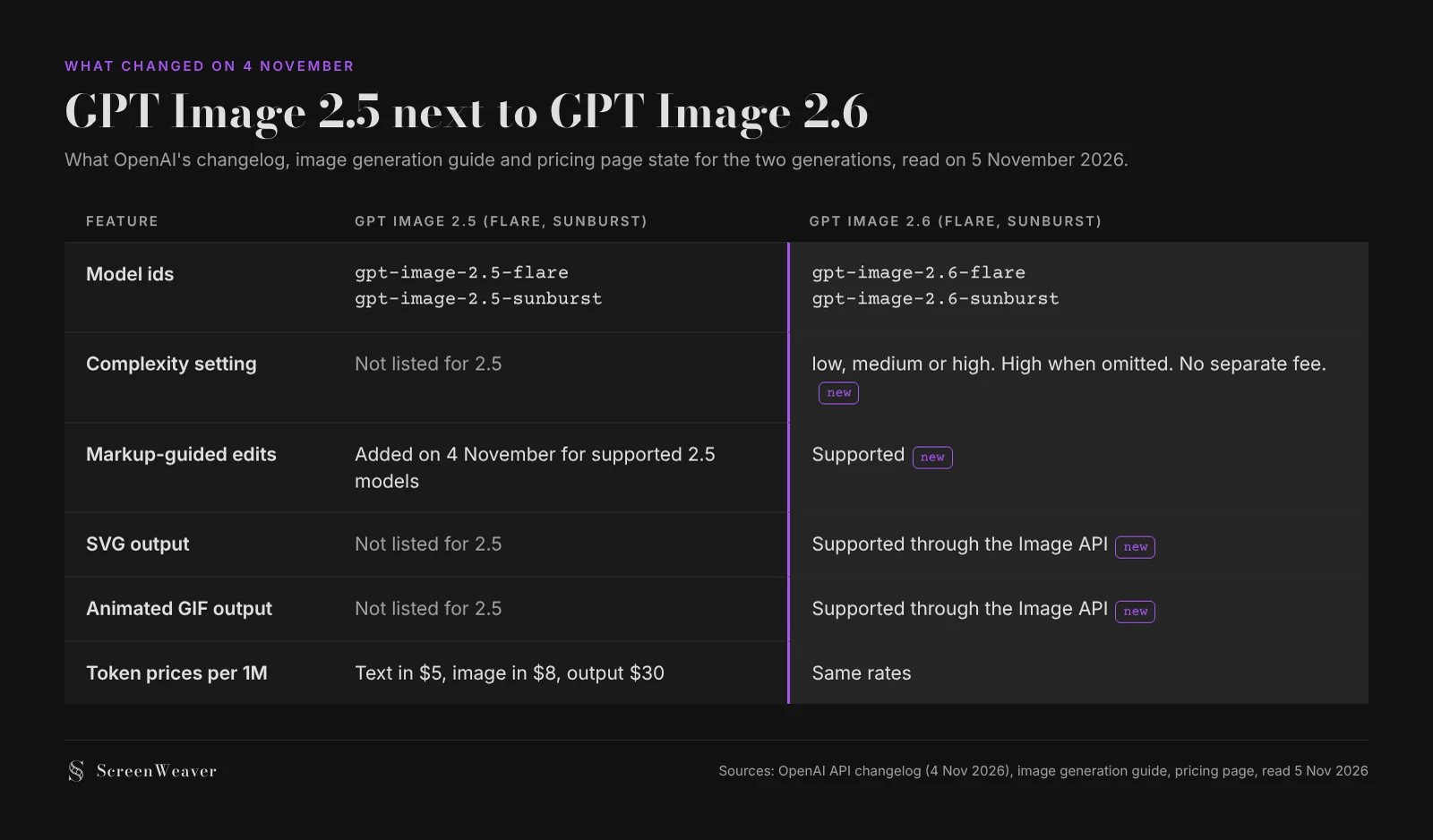
Same split as GPT Image 2.5, which also came as a Flare and a Sunburst. The changelog entry does not announce a retirement date for 2.5, and we found no deprecation for it in October or November.
The four new features
Complexity: how much the model plans
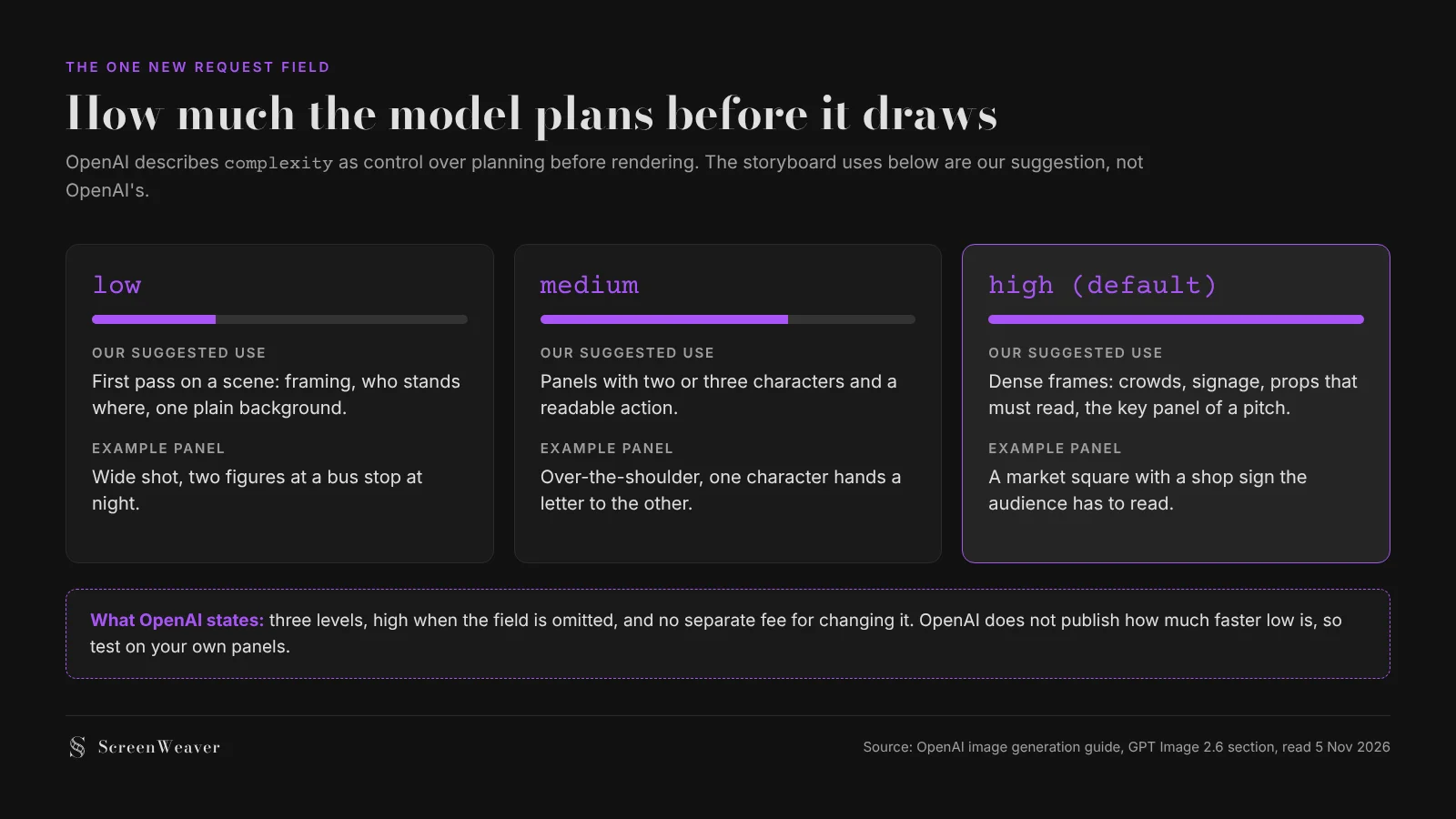
This is the only new request field OpenAI documents in detail. The guide says complexity controls how much the model plans before rendering, with three levels: low, medium and high. If you leave it out, both models use high. Changing it has no separate fee.
That last point matters more than it looks. A storyboard for a short film easily runs to 60 or 100 panels, and most of them are simple: two people, one place, a clear action. Spending maximum planning on a wide shot of an empty corridor makes little sense. OpenAI does not say how much faster low is, and it does not say how output quality changes, so treat the levels as something to test on a handful of your own panels before a full batch.
Markup-guided edits
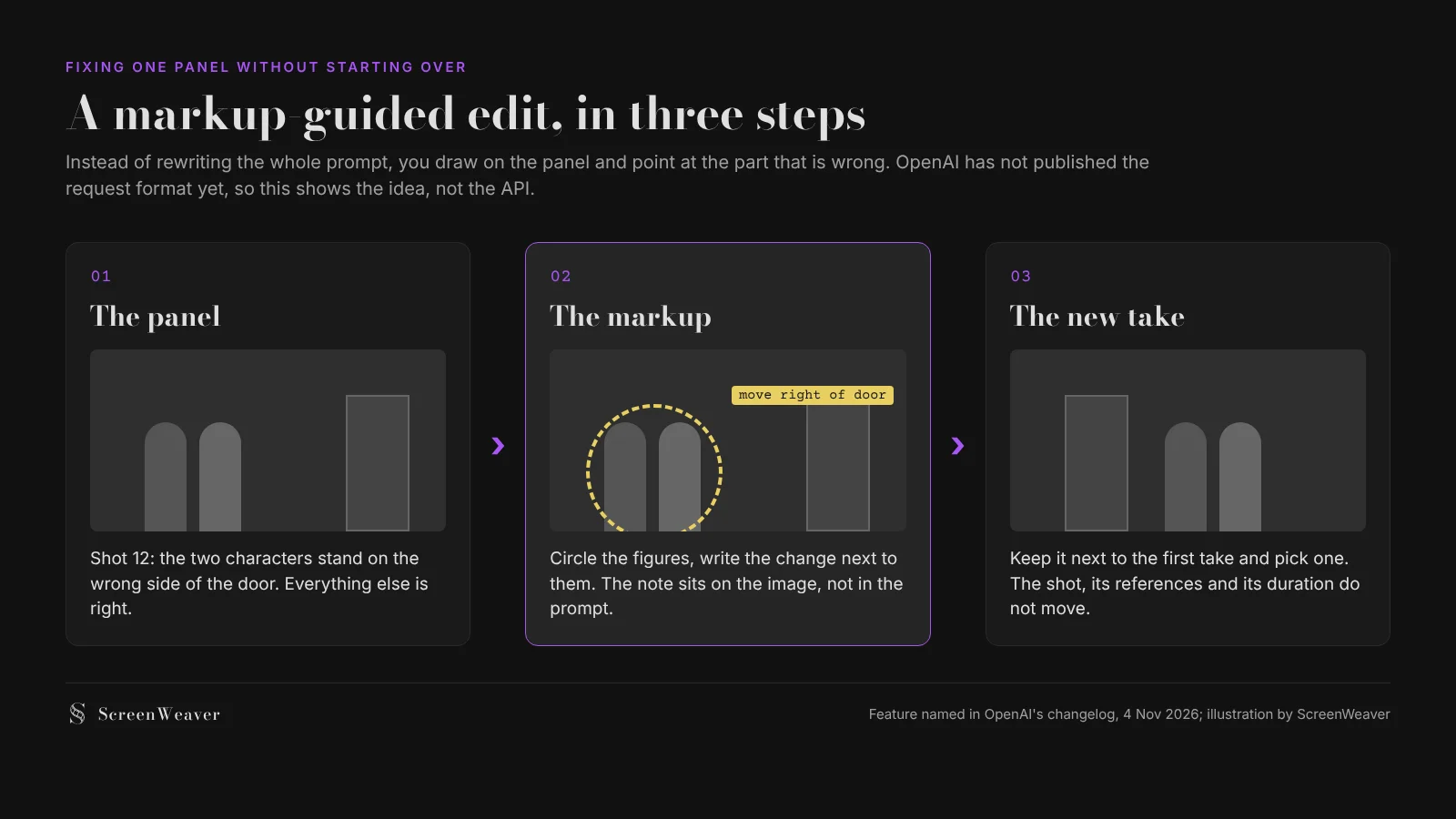
The changelog adds "markup-guided editing" for supported GPT Image 2.5 and 2.6 models. The idea is that you mark up the image itself to show the model what to change, instead of describing the problem in words. The docs we read name the feature but do not publish the request format, the parameters or examples yet.
For storyboards this is the feature with the most potential. The classic headache with AI panels is the one wrong detail: the right characters, the right light, but the actor stands on the wrong side of the door. Rewriting the prompt to fix that often breaks something else. Pointing at the problem is how a director gives notes to a storyboard artist, and it is a better fit for that last 10 percent of a panel. We will know how well it works once the format is documented and we can test it.
Animated GIF output
Both models can return an animated GIF through the Image API. OpenAI's pages do not state the frame count, the frame duration or a size limit. Opper, a third-party gateway that lists the models, describes "a chosen frame count and frame duration" and calls it suited to short looping animations, but we could not confirm those details on OpenAI's side.
A GIF from an image model is not a video model and it will not replace one for a finished shot. Where it could help is in pitching: a looping panel that shows a camera push or a flag in the wind gives a producer a feel for motion before anyone pays for video seconds. Our piece on previs, storyboard and animatic explains where that kind of moving panel sits in the pipeline.
SVG output
The guide lists SVG output for both models, with no further detail. A vector file scales without blur, which suits logos, title cards, simple diagrams and floor plans of a set more than photographic panels.
Try it free
Try ScreenWeaver for free on your script
It is free. Import your existing project, get a clearer view of your outline, and regain control of your story structure in minutes.
Start FreeWhat it costs
On OpenAI's pricing page, both 2.6 models are billed per million tokens, at the same rates as GPT Image 2.5:
| Token type | Price per 1M tokens | Cached |
|---|---|---|
| Text input | $5.00 | $1.25 |
| Image input | $8.00 | $2.00 |
| Image output | $30.00 | n/a |
OpenAI does not give a price per image on that page. Opper lists per-image prices starting at $0.0198, and says that at low and medium quality 2.6 uses more output tokens per image than 2.5, which would make each image a little more expensive at the same rate. OpenAI does not confirm that, so we would wait for real invoices before planning a budget around it. Our guide to AI video credits and budget planning shows how to price a project shot by shot once the numbers settle.
What this means if you storyboard with ScreenWeaver
ScreenWeaver's image node offers GPT Image 2.5 Sunburst as its default model, with GPT Image 2.5 Flare, Nano Banana 2, Seedream 5.0 Pro and Grok Imagine Image in the same list. GPT Image 2.6 is not in that list today, and we will not promise a date here.
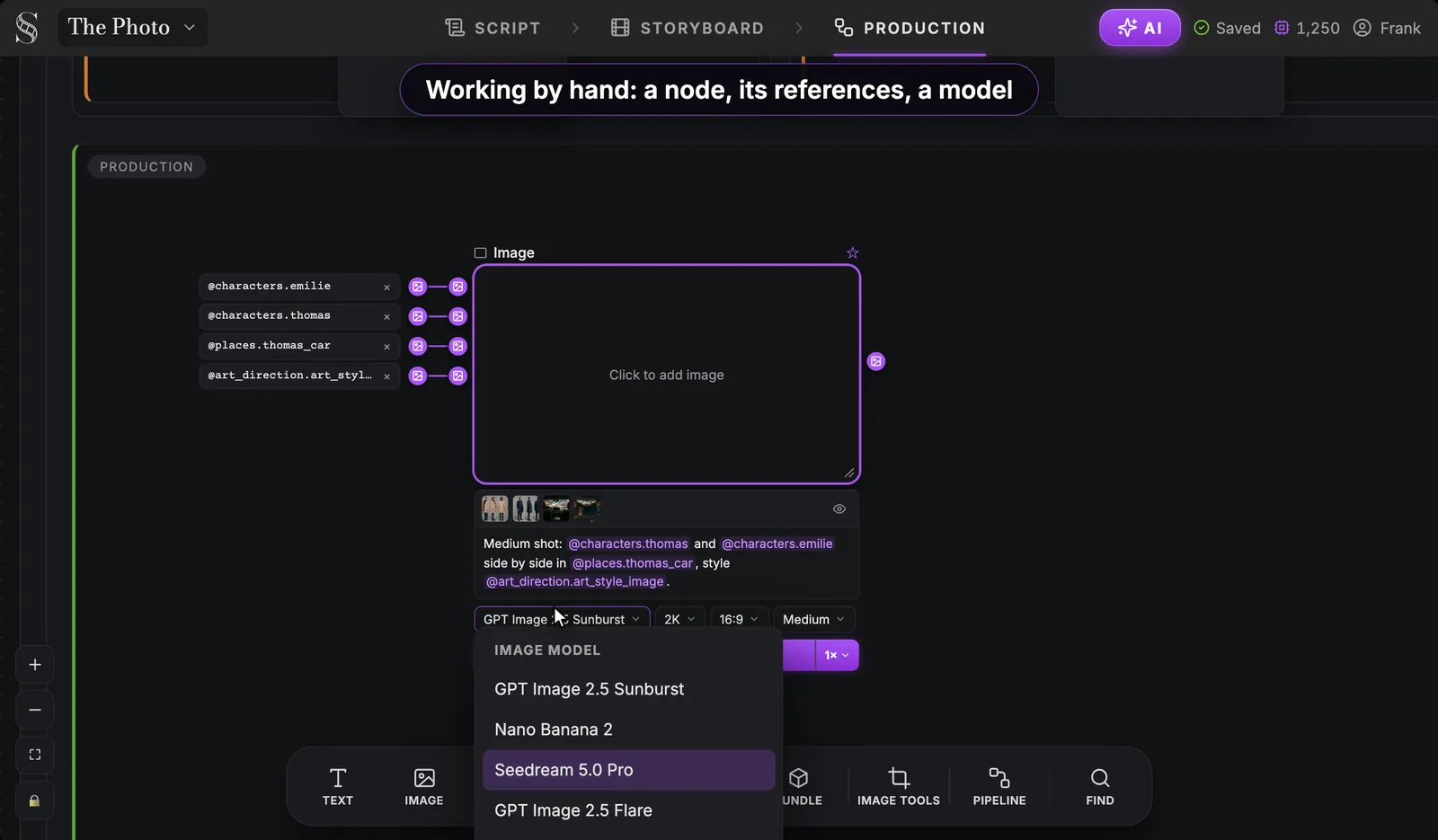
What carries over is the habit that protects any project from model churn. Your script, your shots and your story elements stay the same whichever model draws the panel, because each shot cites its characters and places as references rather than describing them from scratch. When a new model arrives, you rerun a few panels, compare the takes side by side and keep what works. Our node canvas walkthrough shows that loop, and our guide to character consistency in AI storyboards covers why references matter more than the model name.
A quick checklist before you switch models
- Pick five panels that represent the film: one wide, one close-up, one with text in frame, one with three or more characters, one night scene.
- Render them on your current model and keep the results.
- Render the same five on Flare and on Sunburst, with
complexityatlowand athigh. - Compare faces, costumes and props across panels, not just the prettiest single frame.
- Log the real cost of each run, with the date, because token counts per image can differ between versions.
- Only then move the whole storyboard.
FAQ
When was GPT Image 2.6 released? On 4 November 2026, according to OpenAI's API changelog. The entry announces GPT Image 2.6 Sunburst and GPT Image 2.6 Flare for image generation and editing.
What is the difference between Flare and Sunburst? OpenAI positions Flare for fast iteration in interactive generation and editing, and Sunburst for detailed compositions and editing work. Both support the same new features.
What does the complexity setting do? It controls how much the model plans before rendering. The levels are low, medium and high, the default is high, and OpenAI says changing it has no separate fee.
Is GPT Image 2.6 more expensive than GPT Image 2.5? The per-token rates on OpenAI's pricing page are the same: $5 per million text input tokens, $8 per million image input tokens and $30 per million output tokens. A third-party gateway says 2.6 uses more output tokens per image at low and medium quality, which OpenAI has not confirmed.
Can GPT Image 2.6 make videos? No. It outputs images, including animated GIFs and SVG files. For moving shots you still need a video model.
Is GPT Image 2.6 available in ScreenWeaver? Not today. ScreenWeaver offers GPT Image 2.5 Sunburst, which is the default, and GPT Image 2.5 Flare, alongside Nano Banana 2, Seedream 5.0 Pro and Grok Imagine Image.
From script to shots
Turn your script into a film, shot by shot
Write the scene, get its storyboard, then generate each shot with consistent characters. You direct every step.
Start your film free