
Google released Gemini Omni 1.2 Flash on 5 November 2026. The video model now generates clips of up to 15 seconds, up from 10, lets you edit a clip over several conversational turns, follows character and style references more closely, and costs 30% less than Omni 1.1, at $0.07 per second of 720p video.
The source is Google's own launch post, signed by Anish Nangia, a product manager at Google DeepMind, and dated 5 November. We read it on 6 November. The Verge covered the release the same day. We have not generated with the model ourselves, so everything below about quality is Google's claim, not our test.
What Google released
Gemini Omni 1.2 Flash is generally available on the Gemini API and Google Cloud, and Google says it is rolling out across its own apps: Flow, Google Vids, the Gemini app for AI Ultra subscribers, and Google Ads. Google's post says this is the first time Gemini Omni is generally available, and that every output carries an invisible SynthID watermark.
The changes Google lists:
- Length. Native clips up to 15 seconds, where Omni 1.1 stopped at 10. You can set the duration in one-second steps from 3 to 15 seconds.
- References. You can guide a generation with character, product or style images, short motion clips of up to three seconds, and audio cues. Google says faces, costumes, packaging text and brand colors now hold across camera angles.
- Multi-turn edits. You can change a background, the light, the weather or the aspect ratio in a follow-up prompt instead of regenerating the clip, and this works on the full 15 seconds.
- Dialogue. More natural dialogue, clearer lip-sync and separate conditioning for several speakers in one scene.
- Camera. Long continuous moves, such as FPV flythroughs, crash zoom-outs and orbits, with fewer unwanted jump cuts, according to Google.
- Price. $0.07 per second for 720p, which Google describes as 30% below Omni 1.1.
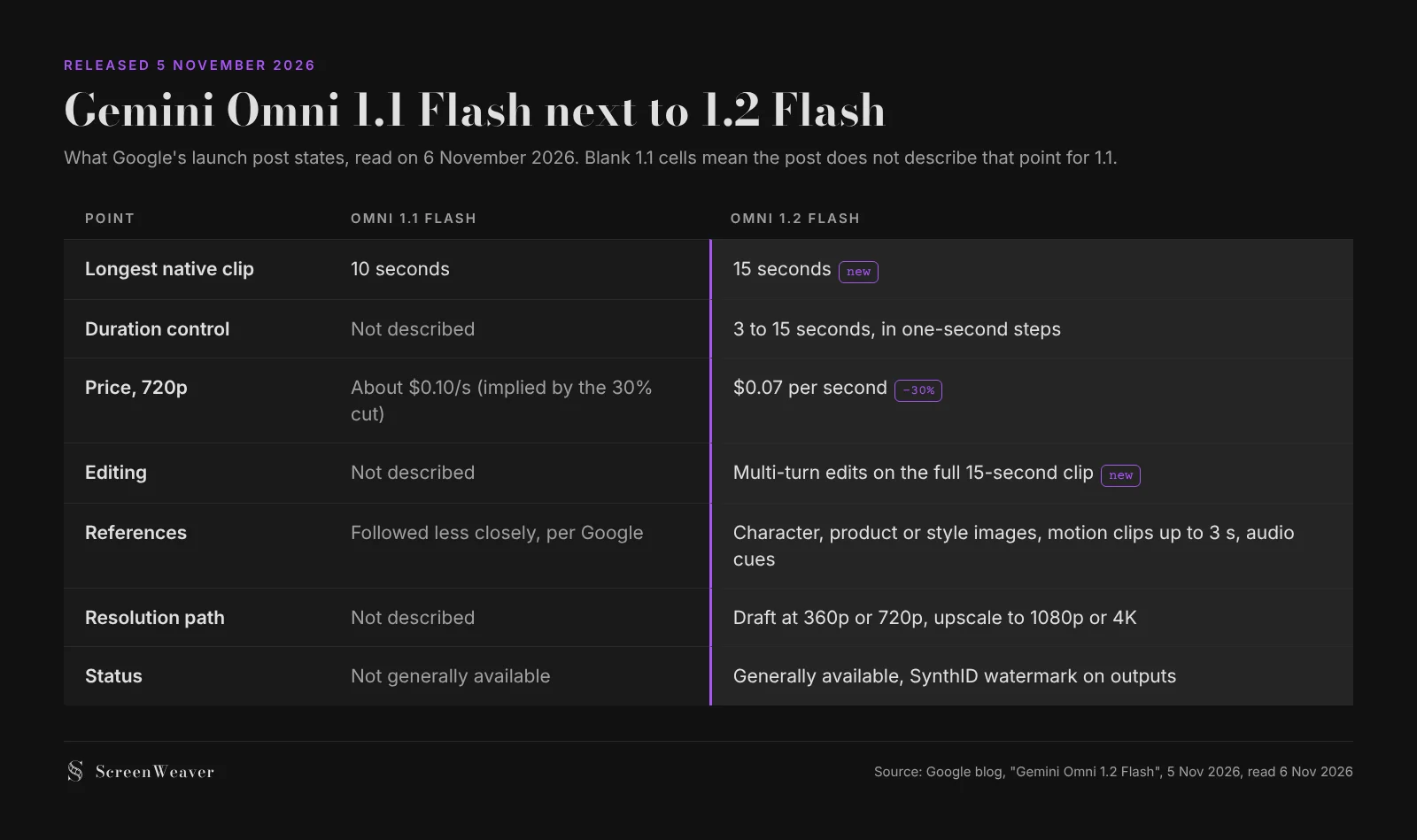
Google is also open about the limits. The post says work is still going on for fast sports action, rapid script changes and complex physics. That is a useful line to keep in mind before you put a fight scene through it.
Why 15 seconds matters on a film
Most shots in a narrative film are shorter than 10 seconds, so the extra five seconds will not change how you cut a dialogue scene. Where it changes things is the shot that has to stay unbroken.
A walk-and-talk, a slow push from a doorway to a face, an establishing move that starts on a street and ends at a window: at 10 seconds these often had to be generated in two pieces and stitched, which is exactly where faces drift and props change. Google's own examples point at this. One shows a continuous FPV flight across a piazza, through bronze doors and up into the Pantheon's dome with no cut. Another connects an exterior first frame and an interior last frame in one camera push, and Google admits the 1.1 version changed small details along the way, such as a soup ladle turning into chopsticks.
The second change that matters for filmmakers is the multi-turn edit. Fixing one detail of a shot by regenerating it costs a full generation and often breaks something that was right. If a follow-up prompt can swap the weather or the background while keeping the performance and the framing, as Google's knight example shows, notes on a shot start to look like notes to a crew. We will believe it once we see it hold on our own scenes; our guide to character drift in AI video explains what to look for.
What it costs per shot
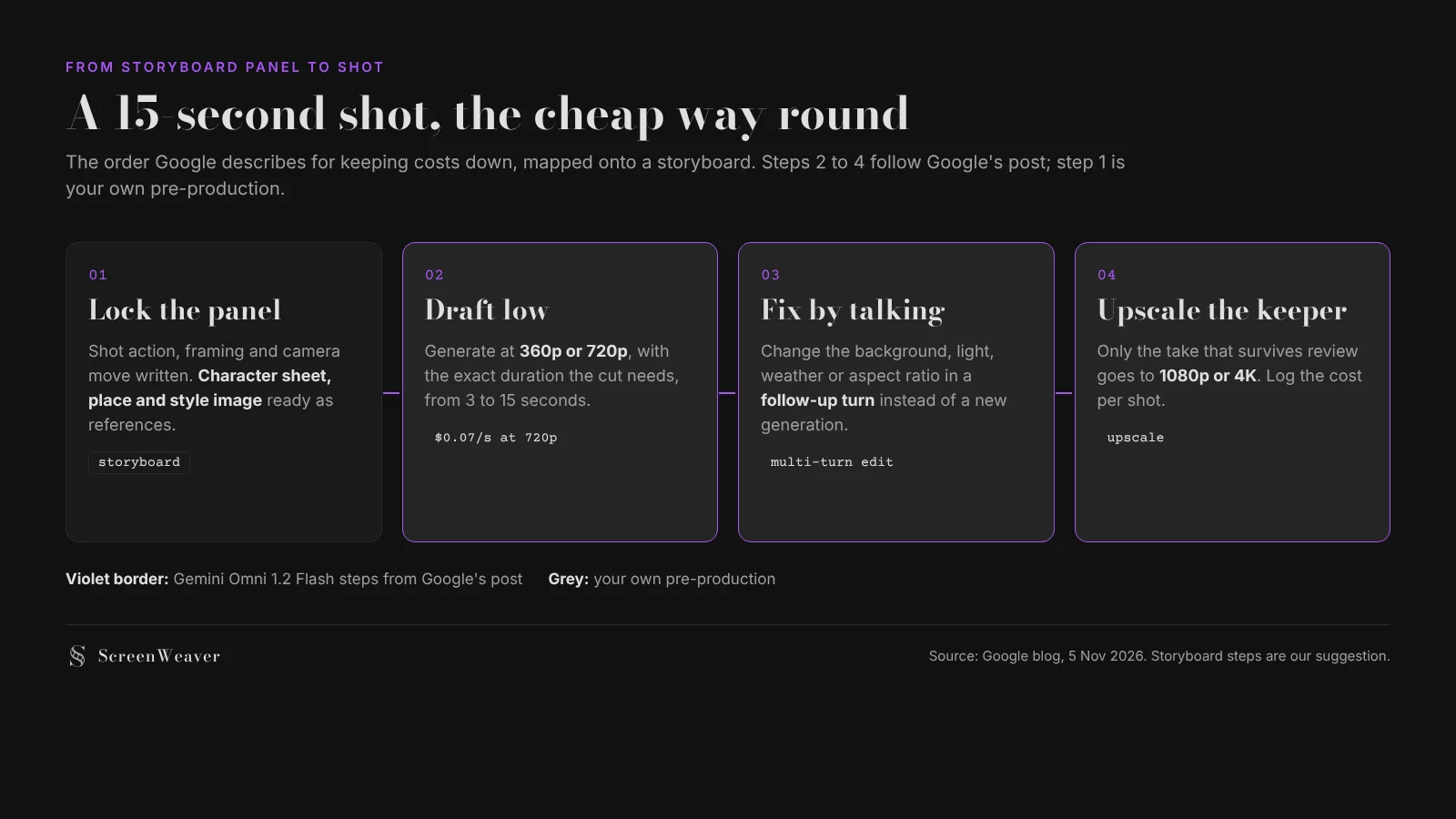
Google publishes one rate in the post: $0.07 per second for 720p. Google also recommends drafting at 360p or 720p, fixing details with follow-up edits and upscaling only the best take to 1080p or 4K. The post does not give the 360p, upscale or edit prices, so the numbers below cover 720p generation only.
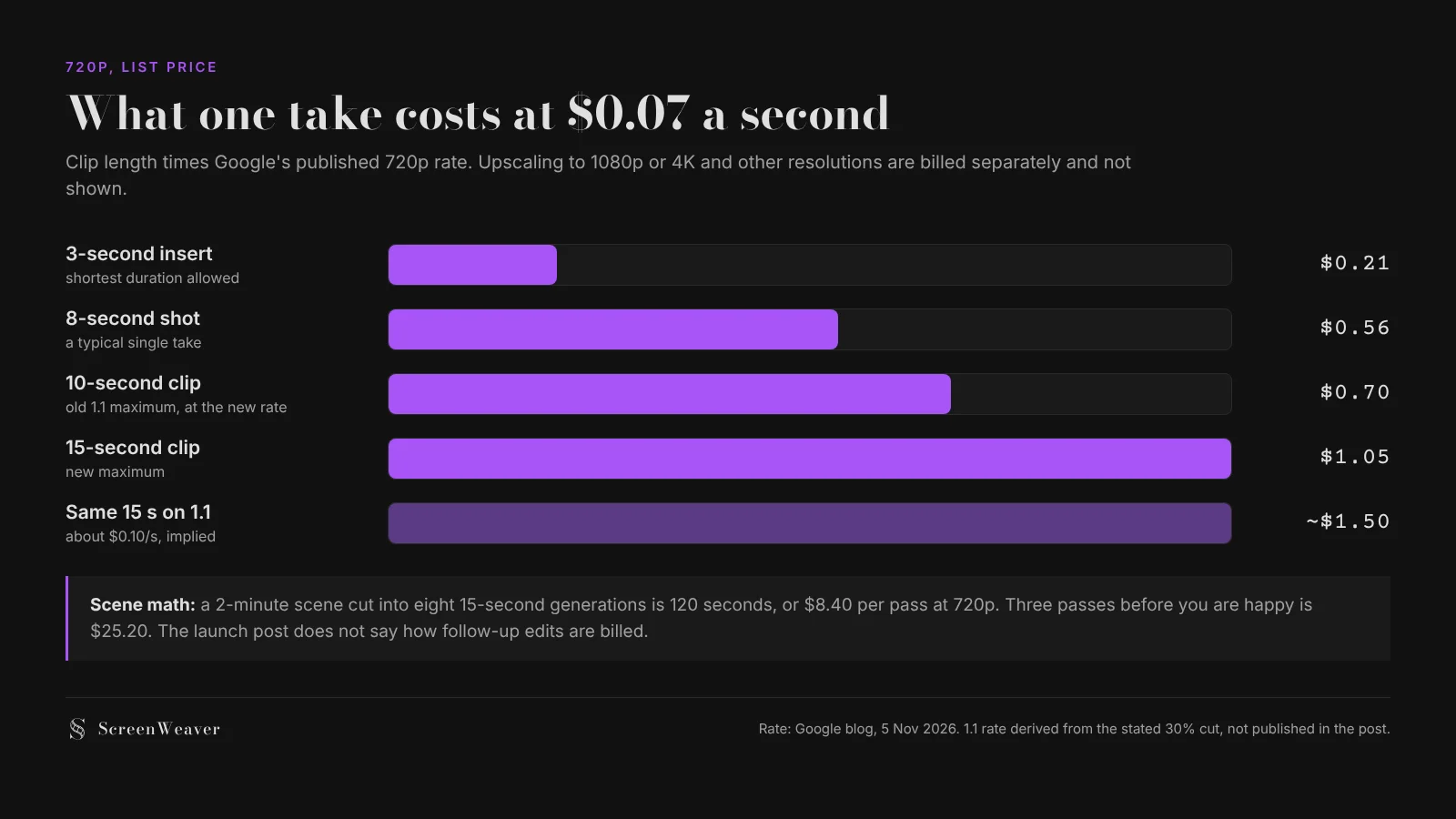
A two-minute scene cut into eight 15-second generations is $8.40 per pass at that rate. If you need three passes before the scene works, that is about $25. Our AI video model pricing comparison puts that rate next to the other models, and our guide to AI video credits and budget planning shows how to plan a project shot by shot.
Try it free
Try ScreenWeaver for free on your script
It is free. Import your existing project, get a clearer view of your outline, and regain control of your story structure in minutes.
Start FreeWhat this means if you work in ScreenWeaver
Gemini Omni 1.2 Flash is not in ScreenWeaver's video model list today, and we will not promise a date here. The video node currently offers Seedance 2.5 as its default, alongside Seedance 2.0, Veo 3.1, Wan 3.0, MiniMax H3, Kling 3.0 and Grok Imagine Video 1.5. Several of those already go past 10 seconds: Seedance 2.5 and Wan 3.0 accept clips of up to 30 seconds, MiniMax H3 and Seedance 2.0 up to 15. Veo 3.1, Google's other video model in the list, stops at 8 seconds.
What carries over is the part that does not depend on the model. A long unbroken shot only holds together if the references are clean: one character sheet per person, one image for the place, one style image for the film. In ScreenWeaver those live as story elements that every shot cites, so you can try a new model on a few shots without rewriting anything. Our storyboard-first workflow walks through that order, and the node canvas walkthrough shows how a shot pulls its references in.
Checklist before you try it on a real scene
- Pick three shots that need to stay unbroken: a walk-and-talk, a slow push-in, a move between two locations.
- Prepare the references first: character sheets, place image, style image. Keep them identical across all three tests.
- Set the duration to what the cut needs, not to 15 seconds by default. Every second is billed.
- Draft at 720p or lower, then try one follow-up edit per shot and note whether faces and props survive it.
- Check the last three seconds of each clip against the first three: that is where drift shows.
- Log the real cost of every run with the date, including upscales.
- Only then decide whether a whole sequence moves to the new model.
FAQ
When was Gemini Omni 1.2 Flash released? On 5 November 2026, according to Google's blog. It is generally available on the Gemini API and Google Cloud and is rolling out in Flow, Google Vids, the Gemini app for AI Ultra subscribers and Google Ads.
How long can a Gemini Omni 1.2 Flash clip be? Up to 15 seconds natively, up from 10 seconds with Omni 1.1. You choose the duration in one-second steps from 3 to 15 seconds.
How much does Gemini Omni 1.2 Flash cost? Google lists $0.07 per second for 720p video, 30% less than Omni 1.1. A 15-second 720p clip is therefore $1.05 at list price. The launch post does not give upscale or edit prices.
Can I edit a clip without regenerating it? Google says yes: multi-turn conversational editing lets you change the background, lighting, weather or aspect ratio of a full 15-second clip in follow-up prompts. We have not tested how well the rest of the shot holds.
Does it generate dialogue and sound? Google says the model produces more natural dialogue, clearer lip-sync and distinct voices for several speakers, and it accepts audio cues as references. The post shows a 15-second animated scene with four voiced characters.
Is Gemini Omni 1.2 Flash available in ScreenWeaver? Not today. ScreenWeaver's video node offers Seedance 2.5 by default, plus Seedance 2.0, Veo 3.1, Wan 3.0, MiniMax H3, Kling 3.0 and Grok Imagine Video 1.5.
From script to shots
Turn your script into a film, shot by shot
Write the scene, get its storyboard, then generate each shot with consistent characters. You direct every step.
Start your film free