
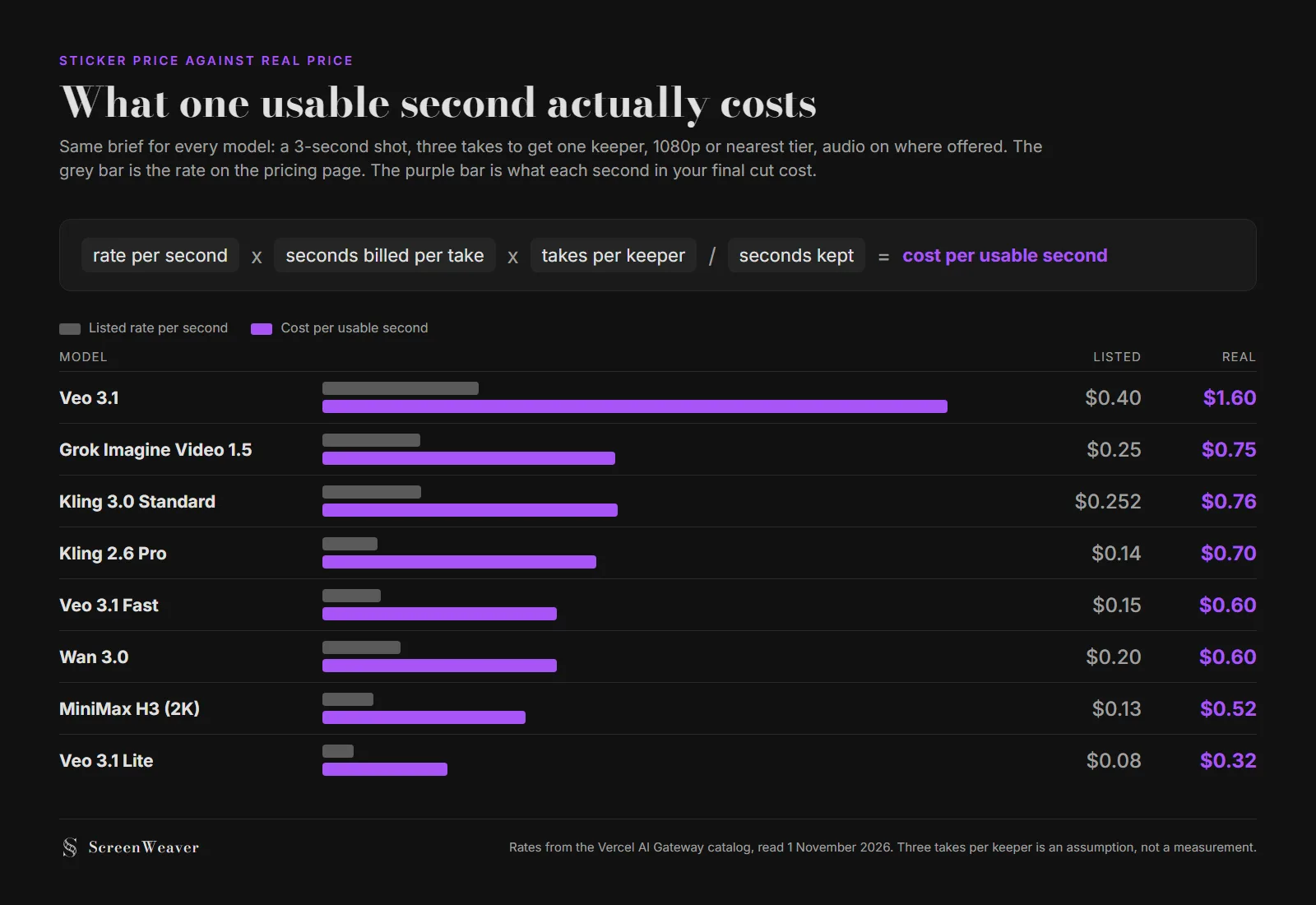
AI video pricing pages quote a rate per generated second. Your film is made of kept seconds. On a 3-second shot with three takes per keeper, Veo 3.1 costs $1.60 per usable second against a listed $0.40, and Veo 3.1 Lite costs $0.32. The gap comes from billing floors and rerolls, and you can work it out before the first take.
This sits in the cost corner of our AI filmmaking guide. Every rate comes from the public catalog of the Vercel AI Gateway, read on 1 November 2026. It lists the per-second price, the allowed durations and the resolutions of each model in one place, which makes it a fair yardstick. Direct provider prices and subscription apps can differ, and they change often.
The formula: four numbers, not one
Most AI video price comparisons stop at the first number. You need all four:
Cost per usable second = rate per second x seconds billed per take x takes per keeper / seconds kept
- Rate per second. The number on the pricing page, for the resolution and audio setting you actually use.
- Seconds billed per take. Not the length of your shot. The shortest duration the model is allowed to generate that covers it. Veo only generates 4, 6 or 8 seconds. Kling 2.6 only generates 5 or 10.
- Takes per keeper. How many generations you burn before one goes in the cut. Lost Garden's second episode averaged about 2.4 generations per kept shot, according to the director's production notes. Our calculator uses 1.5, 3 and 5 as clean, typical and perfectionist profiles.
- Seconds kept. What survives the trim.
Only the first one is printed on the pricing page. You have to supply the other three yourself.
Eight models, one brief
Same brief for every row: a 3-second shot, three takes to land one, 1080p or the nearest tier the model offers, audio on where the model generates it. Seedance 2.5 and 2.0 are left out of the math because the Gateway bills them per million tokens (Seedance 2.5: $10.70 to $11.70 per million at 480p to 1080p), and a per-second figure would be my guess, not theirs.
| Model | Listed rate (setting) | Allowed durations | Billed for a 3 s shot | Cost per take | Cost per usable second |
|---|---|---|---|---|---|
| Veo 3.1 | $0.40/s (1080p, audio) | 4, 6, 8 s | 4 s | $1.60 | $1.60 |
| Kling 3.0 Standard | $0.252/s (audio) | 3 to 15 s | 3 s | $0.76 | $0.76 |
| Grok Imagine Video 1.5 | $0.25/s (1080p) | 1 to 15 s | 3 s | $0.75 | $0.75 |
| Kling 2.6 Pro | $0.14/s (audio) | 5 or 10 s | 5 s | $0.70 | $0.70 |
| Veo 3.1 Fast | $0.15/s (1080p, audio) | 4, 6, 8 s | 4 s | $0.60 | $0.60 |
| Wan 3.0 | $0.20/s (1080p) | 2 to 30 s | 3 s | $0.60 | $0.60 |
| MiniMax H3 | $0.13/s (2K) | 4 to 15 s | 4 s | $0.52 | $0.52 |
| Veo 3.1 Lite | $0.08/s (1080p, audio) | 4, 6, 8 s | 4 s | $0.32 | $0.32 |
With three takes for one 3-second keeper, cost per usable second equals cost per take: you pay for three takes and keep three seconds. Change either number and the last column moves with it.
Kling 2.6 Pro has the third-lowest sticker in the table and lands in the middle once billed. Veo 3.1 at full quality costs five times Veo 3.1 Lite per usable second, which is a fair price for a hero shot and a terrible price for a draft.
The billing floor nobody puts in the headline
A model that only generates in fixed lengths charges you for the gap between your shot and its next allowed duration. Call it the billing floor.
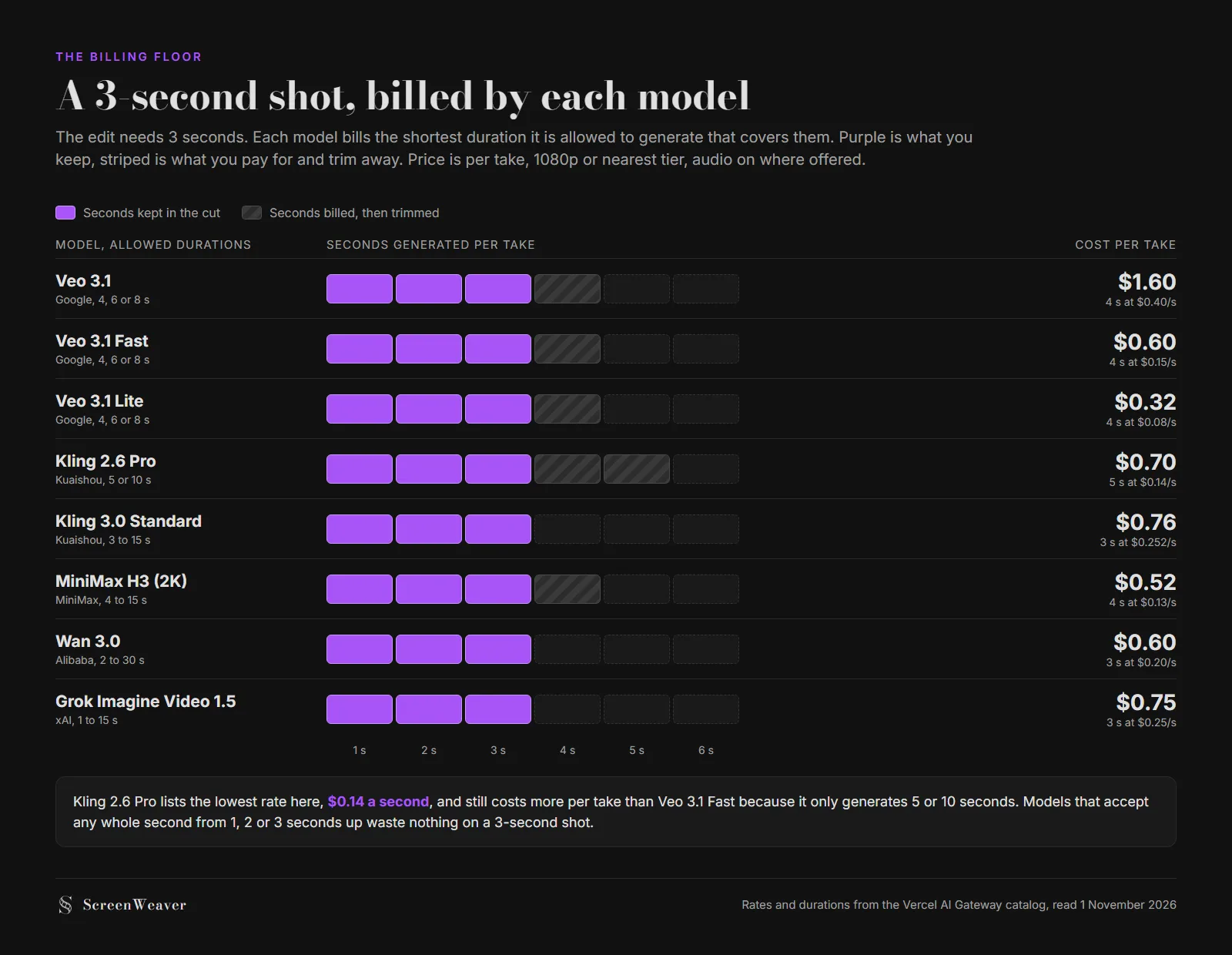
Short shots get hit hardest. Most cuts in a dialogue scene or a trailer run 2 to 4 seconds, and that is exactly where a 4-second or 5-second minimum bites:
- A 2-second insert on Veo is billed 4 seconds. You pay double before the first reroll.
- The same insert on Kling 2.6 is billed 5 seconds. Two and a half times.
- On Grok Imagine Video 1.5, which accepts any whole second from 1 to 15, it is billed 2.
Long shots have the opposite problem. Veo's ceiling is 8 seconds, so a 12-second oner becomes two generations and a continuity problem at the join. Wan 3.0 and Seedance 2.5 go to 30 seconds in one take. The floor and the ceiling both belong in the comparison, and pricing pages rarely show either next to the rate.
The fix costs nothing: before you pick a model for a scene, list its shot durations. If most shots are under 4 seconds, a model with fine-grained durations beats a cheaper rate with a coarse grid. Our AI video model picker filters by maximum clip length if you want a shortlist first.
Audio is half the bill on some models
The Gateway prices several models with and without generated sound, and the gap is large:
| Model | Without audio | With audio | Difference |
|---|---|---|---|
| Veo 3.1, 1080p | $0.20/s | $0.40/s | x2 |
| Veo 3.1, 4K | $0.40/s | $0.60/s | x1.5 |
| Veo 3.1 Fast, 1080p | $0.10/s | $0.15/s | x1.5 |
| Veo 3.1 Lite, 1080p | $0.05/s | $0.08/s | x1.6 |
| Kling 3.0 Standard | $0.168/s | $0.252/s | x1.5 |
| Kling 2.6 Pro | $0.07/s | $0.14/s | x2 |
If the sound will be replaced in the edit by a music track, a recorded voice or a Foley pass, generating it is money spent on something you will mute. Our music video model comparison makes the same call for clips cut to a song. Keep audio on for shots where lip movement and the line need to match, and turn it off everywhere else.
Try it free
Try ScreenWeaver for free on your script
It is free. Import your existing project, get a clearer view of your outline, and regain control of your story structure in minutes.
Start FreeDraft on the cheap tier, render once
The biggest lever in the formula is takes per keeper, and you can split those takes across tiers. Drafts answer framing, motion and prompt wording. Only the last take has to be good enough for the cut.
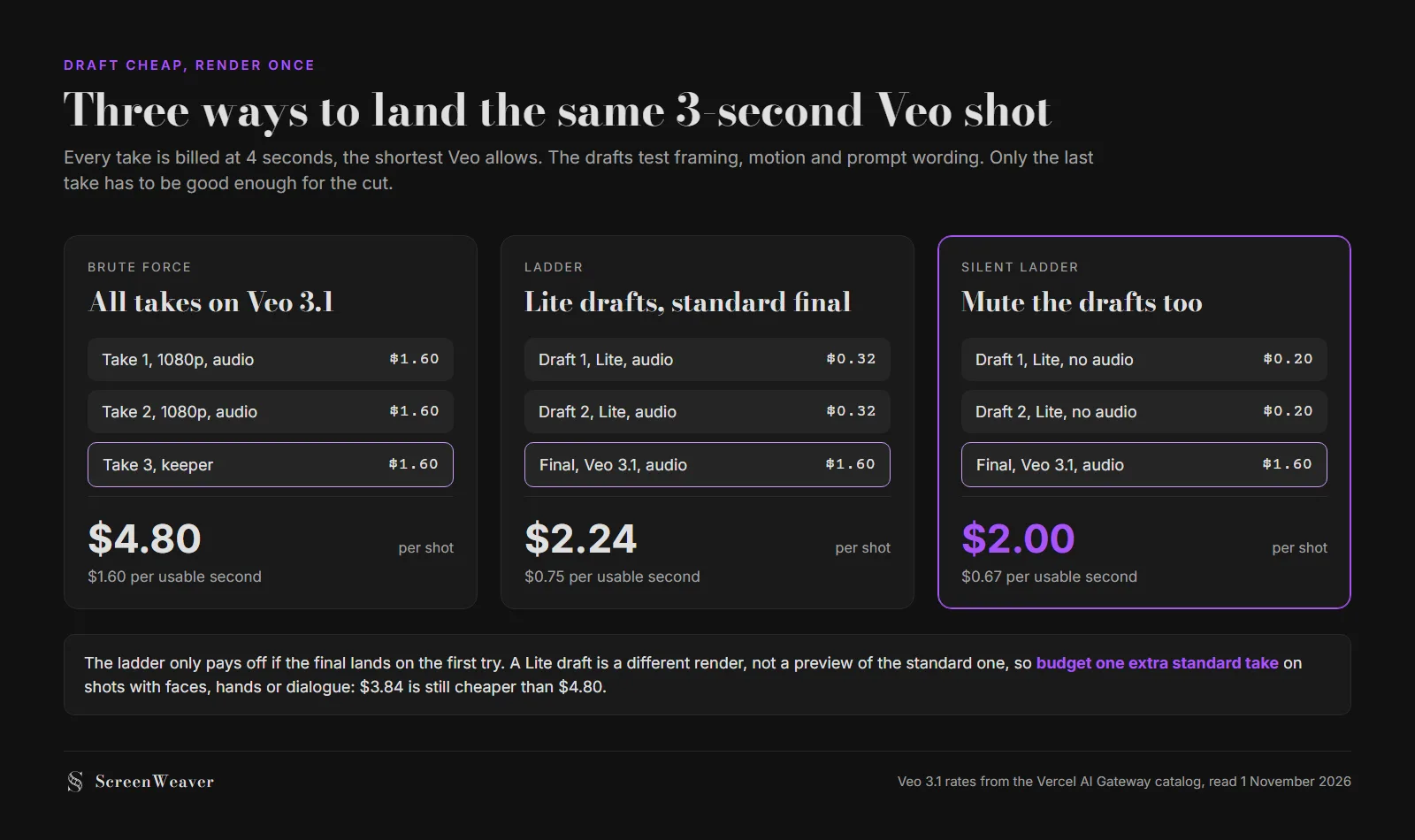
A Lite draft is a different render, not a preview of the standard one, so the final can still miss. Budget one extra standard take on shots with faces, hands or dialogue. Two silent Lite drafts plus two standard takes come to $3.84, still under the $4.80 of brute force.
The same logic works across models: rough out motion on Wan 3.0 at 480p ($0.05 a second on the Gateway), then move the locked prompt and reference image to the model you want for the final.
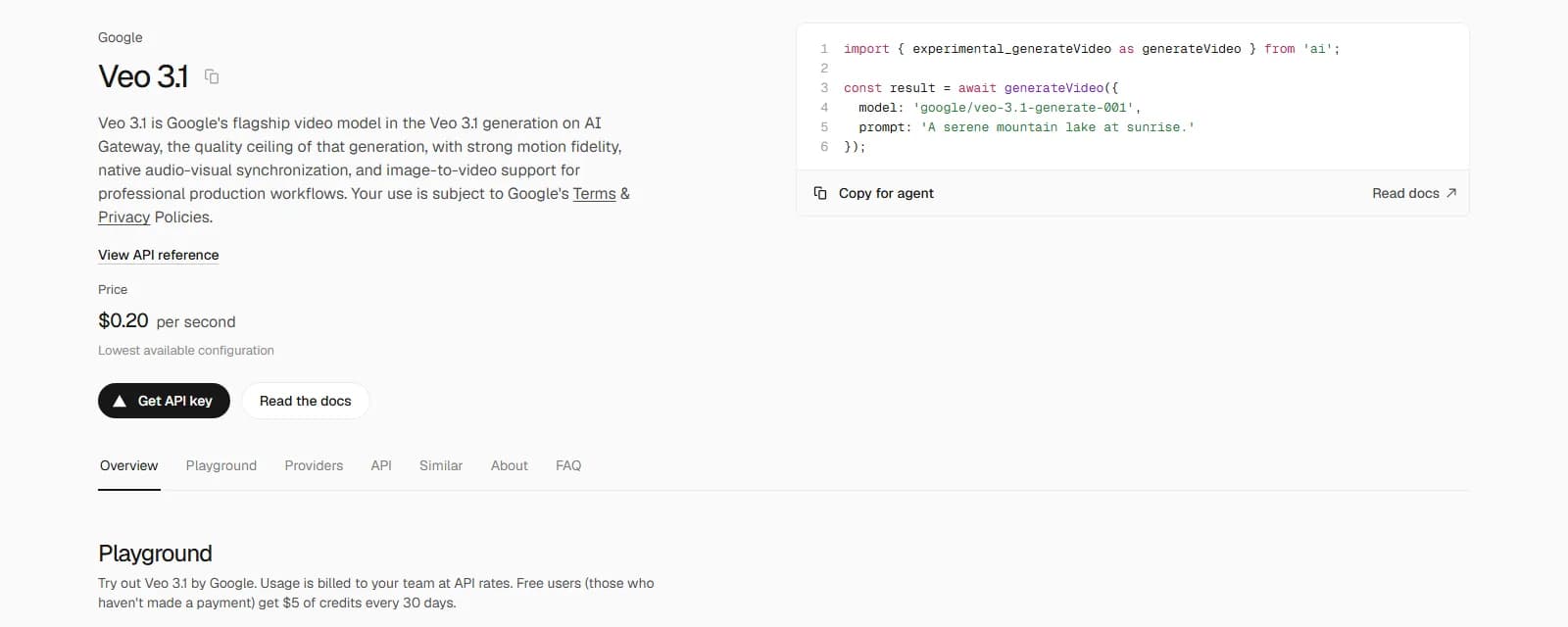
Look at the label under the price on that page: "lowest available configuration". The $0.20 headline is Veo 3.1 without sound. The configuration most filmmakers actually run, 1080p with audio, is $0.40.
A real number to check yours against
One production has published its totals, so you can check your plan against it. Episode 2 of Lost Garden, a 21-minute anime episode made by one person, cost $1,852 and 75 hours, as broken down in our AI film production cost budget. That is 1,260 finished seconds, so about $1.47 per finished second, all costs in, including voices and music.
Set that against the table. A per-usable-second figure of $0.50 to $0.80 for generation alone is consistent with it once you add longer shots, extra takes on hard scenes, voices, music and image generation for references. If your own plan comes out at $0.20 per finished second, your takes-per-keeper number is probably too optimistic. If it comes out at $4, you are rendering drafts on a hero tier.
Where the money actually leaks
The reroll math article covers why takes multiply. These are the leaks that show up specifically in per-second billing:
- Rendering at a duration you will not use. Generating 8 seconds "to have handles" on a shot that will run 3. Handles are useful in live action. In generation they are billed footage.
- Generating audio you will replace. See the table above. On Veo 3.1 at 1080p it doubles the bill.
- Locking the shot list after generating. Every shot cut in the edit was a full set of takes. Cutting it on the storyboard costs nothing.
- Using one model for everything. A coarse-grid model for a scene full of 2-second inserts pays the floor on every cut.
- Forgetting reference inputs. The Gateway bills Seedance at a lower token rate when a video goes in as input, and apps that accept reference clips may charge for their length on top. Read the line before you upload a 30-second reference.
More of these are listed in mistakes that burn AI video credits.
A pre-generation checklist
Run this before the first take of any scene:
- Shot list locked, with a duration in seconds on every shot
- Each shot length checked against the model's allowed durations
- Shots longer than the model's ceiling split on purpose, with the cut point chosen
- Audio off for every shot whose sound will be replaced
- Draft tier chosen (Lite, Fast or a 480p model) and final tier chosen
- Takes-per-keeper budget written down per shot type: inserts, wides, faces, dialogue
- Total estimated with the formula, then compared with $1.47 per finished second as a sanity check
The first item is where a storyboard pays for itself. In ScreenWeaver the shot breakdown comes out of the screenplay and every shot carries its own framing, movement and duration before anything is sent to a video model, so the duration column already exists when you start choosing models. You can run the same numbers for a whole film in the AI video cost calculator, which applies the retry profiles mentioned above.
FAQ
What is the cheapest AI video model per second right now? On the Vercel AI Gateway catalog read on 1 November 2026, the cheapest 1080p option with audio among the models compared here is Veo 3.1 Lite at $0.08 a second. Lower rates exist at lower resolutions, such as Wan 3.0 at 480p for $0.05 a second or Grok Imagine Video 1.5 Lite at 480p for $0.02. Cheapest per listed second is not always cheapest per usable second, because of billing floors.
Why does a 3-second clip cost more than 3 seconds of credits? Many models only generate fixed lengths. Veo generates 4, 6 or 8 seconds, Kling 2.6 generates 5 or 10, MiniMax H3 starts at 4. A 3-second shot is billed at the next allowed length and you trim the rest.
Is it cheaper to turn off audio generation? Yes, on every model the Gateway prices both ways. Veo 3.1 at 1080p drops from $0.40 to $0.20 a second, and Kling 2.6 Pro from $0.14 to $0.07. Keep audio only for shots where the generated sound will stay in the film.
How many takes should I budget per shot? Lost Garden's episode 2 averaged about 2.4 generations per kept shot. Our cost calculator uses 1.5 for clean shots, 3 as typical and 5 for perfectionist work. Budget more for faces, hands and dialogue, fewer for wides and inserts.
Why are Seedance prices missing from the table? The Gateway bills Seedance 2.0 and 2.5 per million tokens, with a lower rate when a video is part of the input, not per second. Converting that to seconds would mean guessing the token count of each clip, so the table leaves it out instead of inventing a number.
Do these prices apply inside apps like ScreenWeaver or Higgsfield? No. These are API rates on the Vercel AI Gateway. Apps sell credits on their own price list, and subscription plans have their own maths. The formula still works: replace the rate per second with what the app charges per second at your settings.
See for yourself
Try the editor on your own script
Import your script or start a new one. Writing, PDF and Final Draft export are free.
Start writing free