
Seedance 2.5 is the best AI video model for most music video shots in 2026. It can take a 30-second slice of your track as a reference, holds the artist on model with up to 30 images, and runs takes long enough for a full verse. For choreography, use Kling 3.0 Motion Control. For one 4K hero close-up, use Veo 3.1.
A music video asks different things of a model than a short film or an ad. The timing is fixed before you start, by a song you did not write. The performer is on screen for three minutes, often in close-up. And the soundtrack already exists, so whatever audio the model generates gets thrown away. This page covers only the model decision. For the whole method, from mapping the song to cutting on the waveform, read how to make an AI music video first.
Every spec below comes from the public Vercel AI Gateway model catalog, read on 31 October 2026, plus the probes ScreenWeaver ran when it put these models on its production canvas. Prices are API list rates in US dollars.
The comparison table
| Model | Hears your track? | Longest take | Bars at 120 BPM | Holds the artist with | Top resolution | Native fps | List price |
|---|---|---|---|---|---|---|---|
| Seedance 2.5 (ByteDance) | Yes, 2 to 30 s of audio | 30 s | 15 | Up to 30 images | 1080p | 24 | $10.70 to $11.70 per million video tokens |
| Seedance 2.0 (ByteDance) | Yes, 2 to 15 s | 15 s | 7 | Up to 9 images | 4K | 24 | $4 to $7.70 per million video tokens |
| Kling 3.0 Motion Control | No, silent output | 30 s, set by your video | 15 | 1 image plus 1 motion video | 1080p | 30 | $0.126 to $0.168 per second |
| Kling 3.0 (Kuaishou) | No | 15 s | 7 | Start frame, or start and end | 4K | 30 | $0.168 to $0.392 per second |
| Veo 3.1 (Google) | No | 8 s | 4 | Up to 3 images | 4K | 24 | $0.20 to $0.60 per second |
| Wan 3.0 (Alibaba) | Yes, 1 to 15 s | 30 s | 15 | Up to 10 images | 1080p | 30 | $0.05 to $0.20 per second |
| MiniMax H3 | Accepts it, output was silent in our probe | 15 s | 7 | Up to 9 images | 2K | 24 | $0.08 to $0.13 per second |
| Grok Imagine Video 1.5 (xAI) | Not sent by ScreenWeaver | 15 s | 7 | Up to 7 images | 1080p | 24 | $0.08 to $0.25 per second |
Three columns decide most music video shots: whether the model can hear the song, how many bars a take holds, and how well it keeps one face across forty cuts.
Can the model hear your song?
Four of the eight models accept an uploaded audio file as a reference: Seedance 2.5, Seedance 2.0, Wan 3.0 and MiniMax H3. The other four only ever see pictures, video and text. Give them a chorus and they have no idea it exists.
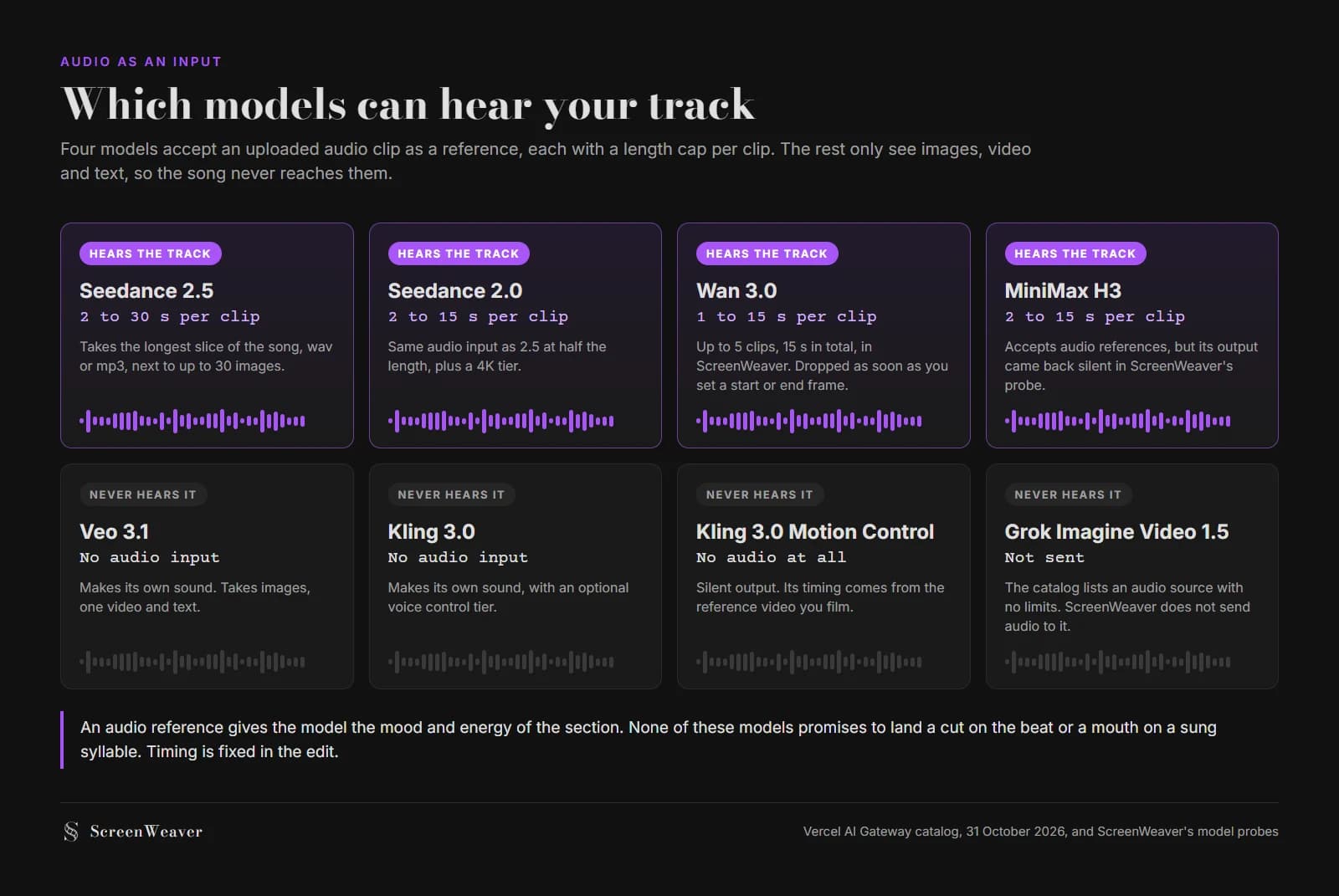
Audio input limits per model, from the Vercel AI Gateway catalog on 31 October 2026 and ScreenWeaver's model probes.
Look at the caps next. Seedance 2.5 takes up to 30 seconds of audio per clip, which covers a full 16-bar verse at 128 BPM. Seedance 2.0 and MiniMax H3 stop at 15 seconds. Wan 3.0 takes clips of 1 to 15 seconds, up to five of them and 15 seconds in total in ScreenWeaver, and drops them the moment you set a start or end frame, because Wan rejects that combination.
MiniMax H3 is the odd case. The catalog says it generates audio and it accepts audio references, but when ScreenWeaver probed it the API ignored the audio switch and the output came back silent. Treat it as a picture model.
An audio reference gives the model the mood and the energy of the section it is illustrating. It does not make the cut land on the snare, and it does not make a generated mouth sing your vocal. Our music video guide says it directly: no general video model lip syncs a real vocal reliably yet. Film the artist singing, keep generated sung shots wide or in profile, or plan a separate lip-sync pass for the few close-ups that need it.
How many bars fit in one take
Music videos are cut in bars, not seconds. In 4/4, one bar lasts 240 divided by the BPM: 2 seconds at 120 BPM, 2.67 at 90, 1.71 at 140. So a model's maximum duration is really a maximum phrase length.
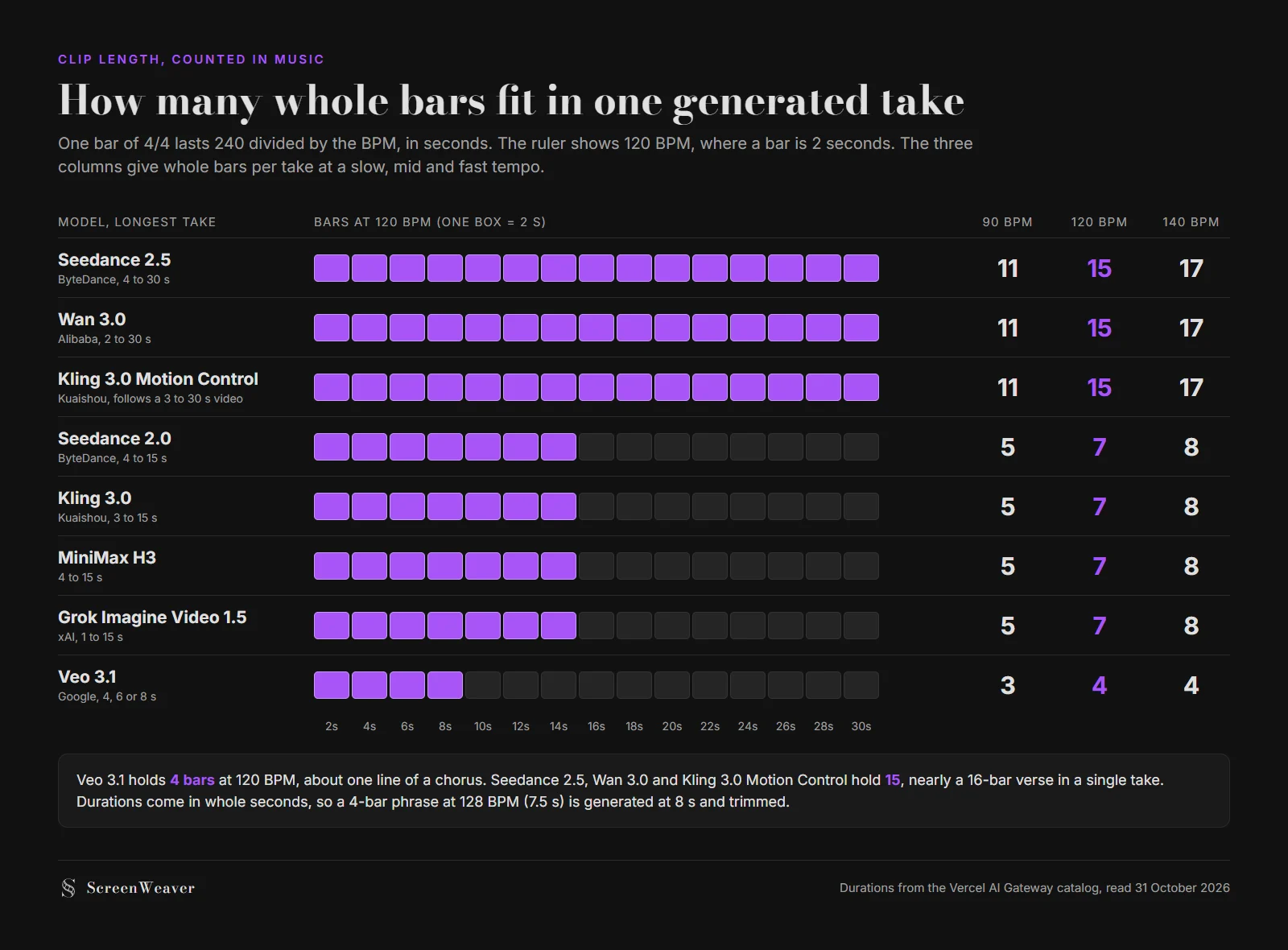
Whole bars per generated take at three tempos, computed from the durations in the Vercel AI Gateway catalog, 31 October 2026.
Veo 3.1 holds 4 bars at 120 BPM. That is one line of a chorus, fine for a fast-cut section and useless for a slow one-take verse. Seedance 2.5, Wan 3.0 and Kling 3.0 Motion Control hold 15, close to a whole 16-bar verse. The 15-second group sits at 7.
Durations come in whole seconds, and Veo only offers 4, 6 or 8. A 4-bar phrase at 128 BPM lasts 7.5 seconds, so you generate 8 and trim half a second. Generate a little long anyway, so you have room to slide the cut onto the beat. Inside ScreenWeaver, Kling 3.0 runs 5 or 10 second clips, not the full 3 to 15 range the API lists.
Holding one face for three minutes
A short film might show its lead in fifteen shots. A music video shows the artist in thirty or forty, under changing light, and every chorus invites a comparison with the last one. A video model only holds what it can see during that generation, so the reference budget decides consistency.
Seedance 2.5 takes 30 images: a full turnaround of the artist, each costume, the dancers, the location. Wan 3.0 takes 10, Seedance 2.0 and MiniMax H3 take 9, Grok Imagine Video 1.5 takes 7. Veo 3.1 stops at 3, which is one person's front, profile and one costume. Kling 3.0 holds a design through its start frame only, since its reference mode is not usable on the gateway (ScreenWeaver's probe confirmed it). The AI anime model comparison goes deeper into how a reference kit gets counted, and the same arithmetic applies to a singer with three outfits.
Each model, for music video work
Seedance 2.5: the default
It is the only model here that ticks all three boxes: it hears 30 seconds of the song, holds 15 bars at 120 BPM, and sees 30 reference images. It also does first and last frame, video editing and extension, and takes up to 10 reference videos. The cost is token billing, which makes a per-shot price harder to predict than a per-second rate, and a 1080p ceiling. The catalog page blurb mentions native 4K, but its capability list stops at 1080p, and so does ScreenWeaver's integration.
Kling 3.0 Motion Control: the choreography model
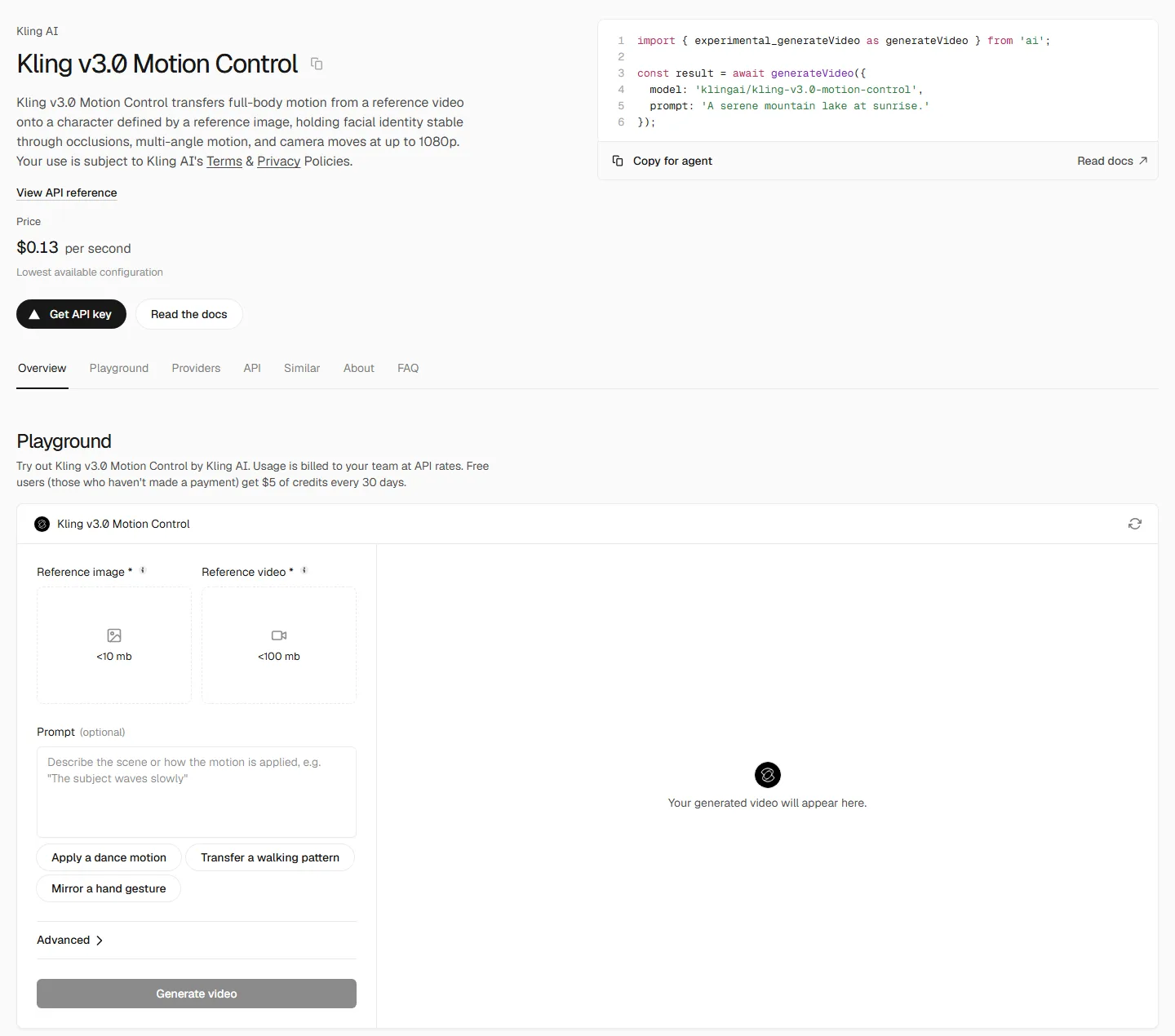
Kling v3.0 Motion Control on the Vercel AI Gateway, captured 31 October 2026.
You give it one image of your performer and one video of the movement, 3 to 30 seconds long, and the output copies the movement. Film a dancer doing the chorus routine to playback in a rehearsal room, feed that clip in with the artist's reference, and you get the routine on your character, on the count you rehearsed. The output length equals the video length and that is what you are billed for, $0.126 per second in standard mode. It is silent and renders at 30 fps, which matters at delivery (see below).
Veo 3.1: one hero shot in 4K
Veo gives 4K at 24 fps, with three reference images and takes of 4, 6 or 8 seconds. At 1080p and 4K it locks to 8 seconds. That profile fits the bridge close-up, the album-cover moment, the single frame the label will pull for the thumbnail. It does not fit a performance verse.
Seedance 2.0: the 4K Seedance
Nine images, 4 to 15 seconds, audio references up to 15 seconds, and a 4K tier that 2.5 does not list. Use it when a section must hold up on a 4K screen and the shot carries one performer.
Wan 3.0: the draft model
Ten images, 2 to 30 seconds, audio references, and $0.05 per second at 480p, the cheapest rate in the group. That makes it the animatic engine. Draft the whole song at 480p, check that the timing and the idea hold, then regenerate the keepers in Seedance. It renders at 30 fps, like Kling.
Kling 3.0, MiniMax H3 and Grok Imagine Video 1.5
Plain Kling 3.0 gives 4K from a start frame, or a start and end frame, at 30 fps. MiniMax H3 outputs 2K and suits silent establishing shots for an intro or an outro. Grok Imagine Video 1.5 has no first and last frame mode, which makes continuity across a chorus harder.
Try it free
Try ScreenWeaver for free on your script
It is free. Import your existing project, get a clearer view of your outline, and regain control of your story structure in minutes.
Start FreeTwo money rules for music video renders
Switch the generated audio off first. Your track replaces it, so paying for model audio is waste. On the gateway, Veo 3.1 at 1080p costs $0.40 per second with audio and $0.20 without. In 4K it is $0.60 against $0.40. Kling 3.0 standard drops from $0.252 to $0.168. An 8-second Veo close-up in 4K costs $3.20 silent instead of $4.80.
Then draft before you render. A 2:56 song at 120 BPM is 176 seconds. Drafting all of it in Wan 3.0 at 480p costs $8.80 at list price.
The AI video cost calculator runs these numbers for your own shot count and takes per shot.
Keep one frame rate to delivery
Seedance, Veo, MiniMax and Grok render at 24 fps. Kling and Wan render at 30. Drop both into one timeline and the editor has to resample one group of clips to match the other. Pick the delivery rate first. If a label delivers through Vevo, its published HD spec asks for a native frame rate of at least 23.98, as our music video guide notes. Then conform every 30 fps clip to that rate in the editor before you fine-tune the cuts on the beat.
Which to pick, section by section
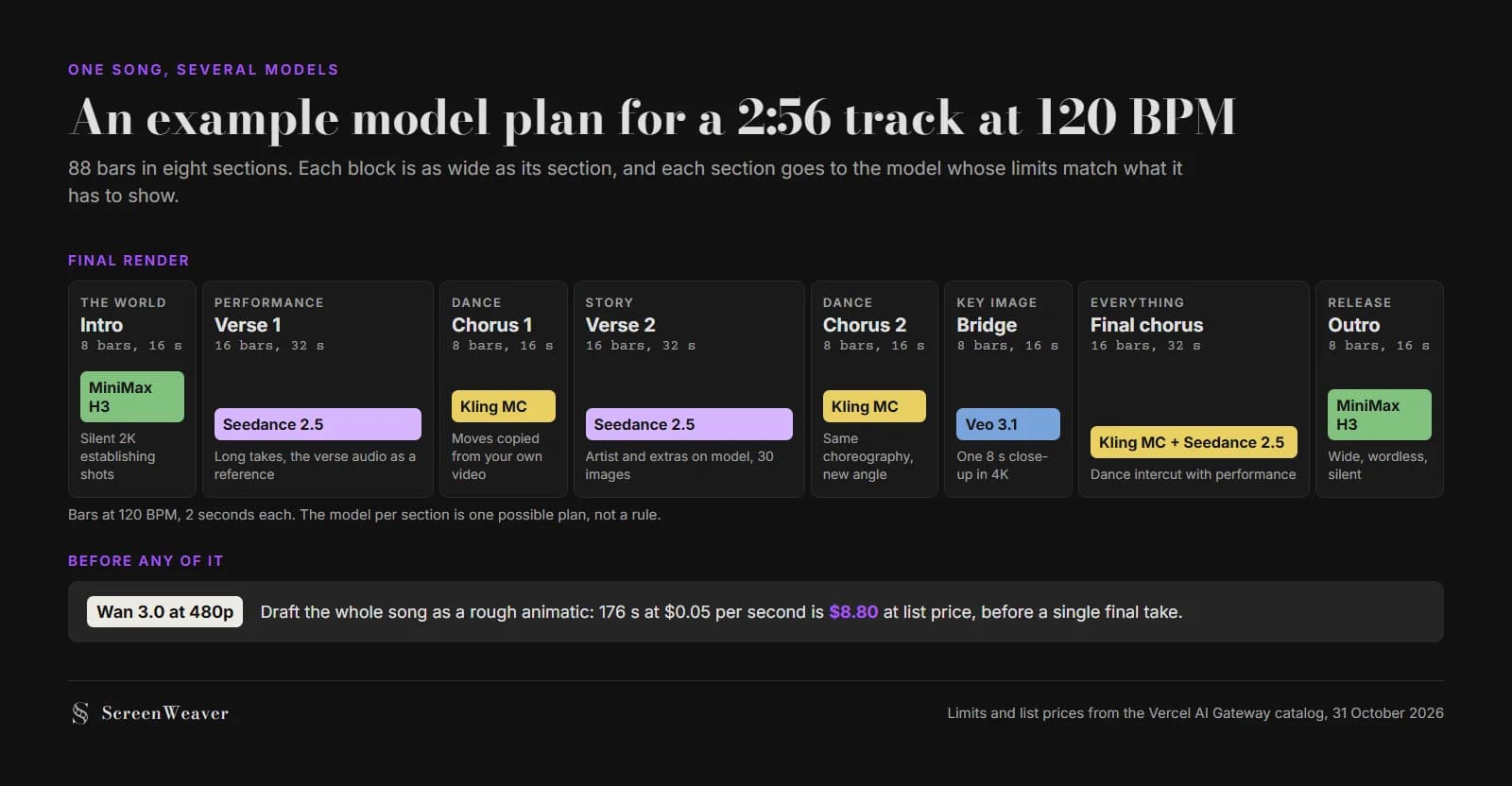
One possible model plan for a 2:56 song at 120 BPM. Limits and list prices from the Vercel AI Gateway catalog, 31 October 2026.
| The section on your board | Send it to | Why |
|---|---|---|
| Performance verse, long takes | Seedance 2.5 | Hears 30 s of the verse, 15 bars per take, 30 images |
| Chorus choreography | Kling 3.0 Motion Control | Copies the routine from a video you film |
| Bridge or key close-up for a 4K master | Veo 3.1, or Seedance 2.0 past 8 s | 4K output, three references is enough for one face |
| Story cutaways with extras | Seedance 2.5 | Room for the artist, the extras and the location in one kit |
| Intro or outro, wordless and wide | MiniMax H3 | Silent 2K establishing shots |
| Rough animatic of the whole song | Wan 3.0 at 480p | $0.05 per second list rate |
You don't need eight accounts to work this way. ScreenWeaver's production canvas carries these models on one video node, so a shot can move from a Wan draft to a Seedance final by changing the model, with the artist's reference sheets already attached from the storyboard. Board the sections first with the music video storyboard method, then see a full clip built that way on the AI music video generator page. If you work outside the canvas, the AI video model picker filters models by audio, length and budget. For the same per-shot logic applied to advertising, read Veo vs Kling for commercials.
FAQ
What is the best AI video model for music videos in 2026?
Seedance 2.5 for most shots. It accepts up to 30 seconds of your track as an audio reference, holds 15 bars per take at 120 BPM, and keeps the artist on model with up to 30 reference images. Use Kling 3.0 Motion Control for choreography and Veo 3.1 for a short 4K close-up.
Can an AI video model lip sync to my song?
Not reliably on a real sung vocal. Seedance 2.5, Seedance 2.0, Wan 3.0 and MiniMax H3 accept an audio reference, which helps with mood and energy, but none of them promises a mouth on the syllables. Film the artist singing, keep generated sung shots wide or in profile, or run a separate lip-sync pass on the close-ups.
Which AI model is best for dance in a music video?
Kling 3.0 Motion Control, when you can film the routine. It takes one image of the performer and a 3 to 30 second video of the movement, and copies that movement onto the character. The output is silent and at 30 fps, so conform it to your delivery frame rate.
How long can an AI music video shot be?
Up to 30 seconds per take with Seedance 2.5, Wan 3.0 or Kling 3.0 Motion Control, which is 15 bars at 120 BPM. Seedance 2.0, Kling 3.0, MiniMax H3 and Grok Imagine Video 1.5 stop at 15 seconds. Veo 3.1 stops at 8 seconds, four bars at 120 BPM.
Should I turn off audio when generating music video shots?
Yes, on models that bill for it. Your track replaces the generated sound. On the Vercel AI Gateway, Veo 3.1 at 1080p drops from $0.40 to $0.20 per second without audio, and Kling 3.0 standard from $0.252 to $0.168.
Can I mix several AI video models in one music video?
Yes, and most clips should. Assign a model per section based on what it has to show, keep the same reference sheets across all of them, and conform everything to one frame rate before the final cut on the beat.
See for yourself
Try the editor on your own script
Import your script or start a new one. Writing, PDF and Final Draft export are free.
Start writing free