
Two model families generate native 4K video today: Kling 3.0 and Seedance 2.0. Veo 3.1 also delivers a 4K file, but Google says it gets there through upscaling. Most of the others, including Seedance 2.5, Wan 3.0 and Grok Imagine Video 1.5, stop at 1080p. MiniMax H3 and HeyGen's model stop at 2K.
That count comes from the public catalog of the Vercel AI Gateway, read on 2 November 2026: 39 video model entries, and only five of them list a 4K tier. The vendors' own pages decide which of those five are native. If you are still choosing tools for a whole film, start with the AI filmmaking guide. This page only answers the resolution question.
Native 4K, upscaled 4K, and why the label matters
UHD 4K is 3840 x 2160 pixels. That is 8.3 million pixels per frame, four times the 2.07 million of a 1080p frame. A model can fill those pixels in two ways.
A native model generates the frame at 3840 x 2160 from the start. Fabric weave, hair, distant foliage, text on a sign: all of it is invented at full size.
An upscaled route generates a smaller frame, then a second pass enlarges it to 4K and guesses the missing detail. You still download a 3840 x 2160 file. What changes is where the detail came from.
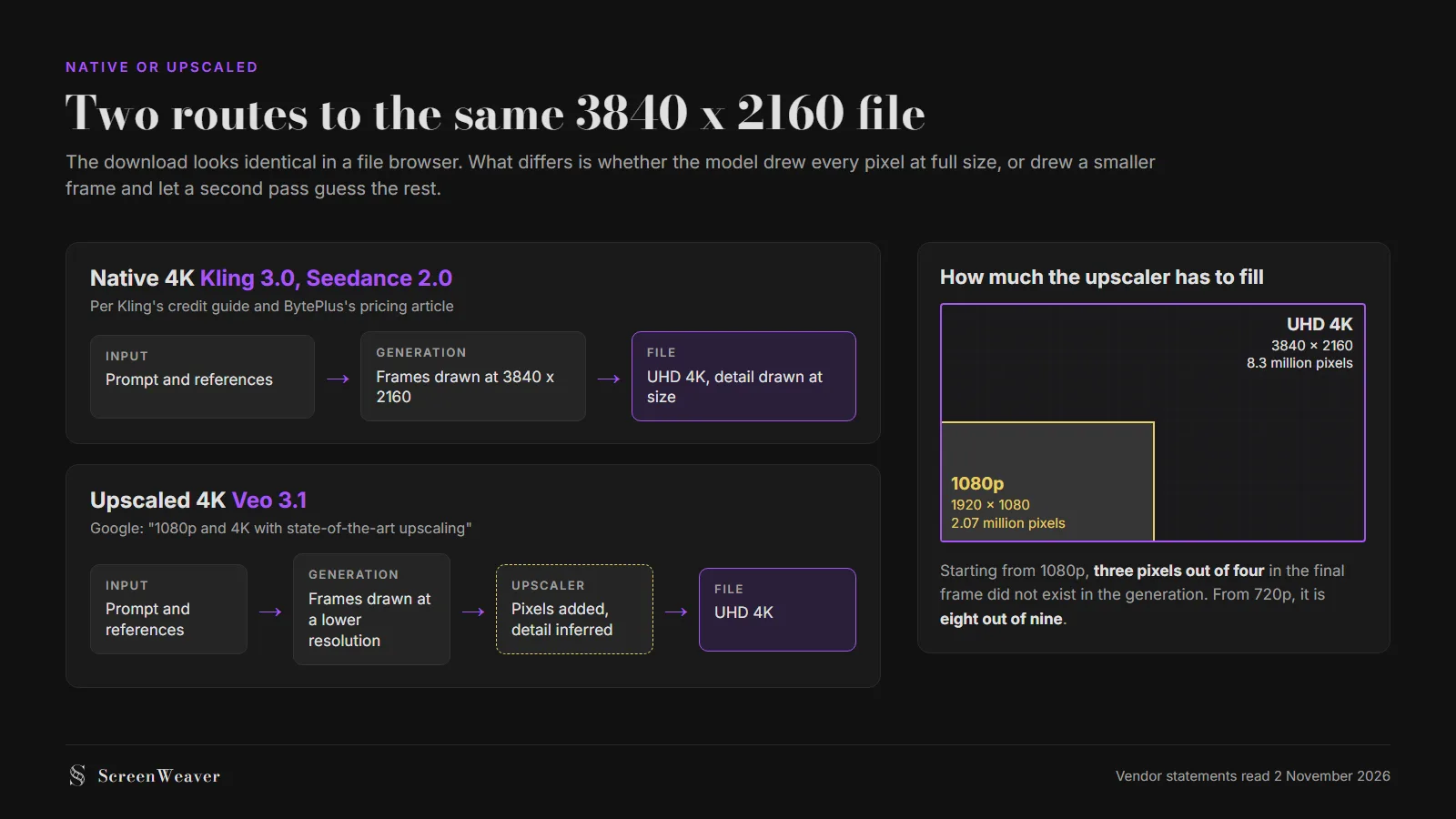
Neither route is a scam. A good upscaler on a clean 1080p source can look excellent on a phone or a laptop. The difference shows on a large screen and in the grade: invented-at-size texture holds up when you punch in, sharpen or push contrast, and a guessed texture tends to smear or turn waxy. BytePlus, which sells Seedance, argues in its own pricing article that an upscaler can only interpolate what the small frame already holds. Read that as a vendor selling the native tier, but the pixel math behind it is real.
Which models deliver 4K: the full list
| Model | Max resolution on the Gateway | 4K type | Clip length | Frame rate |
|---|---|---|---|---|
| Kling 3.0 (text and image to video) | 4K | Native, per Kling | 3 to 15 s | 30 fps |
| Seedance 2.0 | 4K | Native, per BytePlus | 4 to 15 s | 24 fps |
| Veo 3.1 | 4K | Upscaled, per Google | 4, 6 or 8 s (4K forces 8) | 24 fps |
| Veo 3.1 Fast | 4K on the Gateway | Not in Google's Vertex AI spec | 4, 6 or 8 s | 24 fps |
| MiniMax H3 | 2K | No 4K tier | 4 to 15 s | 24 fps |
| HeyGen Video 1 | 2K | No 4K tier | 5 to 15 s | 24 fps |
| Seedance 2.5 | 1080p | No 4K tier | 4 to 30 s | 24 fps |
| Wan 3.0 | 1080p | No 4K tier | 2 to 30 s | 30 fps |
| Grok Imagine Video 1.5 | 1080p | No 4K tier | 1 to 15 s | 24 fps |
| Veo 3.1 Lite | 1080p | No 4K tier | 4, 6 or 8 s | 24 fps |
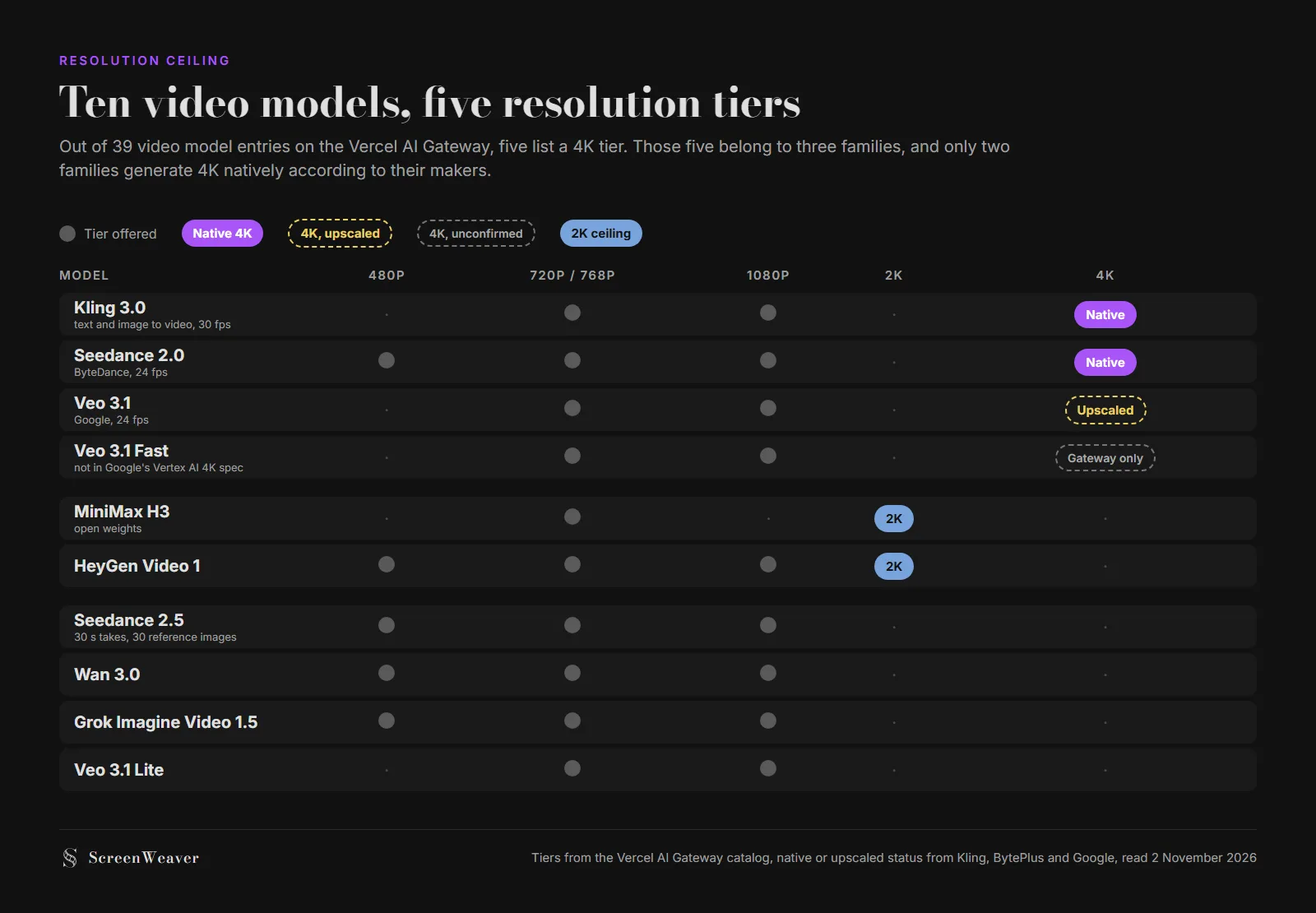
Look at the Seedance 2.5 row. It is the newer Seedance, it handles 30-second takes and up to 30 reference images, and it tops out at 1080p. If a sequence must be native 4K and you love 2.5's reference control, you will be splitting shots between the two Seedance generations. Our anime model comparison ran into the same split.
Kling 3.0: native 4K at 30 frames per second
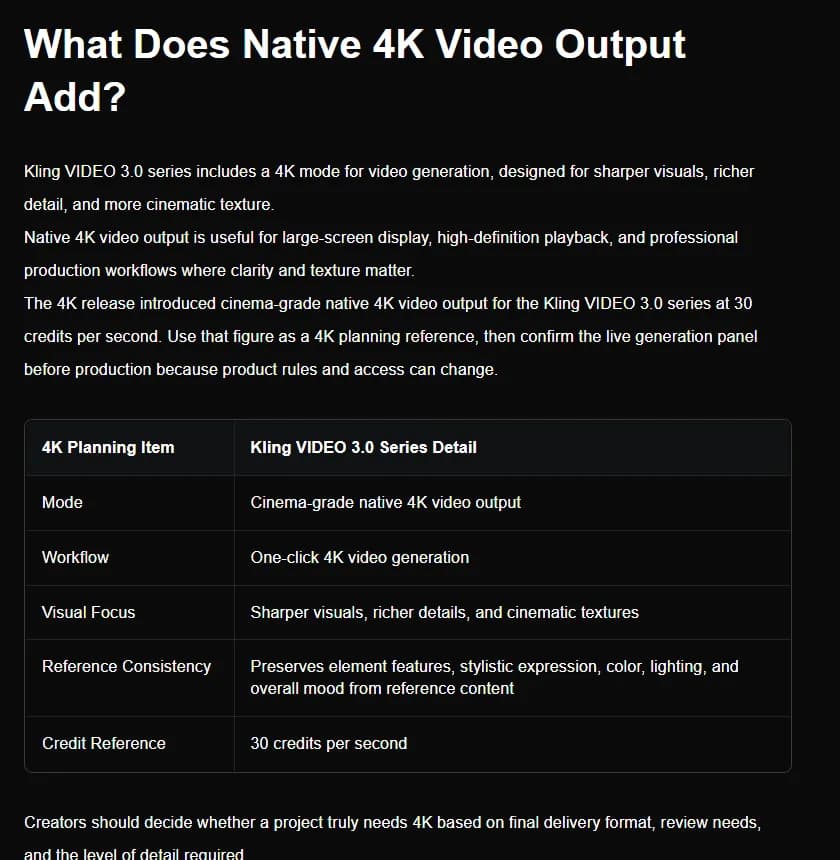
Kling's own credit guide, dated 28 July 2026, describes "cinema-grade native 4K video output for the Kling VIDEO 3.0 series at 30 credits per second." It is a mode toggle on the 3.0 series, not a separate model, and it keeps the 3 to 15 second range.
Two limits apply. Kling 3.0 renders 8-bit SDR, according to Kling's own 3.0 versus 4.0 comparison, which we covered in the Kling prompting guide. More pixels do not add grading latitude, so a heavy grade on a 4K Kling clip can still band in skies and smoke. And Kling 4.0, which runs to 30 seconds, listed 10-bit HDR at 4K as "coming soon" when we checked in October. On the Gateway, Kling 3.0 is billed per second by mode (standard or pro, with or without audio) and the catalog shows no separate 4K line. Run one 4K test and read the bill before you batch a scene.
Seedance 2.0: native 4K, priced openly
BytePlus states that Seedance 2.0 can "render directly at a true 4K resolution of 3840x2160 pixels" and publishes a rate card that shows the jump plainly.
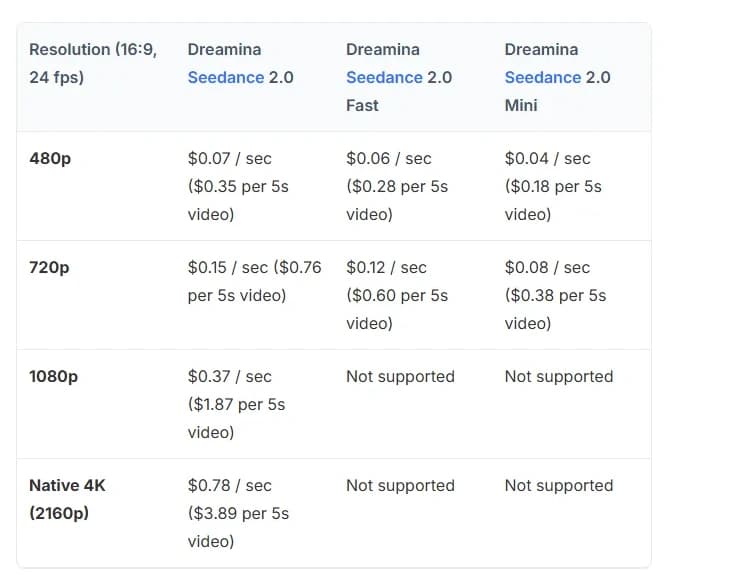
At $0.78 a second, native 4K costs a little over twice the $0.37 of 1080p. Note the bottom rows: Seedance 2.0 Fast and Mini stop at 720p, so the 4K tier means the full model. The Gateway bills Seedance 2.0 by tokens instead, at $4 per million in 4K against $7.70 at 1080p. The per-token rate drops, but a 4K clip contains far more tokens, so do not read the lower number as a cheaper clip.
The same BytePlus article compares a minute of native 4K (about $46.80) with a 720p master pushed to 4K by an enhancement service (about $20.57). Its own benchmark puts native 4K ahead of the 720p master and only "narrowly surpassed" by the enhanced version. Whatever you make of that wording, it is the only vendor-published number we found that puts the two routes side by side.
Veo 3.1: a 4K file through Google's upscaler
Veo 3.1 lists 720p, 1080p and 4K output in Google's Vertex AI spec. When Google announced the 4K option on 13 January 2026, the wording was "Generate videos 1080p and 4K with state-of-the-art upscaling" (Google's announcement). So the file is 4K, and the route is upscaling.
That does not make Veo the wrong choice. Its 4K comes with the strengths covered in our Veo prompting guide: native audio in the same pass and a predictable 8-second unit. But 1080p and 4K both force 8-second clips, and reference images force 8 seconds too. A 3-second insert in 4K is billed 8.
The Gateway lists Veo 3.1 4K at $0.40 a second without audio and $0.60 with it, against $0.20 and $0.40 at 1080p. Veo 3.1 Fast shows a 4K tier on the Gateway at $0.30 and $0.35, although Google's Vertex AI page lists Fast at 720p and 1080p only. Treat Fast in 4K as something to test, not something to plan a delivery on.
Try it free
Try ScreenWeaver for free on your script
It is free. Import your existing project, get a clearer view of your outline, and regain control of your story structure in minutes.
Start FreeWhat 4K adds to the bill
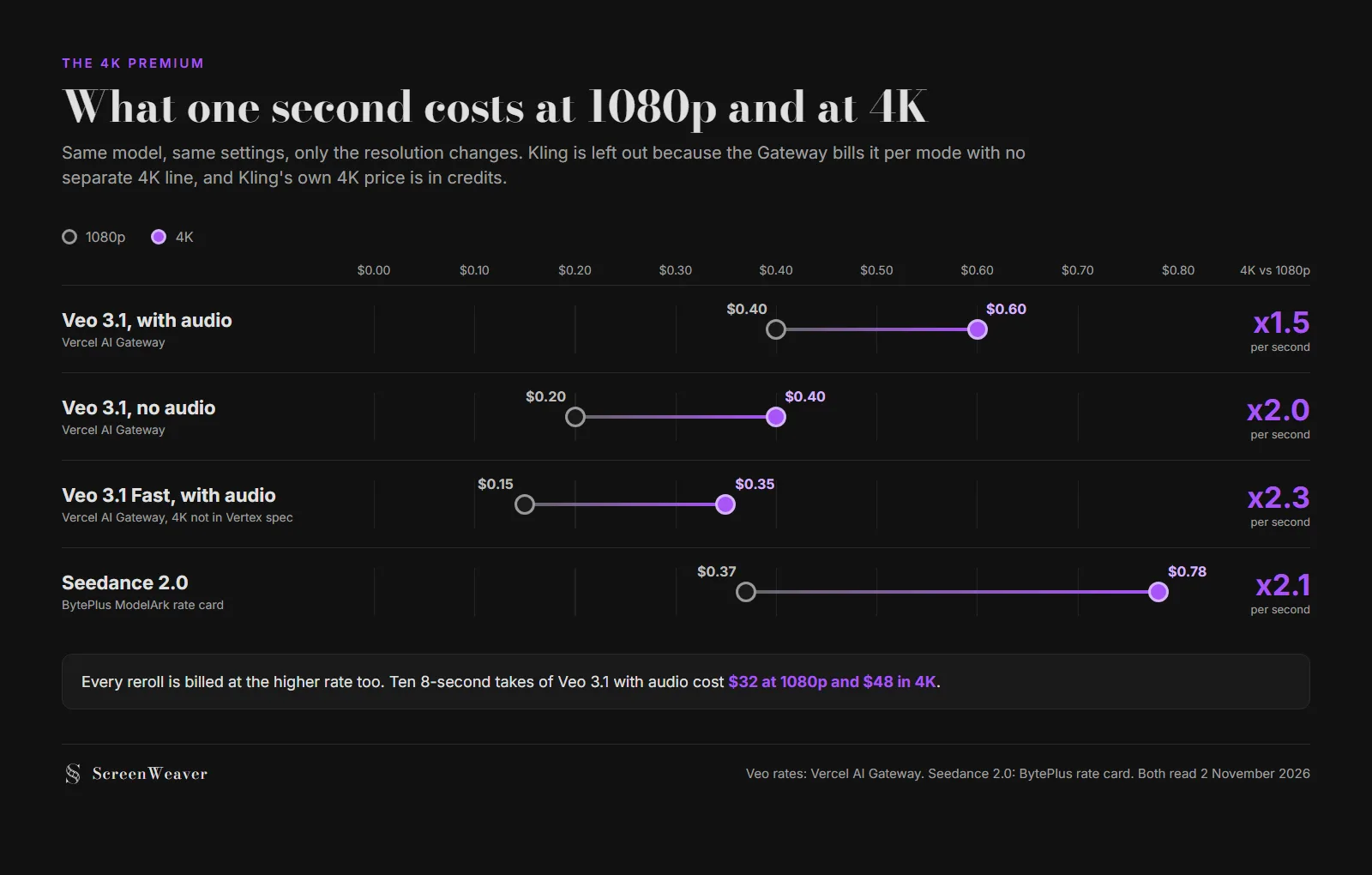
The multiplier runs from 1.5x (Veo 3.1 with audio) to about 2.3x (Veo 3.1 Fast with audio). Then the takes multiply it again. Our pricing comparison shows how billing floors and rerolls turn a listed rate into a cost per usable second, and 4K makes every one of those wasted takes more expensive. So draft at 720p or 1080p, and render 4K once the take is locked.
When native 4K is worth paying for
| Situation | What to generate | Why |
|---|---|---|
| Social cut, phone viewing | 1080p or 720p | A phone downscales a 4K frame anyway |
| YouTube upload, mostly laptop viewers | 1080p, upscale the master if the channel wants a 4K file | An upscaler is enough at that viewing size |
| Client brief that specifies a UHD master | Native 4K on hero shots, 1080p plus upscale on the rest | Pays the premium where a reviewer will pause |
| Wide landscapes, crowds, fine texture | Native 4K | This is where an upscaler has to guess the most |
| Punch-ins and reframes in the edit | Native 4K | You crop into real detail instead of guessed detail |
| Dialogue close-ups with generated audio | Veo 3.1 at 4K, or 1080p | Pick Veo for the audio, not for the pixels |
| Shots you will grade hard | Test first, 4K does not add bit depth | Kling 3.0 is 8-bit SDR at any resolution |
The workflow we recommend: lock the cut at 1080p, then regenerate only the shots that earn 4K. In a typical short, that is the establishing wides, a few hero close-ups and any shot you plan to reframe. Everything else goes through an upscaler at the end.
The 4K workflow in ScreenWeaver
ScreenWeaver exposes 4K on the three model families that offer it: Veo 3.1 (8-second clips at 1080p and 4K), Seedance 2.0 (4 to 15 seconds) and Kling 3.0 (5 or 10 seconds). For the rest of the timeline, the video tools include Topaz Starlight Precise 2.6 and Starlight Fast 2, which target 1080p and 4K. That makes the hybrid workflow above a matter of picking a different model on a shot, not exporting to another app.
Because the shot breakdown comes from the screenplay, every shot already has a duration and a framing before you generate. Decide on the storyboard which shots get 4K, run everything else at 1080p, and the 4K premium stays on the shots that need it. If you are still choosing a model per shot, the AI video model picker lists each model's maximum resolution next to its clip length.
A 4K checklist before you generate
- Delivery spec confirmed: does anyone actually require a 4K master?
- 4K candidate shots marked on the storyboard (wides, texture, reframes, hero close-ups)
- Model chosen for native or upscaled 4K on purpose, not by default
- Clip lengths checked: Veo 4K means 8 seconds, Kling 3.0 tops out at 15, Seedance 2.0 at 15
- Draft takes run at 720p or 1080p, final take only in 4K
- One 4K test clip billed and checked before batching a scene
- Grade tested on that clip: watch skies, smoke and gradients for banding
- Upscaler chosen for every shot that stays at 1080p
FAQ
Which AI video models generate native 4K? Kling 3.0 and Seedance 2.0. Kling calls its 4K mode "cinema-grade native 4K video output", and BytePlus says Seedance 2.0 renders directly at 3840 x 2160. Veo 3.1 also outputs 4K files, but Google describes that 4K as coming from upscaling.
Is Veo 3.1 4K real 4K? The file is 3840 x 2160, so it is a 4K deliverable. Google's January 2026 announcement says Veo generates 1080p and 4K "with state-of-the-art upscaling", so the extra detail is produced by an upscaling stage, not by the base generation.
Does Seedance 2.5 support 4K? Not on the Vercel AI Gateway catalog read on 2 November 2026, which lists 480p, 720p and 1080p for Seedance 2.5. For native 4K in the Seedance family, use Seedance 2.0. Its Fast and Mini variants stop at 720p.
How much more does 4K AI video cost? On the rates we checked, between 1.5 and about 2.3 times the 1080p price per second. Veo 3.1 with audio goes from $0.40 to $0.60 a second on the Gateway, and Seedance 2.0 from $0.37 to $0.78 on BytePlus. Kling quotes 30 credits per second for 4K on its own plans.
Is it better to generate in 4K or upscale 1080p? For most shots, upscaling a clean 1080p generation is enough and costs less. Generate native 4K for wide shots full of fine texture, for shots you will crop into, and for hero frames a client will pause on.
Can I mix 4K and 1080p AI shots in one film? Yes. Edit on a 4K timeline, upscale the 1080p shots to match, and keep native 4K for the shots where detail shows. Grade them together and check the upscaled shots on the largest screen you can find before delivery.
From script to shots
Turn your script into a film, shot by shot
Write the scene, get its storyboard, then generate each shot with consistent characters. You direct every step.
Start your film free