Your comic already has the shots.Now make them move.
- Panels found automatically
- Comics, albums, manga, graphic novels
- Your own art as the reference
One page, six shots
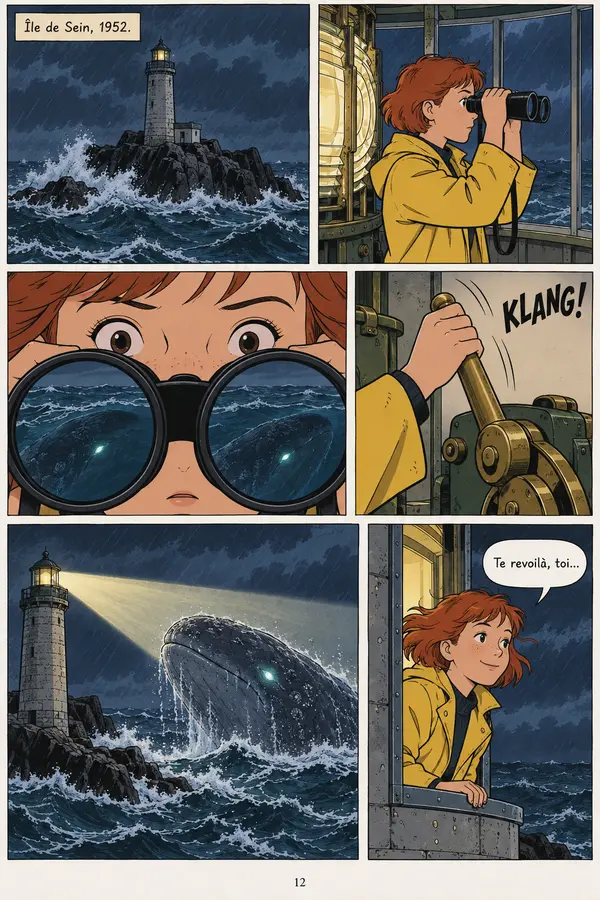
ScreenWeaver found every panel on this page.
- 01Wide: the lighthouse on its rock in the storm, with the caption setting the place and the year.
- 02Medium: the girl in the yellow raincoat watches the sea through binoculars, next to the lamp.
- 03Extreme close-up: her eyes behind the lenses, a whale reflected in them.
- 04Insert: her hand pulls a brass lever, with a KLANG drawn across the panel.
- 05Wide: the beam sweeps the sea and lights the whale as it surfaces.
- 06Medium: she leans on the rail and smiles, with a speech bubble.
A comic page from the ScreenWeaver demo project, lettered in French. When the shots are redrawn, the bubbles, captions and lettering are left out of the frames by default.
Every format
A comic book, an album or a manga: the same pipeline.
Comic books
A monthly issue is a natural short episode. Splash pages and double spreads usually need more than one shot.Albums and BD
A Franco-Belgian album packs dense pages, often eight to twelve panels each. Expect a feature or a few episodes per book.Manga
Pages read right to left. Tell the assistant, and the shot list follows that order. Black and white pages work as references.Graphic novels
Long books with a single arc. Import them in parts: up to 50 pages per call, the next pages in the following call.
Before you start, size the book: pages, panels, episodes and running time. Comic to animation calculator
How it works
From your pages to animated shots, in six steps.
- 01
Create the project
Ask for a film or a series. The assistant creates it and sets the frame: 16:9 for a series, or 9:16 for the phone.
No credits
Set up the MCPTools called
- create_project
- set_project_aspect_ratio
- 02
Import the pages
Send a PDF or images. With panel detection on, every page is cut into its panels, each labelled page and panel with a one-line caption. A page it cannot read is cut by hand from what the assistant sees.
About 1 credit a page
Tools called
- import_media
- 03
Name the cast and the places
The assistant lists who and where comes back from panel to panel and asks you once which to create. Their reference sheets are drawn from your own panels.
No credits
Tools called
- list_entities
- create_entities
- add_reference_images
- 04
Panels become shots
One shot per panel, or several for an action panel or a splash page. Each shot gets an action, a framing, a camera movement and a duration, and cites the characters and the place.
No credits
Tools called
- create_shots
- update_shot
- 05
Redraw or keep your art
Each panel is attached to its shot. The frame is redrawn in the project's format, keeping the composition, or your own drawing is used as the frame as it is.
No credits
Tools called
- set_prompt
- set_shot_panel
- 06
Generate in the app
You generate the frames in Storyboard and the video in Production. Generation never starts from the MCP: you decide what to spend.
Credits per frame and clip
Panel detection costs about one credit a page, and the assistant asks you before going over 20 pages. A page already searched costs nothing the second time.
Page to screen
A comic page is a storyboard with the time left out.
| Your comic has | Animation needs | In ScreenWeaver |
|---|---|---|
| Panels in a grid, in reading order | Shots, in cut order | Panels cut automatically, then a shot list you can reorder, split or merge |
| Gutters between panels | A duration for every shot | Duration set per shot, in seconds |
| Speech bubbles and captions | Lines with a speaker, and voice over | Frames redrawn without the lettering, lines written into the script |
| Sound effects drawn as letters | Sound, and sometimes a cut | The effect leaves the frame, the action stays in the shot |
| A splash page or a double spread | A wide shot, a camera move or several shots | Several shots from one panel, or a continuation that holds the framing |
| Characters drawn hundreds of times | Characters kept on model from shot to shot | Story elements cited in every shot, their sheets drawn from your panels |
The right column is what ScreenWeaver does today. The full method, from sizing the book to the cut, is here: How to turn a comic into an animated series
Before you import
Animate the comics you have the right to animate.
An adaptation starts with the right to adapt. A comic has an author, often an artist, sometimes a colourist and a publisher: check who holds the rights before you bring their pages into a project.
- Your own comic is the simplest case. You hold the rights, and the project stays private.
- Someone else's comic needs the written agreement of its authors or its publisher, even for a fan project shared online.
- The public domain depends on the country. In the European Union, a work becomes free 70 years after the death of its last author.
- Characters can outlive the pages. An old issue may be free while a character's name or look is still a protected brand.
Go further
Guides for adapting a comic
FAQ
Comic to animation questions
Can ScreenWeaver turn a comic into an animation?
Does it work with manga?
How many pages can I import?
Will my characters stay on model?
Can I keep my own drawings as the frames?
How much does it cost?
Are my pages used to train AI models?
Your comic, as an animated series.
Film techniques
Film techniques to explore
Each one with a short clip, a screenplay excerpt and the shot list line.