
Short answer: the first page of a screenplay is the first page after the title page. It has no page number, and it opens with FADE IN: at the left margin (optional in a modern spec). Next comes the first scene heading in caps (INT. or EXT., location, time of day), two to four lines of action, and every speaking character in CAPS the first time they appear. Use Courier 12 pt, a 1.5 inch left margin and 1 inch on the other three sides. Number pages from page 2, top right, with a period.
Page one is where a reader decides how carefully to read the other hundred. The format is fixed, so every deviation shows. Here is the layout, a template you can paste, and the mistakes readers flag most.
First page vs title page
The title page is the cover: title, "Written by", your name and your contact details. It carries no number and does not count as a page of the script. The first page is page one of the story. People who search "script front page" usually mean the title page. To build that page, use the title page maker, and the difference is explained in cover page vs title page. This article is about the page after it.
The layout of page one, line by line
| Element | Where it goes | Rule |
|---|---|---|
| Page number | Nowhere on page one | Numbers start on page 2, top right, 0.5 inch from the top edge, followed by a period ("2.") |
| FADE IN: | Left margin, first line | Optional in a spec. Many current scripts open straight on the scene heading. Pick one and stay consistent |
| Scene heading | Left margin, all caps | INT. or EXT., then the location, then a dash and DAY or NIGHT. One blank line above and below |
| Action | Left margin, full width | Present tense, three or four lines per paragraph at most |
| Character introduction | In the action | NAME IN CAPS the first time, then an age and one telling detail |
| Character cue | About 3.7 inches from the left edge | All caps, above each speech |
| Dialogue | About 2.5 inches from the left edge, about 3.5 inches wide | Plain text, no quotation marks |
| Parenthetical | About 3.1 inches from the left edge | Short, lowercase, only when the line would be misread without it |
The page holds about 55 lines. With standard spacing, one page runs about a minute of screen time. That is why page one is also the first minute of your film.
A first page you can paste
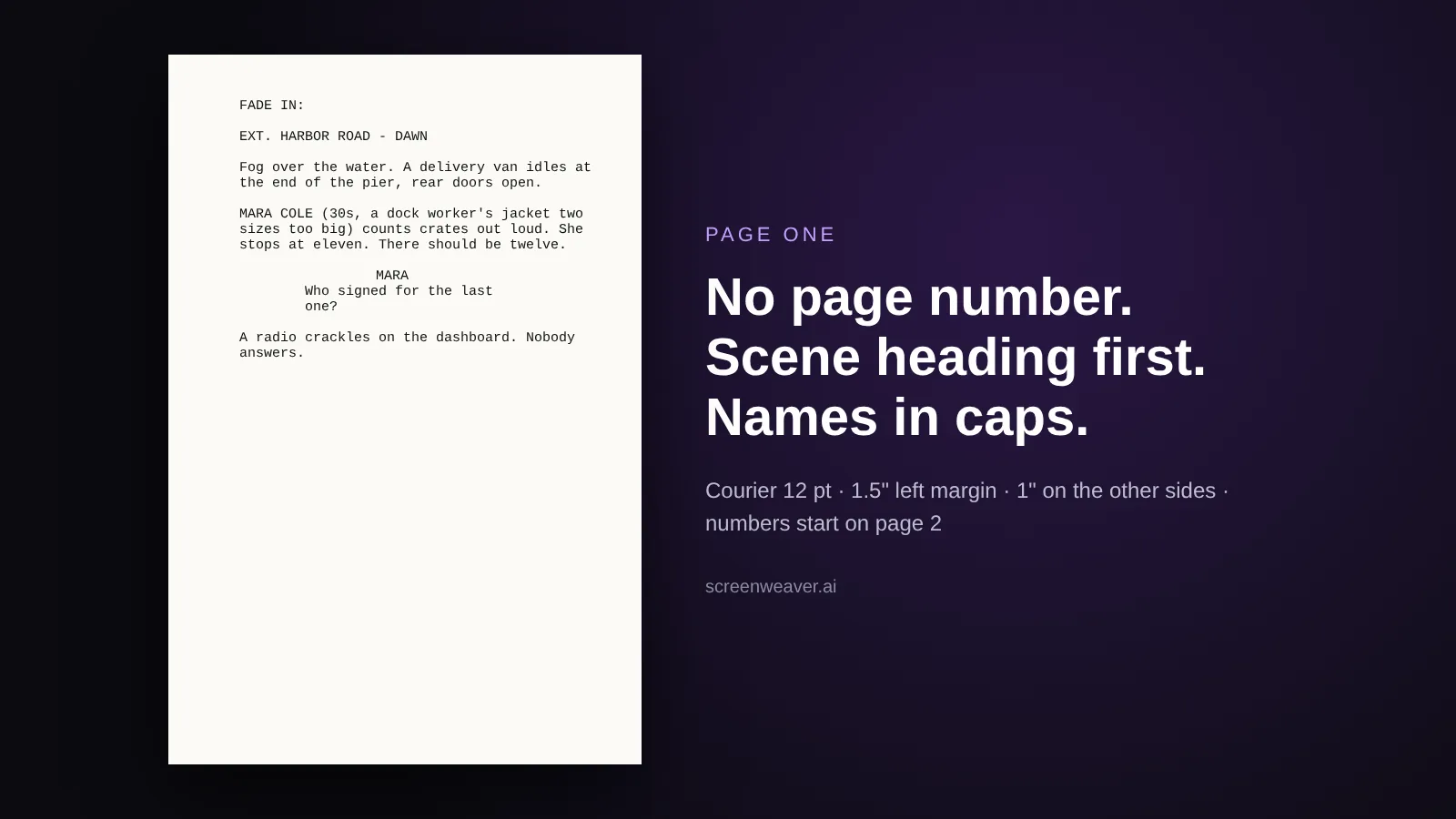
Paste this into ScreenWeaver, or any app that reads Fountain, and replace the content:
FADE IN:

EXT. HARBOR ROAD - DAWN

Fog over the water. A delivery van idles at the end of the pier, rear doors open.

MARA COLE (30s, a dock worker's jacket two sizes too big) counts crates out loud. She stops at eleven. There should be twelve.

MARA
Who signed for the last one?

A radio crackles on the dashboard. Nobody answers.
The Fountain to PDF converter turns it into a properly paginated PDF. You can also write it directly in the free screenplay editor.
Try it free
Try ScreenWeaver for free on your script
It is free. Import your existing project, get a clearer view of your outline, and regain control of your story structure in minutes.
Start FreeWhat a reader looks for on page one
- A place and a time in the first line. The scene heading does this. A reader who doesn't know where they are by line three stops trusting the page.
- White space. Dense action blocks of eight or ten lines tell the reader the whole script will be slow. Keep paragraphs to three or four lines.
- A person doing something. Page one should show a character in action, not a description of scenery or backstory.
- A question. Mara's missing crate is a small question. Page one needs one, so the reader turns to page two.
- Clean format. Correct caps, a correct heading, no camera directions. Format errors on page one suggest format errors on every page.
Seven first-page mistakes
- A page number on page one. Most screenwriting apps hide it. In a word processor you have to turn it off yourself.
- The title repeated at the top of page one. Older scripts did this. Today it reads as dated: the title belongs on the title page.
- A cast list or a synopsis before the first scene. In a spec screenplay these are not part of the script.
- Camera directions ("We see", "CLOSE ON", "ANGLE ON") in the first lines. Write what the audience sees. The shot list comes later.
- Character names not in caps at their first appearance, or every name in caps every time.
- Scene numbers. They belong in a shooting script, not a spec.
- A wrong font or margins. Anything other than Courier 12 pt (or Courier Prime) changes the page count, and readers notice.
The screenplay format checker flags most of these in a pasted page. The screenplay formatting guide covers every element of the rest of the script.
How to do it in ScreenWeaver
- Create a project and open the script editor, which writes in industry screenplay format.
- Start with a scene heading block. Autocomplete suggests the INT. and EXT. prefixes, the locations and the times of day you have already used.
- Press Enter to get the next logical element: action after a scene heading, dialogue after a character. Tab and Shift + Tab cycle the current block through scene, action, character, dialogue, parenthetical, transition and shot.
- Make the cover separately with the title page maker, and put it in front of page one when you send the PDF.
If you already have a script in another format, import it into the editor and check page one there.
FAQ
Does the first page of a screenplay have a page number? No. Page one is unnumbered. Numbering starts on page 2, top right, followed by a period. The title page is never numbered and never counted.
Do I have to start with FADE IN:? No. It is a convention, not a rule. Many current spec scripts open directly on the first scene heading. If you use FADE IN:, put it at the left margin on the first line.
Should the title appear on the first page? Not in a modern spec. The title goes on the title page. Repeating it centered at the top of page one is an older habit that most readers now see as dated.
How many lines fit on the first page? About 55 lines in Courier 12 pt with standard margins. That is roughly one minute of screen time.
What is the difference between the front page and the first page of a script? The front page (or cover page) is the title page, with the title, author and contact details. The first page is page one of the story, which starts with the first scene.
Writing is free
Get the format right from page one
ScreenWeaver formats scene headings, action and dialogue as you type, and exports to PDF and Final Draft.
Start writing free