
An AI music video runs on timecode from day one, because the track is locked: beat map, board by section, two generation lanes (performer and world), then a cut on the waveform. Plan for about 13 generated clips per clip kept, and decide before generating whether the artist's face will be real, generated, or absent.
This is the music video chapter of the AI filmmaking guide and the how to make an AI film walkthrough. Those teach the generation craft. This one covers what a song adds: a structure you did not write, a performer who has to sell it, and a label that has to approve it.
Two videos that actually shipped
Washed Out's "The Hardest Part", directed by Paul Trillo and released by Sub Pop in May 2024, was the first officially commissioned music video made with OpenAI's Sora. The public numbers come from Trillo himself, via fxguide: around 700 clips generated, most closer to twenty seconds than the full minute, about 230 minutes of footage in total, and about 55 clips used in a video that runs just over four minutes. Everything was rendered at 720p and upscaled to 2K with Topaz. Trillo built the video as one continuous push through a couple's life, stitched in After Effects, and he wrote long scene-description prompts that changed along the timeline rather than a single instruction. The two characters are not real people, which turns out to matter for the disclosure phase below.
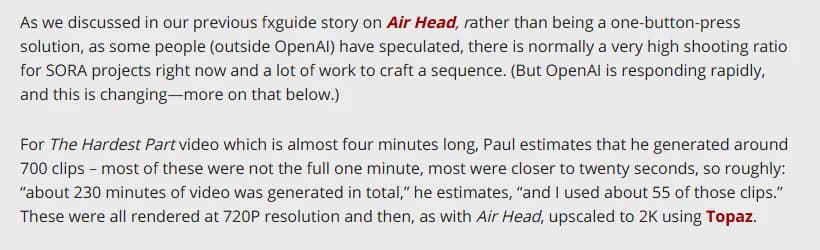
Paul Trillo's own shooting ratio for "The Hardest Part", as reported by fxguide on 8 May 2024. Captured 22 September 2026.
Linkin Park's "Lost", released on 10 February 2023, is the other model. Maciej Kuciara and Emily Yang (pplpleasr) of Shibuya made it, with Kaiber credited as a support studio. The anime scenes are original art by the two directors; the AI work was applied over real material, clips from the band's Live in Texas performance, the Meteora documentary and four earlier videos. It was nominated for Best Rock Video at the 2023 MTV Video Music Awards. No shooting ratio was published, and I will not invent one.
Those two videos are the two lanes of this workflow. Trillo generated a world and a synthetic cast from prompts. Shibuya started from footage of the real band and used generation as a treatment on top. Almost every AI music video made since sits somewhere between them, and the first decision you make is where.
What a song changes in the pipeline
A film script gives you the structure and you decide the timing. A track gives you the timing and you have to find the structure inside it. The story beats article covers how to map a visual turn onto each song section, and the treatment guide covers how to write it up for the artist. Read those first; this article assumes the beat map exists.
Shots are short, for a start. A music video cuts far faster than drama, and the music video storyboard guide shows how average shot length turns into a shot count. At two and a half seconds a shot, a three and a half minute track is roughly 84 shots, and most video models generate five to ten seconds a clip, so you will throw away more than half of every clip you keep. Then there is a performer. Somebody has to sing the words on screen, or you have to build a video that never shows a mouth, and that decision drives the whole cast phase. And the client is an artist and a label, so the approvals run through them rather than a clearance body. Easier than an ad, right up until the artist's face is involved.
The workflow at a glance
| Phase | Deliverable | Who signs it | Days for a 3:30 track | What the model does |
|---|---|---|---|---|
| 1. Track lock and beat map | Marked timeline, section by section | Artist, label | 1 | Nothing |
| 2. Board by timecode | Panels with time in and time out | Artist, label | 2 | Generates panels from the treatment |
| 3. Cast decision | Reference sheets, or a shoot plan for the real artist | Artist, management | 1, plus a shoot day if real | Generates the stand-in and the world references |
| 4. Generation, two lanes | Kept clips, generation log | Director | 3 to 5 | The visible work |
| 5. Edit on the waveform | Cut locked to the master | Artist, label | 2 | Nothing |
| 6. Approvals and disclosure | Signed likeness consent, label sign-off, AI label decision | Label, artist | Runs from day 1 | Nothing |
| 7. Delivery | Vevo or YouTube master, vertical cut | Distributor | 1 | Nothing |
Ten to twelve working days is my planning figure for a full video with a generated performer. Trillo's six weeks on "The Hardest Part" included learning a model that was still in a limited research preview, and a four-minute continuous shot is the hardest form there is. A cut video with a real artist and generated backgrounds can be shorter, because the performance lane is a shoot rather than a generation.
Phase 1: lock the track, then mark it
Nothing starts until the master is final. A remix, a radio edit, or a two-bar change in the bridge moves every timecode on the board, and generated clips do not stretch. Get the label to confirm which version the video is for, in writing, with the exact duration.
Then load the track into your edit timeline, drop a marker at every section change, and write the timecodes down. That list is the spine for everything after. Beside each section, write the one thing the viewer has to understand in it. Verse 1 introduces the world, chorus 1 hits the signature image at full strength, the bridge is the rupture. If you cannot fill that column, go back to the beat map before spending a credit.
Phase 2: board by timecode, and split the board in two
Board the video by section with a time in and a time out on every panel, the way the music video storyboard guide lays it out. Forty to sixty panels is the working range for a three-minute track. Generate the panels from the treatment so each one carries the framing and the character reference, then cut them into an animatic against the master. If chorus 2 is already reading like chorus 1, you have found out on a Tuesday afternoon instead of after three hundred generations.
Then colour every panel as performance or narrative. Performance panels show someone singing the words. Narrative panels show the world, the story, the B-roll. They go down two different lanes in phase 4, they have different take budgets, and they fail in different ways. A board with 30 percent performance and 70 percent narrative is a very different project from the reverse, and the number should be on the front page of the deck the label approves.
Phase 3: the face decision
Every AI music video has to answer one question before generation, and the answer sets the budget: whose face is on screen when the lyrics are sung?
The real artist, shot for real, is the first option and the one I push for when the artist is willing. Put them on a riser in front of a plain backdrop or an LED wall, run playback, and shoot the performance in a day. Generation then builds the world around them: backgrounds, transitions, narrative inserts, treatment passes over the footage the way Shibuya worked on "Lost". Lip sync is free, because the mouth is real. Slow motion still needs the playback-speed arithmetic from the storyboard guide, and the video frames calculator does that sum.
A generated stand-in is the second option. Build one reference sheet for the performer with the reference method, cite it in every performance prompt, and accept that the singing itself becomes a lip-sync pass. Trillo's characters are stand-ins in this sense; nobody in "The Hardest Part" is a real person. Expect the reception conversation too. That video drew a swift backlash, with Youth Lagoon's Trevor Powers calling it "the best case for blatant artlessness I've ever seen", and Ernest Greene defending it to Rolling Stone as a new tool worth exploring. The artist and the label need to have decided how they feel about that while the board is still on the table.
No face is the third option, and it is underused. A video built on hands, places, objects and text never needs a lip-sync pass and never triggers a likeness question. Plenty of videos never show a mouth, and nobody misses it.
Whichever you choose, a generated performer who resembles the real artist needs the artist's written consent for their likeness, and one who resembles anybody else gets redesigned. And never build the stand-in from a real person's photos without a release, which is the same rule as for commercials.
Phase 4: generation, two lanes and a take budget
The narrative lane is straightforward AI filmmaking. Take each narrative panel, write the prompt from the panel and the reference sheet, generate at the model's native clip length, and log every take against the panel number. Cut fast, though: a five-second clip becomes a two-second shot in the edit, so choose the two seconds where the motion is clean rather than hoping the whole clip holds. The reroll math still applies, and the character drift piece explains why a generated stand-in changes shape between takes.
The performance lane is where music videos differ from everything else on this blog. If the artist was shot for real, this lane is a treatment pass: video-to-video stylisation, background replacement, generated transitions in and out of the footage. If the performer is generated, each performance panel needs a still that matches the reference sheet, an audio-driven lip-sync pass fed with the vocal stem for that exact timecode, and then a plosive check. The lip sync section of the voices article covers the check: scrub to B, P and M and confirm the lips close on the consonant. Sung lines are harder than spoken ones because vowels are held for beats, and a mouth that flutters on a sustained note reads as broken at once. Budget three to five times the takes of a narrative shot for a performance shot, and keep performance shots short.
Ask the model picker which current models take a video reference for character consistency and which generate audio natively; both features change the performance lane, and both change with every release, so check on the day. Do not generate the artist's voice, though. The vocal exists, it is the reason the video exists, and the stem is the audio input for every lip-sync pass.
The take budget for a 3:30 track cut at an average shot length of two and a half seconds, so 84 kept clips, with the per-clip API prices from the September 2026 dataset behind the AI video cost calculator:
| Model | Price per 5-second clip | 5 takes per kept clip | 10 takes | 25 takes |
|---|---|---|---|---|
| Kling 2.6 Pro | $0.35 | $147 | $294 | $735 |
| Veo 3.1 Fast | $0.60 | $252 | $504 | $1,260 |
| Veo 3.1 | $2.00 | $840 | $1,680 | $4,200 |
Trillo's 700 to 55 is about 13 takes per kept clip, so the middle column is the realistic one for a fully generated video, and the right-hand column is where performance-heavy boards end up. Voice, music and edit software are not in this table because the track already exists and the production cost breakdown covers the rest of the stack.
Try it free
Try Screenweaver for free on your script
It is free. Import your existing project, get a clearer view of your outline, and regain control of your story structure in minutes.
Start FreePhase 5: edit on the waveform
Cut to the master, never to a scratch mix. Every cut point sits on a transient or on a lyric, and the board already says which, so the first assembly is mostly a matter of dropping each kept clip onto its time in and trimming to its time out. The interesting work is inside the clip: which two seconds of a five-second generation land the beat.
Watch the chorus repeats. The board marked chorus 2 as "variations only, as chorus 1" for a reason; the edit is where you decide whether the signature image returns identical, escalated, or inverted. Then watch the bridge. It is the section people cut for time and regret, and in a generated video it is usually the section with the highest reroll count, because it is the one that has to look different from everything before it.
Deliver the artist a cut with the generated shots flagged. A label that discovers a generated face in the final review has a legitimate reason to send it back.
Phase 6: approvals and disclosure, from day one
For a music video the approvals chain is short: artist, management, label. Get three things signed before the cut. The face decision from phase 3. Written consent for any likeness that is generated. And the disclosure decision for the platforms, which is where most people get surprised.
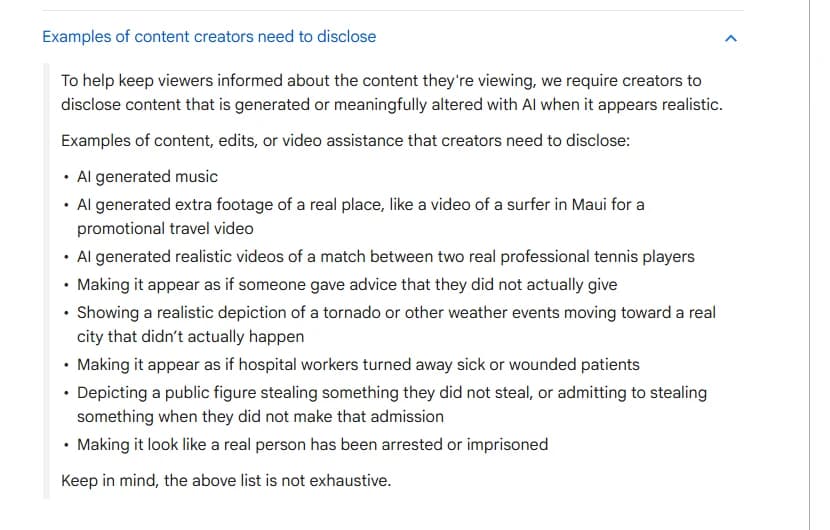
The disclosure examples on YouTube's "Disclosing use of GenAI content" help page, captured 22 September 2026.
YouTube's rule turns on realism, not on AI use. You must disclose when the content makes a real person appear to say or do something they did not do, alters footage of a real event or place, or generates a realistic scene that did not occur. A photoreal generated stand-in singing the artist's song is a realistic scene that did not occur. A treated performance of the real artist on a real riser, stylised into anime, is closer to the page's "fully animated" example and may not need it. Decide per video, with the label, and read the platform detail in the disclosure rules article. The label sits in the player for photorealistic content and in the expanded description otherwise, and YouTube states that disclosing does not limit a video's audience or its eligibility to earn money.
One more line on the same page is easy to miss: AI generated music is on the disclose list. If the track itself was generated, the video has to disclose regardless of what the picture does.
Phase 7: delivery, in the distributor's spec
Many labels deliver to YouTube through Vevo, and Vevo publishes its spec. HD masters are H.264 or ProRes in .mov or .mp4 at 1920x1080, native frame rate no lower than 23.98, 20 Mbps, de-interlaced, with AAC stereo at 44.1 kHz and 320 kbps CBR, and no front or end slates. 4K and 2K masters go as ProRes at 1440p or 2160p, 30 Mbps for 2K and 60 Mbps for 4K.
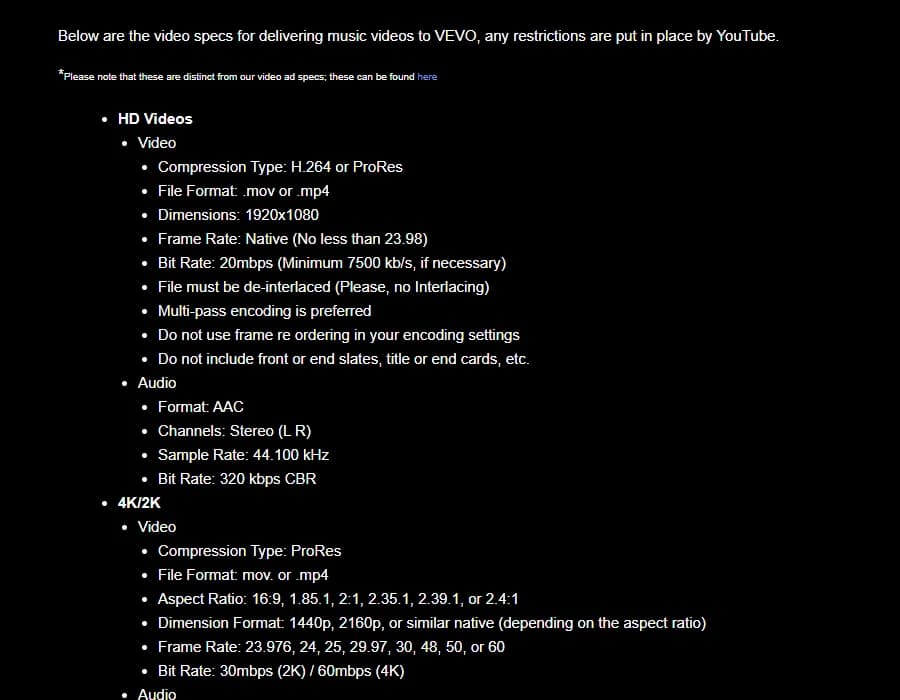
Vevo's published Music Video Specs, captured 22 September 2026.
Native resolution is the first problem for generated footage, because most models still generate at 720p or 1080p and Trillo's 720p-to-2K route through an upscaler is the standard path; check the upscaled master for the smeared edges upscalers put on generated hair and fabric before you deliver 4K. Frame rate is the second. It has to be one rate end to end. Models generate at 24 or at 30, and a timeline that mixes them makes every cut on a beat land a frame late on half the shots. Pick the rate at phase 1, generate everything at it, and conform the real-artist footage to it.
Then the vertical. A performance shot boarded 16:9 rarely survives a 9:16 crop, so mark the vertical frame on the performance panels while boarding, the way the storyboard guide recommends, and generate the key performance shots natively vertical if the model supports it. Vevo keeps a separate vertical spec for the Shorts and TikTok versions.
Checklist before the master goes to the label
- Master version and exact duration confirmed in writing before boarding.
- Every panel carries a time in and a time out, and is colour-coded performance or narrative.
- Face decision made and signed: real artist, generated stand-in, or no face.
- Likeness consent signed for any generated face that resembles the artist; no stand-in built from anyone else's photos.
- Reference sheet for the stand-in cited in every performance prompt; vocal stem used as the lip-sync input.
- Plosive check passed on every performance shot; sustained notes reviewed frame by frame.
- Generation log complete: panel number, model, date, takes generated, take kept.
- Cut delivered to the artist with generated shots flagged.
- Platform disclosure decided per platform with the label; AI-generated music disclosed if the track is generated.
- One frame rate end to end; upscaled master checked at 100 percent on hair, fabric and text.
- Vertical cut framed from the board rather than cropped from the master.
Tools for this
The AI video cost calculator turns the shot count and a take profile into the budget above before the label sees a number. The model picker says which current model takes a video reference and which generates audio. The video frames calculator does the playback-speed arithmetic for slow-motion performance. The AI character consistency sheet builds the stand-in's reference sheet. And ScreenWeaver generates the panels from the treatment, with the character reference attached, which is where the panel numbers in your generation log come from.
FAQ
How many clips do I need to generate for a three-minute AI music video?
Work from the shot count rather than the runtime. At an average shot length of two and a half seconds, three and a half minutes is about 84 kept clips. The one published ratio, Paul Trillo's 700 generated for 55 used on "The Hardest Part", is about 13 to 1, so plan for 800 to 1,100 generations for a fully generated video and fewer if the artist is shot for real.
Can the video show the real artist if it is generated?
Only with the artist's written consent for their likeness, and it is a bad idea unless the artist is enthusiastic about it. The safer routes are shooting the real artist against a plain backdrop and generating the world, or building a stand-in that does not resemble them, or a video with no face at all.
Do I have to label an AI music video on YouTube?
If it contains a realistic generated scene that did not occur, or makes a real person appear to do something they did not, yes. A photoreal generated performer singing the song qualifies. A clearly animated or stylised treatment of real footage may not. YouTube says the label does not limit reach or monetisation, so when in doubt, disclose.
How do I lip-sync a generated performer to singing?
Feed the vocal stem for that exact timecode into an audio-driven lip-sync pass on a still that matches the reference sheet, then check the plosives frame by frame. Sung vowels are held longer than spoken ones, so also check every sustained note for a mouth that flutters. Budget three to five times the takes of a narrative shot.
What resolution should I deliver?
Vevo takes 1920x1080 at 20 Mbps for HD and ProRes at 1440p or 2160p for 2K and 4K. Most models generate at 720p or 1080p, so a 4K delivery means an upscaler; check the upscaled master on hair, fabric and any text before sending it.
Does the workflow change if the track was generated too?
The production phases are the same, but YouTube lists AI generated music among the content that must be disclosed, so the label decision is made for you. Also check the music tool's plan for commercial rights before release; the production cost article has the plan-by-plan detail.
Final Step
Build your next script with Screenweaver
Move from ideas to production-ready pages faster with timeline-native writing and AI-assisted story flow.
Try Screenweaver