Free screenplay converter
Screenplay Formatter
Free script formatting software, in your browser
Paste a scene you typed in Notes, an email or a Word document and get it back as a formatted screenplay. The formatter finds the scene headings, character names, parentheticals, dialogue and transitions, puts each one at its standard position and gives you a PDF, a Final Draft file or a Word file. Free, no account, and the text never leaves this tab.
- Private: your script never leaves this browser tab.
- Free, no signup, no watermark.
- Industry layout kept: scene headings, cues, dialogue, (MORE) and (CONT'D).
Private by design: the conversion runs in this tab and nothing is uploaded.
How the formatter reads your text
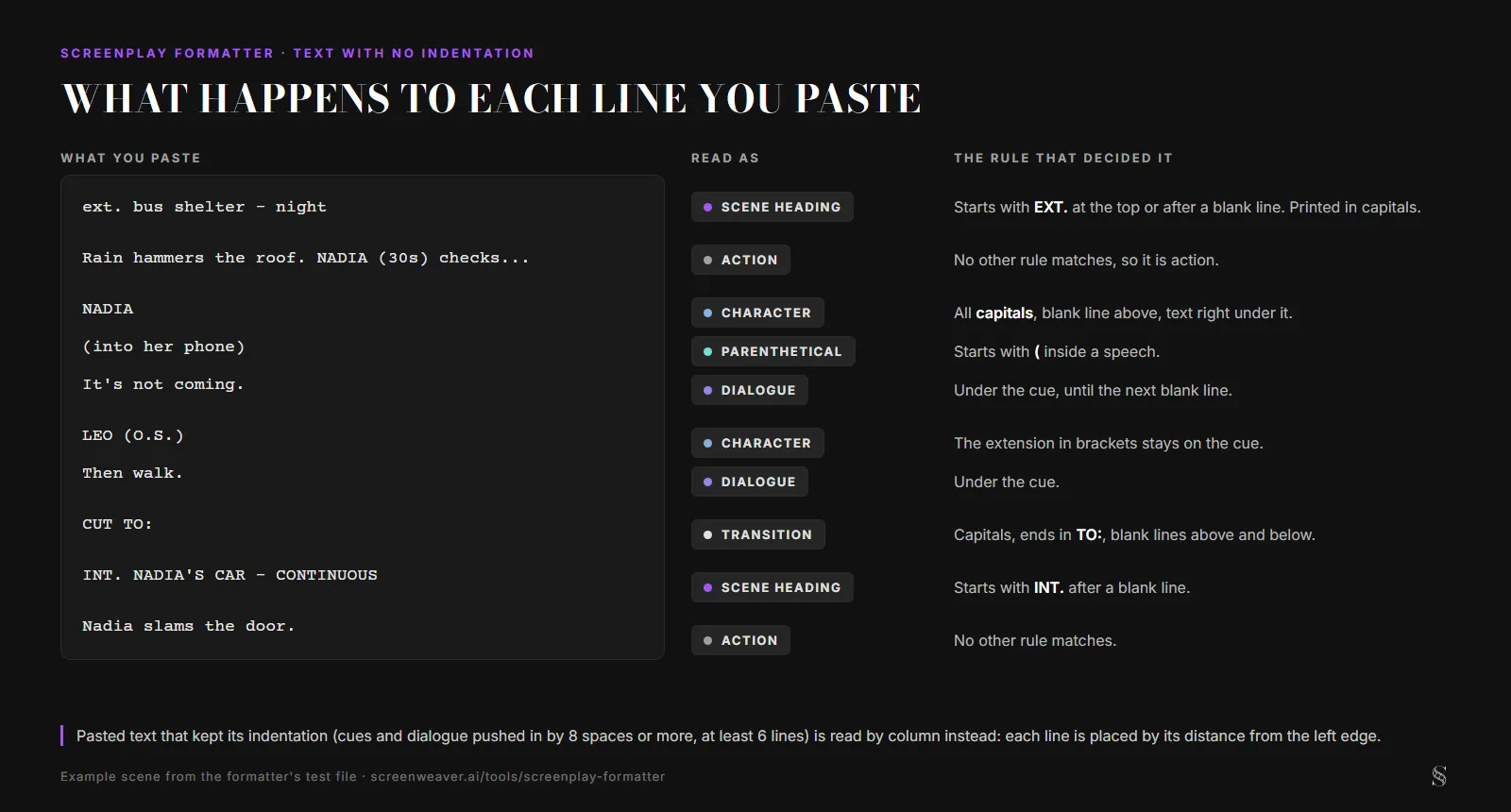
It reads a paste in one of two ways. If the text kept its layout, with names pushed toward the middle by spaces and dialogue indented less, each line is classified by how far it sits from the left edge. If every line starts at the margin, it applies Fountain's rules: after a blank line, a line that starts with INT., EXT., EST. or I/E is a scene heading; a line in capitals with text right under it is a character cue; a line in brackets under the cue is a parenthetical and the lines below are dialogue; a capitalized line ending in TO:, alone between blank lines, is a transition. Everything else is action. Headings typed in lower case come out in capitals, and headings that start with INTÉRIEUR, INNEN, INTERNO or INTERIOR work when typed in capitals. Before you download, switch on Show the elements to see what each line became.
What happens to each line you paste
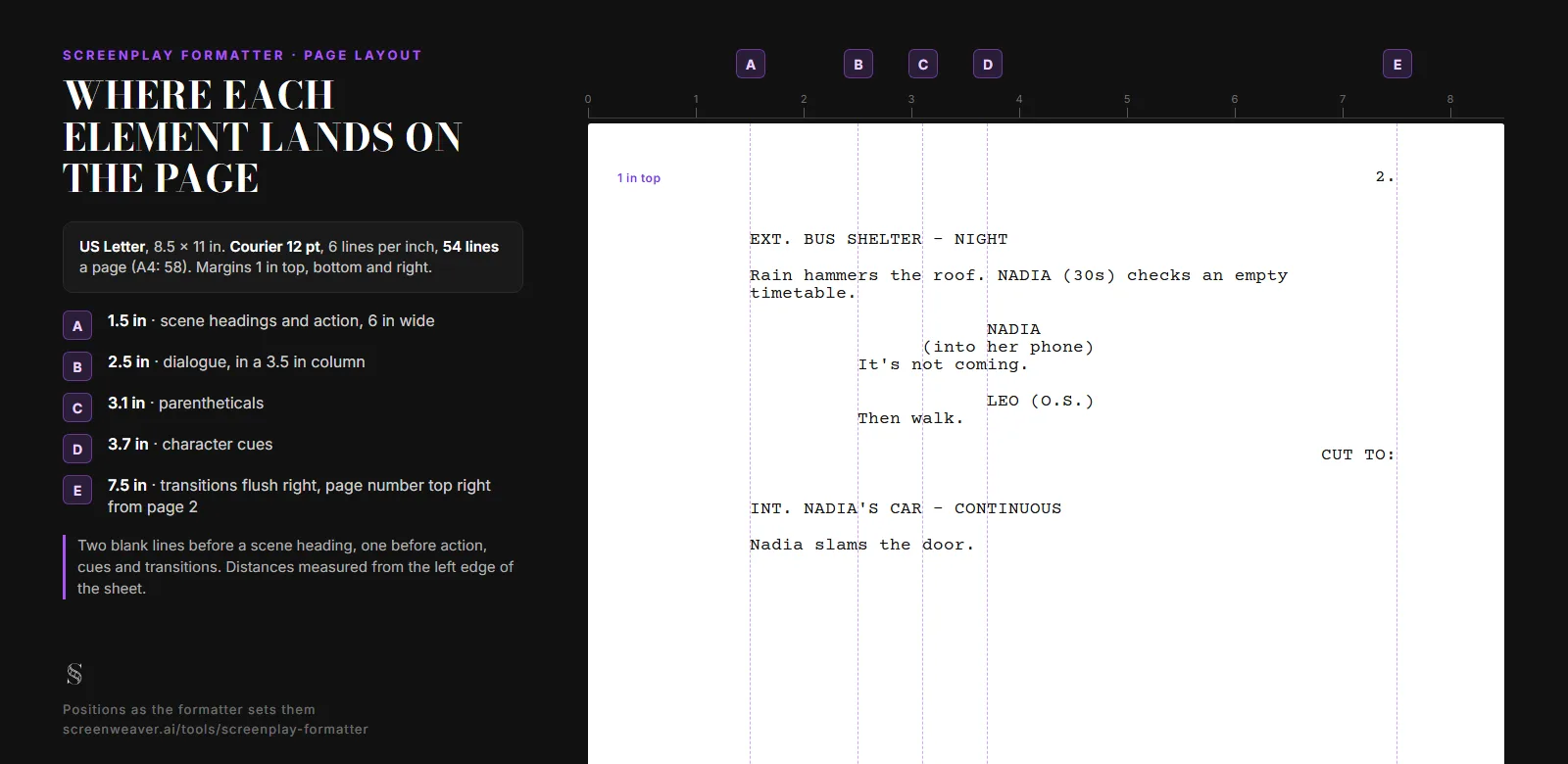
Where each element lands on the page
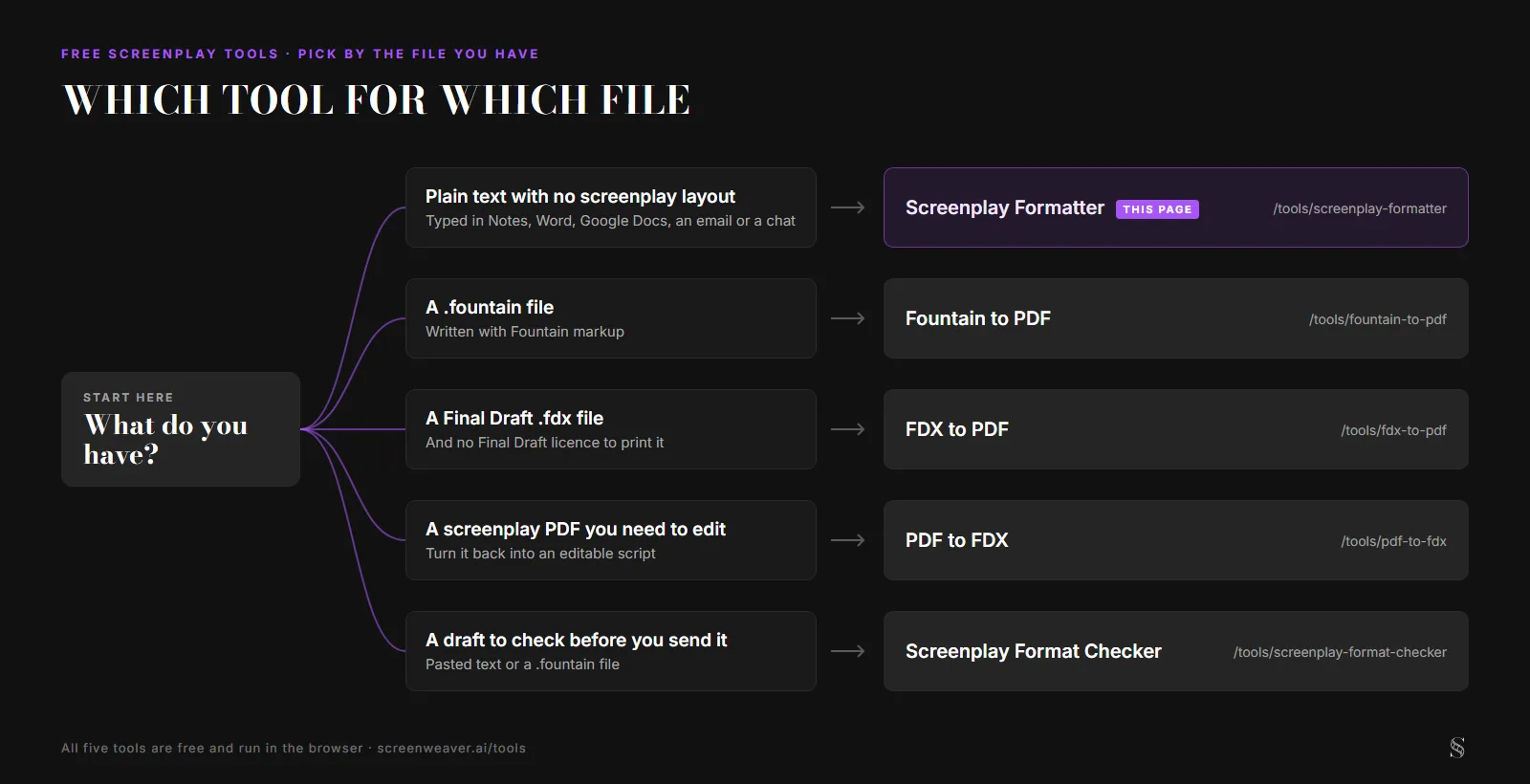
Which tool for which file
Every screenplay format, both ways
Any format in the left column converts to PDF, Final Draft, Fountain, Word or plain text. Apps without a writable format here all open FDX or Fountain.
| Format | Reads | Writes |
|---|---|---|
| Final Draft (.fdx) | ||
| Fountain (.fountain) | ||
| Word (.docx) | ||
| Fade In (.fadein) | Use FDX, which it opens | |
| Highland (.highland) | Use Fountain, which it opens | |
| Celtx (.celtx) | Use FDX, which it opens | |
| WriterDuet (.wdz, .json) | Use FDX, which it opens | |
| Trelby (.trelby) | Use FDX, which it opens | |
| Text (.txt) |
Free script formatting software for drafts that start outside a script app
Plenty of scenes get written somewhere else first: on a phone on the bus, in a Google Doc, in a chat with a co-writer. Retyping them into a screenwriting program just to fix the margins can eat an evening. Paste the text here as it is and it comes back on the standard page.
Formatting by hand fails in small ways a reader spots on page one: a character name that drifts, dialogue as wide as the action, a scene heading stranded at the foot of a page. The formatter paginates the way a screenwriting app does. A heading never ends a page, a cue keeps at least two lines of its speech, and a speech that breaks across pages gets (MORE) and (CONT'D).
If you already write in Fountain, use Fountain to PDF, which reads the full syntax. If you want a numbered list of formatting problems in a draft before you send it, paste it into the screenplay format checker. The rules themselves are in our screenplay formatting guide. And to keep writing with the format applied as you type, ScreenWeaver's free plan includes the screenplay editor.
Who uses it
- Writers who draft on a phone or in notes: paste the scene, check the elements, download a PDF that reads like it came out of a screenwriting app.
- Students: see where each line lands and learn the format without buying software.
- Co-writers and directors: turn dialogue sent by email or in a chat into pages for a table read.
You timed the pages.Now write the rest.
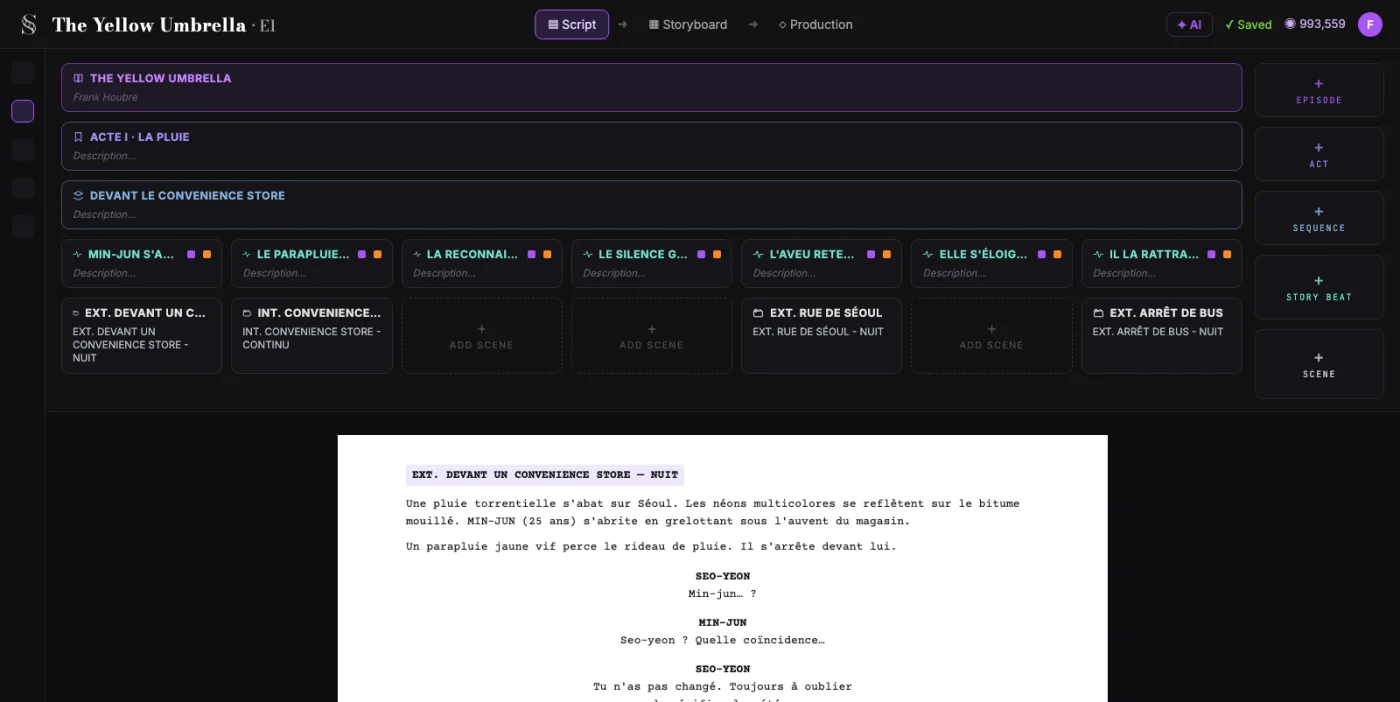
Write the whole screenplay in ScreenWeaver, with industry-standard formatting and unlimited pages. The Screenwriter plan is free and does not expire.
- $0, does not expire
- PDF and Final Draft export
- Mac, Windows, Linux, iPad
Screenplay Formatter: the complete guide
It reads pasted text by column when the text kept its indentation, and by Fountain rules when every line starts at the margin. It then sets each element at its standard position (Courier 12 point, 1.5 inch left margin, dialogue at 2.5 inches, cues at 3.7 inches) and paginates with (MORE) and (CONT'D).
For this workflow, the central problem is clear: a scene typed in an ordinary text editor has none of the screenplay margins, and fixing them by hand is slow and easy to get wrong. Left unresolved, this creates downstream friction and slower decisions. The practical target is a correctly laid out, paginated screenplay from pasted text, as a PDF, a Final Draft file, Fountain or Word.
Limitation to keep in mind: Detection depends on the text. A name in mixed case, a cue with no blank line above it, or a scene heading that starts with another word than INT., EXT., EST. or I/E is read as action. Check the element view before you download.
Advanced workflow: Co-writers who send scenes to each other by email paste each one here, download Fountain, and keep the .fountain file as the text they merge and version.
Step-by-Step Workflow
- Paste the scene or the whole script into the text box.
- Click Read this text and check the scene, character and page counts.
- Switch on Show the elements and fix, in your text, any line read the wrong way.
- Pick PDF, Final Draft, Fountain or Word and download.
Use Cases By Profile
- Writer: paste a scene drafted on a phone and get a PDF that reads like it came out of a screenwriting app.
- Student: watch where each line lands and learn the format without buying software.
- Director: turn dialogue sent in a chat into pages for a table read.
Common Mistakes To Avoid
- Typing character names in normal case: only names in capitals are read as cues.
- Leaving no blank line between an action line and the character name below it.
- Starting a scene heading with a word the formatter does not know, such as ROOFTOP instead of EXT. ROOFTOP.
Professional Best Practices
- Put a blank line before every scene heading and every character name.
- Write a parenthetical on its own line, in brackets, right under the name.
- To force an unusual heading, start the line with a period (.ROOFTOP).
Treat this tool output as a decision support layer, not a replacement for authorship. Great scripts are remembered for specific choices, emotional precision, and clarity of dramatic movement. Tools help by removing noise so your energy can go where it matters: character, conflict, escalation, and payoff. If you review outcomes after each pass and keep an explicit log of accepted changes, your workflow becomes faster and more predictable from draft to draft. That consistency is exactly what professional collaborators value: fewer surprises, clearer rationale, and a script that evolves with intent.
Extended FAQ
Is this screenplay formatter free?
Yes. No account, no page limit, no watermark. The formatting runs in your browser tab.
What text can I paste?
Plain text from anywhere: Notes, Word, Google Docs, an email, a chat. Fountain and Final Draft XML pasted into the box are recognized too.
Why did a character name come out as action?
A cue is recognized when the name is in capitals, has a blank line above it and dialogue directly under it. Fix that line in your text and paste it again.
Can I keep editing the script after formatting it?
Yes. Download Final Draft (.fdx) or Fountain to open it in a screenwriting app (ScreenWeaver, Final Draft, Fade In, Highland and others), or Word to edit it in Word or Google Docs.