
Highland Pro is the replacement for Highland 2, not a paid tier of it. Highland 2 no longer gets updates and cannot be bought. If you own it and write only on one Mac, you can keep using it. If you want iPad and iPhone, iCloud sync and the new tools, Highland Pro costs $59.99 a year or $9.99 a month after a 30-day trial. The facts below were checked on quoteunquoteapps.com, the App Store and the developers' own posts on 28 September 2026. Prices are in US dollars.
Most people searching "Highland 2 vs Highland Pro" hit the same wall. They type the old name, land on a subscription page for an app with a different name, and nobody explains what happened. Here is the short version, then the details.
What happened to Highland 2
Highland started in 2012 as a utility for converting screenplay PDFs. It became a full writing app in 2014. Highland 2 shipped in May 2018 after a three-year beta, and version 2.5 added Revision Mode and the Navigator in June 2019.
In March 2025, Quote-Unquote Apps released Highland Pro. John August announced it on 4 March 2025. The company's own transition post is direct about the old app: Highland 2 has been superseded and there will be no further updates.
Three things follow from that today:
- You cannot buy Highland 2. The address quoteunquoteapps.com/highland-2/ now redirects to the Highland Pro page.
- If you own it, it still installs. The developers say you can download it again from the Mac App Store by clicking your avatar and looking in your previously installed apps.
- It will slowly age. The same post says it should keep working for years, but expects some interface issues as macOS changes.
Why "Pro" and not "Highland 3"? The developers say they wanted to stop the version-number problem, and followed the naming of apps like Logic Pro and Final Cut Pro.
Highland 2 vs Highland Pro at a glance
| Highland 2 | Highland Pro | |
|---|---|---|
| Status | No longer sold, no further updates | Current app, version 3.3.6 updated July 2026 |
| Price model | Free download, one-time Pro upgrade bought in the app | $59.99/yr or $9.99/mo |
| Free option | Free download, no longer offered | 30-day trial |
| Platforms | Mac only | Mac, iPad and iPhone, all native |
| System requirements | No longer maintained | macOS 13 or later, iOS and iPadOS 26 or later |
| Sync | No mobile apps to sync with | iCloud |
| Offline | Local app, local files | Native apps, documents sync through iCloud |
| Collaboration | None live | None live. Comments, and sending a document to readers |
| Formats | Fountain, Final Draft (.fdx), PDF | Import and export Fountain, Final Draft (.fdx), PDF |
| Production features | Revision Mode, Navigator | Revision Mode, scene numbering, cast and location lists, gender analysis |
| If you stop paying | Nothing to stop | Still opens, prints and exports |
Neither version runs on Windows, Linux, Android or in a browser. That has not changed.
What changed in Highland Pro
Highland Pro is close to a new app. The developers describe it as a rewrite in which almost every line of code is new, around 95% of it. The biggest changes:
It left the Mac. Highland Pro runs natively on Mac, iPad and iPhone, and one subscription covers all three. Documents sync with iCloud. For anyone who wanted to write a scene on the train, this is the reason to switch.
New writing tools. The App Store listing names /Lookup, which answers definitions, rhymes and quick facts without leaving the draft. The Shelf stores cut dialogue, snippets and notes. There is also a Title Page Builder, Custom Pages, an Overview of the whole script, and Grammar Highlight.
Improved old tools. The Navigator, headers and footers, templates (14 of them, including Screenplay, Multi-Cam and Manuscript) and themes (12, or build your own) all got reworked.
Steady updates. Recent release notes add paragraph numbering on macOS, a safer way to handle iCloud conflicts, and revision colors that now show when you send a document to others to read.
What stayed the same
The things people loved about Highland 2 carried over.
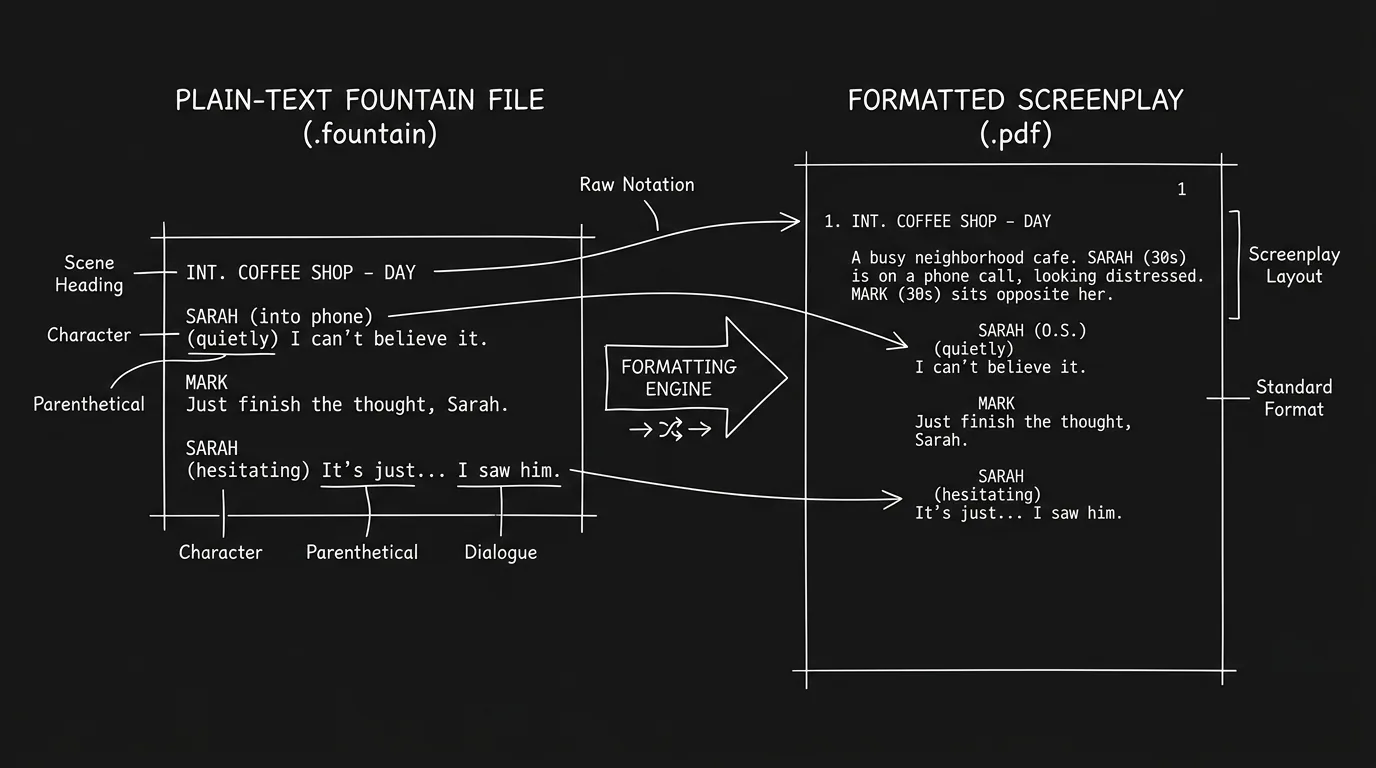
Plain text at the core. Highland is from the creators of Fountain, and Fountain stays first-class. Files move between Highland 2 and Highland Pro without conversion. The .highland format is a package built on plain text, with extra data for Pro features. Our guide to Fountain import and export shows what survives a trip between apps.
PDF melting. Highland's signature trick still works. It turns a Final Draft or Fountain PDF back into an editable script.
A calm interface. Writing sprints, goals, full-screen mode and in-line notes and synopses are all still there.
Pricing: one-time purchase against subscription
This is where Highland 2 owners feel the change most.
Highland 2 was a free download with a one-time Pro upgrade inside the app. You paid once and kept it. Highland Pro is a subscription: $9.99 a month, or $59.99 a year, which the site shows as $4.99 a month billed annually. There is a 30-day free trial, and you can cancel anytime. Quote-Unquote's transition post mentions no upgrade discount for Highland 2 owners.
Two points soften this. First, the App Store listing says that if your subscription lapses, Highland Pro still opens, prints and exports your documents. You are not locked out of your pages. Second, your scripts are plain text, so you can always leave with them.
Did Highland 2 owners actually move? According to John August's April 2026 post on the first year, three quarters of Highland 2's weekly active users switched in the first two months. About 60% of trial users became paying customers. Highland Pro's first year earned more than the last four years of Highland 2 combined. That suggests the subscription is keeping the app alive, which is good news if you rely on it.
For the full picture of the old app, including its feature tiers, see our Highland 2 review.
Try it free
Try Screenweaver for free on your script
It is free. Import your existing project, get a clearer view of your outline, and regain control of your story structure in minutes.
Start FreeWhich one for whom
| You are | Pick | Why |
|---|---|---|
| A Highland 2 owner on one Mac, happy as is | Keep Highland 2 | It still runs, and it costs nothing more |
| A Highland 2 owner who wants iPad or iPhone | Highland Pro | Native apps and iCloud sync on all three |
| On a Mac older than macOS 13 | Highland 2, if you own it | Highland Pro needs macOS 13 or later |
| On an iPhone or iPad not on iOS 26 | Neither on mobile | Highland Pro's mobile apps need iOS or iPadOS 26 |
| New to Highland and on Apple devices | Highland Pro trial | 30 days is enough to write something real |
| On Windows, Linux or a Chromebook | Neither | See the third option below |
| Co-writing live with a partner | Neither | Look at WriterDuet or the options in our comparisons hub |
If you are still on Highland 2, the risk is gradual. It works today. The day a macOS update breaks something, there will be no fix. Export your important scripts to Fountain or Final Draft now, so the choice stays yours.
A third option
Highland is a writing app, and a very good one. It ends at the page.
ScreenWeaver starts at the page and keeps going. The Screenwriter plan is $0 and does not expire, with unlimited projects and pages, industry-standard formatting, outline and beats, and PDF and Final Draft (.fdx) export. It runs in the browser on Mac, Windows, Linux and iPad, installs like an app, works offline and syncs. So it covers the platforms Highland never did.
When the draft is ready, the Storyboard Beta plan ($9.99 a month during the beta) generates the storyboard from your screenplay, with each shot's framing, angle, movement and duration under your control. The Filmmaker plan adds production preparation tied to the same project. Its price is not announced yet, and video generation is targeted for 30 September 2026.
To be fair: ScreenWeaver lists iPad, not iPhone, among its platforms. It exports PDF and Final Draft, not Fountain, and it reads Fountain files as plain text through its assistant, which comes with a paid plan. If you love Highland's plain-text feel on Apple devices, Highland Pro remains a great choice. If you need Windows or a free plan, our Highland alternative page compares the two side by side.
FAQ
Is Highland 2 still available?
Not for new buyers. The Highland 2 page redirects to Highland Pro, and the developers say there will be no further updates. If you bought it before, you can reinstall it from your Mac App Store purchase history.
Is Highland Pro a free upgrade for Highland 2 owners?
No. Highland Pro is a separate subscription at $59.99 a year or $9.99 a month, with a 30-day trial. The developers' transition post mentions no discount for Highland 2 owners.
Can Highland Pro open my Highland 2 files?
Yes. Fountain files work in both, and the .highland format is built on plain text. Highland Pro also imports and exports Final Draft (.fdx) and PDF.
What happens if I stop paying for Highland Pro?
According to its App Store listing, Highland Pro still opens, prints and exports documents in compatible formats after a subscription lapses. You lose the paid features, not your scripts.
Does Highland Pro work on Windows?
No. As of September 2026, Highland Pro runs on Mac, iPad and iPhone only. There is no Windows, Android or web version.
Is Highland 2 or Highland Pro better for Fountain?
Both handle Fountain well, since Highland comes from the creators of the format. Highland Pro adds iPad and iPhone, so you can write Fountain on more devices and keep it synced through iCloud.
Final Step
Build your next script with Screenweaver
Move from ideas to production-ready pages faster with timeline-native writing and AI-assisted story flow.
Try Screenweaver