Cursor + ScreenWeaver

Write in Cursor,storyboard in ScreenWeaver

Keep your screenplay in plain Fountain files, next to your notes and your git history. With ScreenWeaver connected, Cursor’s agent imports your script into a real screenplay project and turns scenes into storyboard shots.
  • Your .fountain files stay yours
  • Sign in, no API key
  • Every edit saved to History
CursorScreenWeaver
Import act2.fountain into my ScreenWeaver project The Yellow Umbrella. Show me the preview first.
  • import_script · preview: 9 scenes, Seo-yeon and Min-jun linked
  • import_script · imported at the end of the script
  • get_project_outline · 23 scenes in the project
Act 2 is in ScreenWeaver: 9 scenes, with Seo-yeon and Min-jun linked to their story elements. The previous version of the script is in History.

Why connect

Fountain is great for writing. A film needs more.

A .fountain file in Cursor is fast, versioned and yours. With ScreenWeaver connected, the same script also becomes a screenplay project with linked characters, places and a storyboard.
Cursor + ScreenWeaverCursor alone
Screenplay written in FountainYes
Characters and places as story elements
Previous version kept in ScreenWeaver before every changeGit, if you commit
Storyboard shots built from a scene
Live collaboration with non-technical co-writers
Final Draft export for producers

Keep writing where you like. The connector sends the script where the film gets made.

Connect in two minutes

Add ScreenWeaver to Cursor

ScreenWeaver is a remote MCP server: nothing to install. Create your project in ScreenWeaver first, then connect.

Reserved for accounts with credits: the Auteur and Studio plans include them.

Server URL

https://app.screenweaver.ai/api/mcp
You choose the projects Cursor may open when you sign in. Disconnect it any time from your ScreenWeaver account, in Connected apps.
  1. 1Open .cursor/mcp.json in your project, or ~/.cursor/mcp.json for every project.
  2. 2Add the ScreenWeaver entry below and save.
  3. 3In Cursor’s MCP settings, click Connect next to screenweaver, sign in to ScreenWeaver, pick your projects and allow.
{
  "mcpServers": {
    "screenweaver": { "url": "https://app.screenweaver.ai/api/mcp" }
  }
}
Then use the tools from the agent chat. Cursor’s menus move between versions: look for the MCP section of its settings.

Prompts to try

Six things to ask Cursor today

Copy a prompt, change the file, project and scene names, and send it to the agent.
  • Push a Fountain file

    Import the-yellow-umbrella.fountain into my ScreenWeaver project The Yellow Umbrella. Show me the preview first and ask me about any character name that looks like one I already have.

  • Replace a rewritten act

    I rewrote act 2 in act2.fountain. Replace scenes 12 to 18 in ScreenWeaver with this version, and ask me before deleting anything.

  • Pull a scene down

    Read scene 5 of my ScreenWeaver project and write it to scene-05.fountain in Fountain format.

  • Notes to shots

    Turn the notes in notes/scene-03.md into storyboard shots for scene 3, in order, with framing, camera movement and duration.

  • Compare drafts

    Compare draft.fountain with the script in ScreenWeaver and list the scenes that differ.

  • Episode overview

    Give me the outline of episode 2: scenes in order, number of shots per scene, and the scenes that have no shots yet.

Script

Your Fountain arrives as a real screenplay

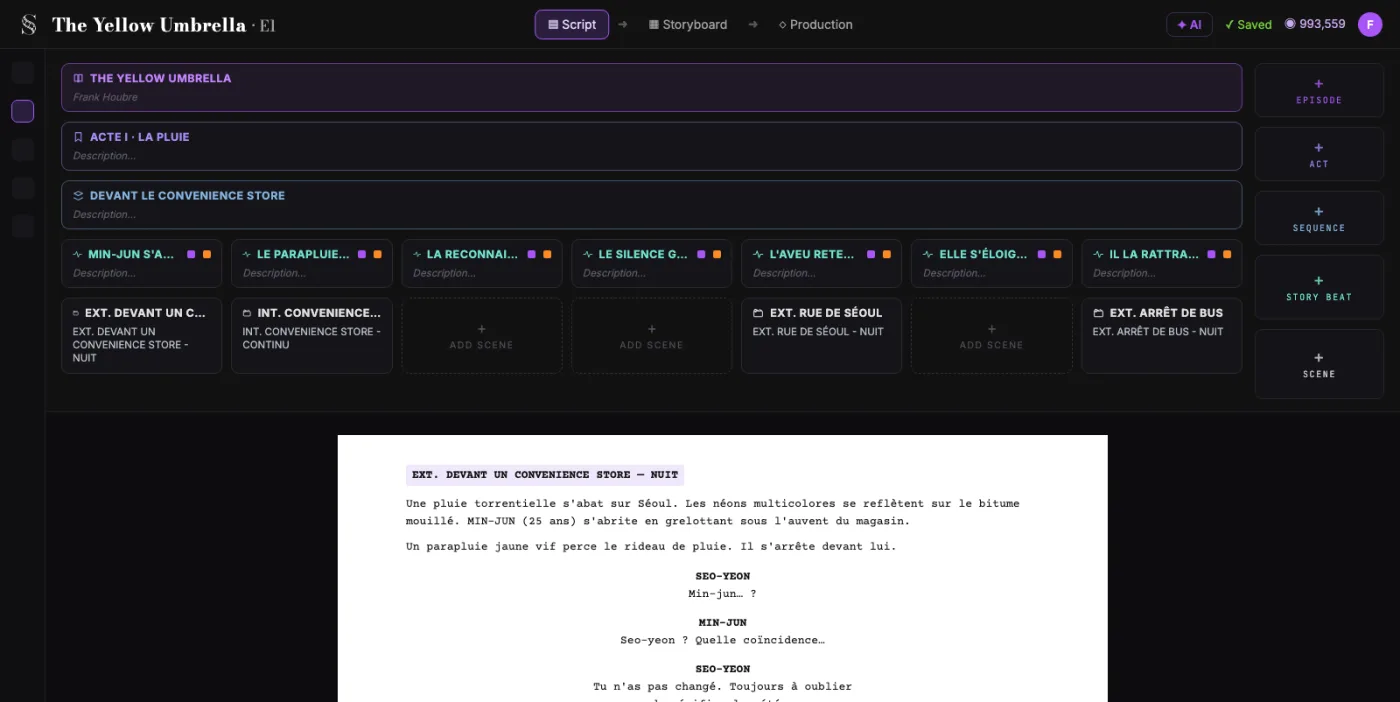
Scene headings, action, cues, parentheticals and dialogue keep their types. Character names and places link to your story elements, and missing ones are created for you.
  • Import preview before anything is written
  • Similar names flagged, like TOBY and TOBIAS
  • Version History before each change
ScreenWeaver screenplay editor showing a scene imported from Fountain

Storyboard

Then the scene becomes shots

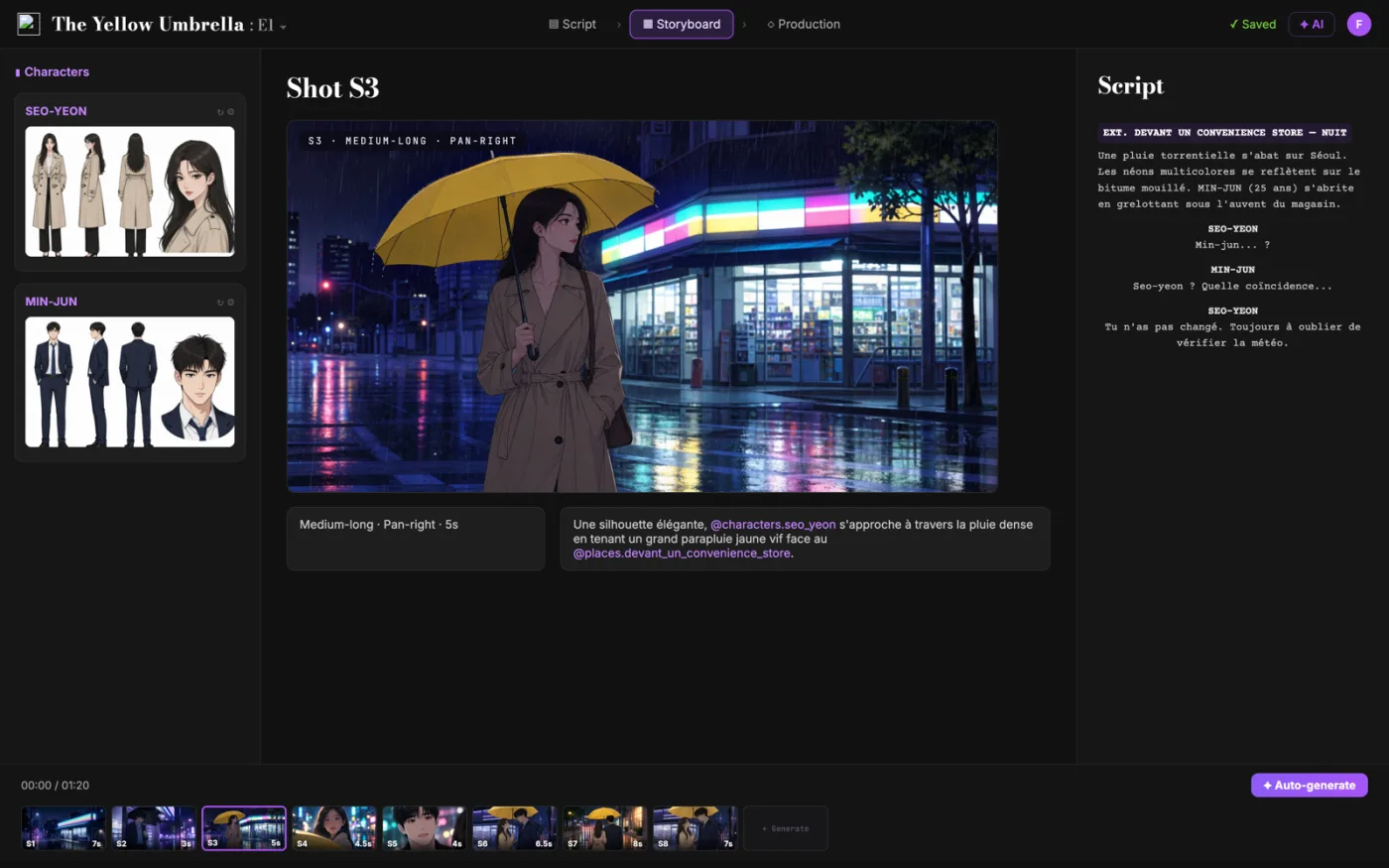
Ask the agent for coverage. It reads the scene and creates the shots in order, with action, framing, camera movement and duration, ready for your storyboard work in ScreenWeaver.
  • Shots tied to their scene
  • Continuous shots chained together
  • Collaborators see every change live
ScreenWeaver storyboard with shots created from Cursor

FAQ

Screenwriting in Cursor

Can I write a screenplay in Cursor?
Yes. Fountain is plain text, so Cursor edits it like any file, and a Fountain extension adds highlighting and preview. With ScreenWeaver connected, the agent can send that script into a real screenplay project.
Does it work with Fountain files?
Yes. The agent reads the file in your workspace and imports it. Final Draft (.fdx) and WriterDuet files work too, and you see a preview before anything is written.
Does it cost ScreenWeaver credits?
Access to the MCP is reserved for accounts with credits, included in the Auteur and Studio plans. Using the tools spends nothing: they read and write your script and shot list, and none of them consumes credits.
Will the agent change my script without asking?
The agent edits what you ask it to edit. Deleting lines or replacing the whole script in ScreenWeaver needs your explicit confirmation, and the version before every change is saved in History.
Can the agent generate my storyboard images?
Not through the connector yet. The agent can create and adjust the shots: action, framing, camera, duration. Image and video generation stay in the ScreenWeaver app for now.
What does ScreenWeaver record about my conversation?
ScreenWeaver logs which tool was called and when, never your prompts or your script text. What Cursor sends to its models depends on your Cursor settings.
Who owns the script?
You do. Your projects are private to you and the people you share them with, and you can disconnect Cursor at any time in Connected apps.

From your .fountain file to the storyboard

Add the server to Cursor, sign in, then ask the agent.