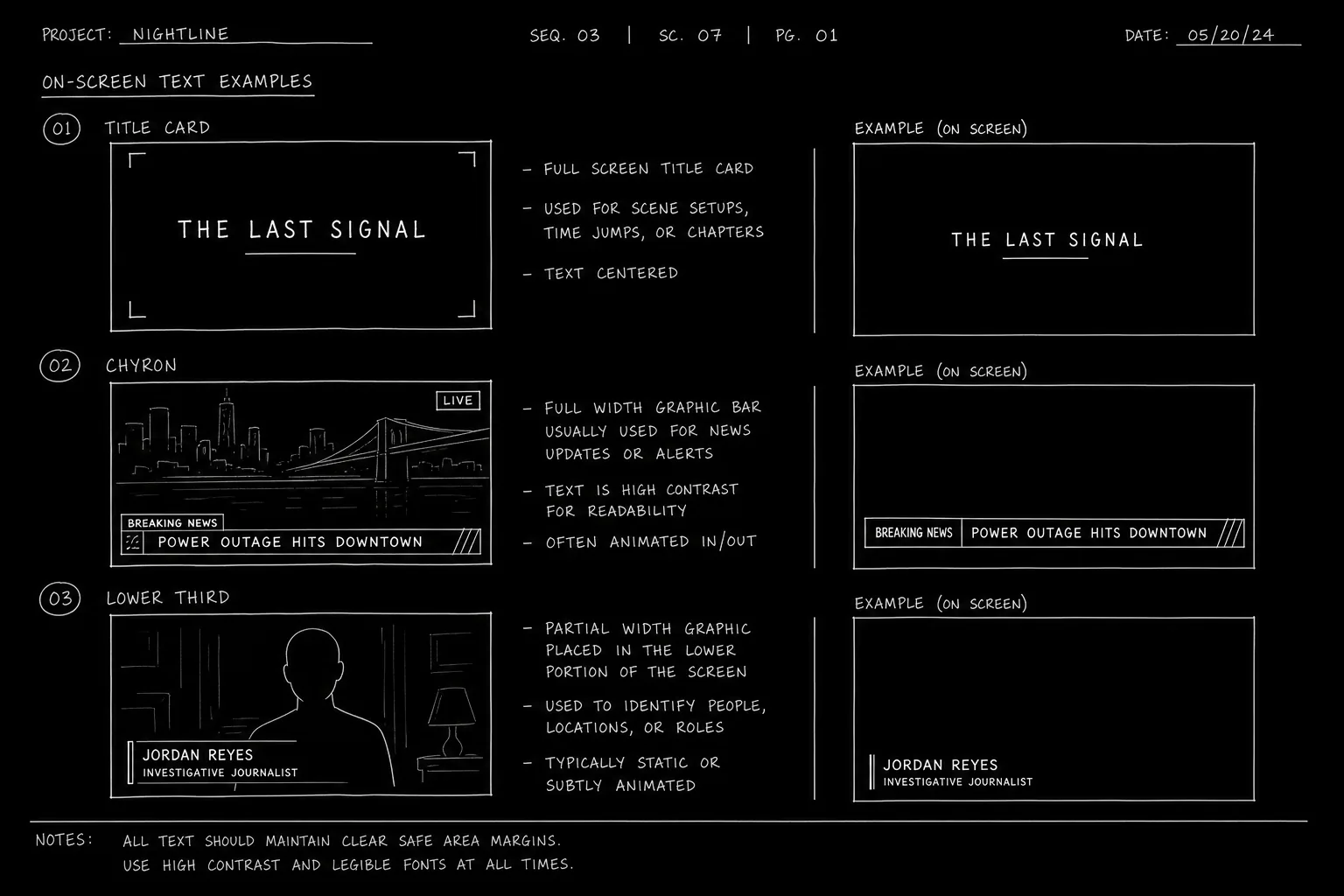

Open a news sequence on the character watching, cue the source in one line such as ON TV - CABLE NEWS (LIVE), then write the anchor's copy as normal dialogue under a cue like ANCHOR - CHANNEL 9, with short present-tense sentences. Put chyrons and graphics on their own lines (CHYRON: "SHELTER IN PLACE") and cut back to the viewer's reaction. More on-screen formats are in our formatting hub.
The president's motorcade stalls on a bridge. In a living room three states away, a local anchor reads breaking copy while a lower-third chyron misspells the vice president's name. Your protagonist watches, phone in hand, realizing the "accident" was announced before the crash footage exists.
News broadcast scenes are everywhere in TV drama: political thrillers, procedurals, sci-fi, family sagas. They deliver exposition, irony, and ticking clocks. They also destroy inexperienced writers who format them as wall-of-text transcripts.
This guide covers how to write and format TV news segments so readers stay oriented, production can budget graphics and feed footage, and the scene remains drama - not homework.
How It Works: News as Diegetic Media
A news broadcast inside your script is media the characters consume. It has a source (network, affiliate, cable), a format (live desk, field package, split screen), and a relationship to story stakes.
Three formatting layers:
- Establish the source - Where is the TV? Who is watching? Is it live or recorded?
- Deliver the broadcast content - Anchor lines, chyrons, reporter packages, B-roll descriptions
- Intercut reactions - Character responses that turn information into conflict
The broadcast is not a monologue block in the center of your page. It is a sequence with cuts.
Every news scene answers: who controls the narrative in this moment?
For anchor-specific craft, see how to write a news anchor scene. For chyron formatting, see chyrons and on-screen text. For multimedia inserts in podcasts and reports, see writing multimedia podcasts and news reports.
Platform and Use-Case Sections
Broadcast Network Drama (ABC, CBS, NBC Tone)
Visual grammar: Clean desk, lower thirds, "BREAKING NEWS" banners, field reporters with mic flags.
Format tip: Label speaker ANCHOR - NETWORK NEWS or specific fictional network. Keep anchor copy tight - three to six lines per block before cutting to reaction.
Cable News (24-Hour Cycle Tone)
Visual grammar: Split screens, ticking scrolls, pundit panels, repetitive chyrons.
Format tip: Use SPLIT SCREEN in action lines. Pundit cross-talk can be overlapping short lines. Indicate scroll text with CHYRON: or TICKER:.
Local Affiliate / Small Market
Visual grammar: Lower production value, weather map transitions, community stories that feel off when breaking national news intrudes.
Format tip: Contrast tone. Local anchor stumbling on national crisis copy creates character and world texture.
Satire and Fake News (Drama Using Parody Networks)
Visual grammar: Exaggerated graphics, absurd chyrons.
Format tip: Format identically to real news. The joke lands when production grammar is straight-faced.
Streaming / Social Clip Rebroadcast
Visual grammar: Vertical crop on TV, phone screen replay, delayed stream buffering.
Format tip: Note [ON PHONE SCREEN] or [DELAYED FEED - 12 SECONDS BEHIND] when timing matters to plot.
Step-by-Step: Formatting a News Sequence
Step 1 - Open with the viewer, not the anchor. Establish who watches and why it matters. INT. KITCHEN - MORNING. MARA stares at the TV over cold cereal.
Step 2 - Cue the source. ON TV - CABLE NEWS (LIVE) or LOCAL 7 MORNING SHOW. One line. Consistent label for the sequence.
Step 3 - Write anchor copy in speaker blocks. Short sentences. Present tense. No stage directions inside dialogue.
ANCHOR - CHANNEL 9
City officials have confirmed a shelter-in-place order for the waterfront district.
Step 4 - Add chyrons and graphics in action or dedicated lines. CHYRON: "SHELTER IN PLACE - WARD 12" See our chyrons guide for conventions.
Step 5 - Intercut every 3-6 lines. Return to character reaction. Silence. Remote click. Phone buzz. Drama lives in the cut back.
Step 6 - Use field packages for variety. REPORTER (V.O.) over described B-roll. ON SCREEN: Helicopter circles the bridge.
Step 7 - End the sequence with a story turn. The broadcast should change what the character does next - call someone, leave the room, lie.
Operational Section: Requirements and Common Mistakes
Formatting Reference Table
| Element | Format example |
|---|---|
| Source cue | ON TV - NETWORK NEWS (LIVE) |
| Anchor dialogue | ANCHOR - CHANNEL 9 then dialogue block |
| Chyron | CHYRON: "BREAKING - VOTE FAILS" |
| Ticker | TICKER scrolls: Markets plunge... |
| Field reporter | REPORTER (V.O.) with B-roll in action |
| Split screen | SPLIT SCREEN: Anchor / Protest crowd |
| End feed | Mara mutes the TV. or The feed cuts to static. |
Length and Pacing
- One-minute of screen news ≈ 120-150 words of anchor copy including pauses.
- TV drama scenes rarely sustain unbroken news longer than one page without intercuts.
- If you need more information, use two separate viewing moments in different scenes.
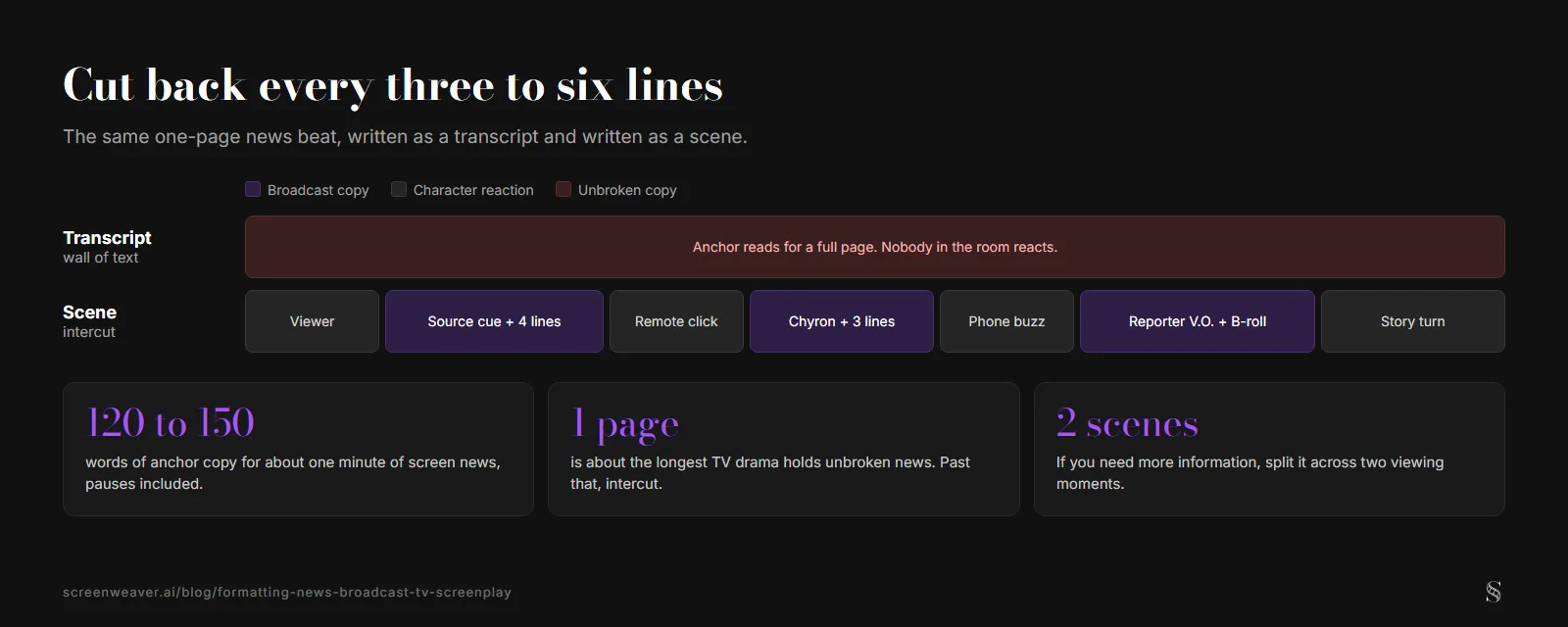
The pacing numbers from this section, with the intercut pattern from Step 5.
Legal and Ethics
Fictional networks reduce clearance issues. Avoid real network logos in spec scripts unless cleared. Be careful with real public figures in satire; consult production legal later, but do not invent defamatory "news" about real people in specs.
Production Notes
Flag stock footage needs early: crowds, disasters, press rooms. VFX may handle chyrons in post; still specify exact chyron text in the script.
Relatable Scenario: The Kitchen Counter Morning
Your protagonist pours cereal while the local morning show murmurs in the background. A chyron should not interrupt the domestic texture - until it does. Format the shift cleanly:
ON TV - LOCAL 7 MORNING SHOW

ANCHOR - LOCAL 7
Traffic is slow on the bridge, and we'll get you a weather check after this break.

Mara reaches for the milk. The feed cuts hard to red BREAKING NEWS graphics.

ANCHOR - LOCAL 7 (CONT'D)
We are interrupting regular programming. Police have surrounded Central Library.

CHYRON: "ACTIVE SHOOTER - CENTRAL LIBRARY"

Mara's spoon stops mid-air.
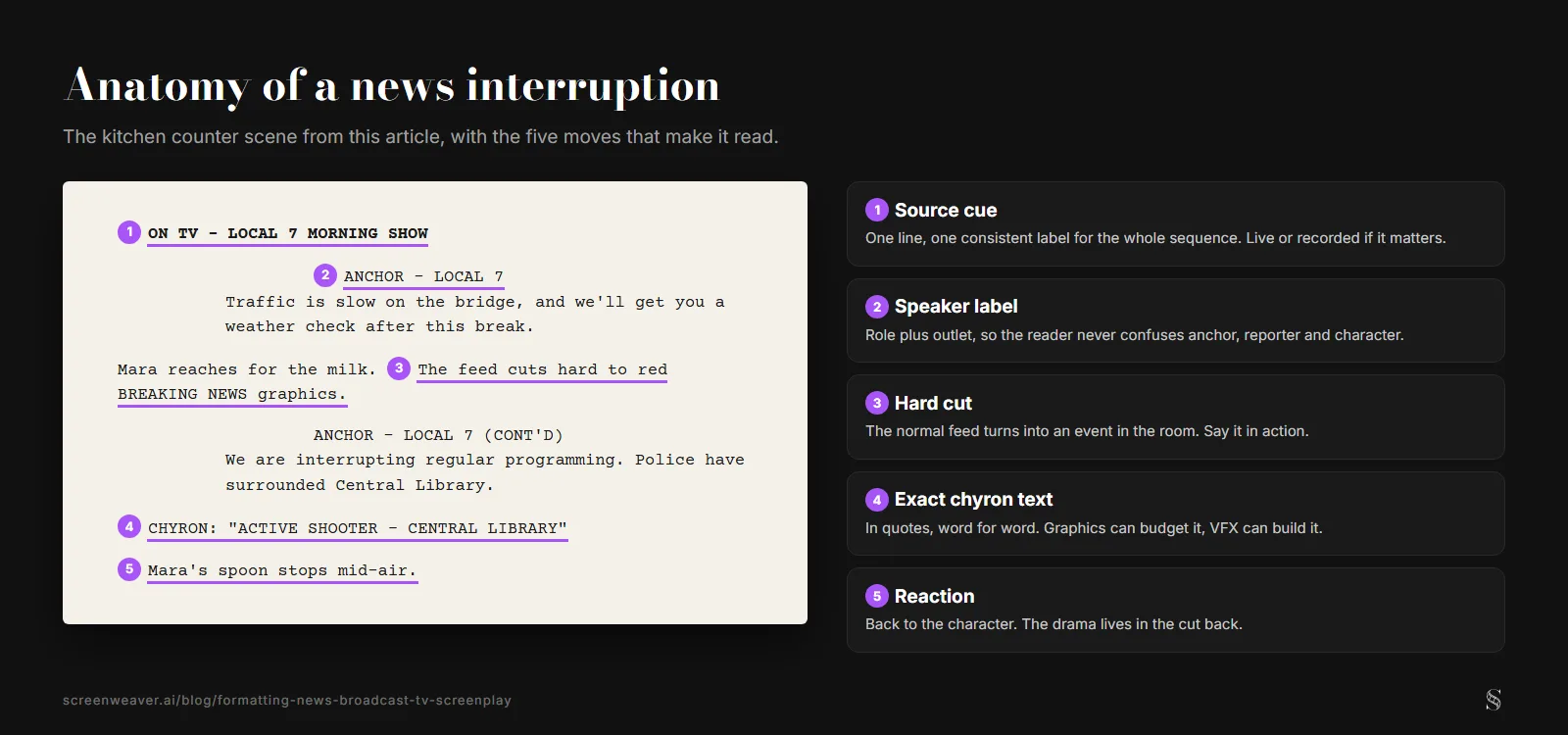
The kitchen counter scene from above, laid out as a page with the five moves marked.
Notice the pattern: normal feed, hard cut, chyron with exact text, reaction. The broadcast becomes an event in the room, not wallpaper.
Relatable Scenario: The Bar With Six Screens
Different channels, different angles on the same crisis. Label each source when your character's eyes jump.
ON SCREEN 1 - CABLE NEWS: Protest crowd.
ON SCREEN 2 - BUSINESS CHANNEL: Ticker shows biotech stock soaring.
ON SCREEN 3 - SPANISH-LANGUAGE FEED: Reporter shouting over sirens.
You do not need full dialogue on every screen. One sharp line per source often beats six pages of transcript.
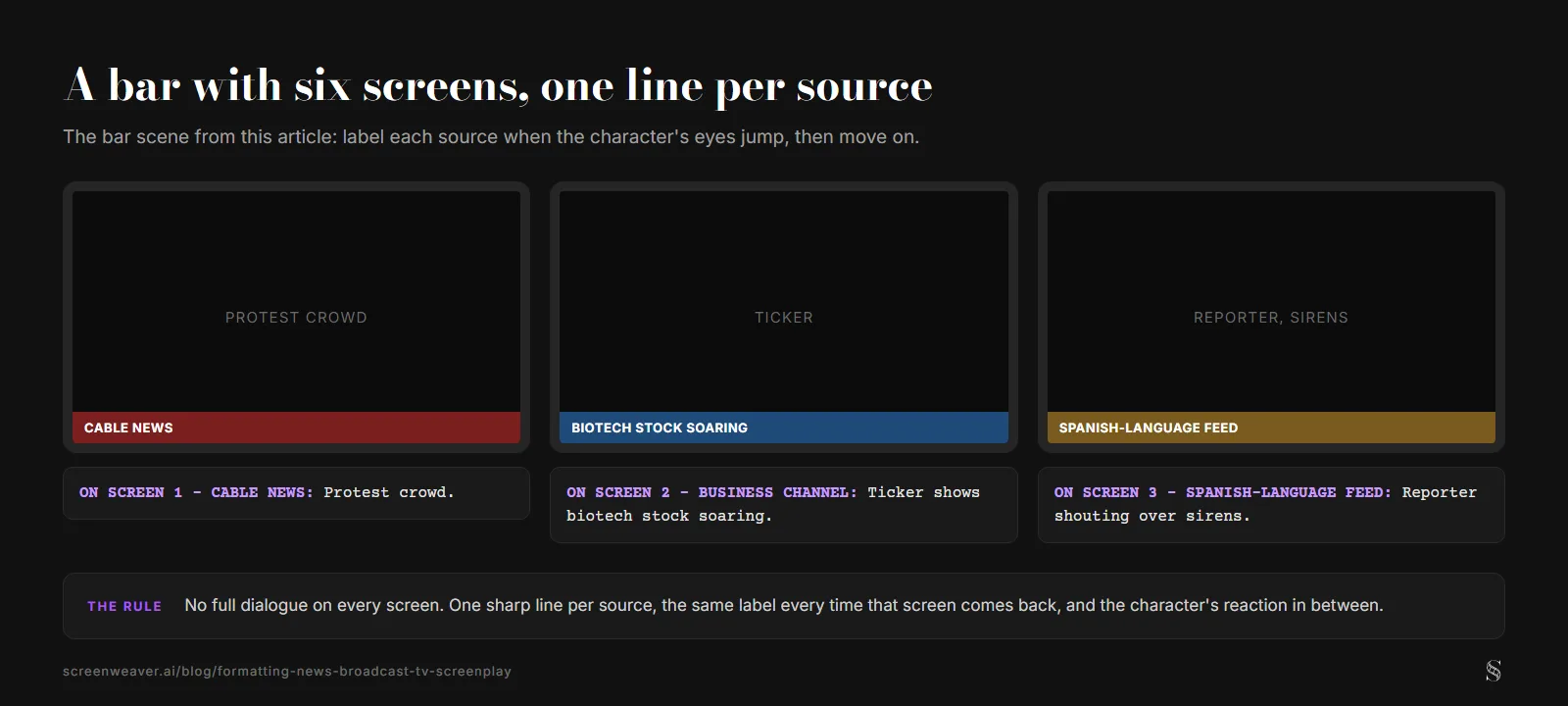
Three of the six screens from the bar scenario, one action line each.
Try it free
Try ScreenWeaver for free on your script
It is free. Import your existing project, get a clearer view of your outline, and regain control of your story structure in minutes.
Start FreeOutcome Section: Results on the Page and Screen
A well-formatted news sequence produces:
Clarity. Readers always know who speaks (anchor vs. reporter vs. character).
Pacing. Intercuts create rhythm. The scene breathes.
Irony and tension. Viewers receive official narrative while characters know ground truth.
Failure outcomes:
- Anchor delivers three pages of exposition without cuts
- Chyrons missing or vague ("A news banner appears")
- Real and fictional sources inconsistently labeled
- Broadcast ends with no character decision change
Success metric: remove the news scene from the script. Does the plot break? If yes, the scene earns its place. If the scene only repeats information characters already know, revise or cut.
Why It Matters: Old Way vs. New Way
The old way: Writers pasted CNN-style transcripts in action blocks. No source labels. No chyrons. Characters stared at TVs while audiences heard lecture.
The new way: TV scripts treat news as directed sequences - source cues, speaker labels, graphics specified, reactions intercut. The format mirrors how editors actually build the scene in Avid or Premiere.
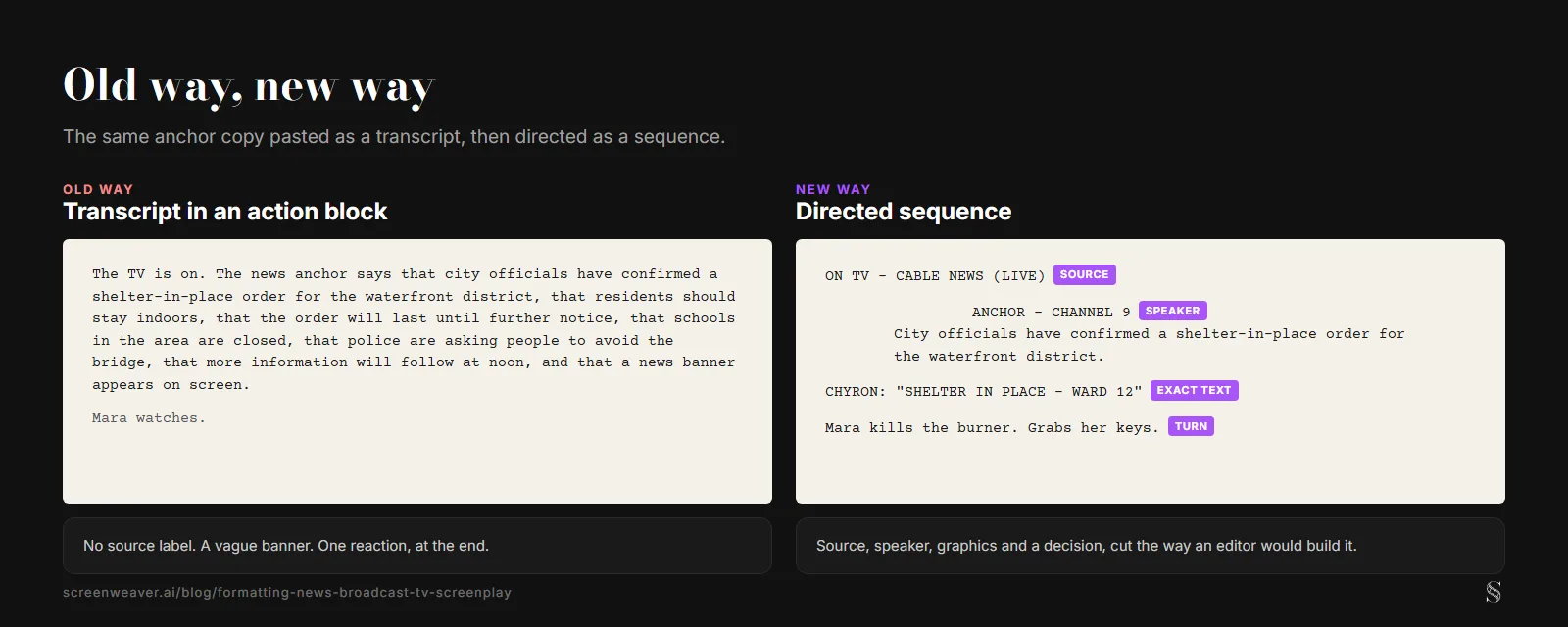
The Step 3 anchor line written both ways. Mara's closing action is an example written for this article.
In an era of misinformation stories and media literacy themes, news broadcast formatting is not a niche skill. It is how your script proves you understand mediated reality as a dramatic tool.
Final CTA: Turn the Feed Into Drama
Pick the news scene in your pilot or episode. Label the source. Break the anchor copy into speakable blocks. Add chyrons with exact text. Intercut reactions every few lines.
The broadcast is not background noise. It is whoever holds the microphone while your characters scramble.
Format it like television. Cut it like a thriller. End it with a choice your protagonist cannot undo.
Writing is free
Get the format right from page one
ScreenWeaver formats scene headings, action and dialogue as you type, and exports to PDF and Final Draft.
Start writing free