
You want to go from "I have an idea" to "I have a draft" as fast as possible. Someone points you to Squibler,assisted drafting, quick generation, a focus on speed. Someone else points you to ScreenWeaver,structure, timeline, visuals. Both can help you develop a story. One is built for fast first drafts; the other is built for holding the whole film in view while you write. This comparison is for writers who care about speed but also care about what happens after the first draft.
Squibler and ScreenWeaver both sit in the augmented screenwriting space. Squibler emphasizes fast story development: you can generate or expand scenes, get help with structure, and move quickly from outline to draft. ScreenWeaver emphasizes a persistent story map,timeline and script as one object,and visual context (concept art, mood) tied to the project. So the real difference is not "assisted or not." It is "optimized for speed of output" vs "optimized for visibility and control of structure and look." For fast story development, which one actually fits?
Want the whole triathlon before this sprint? Top AI tools for screenwriters in 2026. Done? Good. Now we only argue Squibler vs ScreenWeaver.
Then wire the craft spine: revision passes, prompting, and free-tier trade-offs. Squibler’s marketing home is squibler.io; we are not affiliated - verify pricing and terms before you commit a room draft.
Squibler: Built for Fast Story Development
Squibler is built to reduce the time between idea and draft. You can start from a premise or an outline and get scenes generated or expanded with smart assistance. The interface is geared toward moving quickly: less manual formatting friction, more support for getting words on the page. For writers who get stuck on the blank page or who want to iterate on story ideas rapidly, that has clear value. You can test premises and structures without spending weeks on a draft that might not work.
The trade-off is where the product puts its attention. Squibler is optimized for fast story development,getting to a draft. It is not built around a persistent timeline that stays in sync with the script so that you can see act breaks, sequence density, and pacing at a glance. You may have outline or chapter views, but the binding between "move this beat" and "the script reorders" is not the core design. So you get speed at the expense of a single, always-visible story map. For a first draft or a quick spec, that may be acceptable. For a feature where you need to hold the whole in your head and in your tool, you may find yourself wanting a different kind of visibility. Our best screenwriting alternatives guide frames the split between "formatting engine" and "creative partner"; Squibler leans toward the latter but with a speed-first orientation.
Fast development is only useful if the draft you get is one you can actually work with. If you cannot see the structure or restructure without breaking the tool, speed becomes a trap.
ScreenWeaver: Fast Enough, With Full Visibility
ScreenWeaver is not built primarily as a "generate a draft in five minutes" tool. It is built so that from the first scene to the last, you have a timeline that shows acts, sequences, and beats,and that timeline is the same object as the script. You can write quickly, but you are always writing in context. You see where you are in the whole. You can drag to reorder and the script follows. You can attach or generate visual context so that when you are ready to pitch, the script and the look are in one place.
So the comparison is not "Squibler is fast, ScreenWeaver is slow." ScreenWeaver is built for writers who want to move at a sustainable pace while never losing sight of structure,and who want to leave the app with a script and a pitch package, not just a raw draft. If your workflow is "vomit draft first, fix structure later in another tool," Squibler may suit you. If your workflow is "develop and restructure in one place, with visuals," ScreenWeaver suits you. For more on how structure visibility changes the writing process, see our ScreenWeaver vs Final Draft comparison.
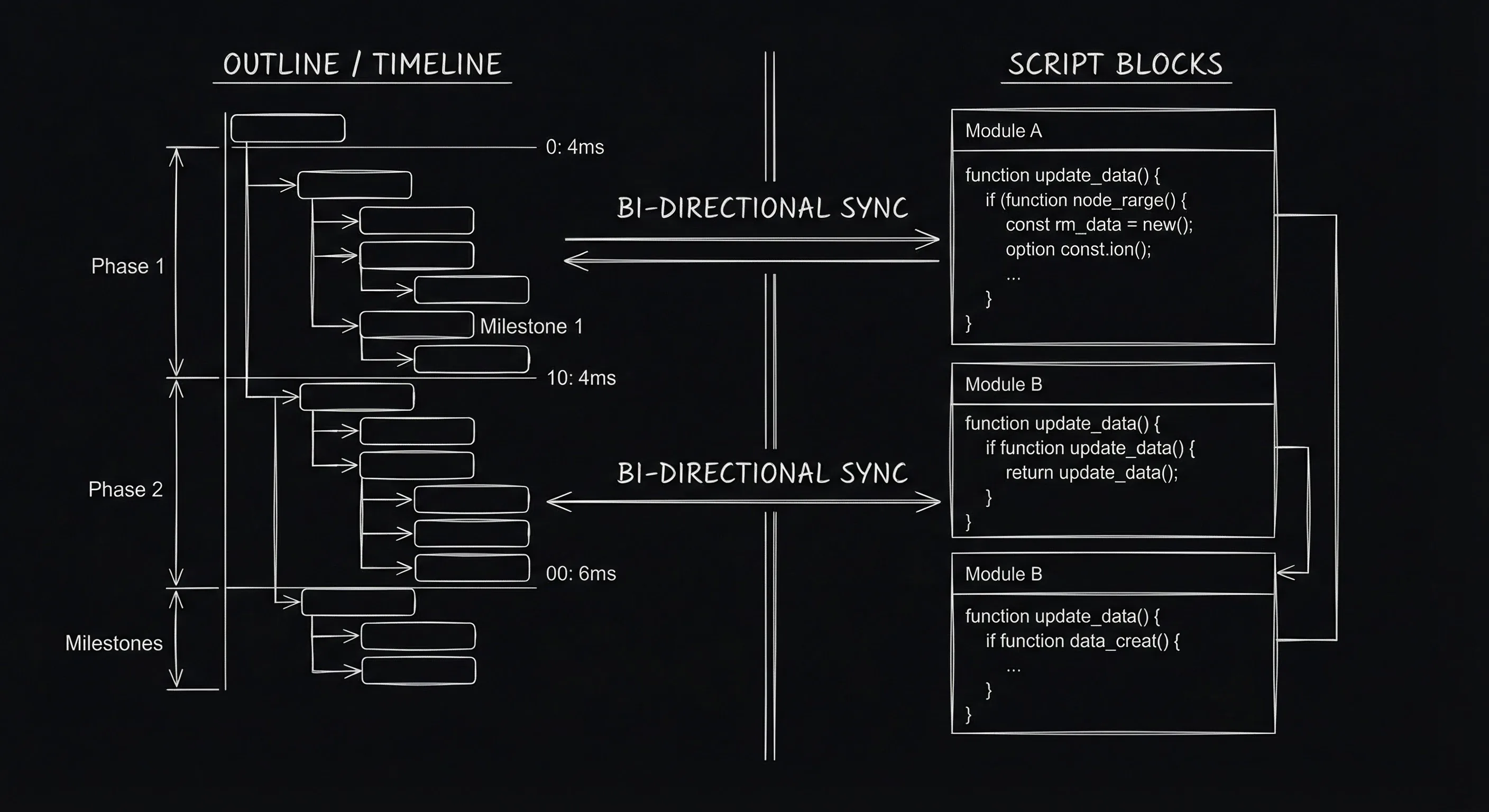
Two approaches: speed-to-draft vs structure-and-visuals in one surface.
AI-Powered Script Development: Comparison
The table below compares the two tools on dimensions that matter for fast story development and for what comes after. "AI-powered" here means assisted drafting, structure help, or generative support,not a replacement for the writer. Both tools assume you are in charge; they differ in what they optimize for.
| Dimension | Squibler | ScreenWeaver |
|---|---|---|
| Primary focus | Fast draft generation, quick iteration | Structure + script + visuals in one map |
| Structural visibility | Outline/scenes; not a single drag-to-reorder timeline | Always-on timeline; drag to reorder script |
| Visuals with script | Not core | Concept/mood tied to scenes; pitch deck |
| Best for | Quick first drafts, testing ideas | Full development and pitch in one place |
| Export | PDF, FDX where supported | PDF, FDX, pitch deck |
Pros, Cons, and Who Wins What
Squibler wins when your priority is raw speed to first draft and you are comfortable managing structure elsewhere or in a separate pass. It is a strong choice for writers who want to try many ideas quickly or who are blocked and need to get something on the page. ScreenWeaver wins when you want to develop and restructure in one place and you want the script and the look of the project in the same app. It is a strong choice for features and for anyone who will need to pitch with visuals. Neither "wins" in an absolute sense. The winner is the tool that matches how you work: speed-first and fix later, or structure-and-visuals from the start. For tips on preserving drafts when you take big structural risks, our version control and snapshots guide applies to either workflow.
BODY IMAGE 2 PROMPT: Metaphor for speed vs structure; dark technical sketch.
The Takeaway
Squibler and ScreenWeaver are both AI-powered script development tools, but they optimize for different outcomes. Squibler for fast story development and quick drafts; ScreenWeaver for full visibility of structure and visuals in one surface. Choose Squibler if speed to first draft is the main goal and you will refine structure elsewhere. Choose ScreenWeaver if you want one place to develop, restructure, and pitch,and you are willing to trade a bit of "generate and go" speed for a map that never gets out of sync with the script.
Final Step
Build your next script with Screenweaver
Move from ideas to production-ready pages faster with timeline-native writing and AI-assisted story flow.
Try Screenweaver