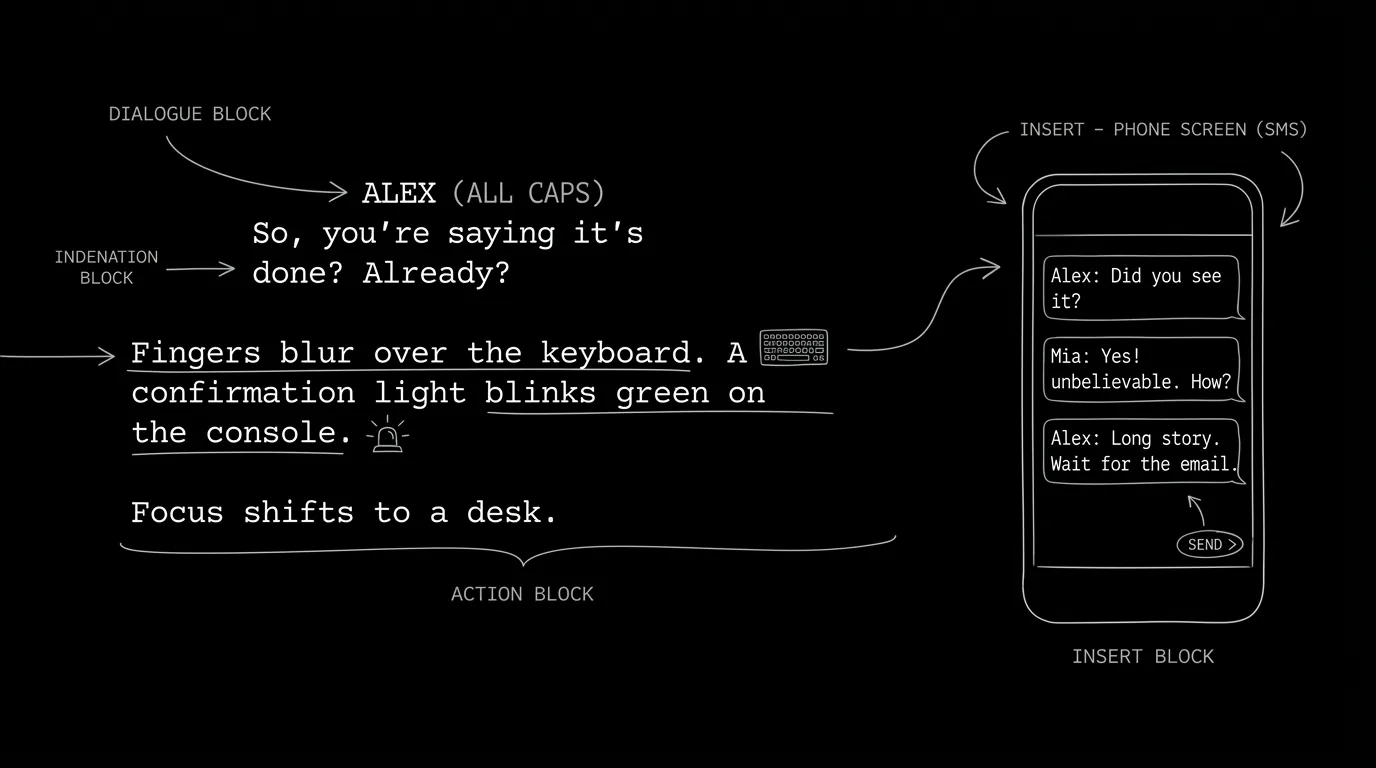

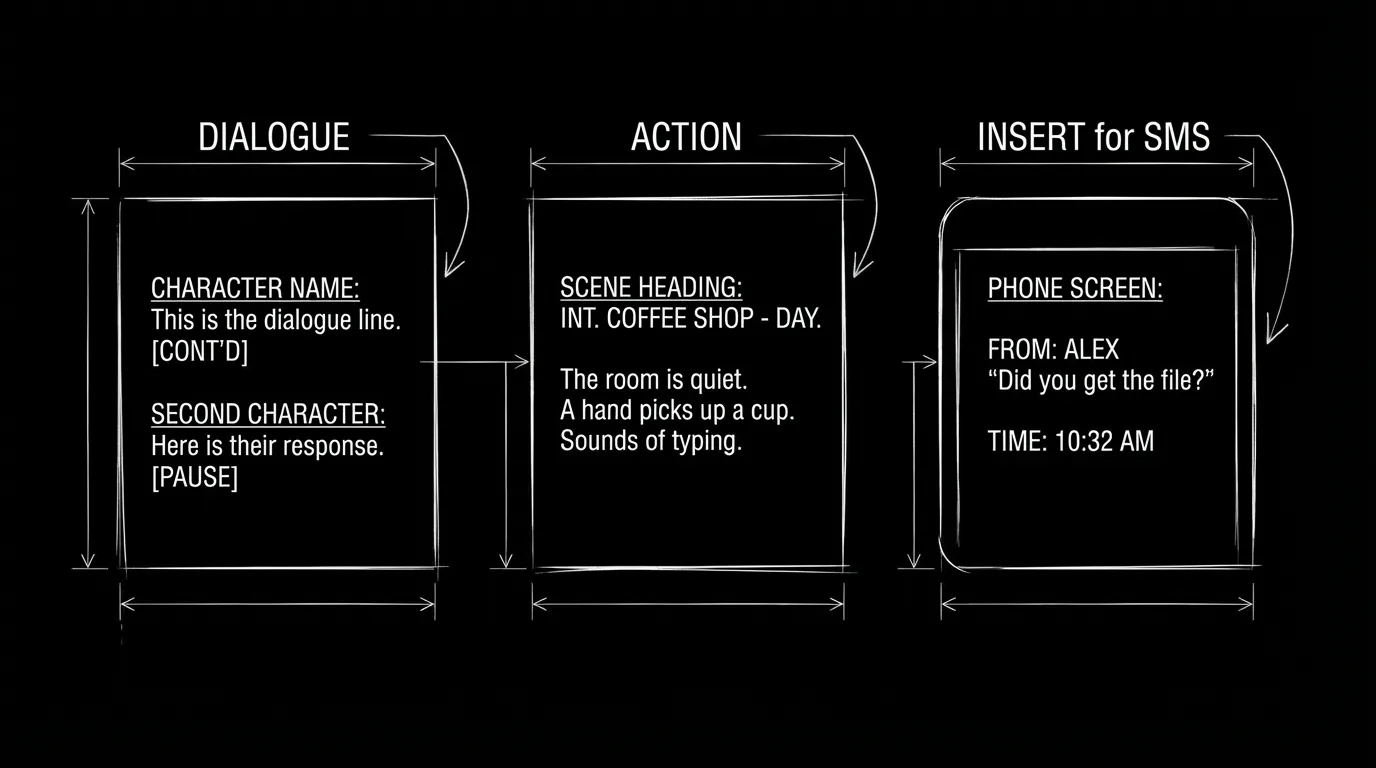
Your character pulls out their phone. We see the screen. Or we don't, we just hear the ping and read the text in the script. Text messages show up in almost every modern script, and producers and readers expect a clear, consistent format. There are three common approaches: dialogue-style (character name + message as dialogue), action-style (message in action lines), and insert-style (visual of the screen). Here's when to use each and how to format so the page stays readable.
The goal isn't to be clever. It's to be clear. The reader should know who sent what without decoding.
Think about it this way. In production, someone has to build the on-screen text or the insert. The script has to answer: who is texting, what does it say, and do we see the phone or not? The three methods map to different presentation choices. Dialogue-style is fast to read and doesn't require a visual. Action-style keeps the flow in description. Insert-style is for when the audience sees the screen. Our guide on phone calls covers intercut and one-side; SMS is another layer of "two places, one exchange." This piece is about the format of the message itself. For on-screen text like chyrons, see chyrons and on-screen text.
Method 1: Dialogue Style (Character + Message as Dialogue)
How it works: You treat the text message like dialogue. Character name (often with a modifier like "TEXT" or "ON PHONE") and then the message content. The reader reads it like a line of dialogue. When to use: When the message is short and you don't need to show the phone. When you have a lot of back-and-forth and dialogue style keeps the pace. Format example: Under the character element you might write "TEXT" or "ON PHONE" so it's clear. The message is in quotes or written as dialogue. Pros: Fast. Clear. No insert needed. Cons: We don't "see" the phone. For dual dialogue when two people are texting at once, see dual dialogue, rare for texts but possible.
Method 2: Action Style (Message in Action Lines)
How it works: The message appears inside action/description. "Her phone buzzes. A text: Where are you?" Or "He reads the message on screen: Don't come home." The text is part of the narrative. When to use: When the message is one of many story beats and you want to keep the flow in action. When we're in one character's POV and we're reading over their shoulder. Format example: Action line. The message can be in italics or quotes. You can specify "Text from SARAH:" if needed. Pros: Flows with the scene. Good for single messages or sparse use. Cons: Long threads get cluttered. For action lines and readability, see micro-pacing.
Method 3: Insert Style (We See the Screen)
How it works: You use an INSERT or similar element to show the phone screen. "INSERT - PHONE SCREEN" or "ON SCREEN - TEXT MESSAGE." Then the message text. The audience is meant to see the device. When to use: When the visual of the message matters, font, emoji, read receipts, or when the screen is the frame (desktop cinema, found footage). Format example: INSERT - SMARTPHONE SCREEN. Then the message, often in a block or with a slug. Pros: Matches what we see on screen. Clear for production. Cons: More space. Can slow the read if overused. For desktop cinema where the whole film is on screens, see desktop cinema.
Relatable Scenario: The Quick Exchange
Two characters texting. Three or four exchanges. Use: Dialogue style. SARAH (TEXT) and MIKE (TEXT), or CHARACTER NAME with "TEXT" in the parenthetical. Quick to read. No insert needed. For phone calls that might intercut with texts, see phone calls.
Relatable Scenario: The Message That Lands Like a Bomb
One character reads a message. The content is the beat. Use: Action style. "He looks at his phone. The message: It's over." The message is in the action so we feel the moment. For subtext in minimal dialogue, see subtext.
Relatable Scenario: The Thriller Where We See Every Screen
The story is told through screens. We see the phone. Use: Insert style. Specify the device and the content. Production will build it. For formatting emojis and GIFs in those inserts, see emojis and GIFs.
Try it free
Try Screenweaver for free on your script
It is free. Import your existing project, get a clearer view of your outline, and regain control of your story structure in minutes.
Start FreeThe Trench Warfare Section: What Beginners Get Wrong
Mixing methods in one script without logic. Sometimes dialogue, sometimes action, sometimes insert. Fix: Pick one primary method for the script. Use another only when the moment demands it (e.g. one insert for a crucial visual).
Unclear who is sending. "A text: Where are you?" From whom? Fix: Always indicate sender (dialogue name, "Text from X," or context). For distinct voices in texts, see distinct voices, texts can have voice too.
Overusing inserts. Every text is an insert. The script becomes a series of screens. Fix: Use insert only when we need to see the screen. Otherwise dialogue or action is faster.
Writing paragraphs in one message. Real texts are short. Fix: Break into short lines. If it's a long message, consider that the character might be typing a lot, or use action to summarize ("She sends a long message. He reads, face falling.").
Forgetting timestamps or read receipts when they matter. In some stories, "read 2:34" or "..." matters. Fix: If it's part of the story, include it in the format (often in insert style). For chyrons and on-screen text, see chyrons.
Three Methods at a Glance
| Method | Best for | Format |
|---|---|---|
| Dialogue | Back-and-forth; no need to see phone | CHARACTER (TEXT): "Message." |
| Action | Single or sparse messages; POV read | Action line with message in italics/quotes |
| Insert | We see the screen; production builds it | INSERT - PHONE SCREEN / message content |
Step-by-Step: Choosing and Formatting
First: Decide if we see the phone or not. If yes, insert (or action that describes what we see). If no, dialogue or action. Second: For back-and-forth, use dialogue style with (TEXT) or equivalent. Third: For one crucial message, action style often lands best. Fourth: Be consistent in the script. One primary method. Fifth: Always indicate sender. For more on phone and digital communication, see phone calls and chyrons.
The Perspective
Three ways to format texts: dialogue (fast, clear), action (message in the flow), insert (we see the screen). Pick one as your default. Indicate sender every time. When the reader knows who sent what and whether we see the phone, the format works. So choose the method. Be consistent. And keep it clear.
Final Step
Build your next script with Screenweaver
Move from ideas to production-ready pages faster with timeline-native writing and AI-assisted story flow.
Try Screenweaver