カメラワークのプロンプト集

すべてのカメラの動きを、動きで見て、そのまま貼れる形で

それぞれのカメラの動きが画面に何をするのかを実際に見て、Veo、Sora、Runway、Kling、Seedance でそれを引き出す言い回しをそのままコピーしてください。頭の中の絵はパンなのにドリーと書いてしまう、ということがなくなります。

動画モデルは実際の撮影の語彙を理解します。ただし、正しい動きに正しい言葉を当てたときだけです。下の各カードは同じ場面でひとつの動きを見せるので、違いが説明ではなく目で分かります。パンは視差なしに視界を振り、トラックは視差を伴って横に滑り、押し込みは空間の中を進むのに対して、ズームは画を平らにします。

アニメーションはブラウザで描かれる CSS だけのデモです。プロンプトをコピーしても、サーバーには何も送られません。

Static / Locked-off

The camera does not move at all, as if mounted on a tripod.

使いどころ: Composed tableaus, dialogue, comedy framing, letting action play inside a fixed frame.

static camera, locked-off shot, no camera movement

完全な例のプロンプトを見る

Wide shot of an empty diner at dawn, static camera, locked-off shot, no camera movement.

Pan

The camera rotates horizontally on its axis, sweeping the view across the scene.

使いどころ: Revealing a landscape, following action across a space, connecting two subjects.

slow pan from left to right across the scene

完全な例のプロンプトを見る

Desert canyon at golden hour, slow pan from left to right across the scene, cinematic.

Tilt

The camera rotates vertically, pivoting the view up or down from a fixed position.

使いどころ: Revealing scale (a tower, a giant), moving from detail to context, hero introductions.

slow tilt upward from the ground to the sky

完全な例のプロンプトを見る

Base of a futuristic skyscraper at night, slow tilt upward from the ground to the sky.

Push-in

The camera moves physically toward the subject, tightening the frame.

使いどころ: Building tension, signaling a realization, isolating a character from their surroundings.

slow push-in toward the subject, smooth cinematic camera move

完全な例のプロンプトを見る

A detective studies a wall of photographs, slow push-in toward the subject, smooth cinematic camera move, moody interior light.

Pull-back

The camera moves physically away from the subject, widening the frame.

使いどころ: Endings, reveals of context or isolation, showing how small the subject is in the world.

slow pull-back away from the subject, revealing the surroundings

完全な例のプロンプトを見る

A lone figure on a rooftop, slow pull-back away from the subject, revealing the surroundings, sprawling city below.

Crash zoom

A sudden, fast zoom onto the subject, snapping the frame tighter in a fraction of a second.

使いどころ: Shock beats, comedic emphasis, stylized action (Tarantino, Wright).

sudden crash zoom onto the subject

完全な例のプロンプトを見る

A cowboy's eyes narrow under his hat brim, sudden crash zoom onto the subject, western standoff.

Dolly / Truck

The camera slides laterally on a track, creating natural parallax between foreground and background.

使いどころ: Moving past environments, following lateral action, elegant scene exploration.

camera trucks right, sliding laterally with natural parallax

完全な例のプロンプトを見る

Rows of neon market stalls at night, camera trucks right, sliding laterally with natural parallax.

Tracking shot

The camera travels with the subject, keeping them framed while the world streams past.

使いどころ: Walk-and-talks, chases, immersing the viewer in a character's forward motion.

tracking shot following the subject as they move, subject stays centered

完全な例のプロンプトを見る

A runner sprints through rain-soaked streets, tracking shot following the subject as they move, subject stays centered.

Orbit / Arc

The camera circles around the subject in a smooth arc, keeping them centered.

使いどころ: Hero moments, revealing all sides of a subject, dramatic emphasis mid-scene.

camera orbits slowly around the subject in a smooth arc

完全な例のプロンプトを見る

A samurai stands ready in a bamboo grove, camera orbits slowly around the subject in a smooth arc.

Crane / Boom

The camera rises (or descends) vertically through space, changing the angle on the whole scene.

使いどころ: Openings and closings, lifting from intimate detail to god's-eye context.

crane shot rising from ground level to a high angle above the scene

完全な例のプロンプトを見る

A wedding crowd throws confetti, crane shot rising from ground level to a high angle above the scene.

Handheld

The camera is carried, with subtle natural shake and drift in every frame.

使いどころ: Documentary realism, unease, action immediacy, found-footage styles.

handheld camera with subtle natural shake, documentary feel

完全な例のプロンプトを見る

Soldiers move through a smoke-filled corridor, handheld camera with subtle natural shake, documentary feel.

Whip pan

An extremely fast pan that blurs the image, snapping from one framing to another.

使いどころ: Energetic transitions, comedic double-takes, connecting simultaneous actions.

fast whip pan to the right with motion blur

完全な例のプロンプトを見る

From the pitcher's wind-up, fast whip pan to the right with motion blur, to the batter waiting.

Rack focus

The lens focus shifts between two planes: foreground and background trade sharpness.

使いどころ: Redirecting attention, reveals within a frame, connecting two story beats without a cut.

rack focus from the foreground subject to the background

完全な例のプロンプトを見る

A letter in trembling hands, rack focus from the foreground subject to the background, where a door slowly opens.

Dutch angle

The camera rolls on its long axis so the horizon sits tilted in the frame.

使いどころ: Disorientation, psychological tension, villain framings, worlds gone wrong.

dutch angle, camera rolls to a tilted horizon

完全な例のプロンプトを見る

A hacker's face lit by monitor glow, dutch angle, camera rolls to a tilted horizon, thriller mood.

Zoom in

The lens focal length increases from a fixed position: the frame tightens but perspective flattens, with no parallax.

使いどころ: Surveillance and documentary feels, retro 70s style, deliberate optical emphasis.

slow zoom in on the subject, optical zoom, no camera movement

完全な例のプロンプトを見る

A figure waits at the far end of a train platform, slow zoom in on the subject, optical zoom, no camera movement, 70s thriller style.

Zoom out

The lens focal length decreases from a fixed position, widening the frame without the camera traveling.

使いどころ: Deadpan comedic reveals, stepping back from a detail to its flat context.

slow zoom out revealing the scene, optical zoom, no camera movement

完全な例のプロンプトを見る

A single melting ice cream cone on hot asphalt, slow zoom out revealing the scene, optical zoom, no camera movement, an empty amusement park around it.

Dolly zoom (Vertigo)

The camera dollies one way while the lens zooms the other: the subject stays the same size as the background warps toward or away.

使いどころ: Realization, dread, vertigo, the world shifting around a character (Jaws, Vertigo).

dolly zoom vertigo effect, background warping while the subject stays the same size

完全な例のプロンプトを見る

A detective freezes as the truth lands, dolly zoom vertigo effect, background warping while the subject stays the same size.

Steadicam glide

The camera floats forward smoothly with a subtle organic sway, stabilized but alive.

使いどころ: Following characters through spaces, immersive long-take feels (Goodfellas, The Shining).

smooth steadicam glide forward, floating camera movement

完全な例のプロンプトを見る

Moving through a crowded backstage corridor toward the stage lights, smooth steadicam glide forward, floating camera movement.

FPV drone dive

A first-person drone races and dives toward the subject at high speed, with aggressive momentum.

使いどころ: High-energy reveals, action sequences, flythrough transitions, music video energy.

FPV drone shot diving toward the subject at high speed

完全な例のプロンプトを見る

A lighthouse on a storm-battered cliff, FPV drone shot diving toward the subject at high speed, waves exploding below.

Aerial pull-away

A drone rises and pulls back, shrinking the subject into an expanding aerial view.

使いどころ: Endings, scale reveals, leaving a character to their fate, establishing geography in reverse.

aerial drone shot rising and pulling away from the scene

完全な例のプロンプトを見る

A lone car drives a desert highway at dusk, aerial drone shot rising and pulling away from the scene.

Barrel roll

The camera rotates a full 360 degrees on its long axis, rolling the whole world around the lens.

使いどころ: Stylized transitions, zero-gravity or dream sequences, high-impact music video moments.

camera barrel roll, full 360 degree rotation

完全な例のプロンプトを見る

Skydivers in freefall against sunset clouds, camera barrel roll, full 360 degree rotation.

Snorricam

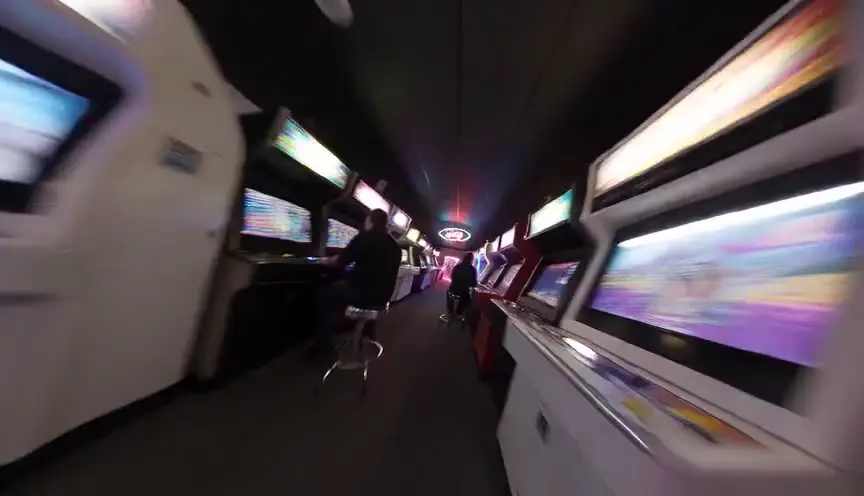
The camera is rigged to the subject's body facing them: the actor stays locked in frame while the world swings behind them.

使いどころ: Panic, intoxication, obsession - subjective states where the world unmoors (Requiem for a Dream).

snorricam shot, camera locked to the subject while the background swings around them

完全な例のプロンプトを見る

A man sprints through a neon market in panic, snorricam shot, camera locked to the subject while the background swings around them.

このページの使い方

思い描いたカットに合う動きを見つけ、その断片をコピーして、AI 動画のプロンプトの中で画面のサイズと被写体のすぐ後ろに貼ってください。どの断片も、主要な動画モデルがいちばん確実に読み取る言い回しを使い、速さの言葉も含んでいます。「ゆっくりした押し込み」と「クラッシュズーム」は同じものの変種ではなく、別の指示だからです。各カードの完全な例は、その断片が順序の整ったプロンプトの中でどう収まるかを見せます。

AI 動画生成におけるカメラの動き

カメラの動きは、AI 動画のプロンプトでいちばん誤用される部分です。Veo、Sora、Runway、Kling といったモデルは、実際の映画の語彙で説明された映像で学習しています。だから「ゆっくり左にパン」「トラッキングショット」「クレーンで上へ」は本当に従う指示になり、「壮大でダイナミックなカメラ」は、モデルが当て推量で埋める雑音になります。

古典的な取り違えは、やり直しの回数として跳ね返ります。パンはその場で回るので視差が出ません。ドリーやトラックは実際に移動するので、手前と奥が分かれます。ズームは焦点距離を変えて画を平らにし、押し込みは空間の中を進んで遠近を自然に保ちます。間違ったほうを指示すると、はっきり壊れてはいないのに、どこか違う動きが出てきます。

1カットにつき動きはひとつ。これは実際の現場でも AI の生成でも変わらない基本です。ひとつの瞬間に2つの動きが要るように思えたら、2本生成してつなぐか、主となる動きを選んで残りは編集に任せてください。ひとつのプロンプトにカメラの指示を積み重ねることが、濁って漂う AI 映像のいちばんよくある原因です。

向いている人

  • AI で映画を作る人: 語彙の当てずっぽうに生成回数を費やさず、思い描いたとおりの動きを指示できます。
  • 映画学生: 用語集の中だけでなく、画面でどう見えるかとして動きの語彙を学べます。
  • 映像チーム: ひとつの資料を共有すれば、パイプラインのすべてのプロンプトが同じカメラの言葉を使えます。

カメラワークのプロンプト集: 完全ガイド

基本となるすべてのカメラの動きについて、動くお手本と、Veo、Sora、Runway、Kling、Seedance で確実にそれを出すプロンプトの断片を組にして示します。

この作業で中心にある問題ははっきりしています。カメラの動きの名前を文章の説明から覚えるので、パンのつもりでドリーと指示してしまい、違う動きの映像が出てくる。放っておくと、後工程で摩擦が生まれ、判断が遅くなります。実務上の目標はそれぞれの動きを動きとして見て、画面に何が起きるかを理解し、AI 動画モデルでそれを引き出す言い回しをそのままコピーできるです。

頭に置いておきたい限界: カメラの言葉への対応はモデルによって違います。パン、押し込み、トラッキングはたいていよく効きますが、オービットやラックフォーカスのような込み入った動きは、2度目の生成か、カメラの制御を明示的に持つモデルが要ることがあります。

進んだ使い方: AI の作り手は、1カットにつきひとつの動きをプロンプト生成ツールと組み合わせ、連なりのあいだ被写体の描写を固定します。動きだけが変わり、世界は変わらないままになります。

手順

  1. アニメーションを見て、頭の中のカットに合う動きを見つけます。
  2. その断片をコピーして、被写体と場所の後ろに置く形で AI 動画のプロンプトに貼ります。
  3. 例を開いて、その断片が順序の整った完全なプロンプトの中でどう使われるかを確かめます。
  4. 1カットにつき動きはひとつに。矛盾する指示を重ねると、モデルは濁らせるか無視します。

立場別の使いどころ

  • AI の作り手: 動きの語彙を当てずっぽうにするのをやめて、思い描いたとおりの動きを指示する。
  • 映画学生: それぞれの動きが画面に何をするのかを、読むのではなく見て学ぶ。
  • 映像チーム: 1枚の資料を共有して、全員のプロンプトが同じカメラの言葉を使うようにする。

避けたいよくある失敗

  • ひとつのプロンプトに複数の動きを重ねて(パン + オービット + ズーム)、濁った動きになること。
  • 押し込みが要るカットに「ズーム」を使うこと。ズームは画を平らにし、ドリーは空間の中を進みます。
  • 名前のついた具体的な動きではなく、「ダイナミックなカメラ」のような曖昧な言葉を指示すること。

実務でのコツ

  • どの動きにも速さの言葉を添えてください。「ゆっくりした押し込み」と「速いホイップパン」はまるで違う振る舞いをします。
  • 動きに動機を添えてください。「被写体を追うトラッキングショット」は、ただの「トラッキングショット」より効きます。
  • モデルが動きを無視するなら、プロンプトの前のほう、ショットの種類のすぐ後ろに移してください。

このツールの出力は、書くことの代わりではなく、判断を支える層として扱ってください。優れた脚本が記憶に残るのは、具体的な選択、感情の精度、ドラマの動きの明快さによってです。ツールは雑音を取り除くことで力になります。あなたの労力が、人物、対立、高まり、報いといった大事なところへ向かうように。ひと巡りごとに結果を見直し、採用した変更を明示的に記録しておけば、作業は稿を重ねるごとに速く、読みやすくなります。その一貫性こそ、プロの共同制作者が価値を置くものです。驚きが少なく、理由がはっきりしていて、意図をもって育っていく脚本です。

さらに詳しい質問

映画の主なカメラの動きは何ですか。

核となる語彙は、パン、ティルト、押し込み、引き、ズーム、ドリー / トラック、トラッキングショット、オービットまたはアーク、クレーンまたはブーム、手持ち、ホイップパン、ラックフォーカス、そしてダッチアングルの傾きです。このページでは、そのすべてを動きで見せ、対応する AI プロンプトを添えています。

AI 動画モデルでいちばん効くカメラの動きはどれですか。

パン、押し込み、引き、トラッキングショット、手持ち風は、Veo、Sora、Runway、Kling、Seedance が確実に理解します。オービット、クレーンの動き、ラックフォーカスも効きますが、やり直しか、カメラ専用の制御を持つモデルが要ることがあります。

パンとドリーの違いは何ですか。

パンはカメラがその場で回るので、視差なしに画面全体が動きます。ドリーはカメラそのものが空間を移動するので、手前と奥が違う速さでずれます。このページの2つのアニメーションを見れば、違いはすぐに分かります。

AI 動画がカメラの動きの指示を無視するのはなぜですか。

よくある原因は、ひとつのプロンプトに複数の動きを重ねていること、長いプロンプトの末尾に動きを埋めてしまっていること、そして言い方が曖昧なことです。名前のついた動きをひとつだけ、画角のすぐ後ろに置き、速さの言葉を添えてください。

ズームと押し込みの違いは何ですか。

ズームは固定した位置からレンズの焦点距離を変えるので、寄るほど遠近が平らになります。押し込みはカメラそのものが被写体へ近づくので、遠近が自然なまま残ります。映画的な結果には「押し込み」を、光学的な効果が欲しいときだけ「ズーム」を指示してください。

ひとつの AI プロンプトにカメラの動きを組み合わせられますか。

一般に、1カットにつき動きはひとつがいちばんうまくいきます。物語が2つの動きを求めるなら、主となるほうを選ぶか、2本のクリップとして生成してつないでください。実際の制作がそのシーンをカバーするのと同じやり方です。

FAQ

よくある質問

使えます。ここでの断片は、主要な動画モデルがどれも学習している標準的な撮影の語彙です。対応の度合いは動きによって違います。パン、押し込み、トラッキングショットはどこでもいちばん確実です。オービットやラックフォーカスは、モデルによってはやり直しが要ることがあります。

パンはカメラがその場で回るので、画面全体がまとめて動き、視差は出ません。ドリーはカメラそのものが動くので、手前と奥が違う速さでずれます。上の2つのアニメーションを見比べれば、違いはすぐ分かります。

たいていは、動きが長いプロンプトの後ろのほうに埋もれているか、言い方が曖昧か、別の動きと重なっているからです。名前のついた動きをひとつだけ、画面のサイズのすぐ後ろに置き、速さの言葉を添え、1カットにつき1つの動きに絞ってください。

たいていの場合は押し込みです。押し込みは空間の中を進むので遠近が自然なまま残り、映画的に見えます。ズームは遠近を平らにします。これは意図的な効果であって、クラッシュズームには最適ですが、ゆっくり迫るドラマの場面には向きません。

たいていは結果が悪くなります。主となる動きを選ぶか、2つの動きを別々のクリップとして生成してつないでください。実際の制作がシーンをカバーするのと同じやり方です。

Preview of ScreenWeaver visual timeline and script rhythm

1カットから、AI 映画のパイプライン全体へ

ScreenWeaver は脚本を、シーン、絵コンテ、カットごとのプロンプトに変えます。人物とロケーションは一貫したままなので、カメラの言葉が当てずっぽうではなく計画になります。無料で始められます。

無料でカットを設計する