
AI screenwriting software, in 2026, means a script editor with an assistant built in: it can read your pages, flag problems, search the draft and rewrite a scene when you ask. The good ones keep you as the author. We compared five editors on AI, FDX export and price on 22 October 2026, and we draw a hard line around dialogue.
If you came for general chat models and prose tools (ChatGPT, Claude, Squibler, Sudowrite), our top AI tools for screenwriters covers them. If you want the machine to draft the script for you, that is a different job, handled on our AI screenplay writer page. This guide is about the editor you actually write in.
The fear is not subtle. Writers worry that "AI screenwriting" means plagiarism engines wearing a creativity costume. Some products lean into that fear with hype. Some writers reject every assistant by reflex. Neither extreme helps you finish better scripts.
The useful category is narrower: software that helps you think, check and revise while leaving authorship, voice and final judgment with you. Screenwriting is not typing speed. It is decision density under uncertainty. A tool that makes the decisions for you also flattens your voice. A tool that shows you options and leaves the choice on your side of the desk keeps the voice where it was.
Assistance should feel like a skilled reader with a flashlight, not a replacement author with a megaphone.
AI screenwriting software compared
We looked at five script editors that writers shortlist this year and checked each vendor's own pricing or product page on 22 October 2026. Prices are in US dollars, before tax. ScreenWeaver is our product, so read that row with that in mind.
| Software | AI built into the editor | Final Draft (.fdx) | Price on 22 Oct 2026 |
|---|---|---|---|
| ScreenWeaver | AI Assistant in the Script tab: reads scenes, searches the script, edits the script on request, builds shots | Import and export | Screenwriter $0 (editor, 20 credits at signup), Auteur $39.99/month, Studio $149.99/month |
| FinalBit (formerly NolanAI) | AI Writing Assistant (Co-Pilot), plus AI script analysis tools on paid plans | Import and export (watermarked on Basic) | Basic $0 (100 one-time AI requests), Creator $40/month, Pro $100/month |
| Arc Studio | No writing assistant in the plans; three paid add-ons bought with credits: Table Read, Character Images, Research Assistant | Export on every plan | Free $0, Essentials $69/year, Pro $99/year |
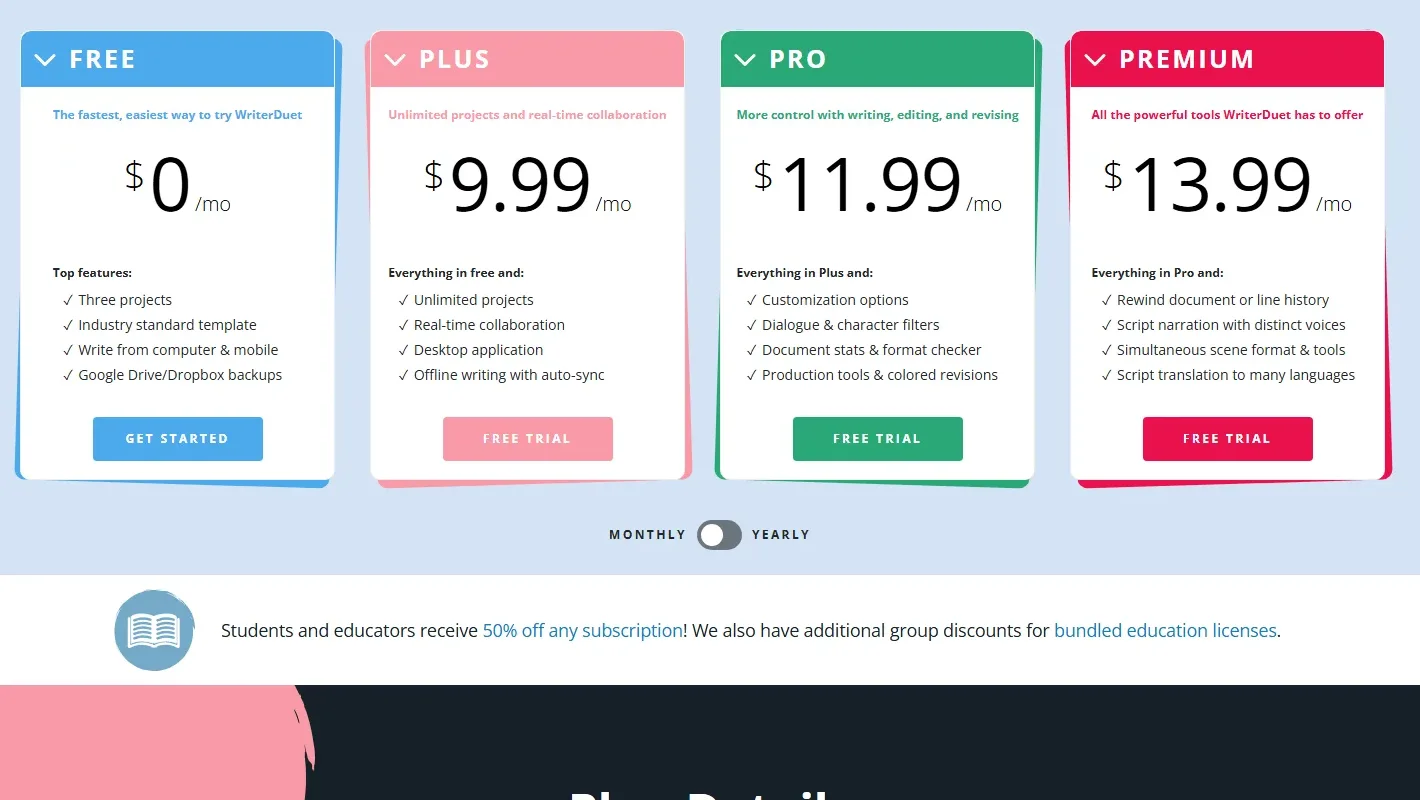
| WriterDuet | No writing assistant on the pricing page; Premium lists script narration with distinct voices and script translation | Import and export | Free $0, Plus $9.99, Pro $11.99, Premium $13.99 per month |
| Final Draft 13 | None mentioned on the product page | Native format | $199.99 to buy (listed down from $249.99), or $99.99/year, $16.99/month |
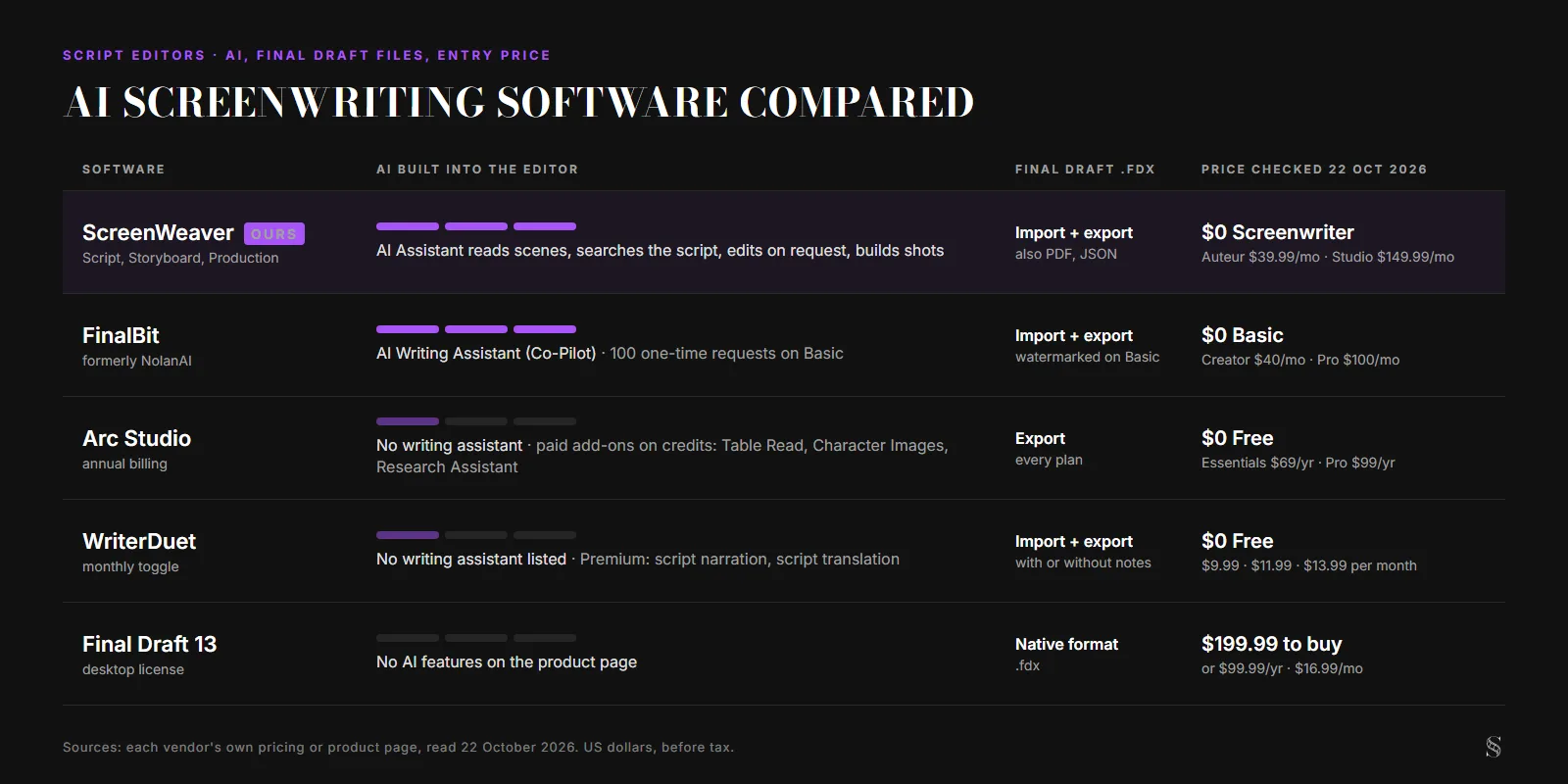
Final Draft 13 still sells itself on formatting and says nothing about AI on its product page. Arc Studio and WriterDuet keep AI out of the writing itself and sell narration, images or research around it. FinalBit and ScreenWeaver put an assistant inside the editor. That is where the AI gets the whole script to work on, instead of a fragment pasted into a chat.
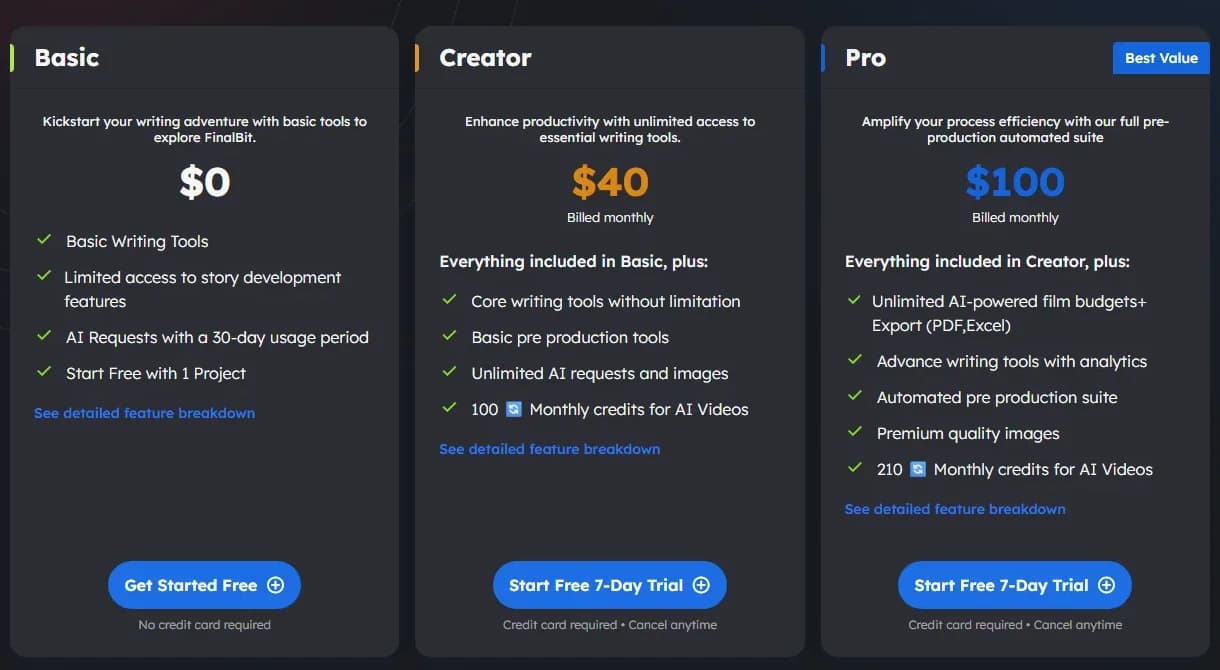
For Arc Studio's tiers in detail, see our Arc Studio review. For Final Draft, the Final Draft 13 review goes through what the license buys. If FinalBit is on your list, NolanAI vs ScreenWeaver compares the two script-first options.
What AI should and should not do in a script
Philosophy is pointless without behavior. In practice, assistance software should cover four kinds of work and keep three risks under control.
The work you want help with: structural diagnostics, continuity spotting, research support with verification, and revision prompts that push you to rewrite in your own words.
The risks: unsolicited dialogue that imitates your characters, scenes inserted without anyone checking cause and effect, and drift, where you stop owning tough decisions because suggestions arrive too easily.
| Assist category | Healthy use | Abuse pattern |
|---|---|---|
| Outline expansions | You choose beats; the tool proposes alternates | You accept expansions without checking causality |
| Continuity passes | Flags props and timeline contradictions | Blind trust without reading the script |
| Tone diagnostics | Surfaces repetitive diction | Lets software redefine a character's voice |
| Research summaries | Starting point for verification | Treated as fact without sources |
| Dialogue suggestions | Something to argue with | Copy-paste authorship |
| Scene rewrites on request | A cut or a reorder you asked for and then read line by line | Accepting a rewrite you haven't read |
Treat the table like a safety checklist.
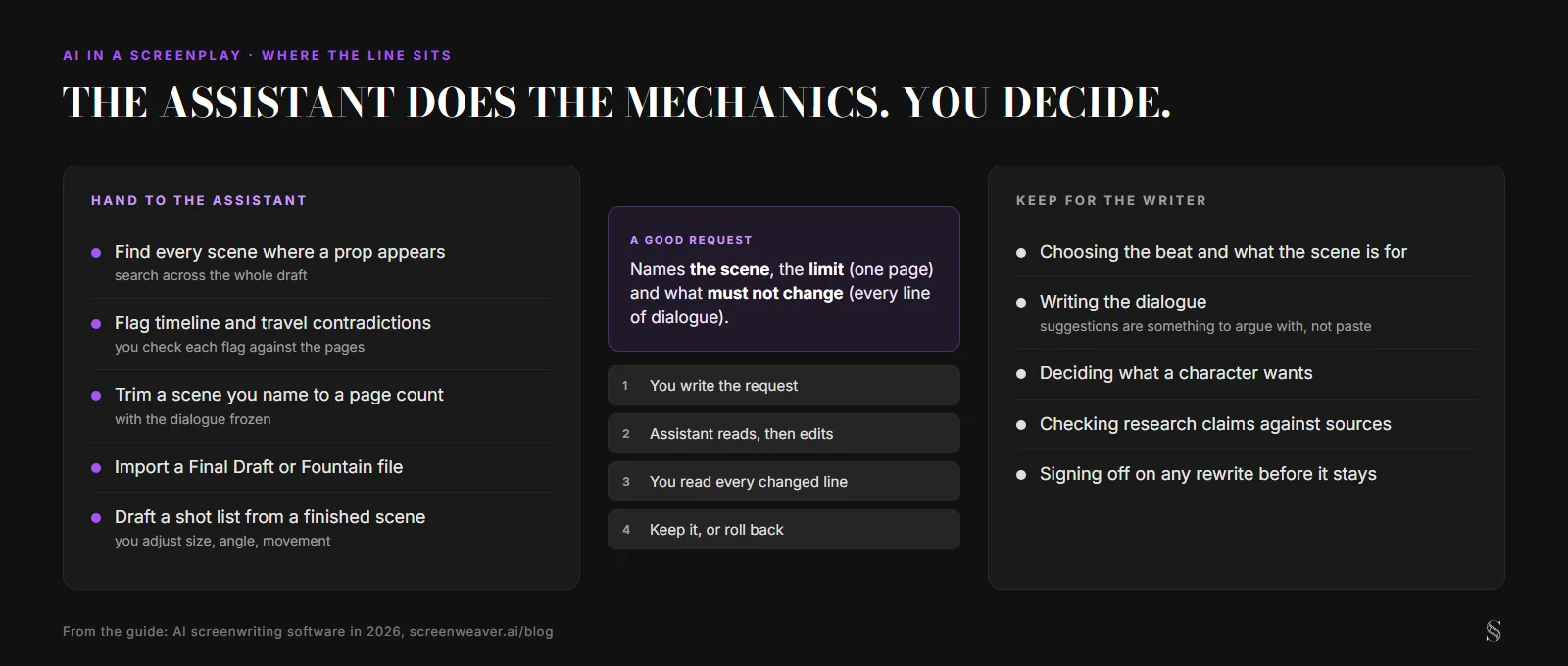
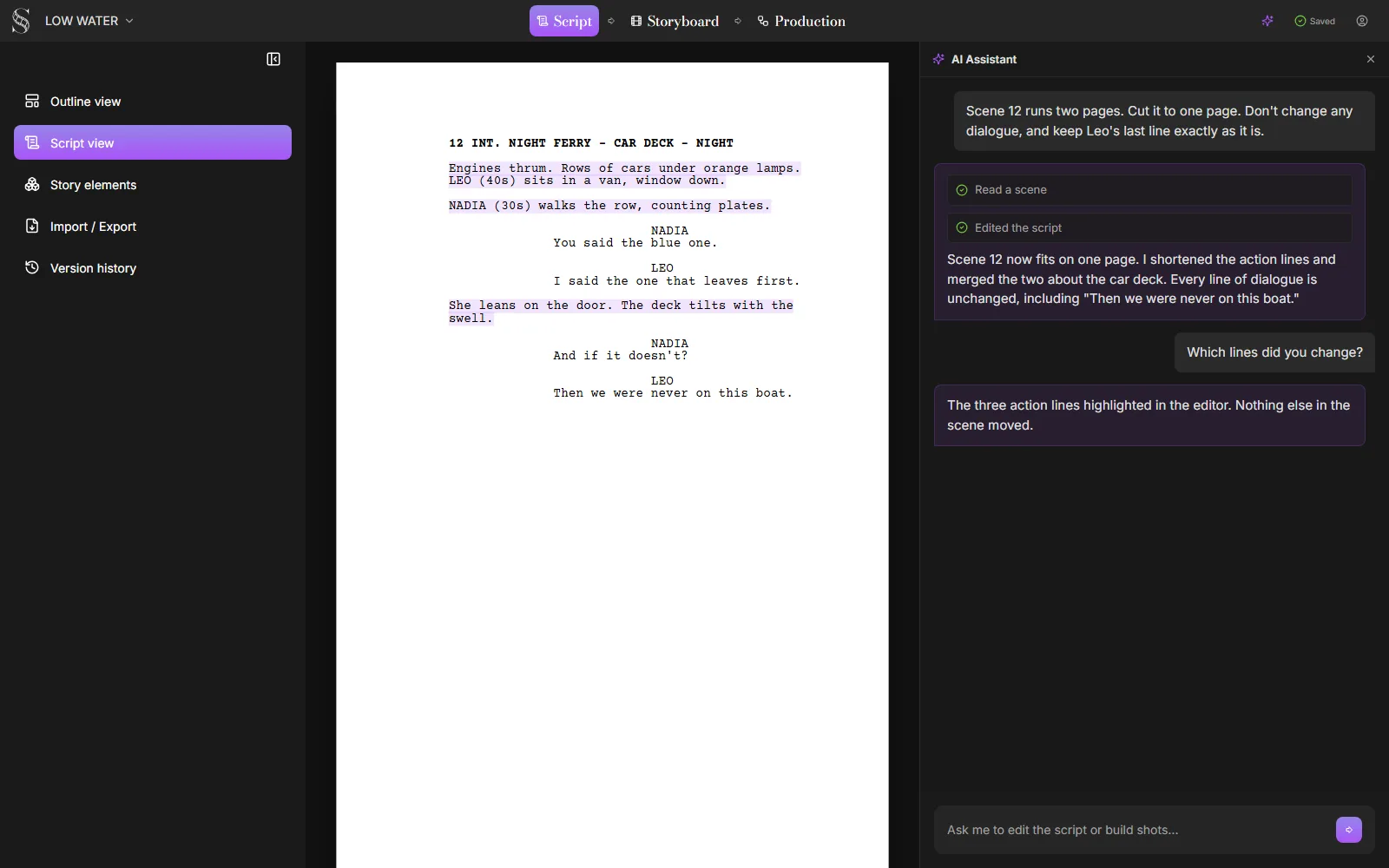
In practice, the writer names the scene, the target length and what must not change. The assistant reads the scene, edits it and says what it cut. The writer reads the result before moving on, and version history is in the sidebar if the cut went too far.
As discussed in our piece on ethics of AI in screenwriting and the WGA line, disclosure and contract rules may apply to how you deploy assistants, so check your own situation.
Scenario one: experienced writer breaking a blind spot
Helena's third act works on theme but feels logistically fuzzy. She uses an assistant to stress-test logistics and timeline contradictions. The tool flags a travel impossibility and a missed payoff setup.
Helena rewrites the scenes herself. The tool did not write the fix. It pointed at the bruise.
Try it free
Try Screenweaver for free on your script
It is free. Import your existing project, get a clearer view of your outline, and regain control of your story structure in minutes.
Start FreeScenario two: beginner avoiding blank-page paralysis without borrowing a voice
Mateo freezes at scene entry. He uses a constrained prompt workflow: generate three beat options labeled as disposable, pick one by hand, then discard the generated prose. His draft sentences are his.
The assistant reduced anxiety, not authorship.
Scenario three: a room needs a consistency pass before a production share
A small team faces a fast network read. They run continuity and naming checks across episodes. Humans decide every change. Software lowers the odds of an embarrassing world-building slip.
Step-by-step: build an assistant workflow you can defend
Step 1: define forbidden zones. Maybe dialogue is human-only, except line-level sparring you then rewrite. Write your rules down.
Step 2: use suggestion sandboxes. Never let raw generations land silently in the canonical draft.
Step 3: label assistant output. If you keep something, mark its status: unvetted, vetted, rejected.
Step 4: verify claims. Research-like output needs its sources checked the way a journalist would.
Step 5: run voice checks. Read aloud anything you paste. If it doesn't sound like your character's mouth, delete it.
Step 6: track what changed. In collaboration especially, transparency reduces mistrust.
Step 7: audit weekly. Make sure the share of pasted text isn't creeping up without you noticing.
Keep research chats and story chats separate, and never feed confidential material into a system your team hasn't approved. Our guide to prompt engineering for screenwriters makes the same point from the prompt side: specific requests beat "make it better."
Failure modes in AI-assisted writing
Over-trust is the classic collapse. A slick paragraph feels finished. It isn't yours, and readers sense it.
Under-editing follows. Suggestions arrive faster than judgment.
Voice flattening shows up when models average diction toward predictable "writerly" rhythms. Our piece on whether AI can write subtext goes into why.
Contract ignorance hurts. Some deals require disclosure; some partnerships ban certain uses.
Security complacency leaks concepts. Treat drafts like assets.
Ethical drift appears when you stop crediting influences and start pretending the text came fully formed from your own head.
If you cannot defend a line in a meeting, you should not ship it.
For professional reference on credits and documentation culture (not legal advice for your situation), see <a href="https://www.wga.org/contracts/credits/manuals/screen-credits-manual" rel="nofollow">WGA Screen Credits Manual</a>.
How to test AI screenwriting software
Ignore sci-fi branding and test five things. Does the product default to human authorship? Can you work without the assistant at all? Are AI edits visible, with a way back to the previous version? Can you export to FDX and PDF without hidden text? Does the vendor say in plain language what happens to your pages?
Then run one real request on a scene you know well. Ask for something mechanical, like a cut to a page count with the dialogue frozen. Read every line of the result. If you spent longer checking the edit than it would have taken to make it, the tool isn't saving you anything yet.
Prefer tools that lead with analysis, organization and constraint checks over raw generation. And make sure the free tier lets you write without the AI, so you can judge the editor first. If formatting is your real worry, our free screenplay formatter turns pasted text into a formatted PDF without any AI at all.
FAQ
What is AI screenwriting software? It's a screenplay editor with an AI assistant built in. Unlike a chat window, the assistant can see the whole script, so it can search it, check continuity, and edit a scene you point it to. Formatting, export and authorship stay in the editor and with you.
Does Final Draft have AI? Final Draft 13's product page, checked on 22 October 2026, mentions no AI features. It sells formatting, Final Draft Cloud with the subscription, and the .fdx format the industry exchanges.
Is there free AI screenwriting software? FinalBit's Basic plan is $0 with 100 one-time AI requests. ScreenWeaver's Screenwriter plan is $0 for the editor, and the 20 credits given at signup cover simple assistant requests. Arc Studio and WriterDuet have free tiers, but their AI extras sit outside the free writing tools.
Will using AI hurt my chances with producers or the WGA? Your contract decides that, along with what you actually hand in. Read the WGA line on AI and keep a record of what the assistant touched. Text you rewrote yourself reads as yours; raw output usually doesn't.
Can I move my script out if I stop paying? Check FDX export before you commit. In the table above, every editor exports to Final Draft format; FinalBit watermarks it on Basic and Arc Studio watermarks the PDF on its free plan.
Final Step
Build your next script with Screenweaver
Move from ideas to production-ready pages faster with timeline-native writing and AI-assisted story flow.
Try Screenweaver