शॉट साइज़ गाइड

हर फ़्रेमिंग सामने, प्रॉम्प्ट कॉपी करने को तैयार

देखिए कि हर शॉट साइज़ फ़्रेम को ठीक कहाँ काटता है, दूर परिदृश्य में खोई एक आकृति से लेकर पूरे परदे को भरती दो आँखों तक, फिर वह प्रॉम्प्ट कॉपी कीजिए जो Veo, Sora, Runway, Kling या किसी भी इमेज मॉडल में वही फ़्रेमिंग बनाता है।

फ़्रेमिंग फ़िल्म भाषा का पहला शब्द है: वही पल चौड़े शॉट में भूगोल बनता है, मीडियम में बातचीत, और क्लोज़अप में इक़बालिया बयान। नीचे हर कार्ड एक ही विषय को क्लासिक सीढ़ी के एक साइज़ पर दिखाता है, ताकि फ़र्क़ बताया नहीं, दिखाया जाए।

फ़्रेमिंग के नमूने आपके ब्राउज़र में बनते हैं। प्रॉम्प्ट कॉपी करने से किसी सर्वर पर कुछ नहीं जाता।

Extreme wide shot

EWS

The subject is a small element in a vast environment; the location is the real subject of the frame.

कब इस्तेमाल करें: Openings, establishing geography, isolation, and scale - the world before the person.

extreme wide shot, the subject tiny in a vast landscape

पूरा उदाहरण प्रॉम्प्ट देखिए

A traveler crosses a salt flat at dawn, extreme wide shot, the subject tiny in a vast landscape, pastel sky.

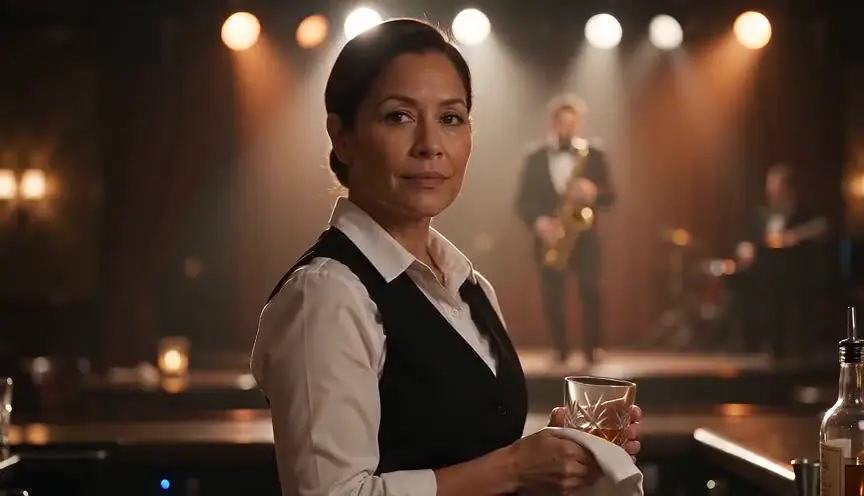
Wide shot

WS

The full subject is visible with generous room around them; body and environment share the frame.

कब इस्तेमाल करें: Establishing a character in a place, blocking-heavy scenes, physical comedy.

wide shot showing the full subject and their surroundings

पूरा उदाहरण प्रॉम्प्ट देखिए

A mechanic stands in a cluttered garage doorway, wide shot showing the full subject and their surroundings.

Full shot

FS

The frame cuts just above the head and just below the feet: the body fills the height of the frame.

कब इस्तेमाल करें: Costumes, posture, and movement - showing exactly how a character carries themselves.

full shot framing the subject from head to toe

पूरा उदाहरण प्रॉम्प्ट देखिए

A dancer in rehearsal clothes holds a final pose, full shot framing the subject from head to toe, studio light.

Cowboy shot

MWS

The frame cuts at mid-thigh - historically to keep a gunslinger's holster visible.

कब इस्तेमाल करें: Confrontations and swagger; a power framing that keeps hands and hips in play.

cowboy shot framing the subject from mid-thigh up

पूरा उदाहरण प्रॉम्प्ट देखिए

A sheriff squares up in the saloon doorway, cowboy shot framing the subject from mid-thigh up, backlit dust.

Medium shot

MS

The frame cuts at the waist: close enough for expression, wide enough for gesture.

कब इस्तेमाल करें: The workhorse of dialogue - conversations, interviews, most scene coverage.

medium shot framing the subject from the waist up

पूरा उदाहरण प्रॉम्प्ट देखिए

A journalist leans into the interview question, medium shot framing the subject from the waist up, office bokeh.

Medium close-up

MCU

The frame cuts at the chest: the face leads, but shoulders keep body language alive.

कब इस्तेमाल करें: Emotional dialogue beats, reactions that still need a hint of posture.

medium close-up framing the subject from the chest up

पूरा उदाहरण प्रॉम्प्ट देखिए

A witness hesitates before answering, medium close-up framing the subject from the chest up, courtroom light.

Close-up

CU

The face fills the frame, cut around the shoulders; every micro-expression reads.

कब इस्तेमाल करें: Key emotional moments, decisions, the audience inside a character's head.

close-up on the subject's face

पूरा उदाहरण प्रॉम्प्ट देखिए

Tears she refuses to release, close-up on the subject's face, candlelight flickering.

Extreme close-up

ECU

A fragment of the face - usually the eyes - fills the entire frame.

कब इस्तेमाल करें: Maximum intensity: realization, terror, obsession, the western standoff stare.

extreme close-up on the subject's eyes

पूरा उदाहरण प्रॉम्प्ट देखिए

The moment the plan clicks into place, extreme close-up on the subject's eyes, reflected neon.

Insert shot

INSERT

A tight detail of an object or action - hands, a letter, a key turning - not a face.

कब इस्तेमाल करें: Story-critical props, cutaways that carry plot information, tactile texture.

insert shot, extreme close-up detail of the object

पूरा उदाहरण प्रॉम्प्ट देखिए

A brass key slides into an old lock, insert shot, extreme close-up detail of the object, shallow focus.

इस पन्ने का इस्तेमाल कैसे करें

वह फ़्रेमिंग चुनिए जो आपके पल की ज़रूरत के मुताबिक़ जितना संदर्भ चाहिए उतना दे, उसका प्रॉम्प्ट हिस्सा कॉपी कीजिए, और उसे अपने AI प्रॉम्प्ट की शुरुआत में रखिए, विषय और क्रिया से पहले, क्योंकि मॉडल शुरुआती शब्दों को ज़्यादा वज़न देते हैं। हर हिस्से में इंडस्ट्री का मानक शब्द है और साथ में आम भाषा का सहारा («विषय को कमर से ऊपर फ़्रेम करते हुए»), जो मॉडल को तब भी सही रखता है जब वह अकेले शब्द को ढीले ढंग से समझे। हर कार्ड का उदाहरण उस हिस्से को पूरे प्रॉम्प्ट में दिखाता है।

फ़िल्म और AI वीडियो जनरेशन में शॉट साइज़

फ़्रेमिंग की सीढ़ी फ़िल्म बनाने की सबसे पुरानी साझा शब्दावली है: बहुत चौड़ा, चौड़ा, पूरा, काउबॉय, मीडियम, मीडियम क्लोज़, क्लोज़, बहुत क्लोज़, और चीज़ों के लिए इंसर्ट। दुनिया भर की यूनिट इन्हीं शब्दों में स्टोरीबोर्ड बनाती हैं, शॉट सूची लिखती हैं और निर्देश देती हैं, और यही वजह है कि वर्णित फ़ुटेज पर सीखे AI मॉडल इन पर प्रतिक्रिया देते हैं।

दो पड़ोसी साइज़ के बीच असली फ़र्क़ यह है कि फ़्रेम में क्या बचा रहता है। मीडियम शॉट हाव-भाव रखता है; मीडियम क्लोज़ हाव-भाव के बदले चेहरा देता है; क्लोज़अप मुद्रा के बदले सूक्ष्म भाव देता है। पल की ज़रूरत से एक साइज़ चौड़ा या तंग माँगना ही वह वजह है जिससे AI के संवाद शॉट अक्सर बहुत दूर या बहुत तीखे लगते हैं।

सीक्वेंस तब पेशेवर लगते हैं जब साइज़ सोच-समझकर बदलते हैं: चौड़े से जगह बताइए, मीडियम में सीन खेलिए, क्लोज़अप पर मोड़ उतारिए, और जब कोई चीज़ कथानक आगे बढ़ाए तब इंसर्ट पर काटिए। इस अनुशासन से बनाए गए AI शॉट ऐसे कटते हैं जैसे असली कवरेज हो, न कि बिखरी तस्वीरों की रील।

यह किसके लिए है

  • AI से फ़िल्म बनाने वाले वही फ़्रेमिंग माँगिए जो आपने सोची थी, बजाय इसके कि क्रॉप सही होने तक दोबारा जनरेट करते रहें।
  • फ़िल्म छात्र फ़्रेमिंग की सीढ़ी वैसे ही सीखिए जैसे वह परदे पर दिखती है, हर साइज़ एक ही विषय पर।
  • निर्देशक और स्टोरीबोर्ड कलाकार एक ही विज़ुअल संदर्भ साझा कीजिए, ताकि बोर्ड, शॉट सूची और AI प्रॉम्प्ट सब एक ही साइज़ भाषा बोलें।

Shot Size Guide: the complete guide

It visualizes the complete framing scale, extreme wide to extreme close-up plus the insert shot, on the same subject, each with the copy-paste prompt fragment for AI video and image generation.

For this workflow, the central problem is clear: shot sizes are learned from written definitions, so creators prompt 'medium shot' expecting a close-up and storyboard frames that do not match what the terms mean on set. Left unresolved, this creates downstream friction and slower decisions. The practical target is you see exactly where every framing cuts the body, and copy the prompt phrasing that produces that exact framing in AI models.

Limitation to keep in mind: Framings are conventions, not laws: a 'medium shot' cut point varies slightly between productions, and AI models interpret the terms with the same small variance.

Advanced workflow: Directors plan coverage by alternating sizes deliberately: wide to establish, medium for dialogue, close-up for the turn. Prompting AI shots with the same discipline produces sequences that cut together like real coverage.

Step-by-Step Workflow

  1. Identify the framing your moment needs: how much body, how much environment, how much face.
  2. Copy the prompt fragment and lead your AI prompt with it, before subject and action.
  3. Expand the example to see the framing used in a complete, well-ordered prompt.
  4. Plan sequences by alternating sizes the way real coverage does: wide, medium, close, insert.

Use Cases By Profile

  • AI filmmaker: prompt the exact framing you storyboarded instead of regenerating until it looks right.
  • Film student: internalize the framing scale visually, the way it reads in a frame, not a glossary.
  • Storyboard artist: share a common size vocabulary with directors and AI pipelines alike.

Common Mistakes To Avoid

  • Prompting 'close-up' when the moment needs chest-up body language: that is a medium close-up.
  • Jumping from extreme wide to extreme close-up with nothing between, which cuts feel jarring.
  • Forgetting the insert shot: story-critical props deserve their own framing, not a corner of a wide.

Professional Best Practices

  • Lead the prompt with the size ('medium shot of...') - models weight early tokens more heavily.
  • The cowboy shot is the secret weapon for confrontation scenes: power without losing the hands.
  • For dialogue coverage, generate matching MCU pairs of both characters for clean shot-reverse-shot.

Treat this tool output as a decision support layer, not a replacement for authorship. Great scripts are remembered for specific choices, emotional precision, and clarity of dramatic movement. Tools help by removing noise so your energy can go where it matters: character, conflict, escalation, and payoff. If you review outcomes after each pass and keep an explicit log of accepted changes, your workflow becomes faster and more predictable from draft to draft. That consistency is exactly what professional collaborators value: fewer surprises, clearer rationale, and a script that evolves with intent.

Extended FAQ

What are the standard camera shot sizes?

The classic scale runs extreme wide shot, wide shot, full shot, cowboy (medium wide), medium shot, medium close-up, close-up, and extreme close-up, plus the insert shot for object details. Each one is visualized on this page with its AI prompt.

What is the difference between a medium shot and a close-up?

A medium shot cuts at the waist and keeps gesture and body language in frame; a close-up fills the frame with the face and cuts around the shoulders. Between them sits the medium close-up, cut at the chest.

What is a cowboy shot?

A framing that cuts at mid-thigh, named for westerns that needed the gun holster visible. It reads as a power framing: taller than a medium shot, with hands and hips still in play.

Do shot size terms work in AI video prompts?

Yes, all major models (Veo, Sora, Runway, Kling, Seedance) understand standard framing vocabulary. Lead the prompt with the size term for the most reliable results, since models weight early words more heavily.

What is an insert shot?

A tight detail shot of an object or action rather than a face: a key turning, a letter, hands on a keyboard. Inserts carry plot information and give the edit room to breathe.

How do I choose the right shot size?

Ask how much context the moment needs. Environment and geography want wides, dialogue wants mediums, emotion wants close-ups, and story-critical objects want inserts. Sequences work best when sizes alternate deliberately, like real coverage.

FAQ

आम सवाल

बहुत चौड़ा, चौड़ा, पूरा, काउबॉय (मीडियम वाइड), मीडियम, मीडियम क्लोज़, क्लोज़ और बहुत क्लोज़, साथ में चीज़ों के ब्योरे के लिए इंसर्ट शॉट। ये नौ ऊपर एक ही विषय पर दिखाए गए हैं।

मीडियम शॉट कमर पर काटता है और हाथ तथा हाव-भाव फ़्रेम में रखता है। मीडियम क्लोज़ छाती पर काटता है: चेहरा आगे रहता है, और कंधा उतना ही बचता है कि शरीर की भाषा जीवित रहे।

हाँ। Veo, Sora, Runway, Kling और Seedance सब मानक फ़्रेमिंग शब्दावली पर प्रतिक्रिया देते हैं। प्रॉम्प्ट की शुरुआत साइज़ के शब्द से कीजिए और आम भाषा का सहारा साथ रखिए, जैसा यहाँ के कॉपी करने लायक हिस्से करते हैं।

टकराव और तेवर के लिए। जाँघ के बीच से काटकर यह हाथ और कमर को खेल में रखता है और मीडियम शॉट से ज़्यादा ऊँचा लगता है, इसी वजह से वेस्टर्न ने इसे गढ़ा और थ्रिलर ने इसे रखा।

फ़्रेमिंग को उस संदर्भ से मिलाइए जो उस पल को चाहिए: भूगोल के लिए चौड़ा, संवाद के लिए मीडियम, भाव के लिए क्लोज़, और कथानक के लिए ज़रूरी चीज़ों के लिए इंसर्ट। फिर पूरे सीक्वेंस में साइज़ वैसे ही बदलते रहिए जैसे असली कवरेज करती है।

Preview of ScreenWeaver visual timeline and script rhythm

शॉट फ़्रेम कीजिए, फिर उसके इर्द-गिर्द फ़िल्म बनाइए

ScreenWeaver आपकी स्क्रिप्ट को ऐसे स्टोरीबोर्ड और शॉट सूची से जोड़ता है जहाँ हर पैनल अपना शॉट साइज़ जानता है, ताकि फ़्रेमिंग के फ़ैसले पूरी यूनिट के पढ़ने लायक योजना बन जाएँ। मुफ़्त शुरू कीजिए।

अपनी कवरेज की योजना मुफ़्त बनाइए